






















Jitter freelancers for SaaS
Bottom left hero backgroundTop right hero background

Best Jitter freelancers for SaaS to hire in 2026

Looking to hire Jitter freelancers for your next SaaS project? Browse the world’s best Jitter freelancers for SaaS on Contra.

Trusted by 50K+ teams from creative agencies to high growth tech companies

Logo for Wix StudioLogo for RiveLogo for WebstudioLogo for GlorifyLogo for JitterLogo for FlutterFlowLogo for CanvaLogo for Workshop BuiltLogo for BuildshipLogo for AppsumoLogo for FramerLogo for BarrelLogo for BubbleLogo for LummiLogo for WebflowLogo for GrayscaleLogo for Stride UXLogo for InstantLogo for SplineLogo for KittlLogo for RelumeLogo for Replo
FAQs

What should I look for in a Jitter expert's portfolio?

A good Jitter expert's portfolio should show creative and fun jitter effects in videos. Look for videos that tell a story or catch your eye with cool movements. It's important that the videos fit well with the style you want for your project.

How can I ensure the Jitter expert understands my project needs?

Share clear details about your project with the Jitter expert. Describe what kind of motion effects you like. Give examples or ideas to help them understand your vision better.

What kind of video formats can a Jitter expert deliver?

Ask the Jitter expert about the video formats they can provide. They should be able to deliver videos that work well on social media, like Instagram or TikTok. Ensuring compatibility with different platforms is important for your promotional content.

How can I agree on a timeline with a Jitter expert?

Discuss the project's timeframe and agree on a schedule with the Jitter expert. It's helpful to set a due date and check on progress regularly. This ensures the project stays on track and everyone knows what to expect.

What should I do if I need changes to the Jitter video?

Talk to the Jitter expert about making changes before starting the project. Decide how many revisions are allowed and how feedback should be shared. This makes sure everyone is on the same page if adjustments are needed.

How do I ensure quality work from a Jitter expert?

Get samples of their previous work to judge their style and quality. Clear communication about what high-quality work means for your project is key. Feedback and drafts help ensure the final product meets your standards.

How can we ensure a smooth working process with a Jitter expert?

Set up a way to communicate easily, like emails or video calls. Clear instructions and using the same tools for feedback helps a lot. When everyone understands the plan, work becomes smoother and more efficient.

What should I prepare before starting with a Jitter expert?

Collect all materials and guidelines the expert will need beforehand. This includes brand colors, logos, and any special conditions for the video. Being prepared helps the Jitter expert start quickly and deliver the best results.

How do I build a good relationship with a Jitter expert?

Respect and trust between you and the Jitter expert bring better results. Praise their good work and give feedback kindly. A good relationship often leads to great collaboration and better videos in the end.

Who is Contra for?

Contra is designed for both freelancers (referred to as "independents") and clients. Freelancers can showcase their work, connect with clients, and manage projects commission-free. Clients can discover and hire top freelance talent for their projects.

What is the vision of Contra?

Contra aims to revolutionize the world of work by providing an all-in-one platform that empowers freelancers and clients to connect and collaborate seamlessly, eliminating traditional barriers and commission fees.
Explore Jitter SaaS projects on Contra

Cover image for Remote Work Life
$1K+ earned

Top services from Jitter freelancers on Contra

Top locations for Jitter freelancers for SaaS

Jitter freelancers for SaaS near you

Cover image for Hospitable gave us one job.
Hospitable gave us one job. Make a short-term rental host feel seen and use story to drive a feeling. No feature walkthroughs, just a video that a new short term rental host would relate to. What we landed on was a voicemail. A host leaving a message for a friend who just listed their first place. And for the visuals we landed on approaching it from the POV the host's iPhone. What are moments a host would actually capture in the lead up to hosting for the first time? We made the whole thing with generative AI. That's the part some people will push back on, and that's fair. But most of our time went into restraint. Pulling the generated stuff back until it felt ordinary and lived-in instead of shiny. AI just let us build that world without a five-figure shoot getting between us and the idea. Multiple models for the homes and the people, Seedance for video, and VO with elevenlabs. It was refreshing to use these tools to chase a feeling, not just try to wow people with AI. We learned a ton in this project and look forward to creating more with this team.
9
19
1.4K
Cover image for Built a secure AI assistant
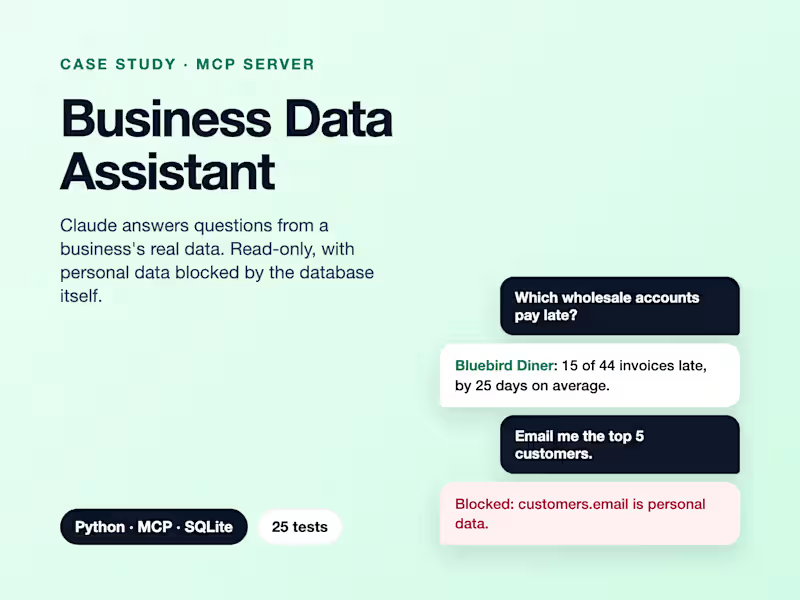
Built a secure AI assistant that answers a small business’s questions from its real data. Read-only, and customer personal data is blocked by the database itself, not just the prompt.
0
24
Cover image for We designed and built a
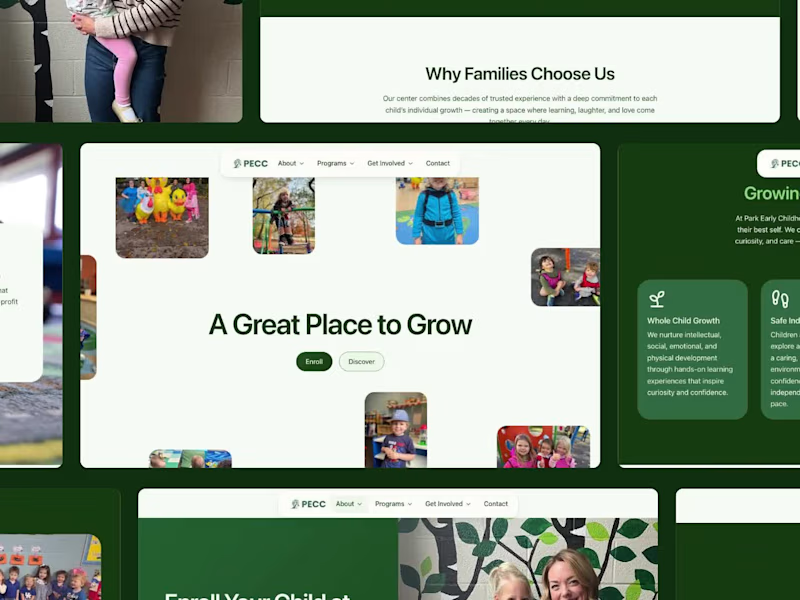
We designed and built a new website for Park Early Childhood Center in Lexington, KY. PECC has been caring for local families since 1979, and the new site lets parents feel that warmth before they ever walk in the door. Real photos of real kids. Clear paths to enroll, join the waitlist, or schedule a tour. Smooth interactions that make it fun to explore, on desktop and mobile. Live now at pecclex.org (http://pecclex.org) 🌱
15
46
1.8K
Cover image for Discord AI Agent
Built a Discord
Discord AI Agent Built a Discord bot with AI-assisted capabilities to support community workflows, automate repetitive interactions, and make information easier to access inside Discord. This project focused on turning a basic bot concept into a more useful operational tool. Instead of relying on manual responses or scattered information, the bot was designed to handle structured interactions, support task-oriented workflows, and create a cleaner experience for users inside the server. What it improved: • reduced repetitive manual responses • made common information easier to access • created a more structured support workflow • added AI-assisted capabilities to a real communication environment Tech used: Python, Discord API, AI workflow logic, backend automation, APIs, GitHub If your team or community needs a smarter bot that can do more than basic commands, this is the kind of system I build.
0
59