Freelance Data Visualizers in RawalpindiFreelance Data Visualizers in Rawalpindi
Flutter Developer | AI & Web Solution | AD Designer
New to Contra
Flutter Developer | AI & Web Solution | AD Designer
Cover image for ShopVerse is a modern, high-performance
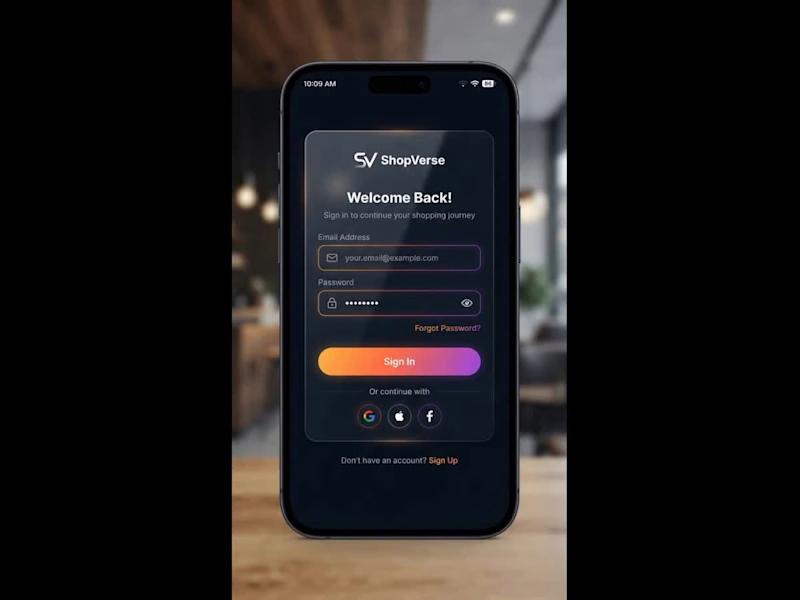
ShopVerse is a modern, high-performance iOS e-commerce application built using Swift (SwiftUI) and powered by Firebase as its backend infrastructure. 🏛️ System Architecture: MVVM Pattern The application is structured around the Model-View-ViewModel (MVVM) architecture to guarantee clean separation of concerns, high maintainability, and testability across both customer and administrator workflows. 1. The Model Layer The Model layer consists of lightweight, immutable data structures conforming to Swift's Codable and Identifiable protocols. Product Model: Stores product details such as unique IDs, titles, descriptions, pricing, stock levels, rating summaries, and array paths for high-resolution images stored in the cloud. Order Model: Captures transaction details including item snapshots, delivery addresses, customer identification, pricing breakdowns, and status states (Pending, Packed, Shipped, Delivered, or Cancelled). User & Cart Models: Manage profile attributes, assigned roles (Customer or Admin), saved shipping addresses, and live active shopping cart items. 2. The View Layer Built declaratively using SwiftUI, the View layer handles everything rendered on the screen. Views remain strictly focused on layout rendering, animations, and capturing user interactions (e.g., button taps, pull-to-refresh gestures, and navigation transitions). Views do not contain business logic or direct database call implementations; instead, they observe state changes exposed by their corresponding ViewModels. 3. The ViewModel Layer ViewModels act as the reactive middleware between the data layer and UI screens. Utilizing @MainActor and @Published properties, ViewModels manage screen-specific states (e.g., loading spinners, active product filters, and checkout step validations). They process user input, execute asynchronous data operations via async/await, and automatically trigger UI redraws whenever data updates. 4. The Service Layer Encapsulated as injected singletons or protocols, services manage external network interactions. Handles low-level Firebase authentication triggers, Cloud Firestore read/write streams, image uploads to Firebase Storage, and payment gateway SDK integrations (e.g., Stripe or Apple Pay). 🔥 Firebase Backend Mechanics & Data Management Firebase serves as the serverless engine driving ShopVerse, enabling real-time database syncing, secure authentication, and scalable media storage. 1. Authentication & Role-Based Access Control (RBAC) Security and session management are handled through Firebase Authentication. Multi-Provider Auth: Supports native Email/Password credentials alongside one-tap sign-ins via Apple ID and Google accounts. Session Persistence: Authenticated tokens are stored securely in the iOS Keychain, allowing users to remain logged in across app restarts. Role Verification: Upon successful authentication, the system queries the user's Firestore profile document to check their role attribute. If designated as admin, the app routes the user to the store management dashboard; otherwise, it presents the primary shopping portal. 2. Cloud Firestore Database Structure Firestore operates as a real-time, NoSQL document-oriented database structured into clean top-level collections. 3. Offline Persistence & Caching Firestore's local disk caching mechanism is enabled during app launch. Uninterrupted Browsing: Product listings and cart states are cached locally on the device disk. If the device loses internet connection, users can still view products and manipulate their cart without app crashes or blank screens. Background Sync: Any state changes made offline are queued locally and automatically committed to the cloud database once connectivity is restored. 4. Real-Time Data Synchronization via Snapshot Listeners Instead of relying on traditional HTTP polling or manual screen pulls, ShopVerse utilizes Firestore addSnapshotListener connections. Live Order Tracking: When an administrator updates an order status in the admin portal (e.g., changing an order from Processing to Shipped), a persistent WebSocket listener pushes the updated state directly to the customer's device in real time, updating the UI timeline instantly. 📱 Advanced SwiftUI Concepts & Interactive UX Patterns To deliver a refined, native iOS user experience, ShopVerse incorporates several specialized SwiftUI and iOS framework capabilities. 1. Skeleton Loading Shimmer Effect Rather than displaying a generic activity indicator (ProgressView), ShopVerse uses a custom shimmer modifier during initial data fetches. Visual Continuity: Placeholder wireframe cards matching the dimensions of actual product cards are rendered instantly. Linear Gradient Wave: An animated gradient mask sweeps horizontally across the placeholder shapes, signaling active loading while maintaining visual context. 2. Tactile Feedback & Haptic Engine Integration To make digital interactions feel physical, ShopVerse leverages the device's Taptic Engine via UIImpactFeedbackGenerator. Action Reinforcement: Tapping the Add to Cart button, toggling a wishlist heart icon, or confirming a checkout step triggers precise physical haptic ticks, increasing user confidence during interactions. 3. Query Debouncing using the Combine Framework Unrestrained search fields can send dozens of unnecessary database queries while a user types, causing performance lag and inflated database read costs. The Debounce Pattern: Utilizing Combine's .debounce(for: .milliseconds(300)) operator, search queries are held in a reactive pipeline. Cost Optimization: Database search requests are only fired after the user pauses typing for at least 300 milliseconds, dropping all intermediate keystroke queries. 4. Administrative Data Visualization via Swift Charts The integrated Admin Portal transforms raw Firestore sales data into actionable visual insights using Apple's native Charts framework. Real-time Metrics: Aggregated sales figures, daily order totals, and revenue metrics are compiled into interactive bar charts and line graphs, allowing store managers to assess revenue trends dynamically.
0
101
Cover image for I made an AS FOOD
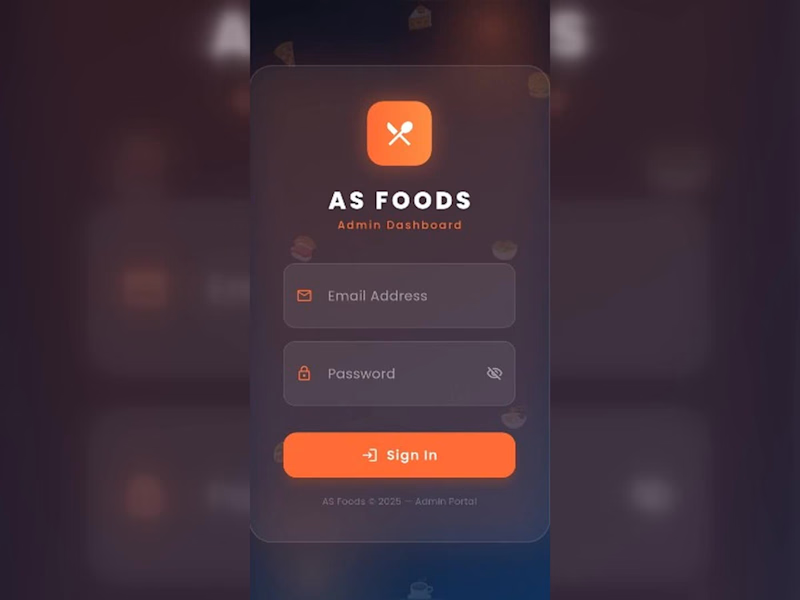
I made an AS FOOD ORDERING MOBILE APP using Reactive Native and Firebase. Bellow is Complete Guide😊 🛠️ Architecture & Tech Stack Frontend Framework: React Native (via Expo or React Native CLI) UI & Styling: NativeWind (Tailwind CSS) or React Native StyleSheet with custom dark/light theme tokens. Icons & Components: react-native-vector-icons (Lucide / Ionicons) & React Native Paper or custom components. Database & Auth: Firebase Firebase Authentication, Cloud Firestore (NoSQL Database), and Firebase Storage (for uploading food/category images). Navigation: @react-navigation/native with Bottom Tab Navigator (@react-navigation/bottom-tabs) and Stack Navigator. 🔐 1. Login Screen (Admin Authentication) Features & UI Components Fields: Email address and Password input fields with visibility toggle (eye icon). CTA: Gradient / Orange styled Sign In button. Footer: Copyright and portal title ("AS Foods © 2025 – Admin Portal"). Technical Implementation & Firebase Setup Firebase Auth Integration: Use signInWithEmailAndPassword(auth, email, password). Role-Based Security: Store admin UID/roles in a users collection in Firestore. Verify if role === 'admin' before allowing dashboard entry. State & Validation: React Hook Form or useState with validation (e.g., standard email regex and non-empty password checks). 📊 2. Dashboard Screen Features & UI Components Header Bar: Admin welcome banner ("Good Morning, Admin! 👋"), Live clock/timer badge, and Sign Out action button. Analytics Cards: Total Revenue (e.g., Rs 20171) Total Orders Count (12 Orders) Total Registered Users (4 Users) Total Food Menu Items (26 Foods) Visual Data: Weekly Orders Bar Chart showing day-by-day order trends (Mon–Sun). Technical Implementation & Firebase Setup Real-time Analytics Listener: Set up onSnapshot listeners on Firestore collections: orders collection: Sum up total price of completed/confirmed status orders for Revenue and total order counts. users collection: Read total count of registered clients. foods collection: Read total menu item count. Chart Integration: Use react-native-chart-kit or victory-native to render the weekly order dynamic bar graph linked to real-time order timestamps. 🍕 3. Foods Screen (Menu Management) Features & UI Components Search Bar & Quick Filters: Search food by name; filter tabs for All, Available, and Unavailable items. Action Header: Quick stats counters (Total, Active, Hidden) and an + Add button to create new menu items. Food Cards Grid: Image, title, price (PKR Rs 500.0), discount status, and quick action buttons (+ Add, - Remove, or toggle availability). Technical Implementation & Firebase Setup Firestore Data Structure (foods collection): JSON Image Storage: Firebase Cloud Storage via ref(storage, 'foods/image.jpg') and uploadBytes() / getDownloadURL(). Search & Filter: Local client-side array filter on fetched foods array using .filter(item => item.name (http://item.name).toLowerCase().includes(query)). 🏷️ 4. Categories Screen Features & UI Components Category Grid: Cards for categories like Appetizers, Chicken, Rice & Biryani, Wraps, Sides, and Beverages. Status Badges & Controls: Quick count of active vs inactive categories, toggle switches, and deletion/edit modal actions. Technical Implementation & Firebase Setup Firestore Data Structure (categories collection): JSON Category-Food Mapping: Link category IDs directly into the foods collection documents for relational querying. 📦 5. Orders Screen Features & UI Components Order Filter Pills: Filter by All, Pending, Confirmed, Delivered, or Cancelled. Order List Cards: Order Hash ID, Customer/Delivery info address, total order amount, timestamp, and colored status pill badges (Yellow = Pending, Green = Confirmed, Red = Cancelled). Sign Out Confirmation Dialog: Modal overlay asking to confirm user logout. Technical Implementation & Firebase Setup Firestore Data Structure (orders collection): JSON Status Updates: Admin tap actions update order state using updateDoc(doc(db, "orders", orderId), { status: "Confirmed" }). Real-time Push Notifications: Firebase Cloud Messaging (FCM) trigger to notify delivery partners or users when an order status changes. 🚀 Step-by-Step Development Roadmap Project Setup: Initialize React Native project with Expo/CLI & install dependencies (react-navigation, @react-native-firebase/app, @react-native-firebase/auth, @react-native-firebase/firestore). Firebase Config: Initialize Firebase SDK in firebaseConfig.js with your Web/Android/iOS API keys. Navigation & Theme: Configure BottomTabNavigator with custom icons and dark mode styling matched to the dark orange interface theme. Auth Flow: Build sign-in screen and wrap main tab screens in an onAuthStateChanged auth gate listener. Firestore Realtime Hooks: Connect screens with real-time listeners (onSnapshot) to reflect live orders and menu management instantly.
0
98
Cover image for I designed a 25-page NGO
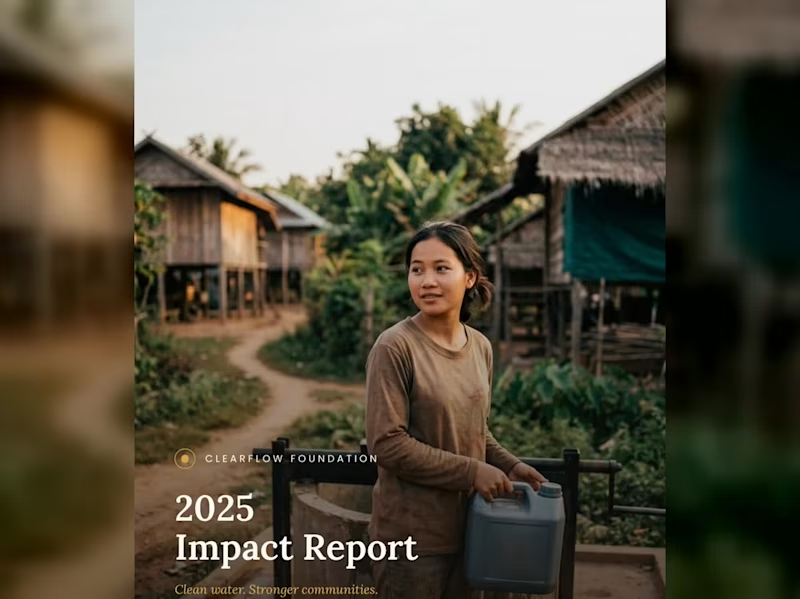
I designed a 25-page NGO Annual Impact Report for a non-profit called Clear Flow Foundation, and then created a short video reel to showcase the document's design, layout, statistics, and photography in an engaging, animated format. STEY BY STEP 😊😍 1. Cover Page (1 Page) Visual Style: Full-bleed, high-impact photo showing a community member carrying clean water in a rural village setting. Soft overlay for high-contrast typography. Header / Logo: ClearFlow Foundation logo placed subtly at the top center/left. Title: 2025 Impact Report Subtitle: Clean water. Stronger communities. 2. Inside Cover / Brand Pattern (1 Page) Visual Style: Elegant, custom line-art vector pattern representing water ripples, topographic lines, or fluid movement. Content: Minimalist brand motif that serves as a visual palette cleanser before diving into the report content. 3. Table of Contents (1 Page) Visual Style: Clean, grid-aligned typography with generous whitespace. Content Breakdown: 01 — Executive Summary & Leadership Letter 02 — Who We Are & Mission Overview 03 — Our Impact (2025 Key Statistics) 04 — Program 1: Sustainable Water Infrastructure 05 — Program 2: Community Health & Training 06 — Community Voices & Field Stories 07 — Financial Transparency & Performance 08 — Acknowledgments & Strategic Goals 4. Letter from Director/CEO (1–2 Pages) Headline: "Behind each statistic is a family no longer walking three hours for water." Content Focus: Opening: Acknowledging milestones achieved in 2025 across 38 villages. Core Message: Emphasizing that long-term sustainability and local empowerment—rather than quick fixes—are the foundation of ClearFlow's work. Sign-off: Warm closing remarks from Sophak Chan (Executive Director). Sidebar / Image: Professional portrait of the director alongside a highlighted quote pull-out. 5. Who We Are / Mission Overview (2 Pages) Headline: Our Mission Core Narrative: > "ClearFlow Foundation exists to ensure every community has reliable access to clean, safe water—and the knowledge to maintain it long after we’ve gone." Founding Context: Established in 2014, working alongside rural communities across Southeast Asia to combine infrastructure with local education. Key Metric Highlights: 11 yrs operating in Southeast Asian communities. 3 provinces with active programs. 6. Section Divider — Our Impact (1 Page) Visual Style: Full-page photographic cover showing clean water flowing from a newly installed filtration system, layered with section header styling. Text: SECTION 03 — Our Impact 7. Impact Overview + Key Stats Spread (2 Pages) Headline: 2025 At a Glance Key Performance Indicators (KPI Grid): 12,400 — People gained access to clean water. 45 — New water points constructed. 38 — Villages reached across two provinces. 96 — Community health workers trained. Sub-Section — Built to Last: 89% of water points fully operational after 5 years. 6,200 hours of hygiene education delivered. 0.4 km average distance to water (down from 3.2 km). 31% reduction in reported waterborne illnesses. 8. Program 1 Deep Dive: Water Infrastructure (2–3 Pages) Headline: Where the Wells Went: Sustainable Engineering Process Explanation: How sites are selected using a structured process evaluating distance, population density, and local readiness. Program Metrics: 14 villages received their first-ever water point. 6 existing wells rehabilitated and upgraded. 3.5 mo average time from survey to completion. 100% of sites selected with community sign-off. Testimonial Callout: "The pump is close enough now that my son fills a bucket before school and still makes it on time." — Village Parent, Kampong Thom Province. 9. Program 2 Deep Dive: Community Training (2–3 Pages) Headline: Training That Stays Local Core Focus: Building local autonomy by training residents directly in maintenance and sanitation management. Program Metrics: 62% of trained health workers are women. 4 training modules per certification cycle. 18 ongoing peer-education groups active. 2 wks average certification training length. Quotes & Data: Quote from a female community health worker on earning trust within her local village. 10. Community Story / Photo Spread (2 Pages) Visual Style: A 2-page full-bleed photograph capturing children playing near a village green or field after receiving clean water access. Minimal Overlay: A single narrative caption focusing on human impact rather than numbers. 11. Section Divider — Our Numbers (1 Page) Visual Style: Serene landscape photo of rice fields and stilt houses at dawn with bold overlay text. Text: SECTION 07 — Our Numbers 12. Financial Overview (2–3 Pages) Headline: 2025 Financial Summary Expense Allocation (Donut Chart/Breakdown): 72% — Program delivery (wells, filtration, training) 14% — Community education & staffing 8% — Administration 6% — Fundraising & operations Financial Totals: $482,000 Total Revenue $398,500 Total Program Expenses $83,500 Surplus reinvested into 2026 expansion 1,240 Individual and organizational donors in 2025 13. Donor & Partner Acknowledgments (1–2 Pages) Headline: With Gratitude to Our Partners Layout: Multi-column list categorizing individual donors, corporate sponsors, and institutional partners who made the year's work possible. 14. Looking Ahead / Future Goals (1–2 Pages) Headline: Our Goals for 2026 Strategic Roadmap: Expand into 20 new villages across two additional provinces. Launch a women-led maintenance technician training track. Reach 90% five-year operational sustainability across all water points. Publish our first fully independent impact audit. 15. Closing Photo Spread (1–2 Pages) Visual Style: Sunset photograph of a local resident looking across a peaceful landscape. Text: "Thank you for making clean water possible." 16. Back Cover / Contact Info (1 Page) Visual Style: Clean layout with subtle branding elements. Content: Contact email & website address. Social media handles. Designer sign-off block / Case study attribution. If you would like to read the complete document, check out the link below: https://drive.google.com/file/d/11wYbQoVzxaZNiWcNnYFLDqCluTZ-mTAI/view?usp=sharing Like this kind of work? Feel free to reach out—let's create something tailored for your business!
0
104
Cover image for 📐 BRAND STRATEGY — CASE
📐 BRAND STRATEGY — CASE STUDY ⚙️ Koia Objects: Making the Photography Match the Positioning Goal: Closing the gap between what Koia Objects makes and how it is seen — using photography as the proving ground for the brand's design logic. 📸✨ 1. 🎯 The Brief Koia Objects is a Swedish stainless steel tableware and serving brand, two years in, with a design sensibility that sits deliberately between two traditions: 🏛️ Bauhaus Rationalism (Mies van der Rohe): Form follows function & industrial precision. 🌿 Nordic Warmth (Alvar Aalto): Human-centric design that keeps precision warm rather than cold. 💰 The Positioning: Accessible Premium — not luxury, not budget, but a fair price for genuine material quality and craftsmanship. ⚡ The Challenge: This positioning has to be felt, not stated. It must be built into every decision the brand makes, starting with how the product is photographed. 2. 🔍 The Diagnosis Most young premium tableware brands drift into one of two failure modes: 🚫 The Catalog Trap (Current State): Flat white backgrounds, even front-on lighting, centered objects. It looks like a cheap e-commerce listing and flattens the way light moves across brushed steel. 🚫 The Overcorrection (To Avoid): Dark moody backdrops, heavy gold rim-lighting, and fake luxury marble. It looks like an imitation of luxury watch ads and ignores both Bauhaus and Nordic roots. 💡 The Fix: Build a third direction grounded in Koia’s true design lineage rather than borrowed conventions. 3. ⚖️ The Design Logic Translating "Bauhaus Rationalism + Nordic Warmth" into 5 concrete photographic principles: 🏷️ Principle🖼️, What It Means in a Photograph🛠️ Function, Visible Show the object doing its job (pouring, serving, being held). Function is the whole premise.✨ Material Honesty Real ,directional light on real steel. Let reflections show weight and precision without over-retouching.🪵 Restraint in Styling Few, purposeful props (raw wood, linen, stone). Nothing on set unless it earns its place.☀️ Warm Directional Light .Soft daylight or a single warm key light instead of flat, cold studio flashes.🏡 Grounded Negative Space, Generous breathing room on a real surface (table, hand, counter) — never a void. 4. 🎬 The Direction, Made Concrete 📋 Shot List 🖼️ Hero Shot: The object alone on a real surface (oiled wood, honed stone) with soft single-direction daylight. 💧 In-Use Shot: The object mid-function (pouring water, serving food, lifted by a hand). 🔍 Material Macro: A tight crop on an edge, weld line, or brushed surface to prove craftsmanship. 🍽️ Grounded Flat Lay: The product with 2–3 purposeful props (linen, raw ceramic, cut citrus) and generous breathing room. 5. 🔄 Before / After — Case Study 🏺 Object: Stainless Steel Serving Pitcher ❌ BEFORE (Catalog Default): Shot dead-on against a white seamless background with flat lighting. The steel looks flat, generic, and cheap. ✅ AFTER (Koia Direction): Shot at a slight angle on an oiled walnut counter, lit by soft side daylight. Highlights catch the spout, shadows add depth, and water is captured mid-pour into a glass. 🌟 Why It Works: Highlights prove the metalwork quality, the pour proves function, and the warm wood adds Nordic cozy vibes without clutter! 6. 📈 Why This Matters Commercially 🏷️ Shifts Value Perception: Replaces price comparison with craftsmanship appreciation ("This is clearly better made"). 📦 Scalable Framework: The 5 principles extend directly to packaging, website UI, and social content as the brand scales. Prepared as an example project — Koia Objects Brand Strategy Engagement. 🚀
0
20
Transforming Data into Actionable Insights 🔍
Data Warehouse Engineer | Cloud Enthusiast | Data Engineer
I design SaaS products that turn visitors into customers
6
Followers
I design SaaS products that turn visitors into customers
Software engineer skilled in data analysis, machin
AI SaaS Dev | LLMs, Agents, Voice & Automation | Web, Mobile
1x
Hired
5.0
Rating
3
Followers
AI SaaS Dev | LLMs, Agents, Voice & Automation | Web, Mobile
Cover image for OCR Receipt Parsing Microservice (AI-Powered
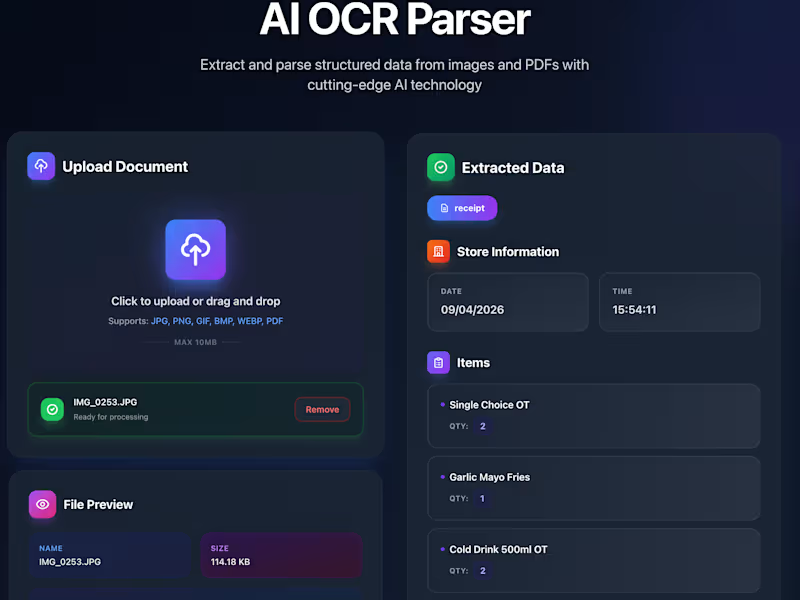
OCR Receipt Parsing Microservice (AI-Powered Backend System) Most receipt-based systems fail because the data is messy, inconsistent, and spread across formats that machines don’t naturally understand. People don’t realise it, but the real problem isn’t capturing receipts, it’s turning them into reliable, structured data that can actually be used. This system removes that friction entirely. You send a receipt (image or PDF), and it comes back as clean, structured JSON ready to plug into any workflow. The core problem it solves: Receipt data is chaotic. Different formats, inconsistent naming, missing structure, and OCR noise make it hard to extract anything usable. Even when OCR works, the output is raw text, not something you can build logic on top of. This project builds a full processing layer that doesn’t just read receipts, it understands and standardises them. What was built: A backend microservice that acts as a structured data engine for receipts. The system accepts images or PDFs via an API, runs OCR, extracts merchant details, dates, totals, and line items, and converts everything into a strict JSON schema. But the real value sits in what happens after OCR. A normalization layer cleans and standardises item names so inconsistent inputs like “BANANA”, “Bananas”, or “Banana 1lb” all map to a single canonical item. Quantities and prices are cleaned, structured, and validated so the output becomes consistent across different stores and formats. The system can also plug directly into Airtable, pushing structured items into a live database, enabling automated workflows like pantry tracking, expense logging, or analytics pipelines without needing a full backend system. Everything is exposed through a simple /parse-receipt API, making it easy to integrate into mobile apps, SaaS products, or internal tools. Technical architecture: FastAPI-based microservice designed for simplicity and performance, with OCR powered by Tesseract or cloud services like AWS Textract and Google Vision depending on accuracy requirements. The parsing layer combines rule-based extraction with AI-assisted cleanup to handle real-world receipt noise. The system is fully containerized using Docker, deployable on platforms like Render or Heroku, and comes with OpenAPI (Swagger) documentation for quick testing and integration. Designed as a stateless service, it avoids database complexity and instead integrates with external systems (like Airtable), making it lightweight and easy to scale. Business value built in: This isn’t just an OCR tool, it’s a data standardization engine. The same system can power expense tracking apps, inventory systems, meal planning products, or financial analytics platforms. Because the parsing and normalization layers are modular, the microservice can be exposed as a standalone API, creating opportunities for reuse across multiple products or even external licensing.
0
159
CTO | AI, Three.js/WebGL, Full-Stack & SaaS Expert
5.0
Rating
11
Followers
CTO | AI, Three.js/WebGL, Full-Stack & SaaS Expert
Cover image for Innovative 3D Jewelry Configurator Showcasing Premium Designs
Interactive 3D Jewelry Configurator & Product Showcase Full Description Developed a premium 3D Jewelry Configurator that enables customers to explore and personalize jewelry through an immersive browser-based experience. The platform features real-time 3D visualization, interactive product rotation, metal customization, realistic gemstone rendering, smooth animations, and responsive controls. Built using modern WebGL technologies to deliver a luxury digital showroom that enhances customer engagement and online product presentation. Similar configurators are increasingly used by jewelry brands to let customers preview metals, gemstones, and designs before purchase. Role Senior Full Stack Three.js Developer Work Description Led the end-to-end development of a luxury 3D Jewelry Configurator, creating an immersive digital experience for showcasing premium jewelry collections. Built the interactive frontend using React, Three.js, React Three Fiber, TypeScript, WebGL, and GSAP, enabling photorealistic rendering, real-time material customization, smooth animations, and responsive 3D interactions. Optimized 3D assets and rendering pipelines to deliver a fast, high-quality experience across desktop and mobile while maintaining scalability for future product collections. Technologies React • Three.js • React Three Fiber • TypeScript • WebGL • GSAP • GLTF/GLB • HDR Lighting • PBR Materials • Node.js • REST APIs Key Contributions Built a luxury 3D jewelry experience Real-time metal & material customization Photorealistic gemstone rendering Smooth 360° product interaction Performance optimization for WebGL Responsive cross-device experience
0
255
Cover image for Interactive 3D Car Configurator &
Interactive 3D Car Configurator & Vehicle Customization Platform Description Led the end-to-end development of a browser-based 3D Car Configurator & Vehicle Visualization Platform, delivering a premium digital showroom experience for automotive businesses. Architected and developed the interactive frontend using React, Three.js, React Three Fiber, TypeScript, WebGL, and GSAP, enabling real-time vehicle customization with dynamic colors, materials, wheels, accessories, and 360° camera controls. Designed scalable backend services with Node.js, Express, and REST APIs to manage vehicle data, product variants, configurations, and business logic. Optimized 3D models using GLTF/GLB, HDR environments, PBR materials, texture compression, and lazy loading to achieve smooth performance across desktop and mobile devices. Technologies React • Three.js • React Three Fiber • TypeScript • WebGL • GSAP • Node.js • Express.js • REST APIs • GLTF/GLB • PBR Materials • HDRI • Git Key Contributions Architected the complete 3D configurator Built immersive real-time vehicle customization Developed scalable backend APIs Optimized rendering performance and asset loading Implemented responsive cross-device experience Delivered a production-ready automotive visualization platform Features Real-Time Vehicle Customization Interactive 3D Visualization Color & Material Selection Wheel & Rim Configurations Accessory & Variant Management 360° Camera Controls Performance Optimization Responsive Web Experience Backend API Integration Scalable Architecture
0
276