
Fullstack Engineer | UX Designer
Fullstack Engineer | UX Designer


AI Agents | Performance marketing

AI Agents | Performance marketing

It costs $0.002 for Gemini to watch a 30-sec Meta Ad frame by frame.
Do this across all your ads and you can see the gaps in your strategy.
Cheaper than a paperclip.
And it gives you something you've probably never been able to get before: a full map of your Meta Creative Strategy.
Which solves the problem that most advertisers don't know which ads to create next.
To see the gaps, prompt Gemini to label each of your ads across 6 dimensions: persona, offer, format, type, emotion and their level of readiness to buy.
The most important dimension you need is 'Persona'.
That's because if you make it clear who (ie which persona) your ad is intended for, Meta is excellent at putting your ads in front of those people.
Which is half the battle of running Meta Ads well.
From that you can answer: Do I have at least one ad live for each of my target customer personas?
If not, you can see the gap to plug.
Repeat this across the other 5 dimensions and you can build an ad account with more 'Creative Divesity'.
But the problem is that Gemini doesn't think like a Meta Ads creative strategist out-of-the-box.
So that means you need to give custom prompts to guide Gemini on how to analyze your ads properly.
After reviewing the output maually, I'm on v5 of my prompts for Gemini.
If you want them so you can map your Meta Ads creative, happy to give them away free.
4
325
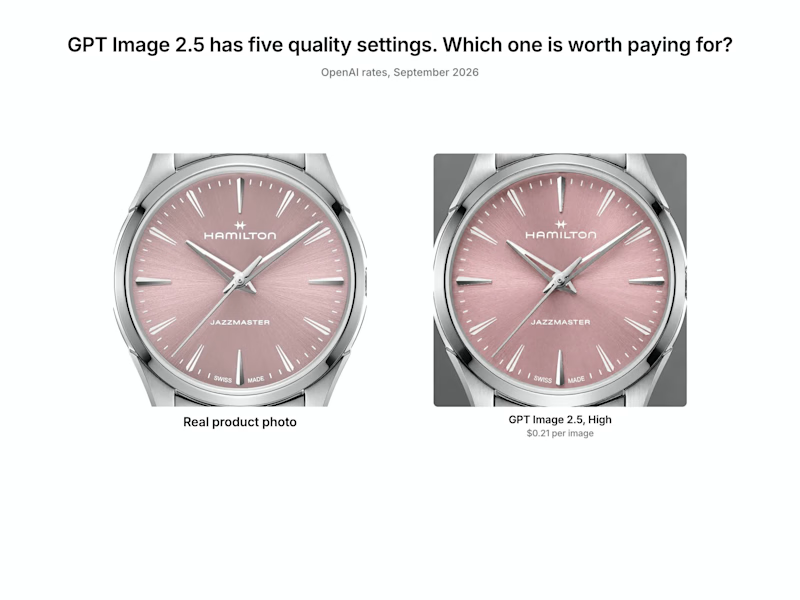
I ran a 'bake off' to see how much image quality changes across the five quality settings of OpenAI's GPT Image 2.5.
Each setting was asked to draw the same watch.
The difference only shows up when you zoom in on the dial, and the price runs from $0.09 an image at Low to $0.59 at Max, about six times more.
My recommendation is to pay for High when the product is a big close-up.
And use Low for everything else. Inside a normal Meta/Facebook Ad, Low and Max look similar.
3
249

Google Ads Growth Engineer | Scaling Revenue & ROAS 3-4x
- $10k+
- Earned
- 4x
- Hired
- 3.4
- Rating
- 23
- Followers
Google Ads Growth Engineer | Scaling Revenue & ROAS 3-4x


Frontend Developer

Frontend Developer


Brand + Web Design for Founders | Ex Pepsi, Vice, Barstool


Brand + Web Design for Founders | Ex Pepsi, Vice, Barstool

I hired a tiny art director to help keep my design references and inspiration organized.
His name is Po, which is short for Hipppo.
Po is really hungry, so he eats everything I find inspiring while I’m browsing the web and social media. Then, when I’m ready to use it, he helps turn those references into ready-made moodboards inside Figma.
I’m getting ready to share him soon.
The bigger goal is to help designers create entire brands from the references and inspiration they already collect.
I’m testing with friends now and have room for a couple more.
If you’re interested, leave a comment and I’ll DM you.
0
124

I’ve never designed an iOS app icon before.
Po doesn’t have a mobile app yet, but he still needs to eat when I’m away from my desk.
I made an iOS Shortcut that lets me send him references while browsing social media, which gave me an excuse to start exploring what his future app icon could look like.
Still learning how to design for Apple’s new OS style. Any tips or details I should be paying attention to (shadow tutorials?!?)?
1
1
199

One thing I’m learning with node workflows like Flora and Weavy is that each step needs to be specialized. Then you layer in the specifics.
A lot of what I’m building right now is for branded imagery. With image models, you get plenty of unwanted artifacts, strange details, and gooey limbs, so it can take a few passes to get the final image where you want it.
I’ve always admired art directors for their eye for detail. These tools force you to put that hat on.
The thing I wish these tools had is a better way to draw, mark up, and revise as you move through the workflow.
In any case, I’m really proud of the images that are coming to life.
1
2
121


Product Designer and Engineer

Product Designer | Mobile & Web UX Specialist


AI product design + no-code MVP · shipped 2 AI apps solo


