UI/UX Design for Location Intelligence Platform with AI features

Yuliia Ishchenko


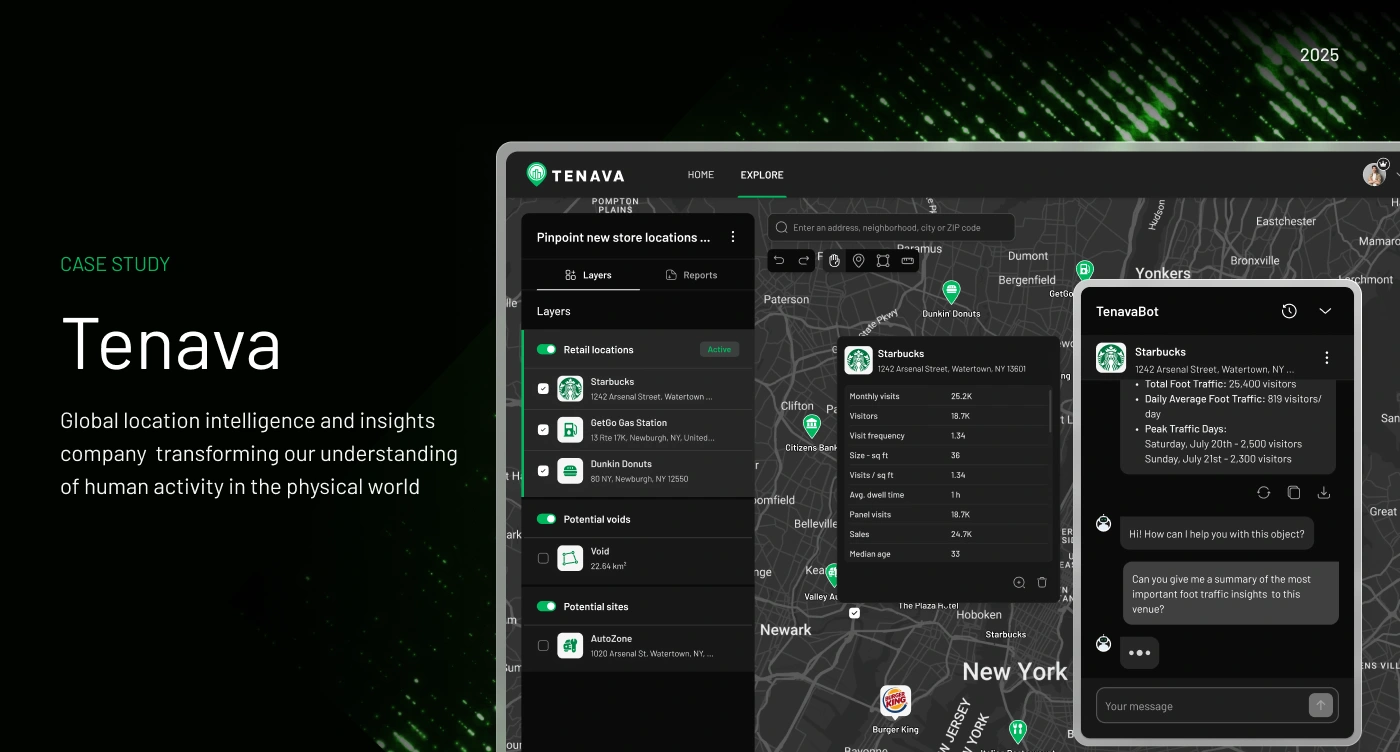
AI-Powered Location Intelligence Platform
Global location intelligence and insights platform transforming how businesses understand human activity in the physical world.
Tenava is a web platform designed to help businesses validate sites faster and smarter using AI-driven, real-time location insights. The product allows users to analyze locations, compare competitor activity, identify market gaps, track potential sites, generate reports, and make more confident expansion decisions regardless of geography.
Year: 2025
Industry: Location Intelligence, AI SaaS, Geospatial Analytics, Retail Tech, PropTech
Project Type: UX/UI Design, Web Application, Landing Page, Mobile Adaptation
Timeline: 9 weeks
Contribution: Competitor Analysis, User Flow, UX/UI Design, Design System, Web App Design, Mobile Adaptation, Landing Page, Email Templates, SEO Content
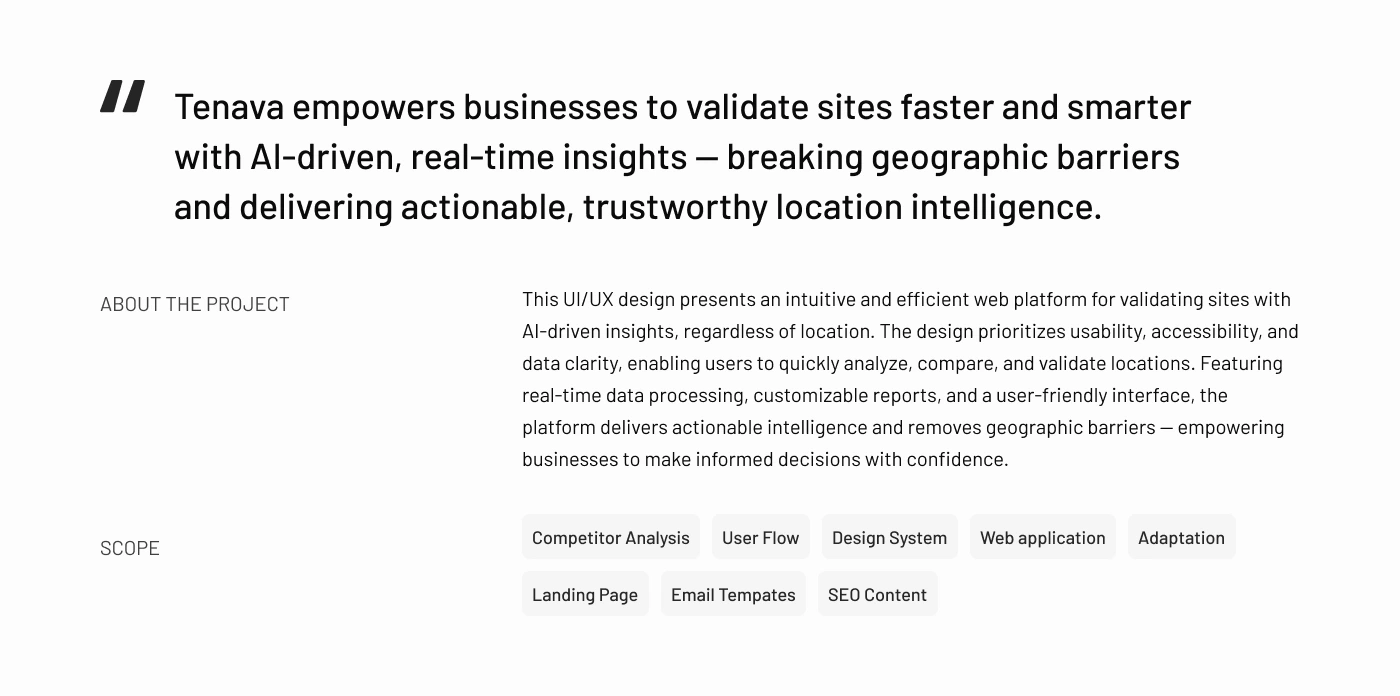
Project Overview
Tenava was designed as an AI-powered location intelligence platform for businesses that need to validate physical locations before entering a new market, opening a new store, or comparing potential expansion opportunities.
The platform combines maps, retail location data, competitor insights, market voids, AI-generated recommendations, and PDF reports in one interface. Instead of manually collecting location data from multiple sources, users can explore a specific area, analyze traffic and demographic insights, save relevant locations, and generate structured reports.
The main design goal was to make complex geospatial data feel simple, actionable, and easy to use for business decision-making.
Problems
Site validation is usually slow and fragmented
Businesses often need to collect location data from different sources: foot traffic, competitors, demographics, zoning, population density, household income, and local demand. This makes the validation process time-consuming and difficult to manage.
Location intelligence tools can feel too technical
Many platforms in this space are built for analysts, not business users. The challenge was to design an interface that feels powerful but still intuitive for users who need fast insights without dealing with overly complex dashboards.
Users need to compare multiple location types in one place
The product had to support retail locations, competitor sites, potential sites, and market voids. Without a clear layer system, map-based data could quickly become visually overloaded.
AI insights needed to feel trustworthy and practical
The AI chatbot had to provide helpful business recommendations, not just generic answers. The interface needed to make AI responses feel connected to the selected location, object, or region.
Reports needed to be easy to generate and share
Users needed a simple way to export saved insights into a structured PDF format for internal review, marketing, investment, or email distribution.
The product needed a responsive experience
Because location research can happen on the go, the platform needed to be adapted for mobile screens while keeping core map interactions, saved locations, profile settings, and AI insights accessible.
Goals
Create a clear and modern web app for AI-powered site validation.
Make complex location data easy to explore and understand.
Design an intuitive map-based interface with organized layers.
Help users search, save, compare, and track retail sites in one place.
Create a trustworthy AI chatbot experience connected to location insights.
Build a PDF report generation flow for saved data.
Adapt the core experience for mobile devices.
Design a marketing landing page to explain the product and support waitlist conversion.
Prepare email templates and SEO content to support launch communication.
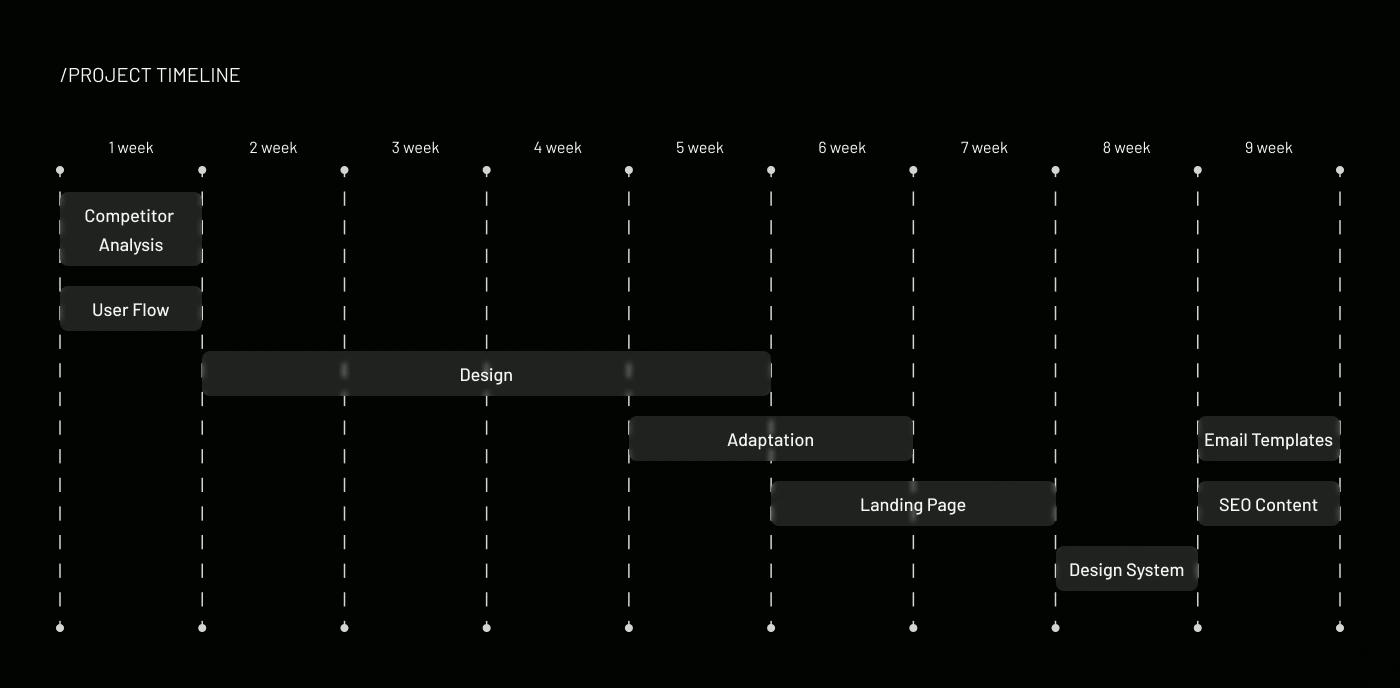
Project Timeline
The project was structured across 9 weeks with clear stages:
Week 1: Competitor Analysis and User Flow
Weeks 2–5: Core Web App Design
Weeks 5–7: Mobile Adaptation
Weeks 6–8: Landing Page Design
Weeks 8–9: Design System
Week 9: Email Templates and SEO Content
This timeline allowed the product experience and marketing materials to be developed in parallel while keeping the visual direction consistent across all deliverables.
Onboarding
The project started with understanding the product idea, target users, core platform logic, and main business goal: helping companies validate locations faster with AI-powered insights.
The scope included not only the product interface but also launch-related materials, including the landing page, SEO content, and email templates. This required the design to work as a full ecosystem: product experience, brand presence, and user acquisition touchpoints.
Competitor Analysis
The competitor analysis helped define how Tenava could stand out among traditional location intelligence and mapping platforms.
The key opportunity was to make the product feel more accessible and AI-assisted. Instead of overwhelming users with complicated analytics screens, Tenava focuses on fast exploration, clear object cards, simple data tables, and direct AI recommendations.
This helped shape the product direction: a dark, data-focused interface with green accents, map-first interactions, and a practical AI assistant.
User Flow
A user flow was created to structure the main product experience.
The flow connects search, map exploration, location cards, layers, saved sites, market voids, chatbot interaction, report generation, and account management.
This helped make the product feel like one connected workspace instead of a set of separate tools.
Visual Identity and Design System
The visual identity was designed to feel technological, precise, and data-driven.
Typography
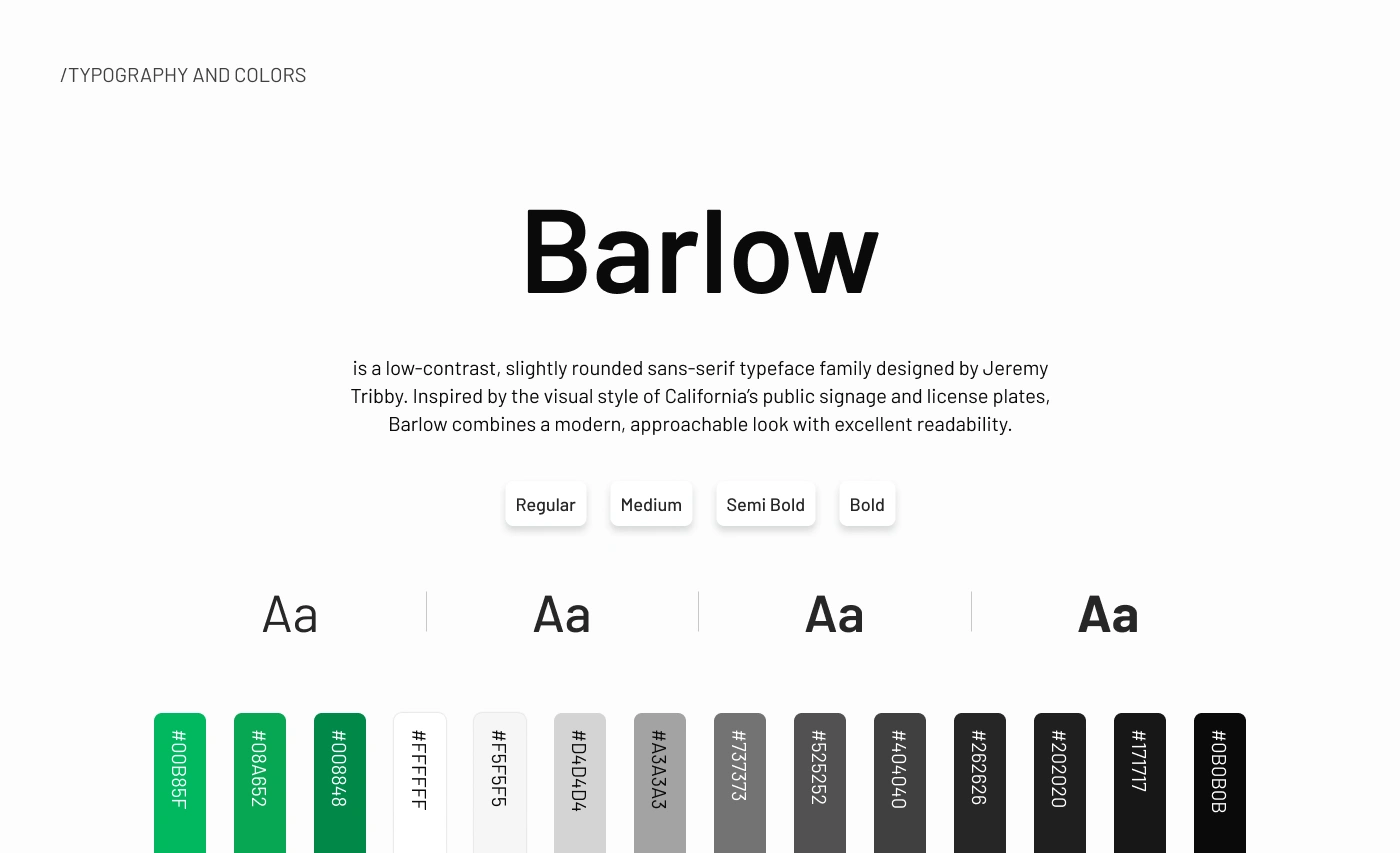
Barlow was selected as the main typeface. Its slightly rounded sans-serif style gives the platform a modern and approachable look while maintaining strong readability across maps, data cards, panels, and landing page sections.
Color Palette
The visual system uses a dark interface with bright green accents.
The green color works as the main action and highlight color, helping users quickly identify active layers, map pins, buttons, selected objects, and important insights.
The dark background supports the map-based product experience and creates a strong contrast for data visualization, cards, chat panels, and interface controls.
Component System
The design system included reusable components for:
Map controls
Search fields
Location cards
Layer panels
Reports panel
AI chatbot interface
Object cards
Buttons and inputs
Profile and subscription screens
Mobile navigation
Pricing cards
Landing page sections
PDF report elements
This helped keep the platform consistent across web app, mobile adaptation, and marketing pages.
Web Application Design
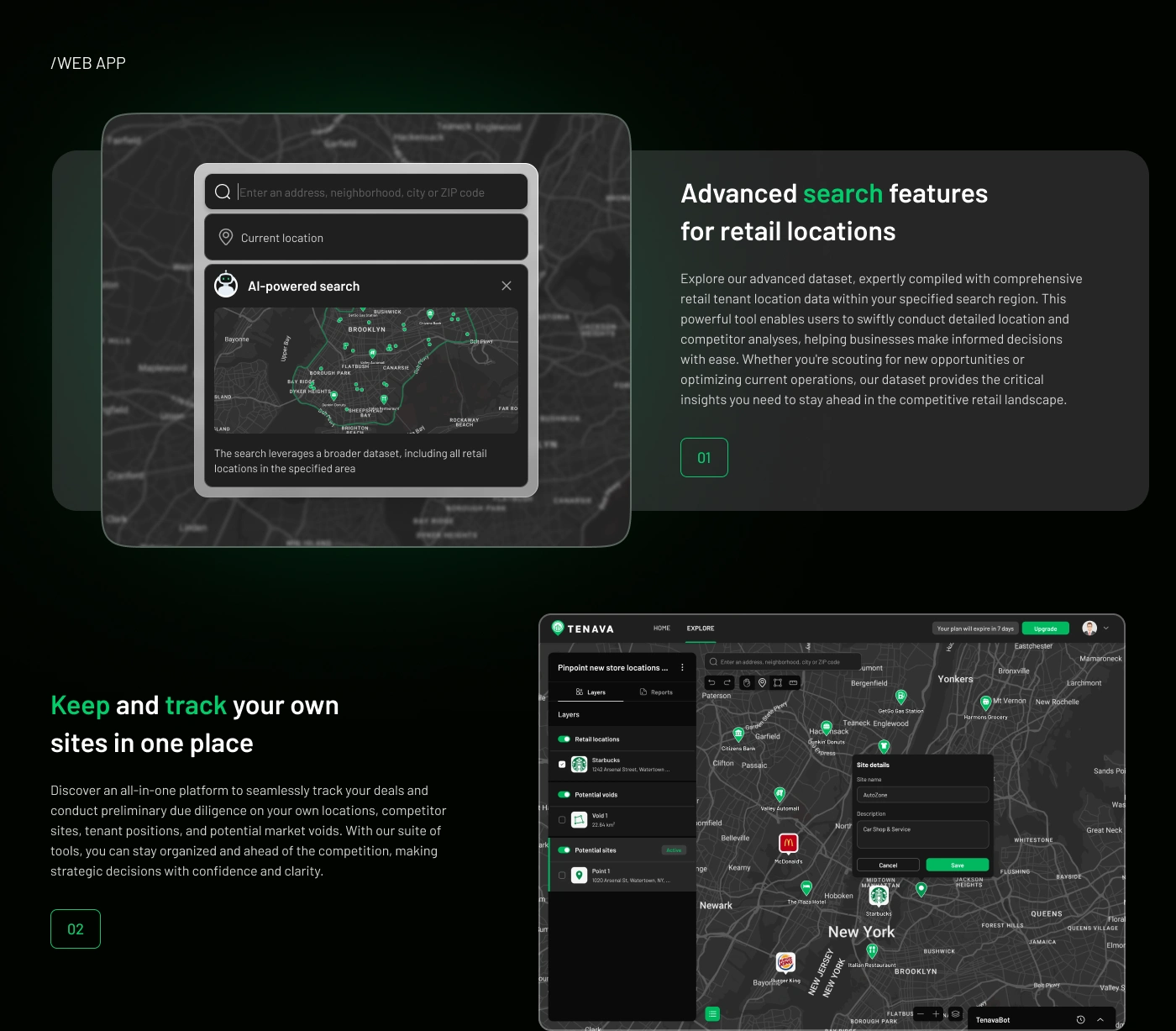
The core web app was designed around a map-first experience. The map acts as the main workspace where users can search, explore, compare, and manage locations.
The interface includes a left-side panel for layers and saved objects, a top search bar for location discovery, map controls for interaction, and contextual cards for selected businesses, voids, or potential sites.
The goal was to give users a powerful research environment without making the interface feel overloaded.
Advanced Search Features for Retail Locations
One of the core features is advanced location search.
Users can search by address, neighborhood, city, or ZIP code. The platform then helps them explore retail locations within a selected region.
The AI-powered search feature allows users to analyze a broader dataset and quickly identify relevant retail tenant locations, competitor presence, and business opportunities.
This feature was designed to support both quick discovery and deeper due diligence.
Highlight Voids in the Market
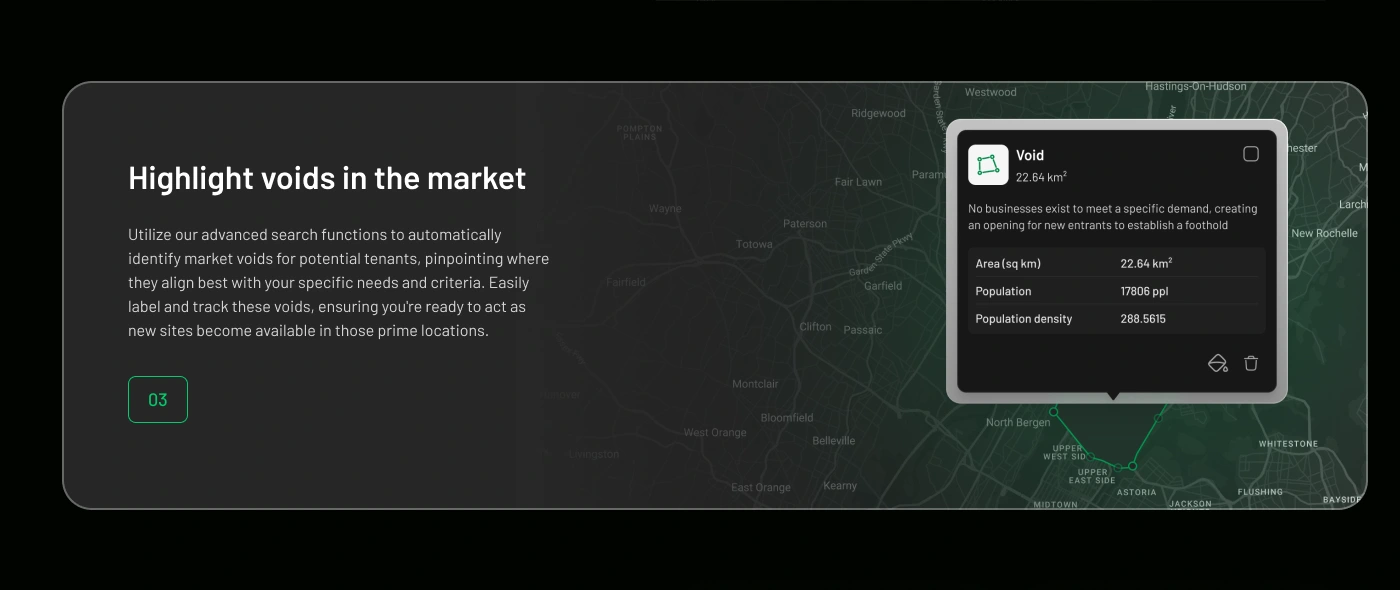
Market voids were designed as a key feature of the platform.
The interface helps users identify areas where specific demand exists but relevant businesses are missing. These voids can be saved, labeled, and tracked as potential opportunities.
Each void card includes important information such as area size, population, and population density. This gives users a clear starting point for evaluating whether a location has business potential.
AI-Powered Chatbot
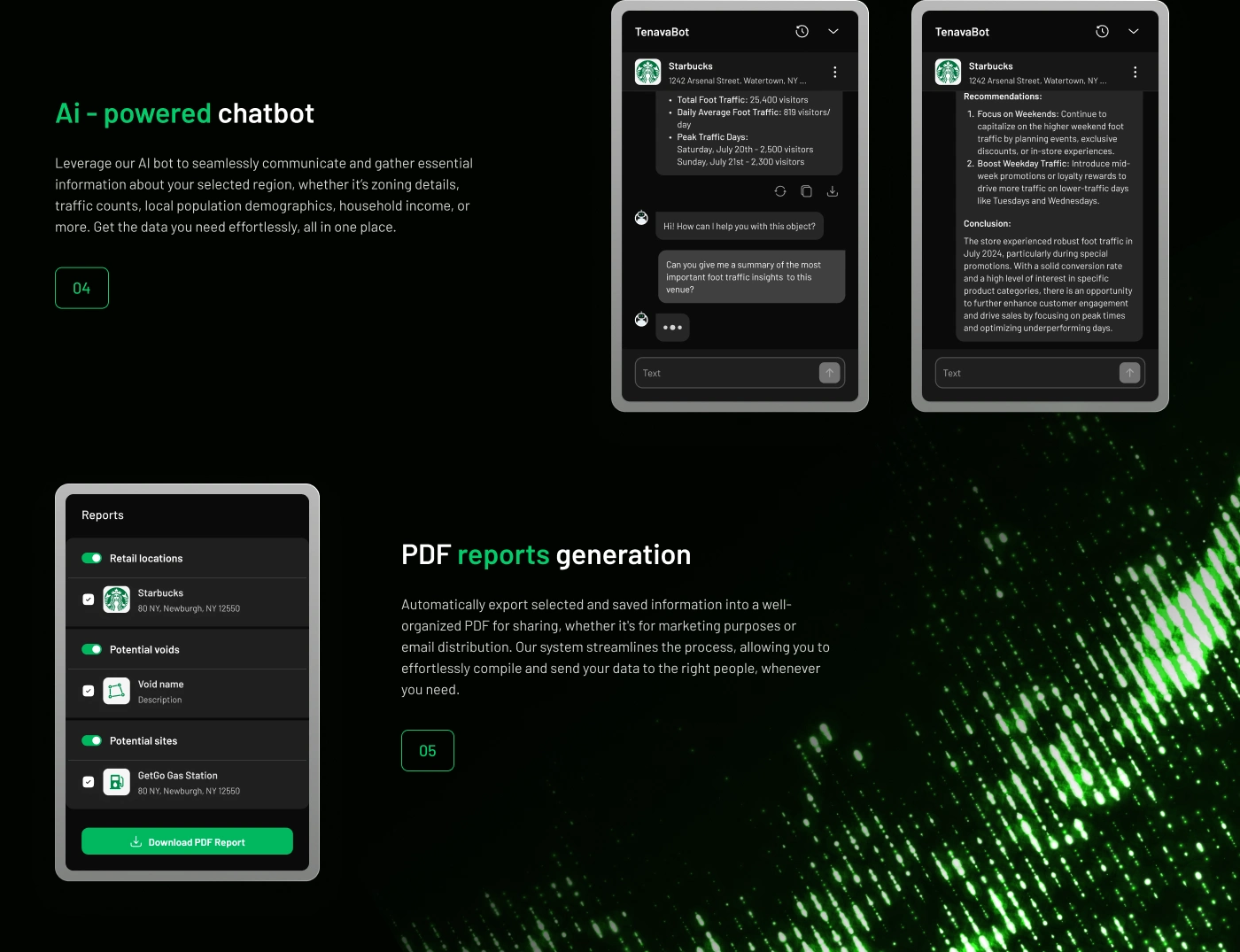
The AI chatbot was designed as a practical assistant inside the platform.
Users can ask questions about selected locations, traffic patterns, local demographics, zoning details, household income, visitor behavior, and other relevant business insights.
The chatbot can summarize key data points and provide recommendations, helping users understand what a location means from a business perspective.
The main design challenge was to make the chatbot feel connected to the selected object, not separated from the map. That is why the chat experience is placed directly inside the product workspace and connected to location cards.
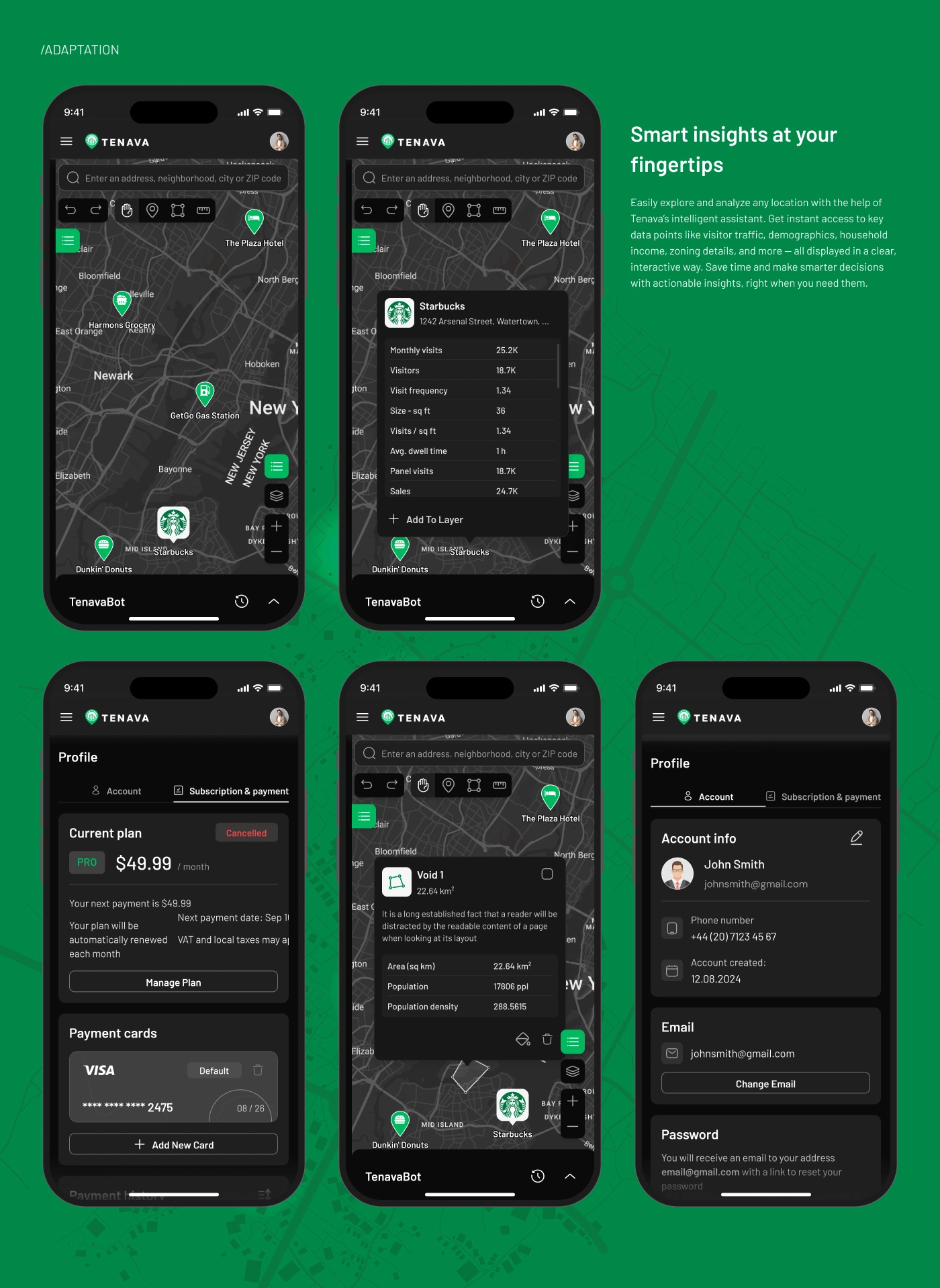
Mobile Adaptation
The platform was adapted for mobile use so users can access smart location insights on the go.
The mobile experience includes:
Map exploration
Search
Location cards
Saved objects
Market void cards
Profile management
Subscription and payment screens
Account information
AI chatbot access
The mobile adaptation focused on keeping the core product usable despite the limited screen size. Key actions were moved into compact panels, bottom controls, and simplified cards.
This allows users to explore locations, review insights, and manage account details from a phone without losing access to important data.
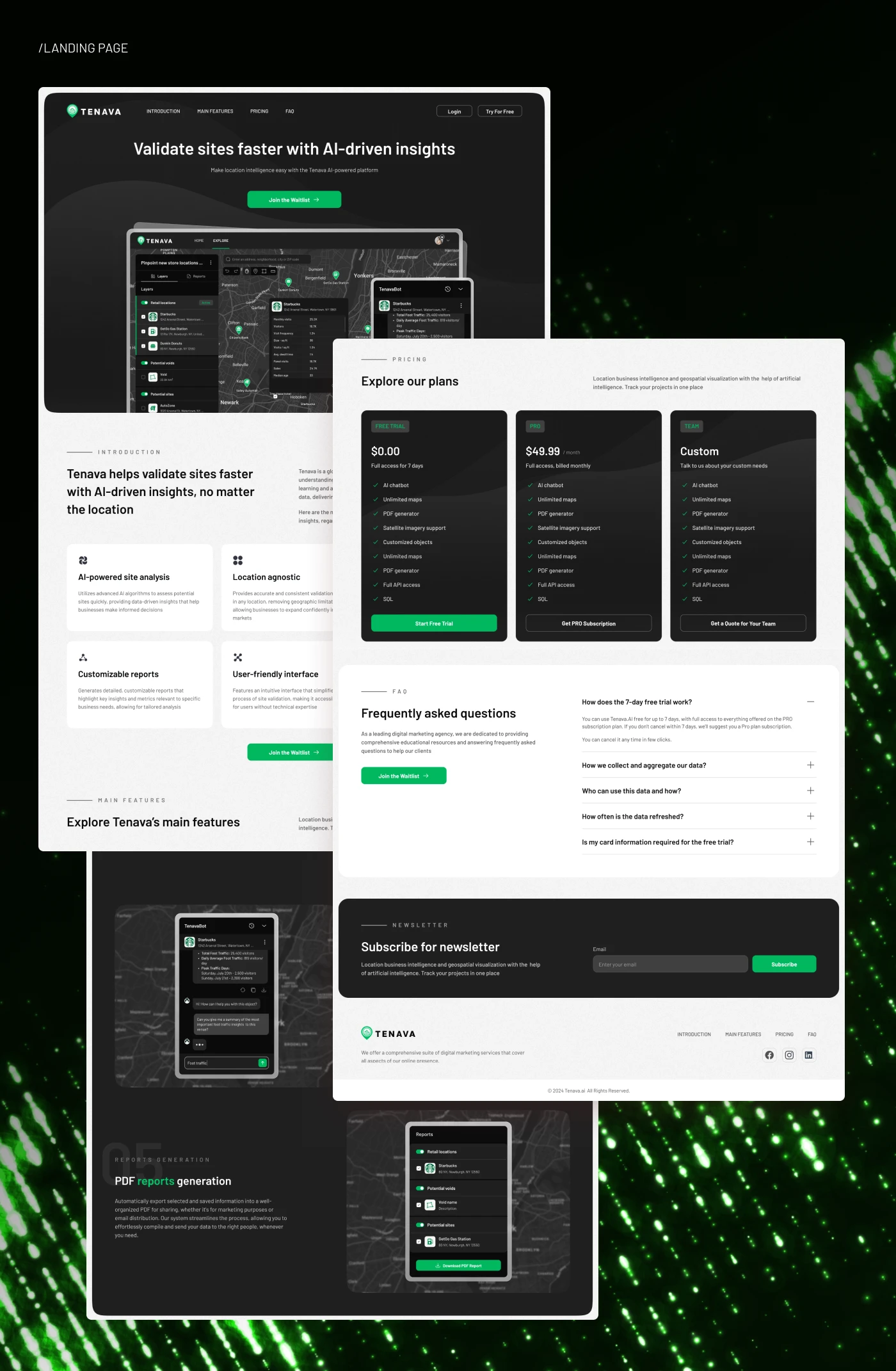
Landing Page Design
A dedicated landing page was created to explain Tenava’s value proposition and support user acquisition.
The landing page presents the main message: Validate sites faster with AI-driven insights.
The landing page was designed to visually connect with the product interface, using the same dark aesthetic, green accents, product mockups, and map-based visual language.
Email Templates and SEO Content
As part of the launch support, email templates and SEO content were also included in the project scope.
The goal was to make the product communication consistent across acquisition channels. The same messaging direction was used across the landing page, product positioning, and email communication: faster site validation, AI-powered insights, location intelligence, and actionable business decisions.
Design Results
The final project delivered a complete product and marketing design foundation for Tenava.
The result included a web app, mobile adaptation, landing page, visual system, report flow, AI chatbot experience, and launch-related materials.
Key Results
A complete map-based web app interface for location intelligence and site validation.
Clear layer structure for retail locations, potential sites, and market voids.
AI-powered chatbot experience connected to selected objects and location insights.
PDF report generation flow for exporting and sharing saved data.
Mobile adaptation for accessing location insights on the go.
Landing page design to communicate the product value and support waitlist conversion.
Consistent visual identity built around dark UI, green accents, and data-driven aesthetics.
Scalable design system for future product growth and feature expansion.
The design turned a complex location intelligence concept into a clear, modern, and actionable SaaS experience.
Project Scope
This case study covers the full first phase of Tenava’s design, including competitor analysis, user flow, product interface, mobile adaptation, landing page, design system, email templates, and SEO content.
The project was built as a scalable foundation for future AI-powered features, additional data layers, deeper analytics, and expanded reporting functionality.
Conclusion
Tenava is a location intelligence platform designed to help businesses make faster and more confident decisions about physical locations.
The design combines map-based exploration, AI assistance, saved site tracking, market void analysis, and PDF report generation into one intuitive product experience.
The final result is a modern AI SaaS platform that makes complex geospatial data easier to understand, compare, and act on.
✍️ Contact me and I will provide you with an estimate for your project!
Like this project
Posted May 1, 2026
UX/UI design for an AI-powered location intelligence platform helping businesses validate sites, explore market gaps, track locations, and generate reports.
Likes
0
Views
28
Timeline
Jul 16, 2025 - Aug 21, 2025