UI/UX Design for QR Codes generating and managing platform

Yuliia Ishchenko


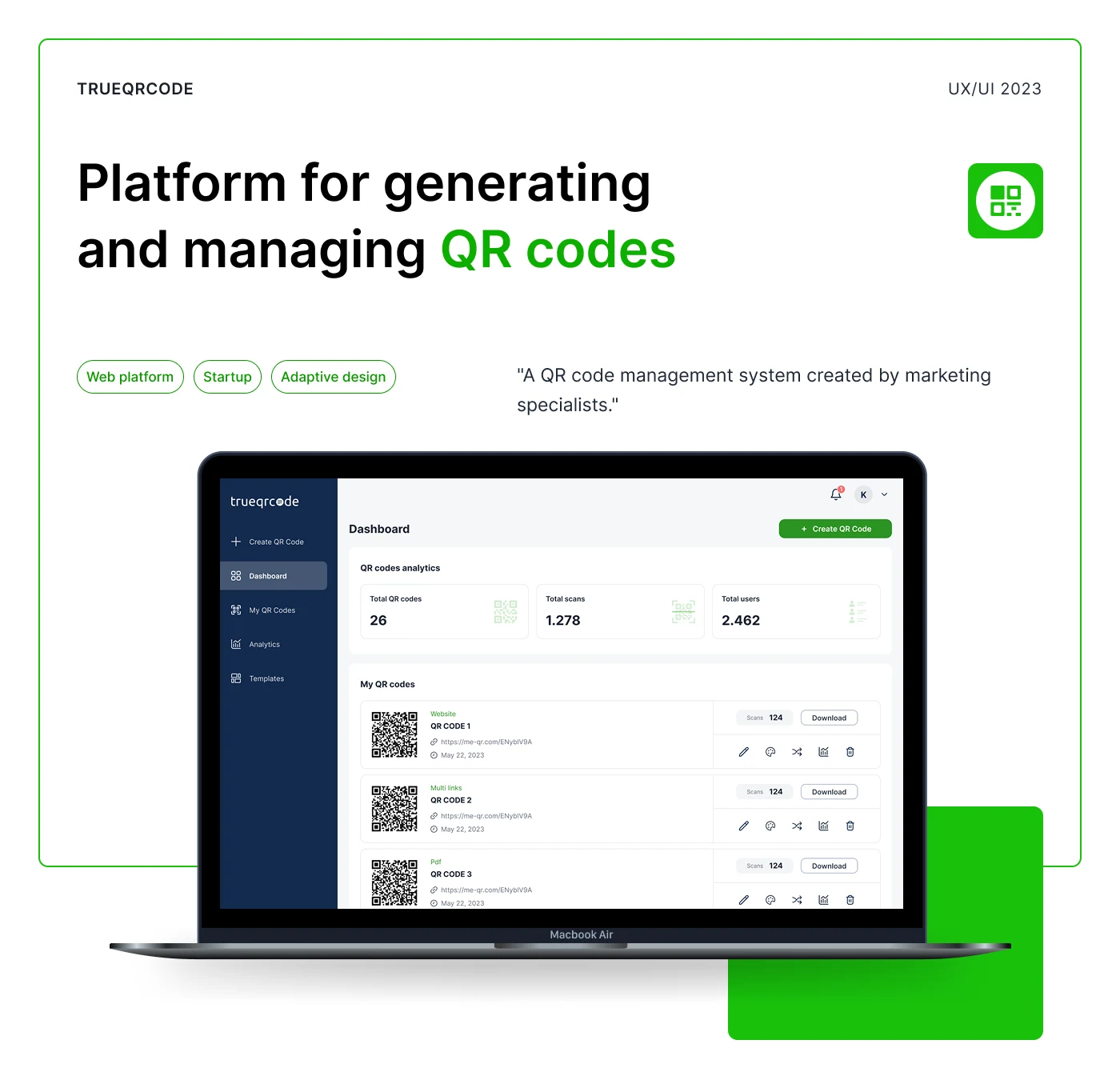
Platform for Generating and Managing QR Codes
A QR code management system created by marketing specialists to simplify QR code creation, customization, tracking, and analytics.
TrueQRCode is a web platform that helps businesses and marketers create, manage, customize, and analyze QR codes in one place. The product supports multiple QR code types, including Website URL, Multi Links, PDF, and vCard Plus, making it useful for marketing campaigns, printed materials, digital business cards, documents, and customer engagement flows.
Year: 2023
Industry: SaaS, Marketing Tech, QR Code Management, Web Platform
Project Type: UX/UI Design, Web Platform Design, Website Redesign, Adaptive Design
Scope: Web Platform, QR Code Generator, Dashboard, Analytics, Templates, Mobile Adaptation
Contribution: UX/UI Design, Website Redesign, QR Code Creation Flow, Adaptive Design, UI Components, Visual System
Project Overview
TrueQRCode was designed as a platform for generating and managing QR codes in a simple, structured, and business-friendly way.
QR codes are now widely used across marketing, sales, events, packaging, restaurants, digital business cards, documents, and offline-to-online customer journeys. However, many companies still create QR codes without a consistent system for storing, editing, tracking, or analyzing them.
The goal of TrueQRCode was to create a user-friendly platform that combines QR code creation, management, customization, and analytics with a clean and intuitive interface.
Instead of using separate QR generators, spreadsheets, and manual tracking, users can manage everything from one dashboard.
Problems
QR code creation was often inconsistent across organizations
Different teams could create QR codes using different tools, naming formats, designs, and tracking methods. This made it difficult to keep all QR codes organized and consistent.
Many QR code generators were unclear or limited
Existing tools often focused only on generating a basic code. They did not provide a clear management system, analytics, templates, or a convenient way to customize QR codes directly inside the platform.
Users needed more than one QR type
Businesses use QR codes for many different purposes: linking to a website, sharing multiple links, opening PDF files, or saving contact information. The platform needed to support several QR types while keeping the creation process simple.
QR code customization needed to be easier
Users needed the ability to change frames, patterns, colors, templates, and design details without leaving the platform or using additional tools.
Analytics had to be easy to access
Marketing specialists need to understand how QR codes perform. The platform needed to show scans, users, QR code activity, and overall performance in a clear dashboard.
The platform needed to work on mobile devices
Since QR code management can happen on the go, the experience had to be adapted for smartphones while keeping the main platform features accessible.
Goals
Create a simple and scalable QR code management platform.
Make QR code generation clear and step-by-step.
Support different QR code types: Website, Multi Links, PDF, and vCard Plus.
Allow users to customize QR code design directly inside the platform.
Build a dashboard for QR code management and analytics.
Create an adaptive mobile version of the web platform.
Redesign the QR code generation part of the website.
Keep the interface clean, modern, and easy to use for marketing teams and business users.
About the Project
The platform was created in response to the growing importance of QR codes in business and marketing. As QR codes became more common, the need for consistency, organization, and performance tracking also increased.
TrueQRCode combines three important functions in one product:
QR code creation
QR code management
QR code analytics
This makes the platform useful not only for generating codes but also for organizing them, customizing their appearance, downloading them, and tracking how they perform over time.
UX Approach
The main UX focus was to make QR code creation feel simple, even when users work with different formats and customization options.
The platform structure was built around the most important user actions:
Create QR Code
View Dashboard
Manage My QR Codes
Check Analytics
Use Templates
Customize QR Code Design
Download QR Codes
Manage Account and Subscription
View Notifications
Use the platform on mobile
The interface was designed to reduce confusion and guide users through each step with clear navigation, visible actions, and preview states.
Visual Identity
The visual identity was designed to feel clean, professional, and practical for a SaaS product.
Typography
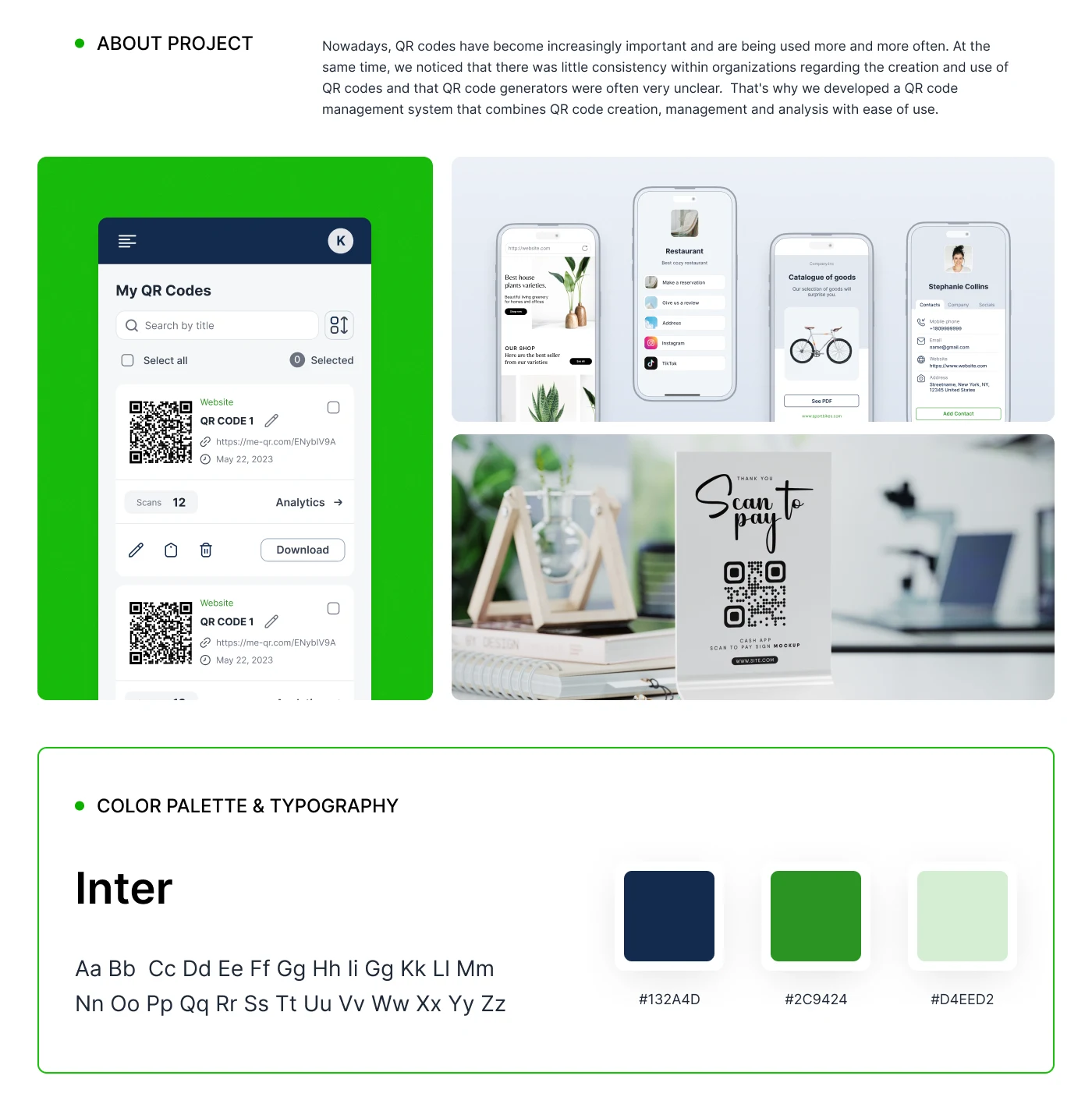
Inter was used as the main typeface.
Inter works well for web platforms because it is highly readable, modern, and suitable for dashboards, tables, forms, analytics cards, buttons, and mobile screens.
Color Palette
The color palette combines a deep navy base with green accents and light supporting backgrounds:
#132A4D — primary dark navy color used for navigation, contrast, and structure.
#2C9424 — green accent used for primary actions, active states, progress, and highlights.
#D4EED2 — light green supporting color used for soft backgrounds and selected states.
The combination creates a clean, trustworthy, and easy-to-scan interface.
Main Platform Screens
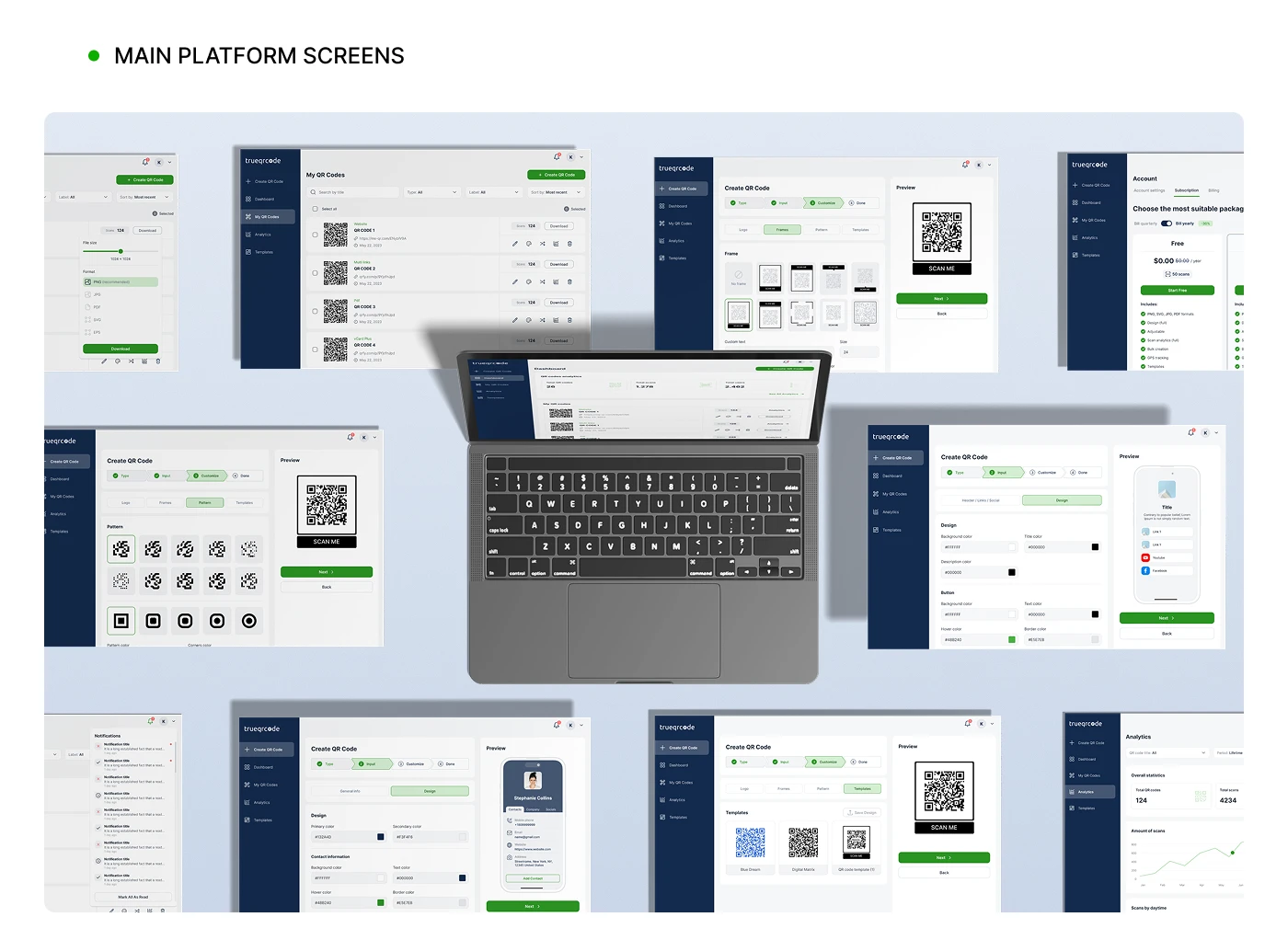
The platform includes a full set of core product screens for QR code creation and management.
Dashboard
The dashboard gives users a quick overview of platform performance, including total QR codes, total scans, and total users.
This helps users understand the current state of their QR campaigns without needing to open separate analytics screens.
My QR Codes
The “My QR Codes” section allows users to search, filter, select, edit, analyze, share, delete, and download QR codes.
Each QR code card includes key information such as type, title, short link, date, scan count, and quick actions. This makes the management experience clear and efficient.
Create QR Code Flow
The QR code creation process was designed as a guided multi-step flow.
Users can choose the QR code type, input the required information, customize the design, preview the final QR code, and download it.
The flow includes clear progress steps, helping users understand where they are and what needs to be completed next.
Templates
The template feature helps users start faster by choosing ready-made QR code styles.
This makes the platform more useful for users who want a polished QR code design but do not want to build everything manually from scratch.
Analytics
The analytics section allows users to track QR code performance, including scans and usage activity.
The goal was to make campaign performance easy to understand for marketing specialists and business owners.
Account and Subscription
The platform also includes account and subscription screens, allowing users to choose packages, manage billing, and access account settings.
Notifications
A notification panel was designed to keep users informed about platform updates, QR code activity, and account-related events.
QR Code Types
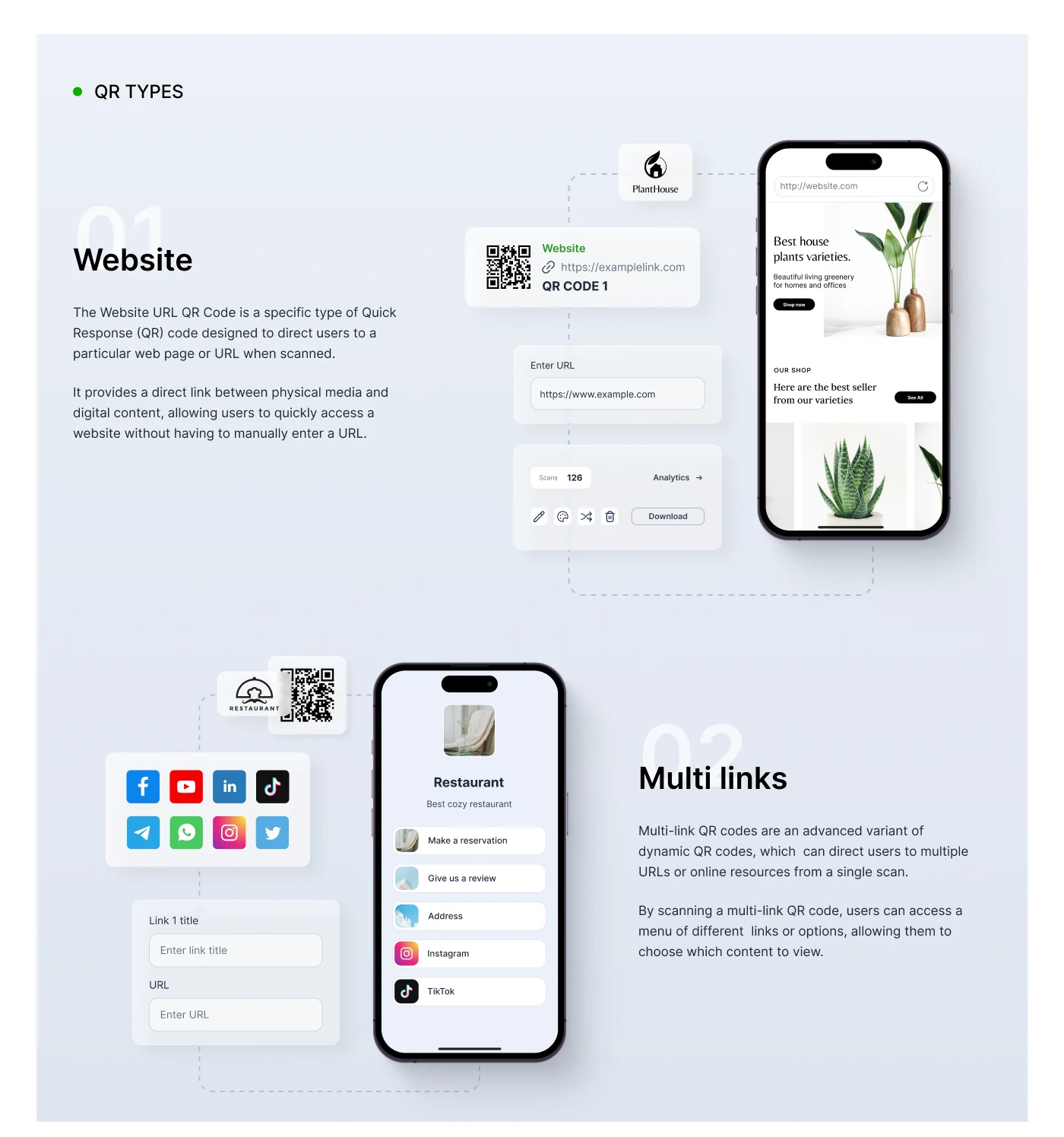
TrueQRCode supports multiple QR code types, each created for a specific business use case.
1. Website QR Code
Website QR codes direct users to a specific web page or URL after scanning.
This is useful for connecting printed materials, packaging, posters, menus, ads, or offline campaigns with digital content.
The flow includes entering a website URL, generating the QR code, previewing the destination, and tracking scan activity.
2. Multi Links QR Code
Multi Links QR codes allow users to share several links from one scan.
Instead of sending users to just one URL, the QR code opens a mini landing page with multiple options, such as social media, reservation links, reviews, address, or other resources.
This is useful for restaurants, personal brands, small businesses, creators, and marketing campaigns where users need several actions in one place.
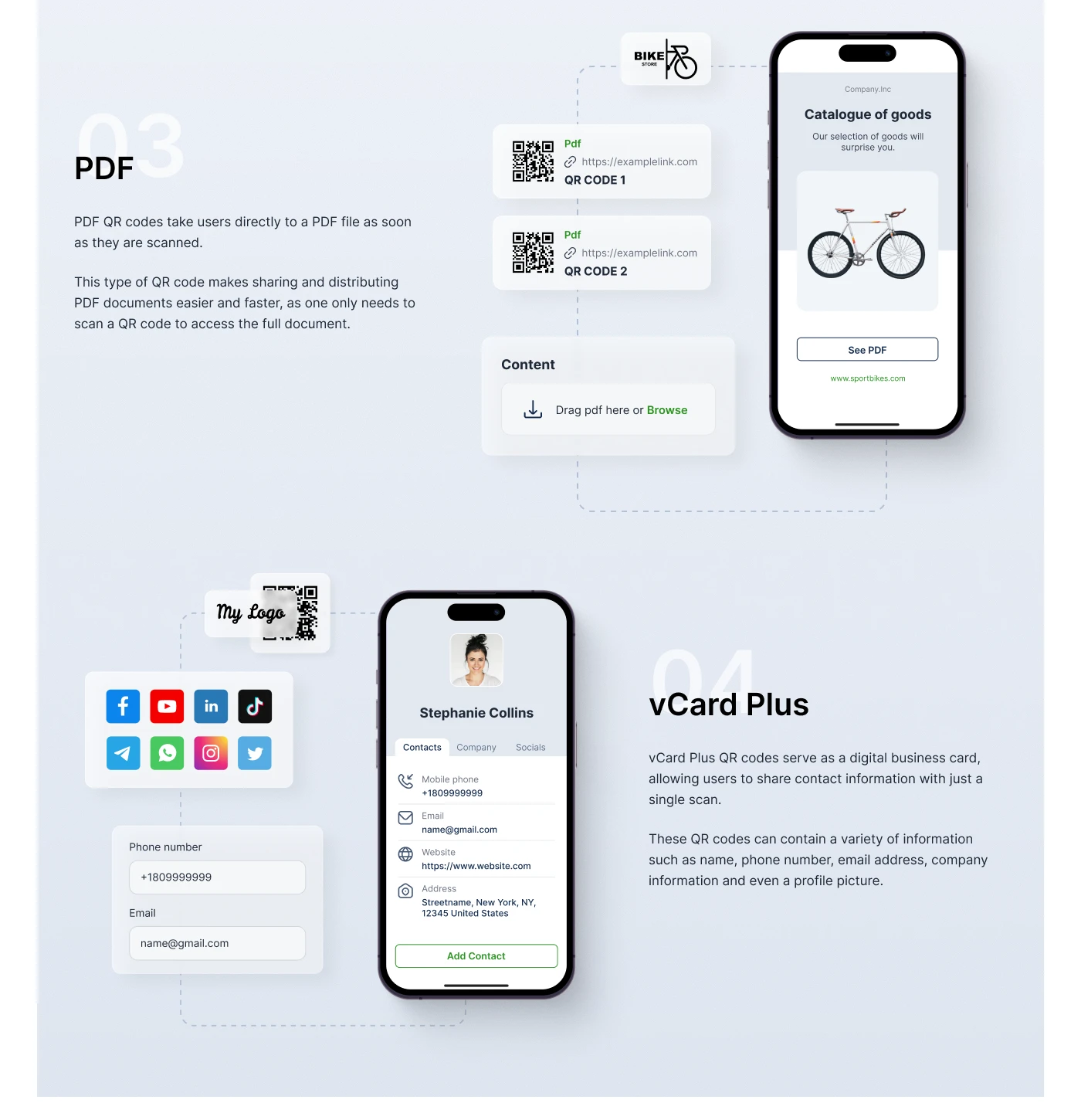
3. PDF QR Code
PDF QR codes direct users to a PDF file immediately after scanning.
This is useful for catalogs, menus, brochures, instructions, event materials, price lists, company presentations, and downloadable documents.
The creation flow includes uploading a PDF file and generating a scannable QR code that gives users direct access to the document.
4. vCard Plus QR Code
vCard Plus works as a digital business card.
Users can share contact information with one scan, including name, phone number, email address, website, company information, address, and profile image.
This type is useful for networking, sales teams, consultants, events, and business owners who want a fast way to share contact details.
Mobile Adaptation
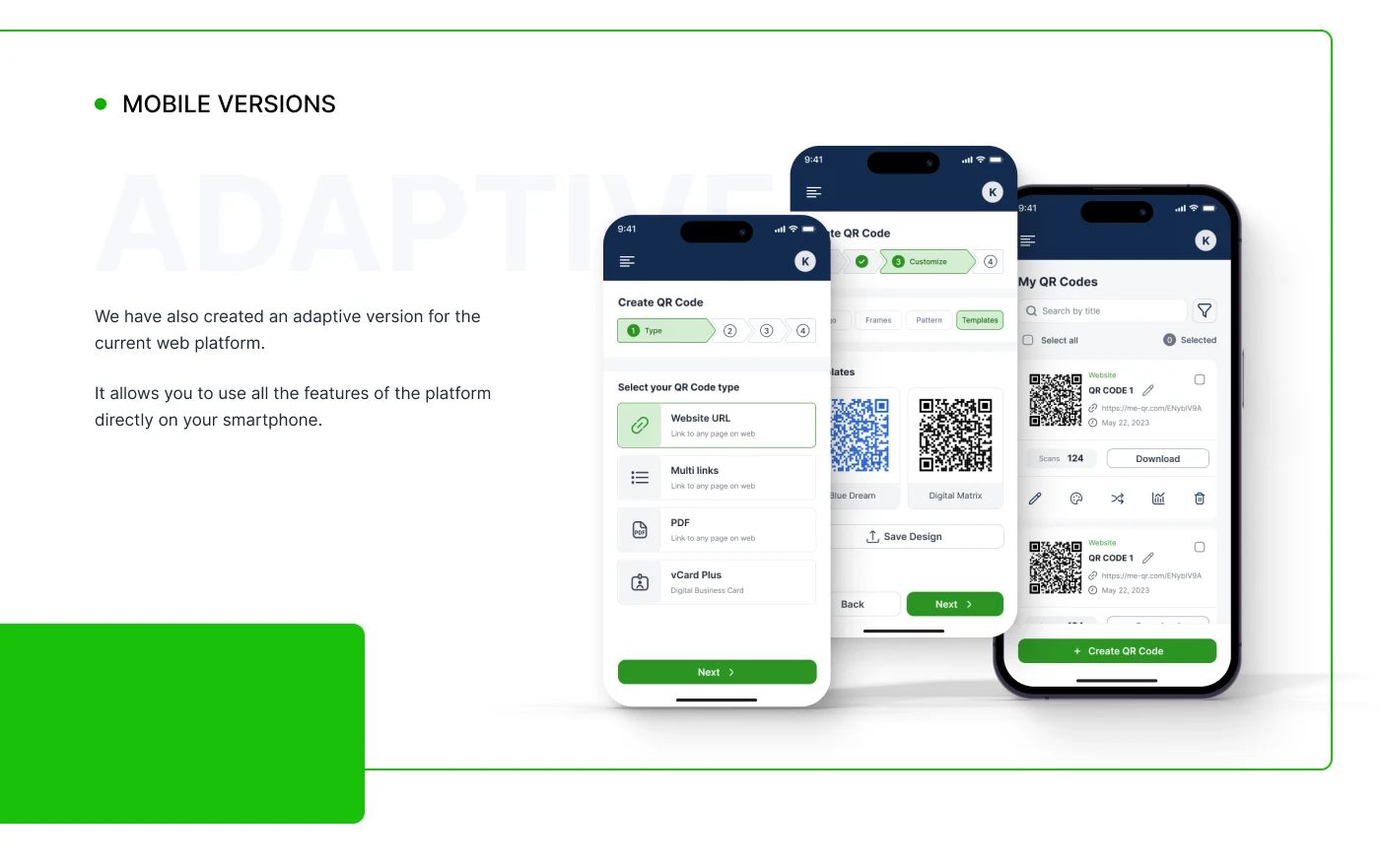
An adaptive mobile version was created for the web platform.
The mobile interface allows users to access the main platform features directly from a smartphone, including:
QR code management
QR code creation
QR code type selection
Template selection
QR code preview
Download actions
Search and filtering
Scan analytics
Quick actions
The mobile version keeps the structure simple and uses card-based layouts to make QR code management easier on smaller screens.
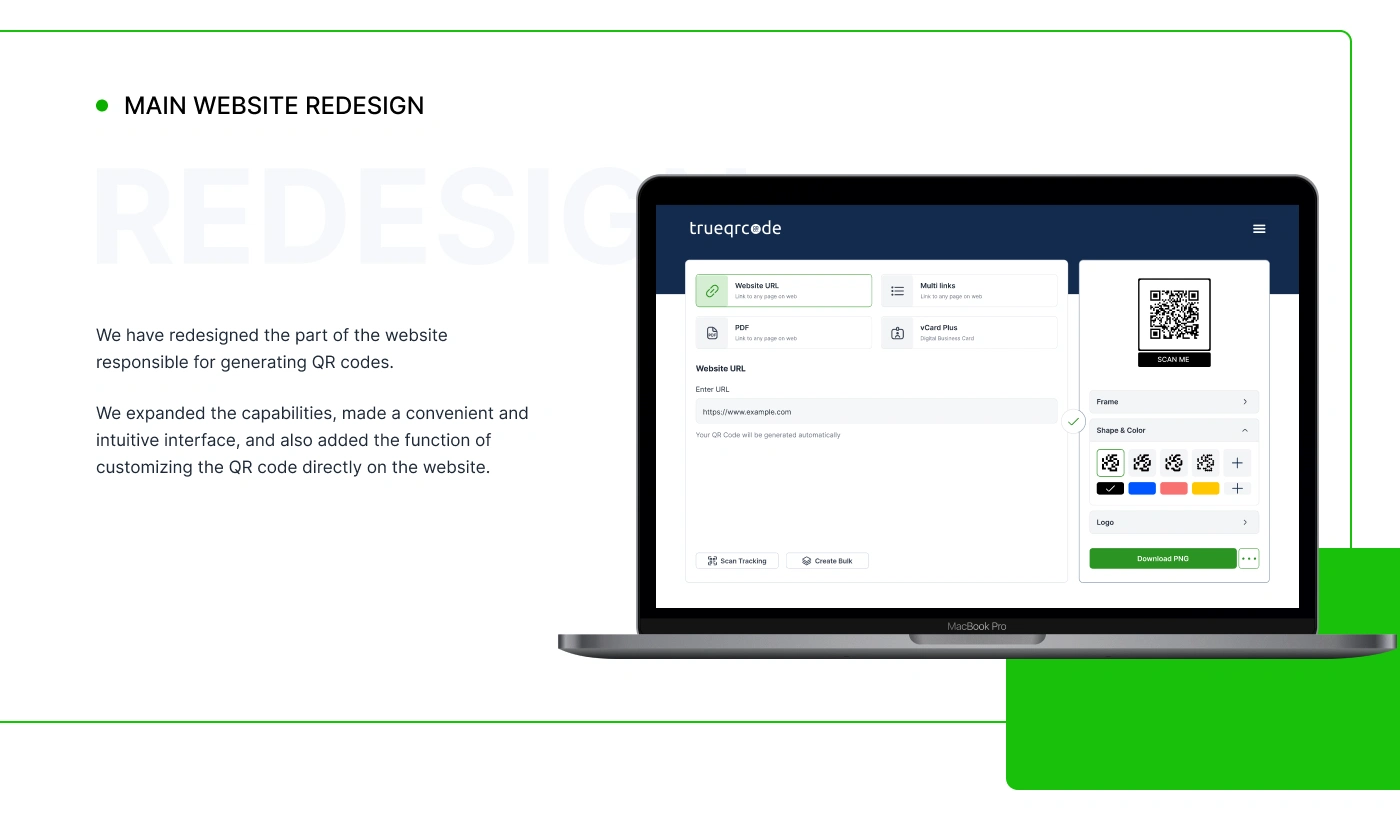
Main Website Redesign
The project also included redesigning the part of the website responsible for generating QR codes.
The redesigned generator expanded the platform’s capabilities and introduced a more convenient interface for creating and customizing QR codes directly on the website.
Users can choose a QR type, enter content, adjust design settings, customize shape and color, add a logo, preview the result, and download the QR code.
This made the website experience more useful and reduced the need for users to switch between different tools.
Design System and UI Components
The interface was built with reusable components to keep the product consistent across desktop and mobile screens.
This helped create a scalable structure for future features and additional QR code types.
Results
The final design created a clear and scalable QR code management platform for business and marketing users.
Key Results
A complete QR code management dashboard for creating, organizing, and tracking QR codes.
A guided QR code creation flow that makes the process easier and more predictable.
Support for multiple QR types, including Website, Multi Links, PDF, and vCard Plus.
Built-in customization tools for frames, patterns, templates, colors, logos, and preview states.
Analytics screens for tracking scans and QR code performance.
Adaptive mobile version that allows users to manage QR codes from a smartphone.
Redesigned website generator with a more intuitive and expanded QR code creation experience.
Consistent visual system based on Inter typography, navy structure, and green action accents.
Project Scope
This case study covers the design of the TrueQRCode web platform, mobile adaptation, QR code generation flow, QR type screens, analytics, dashboard, templates, account screens, and the website generator redesign.
The project was built as a scalable foundation for a QR code management system that can continue expanding with more templates, analytics features, QR types, and campaign management tools.
Conclusion
TrueQRCode is a practical SaaS platform created to simplify how businesses generate, manage, customize, and analyze QR codes.
The design turns a basic QR code generator into a complete management system with dashboard analytics, reusable templates, different QR formats, mobile adaptation, and a cleaner website generator.
The final result is a modern, easy-to-use platform for marketing specialists and businesses that need a consistent QR code workflow.
✍️ Contact me and I will provide you with an estimate for your project!
Like this project
Posted May 1, 2026
UX/UI design for TrueQRCode, a QR code management platform for creating, customizing, tracking, and analyzing QR codes across web and mobile.
Likes
0
Views
17
Timeline
Feb 4, 2026 - Apr 2, 2026