Nest Tracker — AI Home Management Platform

Bobby Papson

Nest Tracker — Home Management Platform
Overview
Nest Tracker is a platform designed to help homeowners organize everything related to their home—rooms, appliances, maintenance reminders, troubleshooting manuals, warranties, and service relationships.
I redesigned the end-to-end experience across the customer dashboard, room and asset management flows, reminders, and technician/admin tools. The goal:
create a clean, modern, intuitive system that brings clarity and structure to home ownership.
The Challenge
Managing a home’s assets is surprisingly complex:
Appliances have different lifespans, manuals, and service schedules
Rooms contain dozens of items that need organizing
Homeowners often lose track of what they own, when it needs maintenance, and where to find documentation
Existing apps were cluttered and not designed for real-world usage
Technician and admin flows weren’t aligned with customer-facing UI patterns
Nest Tracker needed a platform-level design system that made home management feel intuitive, not overwhelming.
My Approach
I redesigned Nest Tracker around four foundational pillars:
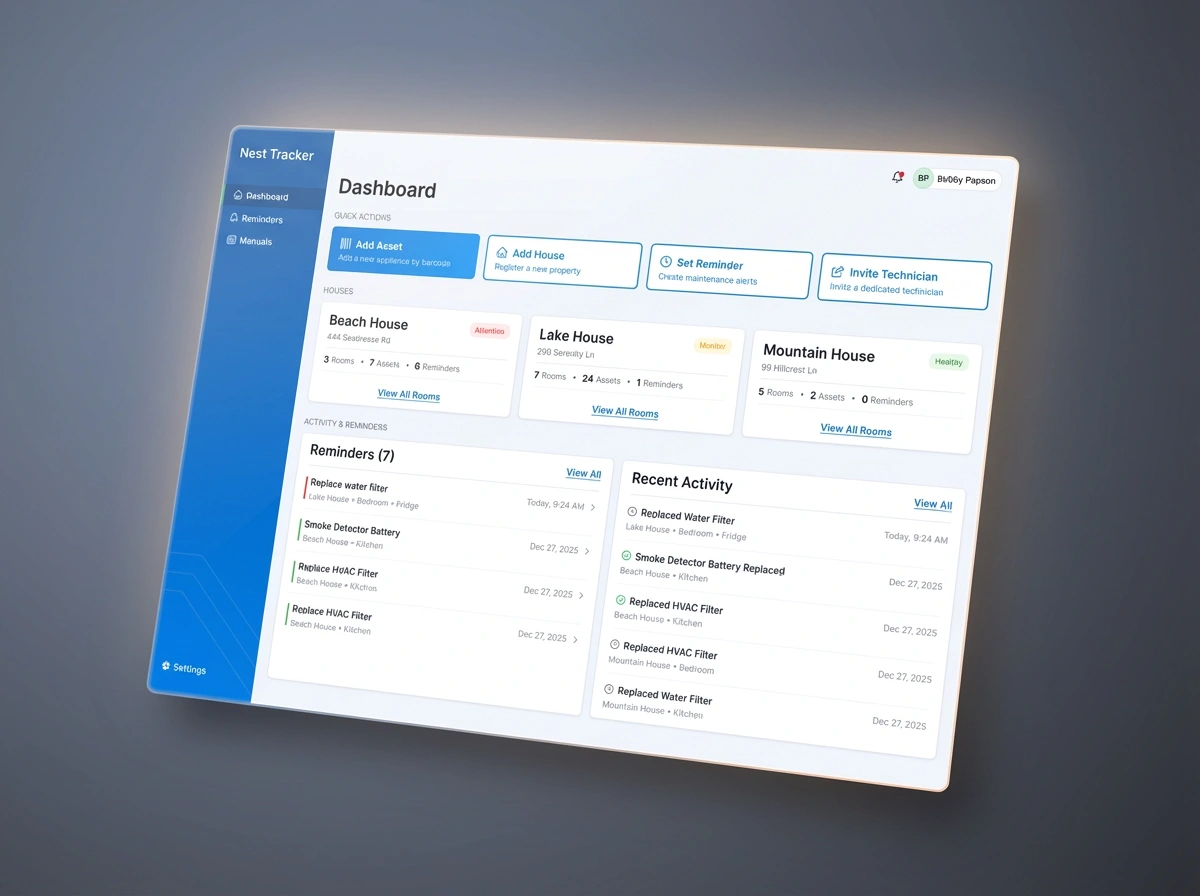
1. A Clear, Actionable Customer Dashboard
The new dashboard gives homeowners a high-level snapshot of:
Rooms in the house
Assets that need attention
Upcoming or overdue reminders
Manuals and documentation status
I used modular cards, clean spacing, and a clear hierarchy to create a calm, structured entry point into the system.
2. Room & Asset Management
I introduced a scalable structure for home organization:
Room Detail Page
Lists appliances and items clearly
Provides quick actions for editing or adding assets
Offers searchable, filterable lists for large homes
Asset Detail Page
Shows model, brand, serial, purchase details
Stores manuals, warranty info, and maintenance logs
Includes reminders, notes, and technician actions
The design treats every asset like a digital record—clean, structured, and future-proof.
3. Guided Drawers for Adding Rooms, Assets & Reminders
To keep the platform lightweight and approachable, I created a guided drawer system:
Add Room Drawer — simple, fast naming + categorization
Add Asset Drawer — structured inputs for details, room placement, model numbers, warranties
Add Reminder Drawer — recurring or one-time reminders, tied to assets or rooms
These drawers reduce friction and maintain consistency across the product.
4. Built-In Manual Finder
One of the most valuable features:
Users enter brand + model number
The system finds and attaches the correct manual
Helps technicians and homeowners troubleshoot without searching online
This creates a centralized knowledge hub for every appliance.
5. Technician & Admin Tools
I extended the design system to handle internal operations:
Technician Management View — see all customer homes, rooms, and tasks
Admin User Management — roles, account states, access control
AI Logs — transparency for automated tasks (manual retrievals, image generation, etc.)
The B2B tools share the same visual language while supporting more powerful workflows.
Impact
The redesigned platform delivers:
A calm, intuitive interface for homeowners
Faster onboarding and asset entry
A scalable design system for future product features
Better technician visibility and control
Improved data quality through structured reminders & manual management
Nest Tracker becomes a single source of truth for home organization.
Closing
Nest Tracker transforms home management into a clear, organized, and guided experience—helping users track the details that matter and stay ahead of maintenance with confidence.
Like this project
Posted Dec 11, 2025
Redesigned the Nest Tracker platform with structured home inventory tools, asset management, reminders, and a scalable design system.
Likes
0
Views
7