
Expert in Sales Management & Business Development
Expert in Sales Management & Business Development


View more →


Brand Designer & Content Strategist | Purpose-Driven
- 5.0
- Rating
- 34
- Followers
Brand Designer & Content Strategist | Purpose-Driven

I’m excited to share a project that sits right at the intersection of design, sustainability, and strategy 🌱
This “How Might We” visual was part of a larger climate-focused campaign I worked on exploring solutions across food security, education, green energy, plastics, policy, environmental conservation, and smart farming practices. The goal was simple but powerful: spark actionable thinking around sustainability challenges in Kenya.
For this project, I:
✨ Designed and illustrated the entire visual system
✨ Translated complex ideas into an accessible, engaging format
✨ Led and managed a 6-month campaign built around these themes
From concept to execution, this was about more than just aesthetics it was about storytelling, advocacy, and driving meaningful conversations that can inspire real change.
Always open to collaborating on projects that blend creativity with impact 🤝
#ClimateAction #DesignForImpact #CreativeStrategy #Sustainability #VisualStorytelling #ContraCommunity
2
154



Admin Assistant|Data Entry|Customer Mgt|Workflow Automation
- 11
- Followers
Admin Assistant|Data Entry|Customer Mgt|Workflow Automation

Lead generation. Supported a client's business development operations over 5 months, taking full ownership of lead generation, email communications, and cross-continental meeting coordination.
On LinkedIn, I researched, identified, and compiled 500+ qualified leads tailored to the client's target audience, building a pipeline that fed directly into the sales and outreach process.
Throughout the engagement, I worked independently, communicated proactively, and delivered to the deadline every week, giving the client the bandwidth to focus on strategy while I handled the operational details.
3
2
345
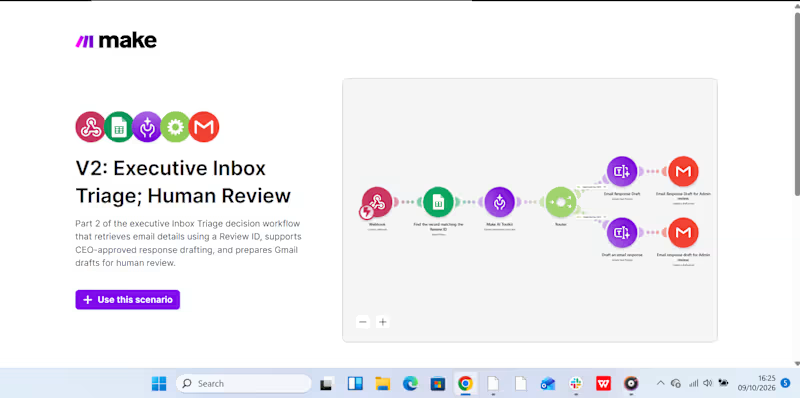
This week, I have been working on automating my boss's inbox management, delegating email triage to AI while I handle reviews and approvals that require sound judgment. Because one wrong response to a client can cost a business revenue, I wanted to build a system that saves time without handing over critical decisions to AI.
How I built it:
I created two connected automation scenarios in Make.com (http://Make.com).
Scenario 1: Intelligent Inbox Triage:
AI analyzes incoming emails, categorizes them by priority, summarizes their content, and recommends the next action. This makes it easier to identify urgent messages and decide what needs attention first.
Scenario 2: Human Review & Approval:
The workflow supports the review and approval process before an email is sent. Slack notifications help bring relevant updates to my attention, so I can review the proposed action and approve the response before it goes out.
Below are snippets of the two scenarios, including a Slack notification, showing how the workflow operates.
My takeaway? AI can help manage the inbox, but when a response could affect revenue or a client relationship, the final decision should remain human.
2
4
636
AI-Powered Lead Follow-Up & Management for Miale
I automated lead follow-up and management for Miale to reduce the manual work involved in reviewing enquiries, categorizing leads, responding to prospects, and keeping the team informed.
The problem:
When leads come in, manually reviewing each response, deciding how to handle it, sending emails, and notifying the team can take time, and makes it easier for follow-ups to slip through the cracks.
The solution:
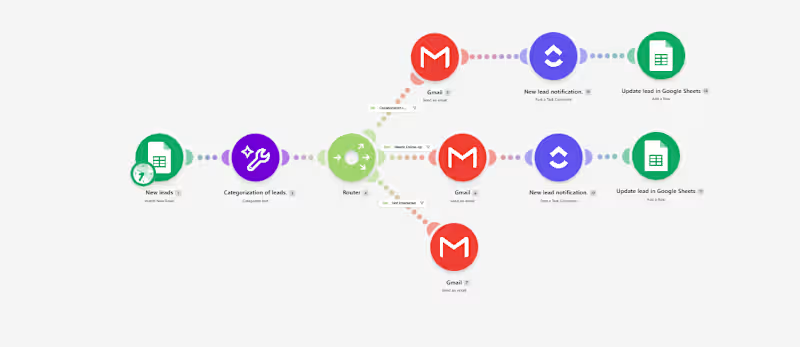
I built an AI-powered workflow in Make that automatically processes new lead submissions.
Here’s how it works:
Google Form → Google Sheets → AI Classification → Router → Email + Slack → Lead Tracking
When a prospect submits the form, AI analyzes their collaboration interest and categorizes the lead as Collaboration Lead, Needs Follow-up, or Not Interested.
The workflow then automatically:
- Routes the lead based on their response.
- Sends a relevant email to the prospect.
- Notifies the team in Slack when a new lead needs attention.
- Updates the lead record for easier tracking.
Tools used:
Make · Make AI Toolkit · Google Forms · Google Sheets · Gmail · Slack
The workflow can also be adapted for client enquiries, sales leads, service requests, bookings, applications, and other repetitive lead-management processes.
The goal isn't simply to automate tasks. It's to build a system that helps businesses respond faster, stay organized, and reduce manual follow-up work.
2
311
AI-Powered Gmail Inbox Assistant: Turning Email Overload into an Organized Workflow
A busy inbox can become a productivity problem.
For a VA or business owner handling a high volume of emails, manually reading every message, deciding its priority, summarizing it, determining what action is needed, and organizing it takes time.
And when everything sits in one inbox, important messages can easily get lost among routine notifications and newsletters.
I built an automation to solve that problem.
The Solution
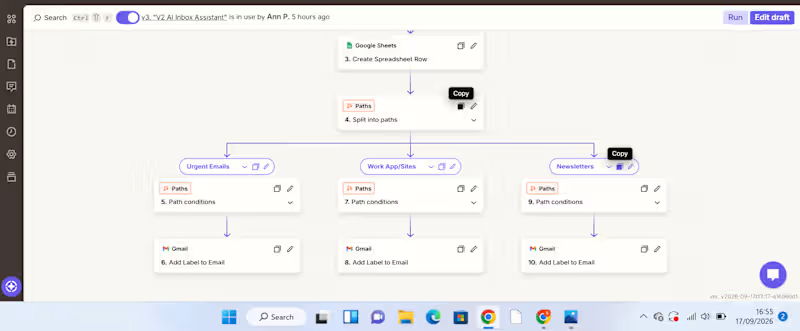
I created an AI-powered Gmail inbox assistant that captures, analyzes, organizes, and records incoming emails automatically.
The workflow starts when a new email arrives in Gmail.
New Gmail → AI analyzes the email → Information is recorded in Google Sheets → Zapier Paths route the email → Gmail label is applied
The AI extracts useful information from each email, including:
Priority – how urgently the email needs attention
Email summary – a concise explanation of what the message is about
Recommended action – what should be done next
Service/category – used to determine how the email should be handled
The information is then captured in a Google Sheet, creating a structured record that can be reviewed, tracked, and used for further workflows.
From there, Zapier Paths use the classification to route the email to the appropriate action.
For example:
Urgent email → AI identifies the priority and summarizes the message → information is recorded in Google Sheets → Urgent Path runs → Gmail applies the Urgent label.
WorkApp/Sites notification → AI identifies the category → details are recorded in Google Sheets → WorkApp/Sites Path runs → the corresponding Gmail label is applied.
Newsletter → AI classifies and summarizes it → information is recorded in Google Sheets → Newsletter Path runs → the Newsletters label is applied.
What Problem Does This Solve?
This automation addresses several repetitive administrative tasks at once.
Instead of manually opening emails, interpreting them, recording important details, and organizing them, the workflow handles the first layer of processing automatically.
It helps create:
Less manual sorting
Emails are categorized automatically.
Better visibility
The Google Sheet provides a structured overview of incoming messages, their priority, summaries, and recommended actions.
Faster prioritization
Users can identify emails requiring attention without reading through the entire inbox first.
A searchable record
Important email information is captured in one place instead of remaining buried inside an inbox.
How Businesses Can Use It
The workflow can be adapted to different businesses and inboxes.
For example, a company could create categories such as:
Client enquiries | Leads | Support requests | Finance | Internal communication | Urgent | Newsletters
The Google Sheet can then become a simple operational dashboard or the starting point for additional automations.
For example, a business could later extend the workflow to:
Urgent email → notify the responsible team member
Client enquiry → create a lead in a CRM
Follow-up required → create a task
Support request → route to the appropriate team
This makes the workflow more than an inbox organizer. It can become part of a wider business process automation system.
Tools Used
Gmail – captures incoming emails and applies labels
AI by Zapier – analyzes and classifies email content
Google Sheets – stores the email priority, summary, recommended action, and category
Zapier Paths – applies conditional logic and routes emails based on their classification
What This Project Demonstrates
My approach to automation is simple:
Find the repetitive problem first. Then build the system around it.
This project started with a common administrative problem—too much email and too much manual sorting—and turned it into a workflow that can analyze information, structure it, make routing decisions, and trigger actions automatically.
I'm building my skills in AI automation with a VA mindset: understanding the business problem first, then creating practical systems that reduce manual work and improve how information flows.
2
319

Strategic Partner for Operations and Systems Management
- $5k+
- Earned
- 1x
- Hired
- 5.0
- Rating
- 4
- Followers
Strategic Partner for Operations and Systems Management
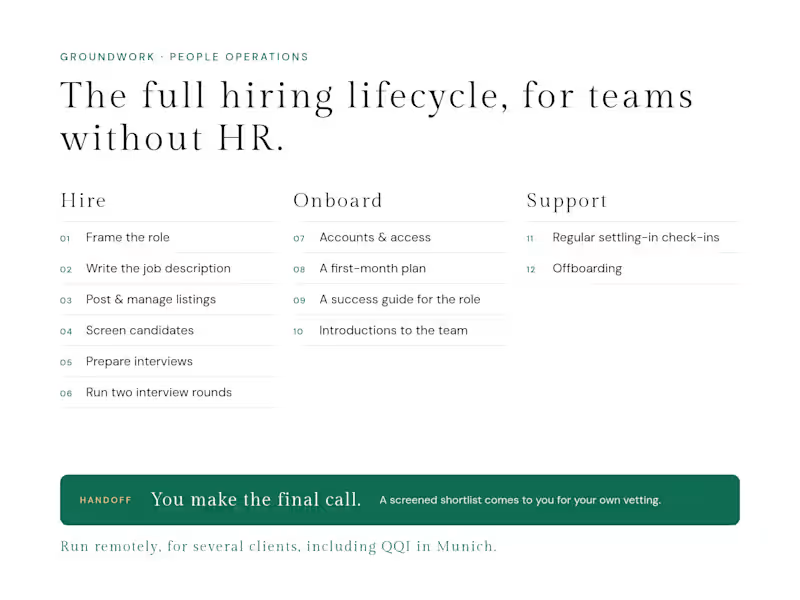
For small organisations without a dedicated HR function, I run the people side end to end, remotely. On hiring, I frame what the role is actually for, write the job description, post and manage the listings, screen candidates, and prepare and run two interview rounds, before handing a screened shortlist to the client for their final vetting. Once someone is hired, I set up their onboarding: accounts and access, a first-month plan, a success guide built on the expectations for the role, and introductions to the team. After that, I run regular check-ins on how they’re settling in and how the experience can be improved, and I handle offboarding when someone leaves. I’ve run this for several clients, including QQI, a real estate firm in Munich, where I led the full cycle for their Marketing Manager hire.
0
38
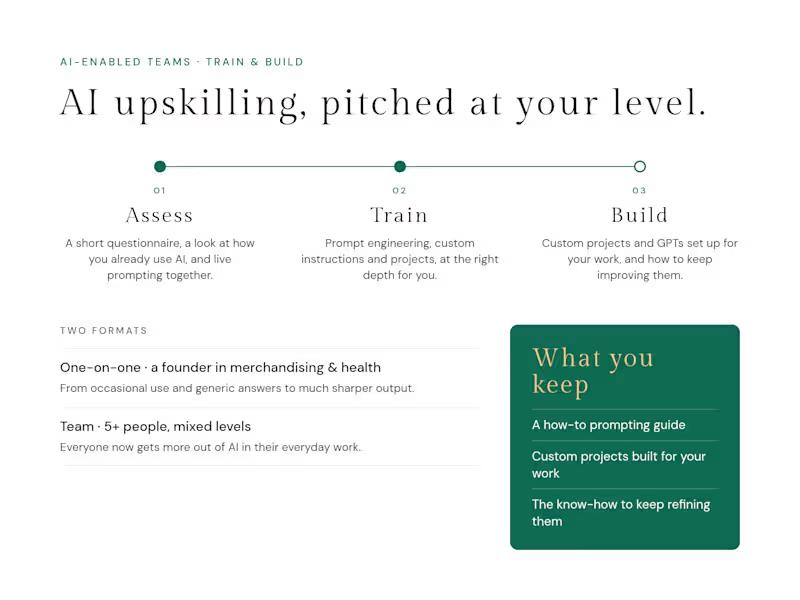
I run customised AI upskilling for founders and teams, built around how each person already works. Before we start, I use a short questionnaire, look at how they currently use AI, and often prompt live together, so the session meets them at their level. Sessions cover prompt engineering, custom instructions and projects. I set up custom projects for their daily work and show them how to keep refining them, and each client leaves with a how-to prompting guide. I also build custom GPTs for specific operational needs. A founder running businesses in merchandising and health went from occasional use and generic answers to much better output. A team of five-plus with mixed levels now gets far more out of everyday use. One team member told me she was amazed at how much she could do, and how much easier it had become.
0
43
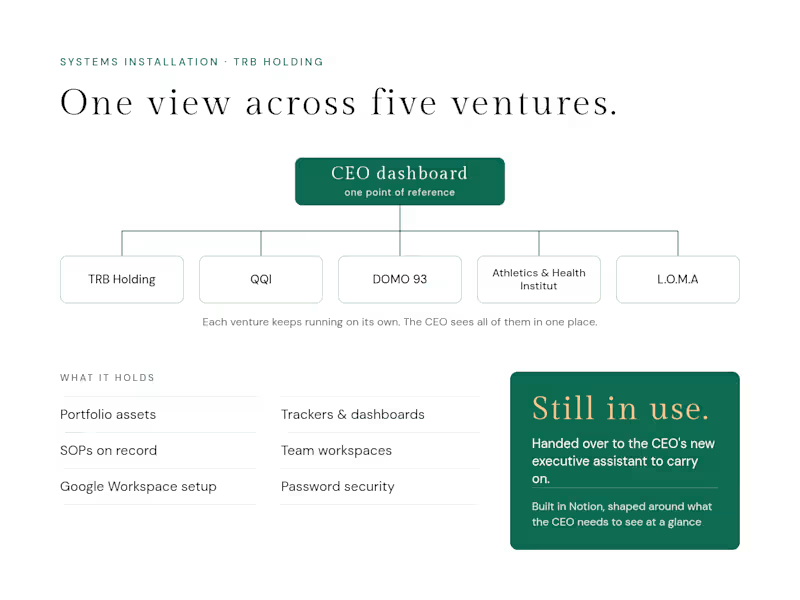
For Timothy Bennett Reischl’s portfolio of five ventures (TRB Holding, QQI, DOMO 93, Athletics and Health Institut, and L.O.M.A), I built a central operating system in Notion. Each venture kept running independently. The system gave the CEO one point of reference across all of them, shaped around what he needed to see at a glance, so he no longer had to dig through separate ventures or trace threads to find information. It holds portfolio assets, trackers, dashboards and SOPs, alongside a Google Workspace setup and password security processes. Some workspaces were also used by venture teams, such as QQI’s marketing representatives. The system is still in use and has been handed over to the CEO’s new executive assistant.
0
43
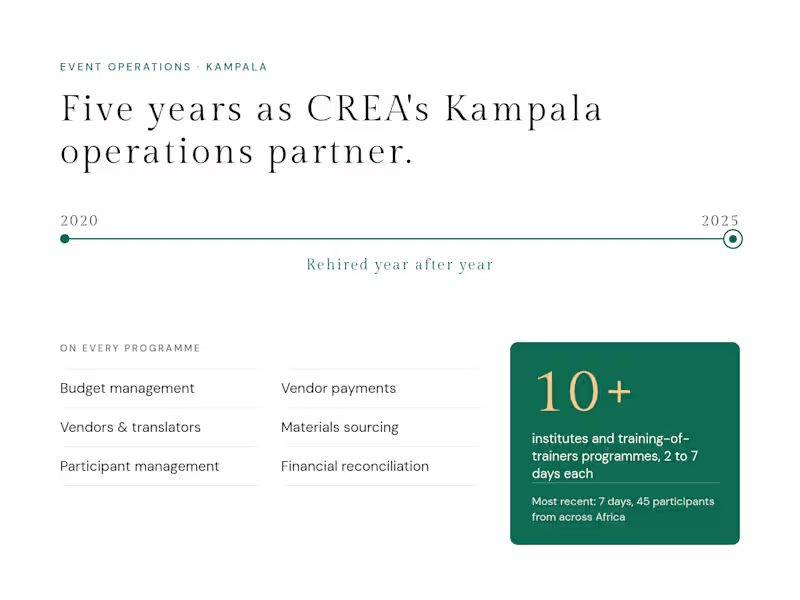
In-country operations and administration for CREA’s educational and capacity-building programmes in Kampala, 2020–2025: budgets, vendor payments, translators, participants and full financial reconciliation across 10+ institutes and training-of-trainers programmes. When things went sideways, I stepped in too, from recovering missing luggage to getting a participant’s forgotten bags to the airport ahead of their flight.
0
43

Your social media bestie
Your social media bestie


View more →

Authentic Content & Social Media Engagement
Authentic Content & Social Media Engagement


View more →

Brand Storyteller | Content & Digital Marketing
Brand Storyteller | Content & Digital Marketing


Expert in SEO Web Content
Expert in SEO Web Content


