Freelancers using ChatGPT in KiambuFreelancers using ChatGPT in Kiambu
✨Turning your vision into stunning, Liveable spaces✨

New to Contra
✨Turning your vision into stunning, Liveable spaces✨

A professional Web Designer and AI Art enthusiast.

Delivering Excellence: Writing, Data Entry, Marketing

Brand Designer & Content Strategist | Purpose-Driven

5.0
Rating
35
Followers
Brand Designer & Content Strategist | Purpose-Driven
Cover image for Creating High-Impact Faceless Reels for
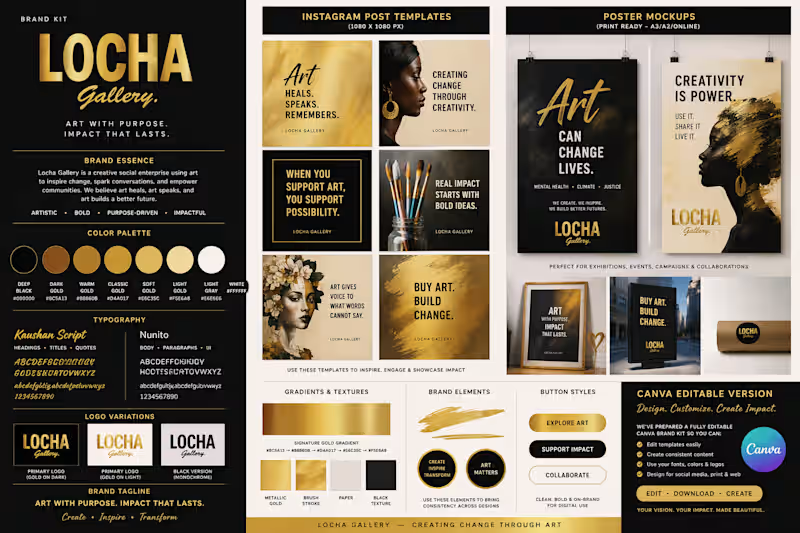
Creating High-Impact Faceless Reels for Locha Gallery Overview To expand Locha Gallery's reach and make conversations around mental health more accessible, I developed a faceless video content strategy focused on educational and advocacy-driven Instagram Reels. The goal was to create engaging, shareable content that could increase visibility while maintaining Locha Gallery's distinctive visual identity. The Challenge Locha Gallery needed a sustainable content approach that would consistently educate audiences on topics such as burnout, grief, depression, anxiety, and emotional well-being without relying heavily on on-camera appearances or extensive production resources. The content needed to: Capture attention within the first few seconds. Communicate complex mental health concepts in simple, relatable language. Remain visually aligned with the Locha Gallery brand. Be efficient enough to maintain a consistent posting schedule. My Role I led the end-to-end production process, including: Content ideation and scripting. Researching relevant mental health themes and awareness campaigns. Sourcing stock video footage. Generate AI-assisted visual elements when appropriate. Designing branded layouts and text treatments. Editing short-form vertical videos optimised for Instagram Reels. Scheduling and managing content publishing. Monitoring audience response and identifying high-performing formats. Process I developed a repeatable content framework centred around three elements: Hook: A compelling opening statement designed to stop users from scrolling. Value: Concise educational information presented through easy-to-read captions and visual storytelling. Brand Consistency: Use of Locha Gallery's visual identity to ensure recognisability across all content. This approach enabled the creation of impactful content without requiring frequent on-camera production. Results The faceless reels contributed to increased audience engagement and expanded the reach of Locha Gallery's mental health advocacy efforts. Outcomes included: Increased views across Instagram Reels compared to previous static content formats. Improved content consistency through scheduled publishing. Greater audience interaction through shares, saves, and comments. Enhanced awareness around mental health topics within Locha Gallery's online community. Tools Used Canva Canva Bulk Create AI-powered video generation tools Instagram Creator tools Stock footage libraries This project demonstrates my ability to transform educational messages into engaging, high-performing digital content that drives awareness while remaining authentic to an organisation's mission and values.
3
112
Graphic Designer | Branding & Marketing Design

24
Followers
Graphic Designer | Branding & Marketing Design
graphic/brand designer and content/research writer
10
Followers
graphic/brand designer and content/research writer
Administrative Virtual Assistant | AI Automation of workflow
10
Followers
Administrative Virtual Assistant | AI Automation of workflow
Cover image for AI-Powered Gmail Inbox Assistant: Turning
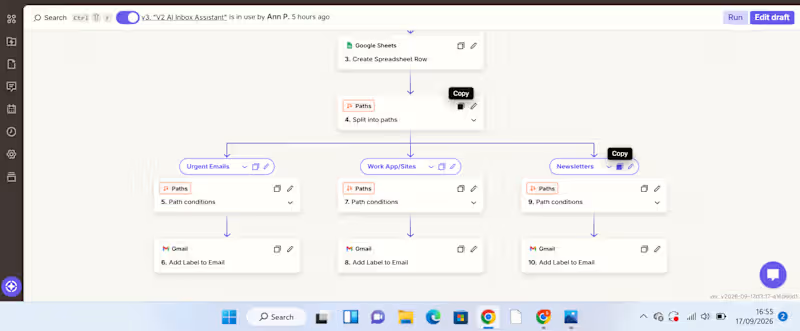
AI-Powered Gmail Inbox Assistant: Turning Email Overload into an Organized Workflow A busy inbox can become a productivity problem. For a VA or business owner handling a high volume of emails, manually reading every message, deciding its priority, summarizing it, determining what action is needed, and organizing it takes time. And when everything sits in one inbox, important messages can easily get lost among routine notifications and newsletters. I built an automation to solve that problem. The Solution I created an AI-powered Gmail inbox assistant that captures, analyzes, organizes, and records incoming emails automatically. The workflow starts when a new email arrives in Gmail. New Gmail → AI analyzes the email → Information is recorded in Google Sheets → Zapier Paths route the email → Gmail label is applied The AI extracts useful information from each email, including: Priority – how urgently the email needs attention Email summary – a concise explanation of what the message is about Recommended action – what should be done next Service/category – used to determine how the email should be handled The information is then captured in a Google Sheet, creating a structured record that can be reviewed, tracked, and used for further workflows. From there, Zapier Paths use the classification to route the email to the appropriate action. For example: Urgent email → AI identifies the priority and summarizes the message → information is recorded in Google Sheets → Urgent Path runs → Gmail applies the Urgent label. WorkApp/Sites notification → AI identifies the category → details are recorded in Google Sheets → WorkApp/Sites Path runs → the corresponding Gmail label is applied. Newsletter → AI classifies and summarizes it → information is recorded in Google Sheets → Newsletter Path runs → the Newsletters label is applied. What Problem Does This Solve? This automation addresses several repetitive administrative tasks at once. Instead of manually opening emails, interpreting them, recording important details, and organizing them, the workflow handles the first layer of processing automatically. It helps create: Less manual sorting Emails are categorized automatically. Better visibility The Google Sheet provides a structured overview of incoming messages, their priority, summaries, and recommended actions. Faster prioritization Users can identify emails requiring attention without reading through the entire inbox first. A searchable record Important email information is captured in one place instead of remaining buried inside an inbox. How Businesses Can Use It The workflow can be adapted to different businesses and inboxes. For example, a company could create categories such as: Client enquiries | Leads | Support requests | Finance | Internal communication | Urgent | Newsletters The Google Sheet can then become a simple operational dashboard or the starting point for additional automations. For example, a business could later extend the workflow to: Urgent email → notify the responsible team member Client enquiry → create a lead in a CRM Follow-up required → create a task Support request → route to the appropriate team This makes the workflow more than an inbox organizer. It can become part of a wider business process automation system. Tools Used Gmail – captures incoming emails and applies labels AI by Zapier – analyzes and classifies email content Google Sheets – stores the email priority, summary, recommended action, and category Zapier Paths – applies conditional logic and routes emails based on their classification What This Project Demonstrates My approach to automation is simple: Find the repetitive problem first. Then build the system around it. This project started with a common administrative problem—too much email and too much manual sorting—and turned it into a workflow that can analyze information, structure it, make routing decisions, and trigger actions automatically. I'm building my skills in AI automation with a VA mindset: understanding the business problem first, then creating practical systems that reduce manual work and improve how information flows.
1
97
Cover image for AI-Powered Client Enquiry Automation
Project Overview:
I
AI-Powered Client Enquiry Automation Project Overview: I built an AI-powered client enquiry automation workflow using Zapier, Google Forms, Google Sheets, AI by Zapier, Gmail, and Google Calendar. The goal was to automate the initial handling of client enquiries from receiving the enquiry to understanding the client's needs, sending an acknowledgement, and creating a follow-up task. The Problem: Managing client enquiries manually can be repetitive and time-consuming. Each new enquiry needs to be reviewed, categorized, summarized, responded to, and followed up. Without a structured process, it's easy for enquiries to be delayed or follow-ups to be missed. The Solution: I designed a workflow that automates these repetitive administrative tasks while using AI to analyze the information provided by the client. The automation follows this process: Client submits enquiry ↓ Google Sheets captures the enquiry ↓ AI analyzes the enquiry ↓ Gmail sends an acknowledgement ↓ Google Calendar creates a follow-up How It Works: 1. Enquiry Collection. The client submits their details and enquiry through a Google Form. The information is automatically recorded in Google Sheets. 2. AI Analysis. AI by Zapier reviews the enquiry and extracts key information such as the service category, priority, concise summary of the client's needs, and recommended next action. This eliminates the need to manually review every enquiry just to determine what it is about and how it should be handled. 3. Automated Client Response. After the enquiry is processed, Gmail automatically sends the client an acknowledgement, ensuring they receive a timely response. 4. Follow-Up Management. The workflow creates a Google Calendar follow-up, helping ensure that the enquiry doesn't get lost after the initial response. Result: The completed workflow turns a manual enquiry process into a structured automated system: Capture → Analyze → Respond → Follow Up The key improvement is the use of AI as a decision-making layer, rather than simply moving information from one application to another. This demonstrates how AI automation can reduce repetitive administrative work, improve response consistency, and help businesses stay organized with client enquiries. Tools Used: Zapier | AI by Zapier | Google Forms | Google Sheets | Gmail | Google Calendar Skills Demonstrated: AI Automation • Workflow Design • Administrative Automation • AI Prompting • Client Enquiry Management • Email Automation • Calendar Automation • Process Optimization
4
4
1.2K
Product Designer and Creative Director
7
Followers
Product Designer and Creative Director

Cover image for Every idea deserves a destination-
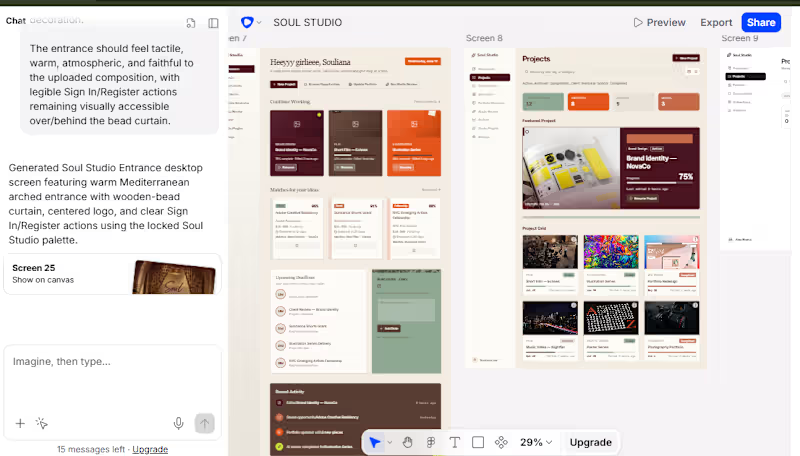
Every idea deserves a destination- Soul Studio. ✦ I stumbled across Contra and its challenges accidentlly and i wondered where this has been all my life. I have struggled with deadlines, ideas that seem to be just that, sometimes creative block and missing required deliverables. So I built Soul Studio because creatives don’t lack ideas—our ideas often disappear into forgotten folders before finding the right opportunity. Soul Studio reverse-matches saved ideas and existing projects with relevant competitions, grants, residencies, jobs and potential clients, then supports the journey through Project Workspaces, AI and human Studio Review, a target-specific Portfolio Generator, career and integration Plugins, Deck Maker and Solara—an AI studio companion. I designed the complete multi-screen experience in Flowstep whereby i generated a PDR and flowstep generated all the pages needed , down to a marketing website for Soul Studio, then connected Codex directly to Flowstep through MCP to inspect, refine and coordinate the screens using natural-language prompts. The process moved from early wireframes and repeated iterations to a polished, clickable creative workspace built around one journey: Idea → Opportunity → Project → Review → Portfolio. Built with @flowstep_ai and Codex through MCP. [FLOWSTEP PROTOTYPE LINK] https://app.flowstep.ai/file?activeFileId=a7cff2c1-2507-4ada-8ece-0c0ef55bcb77 This was my first time using flowstep and it did take some time for me to get the hang of it but when i did, everything went smoothly. Socials link https://x.com/_nyx0x00/status/2083414032405414258?s=20
2
3
204