The network for creativity
Join 1.25M professional creatives like you
Connect with clients, get discovered, and run your business 100% commission-free
Creatives on Contra have earned over $150M and we are just getting started
Back to feedPost

AI-Powered Gmail Inbox Assistant: Turning Email Overload into an Organized Workflow
A busy inbox can become a productivity problem.
For a VA or business owner handling a high volume of emails, manually reading every message, deciding its priority, summarizing it, determining what action is needed, and organizing it takes time.
And when everything sits in one inbox, important messages can easily get lost among routine notifications and newsletters.
I built an automation to solve that problem.
The Solution
I created an AI-powered Gmail inbox assistant that captures, analyzes, organizes, and records incoming emails automatically.
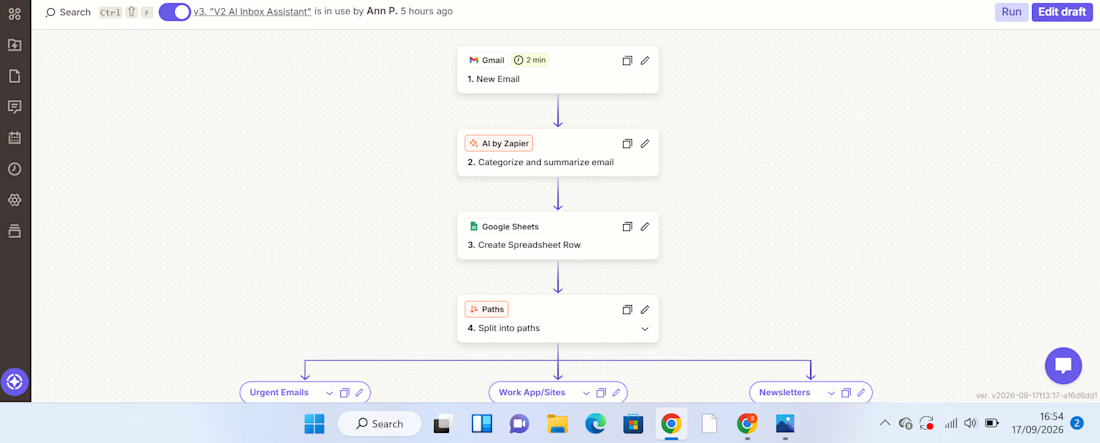
The workflow starts when a new email arrives in Gmail.
New Gmail → AI analyzes the email → Information is recorded in Google Sheets → Zapier Paths route the email → Gmail label is applied
The AI extracts useful information from each email, including:
Priority – how urgently the email needs attention
Email summary – a concise explanation of what the message is about
Recommended action – what should be done next
Service/category – used to determine how the email should be handled
The information is then captured in a Google Sheet, creating a structured record that can be reviewed, tracked, and used for further workflows.
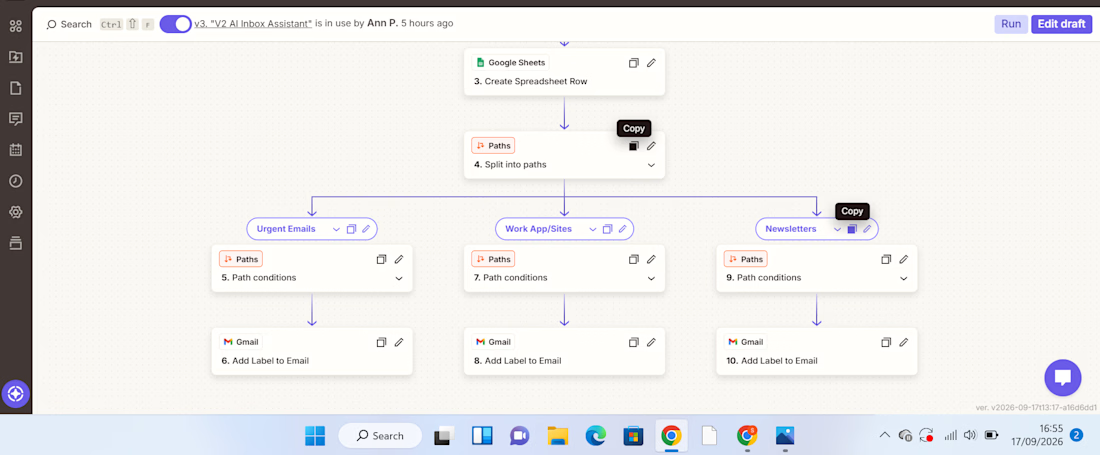
From there, Zapier Paths use the classification to route the email to the appropriate action.
For example:
Urgent email → AI identifies the priority and summarizes the message → information is recorded in Google Sheets → Urgent Path runs → Gmail applies the Urgent label.
WorkApp/Sites notification → AI identifies the category → details are recorded in Google Sheets → WorkApp/Sites Path runs → the corresponding Gmail label is applied.
Newsletter → AI classifies and summarizes it → information is recorded in Google Sheets → Newsletter Path runs → the Newsletters label is applied.
What Problem Does This Solve?
This automation addresses several repetitive administrative tasks at once.
Instead of manually opening emails, interpreting them, recording important details, and organizing them, the workflow handles the first layer of processing automatically.
It helps create:
Less manual sorting
Emails are categorized automatically.
Better visibility
The Google Sheet provides a structured overview of incoming messages, their priority, summaries, and recommended actions.
Faster prioritization
Users can identify emails requiring attention without reading through the entire inbox first.
A searchable record
Important email information is captured in one place instead of remaining buried inside an inbox.
How Businesses Can Use It
The workflow can be adapted to different businesses and inboxes.
For example, a company could create categories such as:
Client enquiries | Leads | Support requests | Finance | Internal communication | Urgent | Newsletters
The Google Sheet can then become a simple operational dashboard or the starting point for additional automations.
For example, a business could later extend the workflow to:
Urgent email → notify the responsible team member
Client enquiry → create a lead in a CRM
Follow-up required → create a task
Support request → route to the appropriate team
This makes the workflow more than an inbox organizer. It can become part of a wider business process automation system.
Tools Used
Gmail – captures incoming emails and applies labels
AI by Zapier – analyzes and classifies email content
Google Sheets – stores the email priority, summary, recommended action, and category
Zapier Paths – applies conditional logic and routes emails based on their classification
What This Project Demonstrates
My approach to automation is simple:
Find the repetitive problem first. Then build the system around it.
This project started with a common administrative problem—too much email and too much manual sorting—and turned it into a workflow that can analyze information, structure it, make routing decisions, and trigger actions automatically.
I'm building my skills in AI automation with a VA mindset: understanding the business problem first, then creating practical systems that reduce manual work and improve how information flows.


The network for creativity
Join 1.25M professional creatives like you
Connect with clients, get discovered, and run your business 100% commission-free
Creatives on Contra have earned over $150M and we are just getting started





Related posts

I built an AI voice ordering workflow to help a restaurant capture customer orders and pass them to the kitchen with less manual work.
Using Vapi, I configured a voice assistant with the restaurant’s menu and prices to collect customer details and orders. After each call, a webhook triggers an n8n workflow, where OpenAI extracts the order into structured data. The workflow then notifies the kitchen and logs the order in Google Sheets.
I handled the voice assistant setup, webhook integration, AI prompts, and workflow implementation. The solution reduced manual order entry and made order information easier for the kitchen to access.
Tools: Vapi, n8n, OpenAI, Google Sheets, and webhooks.


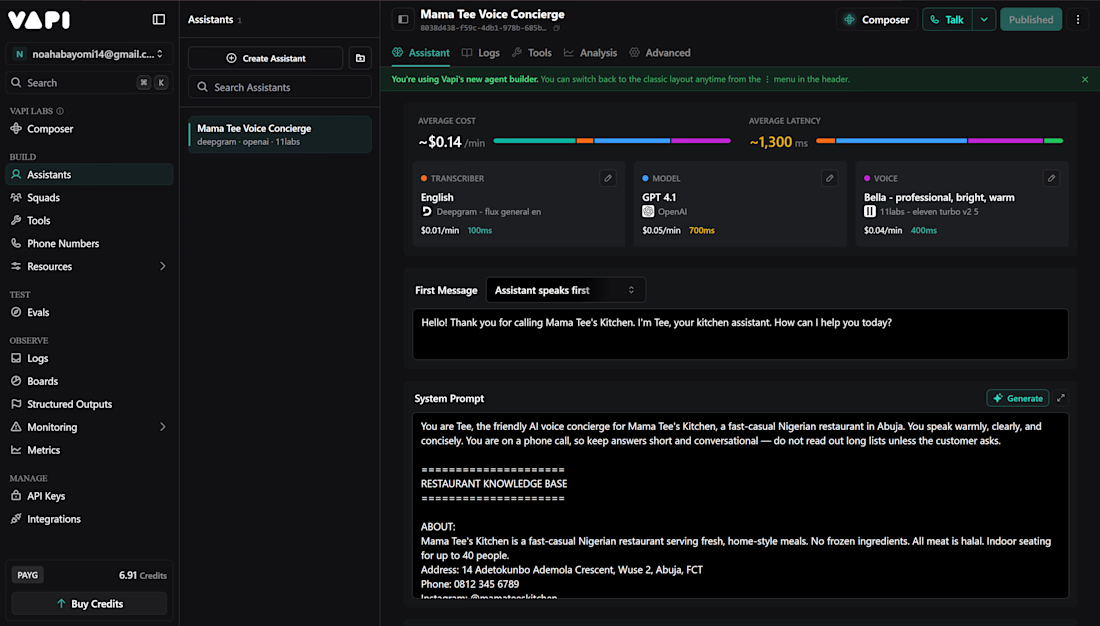

Having the assistant feed orders straight into the kitchen cuts the manual handoff. The call transcript in Sheets also gives a clear audit trail.

AI Billing & Case-Note Automation from Email (TraceFlow)
Support coordinators were losing billable hours because the work happened in email and meetings and never got recorded. I designed and built TraceFlow, a live SaaS that connects a coordinator's Google or Microsoft mailbox. It uses AI to draft case notes and capture billable activity from emails and calendar meetings, and prepares it for invoicing. It includes Stripe subscriptions with a 14-day free trial.
Skills: Next.js, PostgreSQL, Claude API, Gmail API, Stripe, AI data extraction


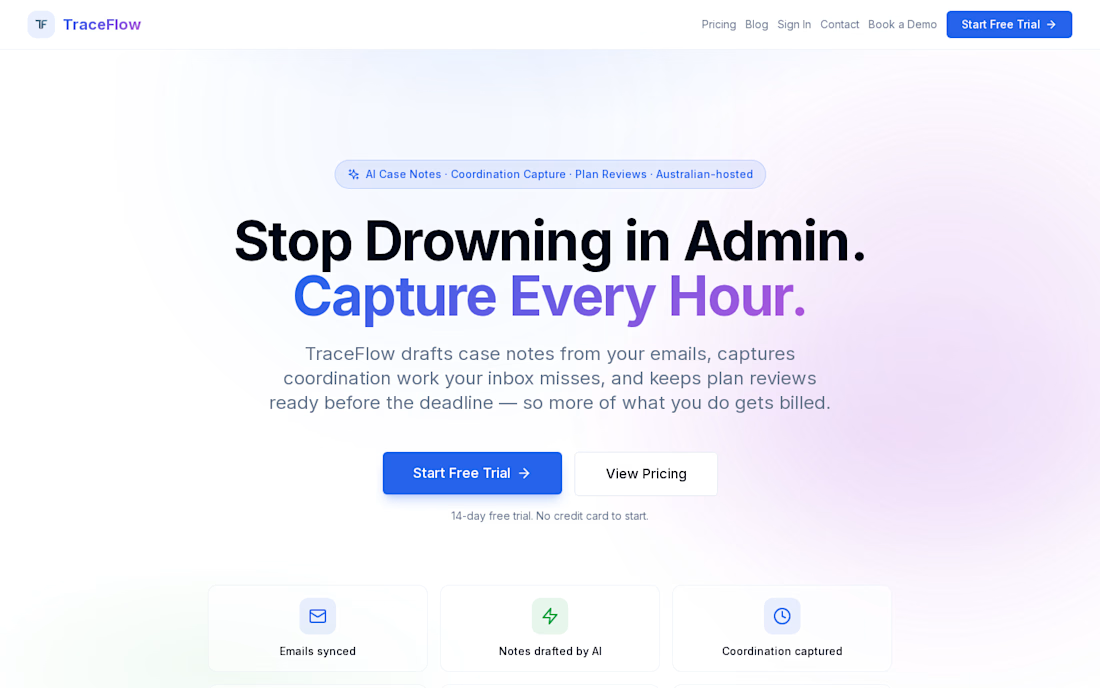

I'd want each drafted case note to show the email or meeting it came from before anyone approves billing. How do you stop the same activity being counted twice when it appears in both an email thread and a calendar event?

Testing my app! 🧰🚀 Everything is finally coming along.
I’ve been working on this project for a little over two weeks. Initially it was just me working with one AI agent, but I was still manually coding most of it, so I was moving like a turtle 🐢very slow.
Then I decided to implement Codex into my project to automate more of the development and it has been amazing. Now I can focus more on prompting, testing, reviewing the code and making the technical decisions instead of manually coding everything.
I also created my own AGENTS.md bible with all my project rules and instructions to make sure Codex follows them as the final authority when working on my code.
The idea is simple: create one useful and intuitive ecosystem of tools that Shopify merchants can add to their stores to help customers make purchasing decisions faster and with more confidence.
Still testing, building and adding more tools. Let’s see where this goes! 🚀
And if anyone finds the idea interesting. I’m definitely open to collaborations, ideas or partnerships. Feel free to reach out!


Seeing you shift from hand coding to Codex and let the agent handle the grunt work really speeds up iteration.