The network for creativity
Join 1.25M professional creatives like you
Connect with clients, get discovered, and run your business 100% commission-free
Creatives on Contra have earned over $150M and we are just getting started
Back to feedPost
AI-Powered Client Enquiry Automation
Project Overview:
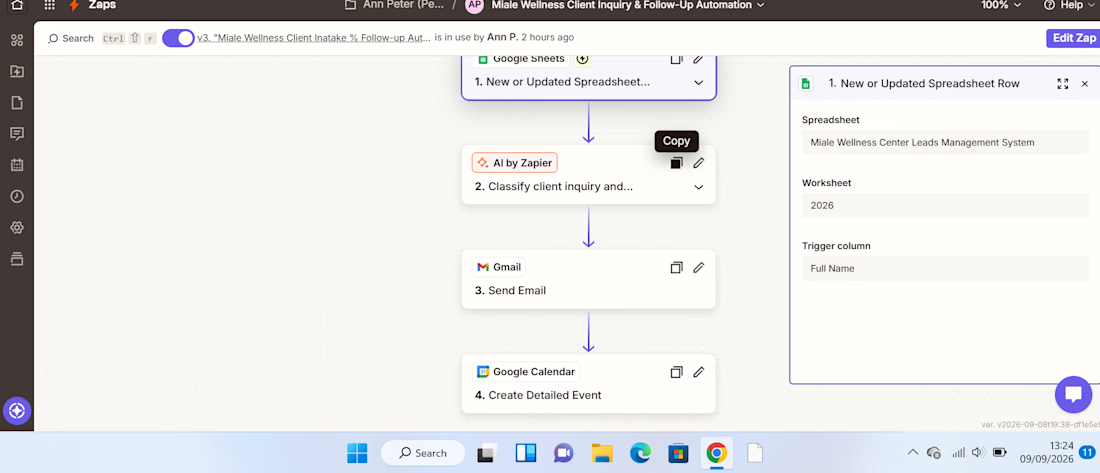
I built an AI-powered client enquiry automation workflow using Zapier, Google Forms, Google Sheets, AI by Zapier, Gmail, and Google Calendar.
The goal was to automate the initial handling of client enquiries from receiving the enquiry to understanding the client's needs, sending an acknowledgement, and creating a follow-up task.
The Problem:
Managing client enquiries manually can be repetitive and time-consuming. Each new enquiry needs to be reviewed, categorized, summarized, responded to, and followed up.
Without a structured process, it's easy for enquiries to be delayed or follow-ups to be missed.
The Solution:
I designed a workflow that automates these repetitive administrative tasks while using AI to analyze the information provided by the client.
The automation follows this process:
Client submits enquiry
↓
Google Sheets captures the enquiry
↓
AI analyzes the enquiry
↓
Gmail sends an acknowledgement
↓
Google Calendar creates a follow-up
How It Works:
1. Enquiry Collection.
The client submits their details and enquiry through a Google Form. The information is automatically recorded in Google Sheets.
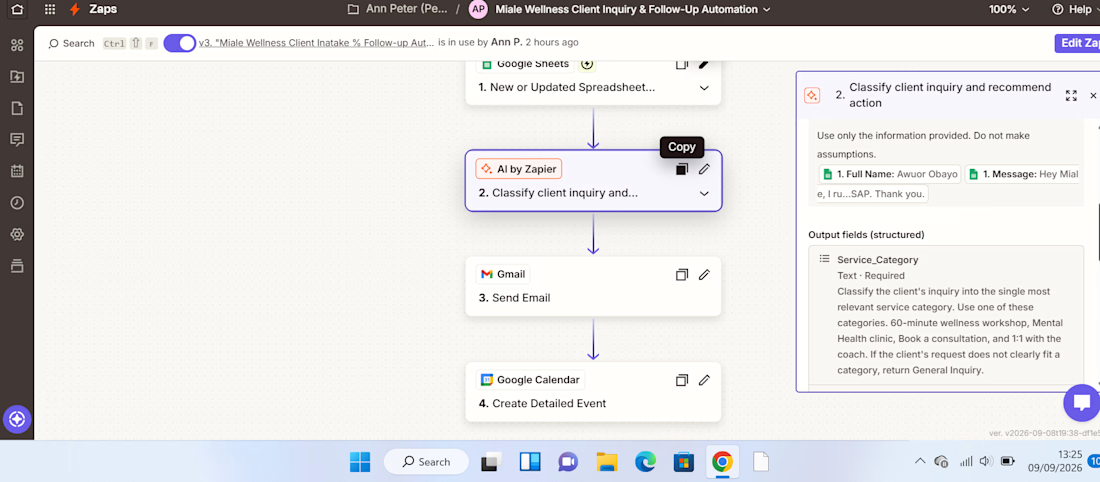
2. AI Analysis.
AI by Zapier reviews the enquiry and extracts key information such as the service category, priority, concise summary of the client's needs, and recommended next action.
This eliminates the need to manually review every enquiry just to determine what it is about and how it should be handled.
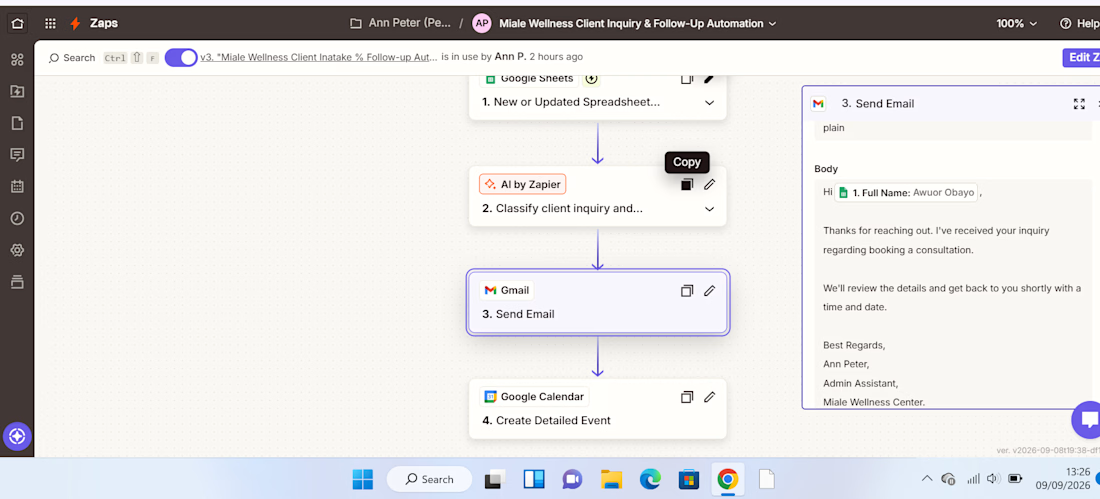
3. Automated Client Response.
After the enquiry is processed, Gmail automatically sends the client an acknowledgement, ensuring they receive a timely response.
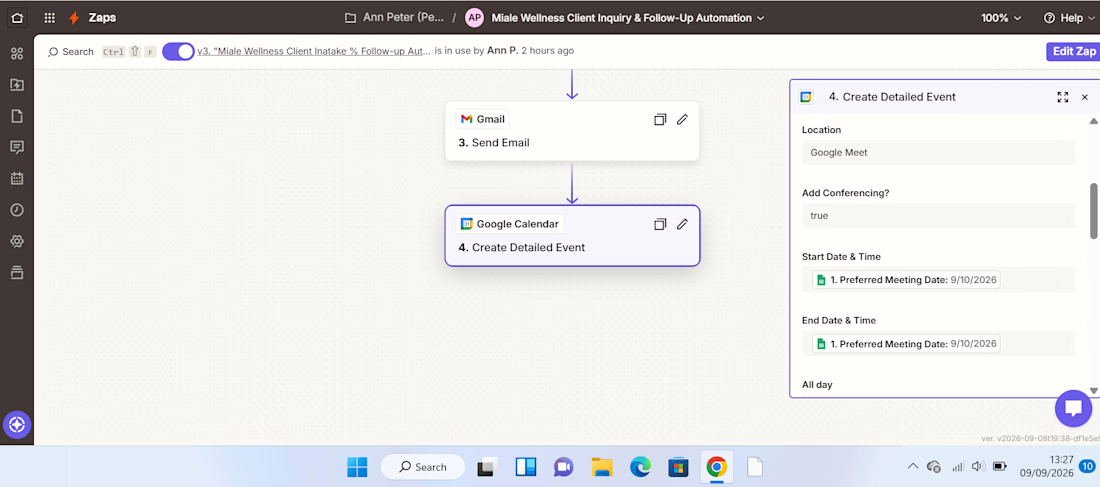
4. Follow-Up Management.
The workflow creates a Google Calendar follow-up, helping ensure that the enquiry doesn't get lost after the initial response.
Result:
The completed workflow turns a manual enquiry process into a structured automated system:
Capture → Analyze → Respond → Follow Up
The key improvement is the use of AI as a decision-making layer, rather than simply moving information from one application to another.
This demonstrates how AI automation can reduce repetitive administrative work, improve response consistency, and help businesses stay organized with client enquiries.
Tools Used:
Zapier | AI by Zapier | Google Forms | Google Sheets | Gmail | Google Calendar
Skills Demonstrated:
AI Automation • Workflow Design • Administrative Automation • AI Prompting • Client Enquiry Management • Email Automation • Calendar Automation • Process Optimization



Really clean workflow, Ann. The Capture → Analyze → Respond → Follow Up structure makes the business value immediately clear. One useful next layer could be an exception route for urgent or low-confidence enquiries, so AI handles the routine cases while anything uncertain...

Thank you for the compliment and recommendation. I started learning AI Automation workflow and this is my first project. I will implement the above.

This is a strong example of turning a messy enquiry journey into a clear system. The Capture → Analyze → Respond flow is easy to follow, and the handoffs between Zapier, Sheets, and Calendar make the automation feel practical rather than opaque.
Thank you for the compliment.
The network for creativity
Join 1.25M professional creatives like you
Connect with clients, get discovered, and run your business 100% commission-free
Creatives on Contra have earned over $150M and we are just getting started









Related posts

𝗬𝗼𝘂𝗿 𝗕𝘂𝘀𝗶𝗻𝗲𝘀𝘀 𝗗𝗼𝗲𝘀𝗻'𝘁 𝗡𝗲𝗲𝗱 𝗠𝗼𝗿𝗲 𝗠𝗮𝗻𝘂𝗮𝗹 𝗪𝗼𝗿𝗸. 𝗜𝘁 𝗡𝗲𝗲𝗱𝘀 𝗦𝗺𝗮𝗿𝘁𝗲𝗿 𝗦𝘆𝘀𝘁𝗲𝗺𝘀.
Think about how much time you spend every week doing the same things.
Replying to customer emails.
Following up with potential clients.
Updating spreadsheets.
Managing leads.
Moving information between applications.
Sending reminders and notifications.
Now ask yourself:
𝗛𝗼𝘄 𝗺𝘂𝗰𝗵 𝗼𝗳 𝘁𝗵𝗶𝘀 𝗮𝗰𝘁𝘂𝗮𝗹𝗹𝘆 𝗻𝗲𝗲𝗱𝘀 𝘁𝗼 𝗯𝗲 𝗱𝗼𝗻𝗲 𝗺𝗮𝗻𝘂𝗮𝗹𝗹𝘆?
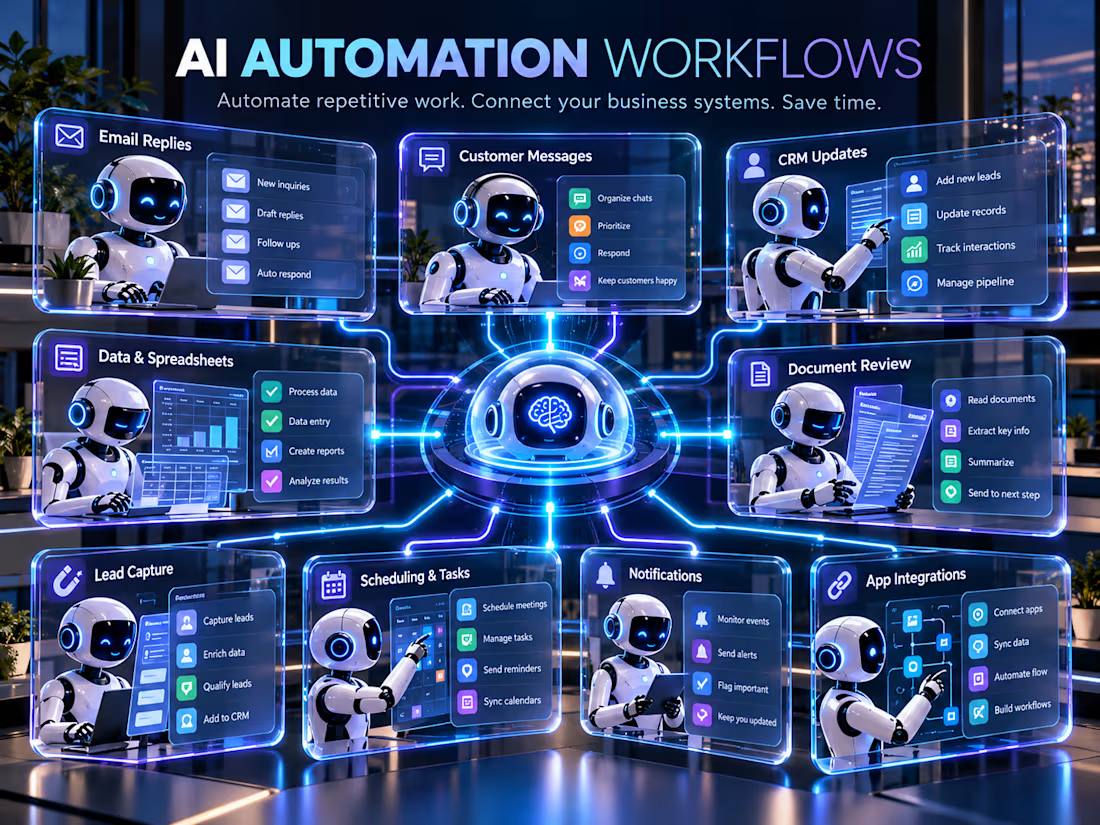
Many repetitive business tasks can be automated, yet businesses continue spending valuable hours doing them manually.
𝗧𝗵𝗲 𝘁𝗼𝗽 1% 𝗺𝗶𝗻𝗱𝘀𝗲𝘁 𝗶𝘀𝗻'𝘁 𝗮𝗯𝗼𝘂𝘁 𝘄𝗼𝗿𝗸𝗶𝗻𝗴 24 𝗵𝗼𝘂𝗿𝘀 𝗮 𝗱𝗮𝘆. 𝗜𝘁'𝘀 𝗮𝗯𝗼𝘂𝘁 𝗯𝘂𝗶𝗹𝗱𝗶𝗻𝗴 𝘀𝘆𝘀𝘁𝗲𝗺𝘀 𝘁𝗵𝗮𝘁 𝗺𝗮𝗸𝗲 𝘆𝗼𝘂𝗿 𝗯𝘂𝘀𝗶𝗻𝗲𝘀𝘀 𝗺𝗼𝗿𝗲 𝗲𝗳𝗳𝗶𝗰𝗶𝗲𝗻𝘁.
Imagine a workflow where:
• A customer submits an inquiry, and their details are automatically recorded.
• Incoming emails are categorized, and relevant replies are drafted for review.
• New leads are added to your CRM without manual data entry.
• Important tasks trigger notifications and reminders automatically.
• Your business applications exchange information without constant copying and pasting.
• AI helps process documents, organize information, and handle repetitive administrative work.
𝗗𝗶𝗳𝗳𝗲𝗿𝗲𝗻𝘁 𝘁𝗮𝘀𝗸𝘀. 𝗗𝗶𝗳𝗳𝗲𝗿𝗲𝗻𝘁 𝗮𝗽𝗽𝗹𝗶𝗰𝗮𝘁𝗶𝗼𝗻𝘀. 𝗢𝗻𝗲 𝗰𝗼𝗻𝗻𝗲𝗰𝘁𝗲𝗱 𝗮𝘂𝘁𝗼𝗺𝗮𝘁𝗶𝗼𝗻 𝘀𝘆𝘀𝘁𝗲𝗺.
That's what I help businesses build.
I've launched my new service on Contra:
𝗖𝘂𝘀𝘁𝗼𝗺 𝗔𝗜 𝗔𝘂𝘁𝗼𝗺𝗮𝘁𝗶𝗼𝗻 𝗪𝗼𝗿𝗸𝗳𝗹𝗼𝘄𝘀 𝗳𝗼𝗿 𝗬𝗼𝘂𝗿 𝗕𝘂𝘀𝗶𝗻𝗲𝘀𝘀
I build workflows using n8n, Python, and APIs to connect business applications, reduce repetitive work, and simplify daily operations.
My approach is simple:
• Understand your existing business process.
• Identify the repetitive tasks taking up your time.
• Build an automation workflow around your actual needs.
• Test the workflow and make sure it performs as intended.
𝗔𝘂𝘁𝗼𝗺𝗮𝘁𝗶𝗼𝗻 𝘀𝗵𝗼𝘂𝗹𝗱𝗻'𝘁 𝗺𝗮𝗸𝗲 𝘆𝗼𝘂𝗿 𝗯𝘂𝘀𝗶𝗻𝗲𝘀𝘀 𝗺𝗼𝗿𝗲 𝗰𝗼𝗺𝗽𝗹𝗶𝗰𝗮𝘁𝗲𝗱. 𝗜𝘁 𝘀𝗵𝗼𝘂𝗹𝗱 𝗺𝗮𝗸𝗲 𝗿𝘂𝗻𝗻𝗶𝗻𝗴 𝗶𝘁 𝗲𝗮𝘀𝗶𝗲𝗿.
You don't have to automate everything overnight. Sometimes, solving just one repetitive problem is the best place to start.
Your time should go toward growing your business, not repeating tasks that a system could handle.
Explore my service:
Business owners and founders: What's one repetitive task you wish you could automate today?
#AIAutomation #BusinessAutomation #WorkflowAutomation



Well said! 🙌 Automating even one repetitive task can save valuable time and help businesses focus on growth.

Picture a consultant who takes 8 sales calls a week.
After each one comes the same routine: replay the recording, write notes, update the pipeline sheet, write the follow-up email. Call it 30 minutes a call. That is 4 hours a week, and on busy days the follow-up slips to tomorrow.
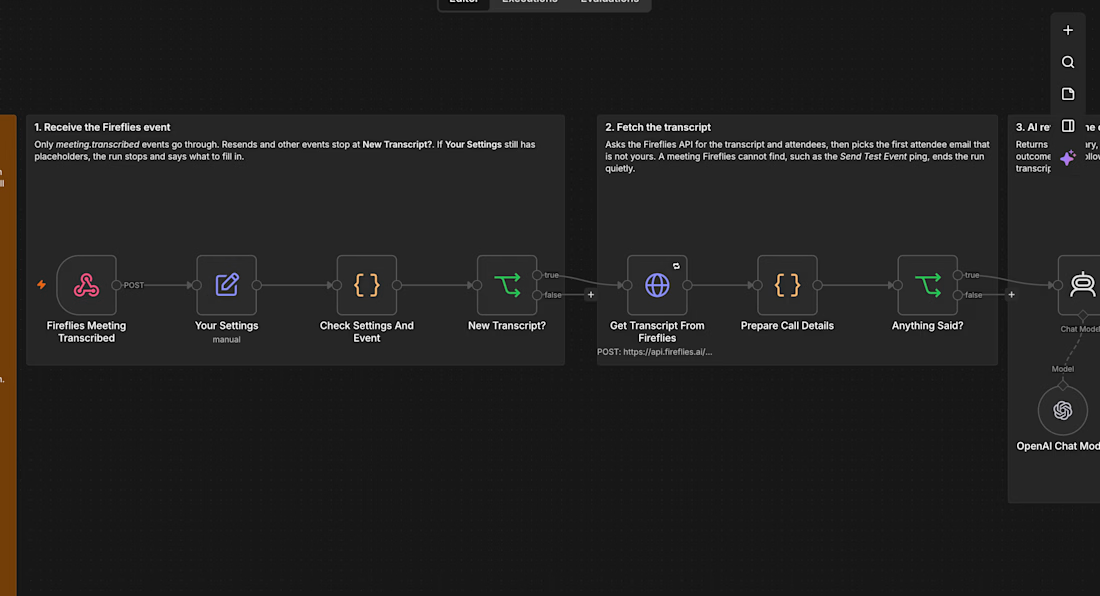
I built an n8n workflow that takes that routine away:
→ Fireflies records and transcribes the call
→ As soon as the transcript is ready, AI writes a summary, the open questions, the next step and whether the prospect is ready to go ahead
→ A follow-up email that fits that outcome is saved in Gmail drafts, addressed to the person on the call
→ The call is logged in Google Sheets and the notes land in your inbox
Nothing is sent automatically. You read the draft, change a line if you want, and press send.
For that consultant, 4 hours of admin a week turns into a few minutes of reading, and every prospect hears back the same day.
I tested it on a real recorded client call and have submitted it to the n8n template library as a free template. If you want it set up for your business, send me a message.


CRAG — Self-Correcting Research Assistant
Overview
A research-assistant project exploring how AI applications can retrieve information and improve the quality of their responses through a self-correction workflow.
Project focus
Python-based AI application development.
Retrieval and research workflow design.
Improving answer reliability through evaluation and correction.
Technologies: Python, AI, retrieval-augmented generation.

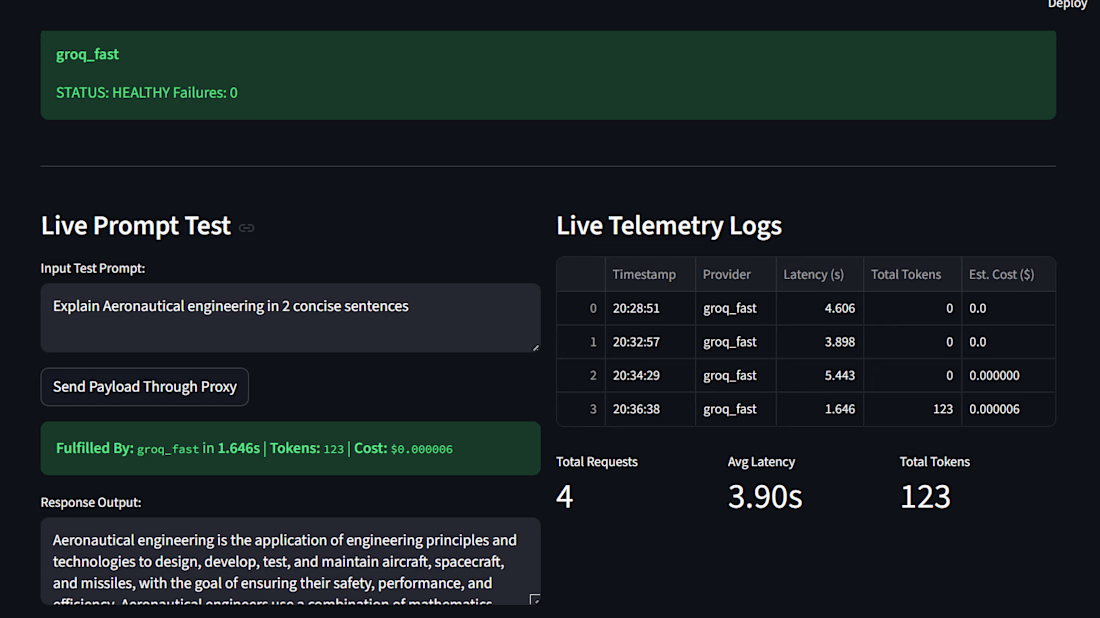

Self-correcting retrieval is the upgrade RAG has needed, Daniel. Most systems stop at the first retrieval and hope for the best, so building evaluation and correction into the workflow is a real reliability win. The live telemetry dashboard makes it feel production-ready.