AI Course Builder LMS: UX Design and Development

AI Course Builder LMS: UX Design and Development Case Study for Perpetua Foundry
Industry: EdTech · Corporate Learning (LMS)
Our role: Solution Architecture, UI/UX Design, Web Development
Deliverable: Three connected portals (Course Designer, Learner and Admin) for an AI-assisted learning platform
Tools: Figma · Node.js, NextJs, Python, Postgres,
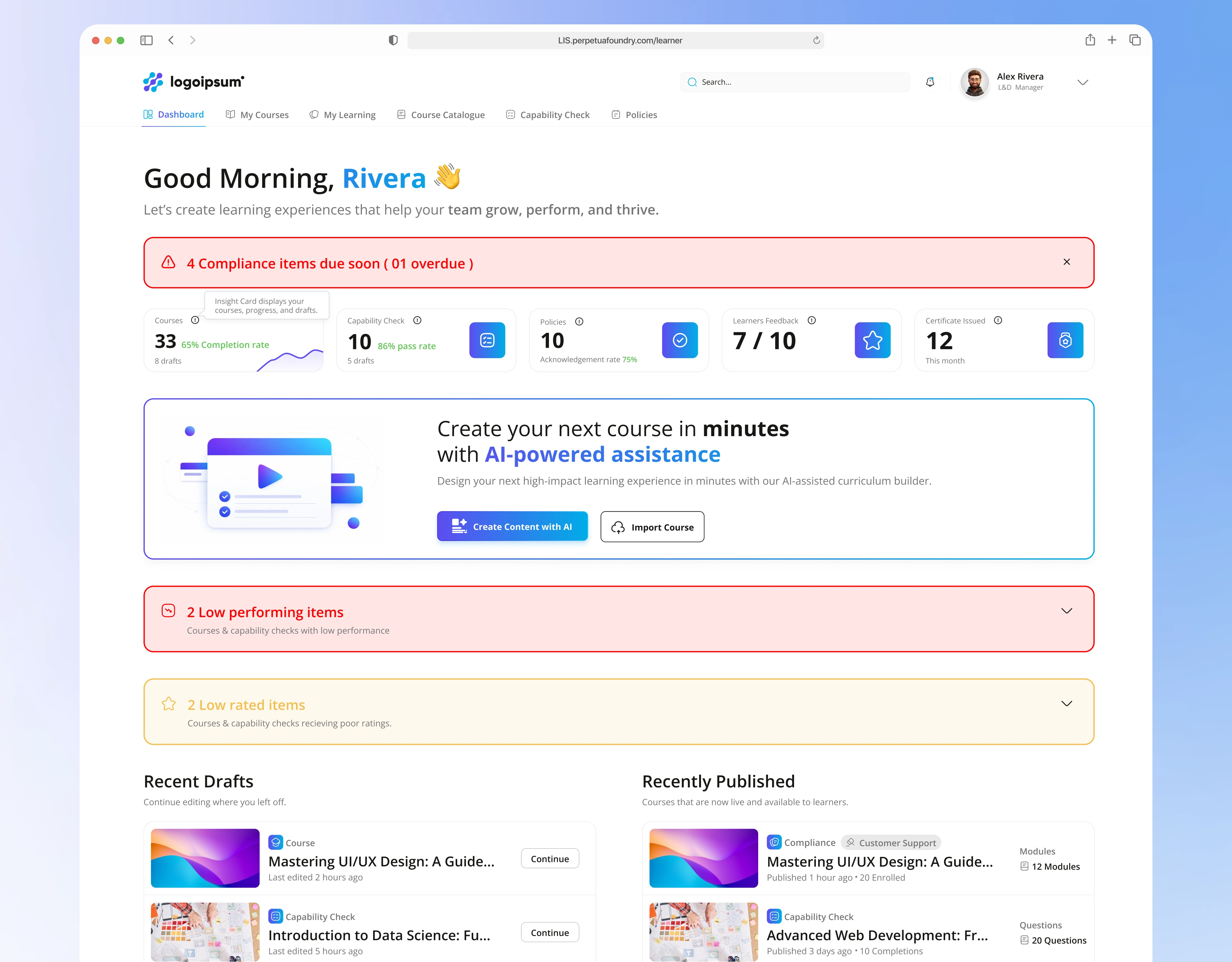
L&D manager dashboard with compliance alerts and AI course creation
The one-line summary
Making a good training course usually takes weeks of slide-writing and chasing people for information. Perpetua Foundry lets a learning manager upload their documents, answer a few smart questions and get a structured course in minutes. We designed and built the system around that idea.
The challenge: three audiences, one platform, and an AI that must not guess
An LMS (learning management system) has to serve people with very different goals:
Course designers (L&D managers) want to create courses, assessments and policies quickly, without becoming instructional designers.
Learners want to know what to learn next, finish it, and prove they did.
Admins want to see who has completed what, manage users and keep records for compliance.
Adding AI makes it harder. If a tool generates a course from a few uploaded files, how does the manager trust it? How do they control it? And how do you keep it from producing generic content that doesn't match what the company actually needs?
How do you let AI do the heavy lifting of course creation, while the human stays in control of what gets published?
Our approach: one product, three portals, one shared journey
We started with the journey a course takes: from a rough idea to a published course, to a learner finishing it, to an admin proving it was done. Each portal serves one stage, and they share one design language, so a user who moves between roles never feels lost.
Portal
Course Designer (L&D)
Learner
Admin
Their main question
"How do I turn my documents into a good course, fast?"
"What should I learn, and how far am I?"
"Is everyone learning, and can I prove it?"
What we designed
Guided AI creation flow, preview and refinement editor, drafts and publishing
Personal dashboard, course player with progress, assessments and certificates
Stats and charts, user management, activity logs, certificate templates
five decisions that make AI course creation feel safe
1. A guided path instead of a blank prompt box
Creation is a clear four-step path: AI Brainstorming and Source Content → Gap Resolution → Course Preview and Refinement → Publishing. The first screen is friendly ("Let's Build Your Course Together"). The manager describes the course in plain words, drops in PDFs, Word or PowerPoint files, and picks the difficulty, course type and duration as simple cards instead of dropdowns.
There is also a Quick Creation button for people in a hurry, so the flow suits both beginners and power users.
Business impact: New users reach their first course without training, because the interface tells them what comes next.
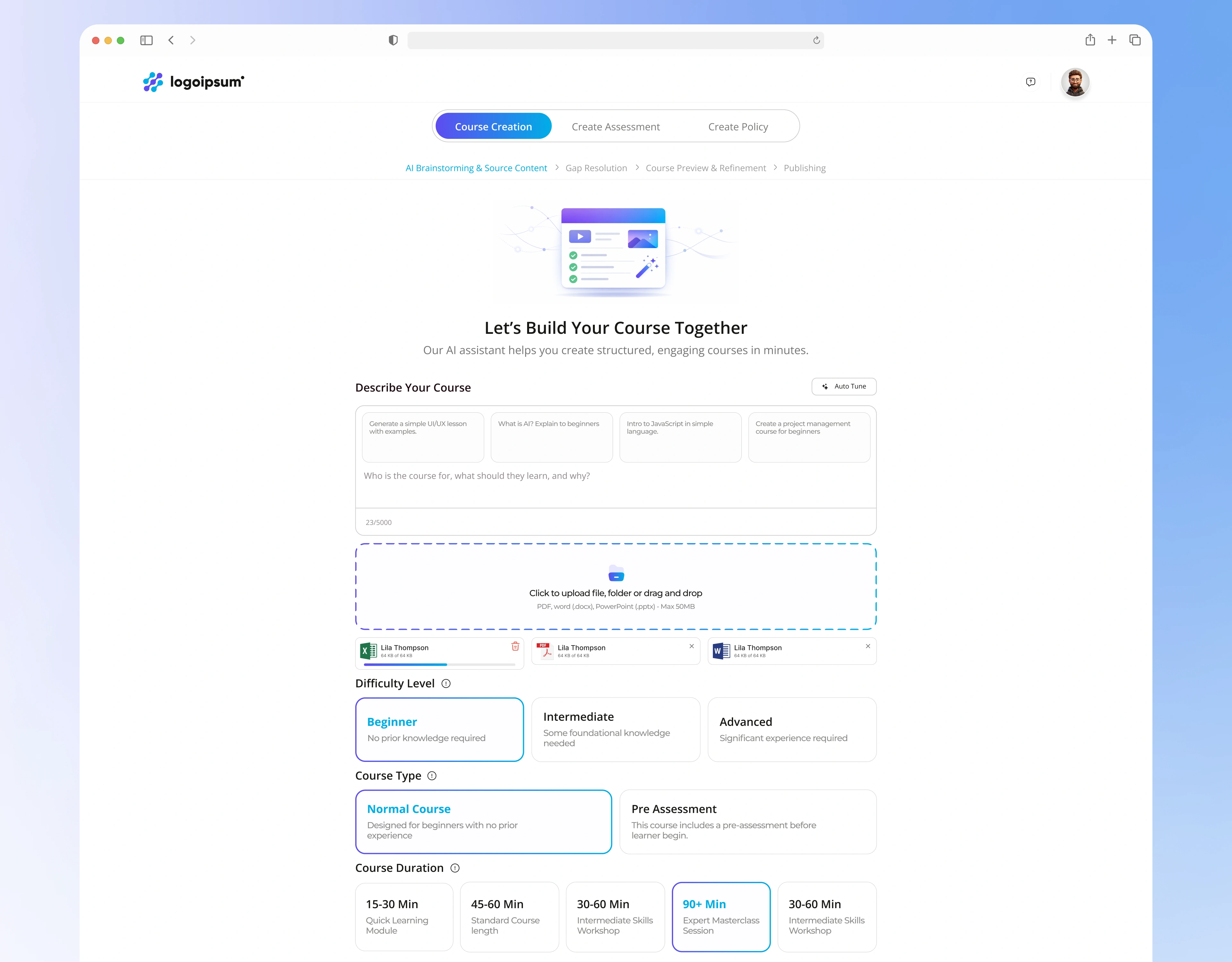
AI course builder interface with prompt, file upload and difficulty settings
2. Gap Resolution: the AI asks before it writes
This is the idea we're proudest of. Before generating anything, the AI reads the uploaded documents and tells the manager what is missing: who the audience is, how success will be measured, and why this training matters now. A Discovery Progress panel shows each area (learning objectives, instructional design, outcomes and measurement, engagement, content, feedback) as Completed, In progress or Not started.
Business impact: The course is built on the company's real goals instead of generic text. That builds trust in the AI and cuts rework.
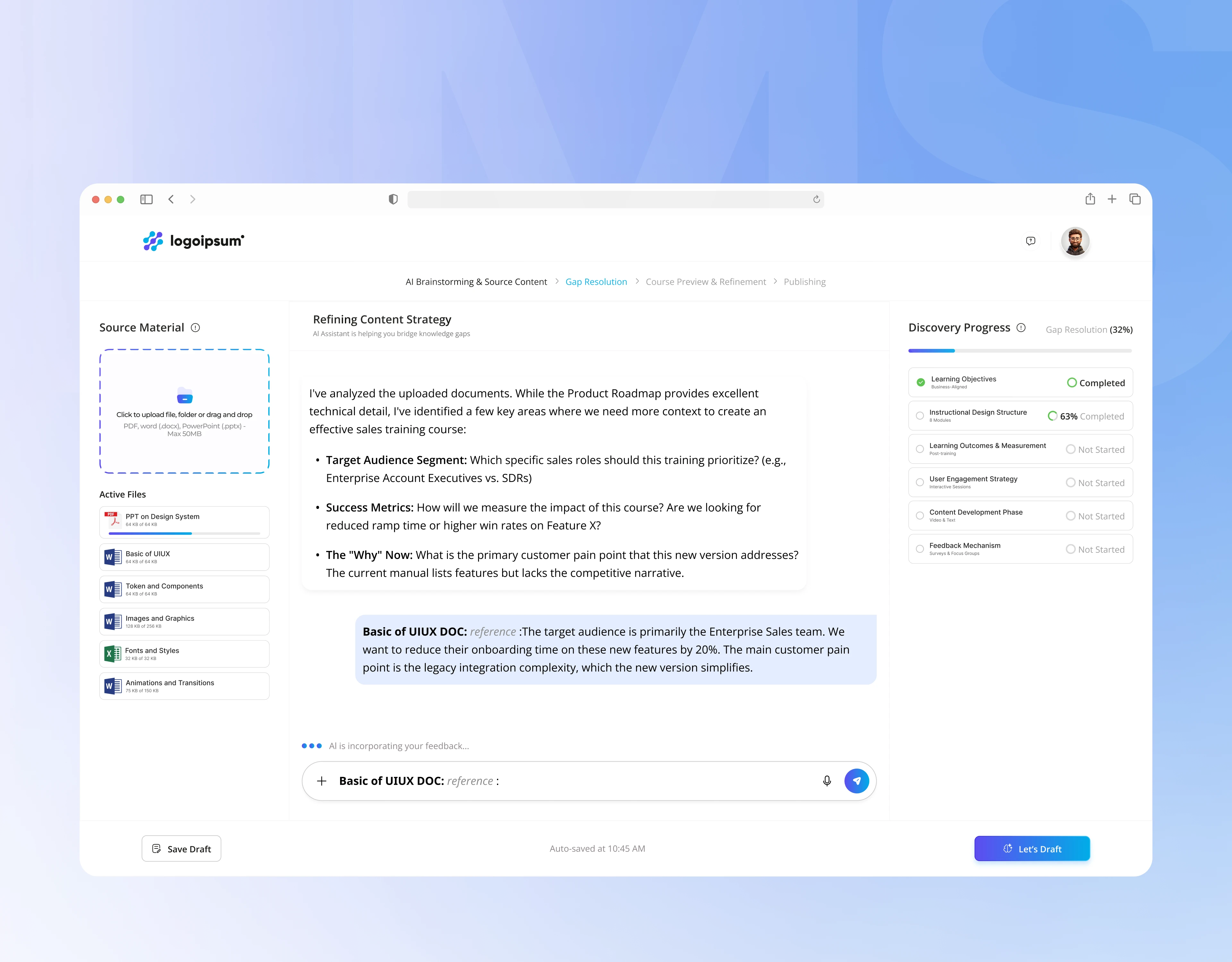
AI gap resolution chat that asks missing questions before building a course
3. A preview editor where the human has the last word
Once the course is drafted, the manager sees the full structure on the left (modules, lessons and assessments with their duration), the content in the centre, and the AI assistant on the right with a confidence score. Every module title and lesson is editable in place, modules can be added, and a preview opens the learner's view before publishing.
Business impact: The AI proposes and the manager approves. Nothing goes out unreviewed, which matters for compliance training.
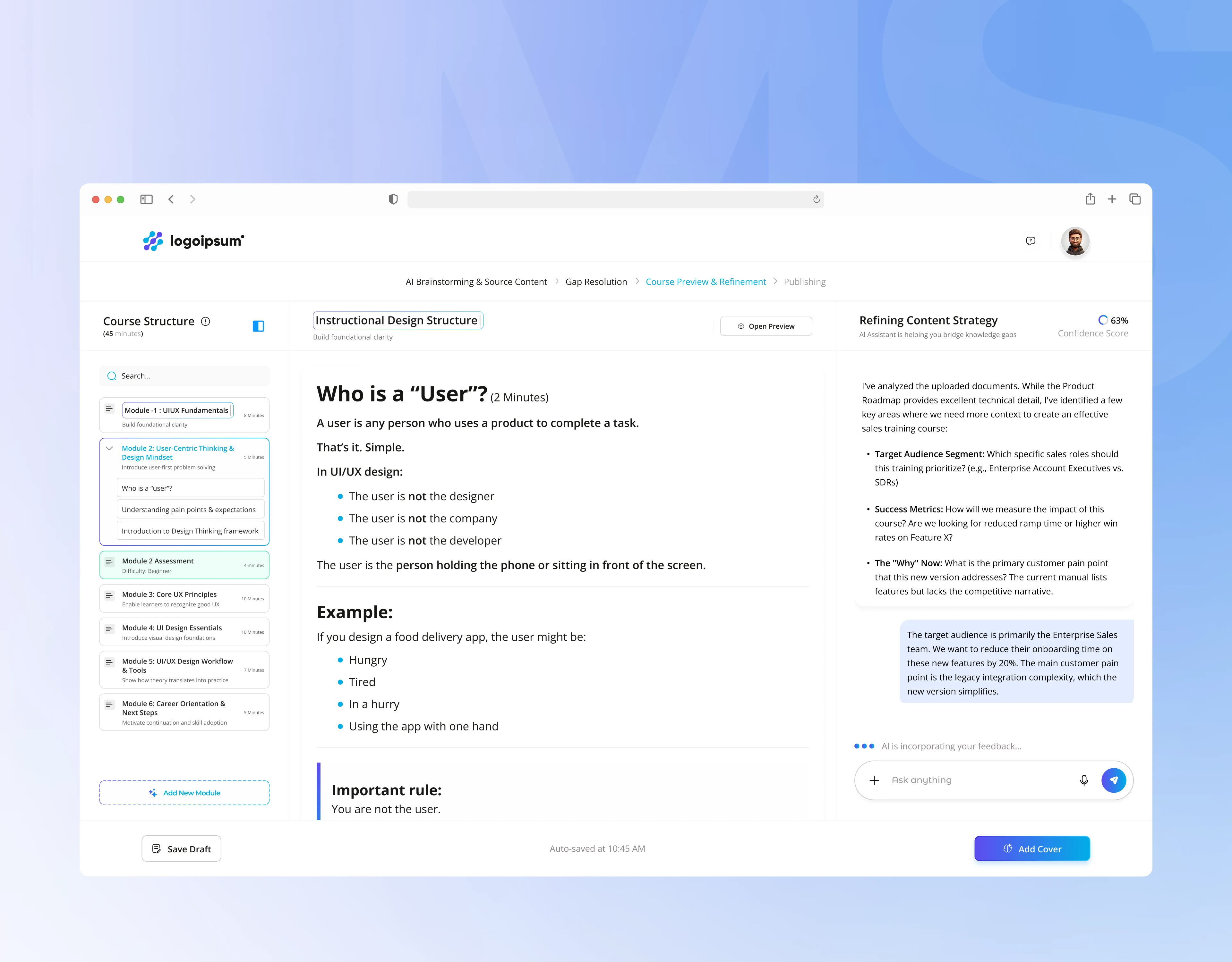
Course preview and refinement editor with module structure and AI assistant
4. A learner experience built around "what's next?"
The learner dashboard opens with Continue your learning, then Mandatory Courses in a highlighted section, a Learning Library and Accomplished Courses with a certificate badge. A small stats panel shows time spent learning, courses in progress and certificates earned. The course player keeps a module sidebar with progress, marks completed modules with a green tick, and colour-codes assessments by difficulty.
Business impact: Learners know the next step in seconds, mandatory training stands out, and completed courses feel rewarding. That supports completion rates.
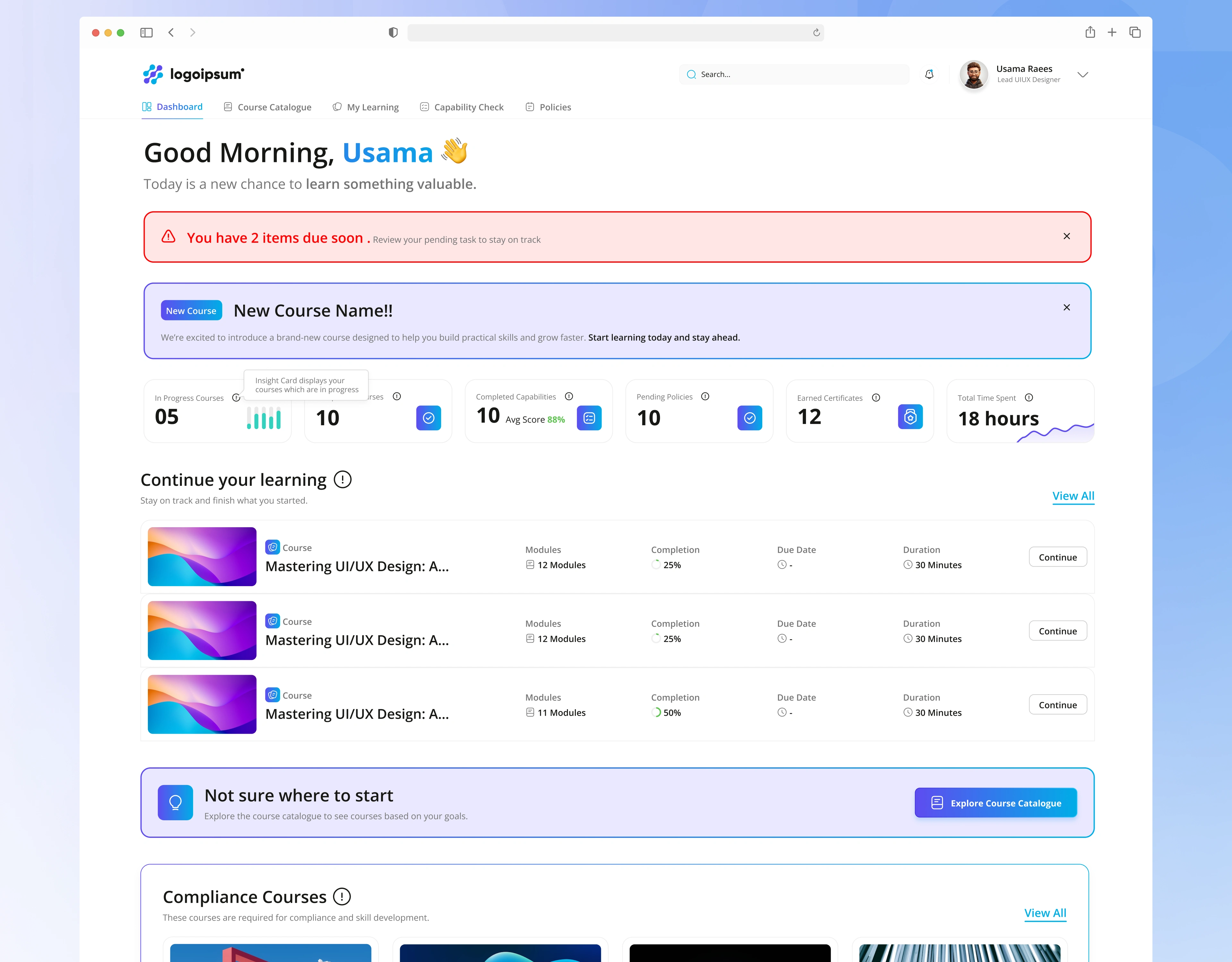
Learner dashboard with continue learning, mandatory courses and achievements
5. Dashboards that point to problems, not just numbers
The L&D dashboard opens with a red alert ("4 Compliance items due soon, 1 overdue"), then highlights low-performing and low-rated items, with recent drafts, recent publications and upcoming deadlines below. The admin dashboard shows total courses, learners, completions, average completion ratio and pass rate, with trend charts and a live activity feed.
Business impact: Managers spend time fixing what needs attention, not hunting through reports.
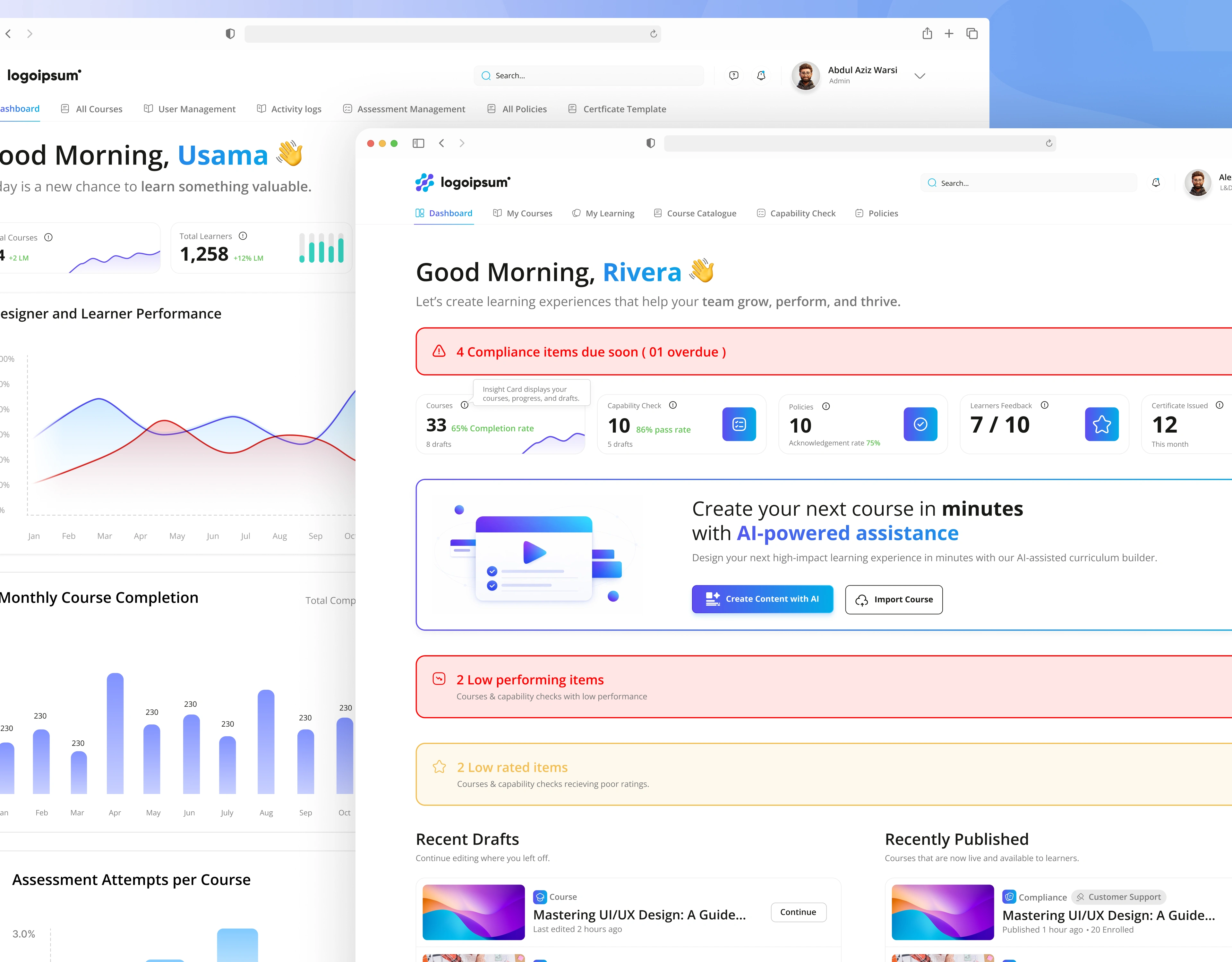
"L&D manager dashboard with compliance alerts and AI course creation", "Admin dashboard with learner stats, completion charts and recent activity"
Development: what it takes to build this
A product like this is more than screens. The design set the requirements for the build. Here are the main engineering pieces behind the interface:
Product feature
Upload PDFs, Word and PowerPoint (up to 50 MB)
AI brainstorming and gap analysis
Course generation and refinement
Draft, auto-save and publish
Role-based portals
Learner progress and assessments
Certificates
Analytics and audit
What had to be built
File upload with type and size checks, progress states, secure storage and text extraction
An AI service that reads the uploaded content, finds missing context and chats with the user
A generation flow that turns approved answers into modules, lessons and assessments, with editable content and a confidence score
Versioned drafts, auto-save, and publish states (draft, published)
Separate Course Designer, Learner and Admin access with login and OTP verification
Progress tracking per module, quiz scoring, pass and fail results
Certificate templates, upload and approval, and issuing on completion
Learner and course statistics, an activity log and an audit trail
Design-to-development handoff: Every state is designed in Figma: empty states, loading and AI-thinking states, errors, tablet layouts for the course preview, and failed or passed assessments. Developers get a clear spec, and fewer questions and rebuilds come back to design.
Beyond the main screens: a complete product
The platform covers more than 100 screens and states across the three portals, including:
Course Designer: login, dashboard, quick and full course creation, import, draft and published views (card and list), assessments, policies and learning analytics
Learner: dashboard, all courses (organisation-wide and departmental), my courses (in progress and completed), course player, assessments with results, and profile
Admin: dashboard, course management, user management with import and add user, activity logs, advanced search, audit and policy sections, and certificate templates
The outcome
The Product gives the business a complete, build-ready AI learning platform: guided course creation, a learner experience that drives completion, and admin tools that prove compliance.
Need an LMS, an AI tool or a multi-role SaaS platform? Here's what we bring
Your challenge
"We want AI in our product, but users won't trust it"
"We have admins, managers and users who all need different things"
"Design and development don't match"
"Our dashboards are just numbers"
What we bring
Human-in-control flows like gap resolution and refinement
Role-based portals with one design language
One team for UX, design and build, with every state specified
Dashboards that point to what needs action
Services: LMS and EdTech design · AI product design · SaaS web app development · admin dashboard design · multi-role platforms · Figma design systems · solution architecture for startups
Let's talk
We help founders and teams turn complex AI and SaaS ideas into products people use, from the first sketch to the final build.
Have a platform in mind? Book a free 30-minute discovery call and we'll map your first three priorities.
Case study based on real project work. Full walkthrough available on request.
Related searches: LMS UI design · AI course creator design · e-learning platform development · corporate training software · learner portal design · EdTech SaaS design and development
0 likes · 0 views · Oct 30, 2026
Created AI-assisted LMS with tailored portals for design, learning, and admin functions.