GoTravelo: Travel Booking Website & Admin

Travel Booking Software Design Case Study: How We Designed GoTravelo, a Flight and Hotel Booking Website with an Admin Dashboard
Industry: Travel · Online Travel Agency · Flights and Hotels
Our role: Product Design, User Interface and User Experience (UI/UX) Design, Responsive Web Design
Deliverable: A customer website for searching and booking flights, hotels and tours (desktop and mobile), and an admin dashboard where the agency team manages every flight and hotel booking, uploads tickets, sends confirmations and tracks payments
Tools: Figma
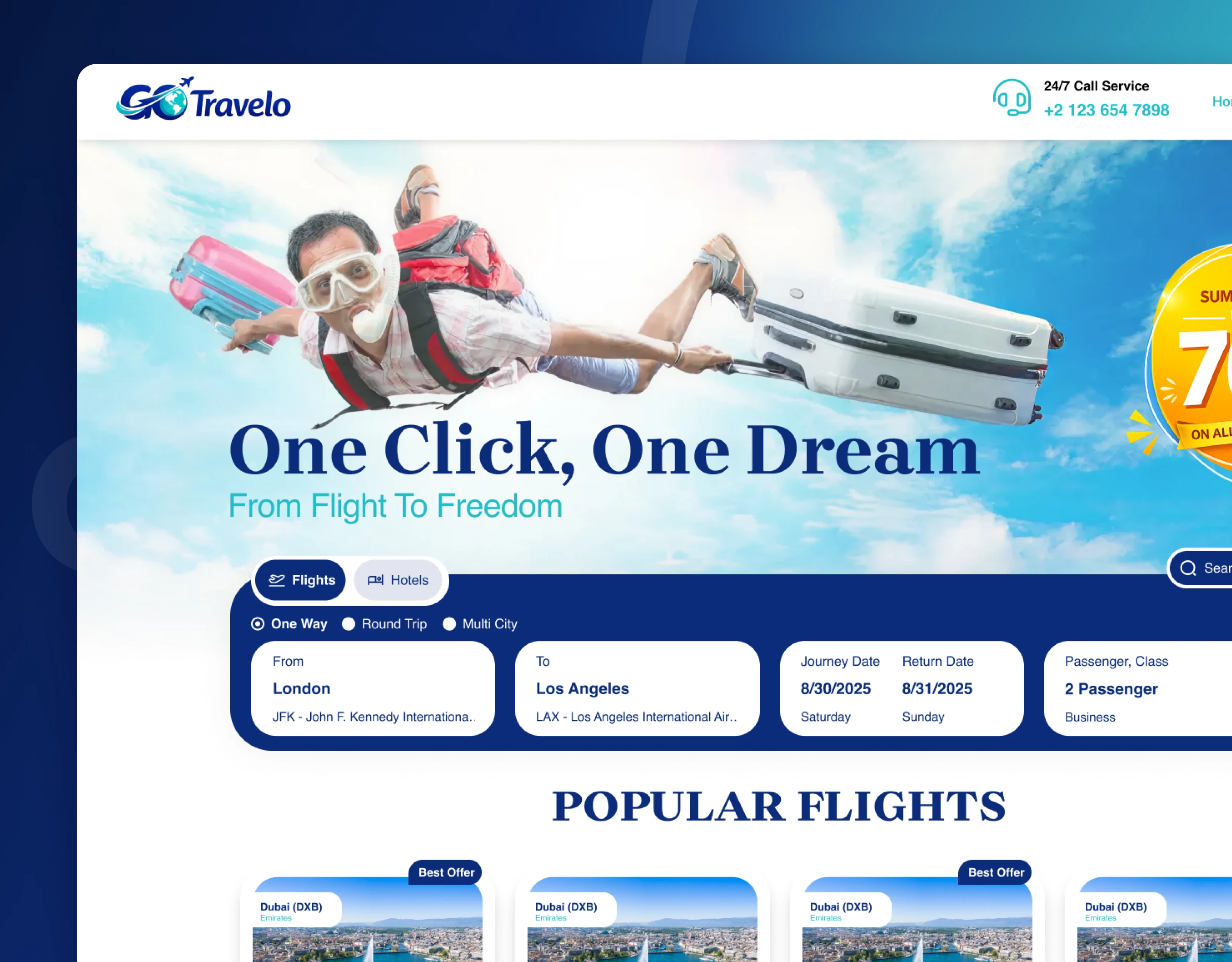
Travel booking website home page with a flight and hotel search box and popular flights
The one-line summary
GoTravelo is a UK travel agency that sells flights, hotels and tours. Its customers need a simple way to search and book a trip, and its team needs one place to manage every booking after it is made. We designed both sides: a customer website built around one search box, and an admin dashboard where staff can follow each booking from the first request to the confirmed ticket.
The challenge: a booking is only half the job
For a travel agency, the work does not end when a customer clicks "Book". Somebody still has to check the details, issue the ticket, email it to the traveller, record the payment and answer questions until the trip is over. In many agencies this happens across separate tools:
Customers move between search results, offers and contact forms, and are not always sure what they are paying for before they reach the payment page.
Agency staff keep track of flight and hotel bookings in spreadsheets and email threads, so it is hard to see which bookings are pending, paid, issued or cancelled.
Bookings made by phone or in person are added separately from online bookings, so the team never sees the full picture in one list.
The goal was not "make a nicer travel website". It was:
How do you make booking a trip feel simple for the customer, while giving the agency a clear, single view of every booking, ticket and payment behind the scenes?
Our approach: follow one trip from search to confirmed ticket
Before designing the screens, we followed one trip from start to finish: the customer searches for a flight, chooses an offer, checks a summary of every detail, and pays. The booking then appears in the agency's dashboard, where a team member reviews the passengers and itinerary, uploads the ticket, emails it to the traveller and records the payment. Each step became a clear screen, and each booking carries the same status everywhere it appears.
Traveller. Main question: "Where can I go, and what will it cost?" What we designed: A home page built around one search box for flights and hotels, with popular flights, destinations, hotels, tours and offers.
Traveller, before paying. Main question: "Is everything correct?" What we designed: A booking summary page that lists passengers, flight, hotel, car and billing details in one place.
Agency team. Main question: "Which bookings need action today?" What we designed: Flight and hotel booking lists with payment status, booking status and a way to add bookings made by phone.
Agency managers. Main question: "How is the business doing?" What we designed: An admin dashboard with booking totals, revenue, ticket sales, booking status and the most popular locations.
The solution: five design decisions that make a travel booking platform work
1. A home page built around one search box
The home page opens with a single, clear promise ("One Click, One Dream") and a search box that switches between flights and hotels. Travellers choose one way, round trip or multi city, pick where they are flying from and to, set their dates and choose the number of passengers and the travel class, then press Search Now. Below the search, the page shows popular flights with prices per ticket, destinations by region, popular hotels with review scores, tours by type (historical, weekend trips, special and holiday tours) and current offers. The whole page is designed for mobile phones as well, with the search box placed right at the top.
Business impact: Travellers can start a search within seconds of arriving, and the popular sections give them ideas when they do not yet know where to go.
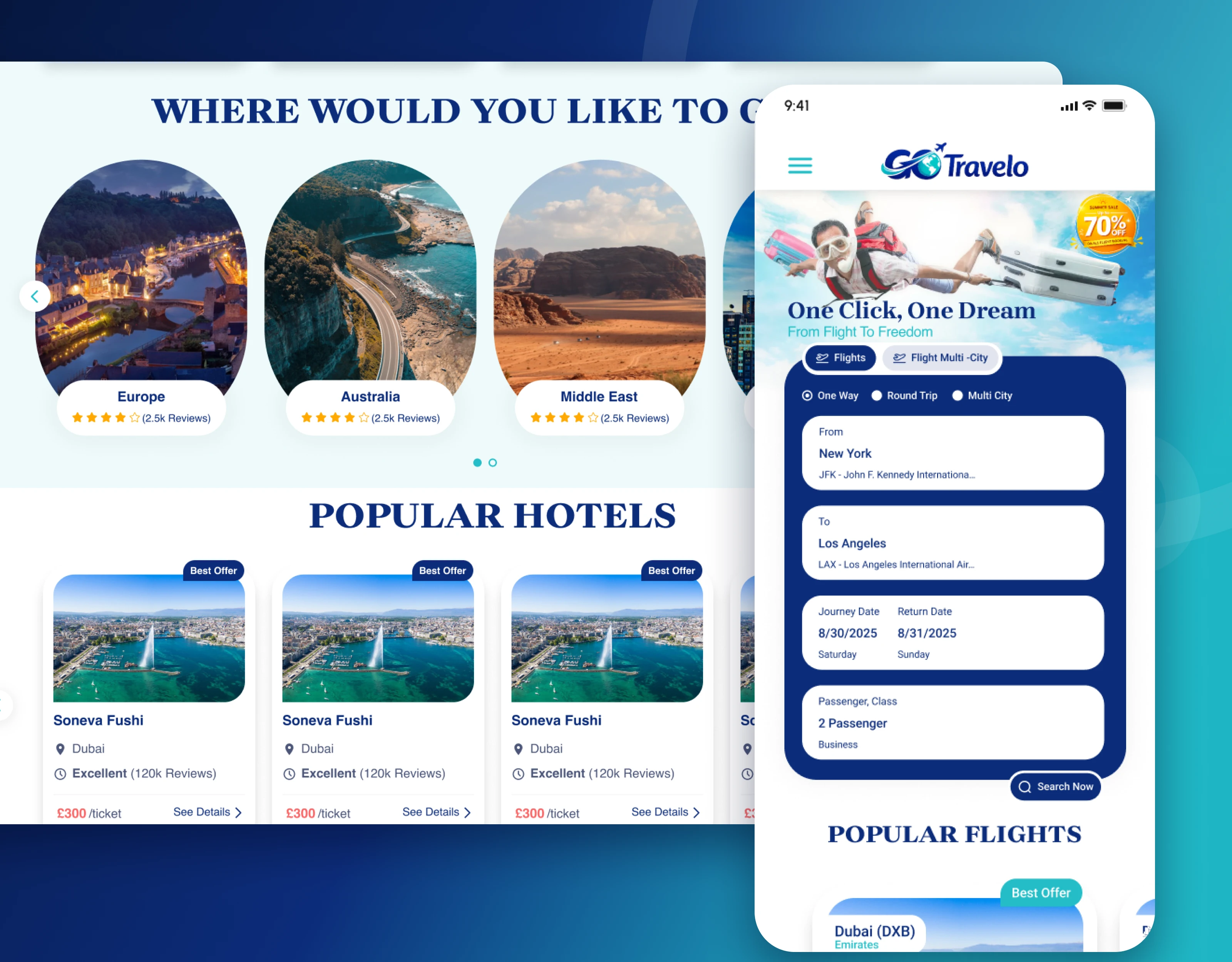
Travel website popular destinations and hotels, with the same home page on a mobile phone
2. A booking summary that removes surprises before payment
Before the traveller pays, a "Booking Summary" page shows everything in clearly separated cards: personal information, each passenger, flight details (departure and arrival times, stops, airline, class, fare type and cancellation rules), hotel details, car hire and billing information, including tax. Only then does the Proceed to Payment button appear.
Business impact: Customers catch mistakes before they pay, which means fewer change requests, refunds and support calls for the agency.
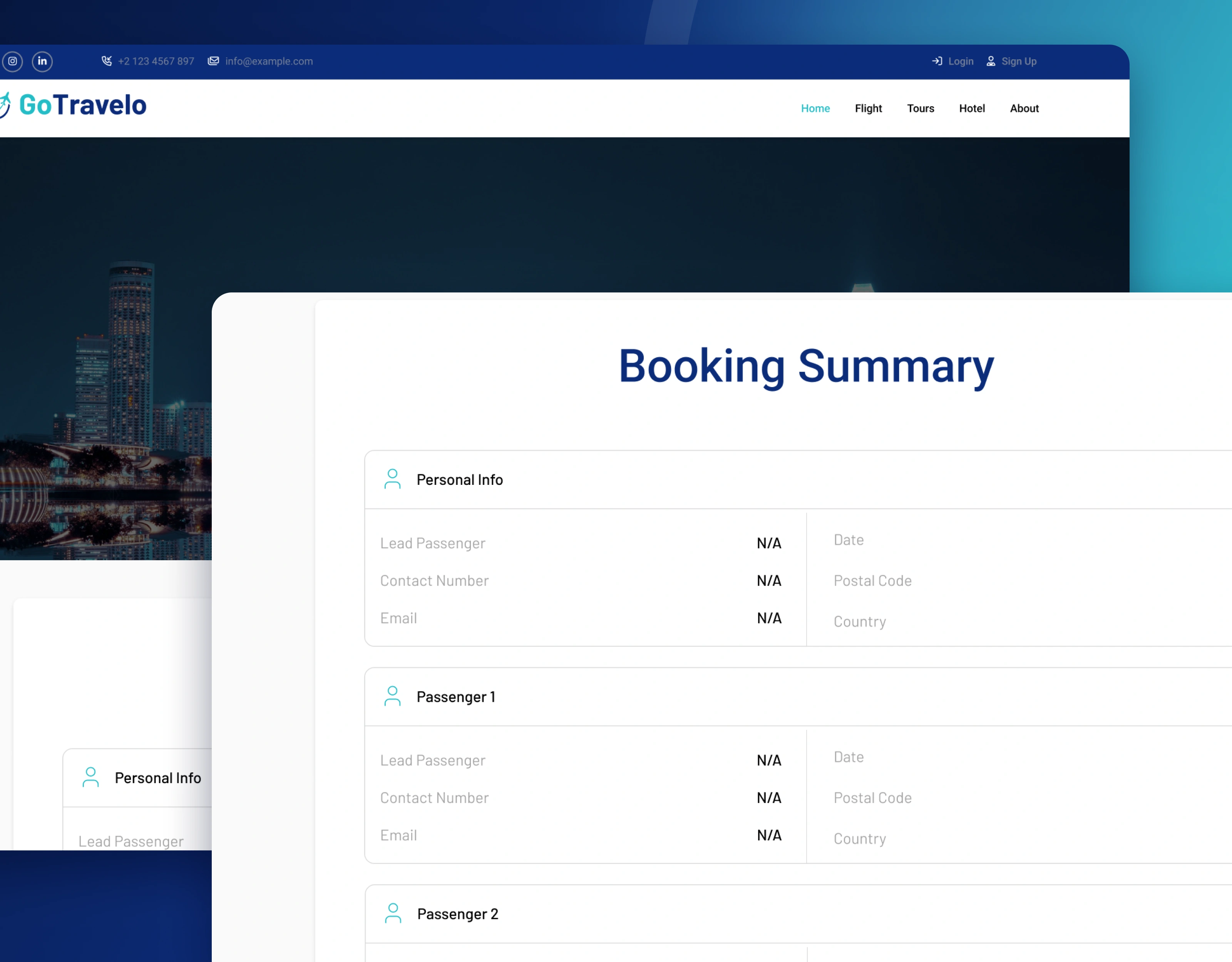
Booking summary page showing traveller, flight, hotel and billing details before payment
3. An admin dashboard that shows the whole business at a glance
The agency's dashboard opens with four summary cards: hotel and flight bookings, active flights and occupied rooms, flight and hotel revenue, and completed flights and hotel check-outs, each with its trend. Below them are the most recent bookings with their status, a monthly ticket sales chart, a status report showing confirmed, pending, published and cancelled bookings, and a world map of the most popular locations by country.
Business impact: Managers can see how many bookings, how much revenue and which markets matter most without exporting a single report.
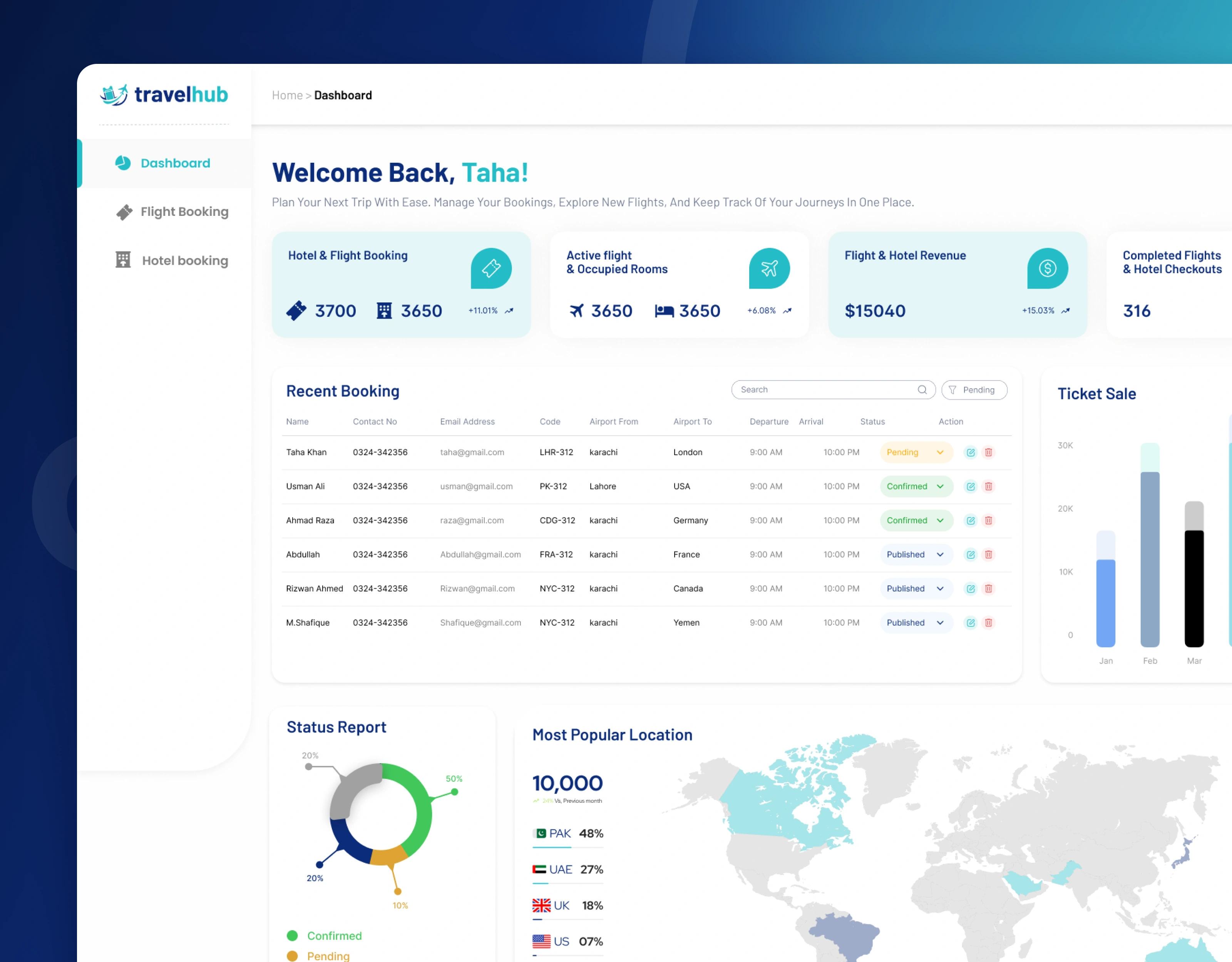
Travel agency admin dashboard with booking totals, revenue, ticket sales and popular locations
4. One list for every booking, online or by phone
The flight booking screen shows pending, confirmed, cancelled and manual bookings as summary cards, followed by a full list with the passenger, contact details, booking reference (PNR), flight number, route, departure and return dates, class, payment status (paid, partially paid or unpaid) and booking status (pending, issued, completed or cancelled). Bookings made by phone or in the office are added through an Add New Booking form, with the lead passenger, extra passengers, trip type and ticket information, and are clearly labelled "Manually" in the list. Hotel bookings follow the same pattern, with guests, room number, check-in and check-out dates and number of nights.
Business impact: Every booking, wherever it came from, lives in one list, so the team always knows what is paid, what is issued and what still needs attention.
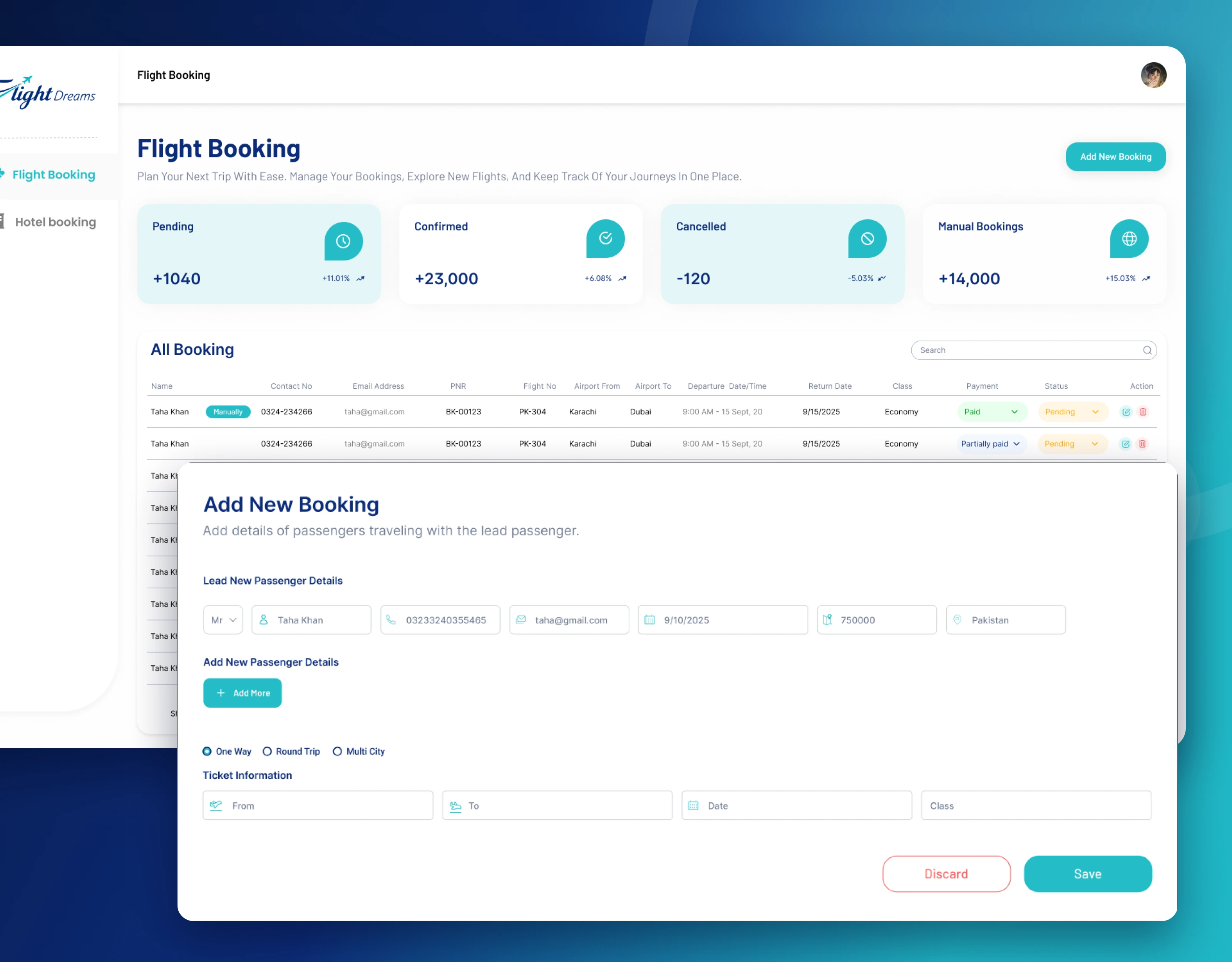
Flight bookings list with payment and booking status, and the form for adding a new booking
5. Booking details where the ticket is uploaded and emailed in one place
Opening a booking shows the client information, every passenger, the full flight itinerary for both directions (airline, times, stops, journey time, PNR and checked baggage) and the payment information with a clear payment summary of subtotal, discount, taxes and amount received. From the same screen, the team can Upload Ticket as a PDF, Preview Send Mail to check the email before it goes out, and Send Email to the traveller. The traveller then receives a "Booking Confirmed" message with a ticket summary, a progress line from pending to ticket booked, a Download Ticket button and practical reminders for the airport.
Business impact: Tickets go out faster and with fewer mistakes, because the team checks the itinerary, the payment and the email in one place before sending.
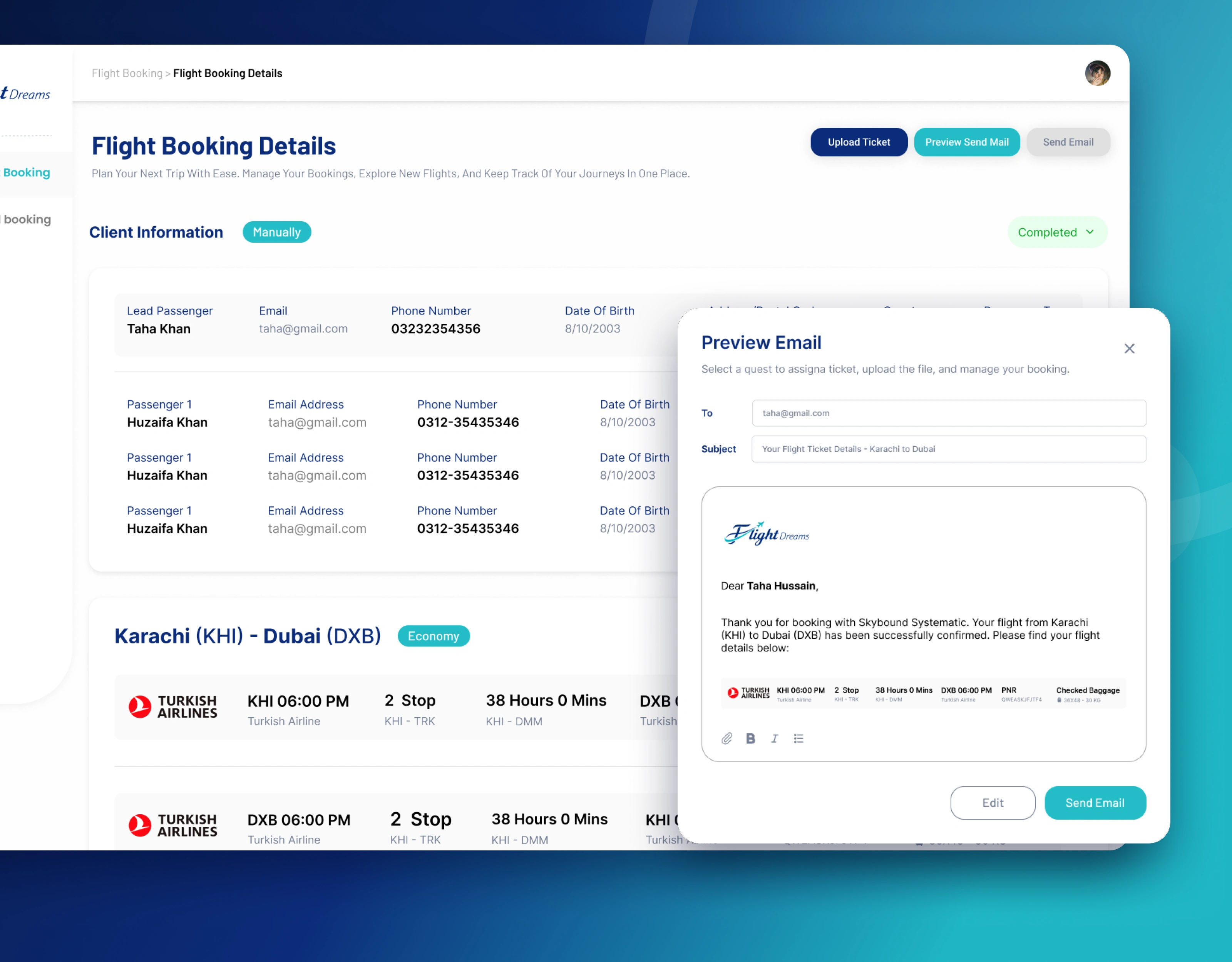
Flight booking details with passengers and itinerary, and the email preview for sending the ticket
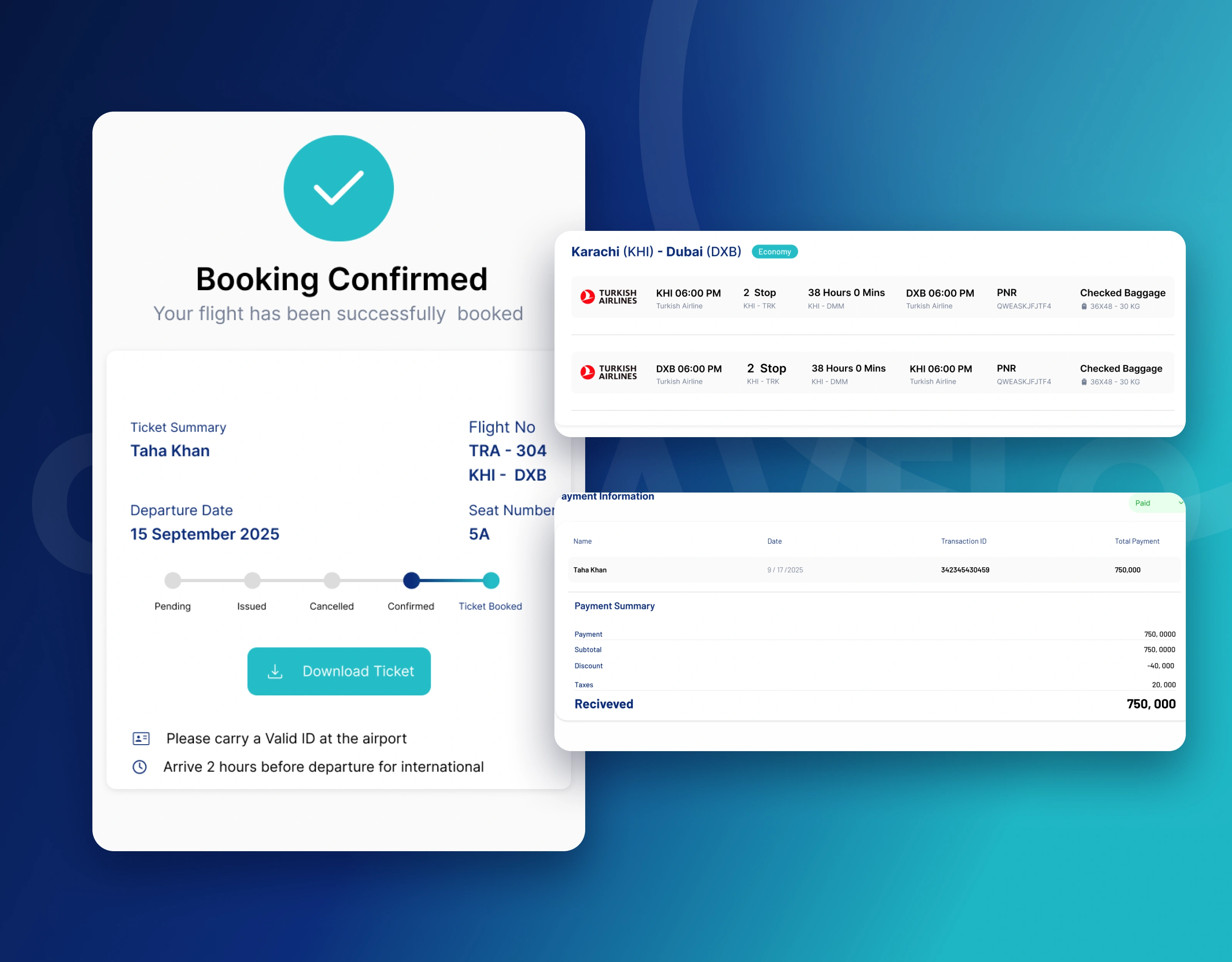
Booking confirmation with ticket status, flight itinerary and payment summary
Beyond the main screens: a complete product, not just a few highlights
The design covers both the customer website and the agency's admin dashboard:
Customer website: home page with flight and hotel search, popular flights, destinations, hotels, tours and offers, a newsletter sign-up and a full footer with contact details and accepted payment methods
Mobile website: the full home page redesigned for mobile phones, with the search box first
Booking summary: personal, passenger, flight, hotel, car and billing information before payment
Admin dashboard: booking and revenue totals, recent bookings, monthly ticket sales, booking status report and most popular locations
Flight bookings: summary cards, a full booking list with payment and booking status, search and pagination
Hotel bookings: total bookings, active bookings, check-ins and check-outs, and a full guest booking list
Booking details: client and passenger or guest information, itinerary and payment summary, with ticket upload, email preview and send
Add New Booking: forms for manual flight and hotel bookings, including extra passengers or guests
Emails: booking confirmation with ticket status and a download button
Account: admin profile details and password change
Every screen follows one visual system: a deep navy and bright teal colour palette, clear status colours for payments and bookings, and reusable components for booking lists, summary cards, forms and modals. This means developers can build it consistently, and new services can be added without redesigning the foundations.
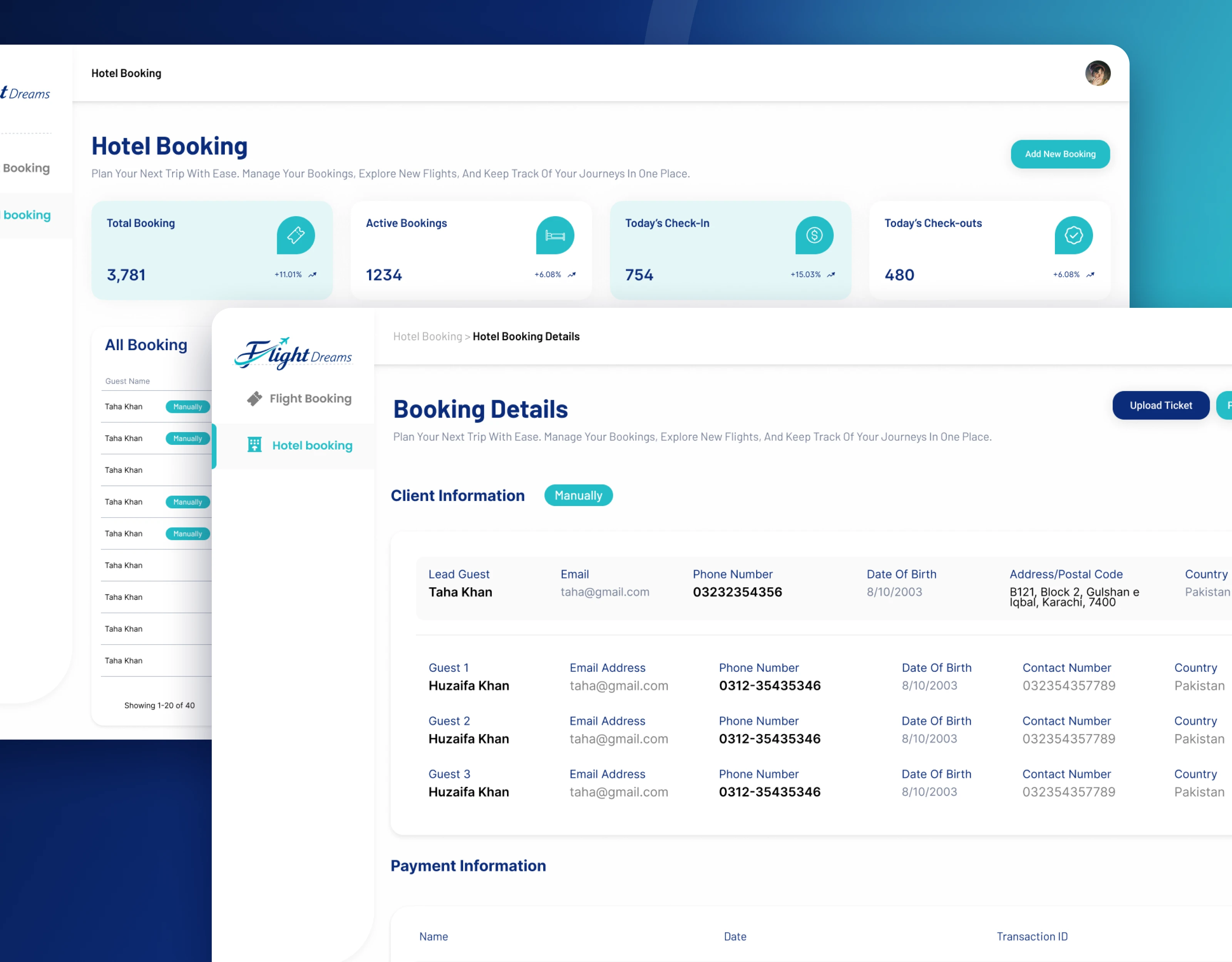
Hotel bookings list and hotel booking details with guests and payment information
The outcome
GoTravelo now has a complete, ready-to-build design for its travel platform: a customer website that makes searching and booking flights, hotels and tours simple on any device, and an admin dashboard that gives the agency one clear view of every booking, ticket and payment.
Need a travel website, booking system or admin dashboard? Here's what we bring
Your challenge: "Customers leave before they finish booking"
What we bring: A search-first home page and a clear booking summary before payment
Your challenge: "Our bookings are spread across spreadsheets and email"
What we bring: One booking list for flights and hotels, online and manual, with clear statuses
Your challenge: "Issuing and emailing tickets takes too long"
What we bring: Booking details with ticket upload, email preview and send in one place
Your challenge: "We can't see how the business is doing"
What we bring: An admin dashboard with bookings, revenue, sales and popular locations
Your challenge: "Developers keep asking what to build"
What we bring: Complete Figma designs for every screen, on desktop and mobile
Services: travel website design · flight and hotel booking design · travel agency admin dashboard design · booking management systems · responsive web design · software-as-a-service (SaaS) product design · Figma design systems
Let's talk
We help travel businesses turn complicated booking operations into products that travellers enjoy using and teams rely on every day.
Building a travel website, booking system or admin dashboard? Book a free 30-minute discovery call and we'll map out your first three priorities.
🌐 https://360xpertsolutions.com · 💼 www.linkedin.com/in/360xpertsolutions
Case study based on real project work. Full walkthrough available on request.
Related searches: travel booking website design · flight booking website UI · hotel booking website design · travel agency admin dashboard · booking management system design · online travel agency design
0 likes · 2 views · Nov 4, 2026
Flight and hotel booking website plus admin dashboard: one-click search, clear booking summary, and one place to manage bookings, tickets and payments.