Daily Meta Ads Reporting Workflow

Uren Karakum


The Setup
A real estate consultant I work with was running several Meta campaigns simultaneously, listings segmented by neighborhood, different audiences, different daily budgets.
Every morning, his routine was the same: log into Ads Manager, pull the latest numbers, and manually relay them to his team. This existing workflow was incredibly tedious, easy to forget, and always left them feeling one step behind the data.
What he wanted from me was basically a very simple workflow where a comprehensive daily report drops directly into their Slack channel every morning.
Building It
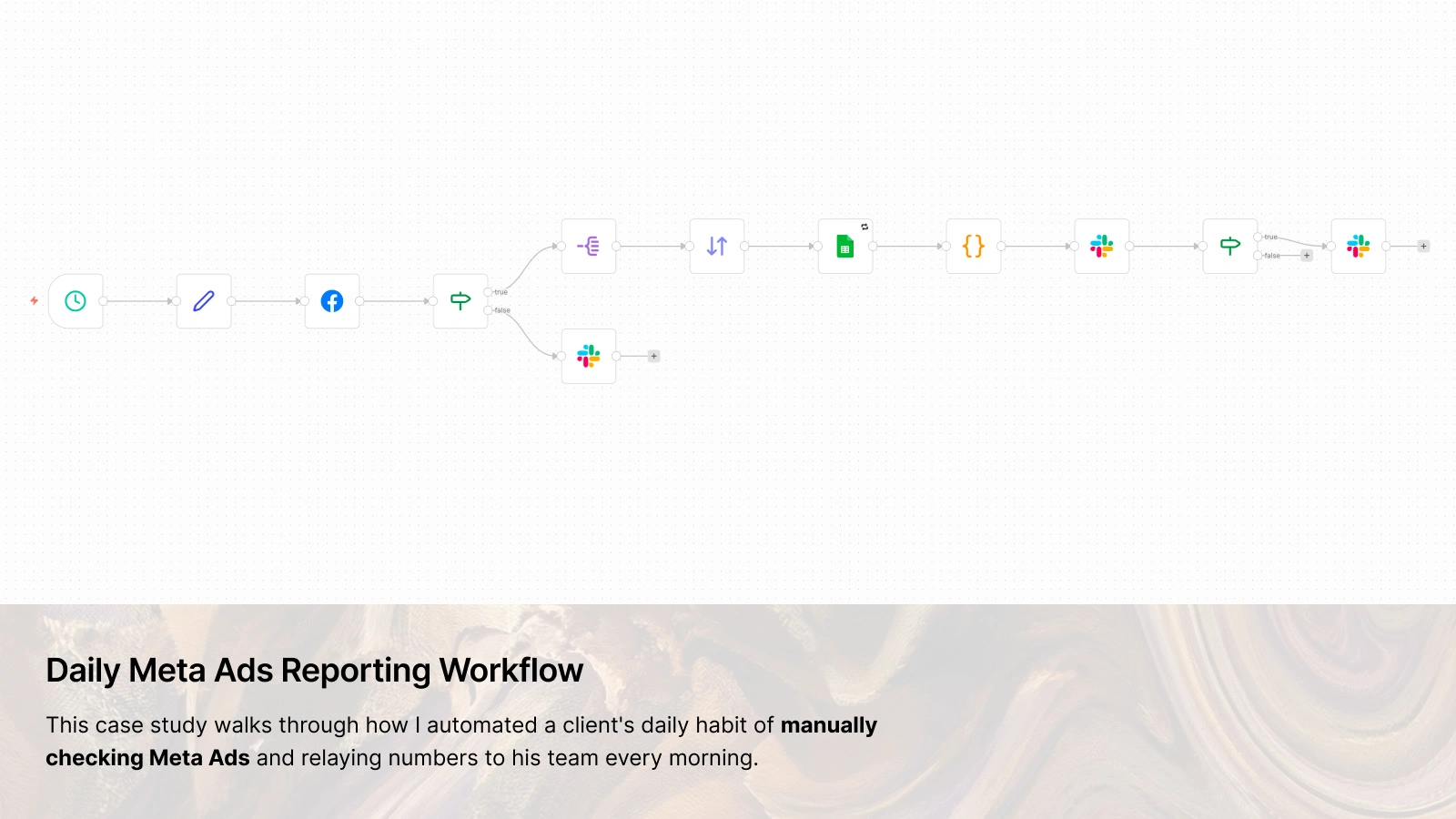
The workflow hits Meta's
act_{accountId}/insights endpoint at campaign level, pulling impressions, clicks, spend, cpc, ctr, campaign_id, campaign_name, and results for date_preset=yesterday.The
results field was the interesting part. I assumed it would return a simple count. It doesn't. It returns an array of objects, each with an indicator string and a nested values array. So building a readable result label meant mapping those raw indicator strings to something a non-technical person could glance at. That became a small normalization function inside a Code node, handling eight different action types and falling back to a cleaned version of the raw string for anything unexpected.The Sheets node writes one row per campaign with the date, campaign ID, name, spend, impressions, clicks, CPC, CTR, and the normalized result label. I had to add retry logic on the Sheets step because the Google Sheets API occasionally drops requests under load.
The Slack message uses Block Kit's native table type, which renders the campaign metrics cleanly in a structured row-and-column format.
After the report goes out, the workflow checks if total spend crossed a threshold that day and fires a separate Slack message if it did. Since budget limits tend to shift over time, the threshold lives in the config node at the top of the workflow rather than buried inside the condition itself. Updating it means changing one field in one place, nothing else.
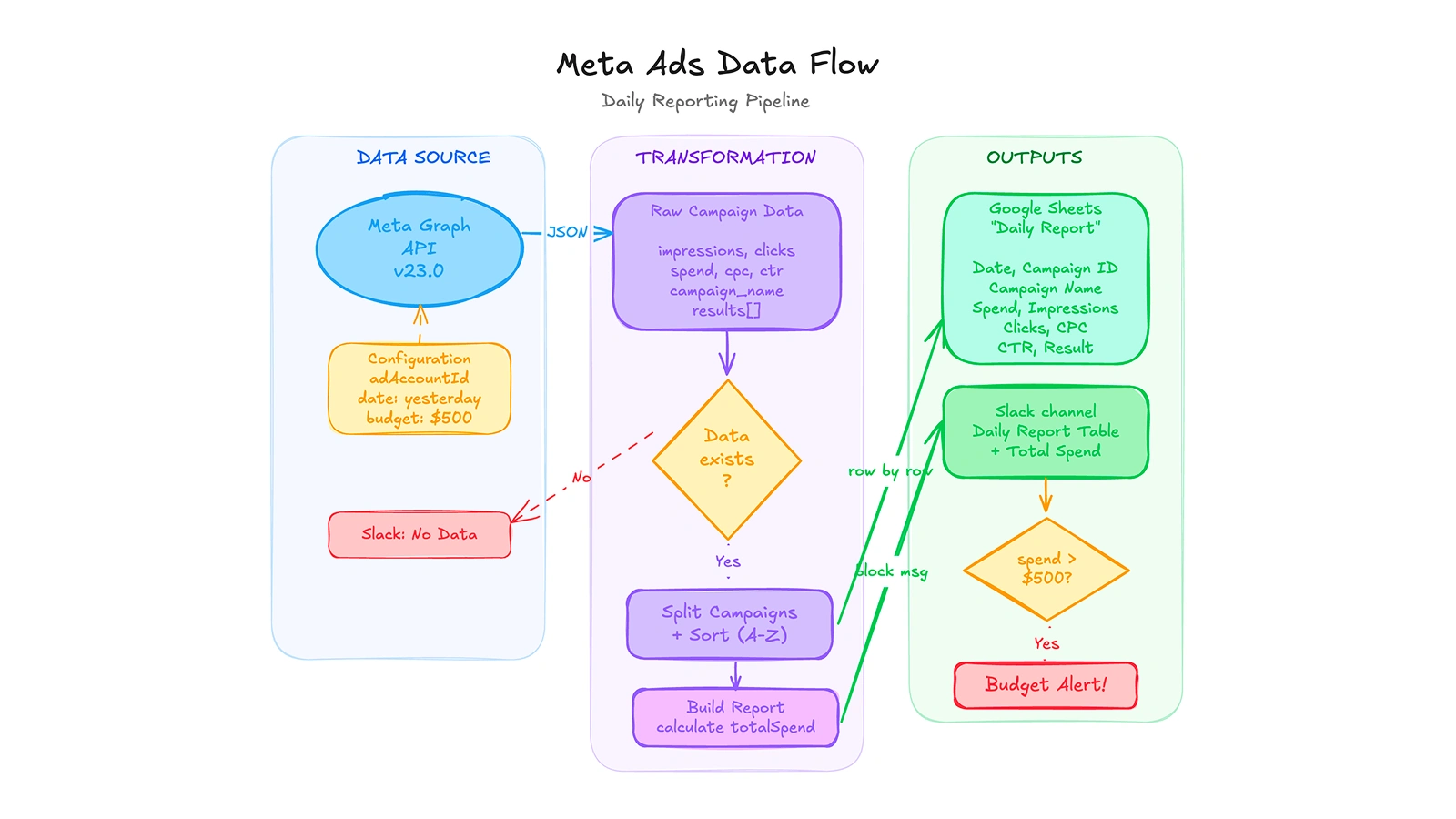
An automated daily pipeline that pulls Meta Ads campaign data via the Graph API, transforms and logs it to Google Sheets, then delivers a formatted report to Slack with a built-in budget threshold alert.
What It Looks Like in Practice
The workflow runs at 08:00 every morning. If the API returns data, the report goes to Slack and the rows go to Sheets. If there's nothing (campaigns paused, API issue, whatever) the team gets a message saying so. It doesn't just silently do nothing.
Before this, overspend was the kind of thing you'd catch in the weekly invoice. By then the campaign had already run for days past its useful budget, and there was nothing to do about it. Now the alert fires the very next morning. The team can pause or adjust the next morning instead of doing damage control at the end of the week.
The Sheets side is quieter but more useful long-term. Every campaign row lands there automatically, so after a few months you have a clean dataset without anyone having to maintain it. The consultant started using it to compare how the same neighborhoods performed across different seasons. That wasn't in the original scope at all.
Tools Used
n8n — workflow automation
Meta Graph API —
act_{id}/insights at campaign levelGoogle Sheets — daily row append, historical record
Slack — block kit report delivery
Like this project
Posted Feb 21, 2026
Built an n8n workflow that pulls Meta Ads campaign data daily, appends it to Google Sheets automatically, and delivers a Slack report with a budget alert.
Likes
1
Views
38
Timeline
Feb 16, 2026 - Feb 18, 2026