Automating Meta Ads Invoice Processing with n8n and AI

Uren Karakum


Automating Meta Ads Invoice Processing with n8n and AI
Executive Summary
Project: Automated Invoice OCR & Archiving Pipeline
Tools: n8n, Slack, AI OCR, Google Drive, Google Sheets, PDF.co
Goal: Eliminate manual data entry for monthly invoice processing.
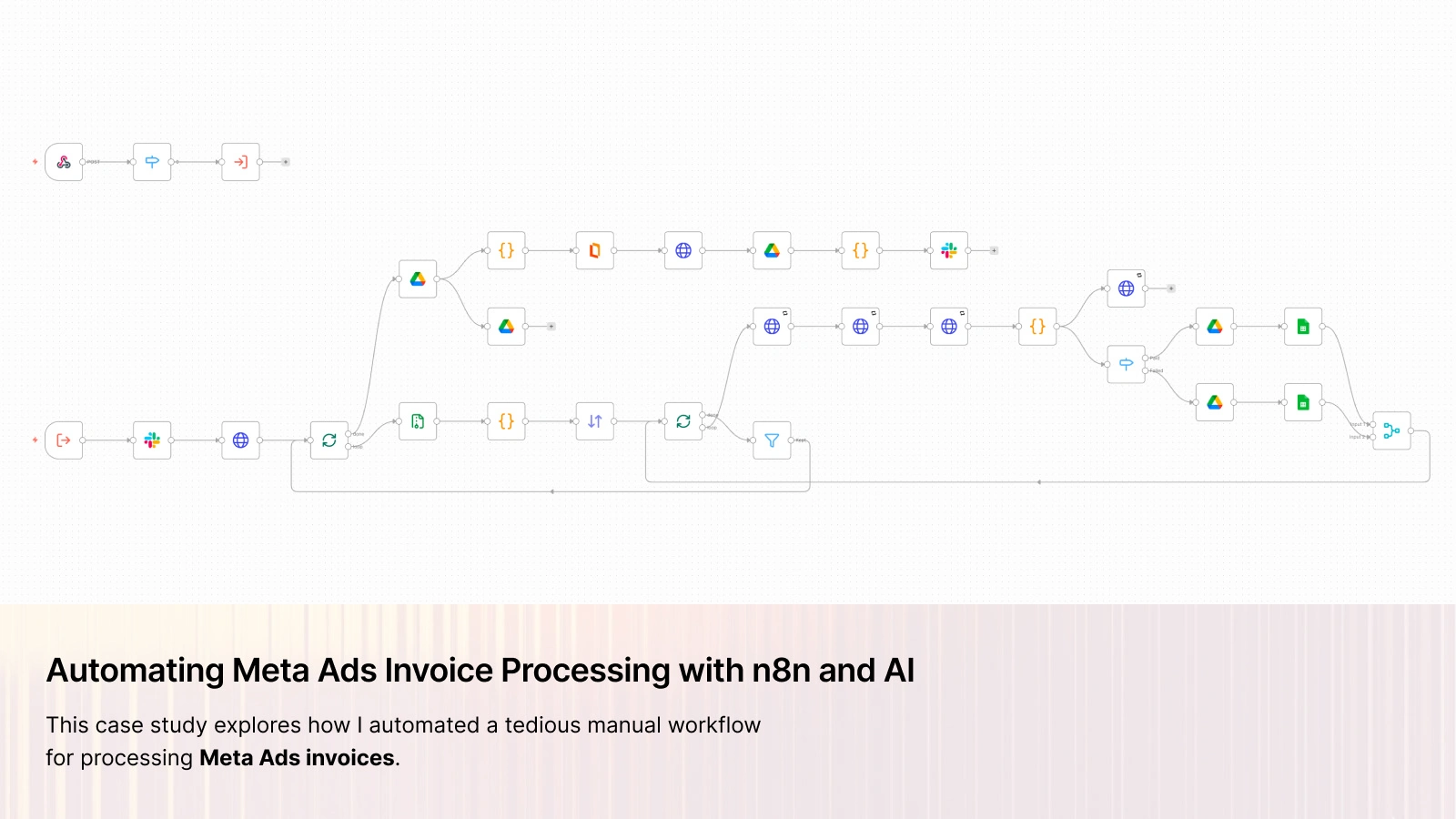
This case study explores how I automated a tedious manual workflow for processing Meta Ads invoices. Putting Slack at the center and using simple automation tools allowed me to transform a time-consuming manual task into a seamless background process.
1. The Challenge
The client faced a repetitive administrative burden at the end of every month:
1. Manual Download: Downloading "Meta Ads" invoice ZIP files from ad accounts.
2. Unzipping: Manually extracting multiple PDFs from these archives.
3. Data Extraction: Opening each PDF to copy and paste details (Amount, Date, Transaction ID, Status) into a spreadsheet.
4. Archiving: Renaming and moving the PDF files into specific Google Drive folders based on their payment status.
5. Merging: Combining all individual invoices into a single PDF file for the accounting department.
This process was prone to human error. Dates were often misformatted, transaction codes were missed, and files were occasionally misplaced.
2. The Solution
I designed a system where the user interacts solely through Slack, while n8n handles the work in the background.
User Interface: Slack
Instead of building a custom frontend, I used the tools the client already had.
1. Trigger: The user types a simple slash command:
/meta-ads-invoice.2. Interaction: A Slack bot responds with a "Continue" button.
3. Input: A secure form pops up allowing the user to upload the raw ZIP file directly from their computer.
The Engine: n8n Workflow
The logic is handled by an n8n workflow that manages the data pipeline:
A. File Processing
Decompression: The workflow receives the ZIP file from Slack and automatically decompresses it, extracting the individual PDF invoices.
Splitting: Each file is processed individually to ensure nothing gets skipped.
B. Intelligent OCR
Traditional parsing is brittle against layout changes. Instead, I integrated a leading AI OCR model.
Upload: The PDF is temporarily sent to the AI API.
Extraction: A strict JSON schema prompts the AI to extract specific fields:
Institution NamePayment Status ("Paid" vs "Failed").Payment Date (automatically normalized to ISO 8601 YYYY-MM-DD).Amount & Currency.Transaction Code & Reference Number.Card Last 4 Digits.Logic: A custom code node matches the extracted data back to the correct binary file using the
transaction_code. This ensures the right data goes with the right file.C. Smart Routing & Storage
A
Switch node evaluates the Payment Status:If "Paid":
Uploads PDF to the "Paid Invoices" folder on Google Drive.
Appends a row to the "Paid" tab in Google Sheets.
If "Failed":
Uploads PDF to the "Failed Invoices" folder on Google Drive.
Appends a row to the "Failed" tab in Google Sheets.
D. Merging for Accounting
After processing the individual files, the system uses PDF.co to take all the successful invoices and merge them into one single file. This master file is then uploaded to a specific folder in Google Drive, making it easy to share the entire month's invoices with the accountant in one go.
E. Final Notification
Once processing is complete, the workflow triggers a Slack bot message using Block Kit. This message provides the user with two links:
Direct view and download link for the merged file.
Link to the Google Sheet containing the extracted data.
This closes the loop, confirming successful execution directly in the chat window.
F. Cleanup
Finally, the workflow deletes the temporary files from the cloud to maintain privacy.
3. Implementation Highlights
Resilience
The workflow includes error handling for "Failed" payments and ensures that even if one file in a batch causes an issue, the others are processed correctly.
4. Results
The new system has completely replaced the manual workflow:
Time Savings: Reduced processing time from hours per month to seconds.
Accuracy: Eliminated data entry errors.
Accessibility: The process can now be triggered from mobile or desktop via Slack.
Conclusion
This project shows that automation doesn't require complex custom UIs. Connecting n8n with Slack for interaction and AI for intelligence enabled me to deliver a document processing solution that is both effective and incredibly easy to use.
Like this project
Posted Jan 17, 2026
Automated Meta Ads invoice processing using n8n, Slack, AI OCR, Google Drive, Google Sheets and PDF.co
Likes
1
Views
14
Timeline
Jan 10, 2026 - Jan 13, 2026