Google Analytics 4 Morning Report

Uren Karakum


The Setup
A client I work with runs a small online pilates studio selling class packs and live session bundles. They run Instagram campaigns a few times a month, usually tied to a new series launch or a seasonal promotion. The morning after a campaign went live, the studio manager would open GA4 to see which pages picked up traffic, switch to a different filter to check where visitors came from, then manually calculate how many people added a pack to their cart but didn't complete the purchase.
She asked me to build something that would land in Slack before the team started their day. On campaign mornings especially.
Building It
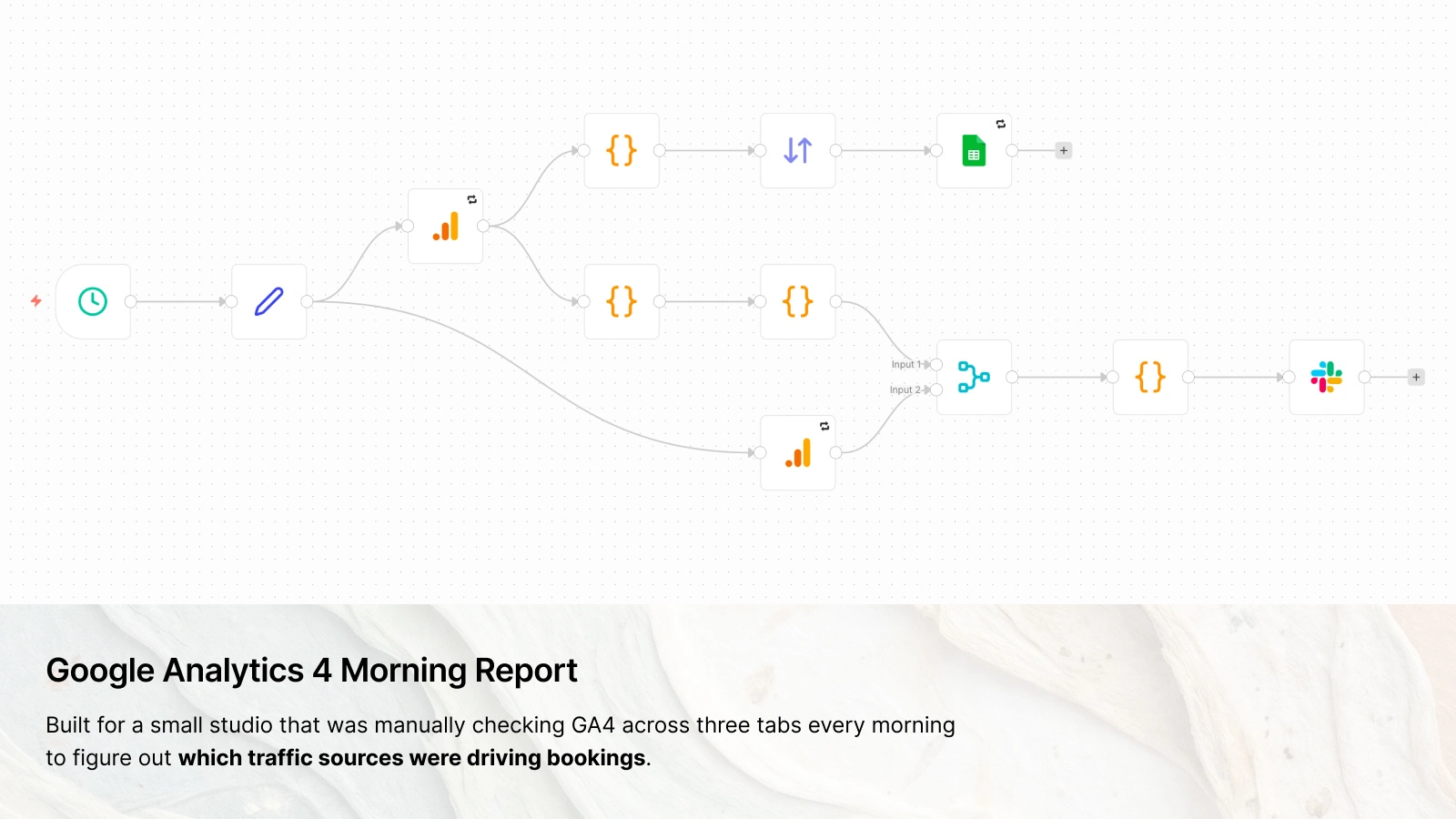
The workflow pulls from GA4's Data API across two parallel branches. The main branch fetches page-level data: sessions, new users, engagement rate, cart additions, checkouts, purchases, and revenue. The second branch fetches traffic by source and medium.
The traffic source data doesn't join to the page table at all. It runs as a separate branch and lands as its own block in the Slack message. Trying to attribute individual page views to a session-level source would have produced numbers that looked precise but weren't, so I kept the two separate.
Within the page-level branch, however, I hit a snag. The detail report builds a key for each row from four fields: date, page URL, campaign name, and referrer. Rows that share the same key get merged. The problem was that
date and sessionCampaignName were never requested from GA4, so both came back empty on every row. A visit from Monday's Instagram campaign and a visit from Tuesday's organic traffic had the same key because both had a blank date and a blank campaign name. They merged into one row. The numbers added up to something, looked plausible, and were wrong. Fixing the dimensions on the GA4 side was straightforward once I identified it. But the campaign fields were still coming back empty more often than they should. That led me to a separate problem entirely: some Meta ad clicks were losing their UTM parameters through a redirect before hitting the landing page, so those sessions were arriving in GA4 with no campaign attribution at all. Fixing the redirect chain on the Meta side meant the campaign name and source fields started populating consistently.After fixing these, I stripped query parameters from page URLs using the
URL() constructor, with a ?-split fallback for URLs it won't parse. Dozens of near-duplicate rows collapsed into a clean page table.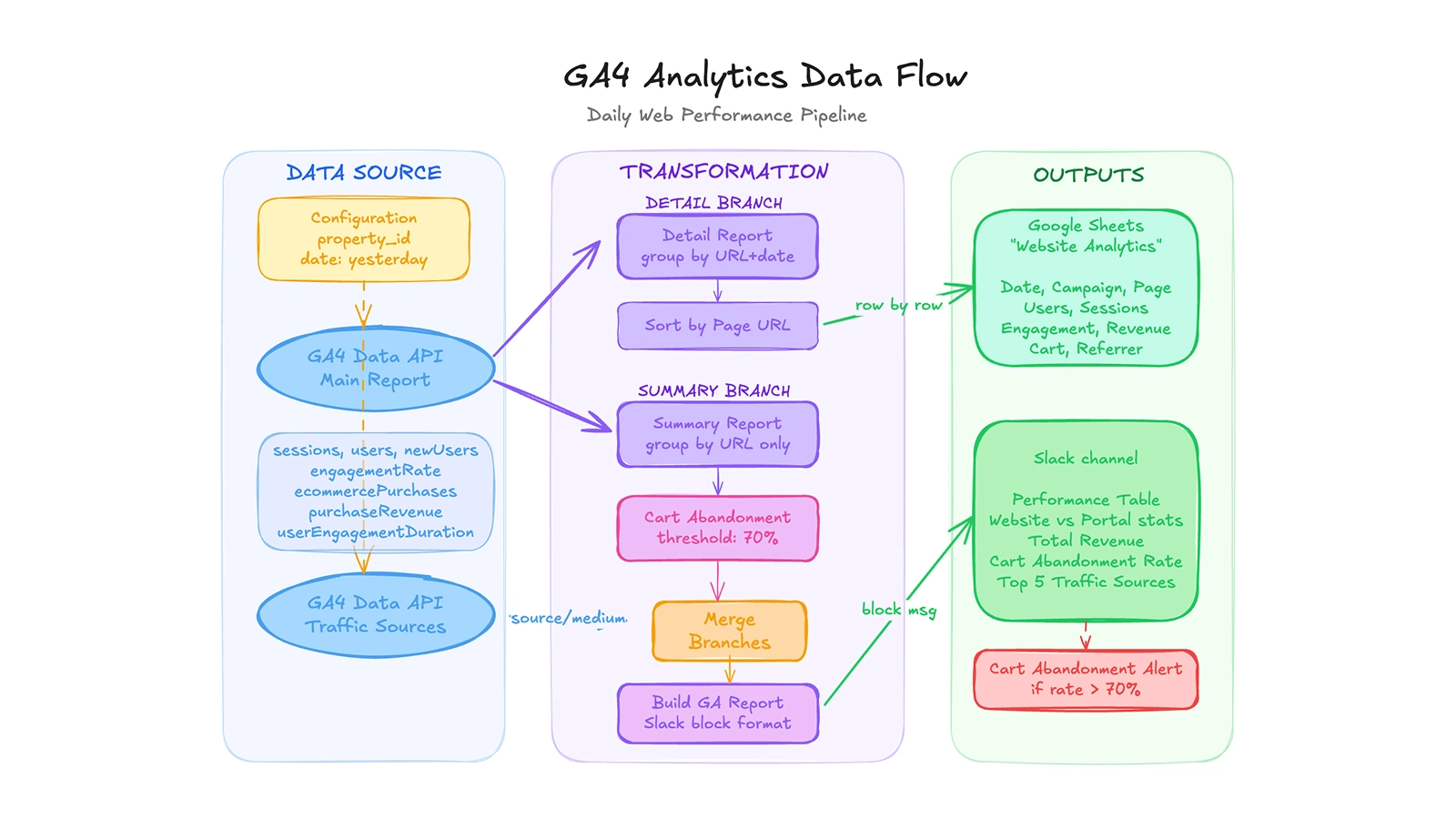
A daily pipeline that pulls GA4 web performance data through two parallel branches (detail and summary), calculates cart abandonment rates, merges traffic source breakdowns, then logs everything to Google Sheets and delivers a rich Slack report with revenue, engagement, and top traffic sources.
What It Looks Like in Practice
Before, the morning after a campaign meant opening GA4, applying filters, switching tabs, doing the cart math manually, and then writing up a summary to paste into Slack. On a good day that took fifteen minutes. On a day when the numbers didn't add up, longer.
Now the Slack message is already there at 6 AM. A page table with users, sessions, engagement time, conversion rate, and revenue. Below that, total revenue, cart abandonment rate with a red or green flag at the 70% threshold, and the top five traffic sources broken down by channel.
The report is most useful the morning after a campaign goes live. Whether the Instagram post moved anything, where people dropped off, which source drove the actual purchases, it's all in one place.
Tools Used
n8n handled scheduling, both API calls, transformation, and delivery to Slack and Sheets.
Google Analytics 4 provided page-level metrics and traffic source data through the Data API.
Google Sheets stores a daily append of the detail report for historical comparison.
Slack received the report as a structured Block Kit message in the campaign channel.
Like this project
Posted Feb 21, 2026
Every morning, a pilates studio's manager opened GA4 across three tabs to check traffic, cart drops, and bookings. One Slack message replaced that.