Site Builder Platform UX/UI Design

Yuliia Ishchenko


Website Builder Platform for Custom Mini-Sites
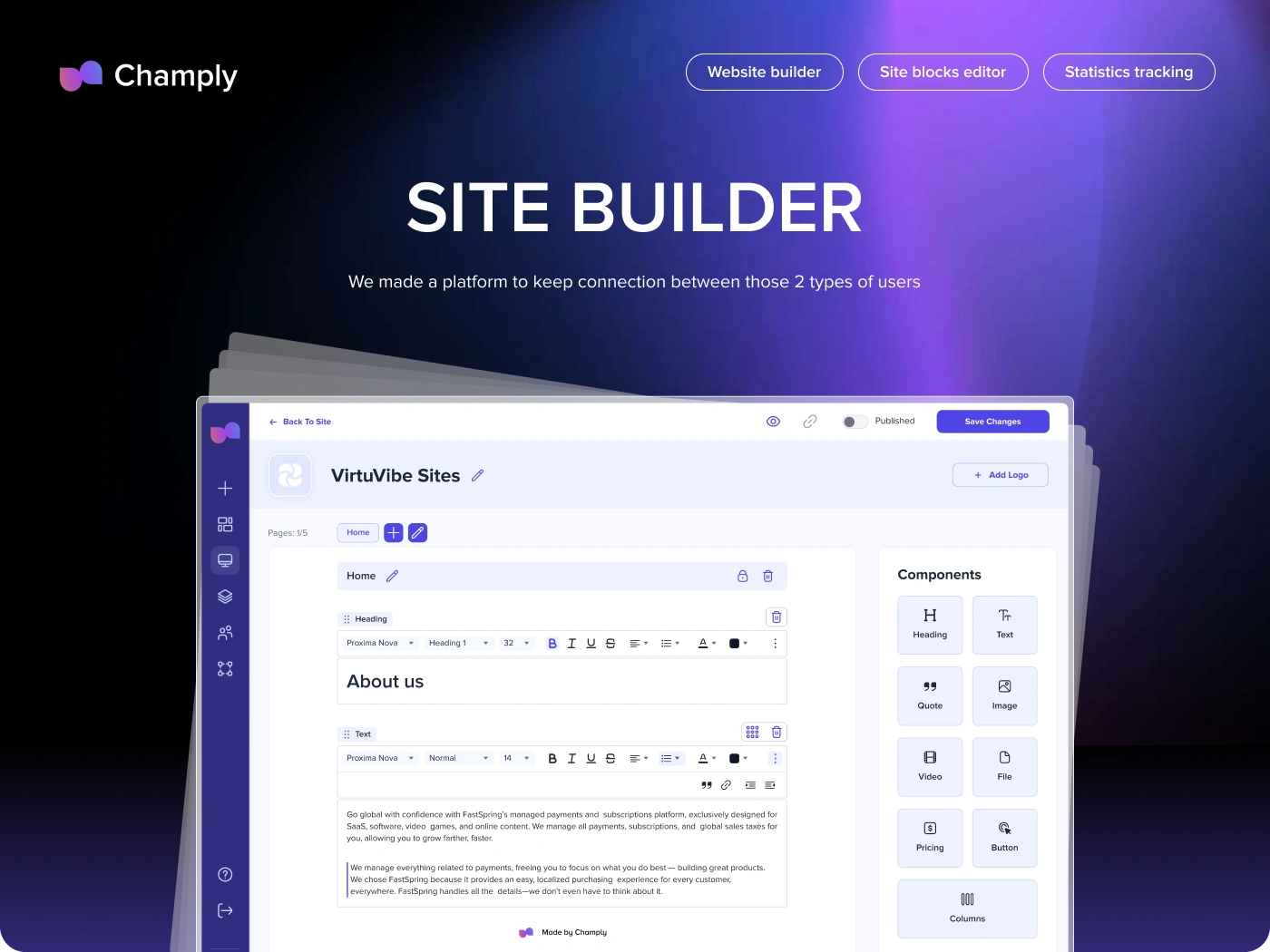
A website builder platform designed to help sellers create customizable mini-sites, manage content, track engagement, and collaborate with teams.
Champly is a SaaS website builder that helps sellers improve the buying experience for prospects through fully customizable mini-sites. The platform allows users to create branded sites, add different content blocks, insert videos, links, documents, pricing sections, and track site performance through built-in statistics.
Industry: SaaS, Website Builder, Sales Enablement, No-Code Tools, Content Management
Project Type: UX/UI Design, Website Builder, SaaS Platform
Timeline: 4 weeks
Scope: Website Builder, Site Blocks Editor, Statistics Tracking, Design System, Dashboard, Team Management
Contribution: Research, Competitor Analysis, User Flow, UI Proposal, UX/UI Design, Clickable Prototype, Design System
Project Overview
Champly was designed as a platform that helps businesses create personalized mini-sites for prospects and clients.
Instead of sending scattered sales materials through different channels, users can build a single branded site with all important content in one place: text, images, videos, quotes, files, pricing, buttons, and layout blocks.
The platform also allows users to track how prospects interact with the created sites, manage site settings, collaborate with team members, and monitor overall performance.
The main goal was to create a simple but powerful website builder that feels intuitive for non-technical users while still giving enough flexibility to customize content.
Problems
Sellers needed a better way to present content to prospects
Sales teams often share decks, documents, videos, pricing details, and links separately. This makes the buying experience fragmented and difficult to follow.
Mini-sites had to be customizable without technical skills
Users needed to create and edit content quickly, without relying on developers or complex website-building tools.
The editor needed to support many content block types
The platform had to allow users to build pages with headings, text, quotes, images, videos, files, pricing blocks, buttons, and custom layouts.
Users needed visibility into prospect engagement
It was important to track statistics such as site views, page views, top-performing sites, and recent activity to understand what content prospects engage with.
The platform needed team and access management
Because mini-sites are often created by sales teams or internal teams, the product needed tools for users, teams, organizations, and project access.
The design system had to support a complex editor
The interface included many small controls, toolbar actions, block states, buttons, text styles, icons, and settings. A scalable component system was needed to keep everything consistent.
Goals
Create a clear and intuitive website builder platform.
Help users build fully customizable mini-sites for prospects.
Design a flexible site block editor for different content types.
Add statistics tracking for created sites and pages.
Support site creation, site management, and team collaboration.
Build a scalable design system for editor components and dashboard screens.
Create a clickable prototype to demonstrate core platform flows.
Make the product feel modern, lightweight, and easy to use.
About the Project
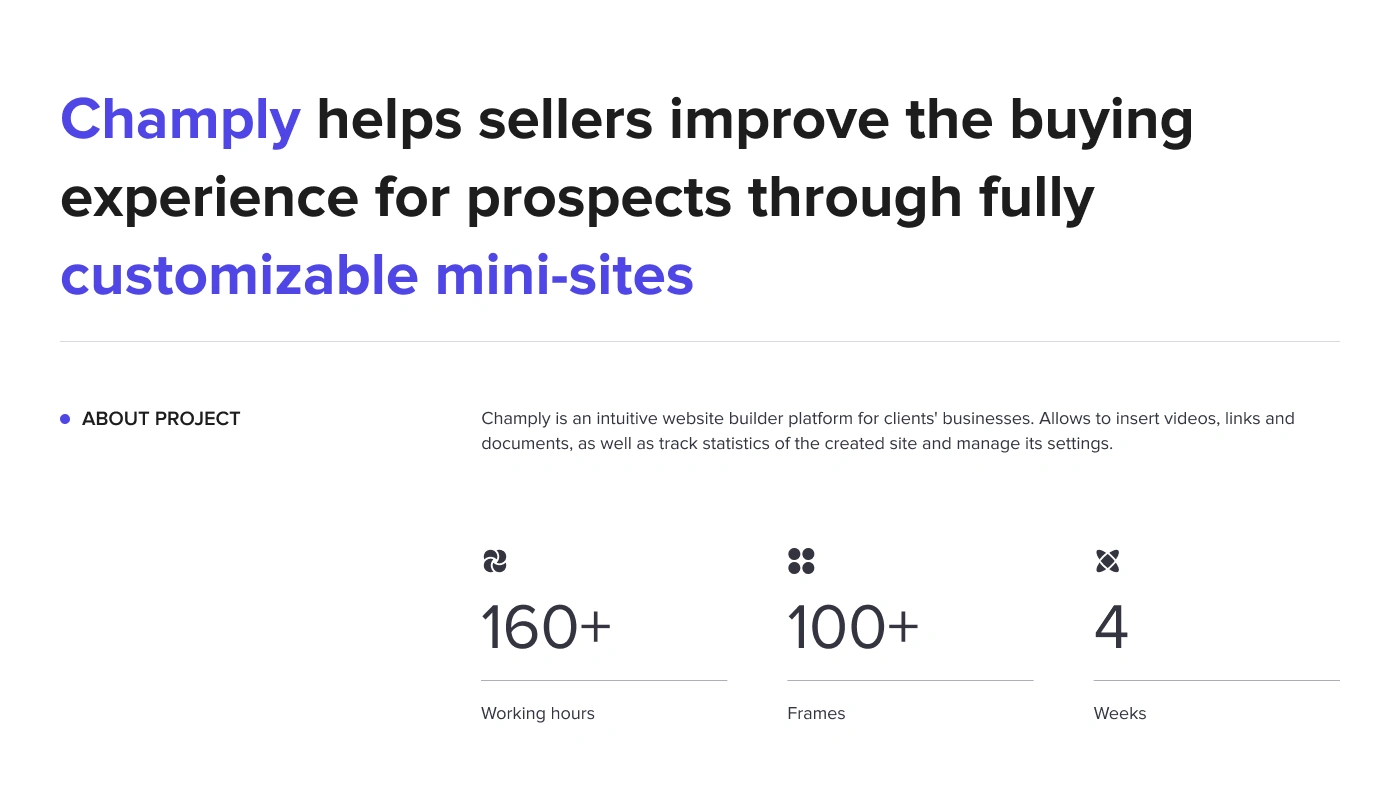
Champly helps sellers improve the buying experience for prospects through fully customizable mini-sites.
The platform allows users to create a site, add business details, edit pages, customize content blocks, publish changes, and track engagement.
The project included:
Website builder
Site blocks editor
Statistics tracking
Content management
Team management
Design system
Clickable prototype
The final design included 160+ working hours, 100+ frames, and was completed in 4 weeks.
Design Process
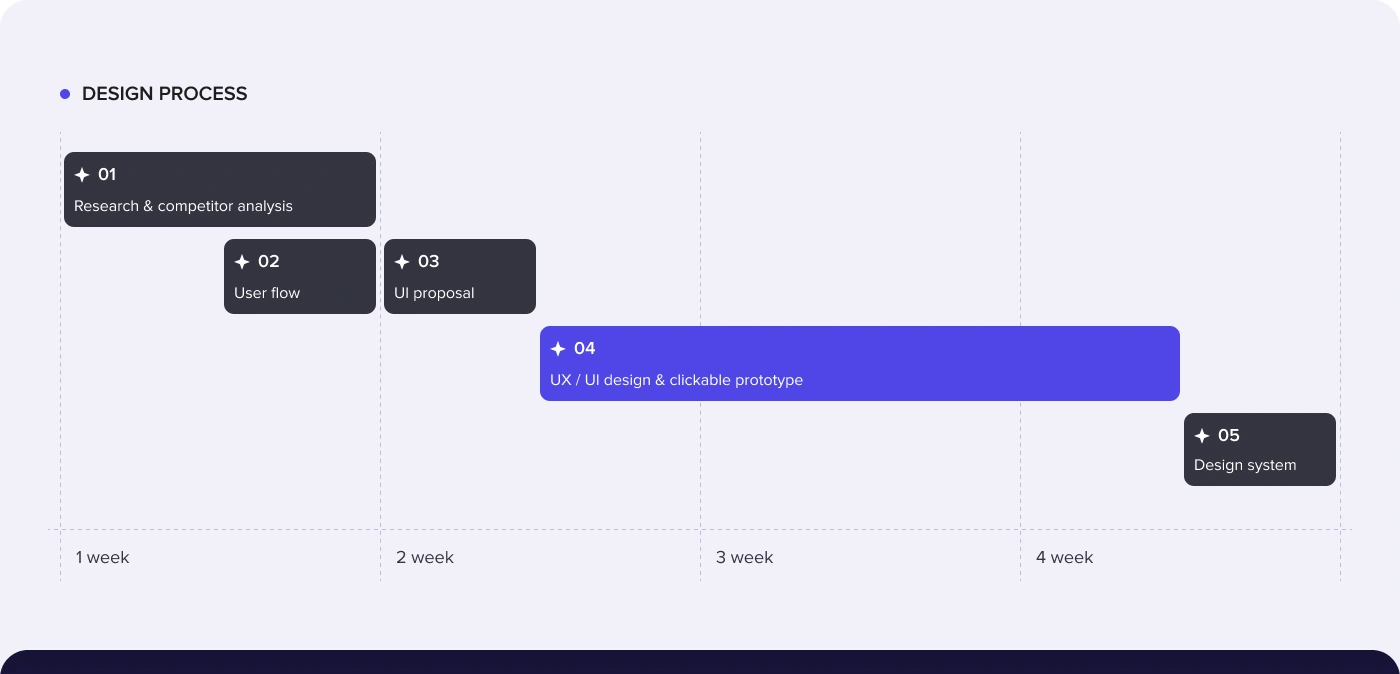
The work followed a structured process focused on product logic, editor usability, and scalable interface components.
1. Research & Competitor Analysis
The first stage focused on understanding how website builders, sales enablement tools, and mini-site platforms structure content creation.
The goal was to identify what users expect from a simple editor and which patterns can make site creation faster and more intuitive.
2. User Flow
A user flow was created to define how users move through the platform:
Create a new site
Add site name
Add company details
Open site page
Edit content blocks
Preview the site
Publish changes
Track statistics
Manage users and teams
This helped structure the platform around clear actions and reduce complexity.
3. UI Proposal
Before moving into full design, a UI proposal was prepared to define the visual direction, layout logic, component style, and overall product mood.
The interface needed to feel clean, modern, and lightweight while still supporting a dense editor environment.
4. UX/UI Design & Clickable Prototype
The main design phase focused on the website builder, dashboard, statistics pages, site editor, content block controls, team management, and settings screens.
A clickable prototype was created to demonstrate the main product experience and show how users can create, edit, and manage sites.
5. Design System
The final stage focused on creating a reusable design system for editor blocks, controls, buttons, icons, inputs, toolbars, panels, and platform screens.
This helped keep the interface consistent across more than 100 frames and prepared the product for future scaling.
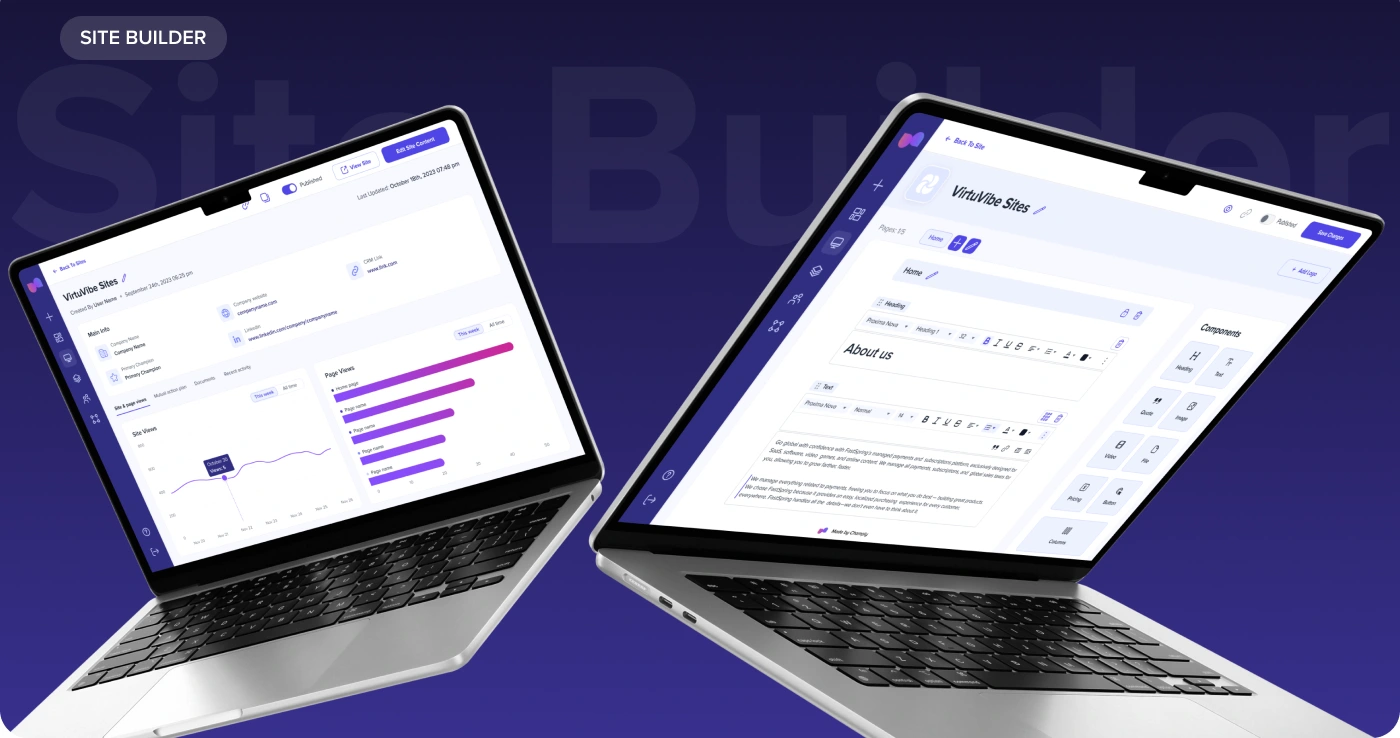
Visual Direction
Champly’s visual identity was designed to feel modern, flexible, and SaaS-oriented.
The interface uses a clean white workspace, soft lavender backgrounds, deep purple navigation, and bright violet accents. This creates a balance between productivity and creativity.
The visual style supports both sides of the product:
A practical dashboard for managing sites and teams
A flexible editor for creating custom content
Website Builder
The website builder is the core part of the platform.
After creating a site, users can manage the main information, company details, site pages, statistics, and settings.
The platform gives users a central space to create and manage content that prospects can interact with.
Key website builder features include:
Create new site
Edit site name
Add company details
Manage pages
Preview site
Publish / unpublish site
Track views
View recent activity
Manage site settings
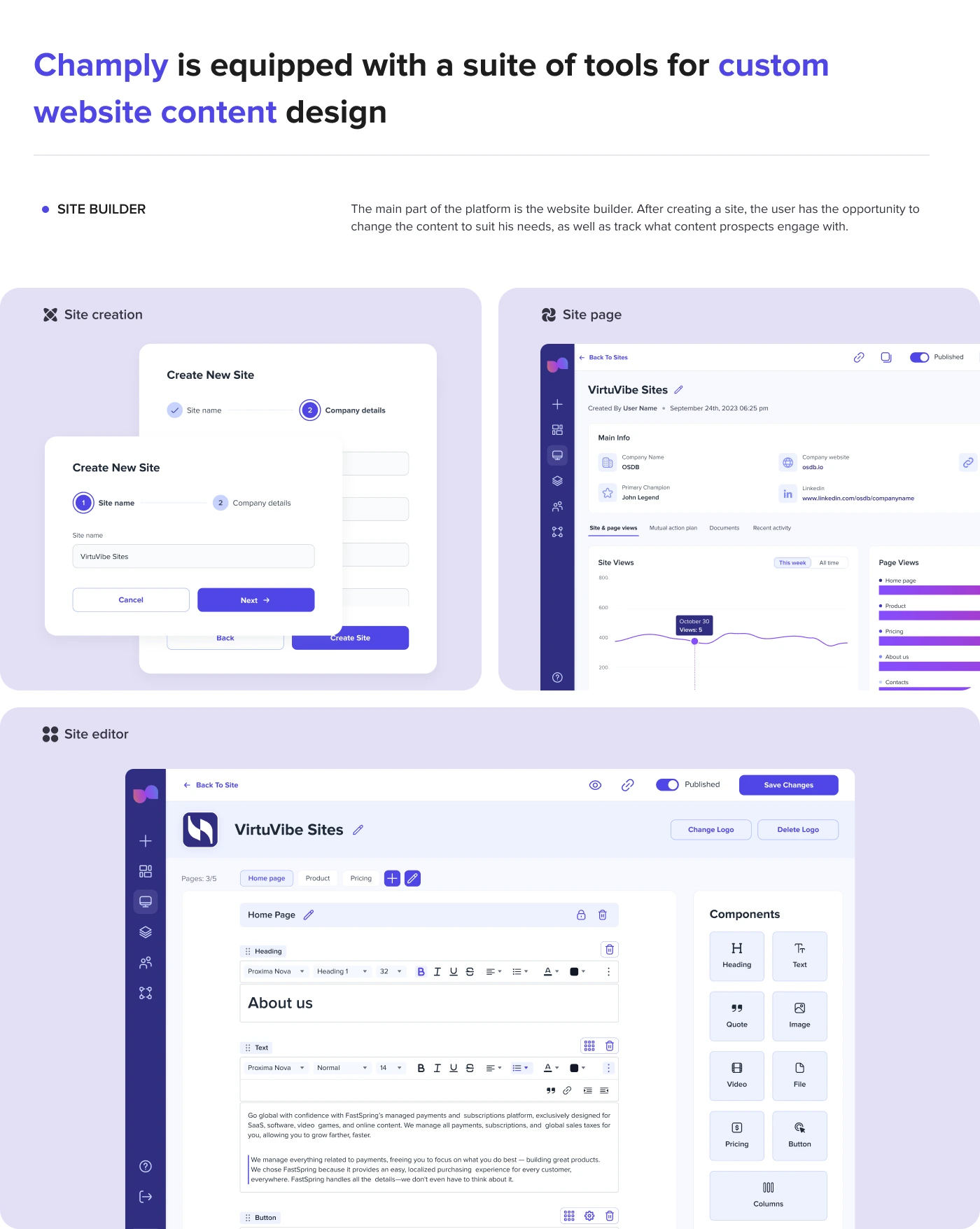
Site Creation Flow
The site creation flow was designed to be simple and guided.
Users start by creating a new site, adding the site name, and entering company details. The multi-step structure helps users complete the setup without feeling overwhelmed.
This flow gives users a clear starting point before they move into the full editor.
Site Page and Statistics
Each site has a dedicated page where users can view key information and performance data.
This gives users a clear overview of how the mini-site performs and which pages or content prospects engage with.
Site Editor
The site editor allows users to build and customize pages using different content blocks.
The editor includes:
Page tabs
Add page action
Block controls
Text editor toolbar
Component panel
Preview action
Published status
Save changes button
Logo management
Page lock and delete actions
The layout keeps the page content in the center and the component library on the right, making it easy to add and edit blocks without leaving the workspace.
Site Editor Features
The editor supports several customizable site blocks: Heading, Text, Quote, Image, Video, File, Pricing block, Button, Content layout, Columns.
Each block was designed with editing states, controls, settings, and reusable patterns. Users can add, edit, rearrange, and customize content without needing technical skills.
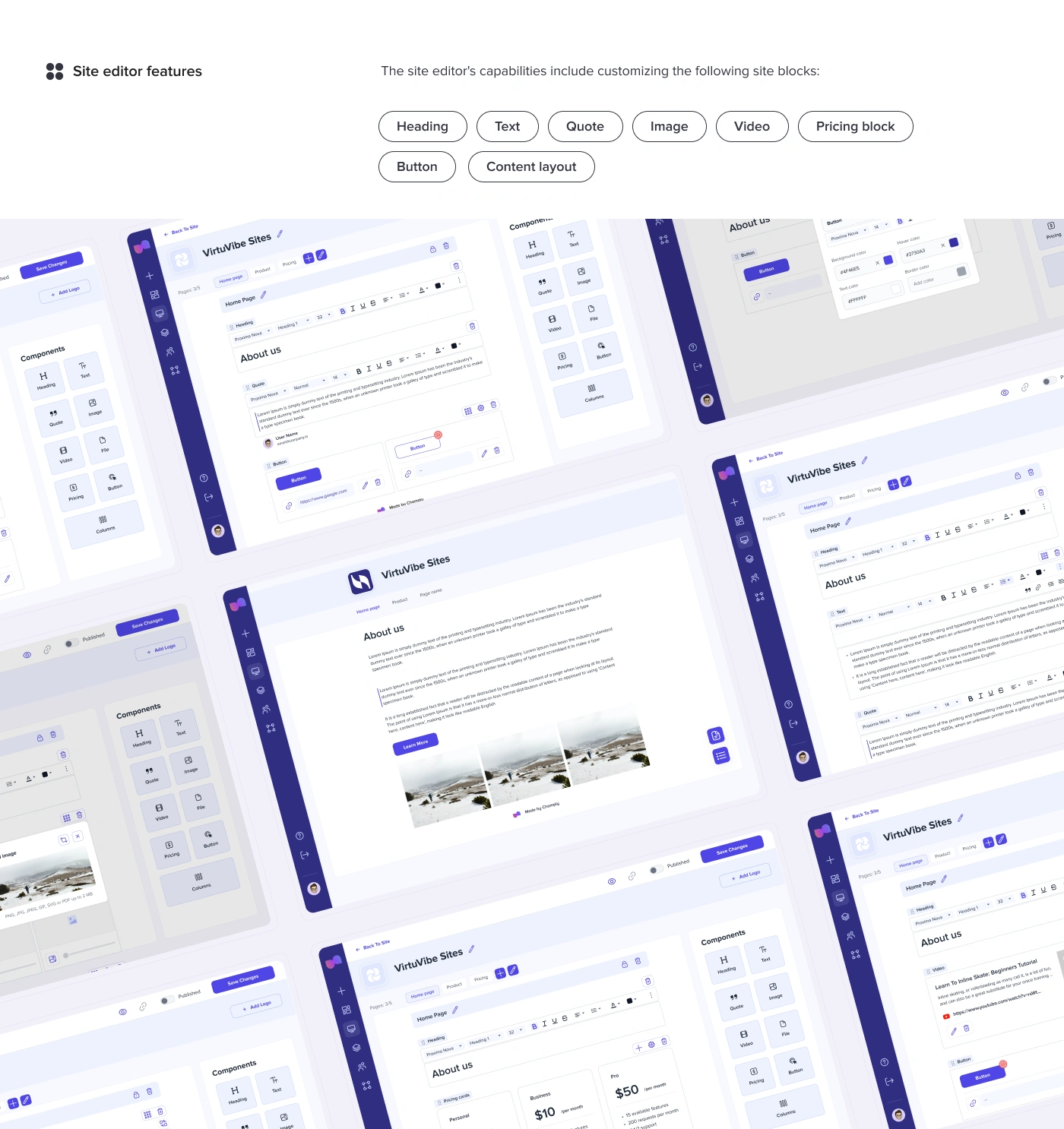
Custom Website Content Design
Champly is equipped with tools for creating custom website content.
Users can build a mini-site that includes different types of content for prospects, such as product information, pricing, supporting documents, videos, quotes, and call-to-action buttons.
This makes the platform useful for sales teams that want to personalize the buying journey and keep all important content in one place.
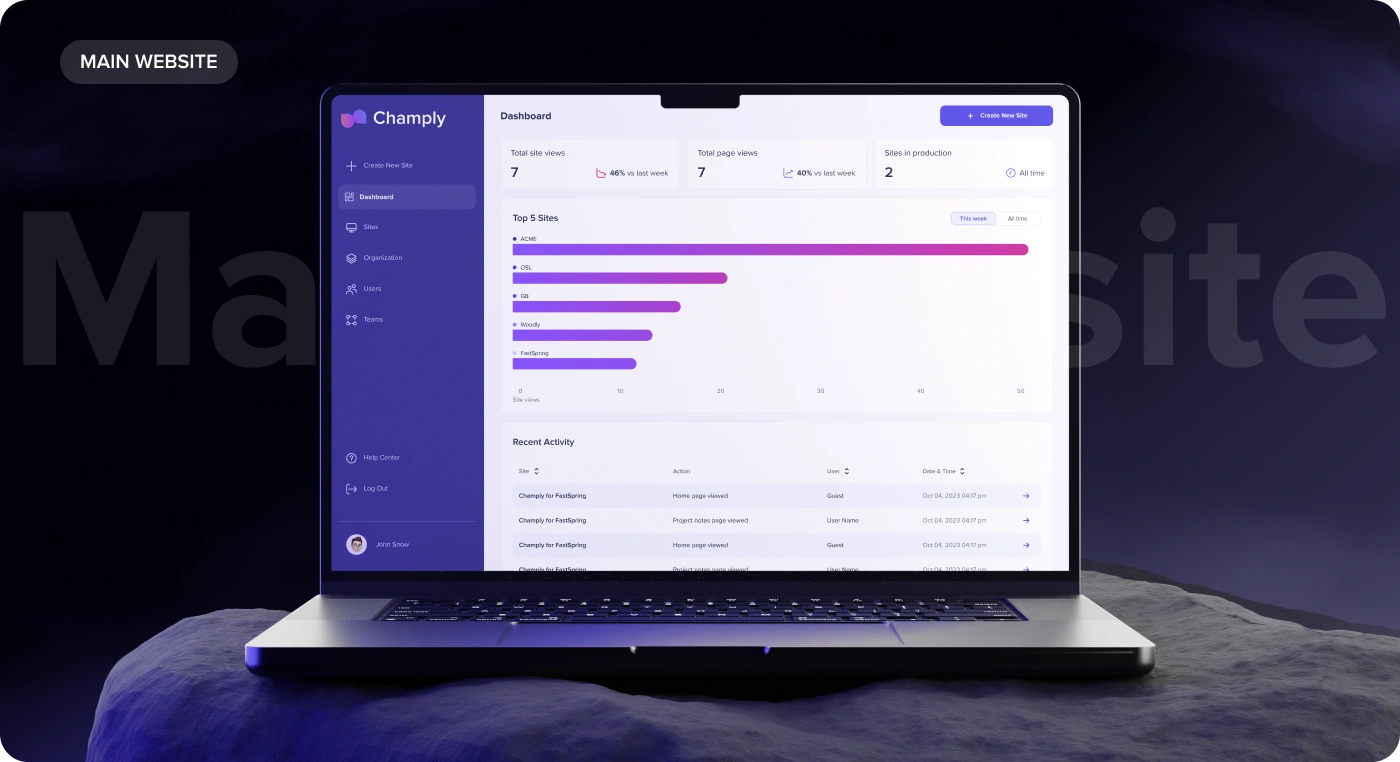
Statistics Tracking
A key part of the product is tracking how prospects interact with created sites.
The dashboard includes:
Total site views
Total page views
Sites in production
Top 5 sites
Recent activity
Weekly and all-time statistics
Page view breakdowns
This helps sellers understand which mini-sites are performing best and what content is getting attention.
Main Platform Dashboard
The main dashboard gives users a high-level view of all created sites and platform activity.
Users can quickly see:
How many sites were created
How many page views were generated
Which sites perform best
What actions happened recently
Which sites are in production
This turns Champly into more than just an editor — it becomes a management tool for created content.
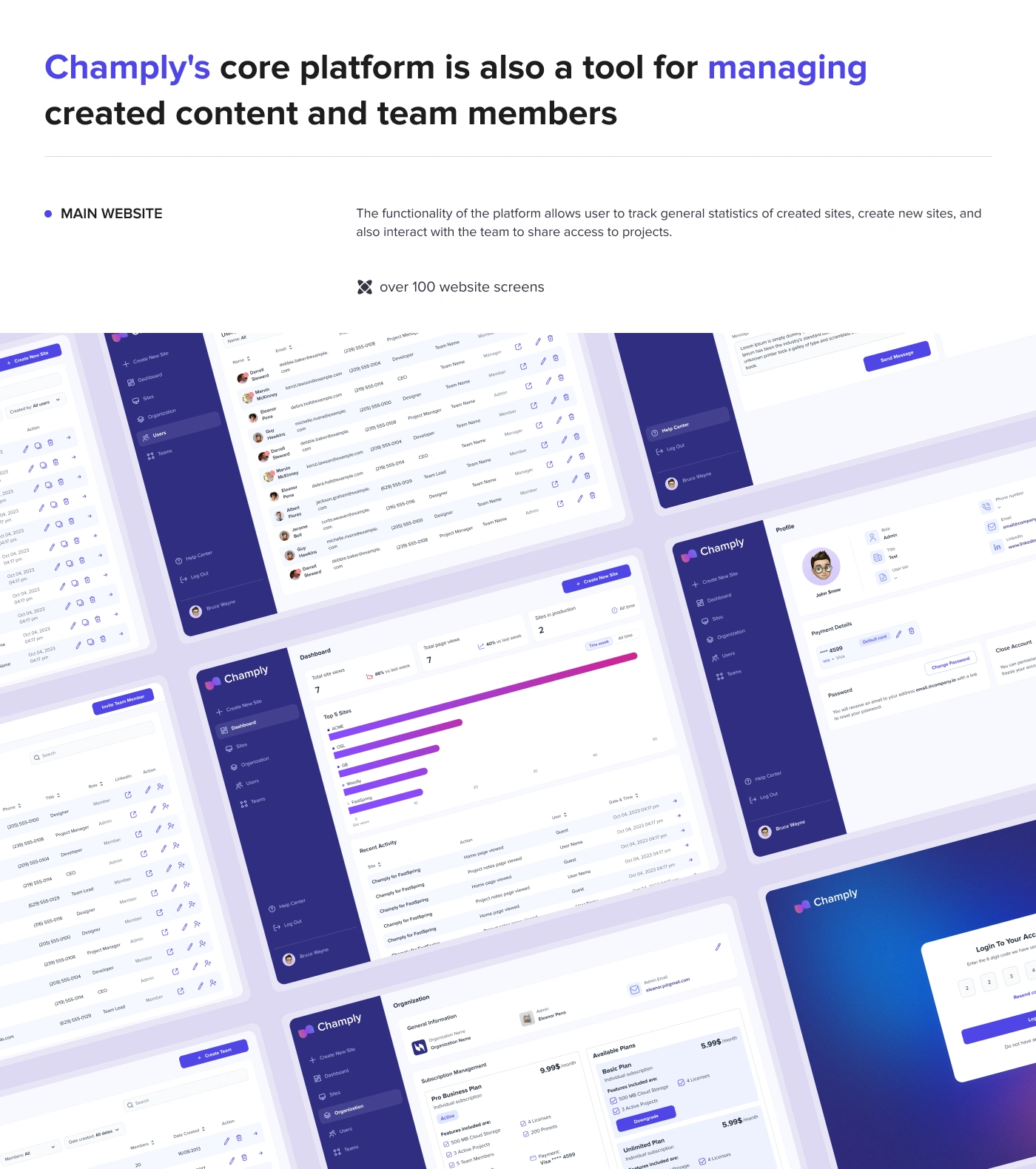
Team and User Management
Champly also includes tools for managing created content and team members.
The platform supports:
Organization settings
User management
Team management
Profile settings
Payment details
Password settings
Access sharing
Team invitations
This makes the product suitable for businesses where multiple people need to create, manage, or review mini-sites.
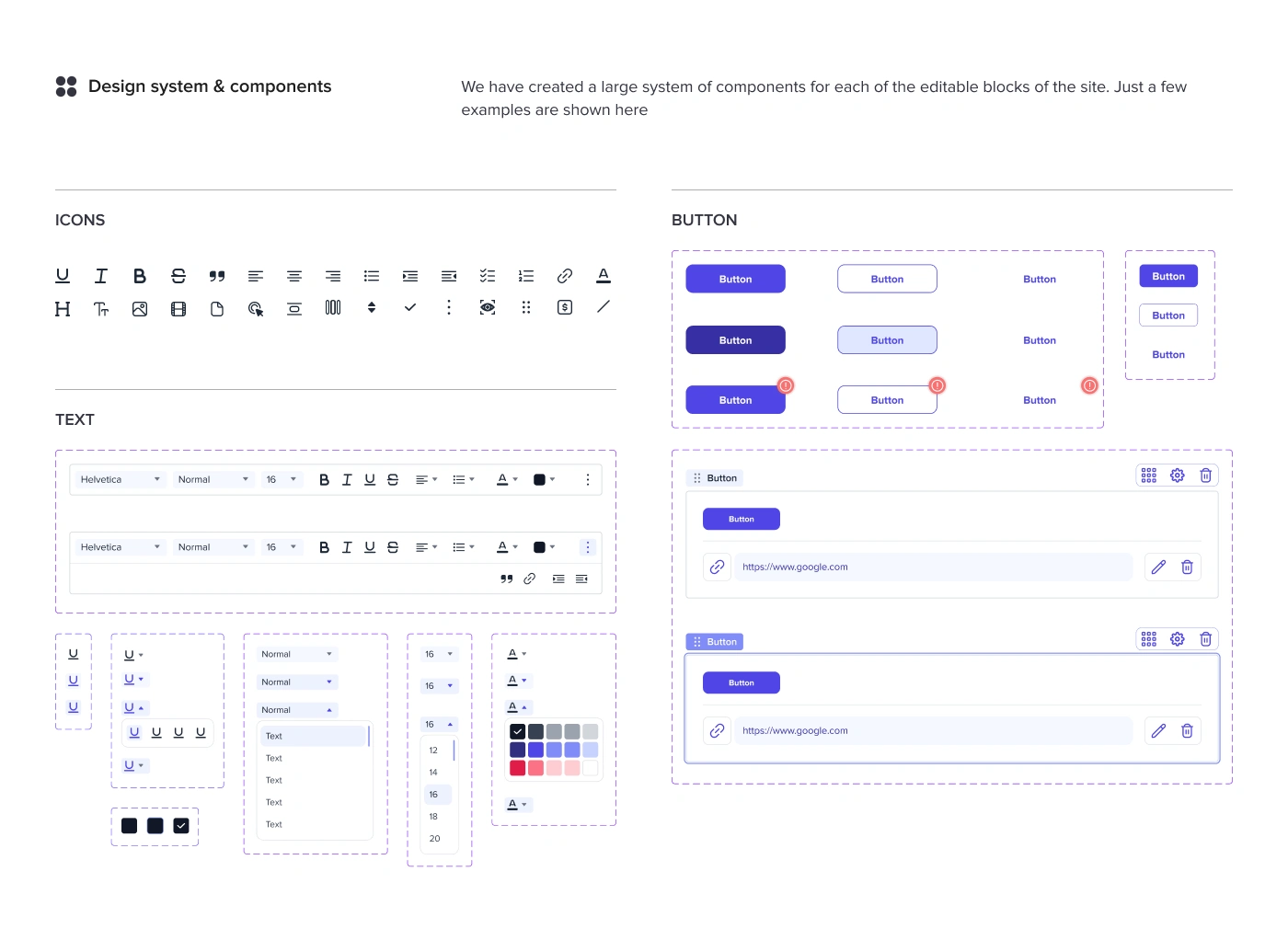
Design System and Components
A large component system was created for the platform. The system included reusable components.
This was especially important because the site editor includes many small interaction states and controls. The design system helped keep them organized and consistent.
Results
The final design created a complete SaaS platform for building, managing, and tracking customizable mini-sites.
Key Results
A full website builder interface for creating and editing mini-sites.
A flexible site blocks editor with headings, text, images, videos, files, pricing, buttons, quotes, and columns.
Statistics tracking for site views, page views, top sites, and recent activity.
Site creation flow with a simple step-by-step setup process.
Team and user management tools for collaboration and access sharing.
A scalable design system with editor components, buttons, icons, controls, and dashboard patterns.
Clickable prototype showing the core platform experience.
100+ screens / frames designed in a 4-week timeline.
Project Scope
This case study covers the design of the Champly website builder platform, including site creation, site editor, block customization, statistics tracking, dashboard, user management, team management, organization settings, and design system.
The product was designed as a scalable foundation for future no-code editing features, deeper analytics, collaboration tools, and advanced content personalization.
Conclusion
Champly is a SaaS website builder designed to help sellers create personalized mini-sites and improve the buying experience for prospects.
The design makes it easy to build custom content, manage created sites, track performance, and collaborate with team members in one platform.
The final result is a clean, flexible, and scalable website builder that combines content creation, statistics tracking, and team management into one connected experience.
✍️ Contact me and I will provide you with an estimate for your project!
Like this project
Posted Apr 23, 2026
UX/UI design for a SaaS website builder for creating custom mini-sites, managing content, tracking engagement, and collaborating with teams.
Likes
0
Views
12
Timeline
Nov 11, 2024 - Jan 2, 2025