E-commerce Dashboard: Sales and Performance Analytics

Muhammad Tayyab


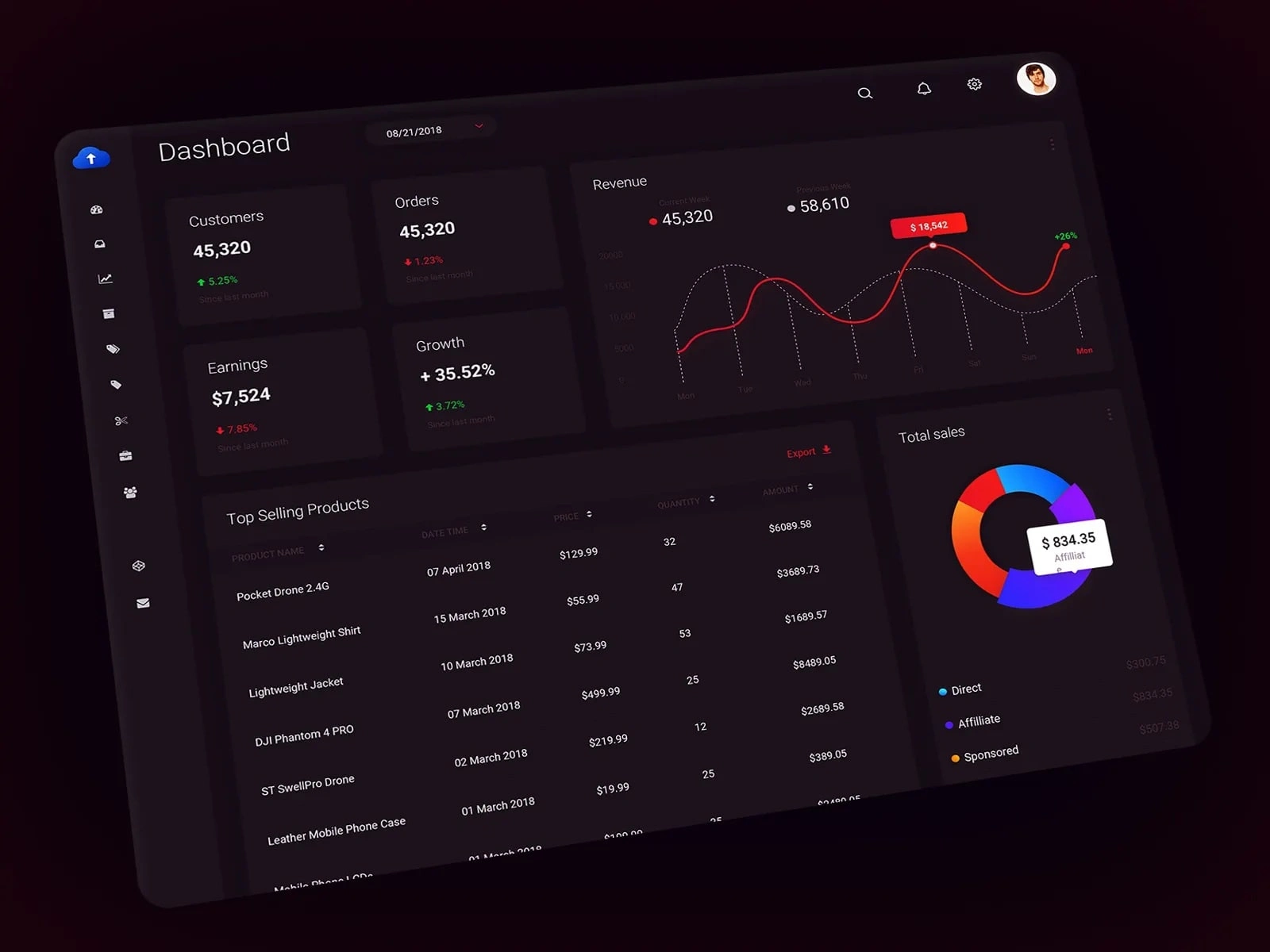
E-commerce Dashboard: Comprehensive Sales and Performance Analytics
As a UX/UI designer, I approached the design of this e-commerce dashboard with the goal of creating an intuitive and data-driven interface that empowers business owners to monitor sales performance, track key metrics, and make informed decisions. The design focuses on clarity, accessibility, and actionable insights to enhance efficiency in managing online stores.
User Research:
The target audience includes small business owners, online sellers, and entrepreneurs who need tools to manage product listings, track performance, and optimize sales.
Key insights revealed the need for a clean, organized layout, real-time updates, and personalized features like revenue tracking and top-selling products.
Information Architecture:
The dashboard is divided into clear sections to provide a structured workflow:
Sidebar Navigation: Includes categories like Dashboard, Customers, Orders, Earnings, Growth, Revenue, Top Selling Products, and Total Sales, ensuring easy access to different functionalities.
Key Metrics: Displays critical financial indicators such as Customers, Orders, Earnings, and Growth percentages, providing quick insights into overall performance.
Revenue Chart: Shows detailed revenue trends over time (Current Week vs. Previous Week) with interactive elements for deeper analysis.
Top Selling Products: Lists popular items with details like date, price, quantity, and total amount, helping users identify high-performing products.
Sales Breakdown: Features a pie chart showing total sales distribution across channels (Direct, Affiliate, Sponsored), offering a comprehensive view of revenue sources.
Visual Design:
Color Palette: Uses a dark mode theme with shades of red, blue, and orange to create a professional and focused look. Bright accents ensure important elements stand out.
Typography: Chose clean, readable fonts for clarity and consistency across all text elements.
Icons and Imagery: Included simple, recognizable icons for each section (e.g., shopping cart for orders, dollar sign for earnings) to enhance usability.
Personalization: Displayed the user's profile picture at the top to create a personalized experience.
Interactive Elements:
Dashboard Widgets: Designed interactive tiles for key metrics (e.g., Customers, Orders, Earnings) with hover effects and drill-down capabilities for deeper analysis.
Charts and Graphs: Implemented responsive charts (e.g., revenue line graph, sales pie chart) with tooltips and zoom functionality to allow users to explore data in detail.
Filter Options: Added dropdown menus and toggles for filtering views (e.g., "Since last month") to enable users to customize their perspective.
Call-to-Action Buttons: Positioned prominently with labels like "Export" to encourage users to take action.
Usability:
Navigation: Kept the sidebar navigation simple and intuitive, allowing users to easily switch between different sections of the dashboard.
Accessibility: Ensured sufficient contrast between text and background for readability, especially for critical information like revenue figures and growth percentages.
Responsiveness: Designed the layout to adapt well to different screen sizes, maintaining readability and functionality on both desktop and mobile devices.
Data Visualization:
Metrics Cards: Showed critical financial data (e.g., 45,320 Customers, $7,524 Earnings) in concise, visually appealing formats.
Revenue Line Graph: Compared current week revenue trends with previous weeks, highlighting changes and patterns for better decision-making.
Pie Chart: Provided a clear breakdown of total sales by channel (Direct, Affiliate, Sponsored), making it easy to understand revenue distribution.
Engagement:
Real-Time Updates: Included live data feeds for metrics like customer counts, order volumes, and earnings to keep users informed about their store’s performance.
Notifications: Highlighted important updates (e.g., new orders, revenue changes) with clear visual cues to ensure timely action.
Performance Tracking: Provided detailed insights into top-selling products and revenue trends, motivating users to optimize their inventory and marketing strategies.
By focusing on clarity, interactivity, and actionable insights, this design aims to provide sellers with a seamless and productive e-commerce management experience. The combination of vibrant visuals, intuitive navigation, and meaningful data ensures users can efficiently manage their online store operations.
Like this project
Posted Jun 8, 2025
Designed an intuitive e-commerce dashboard for sales and performance analytics.
Likes
0
Views
8