
Senior WordPress UX/UI Designer | ACF & WooCommerce
- 1x
- Hired
- 5.0
- Rating
- 41
- Followers
Senior WordPress UX/UI Designer | ACF & WooCommerce


AI Creative Specialist|AI Video Creator |AI UGC & Animation
- 5.0
- Rating
- 56
- Followers
AI Creative Specialist|AI Video Creator |AI UGC & Animation




Professional Web App & Website Developer

From Slow to Fast: How I Audit and Optimize Next.js Websites
Not every website needs a complete rebuild.
Recently, I audited a fitness platform built with Next.js. At first glance, everything looked polished, but a deeper technical review revealed several issues affecting speed, user experience, and search performance.
What I found
Homepage payload of over 3.3 MB
Oversized images slowing down page loads
Unused CSS and JavaScript increasing bundle size
Poor Core Web Vitals, including high layout shift (CLS)
Render-blocking resources delaying the first paint
Accessibility issues affecting screen readers
Runtime console errors that could lead to inconsistent behavior
My approach
Instead of suggesting a rebuild, I focused on optimization.
The audit included:
✅ Performance analysis
✅ Core Web Vitals review
✅ Accessibility audit
✅ UI/UX improvements
✅ Runtime debugging
✅ Technical SEO review
✅ Next.js best practices
The goal was to improve loading speed, create a smoother experience across devices, and make the codebase easier to maintain without disrupting the existing functionality.
Why this matters
A faster website doesn't just feel better it can improve search rankings, reduce bounce rates, increase conversions, and make future updates much easier.
Sometimes the biggest gains come from refining what's already there rather than starting over.
If you have a Next.js, React, or modern web application that feels slow or isn't performing as expected, I'd be happy to review it and point you in the right direction.
1
3
414

A Good Website Is Not Just About Design. It's About How Well It Works.
A business website can look visually impressive and still fail to achieve its purpose.
I've seen this problem repeatedly in website development discussions: too much attention goes into appearance, while important things like navigation, loading speed, mobile responsiveness, and conversion flow are overlooked.
Let's look at a practical example.
Imagine you're building a website for a consulting business.
A potential client visits the homepage. Within a few seconds, they should be able to understand:
What services the business provides.
Who those services are designed for.
Why they should consider the business.
How to take the next step.
Now consider what happens if the website has confusing navigation, slow-loading pages, unclear service descriptions, or a contact form that doesn't work properly.
You could lose a potential customer even if the website looks beautiful.
5 things I consider important when developing a business website
1. Clear website structure
Every page should have a purpose. Your homepage, service pages, about page, and contact page should work together to guide visitors.
2. Mobile responsiveness
A website should work properly across smartphones, tablets, and desktop screens. Visitors shouldn't have to zoom in or scroll sideways to access important information.
3. Website performance
Large images, unnecessary scripts, and poorly optimized resources can affect loading speed. Performance should be considered during development, not treated as an afterthought.
4. Functional contact forms
A contact form should do more than display input fields. It should validate information, handle submissions properly, provide confirmation, and deliver inquiries to the correct destination.
5. Search engine foundations
Proper page titles, meta descriptions, heading structure, descriptive URLs, and image alt text help establish a stronger SEO foundation.
A practical development checklist
Before launching a business website, test the following:
All navigation links work.
Forms successfully submit.
Website displays correctly on mobile.
Images are optimized.
Important pages have clear calls to action.
No broken links or missing pages.
Basic SEO elements are configured.
SSL and security settings are in place.
My takeaway:
A successful website brings together design, functionality, performance, and usability.
Don't just build a website that looks good in a screenshot. Build one that works for the people using it and supports the goals of the business behind it.
Discussion: When evaluating a business website, what matters most to you: design, loading speed, user experience, or functionality?
1
59

YOU SHOULDN'T HAVE TO SPEND HOURS COLLECTING DATA JUST TO UNDERSTAND YOUR BUSINESS PERFORMANCE.
Many businesses collect information from different sources.
For example:
Sales records are stored in one application.
Customer information is stored in a CRM.
Expenses are tracked in spreadsheets.
Website performance is monitored separately.
The challenge is bringing all this information together.
This is where automated reporting becomes useful.
Imagine this workflow:
Your sales platform records new transactions.
Your expense spreadsheet receives updated information.
Your CRM tracks customer activity.
Data is connected to a reporting dashboard.
Your dashboard displays updated business information.
Instead of manually compiling different reports every time, you can create a system that organizes important information in one place.
What can an automated dashboard help you monitor?
📊 Sales performance.
📊 Customer acquisition.
📊 Business expenses.
📊 Lead conversion.
📊 Team productivity.
Tools such as Google Sheets, Excel, Power BI, and automation platforms can help create connected reporting systems.
Remember: Data is valuable, but organized and accessible data is even more useful when making business decisions.
What business metric would you most like to monitor from one dashboard?
#DataAutomation #BusinessAutomation
0
27

Why Most Gym Owners Lose Members Before They Ever Visit
Last week, I was helping a fitness business prepare for a major system transition.
What looked like a simple CRM setup quickly became a customer experience problem.
A new member should be able to:
✅ Choose the right membership
✅ Register easily
✅ Book classes without confusion
✅ Understand exactly what they're paying for
But small setup mistakes can create friction:
Too many membership options
Confusing booking flows
Classes mixed together without structure
Hidden settings affecting visibility
Technology isn't usually the problem.
The real challenge is designing a system that feels simple for members while staying manageable for staff.
That's where CRM and business automation become valuable not because of the software itself, but because of the experience it creates.
If your business relies on memberships, bookings, appointments, or recurring customers, your systems may be affecting conversions more than you realize.
What customer journey are you currently using?
0
179


Experienced Brand & UX Strategist for Web Design


View more →

WordPress & WooCommerce Developer | SEO Expert
WordPress & WooCommerce Developer | SEO Expert

A client's website was suffering from severe load delays and failing Core Web Vitals, which actively harmed their Google rankings and user retention.
Here is how I engineered a high performance turnaround:
1. Forensic Speed Audit: Conducted a deep dive to identify and eliminate render blocking JavaScript.
2. Advanced Caching Setup: Configured robust server side caching to drastically improve load times.
3. Next Gen Media Conversion: Executed a site wide conversion of heavy images into WebP formats, cutting page weight significantly with zero quality loss.
The site now achieves stable 90+ Google PageSpeed Insights scores on both mobile and desktop. All Core Web Vitals errors are fully resolved, and organic search visibility is restored.
0
109

A client needed a high-performing wellness travel site built with Elementor Pro. They required precise, mobile-responsive layouts and a simple way to manage dynamic frontend "Offers" without needing a developer for every update.
Here is how I engineered the solution:
1. Custom Architecture: Built a lightweight, custom Elementor Pro foundation optimized for speed and structured perfectly for technical SEO.
2. Dynamic Content Integration: Utilized Advanced Custom Fields (ACF) to create Custom Post Types. This empowered the client to easily add, edit, or remove custom travel offers directly from their dashboard without touching a single line of code.
The result was a fast-loading, highly dynamic website. The successful launch not only met all requirements but led to a 5-star review and an ongoing, long-term technical partnership.
0
97

A client's Elementor Pro editor was completely frozen on the loading screen, bringing all website design updates and content publication to a sudden halt.
I initiated an emergency technical audit to isolate the root cause. Here is how I resolved the crisis:
1. Plugin Auditing: Identified and safely disabled conflicting legacy plugins that were breaking the live environment.
2. Server Optimization: Diagnosed and resolved severe PHP memory limit constraints that were choking the builder.
3. Systematic Debugging: Optimized the server configuration to ensure the backend remains highly stable.
Full functionality to the Elementor builder was instantly restored, preventing future crashes. I also provided the client with a clear, jargon free breakdown of the failure so they knew exactly what was fixed.
0
127

A recent client needed an urgent, site-wide SEO overhaul. Their organic visibility was suffering due to generic meta tags and a poor internal linking structure, and they needed a solution fast.
Here is how I tackled the tight deadline and delivered a fully optimized site:
1. Rapid Forensic Audit: I started by mapping out the entire site architecture to pinpoint keyword opportunities and establish a targeted strategy.
2. Custom Meta Optimization: I engineered high-converting meta titles and descriptions across the board to boost organic click-through rates.
3. Siloed Internal Architecture: I built a logical internal linking structure to distribute page authority effectively, making it easier for Google to crawl and users to navigate.
The project was delivered well ahead of the strict deadline. The website is now structurally sound, fully optimized for search engines, and ready to scale organic traffic.
1
136


Online Store Management & Admin Support for smooth operation
New to Contra
Online Store Management & Admin Support for smooth operation

Arielle Beauty Care - Performance Optimizaiton
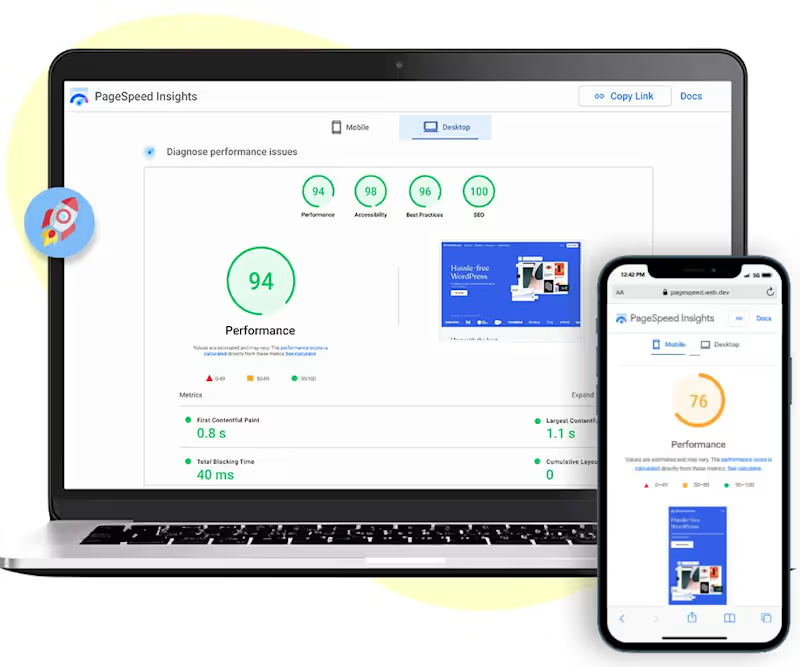
The client store has poor performance on both Mobile and Desktop devices from Google PageSpeed Insight and GTMetrix. Also, the Loading Speed Score is very high on the store backend.
I help the client to optimize the speed of the Shopify store. I have attached the current Mobile and Desktop scores. You can also analyze your store performance on Google speed testing tools :
Google PageSpeed Insights:
https://pagespeed.web.dev/analysis/https-ariellebeautycare-com/ry9nto5755?form_factor=desktop
1
45

My role. Shopify Developer & UX/UI Designer
Project description. I designed and optimized a premium Shopify footwear and fashion store inspired by the user experience of Sam Edelman. The project focused on recreating a luxury, conversion-driven storefront similar to Sam Edelman Official Website, emphasizing clean product discovery, advanced filtering, mobile-first design, and high-performance theme customization. I improved navigation structure, product page UX, and collection layouts to enhance engagement and sales readiness.
Skills and deliverables
Product Page
Shopify Theme
Page Speed Optimization
Shopify Development
Shopify Website Design
1
37

My role. UI/UX Designer & Ecommerce Website Designer
Project description.
This luxury watch ecommerce website concept was designed to deliver a premium online experience for high-end timepiece brands. The goal was to create a modern, elegant, and user-friendly platform that showcases watch craftsmanship while maintaining a seamless shopping journey. Using sophisticated typography, luxury-inspired visuals, intuitive navigation, and responsive layouts, the design enhances product discovery and brand perception. The result is a visually immersive ecommerce experience that builds trust, improves engagement, and reflects the exclusivity of luxury watch brands.
Skills and deliverables
UX & UI Design
Ecommerce Website
Figma
Ecommerce Website Development
Visual Design
1
39

Elegant Luxe Co.
Shopify Store Design & User Experience
Project Type: Shopify Store Design & Development
Industry: Women's Fashion & Apparel
Platform: Shopify
Elegant Luxe Co. is a premium women's fashion brand focused on modern, elegant, and statement-making apparel. The objective was to create a luxurious Shopify shopping experience that reflects the brand's identity while increasing customer engagement, improving navigation, and encouraging more conversions.
I designed a visually appealing, mobile-responsive Shopify storefront that blends premium aesthetics with an intuitive shopping experience.
1
40

SEO Expert | Boost Rankings, Traffic, and Visibility Fast!



View more →