Freelancers using Google Sheets in LagosFreelancers using Google Sheets in Lagos
The AI Trick That Closed $10K While I Slept
5.0
Rating
19
Followers
The AI Trick That Closed $10K While I Slept
AI Automation Specialist | n8n, Make, GHL & AI Agents
1x
Hired
75
Followers
AI Automation Specialist | n8n, Make, GHL & AI Agents
Create thoughtful and exciting designs with me. Welcome!
5.0
Rating
9
Followers
Create thoughtful and exciting designs with me. Welcome!
Automation Expert
New to Contra
Automation Expert
Cover image for I Built a System That
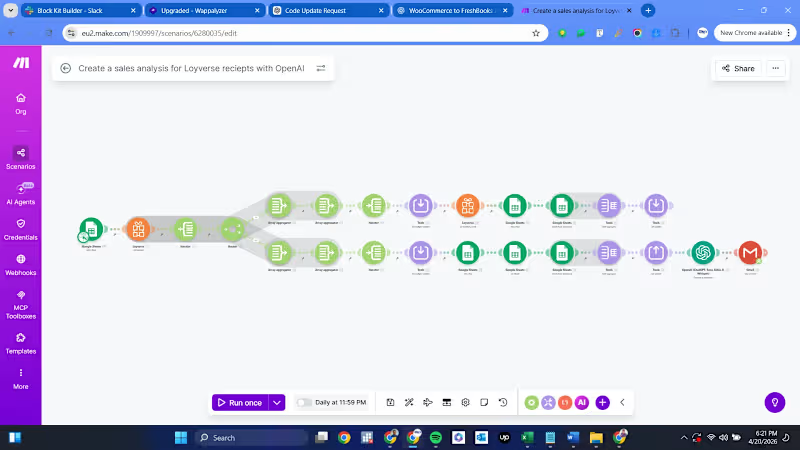
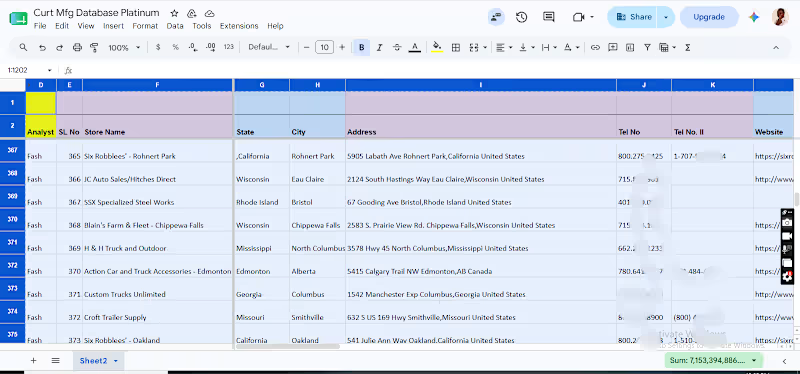
I Built a System That Reads All My Customer Feedback and Sends Me a Full Report Automatically So last week, a friend who runs a training business in Abuja asked me something interesting. He collects feedback after every cohort through Google Forms. Over 6 months he had about 400 responses sitting in a Google Sheet. I asked him what patterns he was seeing. He looked at me and said: "Guy, I opened that sheet once. I read maybe the first 20 rows and closed it. Who has time to read 400 responses one by one?" That is a real problem. He spent money running the forms, spent time distributing them, but the actual data never got used. The insights just sat there collecting dust. That conversation is exactly why I built the system I am going to show you today. It reads your entire Google Sheet of feedback, sends everything to an AI model for deep analysis, and delivers a clean professional report straight to your Telegram. No manual reading. No CSV exports. No guesswork. What This Workflow Does You connect it to any Google Sheet that collects form responses. The system pulls every single row, groups all the answers by question automatically, and feeds the entire batch to DeepSeek AI. The AI analyzes the full dataset and produces a structured report covering overall sentiment, what customers are praising, what they are complaining about, specific recommendations for what to do next, and notable quotes worth paying attention to. That report lands in your Telegram within seconds. If the sheet is empty or something breaks, you get an error alert in the same chat explaining exactly what happened. How I Built It (5 Core Nodes) Here is the core architecture: 1. Google Sheets Node Connects directly to your spreadsheet. Pulls every row from the responses tab in one operation. 2. Aggregate Node Combines all individual rows into a single batch so the AI can analyze everything together instead of one response at a time. 3. Format Feedback Code Node This is the smart part. It reads whatever column headers your form has and groups all answers under each question automatically. If your form has 3 questions or 10 questions, it works the same way. It also adds the total response count. 4. DeepSeek LLM Chain The AI engine. Takes the formatted feedback and writes a professional analysis report. Covers sentiment, highlights, complaints, actionable next steps, and standout quotes. 5. Telegram Delivery Sends the finished report to your phone instantly. If the data was empty, a separate error alert fires instead so nothing fails silently. What It Costs n8n hosting: Already running (Railway) Google Sheets API: Free DeepSeek API: Less than 1 cent per analysis run Telegram Bot API: Free Total: Practically zero compared to hiring someone to read feedback manually.The Business Value If you collect feedback from customers, students, event attendees, or employees and you are not analyzing it consistently, you are wasting the effort you put into collecting it. This automation guarantees every single feedback cycle gets read and summarized. The AI catches patterns a human skimming through rows would miss. Whether you run a training company, a restaurant, an e-commerce store, or a service business, if you have a Google Sheet with customer responses, this workflow turns that data into something you can actually act on. I deployed this today and it is running live right now.:: I build these systems for businesses.ย If you need automated feedback analysis, customer sentiment tracking, or any kind of business process automation, send me a DM. I will break down exactly what I can build for your specific use case.
0
25
Cover image for You can build the most
You can build the most visually stunning workflow in the world, but if it breaks at the first sign of trouble, it is useless. That is why we bring in the heavy hitters to catch those failures and save the automation. This morning at 9:22 AM, my Telegram pinged me before I even opened my laptop. My n8n automation agent had already crawled Hacker News, found a trending GitHub security repository, drafted both a Twitter and LinkedIn post, and delivered the full content to my phone. The repository? RedSun. A proof-of-concept exploit showing how Windows Defender cloud tag logic can be abused to overwrite system files and escalate privileges to SYSTEM level. Windows 10/11 and Server. April 2026 patch cycle. Very real. Very timely. How the System Works Native HTTP Crawler No Zapier. No paid scrapers. n8n fetches Hacker News HTML directly on its own server. Parse and Filter A Code node extracts GitHub links and cross-checks Airtable. If I already posted it, it skips. Zero duplicates. DeepSeek Content Generator Sends the clean data to DeepSeek AI which writes a short Twitter post and a long LinkedIn post automatically. Telegram Delivery The drafted content lands on my phone. I read it, approve, then post manually. The X and LinkedIn nodes are intentionally disconnected for now. Human eyes before anything goes live. That is the rule. Error Guard A parallel Error Trigger node monitors the entire flow. If anything breaks, I get an instant Telegram alert. Nothing dies silently. I build these systems for businesses. Content pipelines, CRM sync, lead capture automation, you name it. Send me a DM and I will break down what I can build for your operation. New automation drop every single day. Follow the thread.
0
28
Cover image for I Built a Zero-Cost Lead
I Built a Zero-Cost Lead Capture Pipeline from Form to Google Sheets inside n8n So earlier today, I was speaking with a client. He runs a logistics business in Lagos and spends heavy money on Facebook ads to capture leads. When I asked him how fast his sales team calls the people who fill out his form, he laughed and said: "Ah, my secretary exports the CSV file from the site dashboard every Friday and we call them over the weekend." I had to tell him the hard truth: By Friday weekend, that lead is absolutely dead. If you don't call a lead within 10 minutes, you might as well burn your ad budget. He knew this, but he complained that paying for Zapier just to sync his form directly to his Google Sheets and ping his phone was too expensive for his current operation ($30+ per month just for webhook middleware). That conversation is exactly why I built the system I'm going to show you today. It hosts your form natively, logs data directly into Google Sheets, and pings your phone instantly. No Zapier, no $30/month subscription. What This Workflow Does You share a simple URL link. A prospect clicks it and submits their name, email, and inquiry. Within 2 to 3 seconds, that data is pushed into your Google Sheets automatically. At the exact same second, your personal Telegram pings you with the exact lead details so you can call them immediately. If anything breaks or Google goes down, you get an instant error alert on your phone. No data is ever lost. How I Built It (Just 4 Nodes) Here is the core architecture: 1. n8n Form Trigger This completely replaces expensive tools like Typeform. n8n hosts the form securely on its own server. You just define the fields (Name, Email, Message) and share the link. 2. Parse Lead Fields A small code logic gate that extracts the form submission cleanly and adds a perfect Date/Time stamp so you know exactly when the lead came in. 3. Append Row In Google Sheets Connects straight to your Google account. It takes the clean parsed data from node 2 and drops it directly into the correct columns in your target spreadsheet. 4. Telegram Priority Notification Sends an alert reading "New lead captured!" straight to your phone with the Name, Email, and Message attached. 5. The Error Guard A failsafe node. If anything fails anywhere in the flow, an Error Trigger fires an alert to your admin chat with the timestamp, so no lead ever disappears silently. What It Costs n8n hosting: Already running (Railway) Google Sheets API: Free Telegram Bot API: Free Total: Basically zero compared to paying $30+/month for standard connector software.The Business Value If you run ads, do email outreach, or capture leads anywhere online, response time is everything. Automating the bridge between lead submission and your spreadsheet removes human error entirely. The instant Telegram ping means you can call a hot lead within 10 seconds of them clicking "Submit". This is not theory. I deployed this today and it is running live right now. I build these systems for businesses.ย If you need an automated lead pipeline, CRM synchronization, or any kind of business process automation, send me a DM. I will break down exactly what I can build for your specific use case. New automation drops in this thread every single day. Follow to stay updated.
0
38
Ai automation specialist and CRM integrator, website designe
New to Contra
Ai automation specialist and CRM integrator, website designe