The network for creativity
Join 1.25M professional creatives like you
Connect with clients, get discovered, and run your business 100% commission-free
Creatives on Contra have earned over $150M and we are just getting started
Back to feedPost


I've made a tutorial on how I turned a basic video into a half-animated world using CapCut AI Effects with the New Age Art filter.
TUTORIAL:
1. Upload your clip into CapCut
2. Fix the base. I always use the auto adjust to clean up lighting and improve quality first.
3. Go to Effects, then AI Effects, and choose the New Age Art effect. Apply it and let it process fully.
4. Overlay your original video and place it on top.
5. Add a mask so you create a rectangle or any shape in the centre with the real footage. The animated version stays in the background.
You end up with this split reality look. Half real, half animated.
If you try it, add the video in the comments or tag me on your post.

Super creative technique.
The split reality effect is such a smart way to make AI feel intentional instead of overused. Thanks for breaking it down so clearly 👏
right?!


Such a great tutorial 🙌
thanks a lot😊

That is such a lovely template! ❤️
😊 thank you

great


This is such a cool breakdown

The New Age Art filter combined with the auto adjust trick is such a good starting point. Starting with a clean base before applying effects makes such a noticeable difference to the final output. Going to try this workflow on a clip I have been sitting on.
yess, please tag me if you post your version

Sorry this is not helpful it's just a lot scrolling...
You can pause the video if you need time to follow the tutorial.

noice

really helpful
yyay, have you tried it?
yes u did it

Very cool!

The 'split reality' concept is a great way to showcase technical skill without losing the human element of the video. Great share!

Great

Such a cool concept to mix AI filter with real footage. A lot of potential. Thanks for the tutorial Rita!
I am glad you liked it

I'd want to try it! Getting on capcut just for this!
hehe so glad! hit me up if you get to try this effect

Good Tutorial!

gotta love this!

How can I save this
I’d love to share the template link, but for some reason I don’t have the Post Template button even after enrolling as a creator.


Very cool!

This is amazing

Nicely done.

Nice hook!

That is so cool

This is a great example of how AI is lowering the barrier to high-quality visual storytelling. With the right workflows, creators can scale content production massively.

Nailed it

Really cool breakdown 🔥

so cool!
thank you, girlie ❤️

Amazing!

wow so cool this is

oh, cool! Thank you!

Wow! This is amazing
The network for creativity
Join 1.25M professional creatives like you
Connect with clients, get discovered, and run your business 100% commission-free
Creatives on Contra have earned over $150M and we are just getting started
Related posts
Giving a fresh feel to my client's website with @Envato at the forefront of my workflow. 👩🎨🍋
Combining my client's brand design and creative assets from Envato, I animated the product using Envato's AI toolkit.
AI is still falling short on delivering a stand alone hero-section-ready output, this is where the human creativity comes in.
AI video was good but flat so I layered in depth, image and texture I got from Envato, giving it fresh, creative, brand-aligned look the raw AI output could not deliver.
Is "technically good", "actually good"?
I think it's a distinction AI can't tell. What do you think?
See the full workflow and the part AI can't deliver in the video. 🎬


Agree with the distinction. Technically good usually means the output is coherent and error free, actually good means it fits the brand and makes the client's product feel like theirs. That second part is still very much a taste call, not something a model can judge for itself yet.

I created this project to explore how AI can transform architectural concepts into cinematic visual experiences. By combining dynamic camera movement, atmospheric lighting, and modern interior design, I developed a luxury visualization that showcases the potential of AI in architectural storytelling and real estate marketing. #AIVisualization #ArchitecturalVisualization #InteriorDesign #AIVideo #LuxuryInteriors #CinematicDesign #RealEstateMarketing #CreativeDirection #MotionDesign #DigitalVisualization



Beautiful

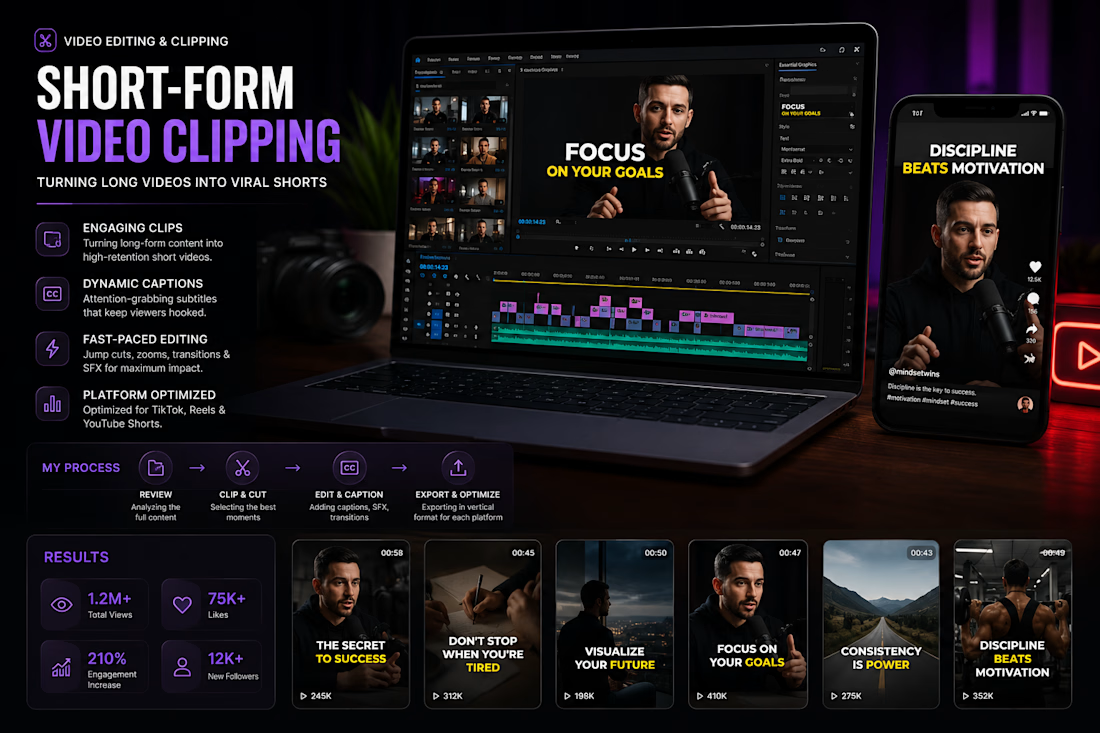
I transformed long-form content into engaging short-form videos optimized for TikTok, Instagram Reels, and YouTube Shorts. Each clip was edited with dynamic captions, smooth transitions, sound effects, and fast-paced storytelling to maximize audience retention and social media engagement. The final videos were optimized for vertical viewing and platform-specific performance.













Trending

Claude
Claude has entered the design space. How are you using Claude Design?

Contra University
Learn from expert creatives how to earn more using next-gen AI tools.
creativeaiflow
Creative AI workflows are evolving. What tools do you use, and what are their strengths and weaknesses?
freelancerlife
Freelancer life is wins, pivots, and everything in between. What’s yours right now?