RevCommerce - Website & E-Commerce Builder Platform

Ayan E.


RevCommerce - Website & E-Commerce Builder Platform
RevCommerce is a full website and online store builder, giving non-technical users the tools to design, launch, and run a live e-commerce site without writing code. I designed the complete product experience: the visual drag-and-drop page builder, global site theming, a full e-commerce backend (products, orders, promotions, cart, shipping), asset management, and account settings.
The central design challenge was balancing power and simplicity - the platform needed to support serious e-commerce operations (I designed screens managing catalogs of 28,000+ products) while staying approachable enough for someone building their first website. Every screen was designed to progressively reveal complexity rather than front-load it.
Understanding Your Site's Performance at a Glance
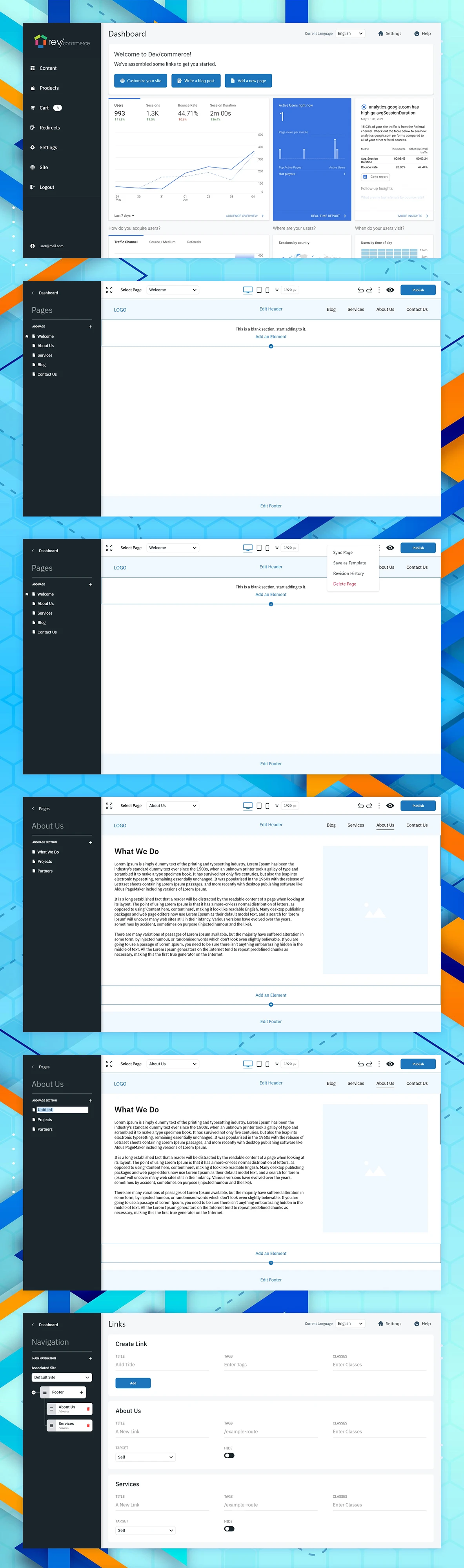
The first screen every user sees after logging in. I designed this dashboard to answer the questions a site owner actually asks - how many people visited, where they came from, how they found the site, and when they visit - using compact charts and cards rather than a data-dense analytics tool that would overwhelm a non-technical owner.
Building a Page Without Touching Code
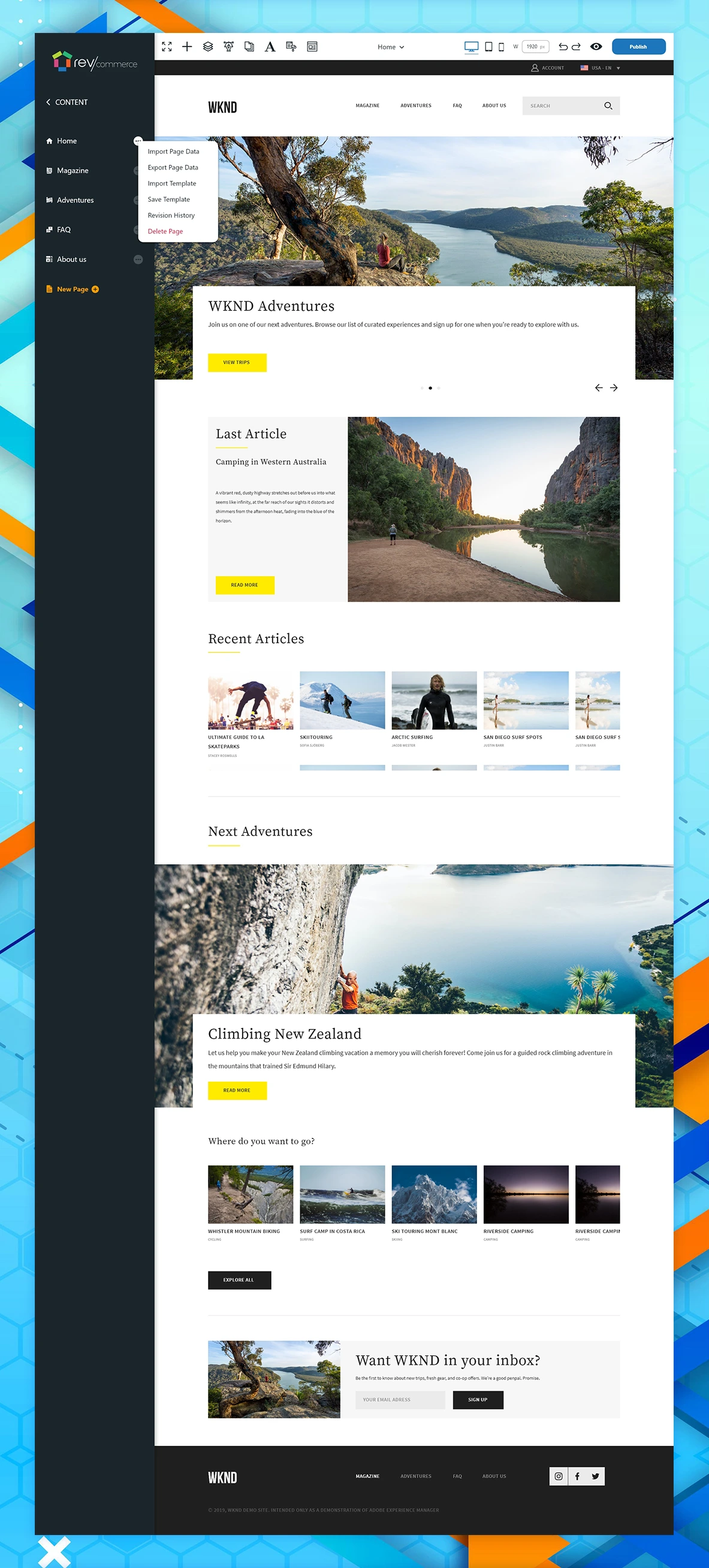
The core editing experience. I designed a live, WYSIWYG canvas where users add and arrange elements directly on the page they're building, with device preview toggles (desktop/tablet/mobile) and undo/redo built into the top toolbar. A right-click-style page menu gives access to power-user actions - syncing changes, saving a page as a reusable template, or reviewing revision history - without cluttering the primary editing surface.
Editing Real Content, Not Placeholder Blocks
For content-heavy pages like About Us, I designed a section-based structure where each content block is independently editable, with a persistent sidebar showing every page section so users can jump directly to the part they want to change, rather than scrolling through a long single-page editor.
Controlling Site Navigation From One Place
Site navigation is easy to get wrong - broken links, inconsistent menus, orphaned pages. I designed a centralized link management screen where users create new links, tag and classify them, and toggle visibility per navigation item, keeping the whole site's navigation structure consistent and editable from a single source of truth.
SEO Controls Built for Non-Experts
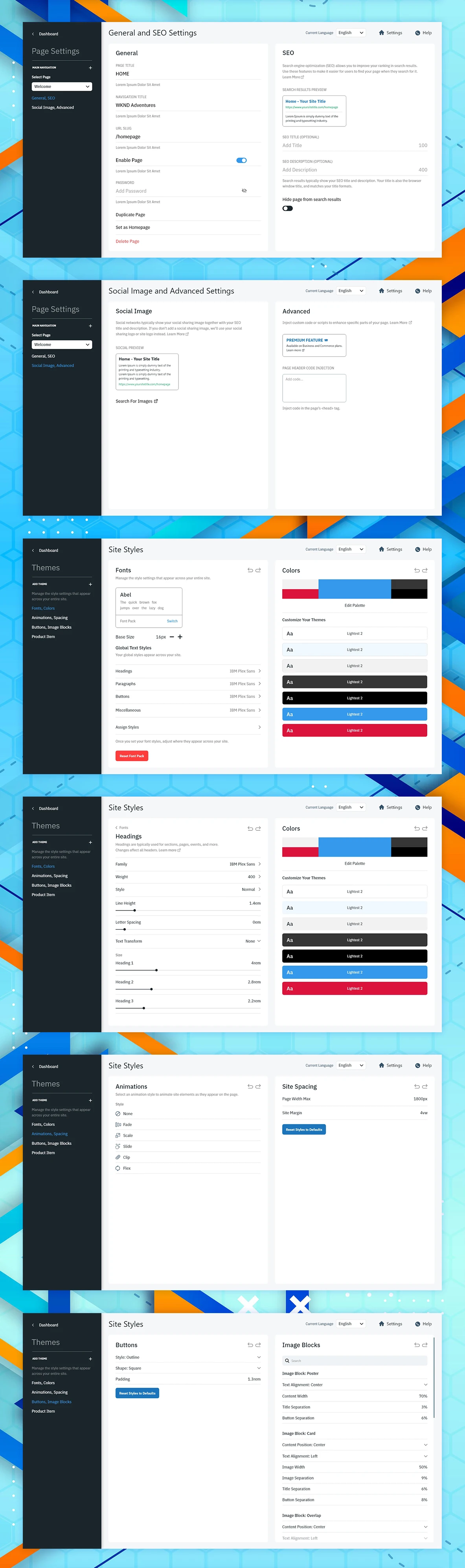
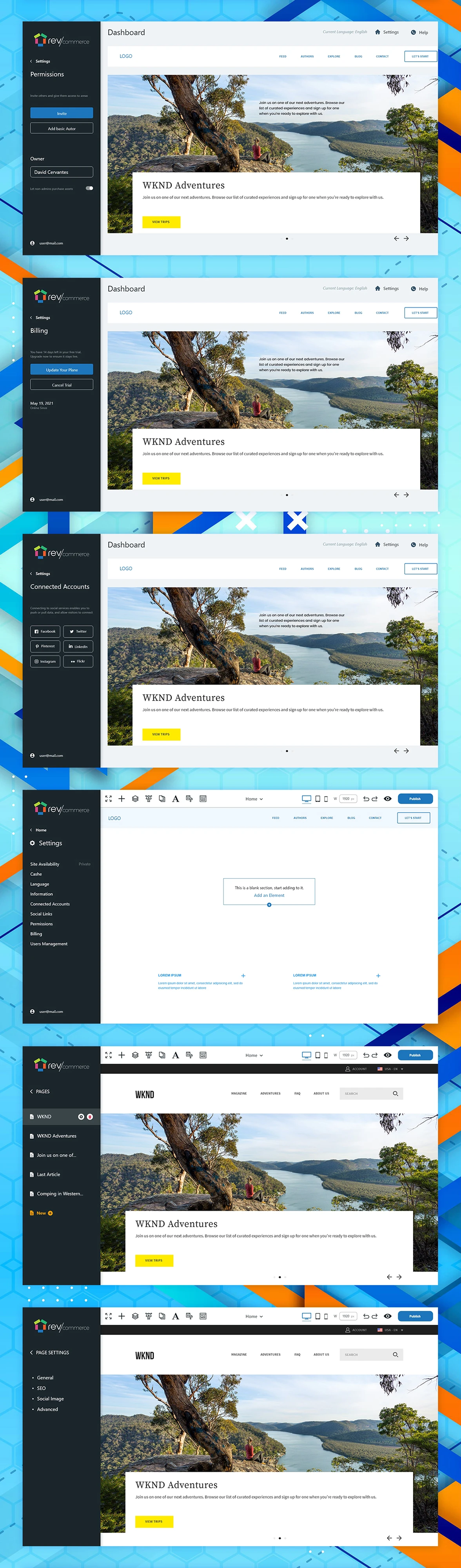
Most site builders bury SEO settings behind jargon. I designed a settings panel with a live search result preview so users can see exactly how their page will appear on Google as they edit the title and description, plus a dedicated social image preview showing how a shared link will look on social platforms - turning an abstract, technical task into something visual and immediately understandable.
One Style System, Applied Everywhere
Rather than styling each page independently, I designed a global site styles system: fonts, heading scales, and a shared colour palette that automatically propagate across every page. Changing a heading's letter spacing or a button's colour once updates the entire site, keeping visual consistency without requiring users to manually update dozens of pages.
Consistent Motion and Component Behavior, Site-Wide
Beyond static styling, I designed global controls for animation style (fade, scale, slide, clip), site-wide spacing and margins, and default behavior for reusable components like buttons, image blocks, and product item cards. This extends the same "set once, apply everywhere" principle to interaction design, not just visual design.
Letting Users Maintain Multiple Brand Looks
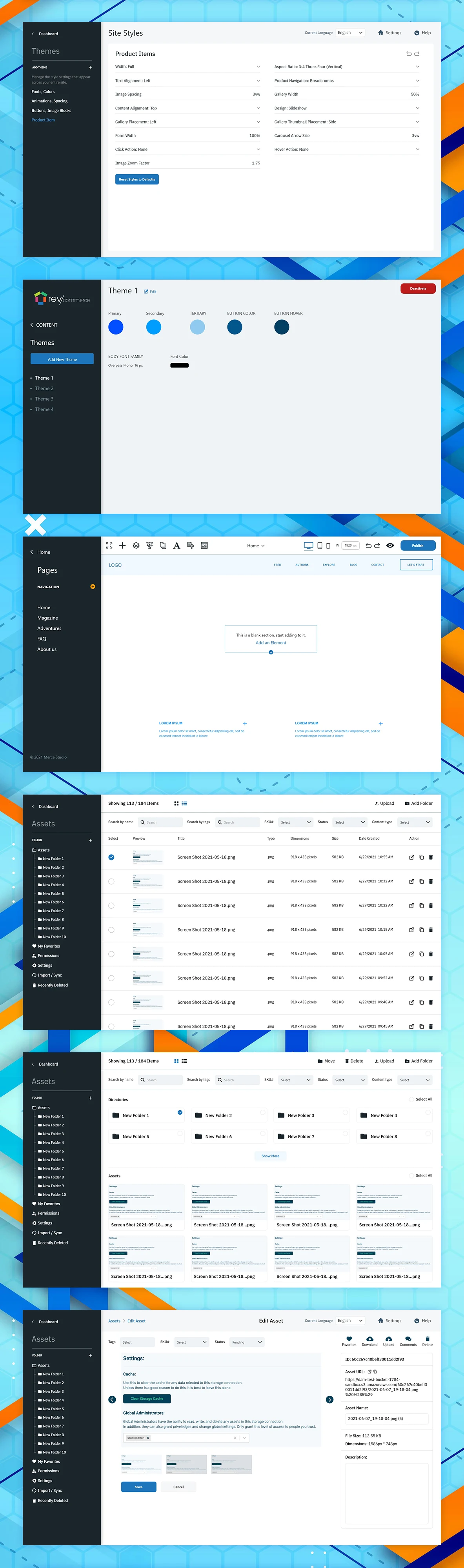
For users managing multiple sites or seasonal brand refreshes, I designed a theme system that lets an entire colour and typography setup be saved, named, and switched between - so a user can maintain several distinct visual identities without rebuilding their site styles from scratch each time.
Managing Media at Scale
With a library shown here holding over 180 items and growing, I designed a dual grid/list view with folder organization, tagging, and search, plus bulk actions for moving, deleting, and uploading. An individual asset editing panel exposes technical details (dimensions, file size, cache settings, CDN URL) for users who need them, without exposing that complexity in the main library view.
Starting Fast, Building Custom
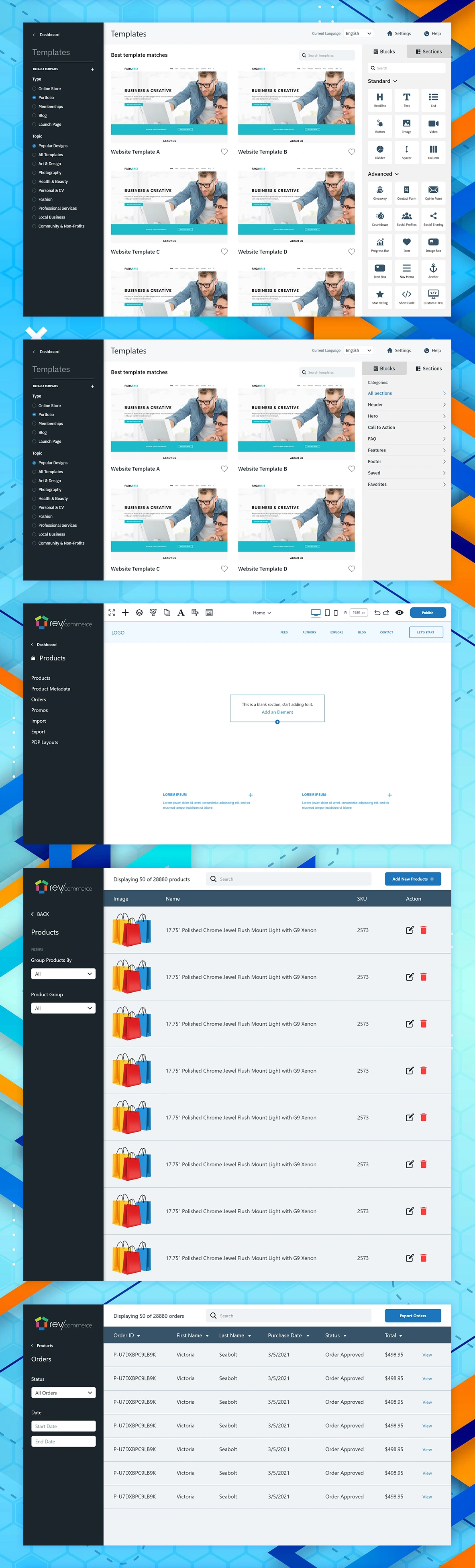
New users need a fast start; experienced users need flexibility. I designed a template gallery organized by type and topic to get a new site off the ground in minutes, paired with a categorized library of pre-built blocks and sections (headers, heroes, testimonials, galleries, CTAs) that can be dragged directly into any page for users who want to build custom layouts rather than start from a full template.
Designing for Real Catalog Volume
This wasn't designed for a handful of demo products - the products table handles catalogs at real e-commerce scale, with fast search, grouping, and inline edit/delete actions built to stay usable even at tens of thousands of SKUs. The orders table mirrors this pattern for order management, giving store owners a fast, filterable view of purchase activity and status without needing a separate reporting tool.
The Operational Tools Behind the Storefront
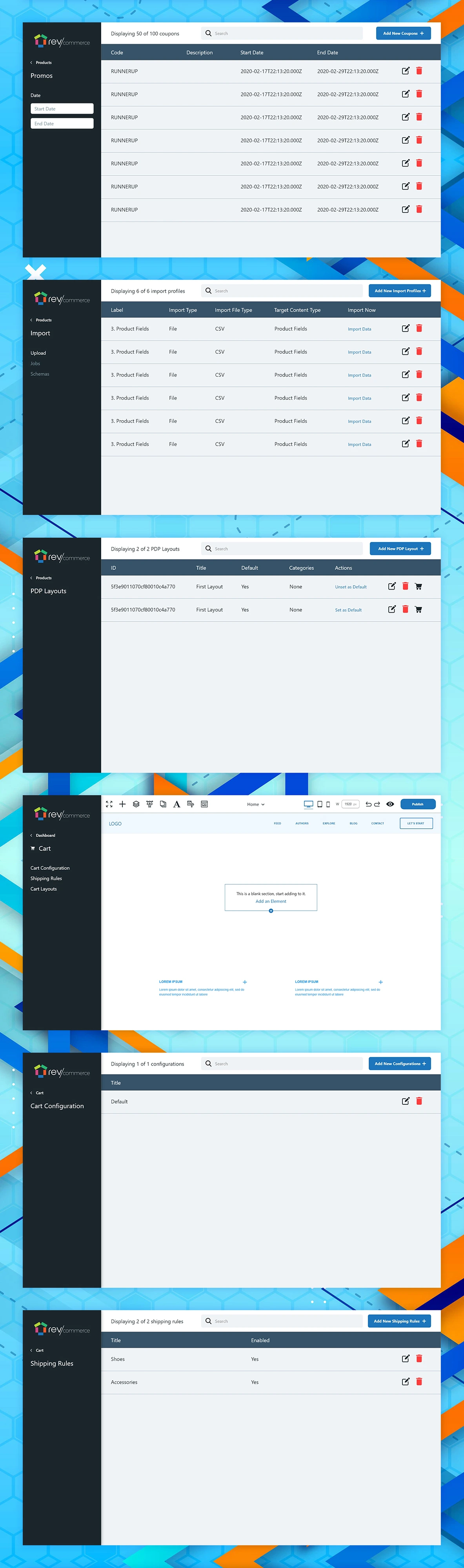
Running a store involves more than listing products. I designed a promotions manager for time-bound coupon codes, a bulk import tool mapping CSV fields directly to product fields for merchants migrating large catalogs, and a product detail page (PDP) layout manager letting store owners maintain multiple PDP templates and set a site-wide default - each screen built around the same clear, tabular pattern so switching between operational tasks feels familiar.
Configuring the Path to Checkout
The cart experience directly affects conversion, so I gave it the same visual page-builder treatment as any other page - fully customizable rather than a fixed template - alongside dedicated configuration screens for shipping rules (enabled per category, like Shoes or Accessories) and multiple saved cart layouts a store owner can switch between and set as default.
Every Account-Level Control, Organized by Purpose
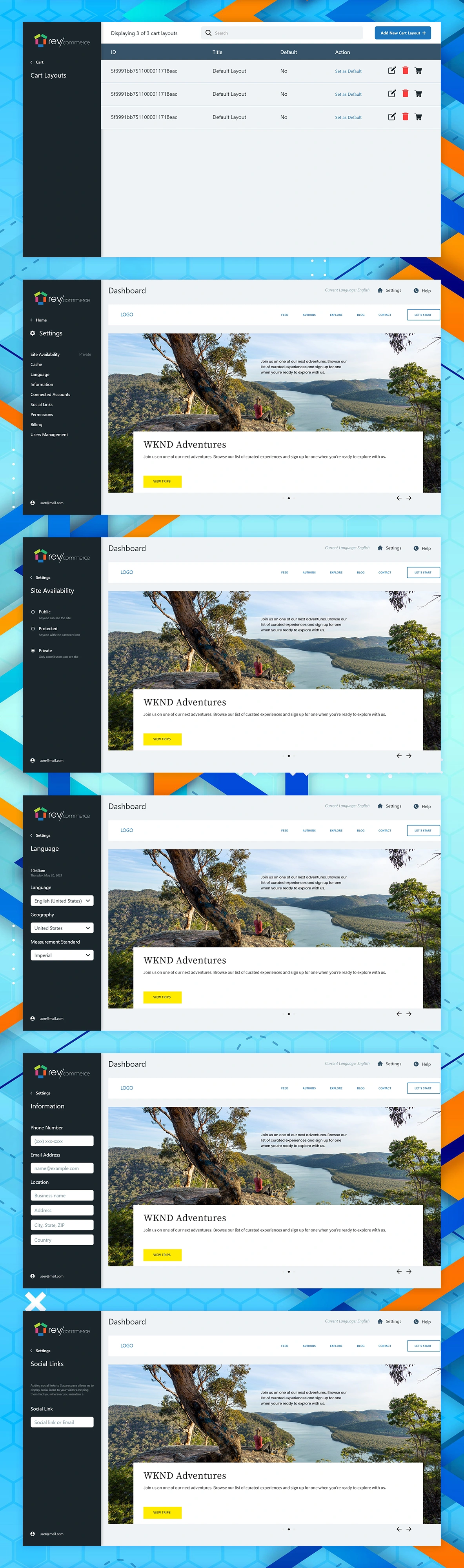
Account-level settings sprawl easily. I organized them into clear categories - site visibility (Public/Protected/Private), language and measurement standards, business information, social links, team permissions, billing, and third-party connected accounts (Facebook, Twitter, Instagram, LinkedIn, Pinterest, Flickr) - each in its own focused screen rather than one long settings page, so users only ever see the controls relevant to what they're trying to change.
Never Losing Sight of the Real Site
A deliberate pattern I carried through every settings screen: the user's actual live site stays visible behind every settings panel, sized and positioned consistently. This keeps users grounded in what they're actually changing, rather than configuring values in the abstract and hoping the result looks right after saving.
Precise Control, Without Leaving the Canvas
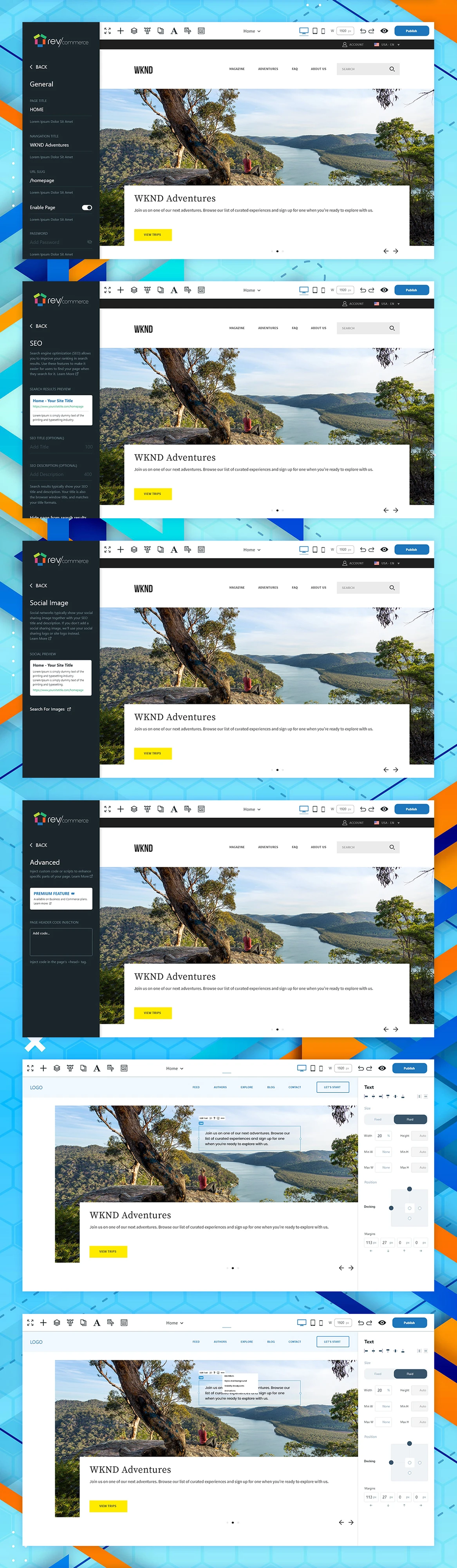
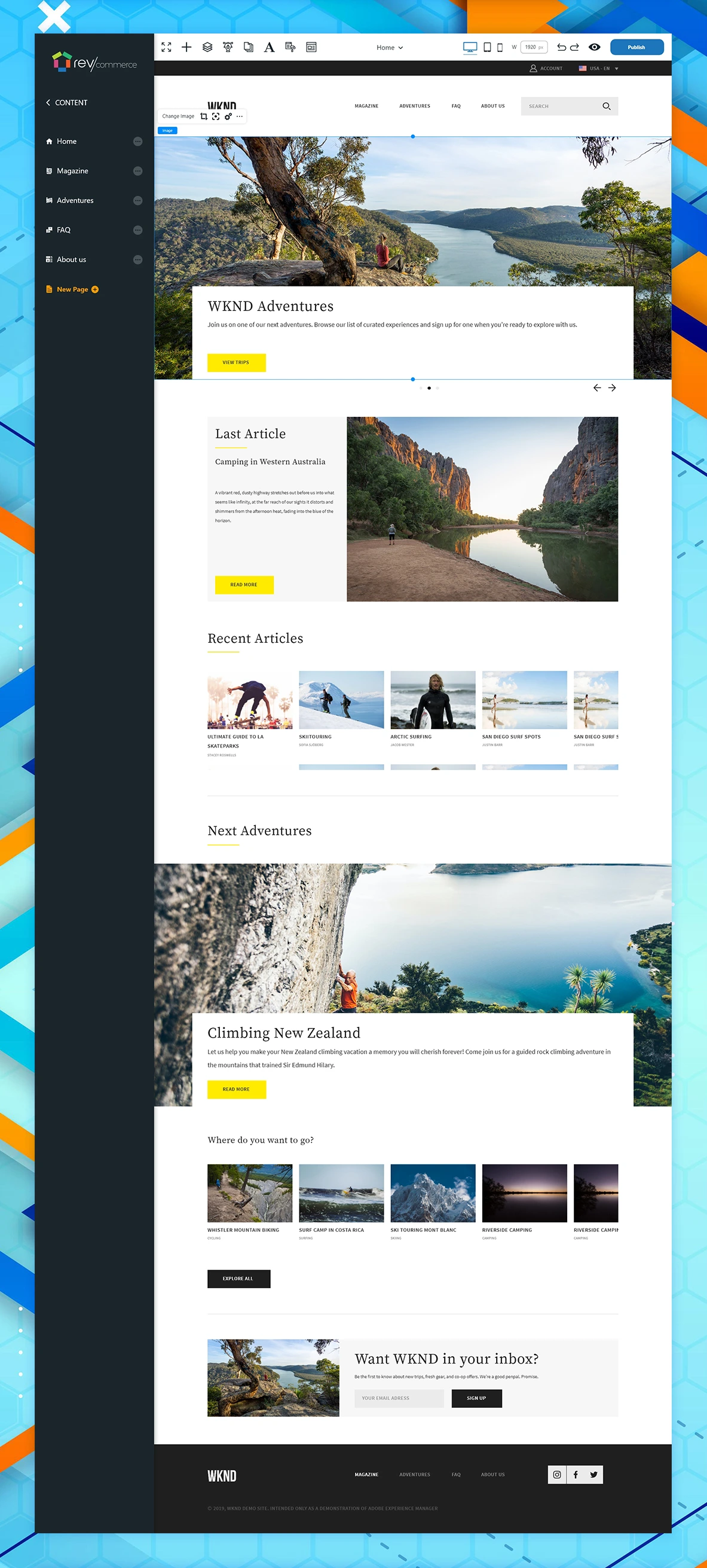
For users who want to fine-tune an individual element, selecting it surfaces a focused property panel - width, border radius, margin, padding - directly alongside the canvas. I designed this to give power users precise, design-tool-level control while keeping the interaction lightweight enough that it doesn't intimidate someone who just wants to drag a block onto the page.
From Builder to Published Site
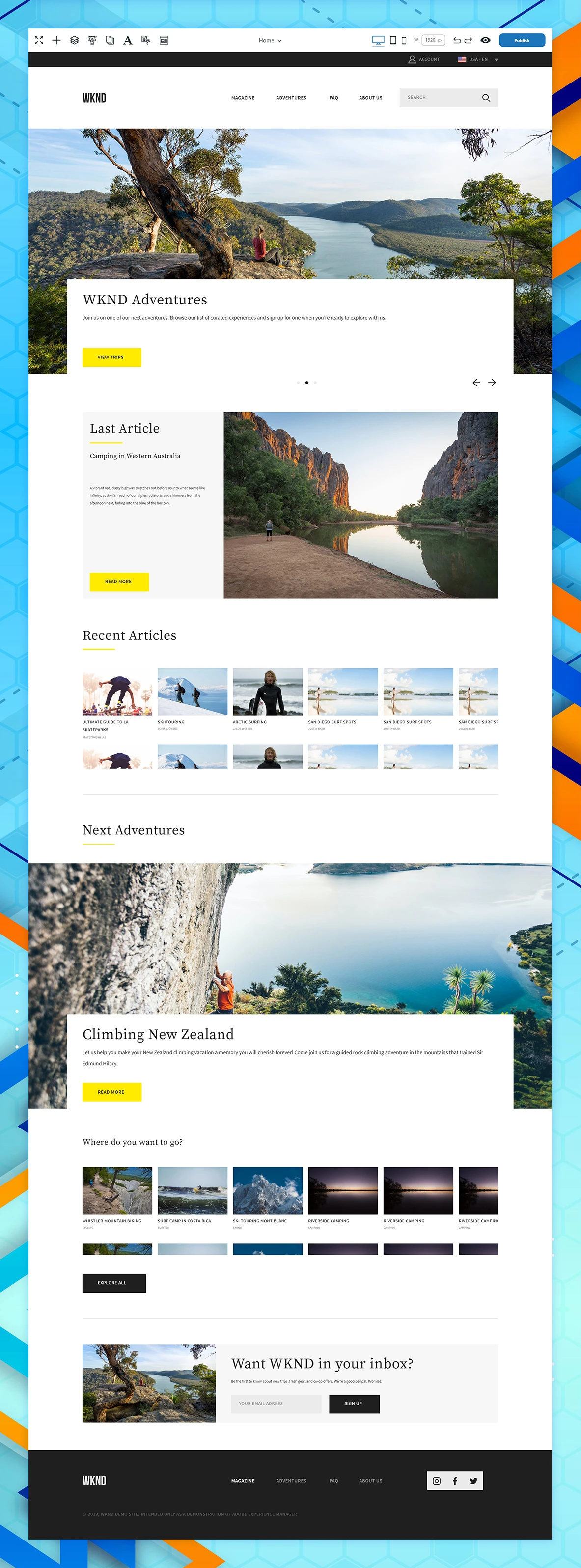
The proof of the system: WKND Adventures, a fully realized adventure travel site built entirely in the platform - a rotating hero, featured articles, a recent articles grid, curated adventure listings, and an email capture, all built from the blocks and styling tools shown in earlier sections. This closing section demonstrates the builder isn't just a set of disconnected tools, but a coherent system that produces a polished, real-world site.
Like this project
Posted Sep 3, 2026
RevCommerce is a full website and online store builder, giving non-technical users tools to design, launch, and run a live e-commerce site without writing code.