
Inventory Data Cleaning & Spreadsheet Standardisation
Project Overview
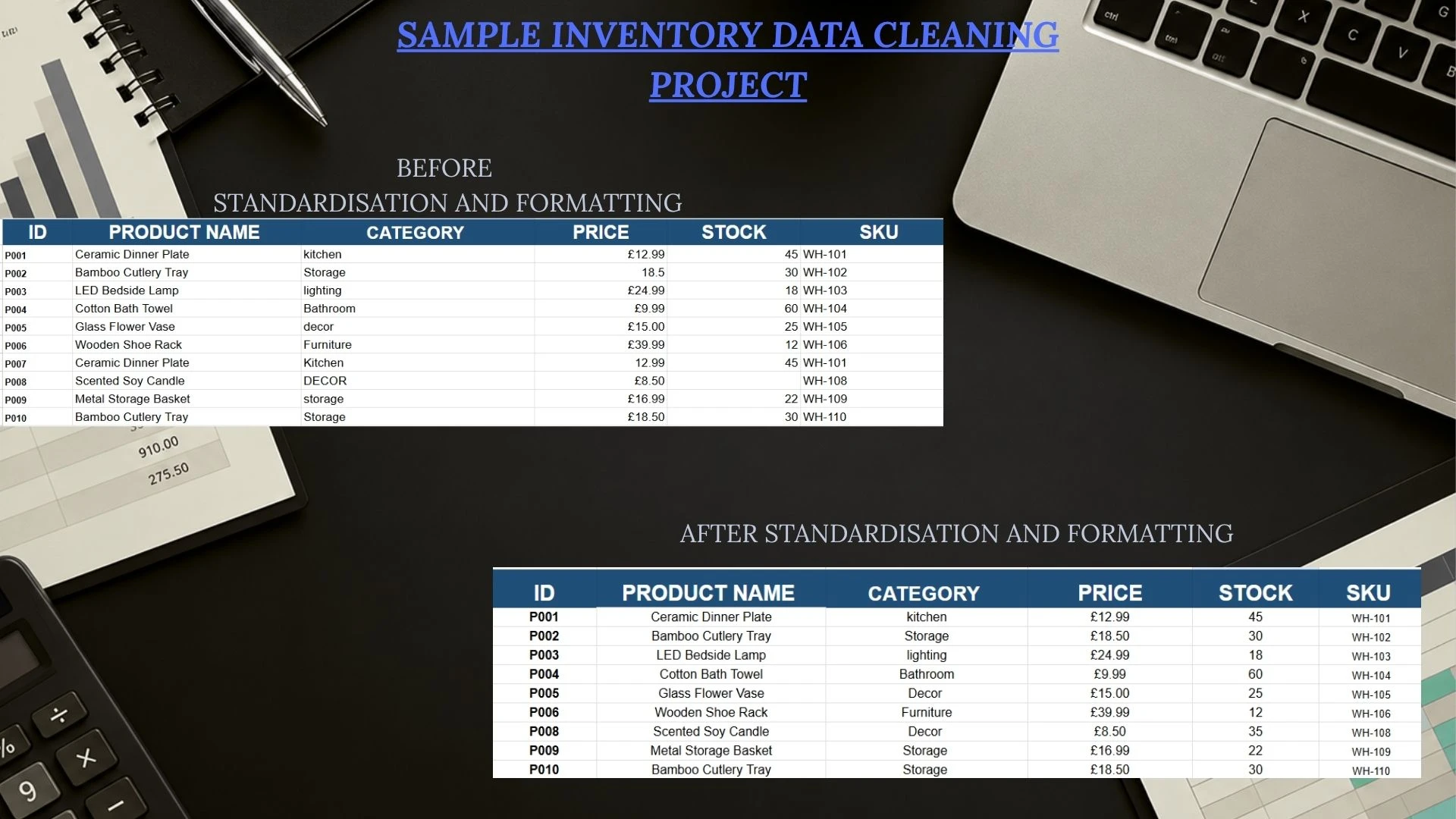
This project demonstrates how I take an unorganised inventory spreadsheet and turn it into a cleaner, more consistent and easier-to-manage document using Google Sheets.
The aim was to improve data accuracy, identify potential issues and ensure that all product information followed a consistent format.
The Challenge
The original inventory spreadsheet contained several inconsistencies that could make managing stock information more difficult.
These included:
Inconsistent capitalisation across product categories.
Prices displayed in different formats, including missing currency symbols.
Duplicate product entries requiring further review.
Inconsistent formatting across the spreadsheet.
Although these may seem like small issues, they can cause confusion when managing larger inventories.
My Approach
1. Initial Data Review
I started by reviewing the original spreadsheet to identify formatting inconsistencies, duplicate entries and any potentially missing information.
2. Data Standardisation
I standardised product categories, corrected formatting inconsistencies and ensured prices followed a consistent GBP currency format.
3. Duplicate Identification
During the review, I identified duplicate product entries. Rather than automatically deleting them, I treated them as items requiring client confirmation.
This is an important part of my workflow, as two identical product names do not always mean an entry is incorrect.
4. Final Quality Check
After making the appropriate formatting improvements, I reviewed the spreadsheet again to ensure the information was consistent and easy to read.
The Results
The completed spreadsheet demonstrates:
More consistent product and category formatting.
Standardised GBP price displays.
Improved readability and organisation.
Identification of duplicate records for review.
A clearer spreadsheet suitable for ongoing inventory management.
My Approach to Client Data
I believe accuracy is just as important as presentation.
When working with client spreadsheets, I don't automatically delete duplicate records or change potentially incorrect information without approval.
Instead, I document any concerns, communicate them clearly and only make changes that have been authorised.
Project Note: This is a self-created sample project using fictional inventory data to demonstrate my spreadsheet cleaning and standardisation skills.
0 likes · 0 views · Nov 5, 2026
Cleaned and standardised sample inventory data using Google Sheets, improving consistency, identifying duplicates and correcting formatting issues.

