AI Assistant App Full Case Study

Abdul Qadeer


The Challenge
AI assistants are everywhere, but most feel like glorified search bars. Users type a question, get a wall of text, and then have to figure out what to do with it. The interface is an afterthought: a chat bubble on a blank screen. There's no structure, no workflow integration, and no visual intelligence. The AI might be smart, but the app around it isn't.
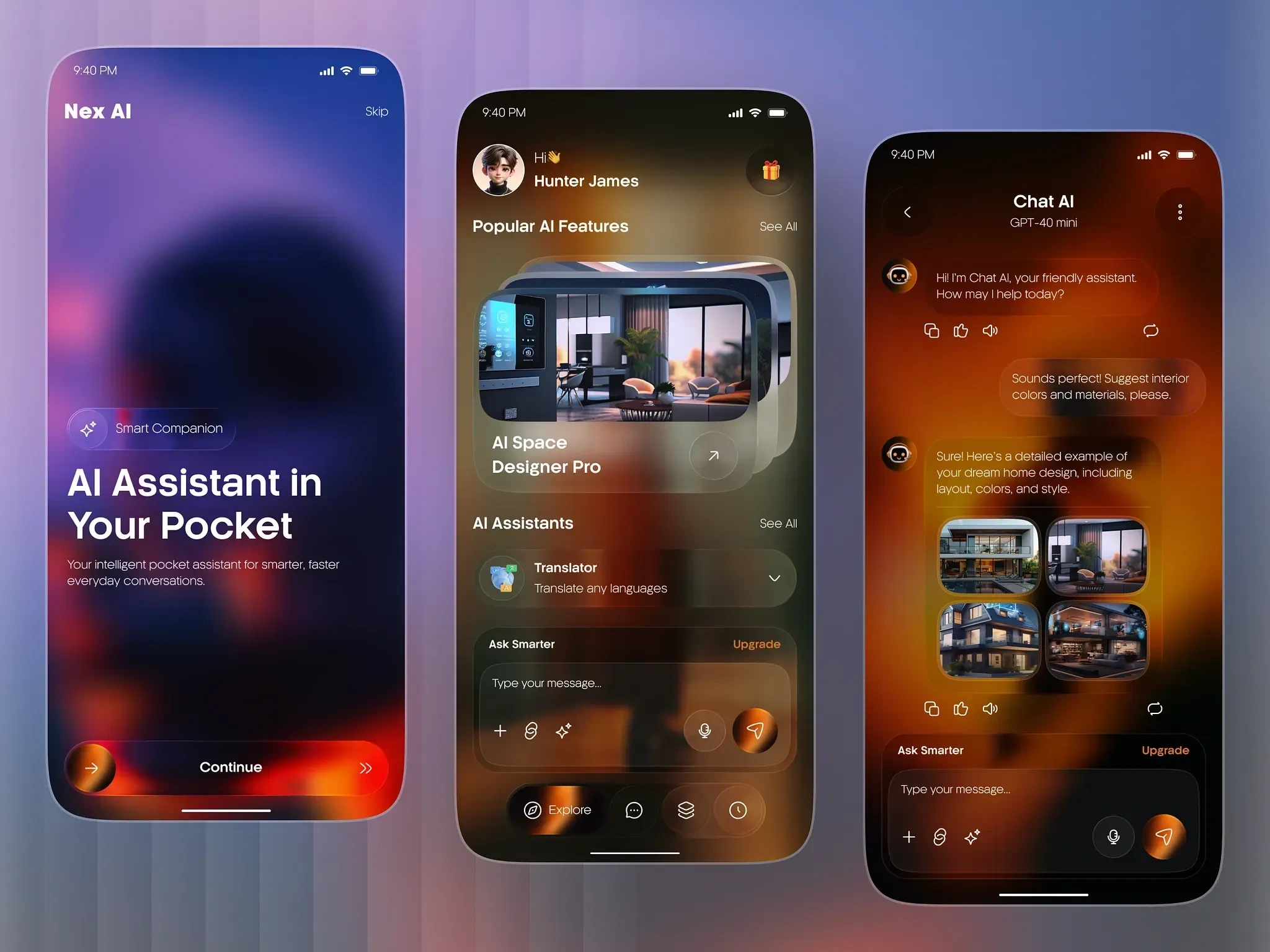
This project focused on designing an AI assistant app that goes beyond chat. The goal: create an interface where AI feels like a capable partner, not just a text generator. Smart chat, productivity features, and contextual tools, all in one cohesive experience.
Design Approach
The design process started in Figma, where every screen was built to make AI interactions feel natural, productive, and visually engaging.
Key design decisions:
Conversational interface with rich responses. The chat isn't just text bubbles. AI responses include formatted text, code blocks, image generations, charts, action buttons, and inline suggestions. The interface adapts to the content type, making responses scannable and actionable.
Quick action shortcuts. Common tasks (summarize, translate, generate image, write email, analyze data) are accessible as one-tap shortcuts above the keyboard. Users don't need to type elaborate prompts for routine tasks. The shortcuts learn from usage patterns and surface the most relevant actions.
Conversation history with search. Past conversations are organized by topic with full-text search. Users can pick up where they left off or reference previous AI outputs. No more re-asking the same question because the chat history disappeared.
Multi-modal input. Text, voice, image upload, and document attachment. Users can photograph a document and ask the AI to summarize it, or voice-dictate a complex request while hands-free. The input method adapts to the context.
Workspace integration. The AI connects to calendar, email, notes, and task management. It can draft emails, schedule meetings, create to-do items, and pull context from existing documents. The assistant lives inside the user's workflow, not beside it.
Prompt templates library. Pre-built prompt templates for common use cases: content writing, code review, data analysis, brainstorming, and learning. Users customize templates and save their own. Templates lower the barrier for users who don't know how to prompt effectively.
Dark theme with AI-native aesthetics. Deep backgrounds with gradient accents and subtle glow effects around AI responses. The visual language communicates intelligence and capability. Smooth animations on message generation create a feeling of the AI "thinking" rather than just loading.
Interaction Model
The AI interaction follows a natural pattern:
Ask via text, voice, or image
Receive rich, formatted responses with action options
Act on suggestions with one-tap shortcuts
Save useful outputs to workspace or conversation history
Refine with follow-up questions in context
Each interaction builds on the previous one, creating a continuous workflow rather than isolated queries.
The Result
A fully designed AI assistant app built in Figma, focused on making AI interactions productive and visually intelligent. The design serves AI startups, productivity app companies, and tech platforms looking for a mobile AI interface that goes beyond basic chat to deliver a true AI-powered productivity companion with rich responses, workflow integration, and intuitive interaction patterns.
Like this project
Posted Jul 14, 2026
UI/UX design and development of an AI-powered assistant mobile app featuring smart chat, productivity tools, and an intuitive conversational interface.
Likes
0
Views
29