Planso - Task Management Board UI/UX for a SaaS Product

Pulok Paul✦




Have a project in mind?
Posted Oct 12, 2026
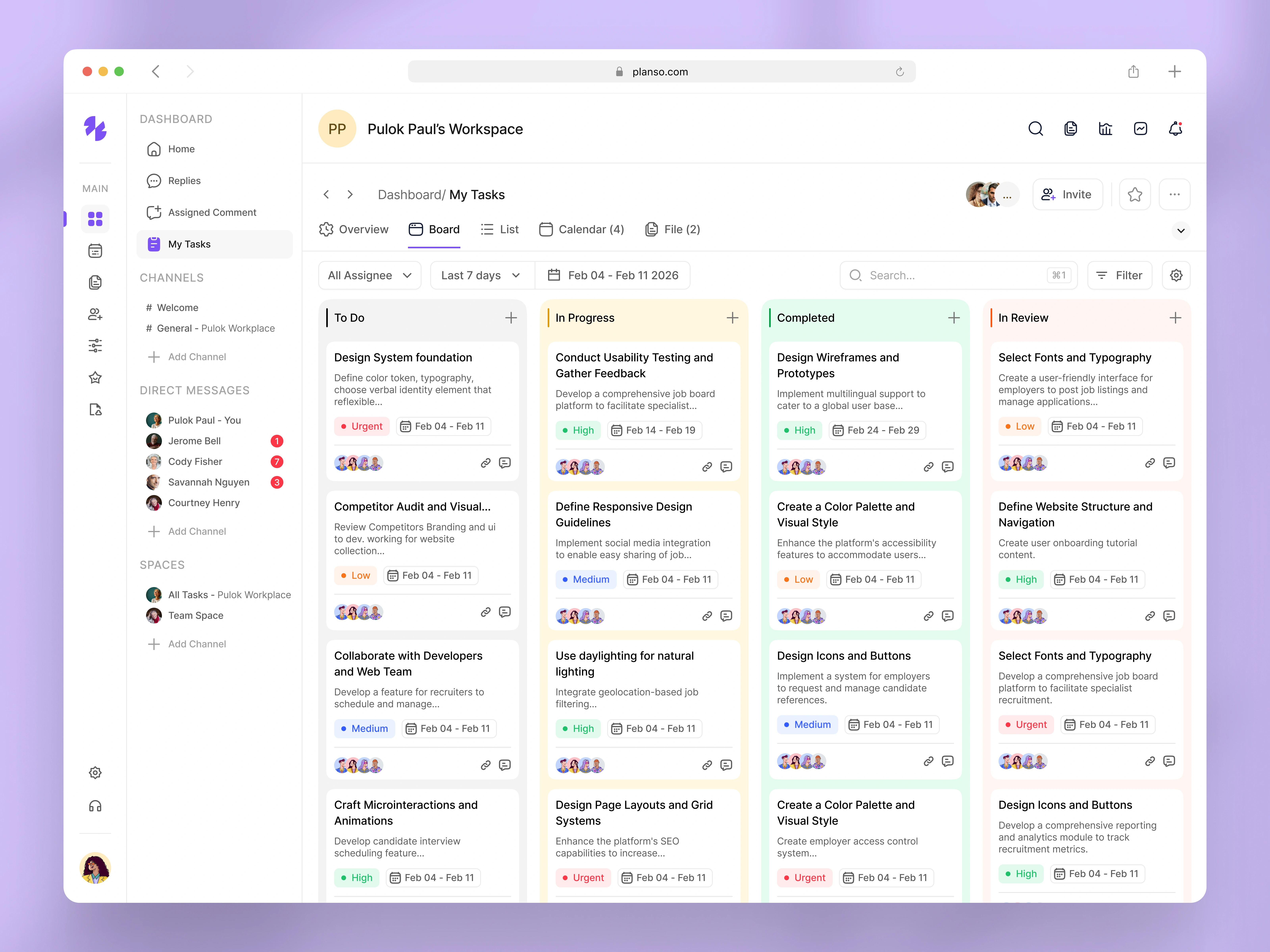
I recently designed the “My Tasks” board experience for Planso , a project management SaaS platform built to help teams plan, prioritize, and execute work with clarity. This screen focuses on how users track tasks visually , manage priorities, and collaborate efficiently—all from one workspace. 🔍 The Problem Many task management tools feel overwhelming and hard to prioritize. → Tasks lack clear status visibility → Priorities are difficult to scan quickly → Teams struggle to track progress at a glance → Boards become cluttered as projects grow 🎯 The Goal Design a clear, structured task board UI that allows users to: → Instantly understand task status → Prioritize work with confidence → Track progress across multiple stages → Collaborate without confusion 🧠 UX Thinking & Key Decisions While designing this board view, I focused on real team workflows. Key UX decisions: → Column-based task flow (To Do → In Progress → Completed → In Review) → Color-coded priority indicators (Urgent, High, Medium, Low) → Due dates and ownership visible at card level → Avatar grouping for quick team context → Minimal card design to reduce cognitive load 🎨 UI Solution The final design delivers: → A modern Kanban-style task board UI → Clear visual hierarchy for fast scanning → Balanced spacing to avoid clutter → Scalable components aligned with a SaaS design system → A calm, productivity-focused interface This allows users to manage complex workloads without feeling overwhelmed . 📈 Outcome → Faster task prioritization → Improved visibility of work progress → Better collaboration across teams → A scalable task management experience ready for growth This design reflects my ability to build practical, real-world SaaS interfaces that balance usability, clarity, and business needs. 📩 Open to UI/UX & Product Design roles 💬 Feedback from founders, recruiters, and designers is always welcome