Viqsa 360 Real Estate CRM UI/UX Design

Tarang Patel


Viqsa 360 — Real Estate CRM System
Project Overview
Viqsa 360 is a comprehensive real estate CRM system designed to streamline property management, client interaction, and sales tracking for real estate professionals.
Key Goals:
Simplify user onboarding with a secure sign-in process
Provide easy access to company information and contacts
Enable property management, sales tracking, and reporting
Maintain a consistent and intuitive UI/UX across Web & Mobile
Support data-driven decision-making through clear dashboards and reports
Focus Areas: SaaS interface design, data presentation, user journey
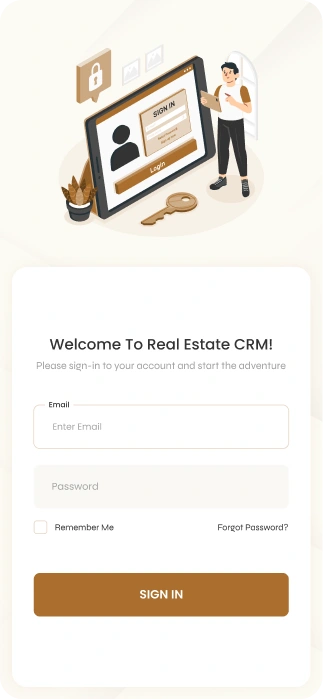
Sign In Screen
Purpose: Secure onboarding for users.
Highlights:
Minimalist login with clear field labels
Brand-consistent visuals and colors
Error validation to prevent login mistakes
Quick access to main dashboard
Design Decisions:
Mobile-first layout for accessibility on-the-go
Focused on clarity and reducing user friction
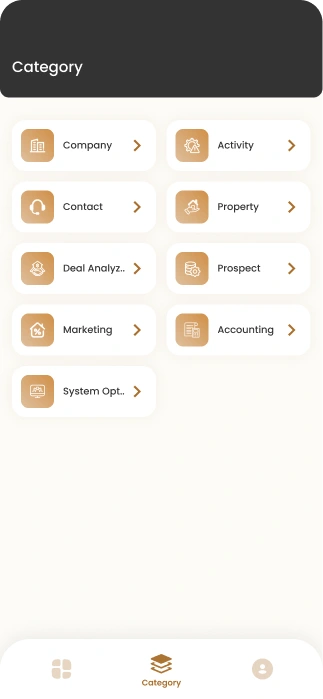
Category Screen
Purpose: Provides a clear, organized overview of different property categories, helping users quickly navigate listings and manage properties efficiently.
Highlights:
Displays all property categories with visual cards and icons for instant recognition
Shows key metrics per category (number of properties, sold, available)
Offers quick navigation to category-specific property lists
Designed for both Web and App, maintaining a consistent and responsive layout
Includes interactive elements such as expandable cards or filters for advanced property management
Enhances user productivity by reducing clicks and providing immediate access to relevant data
Design Decisions:
Hierarchical layout emphasizes the most important categories first (e.g., Residential, Commercial, Land)
Consistent color coding for each category to improve visual recognition
Icons and imagery help users quickly identify and differentiate categories
Spacing and alignment optimized for scanning and usability
Integrated action buttons for adding, editing, or managing properties directly from the category view
Maintains responsive design principles, ensuring the layout works seamlessly across Web and Mobile
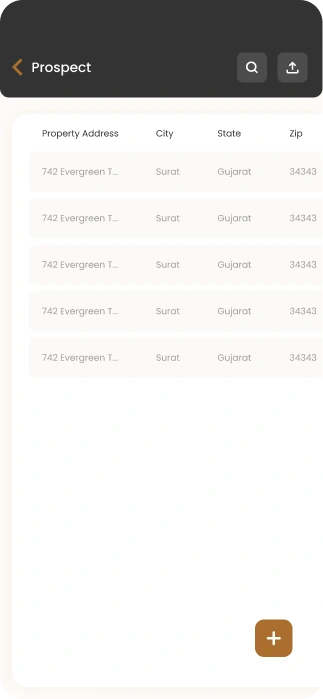
Prospect Page
Purpose: Manages potential clients and tracks their engagement with properties.
Highlights:
Displays list of prospects with status, interests, and last interactions
Quick actions for follow-up: call, email, or schedule appointment
Filters and search functionality for fast access to key prospects
Integrates with property and sales workflows for seamless management
Design Decisions:
Prioritized data clarity and quick scanning
Action buttons clearly marked for fast interaction
Consistent UI/UX design with other CRM modules
Mobile-first layout for field agents to manage prospects on the go
Impact:
Improves lead management and conversion rates
Provides CRM users a centralized hub for prospect tracking
Supports structured follow-up workflows and better client engagement
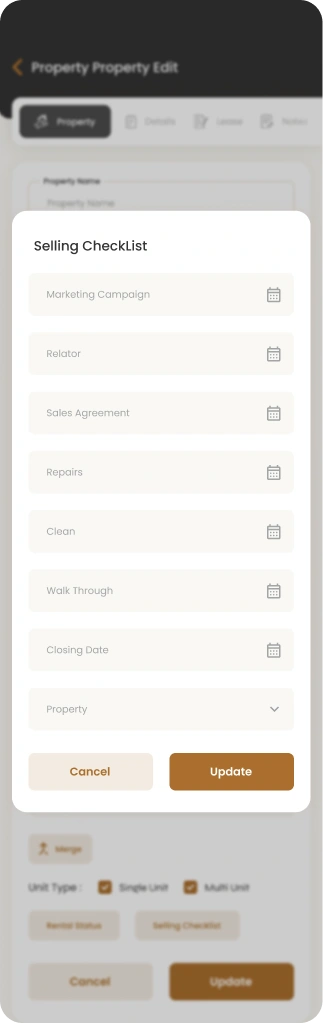
Property Selling Checklist Page
Purpose: Streamlines the process of managing property sales step-by-step.
Highlights:
Displays all tasks required to complete a property sale
Checkboxes for task completion and status tracking
Prioritizes tasks by urgency or stage of sale
Allows agents to add notes, assign tasks, or update progress
Design Decisions:
Step-by-step workflow ensures no critical step is missed
Visual progress indicators to track completion status
Clean layout reduces cognitive load for agents
Mobile-friendly design enables on-the-go management
Impact:
Ensures structured and efficient property sales workflow
Increases agent productivity and reduces errors
Provides managers with a clear overview of sales progress
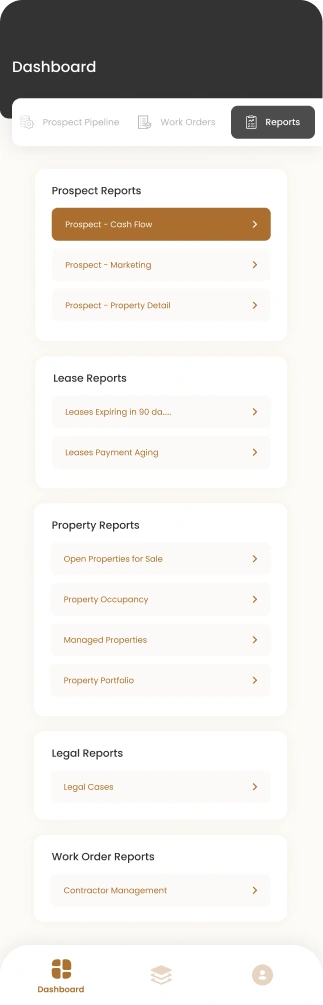
Report Page
Purpose: Provides analytics and insights for property sales and CRM performance.
Highlights:
Interactive charts and graphs to visualize key metrics
Filterable by date range, agent, property type
Displays sales trends, completed transactions, and active listings
Includes exportable reports for business use
Designed to be intuitive and visually clear for fast decision-making
Design Decisions:
Prioritized visual hierarchy: key metrics displayed prominently
Balanced data density with clean, uncluttered layout
Dashboard layout allows quick scanning and easy access to detailed data
Consistent branding and typography across Web and Mobile
Impact:
Helps real estate managers quickly assess performance
Reduces time spent manually compiling reports
Supports data-driven decisions for sales strategies
Project Summary / Impact
Designed a comprehensive CRM module for real estate professionals
Focused on data visualization, workflow efficiency, and user engagement
Screens showcase expertise in SaaS UI/UX, dashboard design, and productivity-focused workflows
Delivered Web and Mobile-friendly interfaces for seamless real estate operations
Like this project
Posted Jan 30, 2026
Designed an intuitive real estate CRM UI/UX with smart dashboards, lead workflows, and data visualization to improve productivity and user engagement.