Honda Konnekt | Rider App & Fleet Management Platform

Srikar Suresh


Introduction
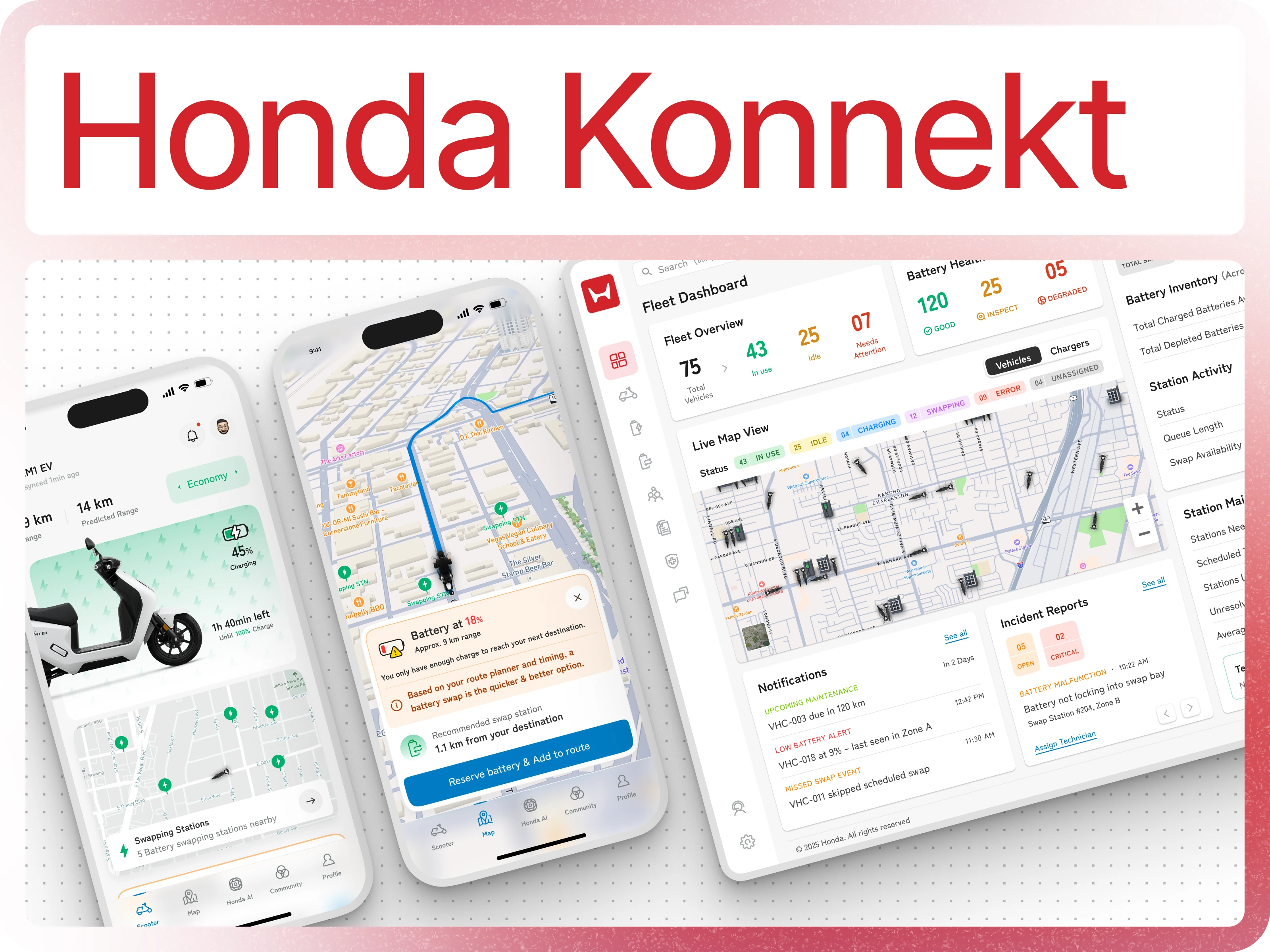
Honda Konnekt is a connected mobility platform designed to elevate the experience of both EV riders and fleet operators. The goal was to build a unified ecosystem that simplifies everyday riding, streamlines battery swapping, and gives operators real-time visibility into fleet performance. The project involved designing a complete product suite from the rider-facing mobile app to the operational dashboards used by station managers and fleet supervisors.
With a focus on clarity, reliability, and intelligent assistance, the system delivers actionable insights at every level: riders get accurate range predictions and seamless navigation, while operators manage fleets, stations, and battery inventories with precision. This case study outlines the design decisions, interaction models, and user flows that shaped an integrated platform capable of supporting modern electric mobility at scale.
Homepage Overview
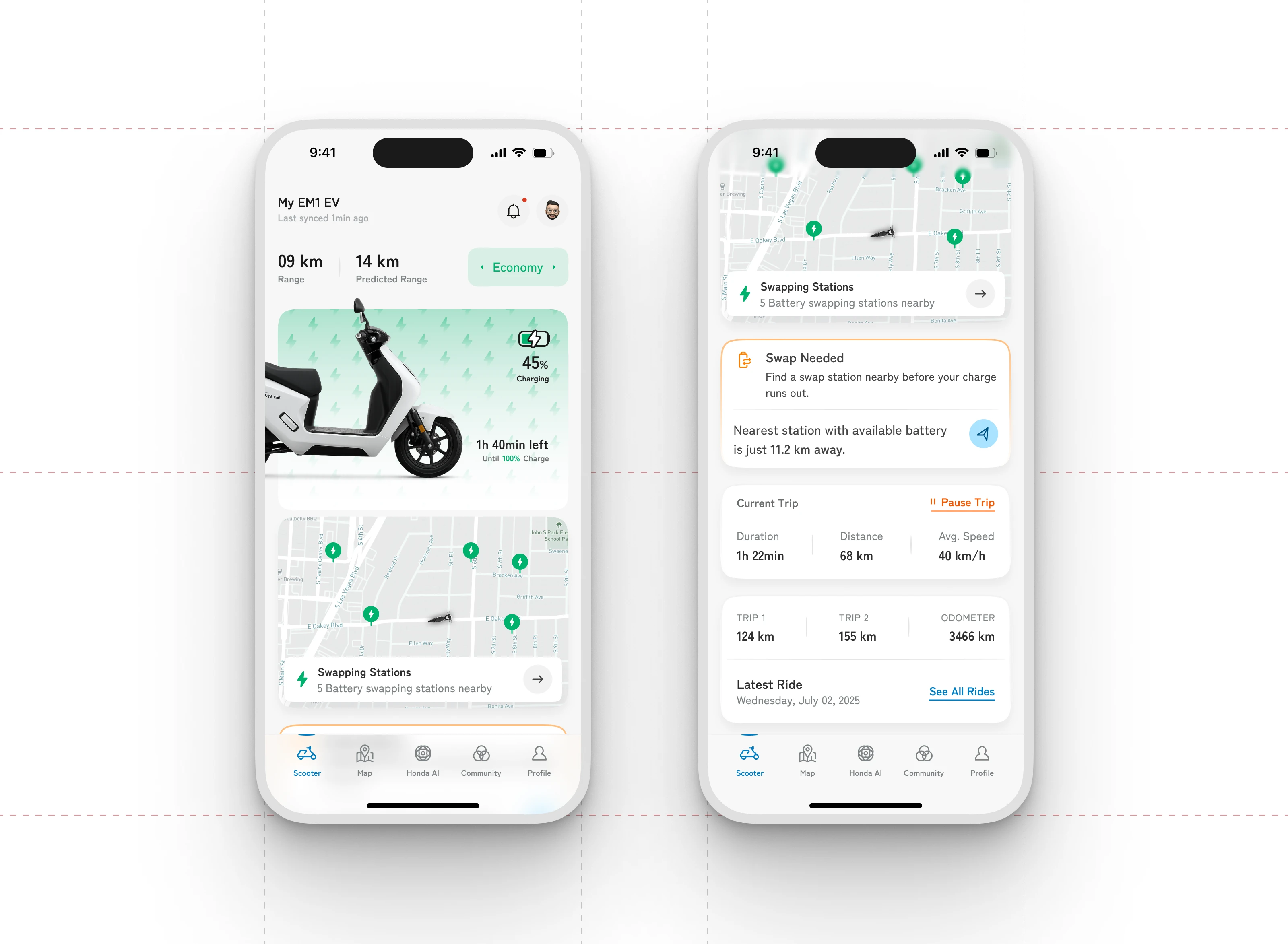
The homepage centralizes all essential vehicle information to give riders immediate clarity on their EV’s status. It opens with the user’s scooter name and model, paired with real-time sync status for transparency. Core metrics such as available range, predicted range, and the selected drive mode are placed prominently to support quick decision-making before a ride.
A dedicated vehicle widget visualizes the scooter along with its current charge level and the estimated time required for a full recharge. Below this, an interactive map highlights nearby charging and battery-swap stations, helping users plan charging stops without friction. The screen also surfaces active trip details including duration, distance, and average speed followed by cumulative trip history for long-term tracking. When the battery is running low, a contextual swap notification appears, pointing the rider to the closest station with an available battery. The layout keeps information compact and actionable, ensuring riders always know the state of their vehicle and what they need to do next.
Homepage
Intelligent Navigation
The navigation screen integrates real-time battery monitoring with route guidance to prevent range anxiety. When the battery drops to a critical level, the interface immediately alerts the rider with a clear warning and an estimated remaining range. Instead of leaving the user to figure out the next step, the system automatically evaluates the planned route and recommends the nearest battery-swap station that fits the journey.
To streamline the experience further, the user can reserve a battery directly from this prompt and add the station to their active route with a single action. This reduces uncertainty during low-charge situations and ensures riders always have a reliable, predictable path to continue their trip.
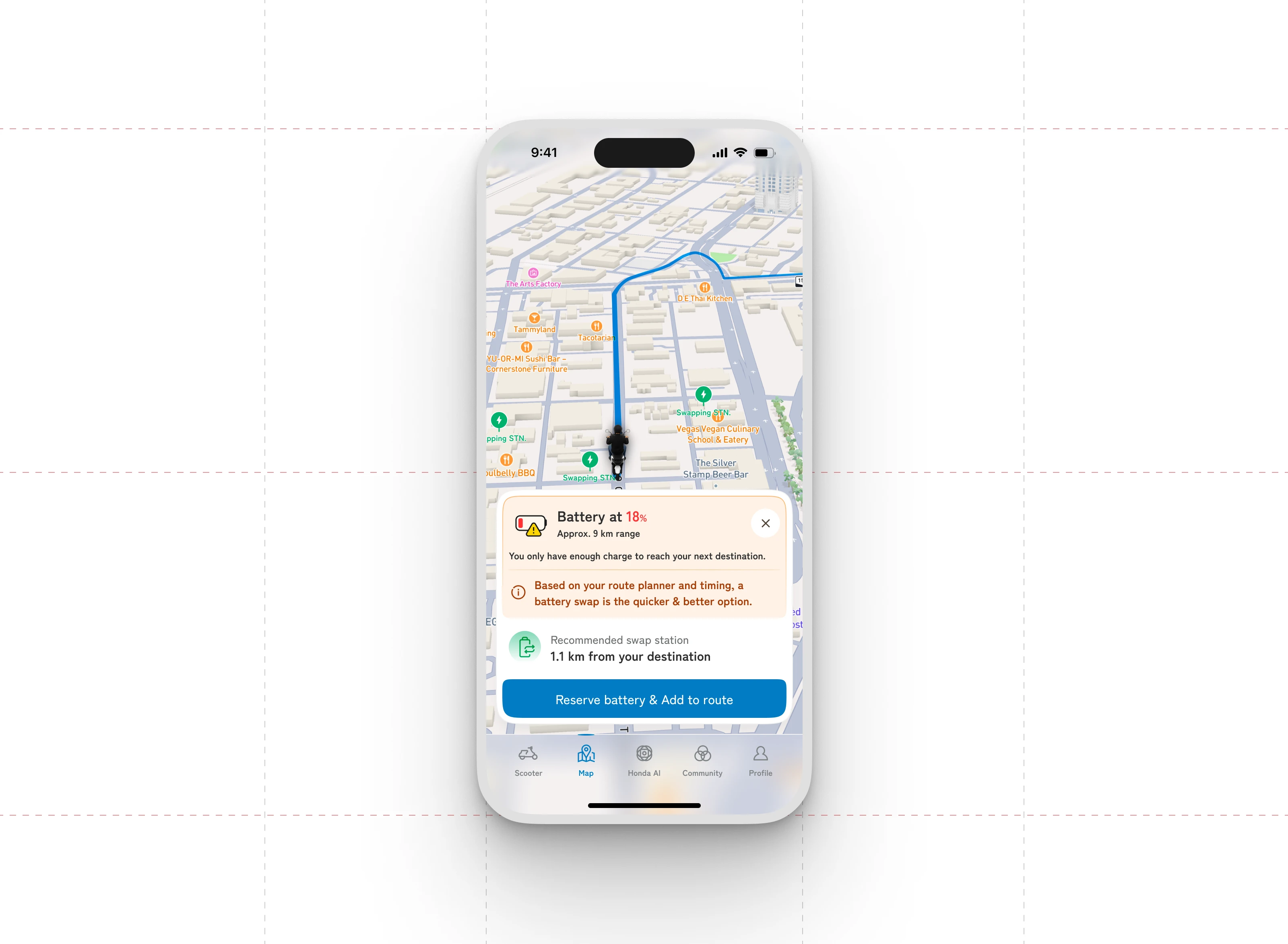
Rider Navigation Screen
Honda AI Assistance
The Honda AI screen functions as an intelligent support layer that answers rider questions in real time. It contextualizes queries using live vehicle data, such as current battery level, estimated range, and trip distance. When a rider asks whether they can reach a destination, the AI calculates range against route length and offers a clear, actionable response. It also recommends the safest next steps—such as performing a battery swap—and identifies the closest station when needed. Beyond guidance, it can automatically update the rider’s route based on their approval. This conversational format makes technical information easier to understand while helping riders make informed decisions without navigating through multiple menus.
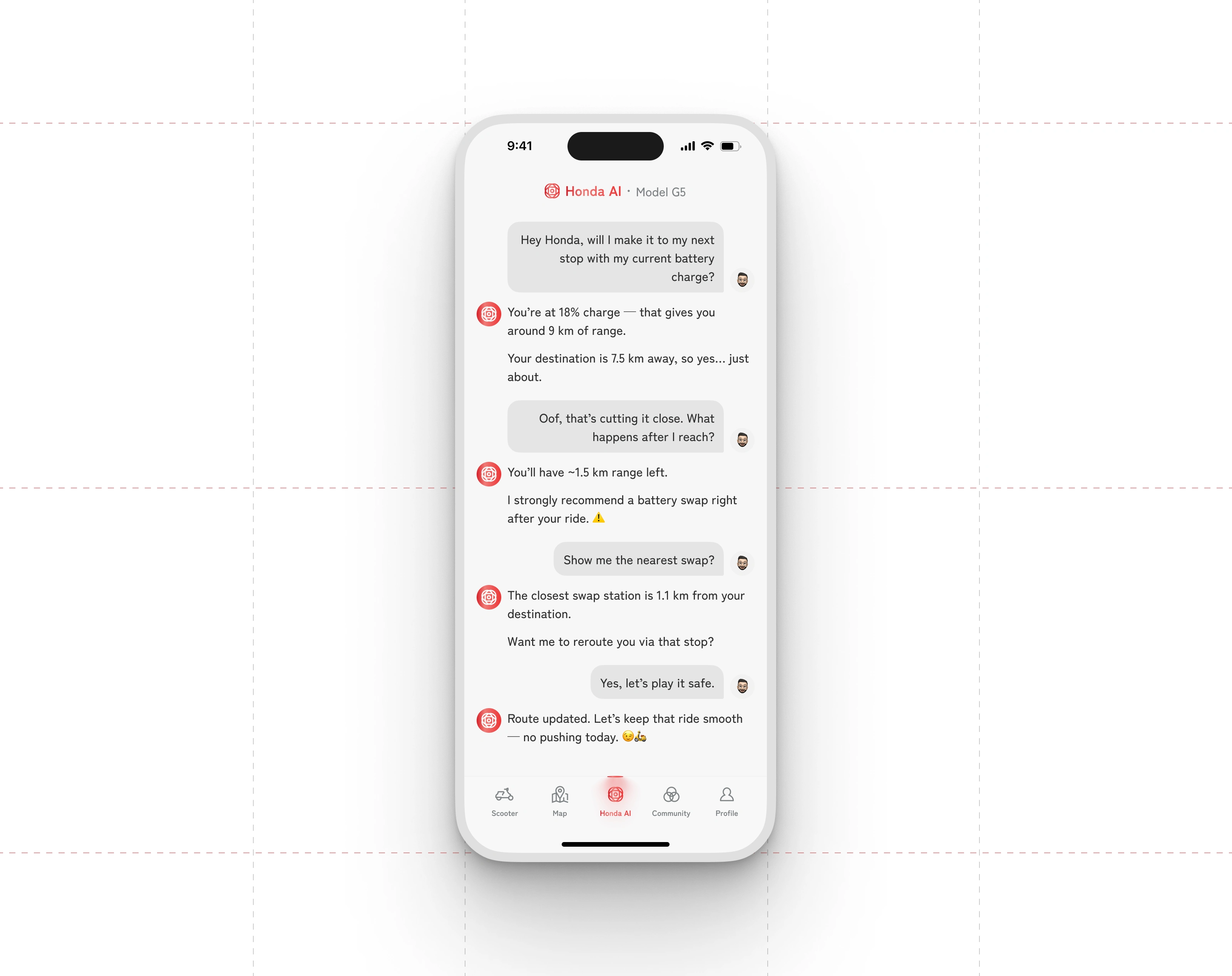
Honda AI Chat Screen
Community & Sustainability Leaderboard
Community
The Community section adds a social dimension to the Honda Konnekt experience by bringing riders together around shared habits and everyday usage. Users can post updates, exchange riding tips, and engage with others through likes and comments, creating an active space for practical knowledge and real-world experiences.
Leaderboard
The Leaderboard highlights riders who adopt consistent, eco-friendly riding patterns. Points are earned through sustainable behavior such as efficient trip planning or optimal battery usage, and users can see how they rank against others in the community. This introduces a light, motivating layer of competition that encourages smarter, greener riding practices. By surfacing top performers and showing individual progress, the leaderboard turns responsible riding into a rewarding, trackable habit.
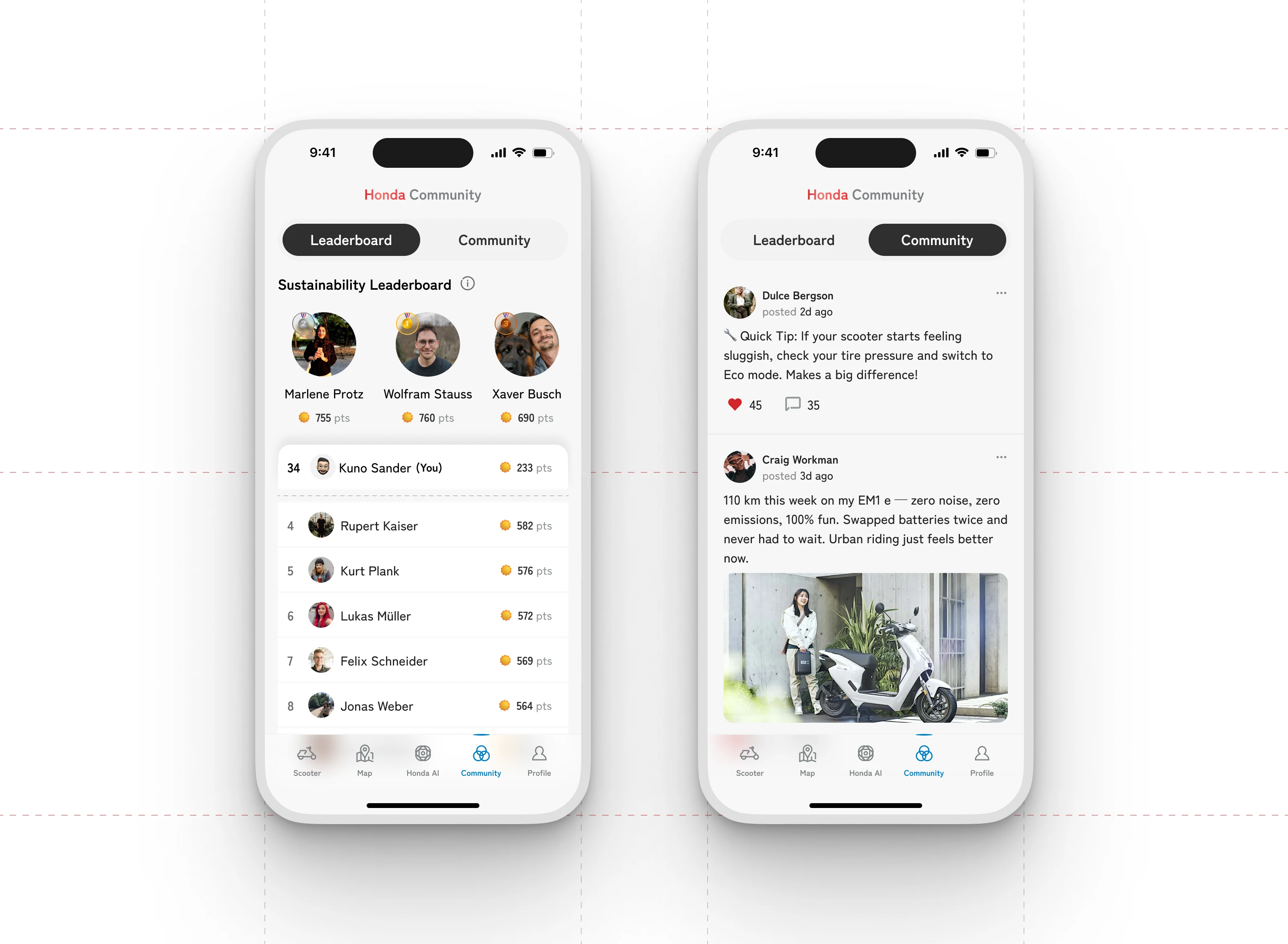
Honda Rider Community and Sustainability Leaderboard
Fleet Manager Dashboard
The Fleet Manager Dashboard provides a consolidated operational view for managing a large network of delivery vehicles, swap stations, and battery health. The layout prioritizes quick situational awareness, allowing managers to identify issues, track utilization, and oversee maintenance without digging through multiple screens. High-level stats, live maps, and actionable alerts are grouped logically, enabling faster decision-making and reducing operational downtime.
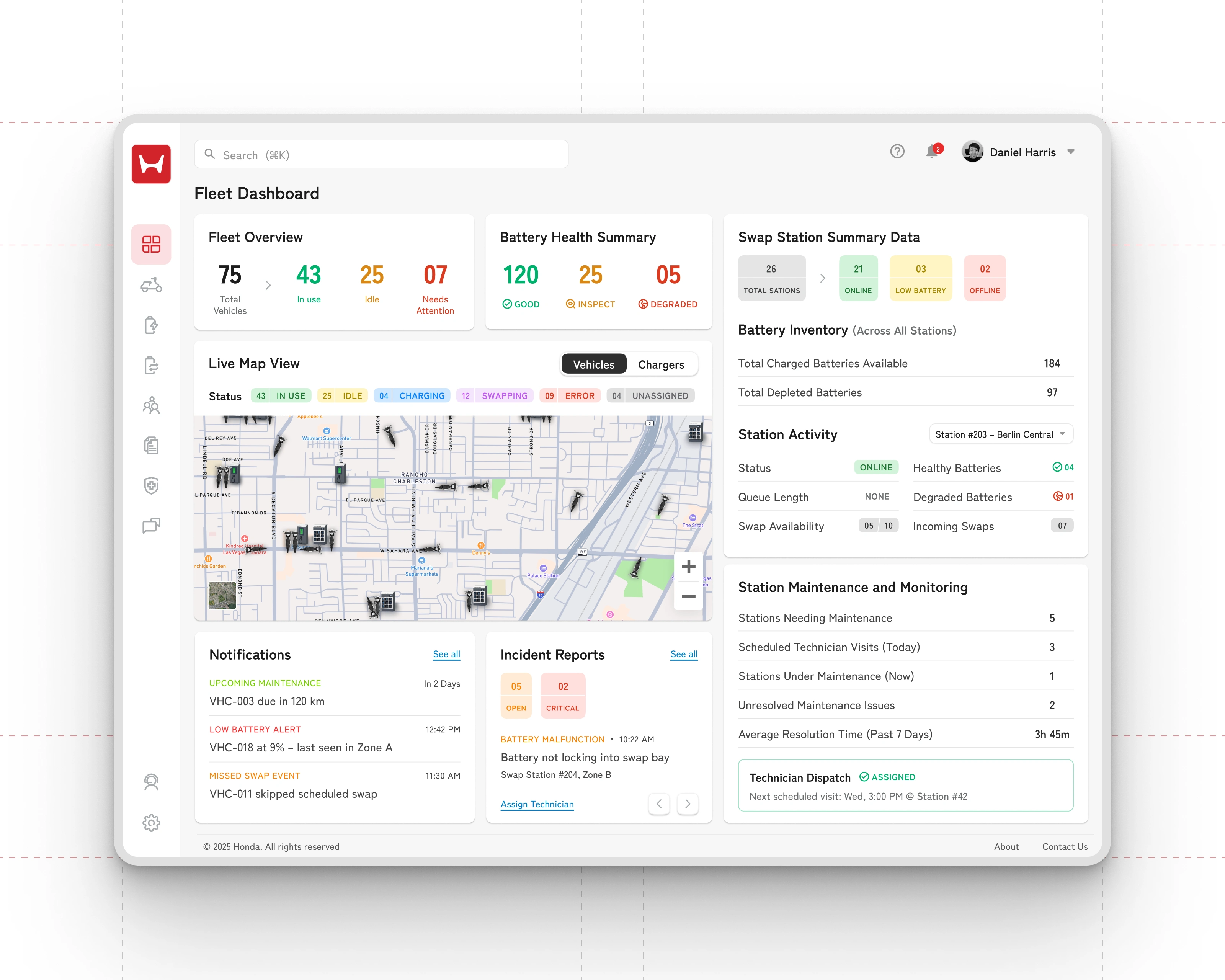
Key UI Highlights
Fleet Overview Panel
Displays total vehicles and their real-time status: in use, idle, or needing attention.
Helps managers assess resource distribution and overall fleet efficiency at a glance.
Battery Health Summary
Shows the number of batteries in good, inspect, or degraded condition.
Allows early detection of performance issues to prevent failures during delivery runs.
Swap Station Summary Data
Summarizes station availability, battery levels, and online/offline status.
Aggregated battery inventory gives a clear picture of charged vs depleted units across all stations.
Live Map View
Provides a geospatial representation of vehicles, stations, and chargers.
Status badges (in use, idle, charging, swapping, error) make it easy to spot issues on the map in real time.
Notifications Feed
Surfaces critical alerts such as upcoming maintenance, low battery warnings, or missed swap events.
Designed to catch urgent issues early and reduce delivery disruptions.
Incident Reports
Highlights open and critical incidents, such as battery malfunctions.
Includes direct actions like assigning technicians for quicker resolution.
Station Maintenance & Monitoring
Displays scheduled visits, stations currently under maintenance, and unresolved issues.
Offers a snapshot of operational health with metrics like average resolution time.
Technician Dispatch Module
Confirms assigned technicians and upcoming service schedules.
Helps track maintenance workflows and ensures accountability.
Battery Swap Station – Detailed View
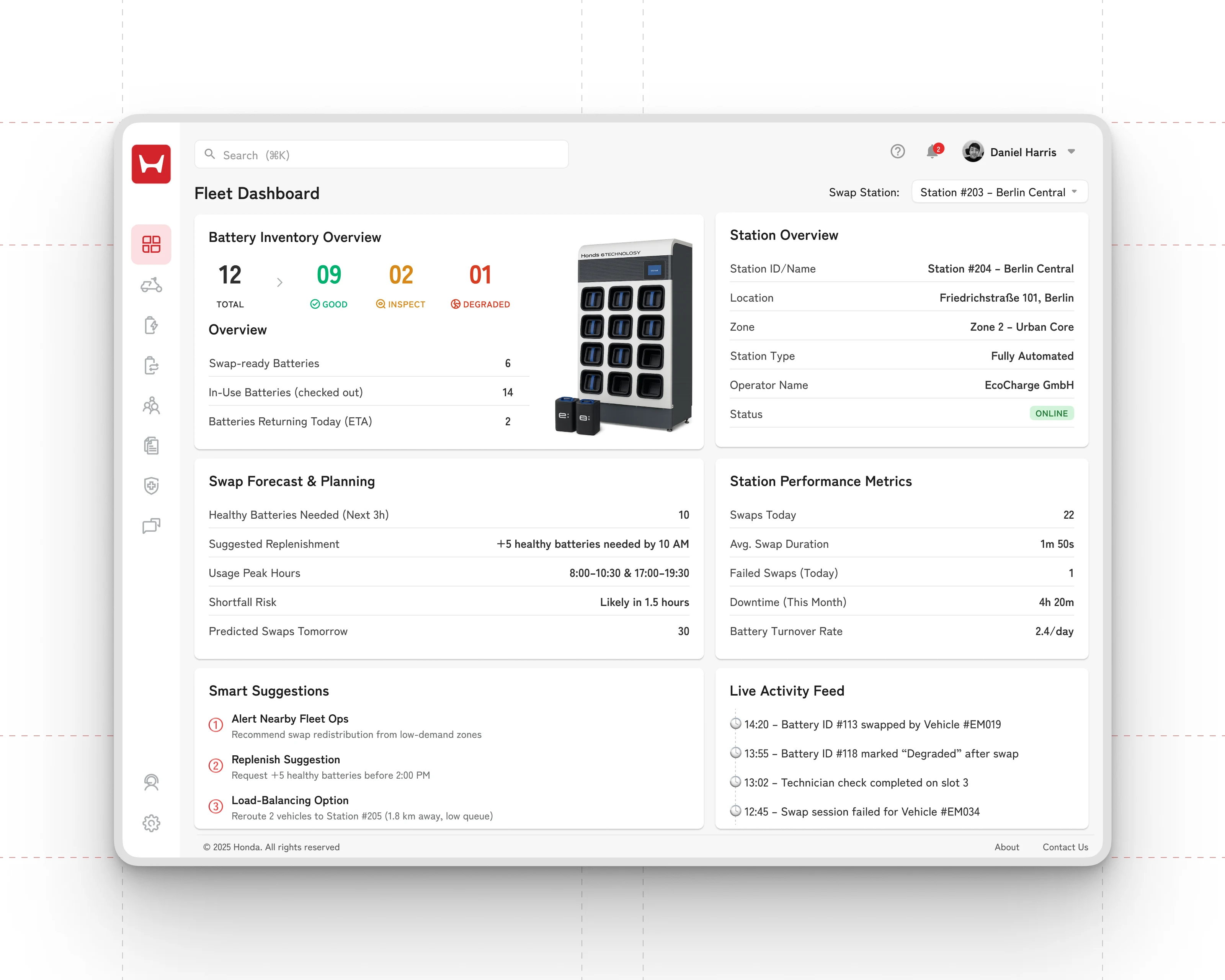
This screen gives fleet managers a focused, station-level breakdown that brings together battery inventory, station performance, operational risks, and predictive insights. The interface is designed to support rapid decision-making by surfacing the most relevant metrics upfront—such as battery availability, swap demand forecasts, and live activity—while offering deeper operational context for maintenance and planning. The layout keeps critical information tightly grouped, helping managers respond to shortages, anticipate peak load, and maintain smooth station operation.
Key UI Highlights
Battery Inventory Overview
Shows total batteries at the station, categorized by health status: good, inspect, and degraded.
Includes the count of swap-ready batteries, in-use batteries, and those expected to return later in the day.
Helps managers gauge whether current inventory can sustain upcoming demand.
Station Overview Panel
Lists station ID, location, type, operator, and online/offline status.
Provides essential operational context to quickly identify the station and its zone classification.
Swap Forecast & Planning
Predicts the number of healthy batteries required in the next three hours.
Suggests how many batteries need replenishment and by what time.
Highlights peak usage windows, shortfall risk timelines, and expected swaps for the next day.
Gives managers a data-backed forecast to prevent shortages before they occur.
Smart Suggestions
Proactive recommendations based on real-time data and predicted trends:
Alerting fleet ops when redistribution is needed.
Advising replenishment before a specific time.
Offering load-balancing options by rerouting vehicles to nearby stations.
Automates operational judgment, reducing manual oversight.
Station Performance Metrics
Displays daily swaps, average swap duration, failed swaps, monthly downtime, and turnover rate.
Helps track efficiency and detect stations that may require technical intervention.
Live Activity Feed
Streams real-time events such as completed swaps, battery health updates, and technician checks.
Gives a transparent log of operational actions for traceability and quick troubleshooting.
Live Tracking – Rider Activity & Route Visualization
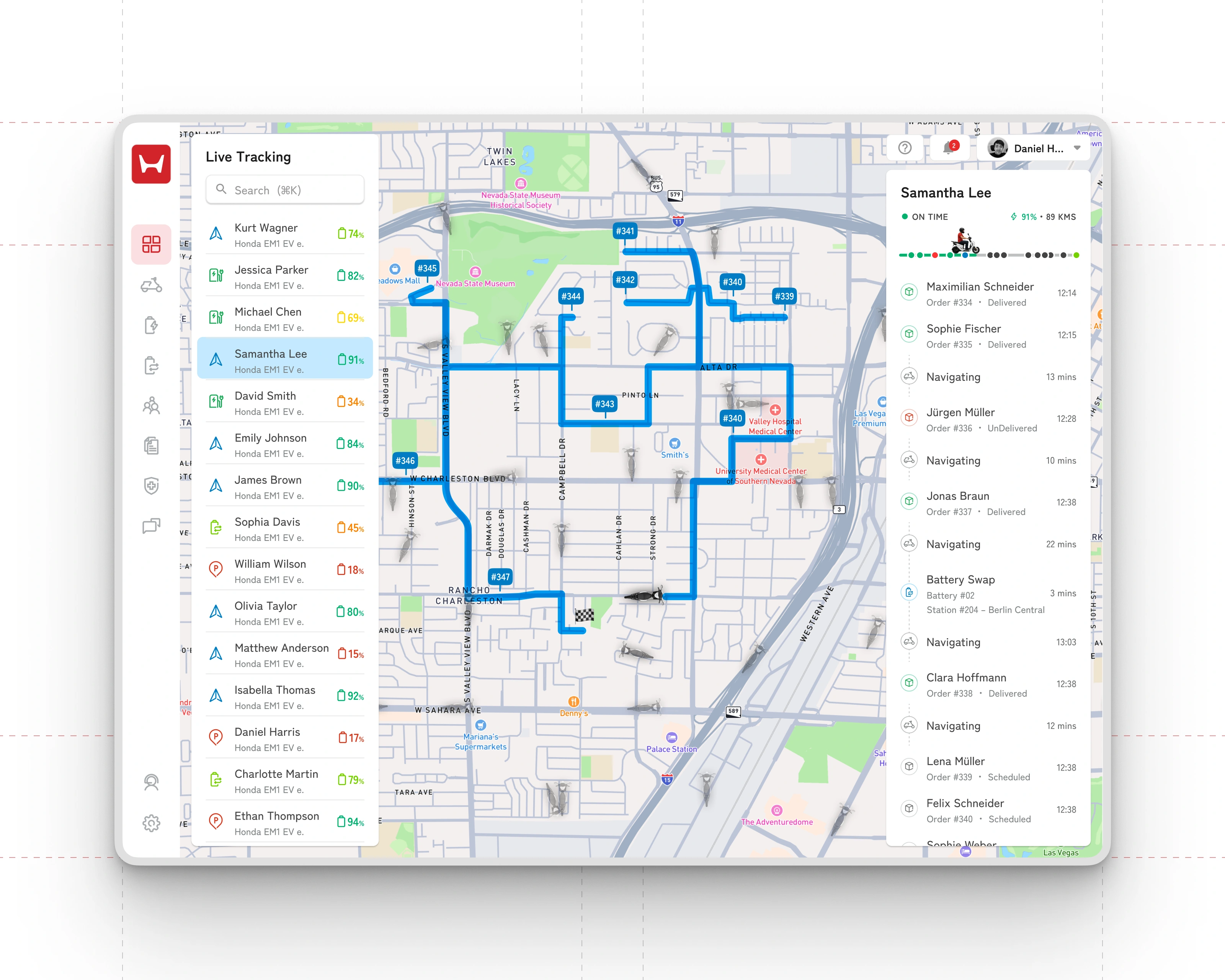
This screen provides a real-time, map-based view of a rider’s ongoing deliveries, routes, and operational status. It consolidates location data, battery levels, and order progression into a single visual interface, allowing fleet supervisors to monitor rider performance with precision. The layout balances a high-level fleet list with an in-depth activity timeline for the selected rider, making it easy to switch between fleet-wide oversight and individual rider tracking.
Key UI Highlights
Fleet Rider List
Displays all riders with their current battery percentage and vehicle type.
Status indicators (color-coded percentages) help managers quickly identify riders who may need battery swaps or assistance.
Enables seamless switching between riders while maintaining map context.
Route Visualization on Map
Shows the complete route of the selected rider, including planned paths, completed stops, and delivery checkmarks.
Live position of the rider is highlighted to help supervisors monitor progression and timing.
Visual markers differentiate delivery stops, navigation stretches, and battery swap points.
Rider Summary Panel
Presents the selected rider’s health indicators such as on-time status, battery level, total kilometers, and performance icons.
Gives supervisors a quick read on whether the rider is meeting delivery expectations.
Order & Activity Timeline
Displays a chronological list of the rider’s tasks—delivered orders, navigation periods, missed or pending orders, and battery swap events.
Includes timestamps for each activity, improving accountability and tracing.
Clearly outlines where delays or exceptions occurred, making it easier to intervene when necessary.
Battery Swap Visibility
Logs swap sessions with battery ID and station details.
• • Helps fleet operators confirm that riders are handling swaps efficiently and not risking downtime.
Like this project
Posted Dec 5, 2025
A seamless EV ecosystem that empowers riders, optimizes battery swaps, and gives fleets real-time operational control.