KeepFit | Your Daily Fitness Companion

Srikar Suresh


Introduction
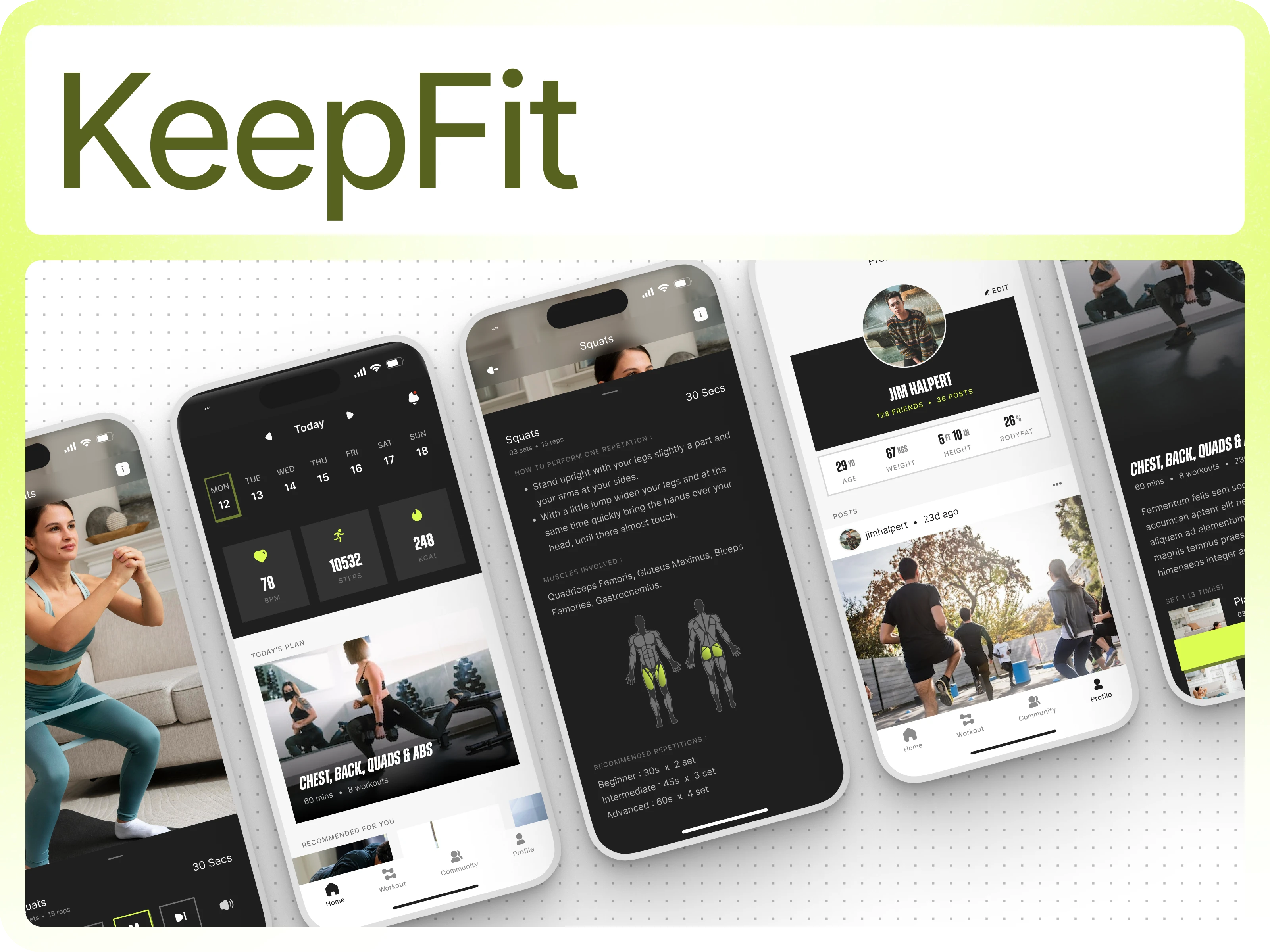
KeepFit is a personalised fitness app that simplifies training, tracks progress and keeps users motivated through data and community. It builds a tailored workout experience from the moment a user signs up, collecting essential fitness indicators to generate daily plans, exercise recommendations and goal-driven insights. KeepFit offers structured workouts, real-time activity tracking, challenges, leaderboards and a social feed, creating a cohesive ecosystem for users to stay consistent, understand their progress and connect with others pursuing similar goals.
Onboarding Flow
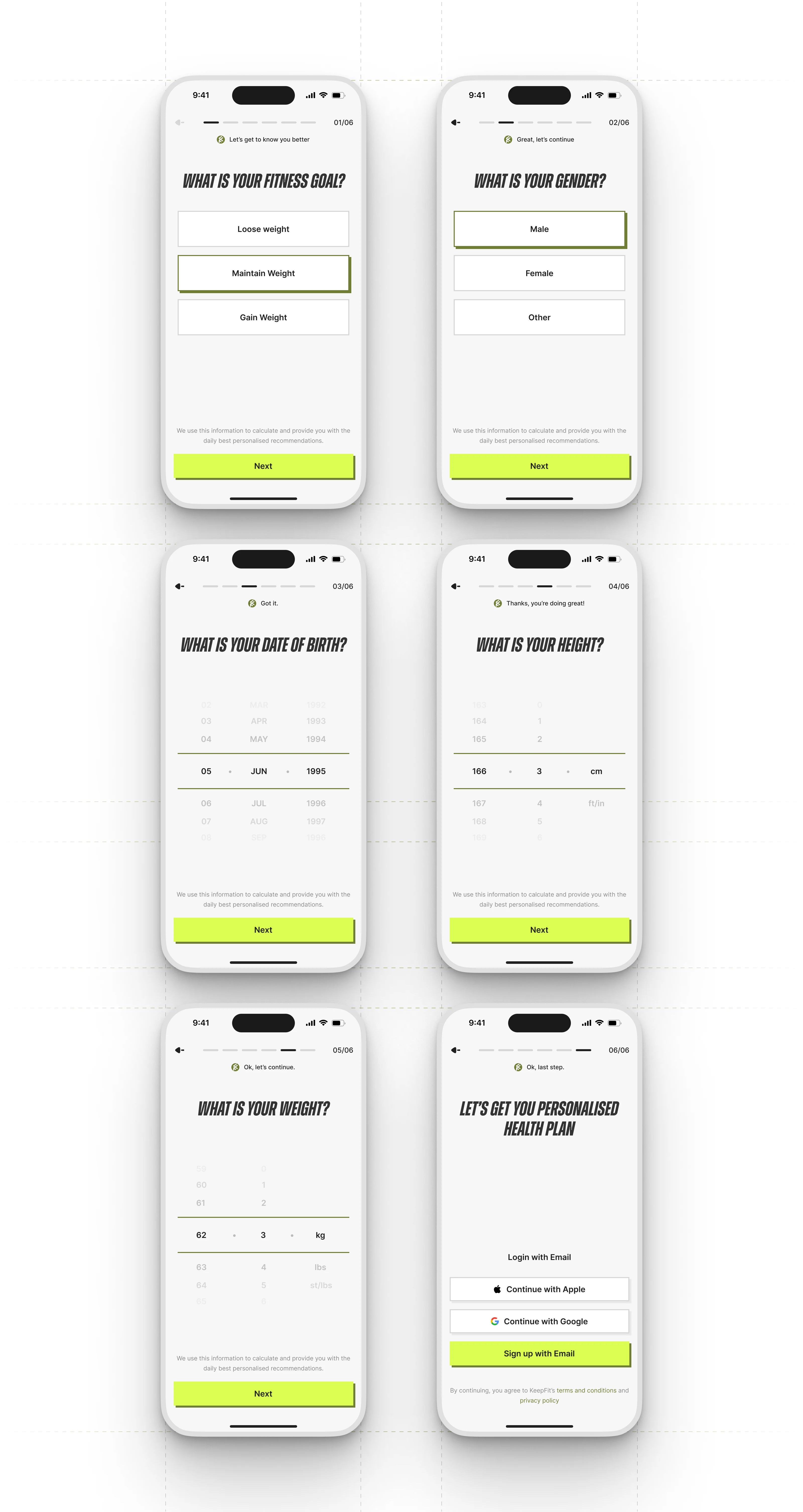
Onboarding Flow
The onboarding process gathers essential data for personalised fitness recommendations. The app starts by identifying the user’s fitness goal, followed by key personal attributes like gender, date of birth, height, and weight. Each step is a single-screen interaction, reducing cognitive load and keeping users engaged.
Clear progress indicators and bold selection states make choices easy. Wheel pickers for numerical entries ensure precise inputs. Subtle guidance messages reinforce progress without interrupting momentum.
The final step transitions into account creation with flexible sign-in options. The design prioritises clarity, speed, and completion, capturing accurate data while keeping the experience light and user-friendly.
Home and Workout Progress
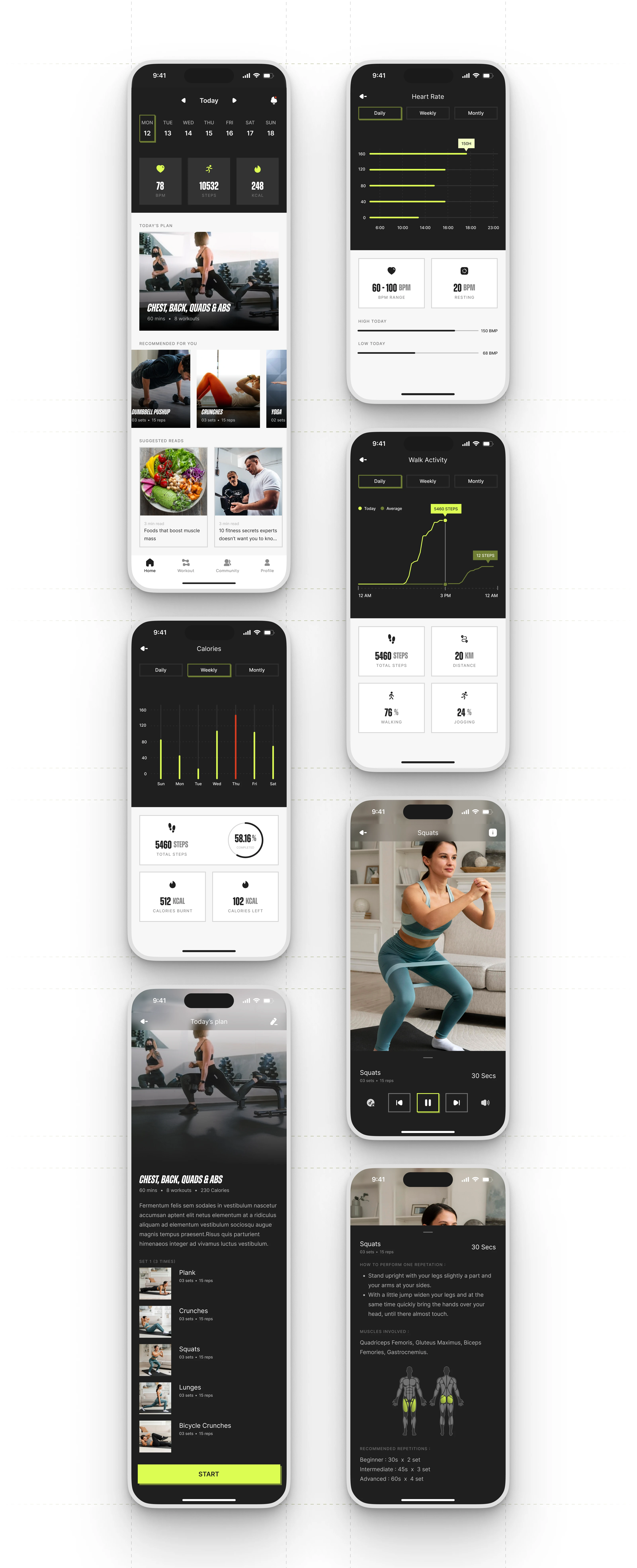
Homepage and Activity Flow
The home screen displays a snapshot of daily activity, a personalised workout plan, and learning content. A horizontal calendar and progress summary provide quick context. High-contrast tiles show heart rate, steps, and calories for fast scanning. The ‘Today’s Plan’ module displays the day’s scheduled workout. Recommended exercises and curated reads keep the interface dynamic and personalised.
Clear visual charts show heart rate, steps, and calories with daily, weekly, and monthly views. They prioritise trend recognition over raw data, helping users understand performance changes. Supporting metrics, averages, ranges, and time-based highlights are below each chart.
The workout detail flow is clear and structured. Each plan outlines duration, exercises, and calorie burn. Users can explore individual exercises for form instructions, muscle groups, and recommended rep ranges. This reduces guesswork and supports safe, progression-focused training.
During an active workout, the interface shifts to an immersive mode with large imagery, minimal distractions, and direct access to controls. The layout stays grounded in usability, with large tap targets, predictable placement, and uninterrupted visibility of the exercise.
Overall, the Home and Workout flows keep users informed, motivated, and guided throughout their training without overwhelming them.
Workout Flow
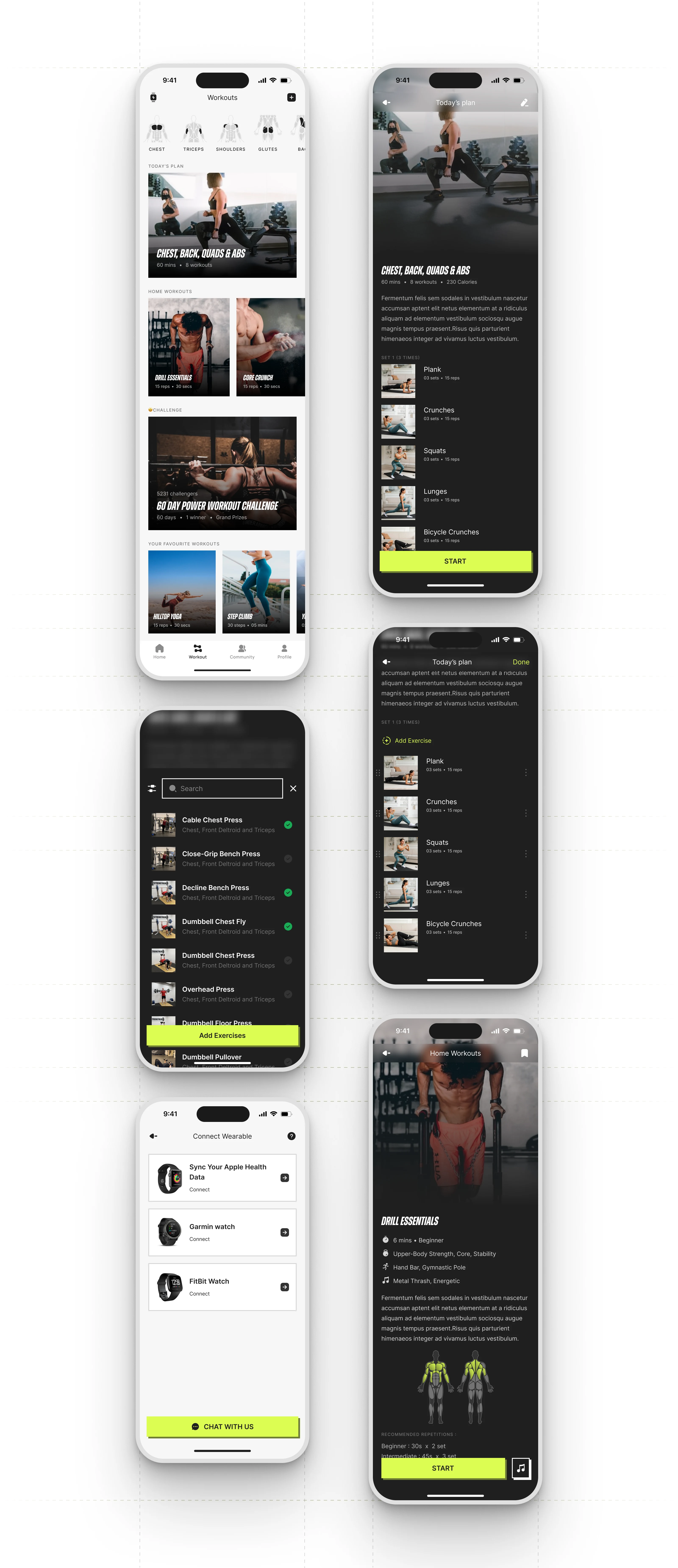
Workout Flow
The workout flow offers complete control over training while keeping navigation fast and predictable. The main screen has a muscle-group selector for instant exercise exploration. Below, the daily workout plan is prominent, ensuring personalised routines are accessible. Curated sections like Home Workouts, Challenges and Favourite Workouts keep the page fresh and adaptable.
Users get a structured overview of their daily plan, including duration, exercise count and estimated calories. A clean list of movements with sets and reps follows. Each workout card has high-quality visuals and simple typography for easy scanning.
The editing mode lets users customise their routine by adding or reordering exercises. A searchable exercise library with filters and muscle-group tags speeds up discovery. Clear selection states prevent confusion when building or modifying a plan.
Individual exercise screens provide step-by-step instructions, muscle charts and recommended rep ranges for different user levels. This educational layer boosts confidence and reduces the risk of improper form. When users start a workout, the UI shifts into an immersive training layout with large visuals, essential controls and minimal distractions, supporting smooth pacing during active sessions.
The flow also supports external integrations. A dedicated Wearables screen connects Apple Health, Garmin and Fitbit devices, enabling real-time metric syncing and improved personalised recommendations.
Overall, the workout flow offers a flexible and guided training experience, balancing structure with personalisation for users to build routines that suit their goals and training style.
Community Flow
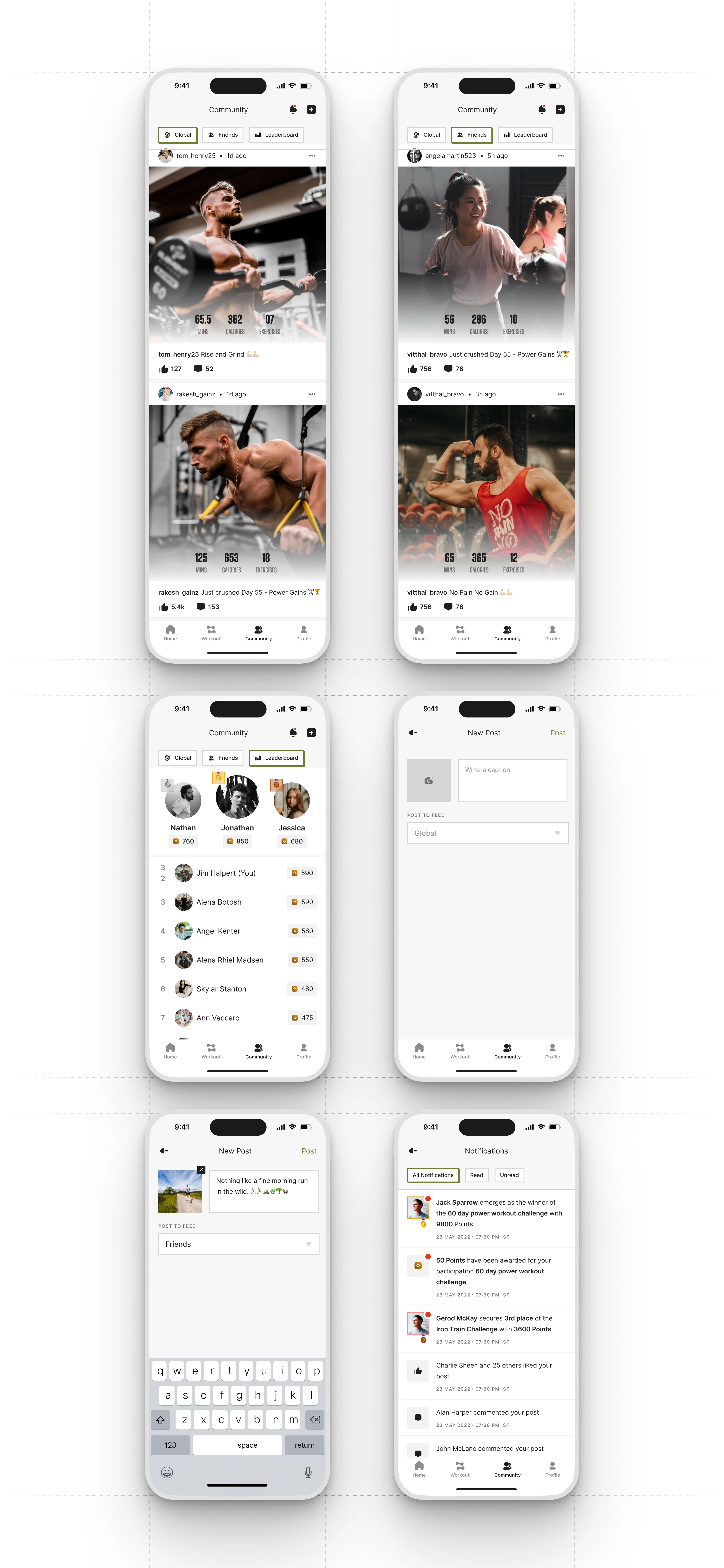
Fitness Community
The community flow turns user progress into social motivation. The main feed offers Global, Friends, and Leaderboard views, each with a different perspective on activity and achievement. Posts highlight workout stats with high-impact visuals that celebrate effort and consistency. Lightweight interactions like likes and comments keep engagement casual yet meaningful.
The Friends tab focusses on a personal network, encouraging accountability within smaller circles. The Leaderboard brings a competitive layer, ranking users by points earned through workouts and challenges. Clear badges, medals, and point indicators provide instant clarity on performance and ranking.
Creating a post is simple: users can upload a photo, write a caption, and choose where to publish. This quick workflow lowers the barrier to sharing progress, turning small wins into community moments.
Notifications tie the social layer together, providing updates on challenge results, awarded points, likes, and comments. Each notification is structured for fast scanning, with highlights and timestamps that keep everything organised.
Overall, the community flow connects training with motivation, allowing users to share progress, celebrate achievements, and stay accountable without distracting from the core fitness experience.
Profile
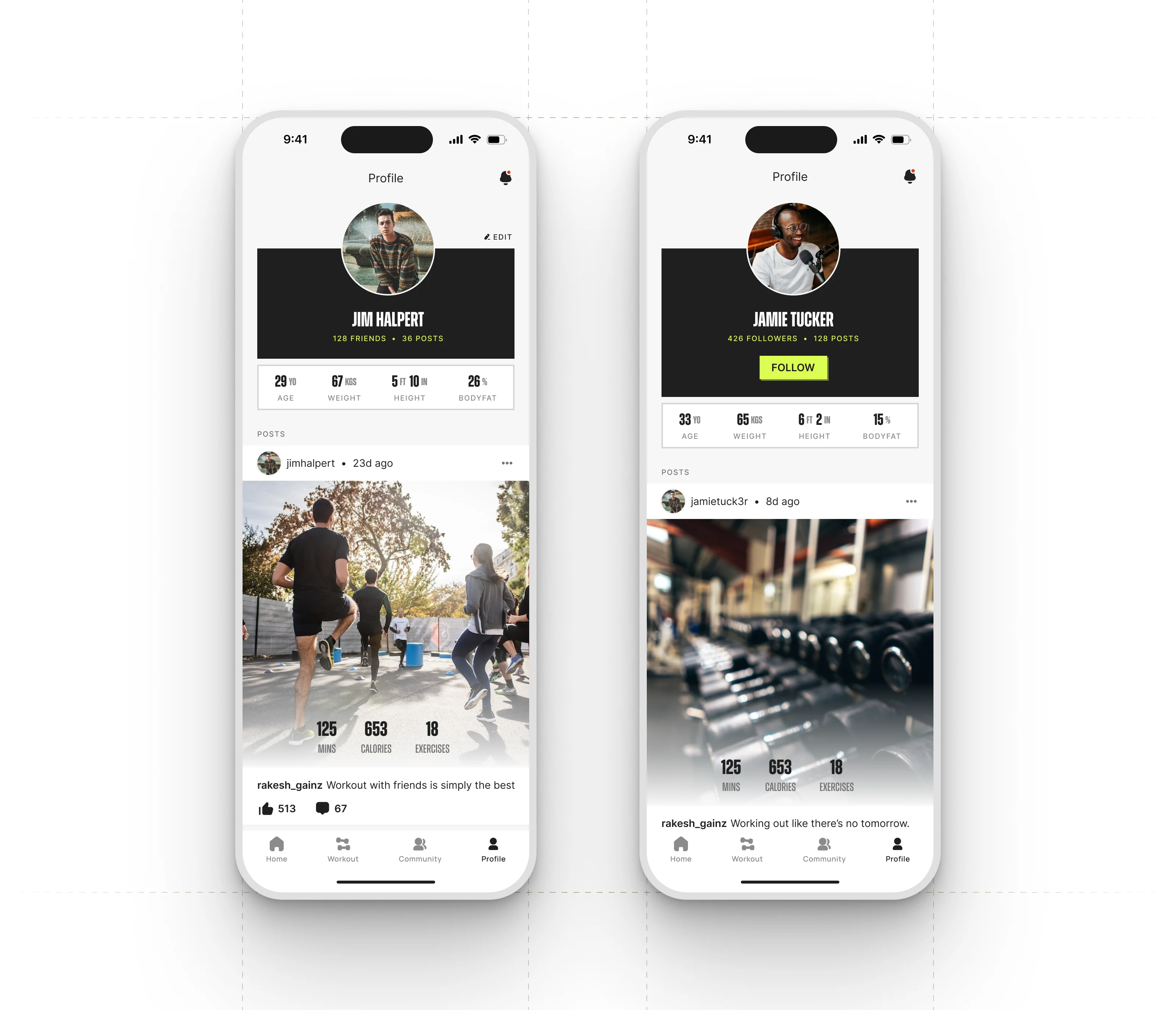
User Profile
The profile screen brings users’ fitness identity together. It shows key personal metrics like age, weight, height and body-fat percentage, giving users a quick overview of their current status. The header includes friend count and total posts, reinforcing social presence within the community.
A large profile photo and editable banner area allow users to personalise their space, making the profile feel more like a fitness journal. Below the overview, the feed shows all posts shared by the user, each with detailed workout stats and community engagement. This creates a consistent, motivating loop where progress is tracked and celebrated.
Overall, the profile screen balances personal data, social activity and visual identity, reflecting users’ fitness journey and their presence in the KeepFit community.
Like this project
Posted Dec 6, 2025
KeepFit reimagines how everyday users approach fitness by combining personalised training, real-time insights and a socially driven experience into one app.