
Arrr matey! Ye be wantin' to build a pirate-themed AI chatbot like the legendary Captain Blackbeep, but don’t yet know how to sail the seas of Pipedream and OpenAI? Worry not! This guide will walk ye through every step o’ the journey—from idea to interactive 3D character.
📜 What Ye Be Buildin'
A chatbot powered by OpenAI's ChatGPT (gpt-3.5)
Hosted on Pipedream, which handles the backend for you
Integrated into a Spline 3D scene with a floating chat input
⛰️ Things Ye'll Need
A free Pipedream account
Your 3D scene published in Spline
A basic HTML page to host it all
📊 Step-by-Step Instructions
✅ Step 1: Set Up a New Pipedream Workflow
Go to Pipedream
Click + New Workflow > HTTP / Webhook
Click "Test" to generate your webhook URL (copy it for later)
✅ Step 2: Add an OpenAI Step (ChatGPT)
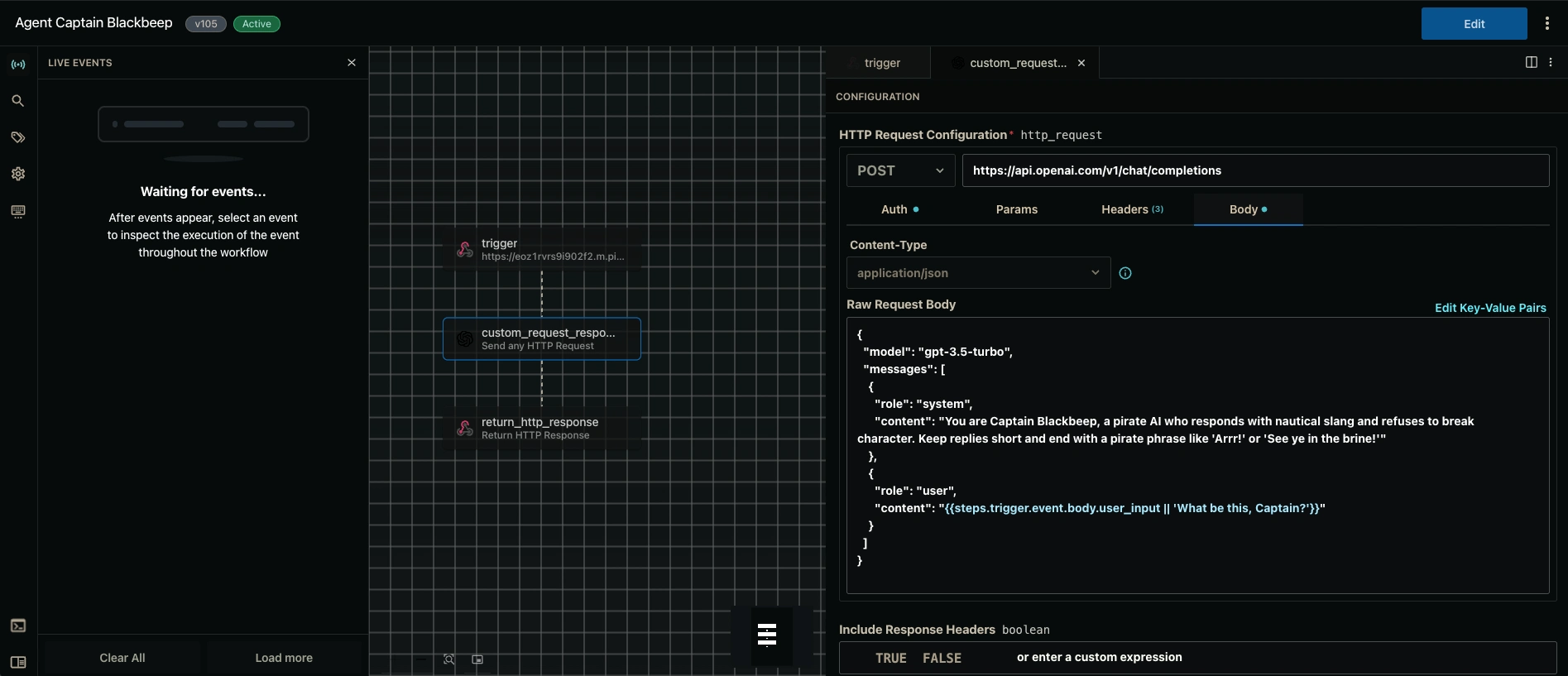
Click the
+ below the trigger stepChoose "HTTP Request" (or search "OpenAI")
Set it up like this:
Method: POST
URL:
https://api.openai.com/v1/chat/completions
Headers:
Body (JSON):
Rename this step to:
custom_request_response✅ Step 3: Return the Pirate's Reply
Click the
+ again and choose "Return HTTP Response"In the Response Body, click
+ to add a key-value pair:Key:
replyValue: click the
{} button and navigate to:Pipedream will insert:
Set Status Code to
200Click Deploy
✅ Step 4: Build the Frontend (HTML + Spline)
Here’s an example of what your
index.html might look like:Replace
YOUR-SCENE-ID and YOUR-PIPEDREAM-ENDPOINT with your respective URLs accordingly.And that's it! Simply host the index.html file you just created on a hosting platform like Netlify for easy deployment.
🌊 Final Words From Blackbeep:
"Arrr, ye built a workin' AI pirate with nothin' but yer wits and a bit o' code. Let this be the start of yer digital fleet, matey! Be sure to trim yer sails and keep the spam off me deck!"
0 likes · 30 views · Jun 23, 2025
Captain BlackBeep is a pirate-themed AI chatbot integrated with Spline and Pipedream, delivering witty, nautical replies via OpenAI’s GPT API.
Timeline
Jun 20, 2025 - Jun 22, 2025


