

Ai Native Developer | Web, Mobile, Desktop & Chromium Expert
- $•••••
- Earned
- 8x
- Hired
- 5.0
- Rating
- 201
- Followers
Ai Native Developer | Web, Mobile, Desktop & Chromium Expert


Full-stack Design Engineering ✓ Premium Digital Brands. ⌚💎

Full-stack Design Engineering ✓ Premium Digital Brands. ⌚💎




Founding AI Engineer, Agents, Automation, Cloud, Full-Stack
- $1k+
- Earned
- 9x
- Hired
- 4.7
- Rating
- 62
- Followers
Founding AI Engineer, Agents, Automation, Cloud, Full-Stack





Full-stack developer


SaaS| Browser Extension Developer| Save Time with automation
SaaS| Browser Extension Developer| Save Time with automation
Description
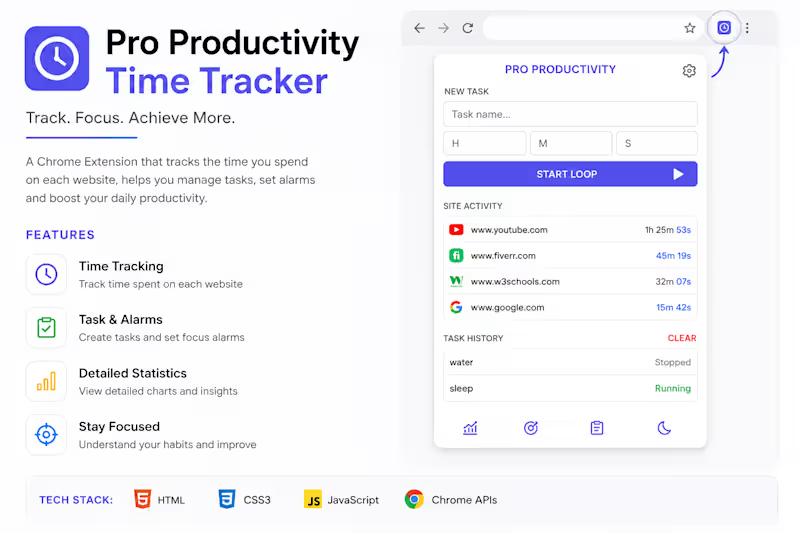
Pro Productivity is a Chrome extension designed to help users understand and improve their online habits. The extension automatically tracks the time spent on each website, providing detailed insights into daily browsing behavior. Users can create tasks, set focus timers, and receive reminders to stay productive throughout the day.
The extension features real-time website activity tracking, task management, focus alarms, and productivity analytics in a clean and intuitive interface. By visualizing browsing patterns and tracking task progress, users can identify distractions, manage their time more effectively, and build better productivity habits.
Key Features
✅ Website Time Tracking
Automatically tracks time spent on every website.
Displays real-time browsing activity.
✅ Task Management
Create and manage productivity tasks.
Monitor active and completed tasks.
✅ Focus Timers & Alarms
Set custom focus sessions.
Receive alerts when task timers expire.
✅ Activity Dashboard
View browsing history and usage statistics.
Analyze productivity trends over time.
✅ Clean User Interface
Modern dark-themed design.
Easy-to-use and distraction-free experience.
Technologies Used
React
WXT Framework
JavaScript
Chrome Extension APIs
Local Storage
HTML5
CSS3
Problem Solved
Many users underestimate how much time they spend online. Pro Productivity provides clear visibility into browsing habits while helping users stay focused on important tasks through time tracking and smart reminders.
Results
The extension enables users to:
Track online activity accurately.
Reduce distractions.
Improve time management.
Increase productivity through focused work sessions.
Gain valuable insights into their daily digital behavior.
Role: Full-Stack Chrome Extension Developer
Project Type: Productivity & Time Management Tool
Platform: Google Chrome Extension
1
58
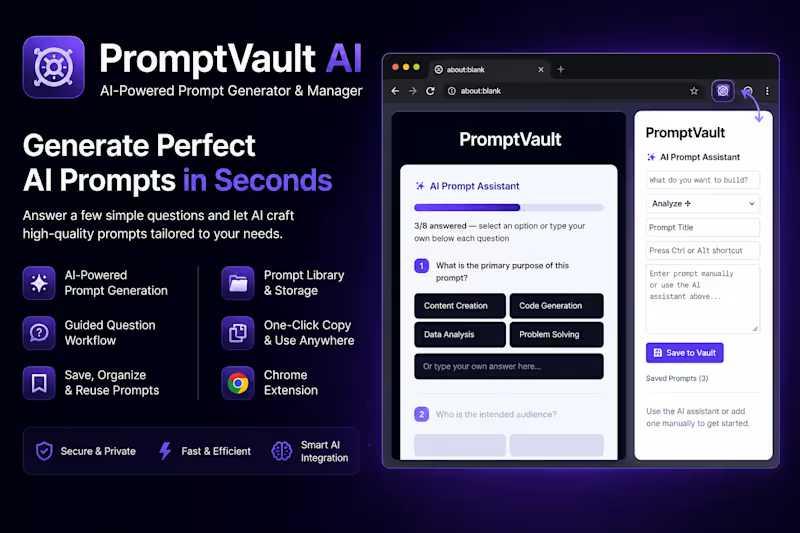
PromptVault AI is a Chrome extension I built that helps users
generate, save, organize, and reuse high-quality AI prompts in
seconds. The extension uses a guided question workflow where users
answer a few simple questions and the AI crafts perfect prompts
tailored to their specific needs.
Key features I developed:
AI-powered prompt generation for content creation, code generation, data analysis, and problem solving
Guided multi-step question workflow to capture user intent
Prompt Library & Storage to save and organize prompts
One-click copy to use prompts anywhere instantly
Keyboard shortcut support (Ctrl/Cmd) for power users
Clean sidebar UI that works on any webpage
Secure, private, and fast — no data leaves the browser
Tech stack: React, JavaScript, Chrome Extension APIs, AI API
integration, HTML/CSS
1
69
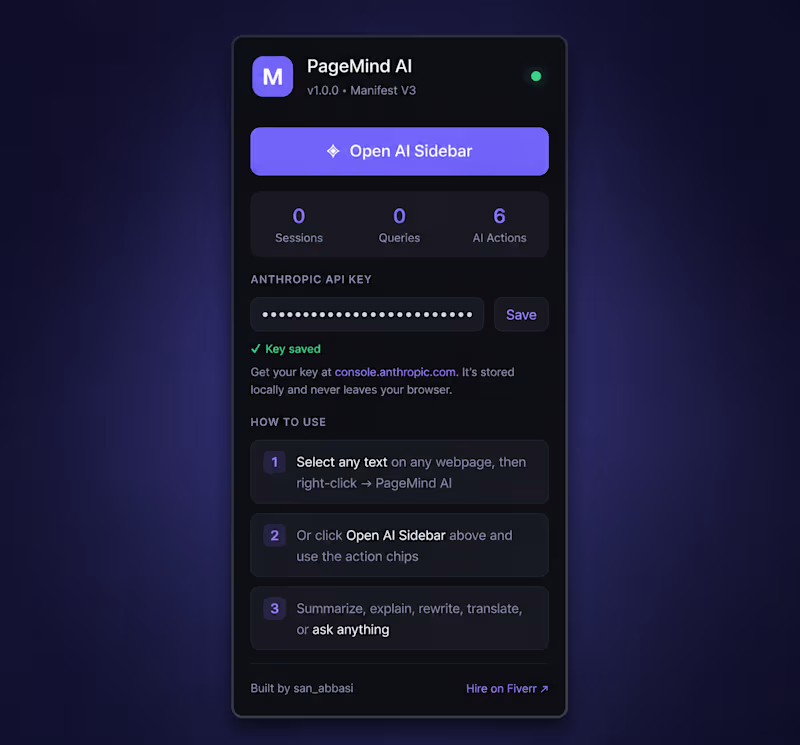
PageMind AI is a Chrome extension I built from scratch that brings
AI-powered browsing capabilities directly into the browser. The
extension allows users to interact with web page content using AI,
summarize pages, ask questions, and get instant explanations without
leaving the tab.
Key features I developed:
AI chat integration that understands and responds to page content
Clean, responsive extension UI built with React and JavaScript
Session tracking with counters for messages and interactions
Sidebar panel that opens within any webpage seamlessly
Secure and optimized for fast, lightweight performance
Tech stack: React, JavaScript, Chrome Extension APIs, AI API
integration, HTML/CSS
1
68


Full-Stack Developer | Custom Web, Shopify, WordPress & SaaS
New to Contra
Full-Stack Developer | Custom Web, Shopify, WordPress & SaaS
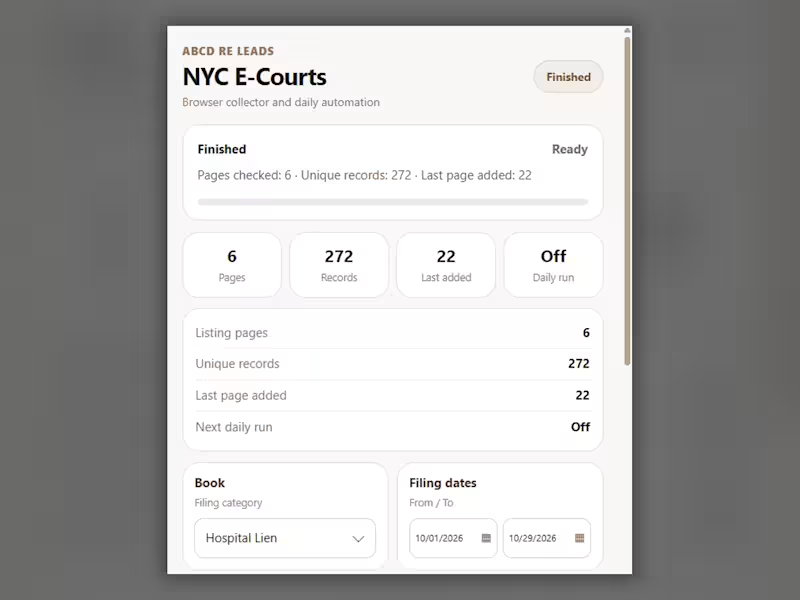
NYC E-Courts | Chrome Extension & Court Data Automation
Developed a custom Chrome extension for collecting, organizing, and managing publicly available court filing records from the NYC E-Courts system as part of the ABCD RE Leads public records management platform. Built using JavaScript, HTML5, CSS3, and Chrome Extension APIs, the extension supports filing category selection, From/To date filtering, automated listing navigation, and multi-page record collection. Implemented historical and daily collection workflows, progress tracking, scheduling, pause/resume controls, and CSV exports. Added backup functionality and token-based synchronization with a PHP and MySQL dashboard. Designed an intuitive interface displaying collection statistics, processed pages, unique records, and synchronization status, with support for manual CAPTCHA verification to streamline court records research and data management.
0
178
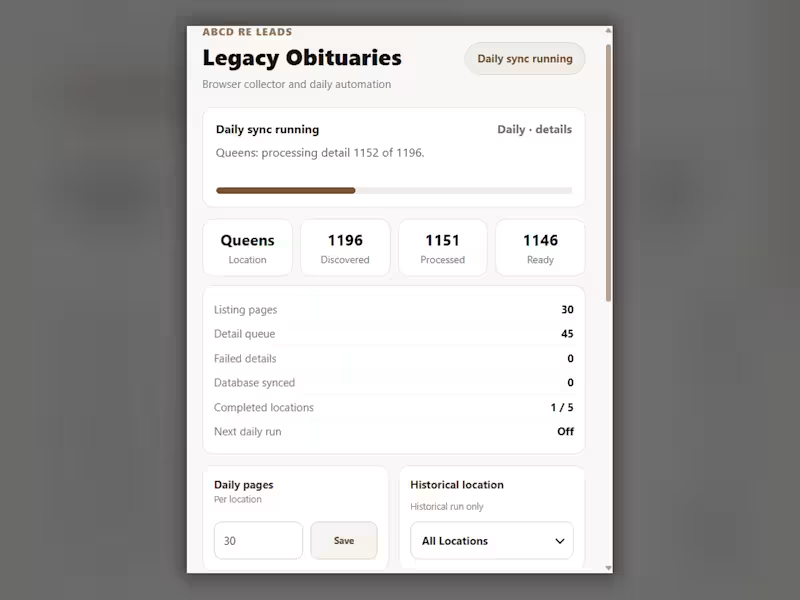
Legacy Obituaries | Chrome Extension & Data Automation
Developed a custom Chrome extension for collecting, organizing, and managing publicly available obituary records from Legacy.com (http://Legacy.com) as part of the ABCD RE Leads public records management platform. Built using JavaScript, HTML5, CSS3, and Chrome Extension APIs, the extension supports location-based data collection across Brooklyn, Queens, Bronx, Nassau, and Staten Island. Implemented historical and daily collection workflows, listing pagination, configurable page limits, progress tracking, scheduling, and pause/resume controls. Added CSV exports, backup and import functionality, and token-based synchronization with a PHP and MySQL dashboard. Designed an intuitive extension interface with collection statistics, processing indicators, and support for manual CAPTCHA verification to streamline obituary research and record management.
0
153
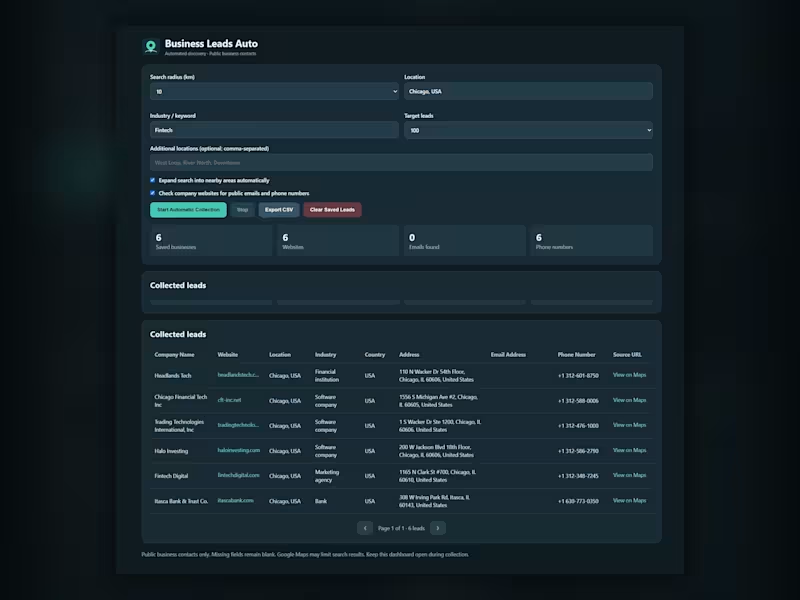
Business Leads Auto | Google Maps Lead Extraction Extension
Developed Business Leads Auto, a custom Chrome extension designed to automate B2B lead generation and business data extraction from publicly available Google Maps listings. Built using JavaScript, HTML5, CSS3, and Chrome Extension APIs, the tool supports industry-based searches, location targeting, configurable search radius, and business contact discovery. Implemented automated collection of business names, addresses, phone numbers, websites, and publicly listed email addresses. Designed an interactive dashboard featuring search filters, real-time extraction progress, saved leads, pagination, and CSV exports. The extension simplifies business prospecting, reduces manual research, and helps sales and marketing teams organize potential customers into structured lead lists.
0
109

Eddi | Webflow SaaS Website Development & CMS Integration
Designed and developed a fully responsive, multi-page SaaS website for Eddi, a data-driven platform helping educational institutions, nonprofits, and mission-driven organizations streamline financial operations, funding management, analytics, and organizational performance.
Built the website using Webflow, HTML5, CSS3, and JavaScript, creating a modern, professional interface with consistent branding, intuitive navigation, interactive components, and conversion-focused layouts.
Developed dedicated pages for Administration & Leadership, Grants & Funding, Finance & Operations, Data Analytics, Student Success, and industry-specific solutions for K-12 School Districts, Higher Education, Nonprofits, and Government Organizations.
Implemented Webflow CMS Collections to manage dynamic blog articles, individual blog templates, success stories, and case studies. Created reusable page structures that maintain consistent designs while displaying unique content across multiple pages.
Built interactive components, including FAQ accordions, blog category filtering, responsive feature cards, dashboard previews, statistics sections, testimonials, and prominent calls to action.
Focused on responsive UI/UX design, SEO-friendly page structures, performance optimization, accessibility, and maintainable development across desktop, tablet, and mobile devices.
The result is a scalable, CMS-powered Webflow website that effectively communicates Eddi's platform capabilities, supports efficient content management, and provides a consistent user experience across its extensive page structure.
2
0
33

Python Automation Engineer: Scrapers, Telegram Bots, AI
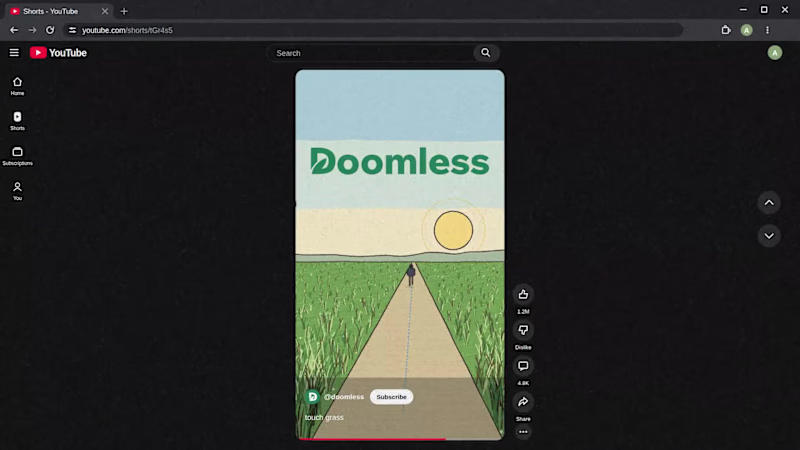

Quick Video Export for Claude Design — Browser Extension
A lightweight Manifest V3 browser extension for Claude Design, Anthropic's AI-assisted animation tool. Claude Design already supports video export, but it's buried a few clicks deep in the Share menu — this adds a small button right on the timeline toolbar that jumps straight to the native export dialog in one click.
What I handled end-to-end:
DOM-based UI injection that matches the host app's existing design tokens and toolbar styling, so the button feels native
Resilient element detection with console warnings that flag if the site's markup changes — so regressions after a redesign are easy to catch instead of failing silently
A custom inline SVG icon (no dependency on the host site's own icon font)
Store-ready packaging for both browsers: manifest configuration, privacy/data-collection disclosures, and full submission to Chrome Web Store and Firefox Add-ons (AMO)
Zero data collection, no tracking, no network requests — everything runs locally in the browser. Free and open source.
Links:
Chrome Web Store: https://chromewebstore.google.com/detail/hleiiamhkjnlhmaofhihpedcpddainjd
Firefox Add-ons (in review, link goes live soon): https://addons.mozilla.org/en-US/firefox/addon/video-export-for-claude-design/
GitHub (source): https://github.com/vsevalid/video-export-claude-design
0
131


An Enthusiastic Full-stack Dev and Ethical Hacker.


