AI Development Projects in LahoreAI Development Projects in Lahore
Cover image for Aura — Spatial Soundscape Generator
Aura — Spatial Soundscape Generator Built with Google Stitch Aura is a spatial soundscape generator built with Google Stitch for the theme “Build interfaces that feel alive.” Stitch Project Link: https://stitch.withgoogle.com/projects/18244428936012560793?pli=1 Live Deployment Link: AURA (https://aura-studio-193182769983.asia-southeast1.run.app/#workflow)Most ambient sound apps rely on static lists, sliders, and presets. I wanted to take a different direction and make sound feel physical, visual, and interactive. Aura turns each ambient sound into a living glass node inside an immersive canvas. Users drag sounds closer to the central Listener to increase intensity, move them through space to shape presence, and overlap nodes to create blended moods. The idea behind Aura is simple: 🚀 You don’t adjust sound — you shape it. 👍 The project includes: A polished landing page A Begin Session flow into the core experience A spatial sound canvas Draggable sound nodes for ambient audio Real audio playback Intensity changes based on distance from the Listener Motion-rich glow, ripple, hover, and drag states A premium visual style inspired by spatial audio and immersive interfaces 🙌 Google Stitch Usage Google Stitch was the core part of my creative workflow. I used Stitch to generate the first version of Aura directly on the canvas, then refined the landing page, Aura Studio, glass sound nodes, motion states, hover states, ripple effects, and shader-style background through prompt-based and in-place edits. After the design direction was created in Stitch, I continued directly into Google AI Studio to make the prototype functional, including the Begin Session navigation, draggable sound nodes, spatial audio behavior, and real sound playback. 🙌New Stitch Features Used Streaming generations directly to the canvas In-place AI edits using prompts and point-and-click interactions Native motion, animation, shaders, and hover states on HTML canvas Expanded builder workflow / handoff (Continued from Stitch into Google AI Studio to make the prototype functional.) 💯 Feedback on Using Stitch Stitch actually surprised me on many occasions, stitch helped me move quickly from an abstract idea into a polished product experience. The most useful part was being able to generate the interface, then refine specific parts of the design without starting over. In-place edits were especially helpful for improving the glass sound nodes, motion behavior, and visual atmosphere of Aura Studio. Once I defined the core logic — distance equals intensity, movement shapes presence, and overlap creates blends — Stitch made it easier to turn the idea into a working visual experience.
1
137
Cover image for Hey Contra 👋 I've been
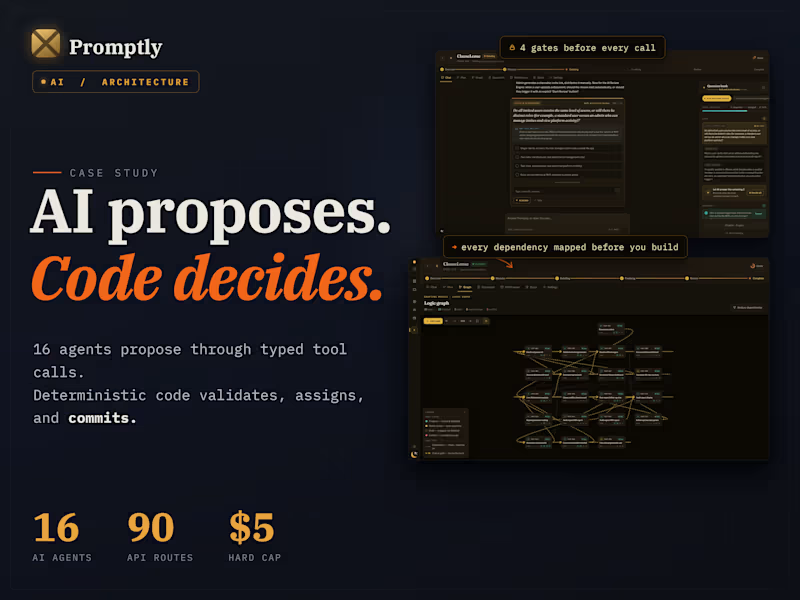
Hey Contra 👋 I've been heads-down building Promptly, and I'd love your eyes on it before our launch. From my time delivering over 20 software projects as a tech lead, I realized the biggest bottleneck in building an app isn't the code itself. It is communication. Founders speak in ideas, and developers speak in strict logic. Here is how Promptly works. You just describe your app idea in plain English. The AI actually pushes back, asks the hard questions, catches the vague bits, and automatically writes a developer-ready blueprint as you chat. The goal is simple. When you hand this document to a developer, the next thing you get back is an accurate, fixed-price quote. No more wasting days trying to draft technical specifications and sitting through endless rounds of discovery calls just to get on the same page. Instead of staring at a blank document, you get three tools that update in real-time: The Pushback Chat: It refuses to just nod along. If you say "make it fast and secure," it helps you define exactly what that means. It hunts down edge cases before you ever pay someone to fix them. The Visual Map: A live, interactive diagram showing exactly how your features connect. It catches logic flaws and missing steps before any code is written. The Living Blueprint: An auto-generated, professional project spec that exports straight to Notion, Linear, or PDF. Plus, it gives your idea a "Developer-Readiness Score" out of 100 so you know if it is actually ready to build. It even recommends the best tech stack based on your specific budget and complexity. The core engine and all of these interactive features are fully functional right now, but I am still smoothing out the final rough edges. I am aiming for a public launch in about three weeks. Where I need your help. I have three quick questions: Where would you want to export your project blueprint, beyond Notion, Linear, or PDF? What is the biggest headache you face right now when trying to explain your ideas to developers? What feels missing? The blind spots are the most valuable to me right now. Any feedback on new features, improvements, or things I should kill entirely would be hugely appreciated. Drop a comment below. Thank you for taking a look 🙏 building solo, in public
14
21
1.7K