Freelancers using FastAPI in GurugramFreelancers using FastAPI in Gurugram
Versatile Fullstack Engineer | Web & Mobile Expert
$50k+
Earned
5x
Hired
5.0
Rating
99
Followers
Versatile Fullstack Engineer | Web & Mobile Expert
Full Stack Developer
6
Followers
Full Stack Developer
Cover image for AI Resume Screening | Candidate
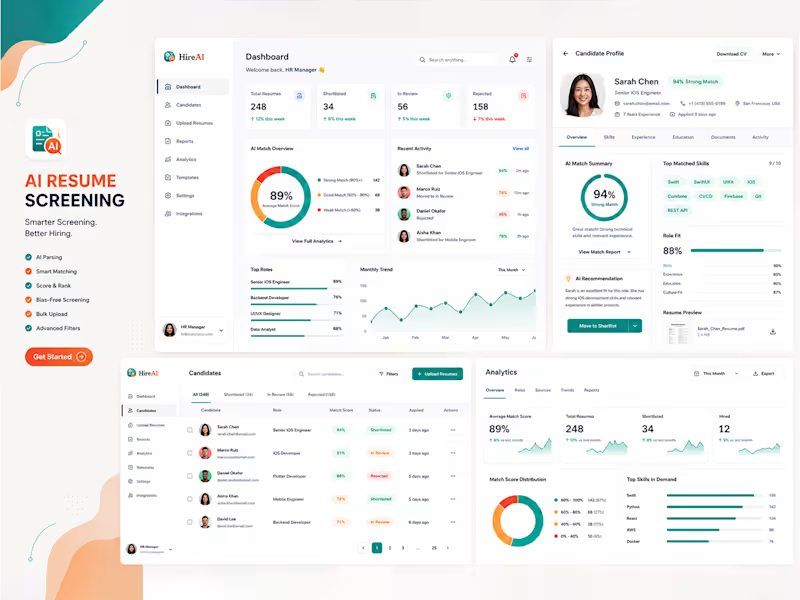
AI Resume Screening | Candidate Ranking System | AI HR Recruiter | ATS CV/Resume Optimization 𝗢𝘃𝗲𝗿𝘃𝗶𝗲𝘄 Recruiters often spend hours manually reviewing resumes, comparing candidate qualifications, and identifying the best fit for open positions. To address this challenge, I developed an AI-powered Resume Screening and Candidate Ranking Platform that automates candidate evaluation, improves hiring efficiency, and reduces recruitment time. 𝗖𝗵𝗮𝗹𝗹𝗲𝗻𝗴𝗲 Traditional recruitment processes involve reviewing hundreds of resumes for a single position. This manual approach is time-consuming, inconsistent, and often results in qualified candidates being overlooked. Recruiters needed a solution capable of quickly analyzing resumes, matching them against job requirements, and generating reliable candidate rankings. 𝗦𝗼𝗹𝘂𝘁𝗶𝗼𝗻 I built an intelligent recruitment platform that leverages Artificial Intelligence and Natural Language Processing (NLP) to automate resume analysis and candidate assessment. 𝗞𝗲𝘆 𝗳𝗲𝗮𝘁𝘂𝗿𝗲𝘀 𝗶𝗻𝗰𝗹𝘂𝗱𝗲: - ATS-compatible resume parsing for PDF and DOCX files - Automated extraction of skills, experience, education, certifications, and contact information - AI candidate matching based on job descriptions - Intelligent candidate scoring and ranking system - Semantic skill matching using NLP techniques - Automated shortlist generation for recruiters - Recruiter dashboard for managing applications and rankings - Bulk resume processing for high-volume recruitment - Interview recommendation system based on candidate fit - Fair and consistent evaluation framework to reduce manual bias 𝗗𝗲𝘃𝗲𝗹𝗼𝗽𝗺𝗲𝗻𝘁 𝗣𝗿𝗼𝗰𝗲𝘀𝘀 The platform was designed with scalability and accuracy in mind. The workflow begins by parsing uploaded resumes and extracting structured candidate data. AI models then compare candidate profiles against job requirements, analyzing technical skills, years of experience, educational background, and industry relevance. A ranking engine generates compatibility scores and presents candidates in order of suitability. Recruiters can review detailed scoring insights, compare applicants, and make faster hiring decisions. 𝗥𝗲𝘀𝘂𝗹𝘁𝘀 The solution significantly improved recruitment efficiency and candidate discovery. 𝗢𝘂𝘁𝗰𝗼𝗺𝗲𝘀 > Reduced manual resume screening time by up to 80% > Accelerated candidate shortlisting process > Improved recruiter productivity and hiring speed > Increased consistency in candidate evaluation > Enabled processing of hundreds of resumes within minutes > Enhanced talent identification through AI-driven matching 𝗖𝗼𝗻𝗰𝗹𝘂𝘀𝗶𝗼𝗻 This AI recruitment platform transforms traditional hiring workflows by automating resume screening, ranking candidates intelligently, and helping recruiters identify top talent faster, more accurately, and at scale.
1
74
Cover image for  AI Smart Call Assistance
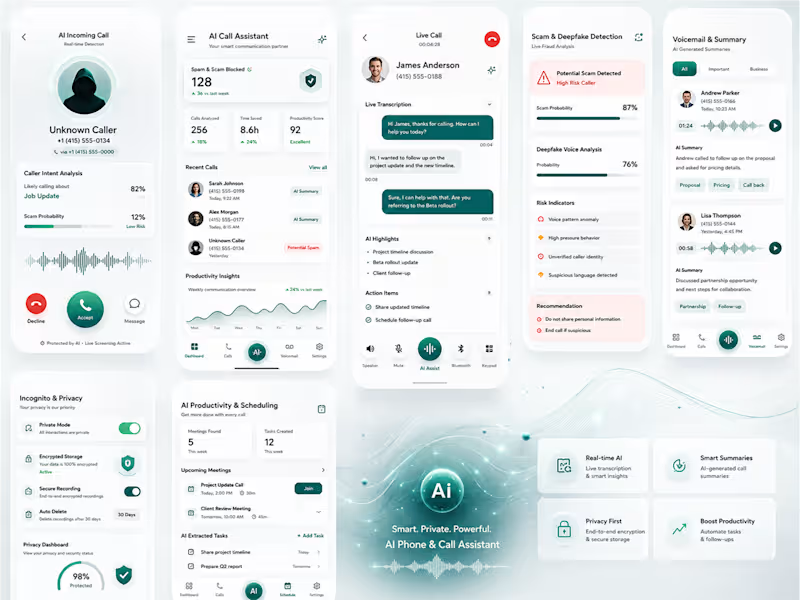
AI Smart Call Assistance App Modern users struggle with spam calls, missed context, and inefficient call handling. We designed an AI-powered Smart Call Assistance experience inspired by intelligent call management systems like Hiya AI Phone, focusing on real-time call screening, transcription, and AI summaries to improve communication efficiency. Problem Statement (Users face): -- High volume of spam and unknown calls -- Lack of context during calls -- Difficulty remembering key points from conversations -- Inefficient call handling in professional workflows Solution: We designed a smart AI call assistant that helps users: > Identify and filter spam calls in real time > Generate automatic call transcripts > Provide AI-powered call summaries after every conversation > Highlight key action points and follow-ups Key Features 1. AI Call Screening: Detects spam and unknown callers instantly 2. Live Transcription: Converts speech to text during calls 3. Smart Summaries: Auto-generated call insights & decisions 4. Call Insights Dashboard: Stores past call history with searchable notes 5. Privacy-Focused Design: On-device processing and secure data handling UX focused Approach on: - Minimal interaction during calls (hands-free experience) - Clear visual hierarchy for call insights - Fast access to summaries post-call - Reducing cognitive load through automation Outcome: The concept demonstrates how AI can transform traditional calling into a productivity-first communication tool, reducing spam interference and improving decision-making speed.Or rewrite it in a more premium startup pitch tone
2
1
77
Building Production-Grade AI Agents & RAG Systems
13
Followers
Building Production-Grade AI Agents & RAG Systems
Full-Stack Web & Mobile App Expert | UI/UX
New to Contra
Full-Stack Web & Mobile App Expert | UI/UX
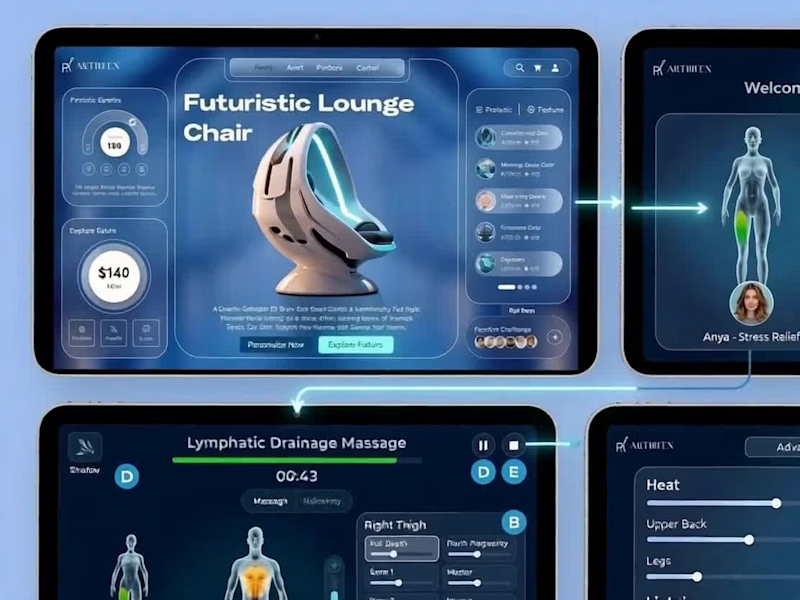
Cover image for Transforming Lounge Chairs into Immersive Wellness Ecosystems
This project represents a fusion of high-end industrial design and user-centric digital interfaces. The goal was to transform the experience of a "Futuristic Lounge Chair" from a simple utility into an immersive wellness ecosystem. Below is the structured content and design approach used for this project. 1. Project Vision To create a seamless, cohesive digital experience that bridges the gap between luxury furniture and advanced medical-grade massage technology. The interface is designed to feel as "premium" as the chair itself, utilizing a "Glassmorphism" aesthetic that matches the futuristic pod-like hardware. 2. Design Approach: The "Glass-Wellness" Framework A. Visual Language (UI) Color Palette: Deep midnight blues and cyans provide a calming, "spa-at-night" atmosphere. High-contrast accent colors (lime green for active zones, amber for heat) provide clear functional feedback. Aesthetics: * Frosted Glass (Glassmorphism): Used for panels to create depth and a lightweight feel. 3D Anatomical Mapping: A high-fidelity human model provides immediate visual feedback on where the massage is currently focusing. Typography: Clean, sans-serif fonts (like Montserrat or Inter) for maximum legibility on tablet screens. B. User Experience (UX) & Interaction Zero-Gravity Navigation: Large, thumb-friendly hit targets were prioritized, recognizing that users are often reclined and less precise with their movements. Contextual Awareness: The interface changes based on the user’s state—moving from a "Discovery" mode (Product Benefits) to an "Active" mode (Live Session Management). 3. User Flow & Interaction Design Phase I: Discovery & Personalization Landing Interface: Displays the chair's technical specs (16H battery life, mental wellness benefits). Profile Selection: Users select or create a profile (e.g., "Anya - Stress Relief" or "Leo - Recovery"). This automatically adjusts the chair’s physical dimensions and pressure preferences. Phase II: Program Selection Dynamic Library: A scrollable list of specialized programs like "Lymphatic Drainage," "Deep Tissue," or "Yoga Stretch." Visual Preview: Selecting a program highlights the targeted body zones on the 3D model before the session starts. Phase III: Active Session Management Real-time Feedback (A): The 3D avatar pulses in the area being massaged (e.g., Anterior Right Thigh). Intensity Granularity (B): Side-panel sliders allow users to adjust "Roll Depth" and "Pinch Frequency" per zone without pausing the session. Status Indicators (D): Clear display of remaining time, current technique (Shiatsu), and a prominent "Emergency Stop/Pause" button (E). Phase IV: Advanced Environment Control Ambient Sync (F): A dedicated settings panel to control the "pod environment." Heat Mapping: Specific sliders for Upper Back and Leg heat. Chroma-Therapy: A color wheel to adjust the chair’s internal LED lighting. Audio Integration: Options for Nature Ambiance or custom Spotify playlists synced to the massage rhythm. 4. Technical Constraints & Solutions Hardware Limitation: To ensure the interface runs smoothly on standard chair tablets, heavy 3D renders are replaced with high-quality 2D sprite sheets or lightweight WebGL to maintain 60fps performance. Low-Light Optimization: The "Dark Mode" default prevents eye strain during evening use, which is when most users utilize massage chairs. Project Outcome The result is an interface that doesn't just "control" a chair, but manages an entire Wellness Environment, making the technology feel invisible and the relaxation feel absolute.
0
72
Developer building AI-powered and scalable digital solutions
New to Contra
Developer building AI-powered and scalable digital solutions