Freelancers using GitHub in BangladeshFreelancers using GitHub in Bangladesh
I design and build automation,web & software products
8
Followers
I design and build automation,web & software products

Cover image for From Fiverr payout problems to
From Fiverr payout problems to my first payment on Contra 🚀 Today is a special day for me. I just received my project payment on Contra and the story behind it is probably more interesting than the payment itself. I started freelancing on Fiverr, and for a long time it was my main platform for working with international clients. Recently, I was working on a large software project for a Canadian client. This wasn't a simple website project. I was developing a complete Lottery POS & Management Software including the POS system, seller management, ticket generation, thermal printing, draw management, commissions, reporting, role-based access, QR/barcode workflows, offline synchronization, and the overall backend architecture. The project was divided into multiple milestones. Everything was going smoothly. Until the final milestone. Then Fiverr happened. When I was ready to receive the final project payment, my Payoneer account was suddenly closed without any clear reason. That created a serious problem. The project was completed, the client was ready to pay, but my normal payout route was suddenly unavailable. At that point, I had two choices: Keep trying to solve the payout problem... or find a better way to handle the project. So I talked to my client and suggested: "Why don't we move the project to Contra?" The client agreed. And that's how I ended up here. Today, I received my payment on Contra. Honestly, the feeling is different. It's not just: "I got paid." It's: "I successfully delivered a real software product to an international client, moved the project to a new platform when things went wrong, and still managed to complete the payment successfully." That feels rewarding. This project also reminded me why I enjoy software development so much. I wasn't just designing screens or building a landing page. I was working on an actual business system that needs to handle: → Sellers → POS terminals → Lottery tickets → Draws → Commissions → Printing → Reports → Permissions → Data synchronization → Future scalability That's the kind of work I want to do more of. Real software. Real businesses. Real problems. And now I'm officially starting my Contra journey. Huge thanks to my client for trusting me through the transition from Fiverr to Contra, and thanks to the Contra community for being part of this next chapter. First payment on Contra: received. Next milestone: build bigger software. 🚀
0
81
Cover image for Quoffer
Development Journey and Product Case
Quoffer Development Journey and Product Case Study Project Overview Quoffer is a Shopify application for merchants who need to sell products through negotiated pricing instead of relying only on fixed-price checkout. The product supports two primary workflows: Request a Quote Make an Offer The system connects these workflows to merchant review, negotiation, automated pricing rules, draft orders, invoices, notifications, and Shopify order creation. The core product flow is: The key product objective was to keep the negotiation process inside the Shopify ecosystem instead of forcing merchants to manage it through email, spreadsheets, phone calls, or external messaging platforms. 1. Problem Definition Shopify works extremely well when the merchant has a fixed product price. The standard flow is: This becomes inefficient for businesses where price depends on the customer or transaction. Examples include: Wholesale purchasing Bulk orders High-value products Custom products Made-to-order products Art and collectibles B2B purchasing Negotiated discounts A wholesale customer purchasing 500 units may expect a different price from someone purchasing five units. A merchant selling a $5,000 product may also be willing to accept a $4,200 offer. Without a dedicated workflow, the merchant might handle the process manually: This creates unnecessary work and increases the possibility of pricing and order-entry errors. Quoffer was designed to remove this gap. 2. Product Objective The product was designed around a simple objective: Allow merchants to manage negotiated sales without leaving Shopify. Instead of treating an offer or quote as an isolated form submission, the application treats it as the beginning of a transaction. The intended lifecycle is: This distinction is important. A form that collects an offer is only a feature. A system that takes the offer through negotiation and eventually creates a real Shopify transaction is a complete commerce workflow. 3. Product Scope The product was structured around two different purchasing scenarios. 3.1 Request a Quote The quote workflow is primarily useful for B2B and wholesale purchasing. A customer can submit products, quantities, contact information, and additional requirements. Example: This approach is more appropriate than showing a single retail price when the final price depends on order volume or customer requirements. 3.2 Make an Offer The second workflow allows customers to propose their own price. Example: A counter-offer creates a negotiation rather than forcing the merchant to accept or reject the customer's first proposal. 4. Development Journey Phase 1: Product Discovery The first challenge was deciding what the product should actually solve. The Shopify App Store already contains applications focused on: Make an Offer Request a Quote Wholesale Pricing Discounts B2B purchasing Building another application that only added a "Make an Offer" button would provide limited differentiation. The product direction was therefore expanded. Instead of: the product became: This decision influenced the application architecture, database design, merchant dashboard, and Shopify integration. 5. Phase 2: Negotiation State Design An offer cannot be treated as a single database record containing only a price. A real negotiation can contain multiple actions. Example: The application therefore needs to preserve the history of the negotiation. A simplified state model is: This makes the negotiation traceable and prevents the system from losing previous pricing decisions. 6. Phase 3: Offer Engine The offer engine handles the basic commercial decisions. The three fundamental actions are: The engine also needs to understand the original product price, proposed price, currency, customer, product, merchant decision, and current negotiation state. For example: The merchant can then decide whether to accept, reject, or counter the offer. 7. Phase 4: Automated Offer Rules Manual evaluation becomes inefficient when a store receives a large number of offers. The system therefore supports rule-based decisions. Example: Another rule: Another: The important architectural decision is that these rules should exist independently from the storefront interface. The storefront submits the offer. The rule engine evaluates it. The decision engine performs the appropriate action. This makes the system easier to extend later. 8. Phase 5: B2B Quote Management B2B quoting introduces additional complexity because a quote can contain multiple products and quantities. Example: The merchant may then provide custom pricing for the complete request. The system therefore needs to maintain relationships between: This structure allows the application to handle a real quotation instead of treating the request as a simple contact form. 9. Phase 6: Quantity-Based Pricing Wholesale pricing often depends on volume. A merchant may define: This creates two complementary mechanisms: The merchant can automate predictable pricing while retaining control over unusual or high-value deals. 10. Phase 7: Merchant Dashboard As offer volume grows, managing everything through email becomes impractical. The merchant dashboard therefore becomes the operational center of the application. A simplified dashboard structure is: The objective is to give merchants one place to review and manage active negotiations. 11. Phase 8: Negotiation History Every negotiation needs an understandable timeline. Example: This history provides both operational visibility and commercial accountability. It also helps merchants understand how a final selling price was reached. 12. Phase 9: Shopify Draft Order Integration A major architectural decision was to use Shopify's existing order infrastructure instead of creating an independent order system. After an offer is accepted: This allows the merchant to continue using Shopify for: Orders Customers Products Payments Fulfillment Store administration Quoffer effectively becomes the negotiation layer on top of Shopify. 13. Phase 10: Payment and Invoice Workflow For B2B sales, payment does not always happen through a normal storefront checkout. The merchant may first need to issue an invoice or payment request. The workflow therefore becomes: This keeps the commercial agreement and the Shopify transaction connected. 14. Phase 11: Notification System Negotiation is time-sensitive. A merchant may lose a sale if an offer remains unanswered for too long. The application therefore needs notification events around important actions. Examples: The application also supports configurable communication capabilities such as email notifications and external alerts. The purpose is not simply to send more notifications. The objective is to reduce the response time between a customer's offer and the merchant's decision. 15. Phase 12: Custom Forms Different businesses require different information. For example: Another merchant may need: A fixed form would limit the application. A configurable form system allows the merchant to define the information required for their own sales workflow. 16. Phase 13: Storefront Integration The storefront interface was intentionally kept simple. The customer should not need to understand the complexity of the backend system. Example: Clicking the relevant action opens the appropriate workflow. The complexity remains inside the application. 17. Phase 14: Pricing Visibility Some merchants want to display a price. Others prefer to hide the price and request a quote. The application therefore needs to support different storefront strategies. Example 1: Example 2: Example 3: This allows the same application to support different sales models. 18. Phase 15: Internationalization The application is intended for Shopify merchants operating across different markets. Important considerations include: Multiple currencies Translated customer-facing content Localized forms Localized notifications Merchant-defined text The architecture should keep UI content separate from application logic so that language changes do not require changes to the underlying business rules. 19. Technical Architecture A simplified architecture looks like this: Supporting services handle: 20. Data Architecture A simplified data model can be represented as: The store relationship is critical. Every quote, offer, customer-related record, rule, and negotiation must remain associated with the correct Shopify store. This is essential for multi-tenant SaaS security. 21. Reliability Considerations Negotiated commerce introduces several cases that need explicit handling. Duplicate Offer A customer accidentally submits the same offer twice. The system should prevent duplicate processing. Concurrent Offers Multiple customers may negotiate for the same product. Inventory and offer validity must therefore be considered. Product Price Changes The product price may change while an offer is still pending. The application needs a clear policy for whether the existing offer remains valid. Inventory Changes A product could become unavailable after a negotiation begins. The system must prevent an accepted offer from creating an invalid transaction. Expired Offers Merchants may want offers to expire after a specific period. Payment Failure A customer can accept an offer without successfully completing payment. The negotiation and order states must therefore remain separate. Shopify API Failure External API failures should not leave the application in an inconsistent state. These cases require idempotency, validation, retry handling, and explicit transaction states. 22. Security Architecture The application works with customer and commerce information, making security a core architectural requirement. Important areas include: Other important controls include: Webhook verification API authorization Input validation Secure credentials Tenant isolation Rate-limit handling Audit logging Controlled data access The fundamental rule is: No merchant should ever be able to access another merchant's data. 23. Product Feedback and Iteration The early product feedback highlighted an important shift. Once the main functionality was available, the focus moved from: "Does the feature work?" to: "Can merchants operate the feature efficiently?" Feedback areas included: Dashboard navigation Configuration workflow Notification settings Feature interaction UI refinement This is an important stage in SaaS development. The next improvement is not always another feature. Sometimes the highest-value improvement is reducing the number of steps required to complete an existing task. 24. Product Validation Quoffer launched on the Shopify App Store in January 2026. At the time of analysis, the Shopify listing showed a 4.7/5 rating from 6 reviews. The early reviews highlighted areas including: UI Customization Ease of use Customer support Offer functionality The review count is still small, so this should be treated as early validation rather than conclusive product-market fit. The more important signal at this stage is whether merchants continue using the application after initial installation and whether they successfully complete real negotiated transactions. 25. Competitive Position Quoffer operates across several Shopify categories: The product's positioning comes from connecting these workflows. Instead of providing only: the broader workflow becomes: That is the more meaningful product differentiation. 26. Business Value The primary business value is the ability to recover transactions that may otherwise be lost because the customer cannot accept the standard price. Traditional flow: Negotiated flow: For B2B merchants, the same system reduces the manual work involved in preparing and managing quotations. 27. What Makes the Product Technically Interesting The visible feature is simple: Make an Offer The underlying system is considerably more complex. It needs to connect: The engineering challenge is therefore not the button. It is maintaining a consistent transaction lifecycle across multiple systems. 28. Key Engineering Decisions Shopify as the Commerce Backbone Products, customers, orders, and payments remain connected to Shopify. State-Based Negotiation Every offer has a defined lifecycle. Separate Rule Engine Pricing and negotiation rules are separated from UI components. Negotiation History Previous offers and counter-offers remain traceable. Multi-Tenant Architecture Each Shopify store is isolated from every other store. Event-Driven Processing Important Shopify and application events can trigger automated actions. 29. Future Development Opportunities The current architecture creates several potential expansion paths. Pricing Intelligence The system could recommend counter-offers based on: Historical acceptance rates Product margin Inventory Customer value Previous negotiations Sales Analytics Merchants could track: CRM Integration Negotiation information could be synchronized with CRM platforms. AI-Assisted Negotiation The system could recommend: Agency Management Agencies could manage multiple Shopify stores from one administrative environment. 30. Development Lessons Lesson 1: Define the Transaction Before Building the Interface The negotiation lifecycle determines the database, API, UI, and integration architecture. Lesson 2: Preserve Business History A final price without the negotiation history loses important commercial information. Lesson 3: Keep Shopify as the Source of Commerce Truth There is little value in rebuilding Shopify's order infrastructure. Lesson 4: Separate Automation From Presentation The storefront should remain simple while the backend handles complex rules. Lesson 5: Design for Failure From the Beginning API failures, duplicate events, payment failures, and inventory changes are normal operational conditions. Lesson 6: Optimize Existing Workflows Before Adding Features A faster and clearer workflow can create more value than another feature. 31. Final Product Summary Product: Quoffer Platform: Shopify Category: B2B and B2C negotiated commerce Primary users: Wholesale merchants B2B businesses High-value product sellers Custom-product businesses Merchants using negotiated pricing Core workflows: Core technical components: Core business objective: Convert negotiated customer intent into completed Shopify transactions while reducing manual merchant work. 32. Final Case Study Statement Quoffer was developed to solve a specific limitation in conventional Shopify commerce: the assumption that every product must be purchased at a predefined price. The product introduces a structured negotiation layer between the customer and Shopify checkout. The result is a Shopify-native workflow that allows merchants to handle wholesale quotes, negotiated prices, counter-offers, and high-value transactions without moving the sales process into disconnected external tools. The most important engineering challenge was not creating an offer form. It was building a reliable system that could take a non-standard customer request through pricing logic, negotiation, merchant approval, and finally into a real Shopify transaction. That workflow is the foundation of Quoffer.
2
136
Cover image for I recently started something new:
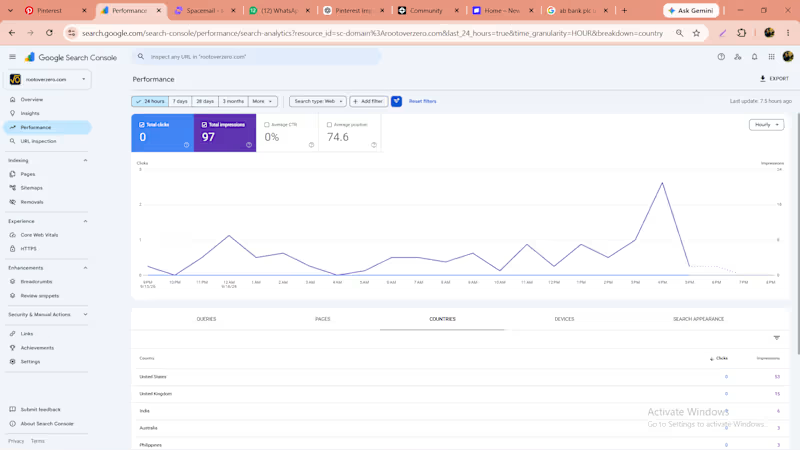
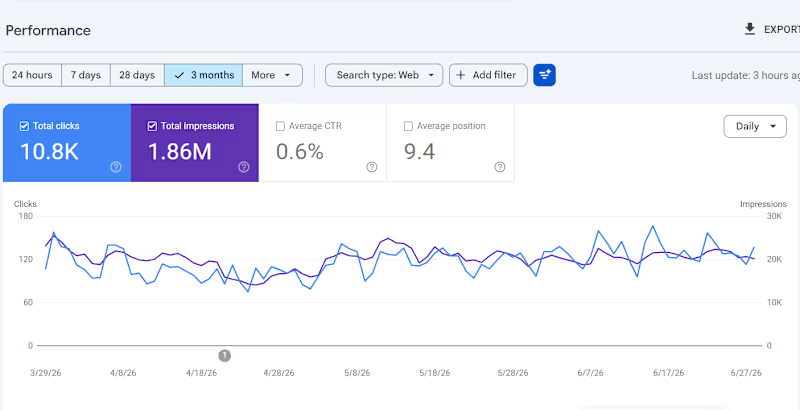
I recently started something new: Root Over Zero — a business I’m building from the ground up with a strong focus on organic growth. Instead of immediately putting money into ads, I’m experimenting with SEO, content, useful web tools, and platforms like Pinterest to see how far I can take a business through organic discovery. The interesting part is that it’s already starting to work. Google has indexed the website, and I’m beginning to see impressions coming from the US and UK. Pinterest is also starting to pick up some of the content, so I’m now testing which topics, visuals, and content formats can turn those impressions into actual visitors. I’m taking the organic route intentionally. I want to build an asset that compounds—where every useful article, tool, search ranking, and piece of content can continue bringing people in months after it’s published, instead of having traffic disappear the moment an ad budget stops. It’s still very early, but seeing people from markets I’ve never actively reached discover something I built is probably the most exciting part of the experiment. I’ll be documenting the process as I go. Root Over Zero: https://rootoverzero.com What would you focus on first if you were building a new business today—paid growth or organic growth? And why? #RootOverZero #SEO #OrganicGrowth #DigitalMarketing #WebDevelopment #WebDesign #UIUX #ProductDesign #SaaS #Startup #Entrepreneurship #GrowthMarketing #PinterestMarketing #ContentMarketing #GoogleSEO #BusinessGrowth #Contra
0
19
Web Dev & Cybersecurity with 100% Confidentiality

Web Developer | HTML, CSS, Bootstrap & Responsive Websites
New to Contra
Web Developer | HTML, CSS, Bootstrap & Responsive Websites
SEO & AI Workflow Specialist | Claude Code Expert
New to Contra
SEO & AI Workflow Specialist | Claude Code Expert

Cover image for I built my entire portfolio
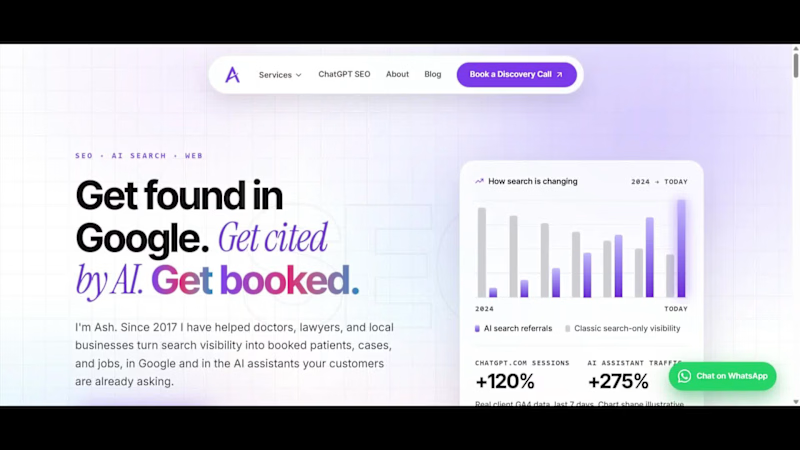
I built my entire portfolio site with 10 Lovable credits. Here's the exact workflow. Most people burn through Lovable credits fast because they try to build the whole thing inside Lovable, prompt after prompt after prompt. I don't. Here's how I kept it to 10. The workflow: Lovable + Claude Code + GitHub 1. Lovable for the scaffold only. One clean generation to get the project skeleton, routing, and a starting design. That is where the ~10 credits went, and that is the last time I spent any. 2. Claude Code does the real building. Every page, the whole design system, the content, the SEO, the performance work, all of it happens in Claude Code on my machine. No per-prompt credit meter running. 3. GitHub is the bridge. Claude Code commits and pushes straight to the repo. 4. Lovable auto-syncs from GitHub. The changes land back in Lovable with zero extra credits burned. So Lovable stays the front door and the deploy target, but the heavy lifting lives in Claude Code, where I am not paying by the prompt. What that actually produced (in the video): - A 15-page site where every page is an original design, not a template reskin - 100 PageSpeed on desktop, every category green - Built for AI search, not just Google. llms.txt, clean structured data, the full AEO setup - Self-hosted fonts, accessibility at 100, real Core Web Vitals work Live at hey-ash.com (http://hey-ash.com). Loveable Link: hey-ash.lovable.app If you are spending real money on Lovable credits, this is the unlock. Scaffold in Lovable, build in Claude Code, sync through GitHub. Happy to break down any part of it.
0
54
Web Developer building responsive and modern websites.