The network for creativity
Join 1.25M professional creatives like you
Connect with clients, get discovered, and run your business 100% commission-free
Creatives on Contra have earned over $150M and we are just getting started
Back to feedPost

Quoffer
Development Journey and Product Case Study
Project Overview
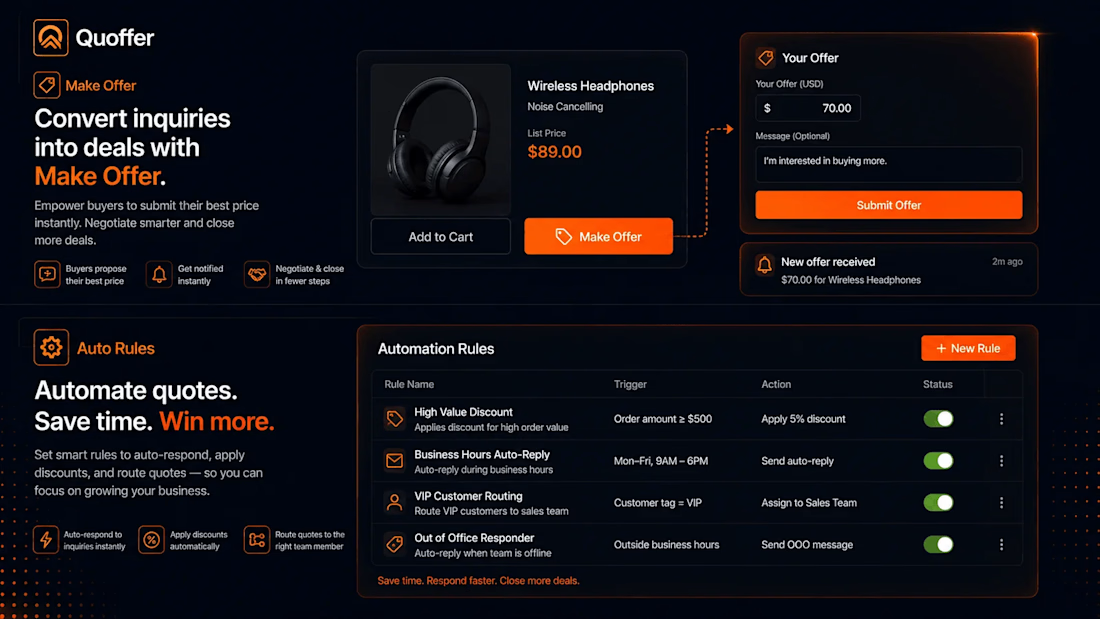
Quoffer is a Shopify application for merchants who need to sell products through negotiated pricing instead of relying only on fixed-price checkout.
The product supports two primary workflows:
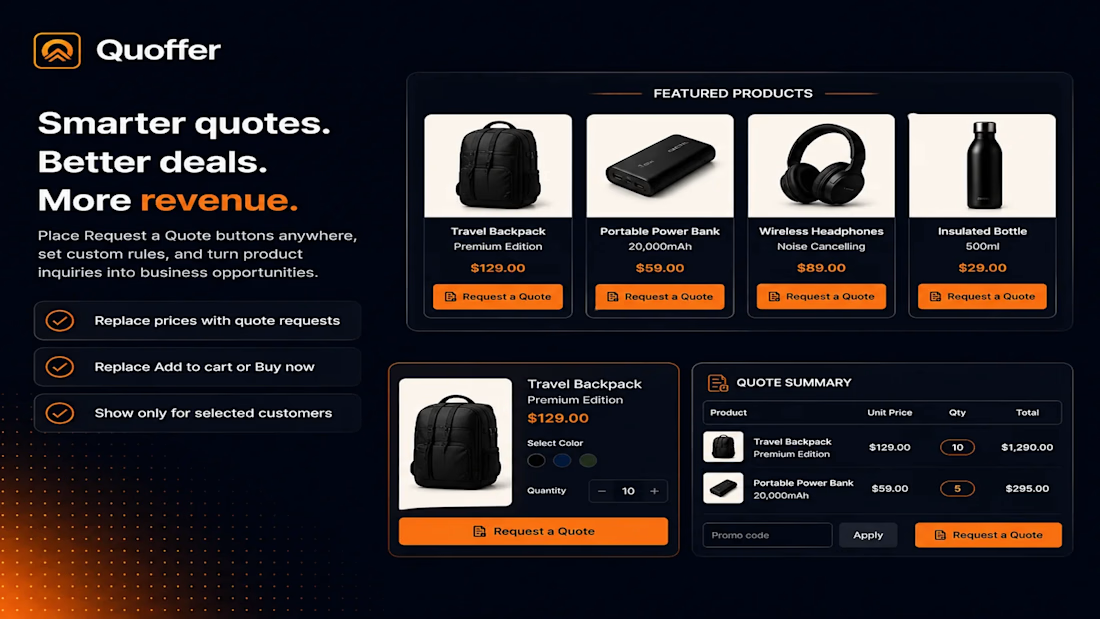
Request a Quote
Make an Offer
The system connects these workflows to merchant review, negotiation, automated pricing rules, draft orders, invoices, notifications, and Shopify order creation.
The core product flow is:
The key product objective was to keep the negotiation process inside the Shopify ecosystem instead of forcing merchants to manage it through email, spreadsheets, phone calls, or external messaging platforms.
1. Problem Definition
Shopify works extremely well when the merchant has a fixed product price.
The standard flow is:
This becomes inefficient for businesses where price depends on the customer or transaction.
Examples include:
Wholesale purchasing
Bulk orders
High-value products
Custom products
Made-to-order products
Art and collectibles
B2B purchasing
Negotiated discounts
A wholesale customer purchasing 500 units may expect a different price from someone purchasing five units.
A merchant selling a $5,000 product may also be willing to accept a $4,200 offer.
Without a dedicated workflow, the merchant might handle the process manually:
This creates unnecessary work and increases the possibility of pricing and order-entry errors.
Quoffer was designed to remove this gap.
2. Product Objective
The product was designed around a simple objective:
Allow merchants to manage negotiated sales without leaving Shopify.
Instead of treating an offer or quote as an isolated form submission, the application treats it as the beginning of a transaction.
The intended lifecycle is:
This distinction is important.
A form that collects an offer is only a feature.
A system that takes the offer through negotiation and eventually creates a real Shopify transaction is a complete commerce workflow.
3. Product Scope
The product was structured around two different purchasing scenarios.
3.1 Request a Quote
The quote workflow is primarily useful for B2B and wholesale purchasing.
A customer can submit products, quantities, contact information, and additional requirements.
Example:
This approach is more appropriate than showing a single retail price when the final price depends on order volume or customer requirements.
3.2 Make an Offer
The second workflow allows customers to propose their own price.
Example:
A counter-offer creates a negotiation rather than forcing the merchant to accept or reject the customer's first proposal.
4. Development Journey
Phase 1: Product Discovery
The first challenge was deciding what the product should actually solve.
The Shopify App Store already contains applications focused on:
Make an Offer
Request a Quote
Wholesale Pricing
Discounts
B2B purchasing
Building another application that only added a "Make an Offer" button would provide limited differentiation.
The product direction was therefore expanded.
Instead of:
the product became:
This decision influenced the application architecture, database design, merchant dashboard, and Shopify integration.
5. Phase 2: Negotiation State Design
An offer cannot be treated as a single database record containing only a price.
A real negotiation can contain multiple actions.
Example:
The application therefore needs to preserve the history of the negotiation.
A simplified state model is:
This makes the negotiation traceable and prevents the system from losing previous pricing decisions.
6. Phase 3: Offer Engine
The offer engine handles the basic commercial decisions.
The three fundamental actions are:
The engine also needs to understand the original product price, proposed price, currency, customer, product, merchant decision, and current negotiation state.
For example:
The merchant can then decide whether to accept, reject, or counter the offer.
7. Phase 4: Automated Offer Rules
Manual evaluation becomes inefficient when a store receives a large number of offers.
The system therefore supports rule-based decisions.
Example:
Another rule:
Another:
The important architectural decision is that these rules should exist independently from the storefront interface.
The storefront submits the offer.
The rule engine evaluates it.
The decision engine performs the appropriate action.
This makes the system easier to extend later.
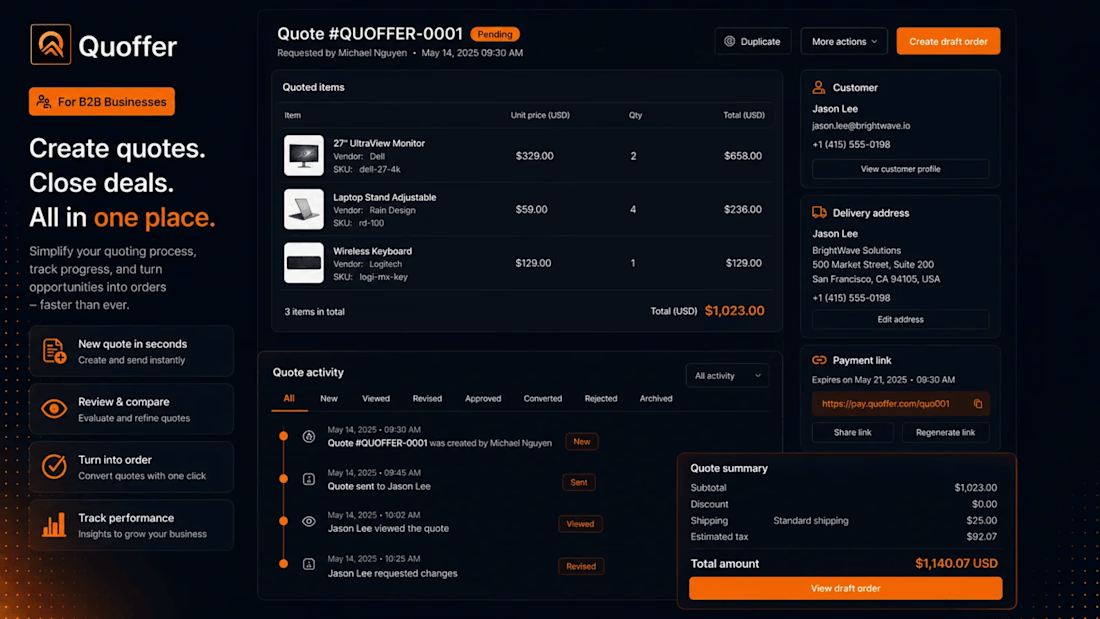
8. Phase 5: B2B Quote Management
B2B quoting introduces additional complexity because a quote can contain multiple products and quantities.
Example:
The merchant may then provide custom pricing for the complete request.
The system therefore needs to maintain relationships between:
This structure allows the application to handle a real quotation instead of treating the request as a simple contact form.
9. Phase 6: Quantity-Based Pricing
Wholesale pricing often depends on volume.
A merchant may define:
This creates two complementary mechanisms:
The merchant can automate predictable pricing while retaining control over unusual or high-value deals.
10. Phase 7: Merchant Dashboard
As offer volume grows, managing everything through email becomes impractical.
The merchant dashboard therefore becomes the operational center of the application.
A simplified dashboard structure is:
The objective is to give merchants one place to review and manage active negotiations.
11. Phase 8: Negotiation History
Every negotiation needs an understandable timeline.
Example:
This history provides both operational visibility and commercial accountability.
It also helps merchants understand how a final selling price was reached.
12. Phase 9: Shopify Draft Order Integration
A major architectural decision was to use Shopify's existing order infrastructure instead of creating an independent order system.
After an offer is accepted:
This allows the merchant to continue using Shopify for:
Orders
Customers
Products
Payments
Fulfillment
Store administration
Quoffer effectively becomes the negotiation layer on top of Shopify.
13. Phase 10: Payment and Invoice Workflow
For B2B sales, payment does not always happen through a normal storefront checkout.
The merchant may first need to issue an invoice or payment request.
The workflow therefore becomes:
This keeps the commercial agreement and the Shopify transaction connected.
14. Phase 11: Notification System
Negotiation is time-sensitive.
A merchant may lose a sale if an offer remains unanswered for too long.
The application therefore needs notification events around important actions.
Examples:
The application also supports configurable communication capabilities such as email notifications and external alerts.
The purpose is not simply to send more notifications.
The objective is to reduce the response time between a customer's offer and the merchant's decision.
15. Phase 12: Custom Forms
Different businesses require different information.
For example:
Another merchant may need:
A fixed form would limit the application.
A configurable form system allows the merchant to define the information required for their own sales workflow.
16. Phase 13: Storefront Integration
The storefront interface was intentionally kept simple.
The customer should not need to understand the complexity of the backend system.
Example:
Clicking the relevant action opens the appropriate workflow.
The complexity remains inside the application.
17. Phase 14: Pricing Visibility
Some merchants want to display a price.
Others prefer to hide the price and request a quote.
The application therefore needs to support different storefront strategies.
Example 1:
Example 2:
Example 3:
This allows the same application to support different sales models.
18. Phase 15: Internationalization
The application is intended for Shopify merchants operating across different markets.
Important considerations include:
Multiple currencies
Translated customer-facing content
Localized forms
Localized notifications
Merchant-defined text
The architecture should keep UI content separate from application logic so that language changes do not require changes to the underlying business rules.
19. Technical Architecture
A simplified architecture looks like this:
Supporting services handle:
20. Data Architecture
A simplified data model can be represented as:
The store relationship is critical.
Every quote, offer, customer-related record, rule, and negotiation must remain associated with the correct Shopify store.
This is essential for multi-tenant SaaS security.
21. Reliability Considerations
Negotiated commerce introduces several cases that need explicit handling.
Duplicate Offer
A customer accidentally submits the same offer twice.
The system should prevent duplicate processing.
Concurrent Offers
Multiple customers may negotiate for the same product.
Inventory and offer validity must therefore be considered.
Product Price Changes
The product price may change while an offer is still pending.
The application needs a clear policy for whether the existing offer remains valid.
Inventory Changes
A product could become unavailable after a negotiation begins.
The system must prevent an accepted offer from creating an invalid transaction.
Expired Offers
Merchants may want offers to expire after a specific period.
Payment Failure
A customer can accept an offer without successfully completing payment.
The negotiation and order states must therefore remain separate.
Shopify API Failure
External API failures should not leave the application in an inconsistent state.
These cases require idempotency, validation, retry handling, and explicit transaction states.
22. Security Architecture
The application works with customer and commerce information, making security a core architectural requirement.
Important areas include:
Other important controls include:
Webhook verification
API authorization
Input validation
Secure credentials
Tenant isolation
Rate-limit handling
Audit logging
Controlled data access
The fundamental rule is:
No merchant should ever be able to access another merchant's data.
23. Product Feedback and Iteration
The early product feedback highlighted an important shift.
Once the main functionality was available, the focus moved from:
"Does the feature work?"
to:
"Can merchants operate the feature efficiently?"
Feedback areas included:
Dashboard navigation
Configuration workflow
Notification settings
Feature interaction
UI refinement
This is an important stage in SaaS development.
The next improvement is not always another feature.
Sometimes the highest-value improvement is reducing the number of steps required to complete an existing task.
24. Product Validation
Quoffer launched on the Shopify App Store in January 2026.
At the time of analysis, the Shopify listing showed a 4.7/5 rating from 6 reviews.
The early reviews highlighted areas including:
UI
Customization
Ease of use
Customer support
Offer functionality
The review count is still small, so this should be treated as early validation rather than conclusive product-market fit.
The more important signal at this stage is whether merchants continue using the application after initial installation and whether they successfully complete real negotiated transactions.
25. Competitive Position
Quoffer operates across several Shopify categories:
The product's positioning comes from connecting these workflows.
Instead of providing only:
the broader workflow becomes:
That is the more meaningful product differentiation.
26. Business Value
The primary business value is the ability to recover transactions that may otherwise be lost because the customer cannot accept the standard price.
Traditional flow:
Negotiated flow:
For B2B merchants, the same system reduces the manual work involved in preparing and managing quotations.
27. What Makes the Product Technically Interesting
The visible feature is simple:
Make an Offer
The underlying system is considerably more complex.
It needs to connect:
The engineering challenge is therefore not the button.
It is maintaining a consistent transaction lifecycle across multiple systems.
28. Key Engineering Decisions
Shopify as the Commerce Backbone
Products, customers, orders, and payments remain connected to Shopify.
State-Based Negotiation
Every offer has a defined lifecycle.
Separate Rule Engine
Pricing and negotiation rules are separated from UI components.
Negotiation History
Previous offers and counter-offers remain traceable.
Multi-Tenant Architecture
Each Shopify store is isolated from every other store.
Event-Driven Processing
Important Shopify and application events can trigger automated actions.
29. Future Development Opportunities
The current architecture creates several potential expansion paths.
Pricing Intelligence
The system could recommend counter-offers based on:
Historical acceptance rates
Product margin
Inventory
Customer value
Previous negotiations
Sales Analytics
Merchants could track:
CRM Integration
Negotiation information could be synchronized with CRM platforms.
AI-Assisted Negotiation
The system could recommend:
Agency Management
Agencies could manage multiple Shopify stores from one administrative environment.
30. Development Lessons
Lesson 1: Define the Transaction Before Building the Interface
The negotiation lifecycle determines the database, API, UI, and integration architecture.
Lesson 2: Preserve Business History
A final price without the negotiation history loses important commercial information.
Lesson 3: Keep Shopify as the Source of Commerce Truth
There is little value in rebuilding Shopify's order infrastructure.
Lesson 4: Separate Automation From Presentation
The storefront should remain simple while the backend handles complex rules.
Lesson 5: Design for Failure From the Beginning
API failures, duplicate events, payment failures, and inventory changes are normal operational conditions.
Lesson 6: Optimize Existing Workflows Before Adding Features
A faster and clearer workflow can create more value than another feature.
31. Final Product Summary
Product: Quoffer
Platform: Shopify
Category: B2B and B2C negotiated commerce
Primary users:
Wholesale merchants
B2B businesses
High-value product sellers
Custom-product businesses
Merchants using negotiated pricing
Core workflows:
Core technical components:
Core business objective:
Convert negotiated customer intent into completed Shopify transactions while reducing manual merchant work.
32. Final Case Study Statement
Quoffer was developed to solve a specific limitation in conventional Shopify commerce: the assumption that every product must be purchased at a predefined price.
The product introduces a structured negotiation layer between the customer and Shopify checkout.
The result is a Shopify-native workflow that allows merchants to handle wholesale quotes, negotiated prices, counter-offers, and high-value transactions without moving the sales process into disconnected external tools.
The most important engineering challenge was not creating an offer form.
It was building a reliable system that could take a non-standard customer request through pricing logic, negotiation, merchant approval, and finally into a real Shopify transaction.
That workflow is the foundation of Quoffer.



The network for creativity
Join 1.25M professional creatives like you
Connect with clients, get discovered, and run your business 100% commission-free
Creatives on Contra have earned over $150M and we are just getting started
Related posts


Great stuff! Would love to know what the brief looked like. You clearly took it somewhere special.

Rofella - Brand Expressions




The serif wordmark against that warm, textured paper feels so confident and timeless, and the deep burgundy gives the whole identity real character. Beautifully restrained work, keep going! Did the paper texture come from a real scan or did you build it digitally?


More screens for mystical tarot reading app concept, inspired by a little spooky season magic 🎃🔮


