








Gnarly — a bold landing page for ugly fruit & veg. 🥕
Designed and built in Framer with a playful visual system, bold typography, organic shapes, and motion-led interactions.
The goal was simple: make “ugly” feel fresh, fun, and desirable.
UI/UX Design · Figma · Framer · Motion · Web Design
#webdesign #framer #framerdesign #uidesign #uxdesign #landingpage #webdesigner #productdesign
0
52

Every recipe app asks what you want to cook.
I never know that. I know what's in my kitchen.
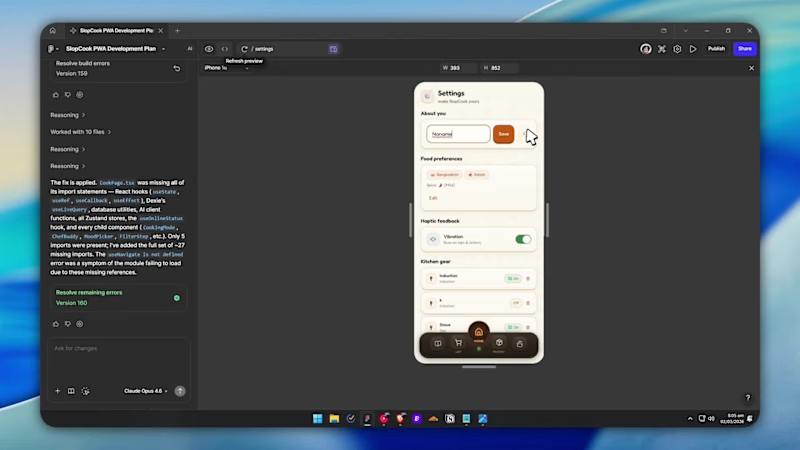
So I built SlopCook (https://slopcook.figma.site).
ADD what you have in your kitchen closet. It tells you what you can make based on those.
🧺 The Cooking Page has a fridge with magnets and stickers. Drag things around. Tap a card and watch the fridge open into cooking mode.
Oh u can also add your image to put in the fridge if you want.
⏱️ Cooking page is distraction free. Step by step guides.
Timer on each step so you don't burn your spices (I used to do that. A LOT)
Built as a PWA so it works on any device.
Not a programmer.
150+ prompts.
Zeroooo tools outside Figma Make.
It actually surprised me. How easy the uiux is + superb consistent
This is what I wanted to exist. So I made it.
Thank you 😃 @Contra HQ @Figma
3
2
234

Stop Recording the Past. Start Protecting the Present.
Traditional CCTV has a major flaw: it only tells you how you got robbed after it already happened.
For property managers, retail owners, and apartment boards, passive surveillance isn’t enough anymore. You don't need a digital witness—you need an active intelligence officer.
That’s why I built the Real-time NeuraSense Vision Suite.
NeuraSense bridges the gap between High-Speed Computer Vision and Generative AI to turn standard security cameras into a proactive digital shield.
What makes NeuraSense different?
True Behavioral Intelligence: We’re way past basic motion detection. NeuraSense understands human intent. It easily differentiates between a resident unlocking a door and an unauthorized visitor "piggybacking" through a secure gate.
Sub-Second Latency Alerts: When a threat like loitering, theft, or forced entry occurs, a real-time alert hits your mobile app in under a second—giving your team the power to intervene before a situation escalates.
Talk to Your Data: Powered by Gemini AI, security teams and property managers can query their surveillance system using natural language. Want to know how many delivery trucks entered today or find a specific incident? Just ask. Incident reporting is now 10x faster.
Who is this for?
Property Managers & Apartment Owners looking to slash liability and secure common areas.
Remote Security Authorities needing high-fidelity, low-noise alerts to manage multiple sites efficiently.
Retail Owners aiming to curb shrink and loitering without hiring massive security details.
Security shouldn't be a post-mortem exercise.
If you are looking to upgrade your property's safety from reactive to proactive, let’s connect.
0
136
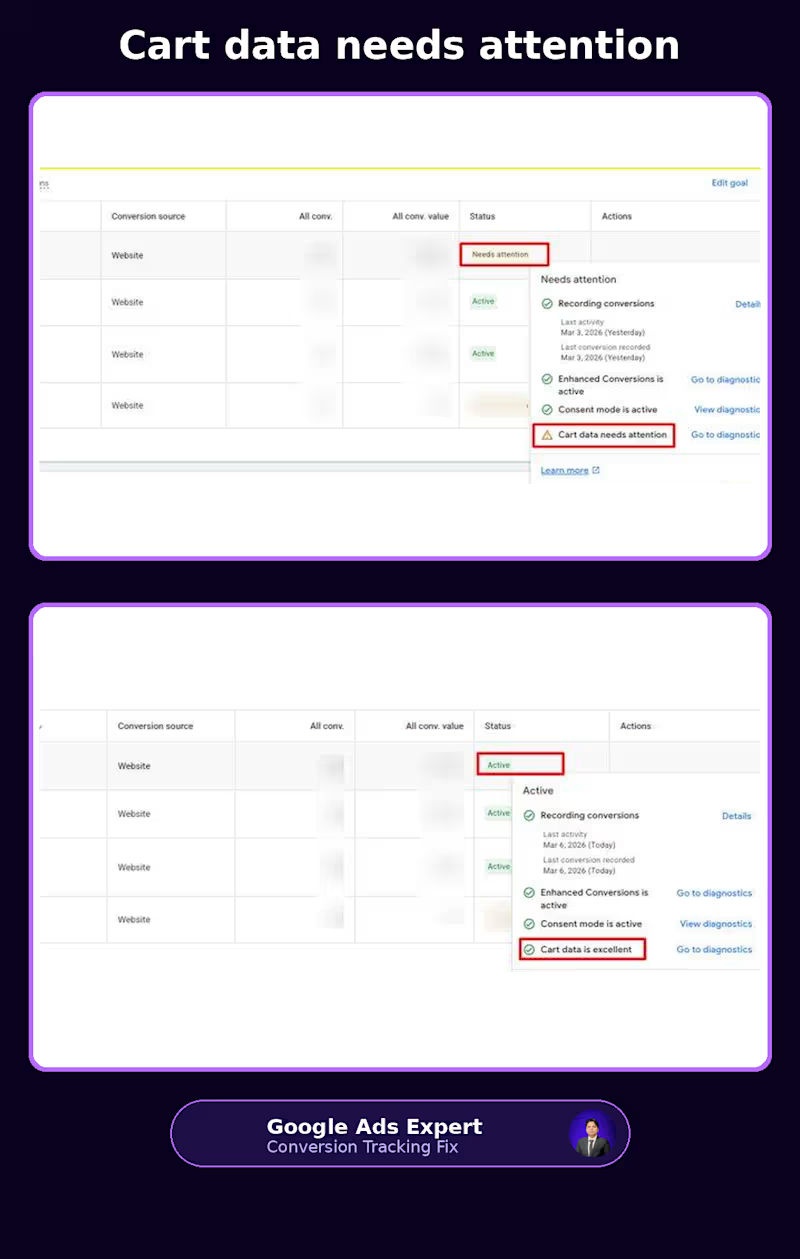
“Cart data needs attention” is not a warning I’d ignore on an ecommerce account.
Especially if you're running Shopping or Performance Max.
I recently worked on a setup where Google Ads was recording conversions, but the cart data wasn't being passed properly.
The account was showing:
Before: Cart data needs attention
At first glance, you might think:
“Conversions are coming in, so what's the problem?”
The problem is that a purchase conversion alone doesn't tell Google everything it needs to understand the transaction.
For ecommerce, the product information matters too.
Which product was added?
What was its ID?
How many units?
What was the cart value?
Without that information being passed correctly, Google has less context about what people are actually buying.
During the audit, I found a few issues:
Cart events weren't sending the required product data correctly
The dataLayer wasn't providing complete add_to_cart information
Enhanced Conversions wasn't fully configured
Consent Mode was affecting the signals being sent
So the fix wasn't simply “install another tag.”
The data flow needed to be checked from the storefront all the way into Google Ads.
I fixed the ecommerce dataLayer, validated the add_to_cart and purchase events, configured Enhanced Conversions, and checked that Consent Mode was behaving correctly.
After the changes, the diagnostics moved to:
Recording conversions: Active
Enhanced Conversions: Active
Consent Mode: Active
Cart data: Excellent
That's the part I think ecommerce advertisers often overlook.
A conversion showing up in Google Ads doesn't automatically mean your ecommerce tracking is healthy.
You can have purchases being recorded while product IDs, quantities, values or consent signals are incomplete.
And if you're running PMax or other value-based campaigns, those details matter because your bidding decisions are built around the data you send back.
This is why I spend so much time looking beyond whether a tag “fires.”
I want to know whether the right data is being collected, passed and understood by the platforms that are using it.
If you're seeing “Cart data needs attention” in Google Ads, or your Shopify/WooCommerce tracking doesn't quite look right, feel free to connect or message me.
Have you checked your Google Ads conversion diagnostics recently?
#GoogleAds #PMax #EcommerceTracking #ConversionTracking #GoogleTagManager #EnhancedConversions
0
64

A client asked me last week: “I paid my insurance in full in October. Why is the whole amount not showing in my expenses?”
Fair question. Honestly, this is one of the most common things business owners ask me.
Here’s how I explained it. When you pay for a full year of insurance, the money leaves your bank on day one. But the insurance company protects you for 12 months, not one day. So you only use a small part of it at the start. The unused part isn’t an expense yet. It’s cover you have already paid for and still have.
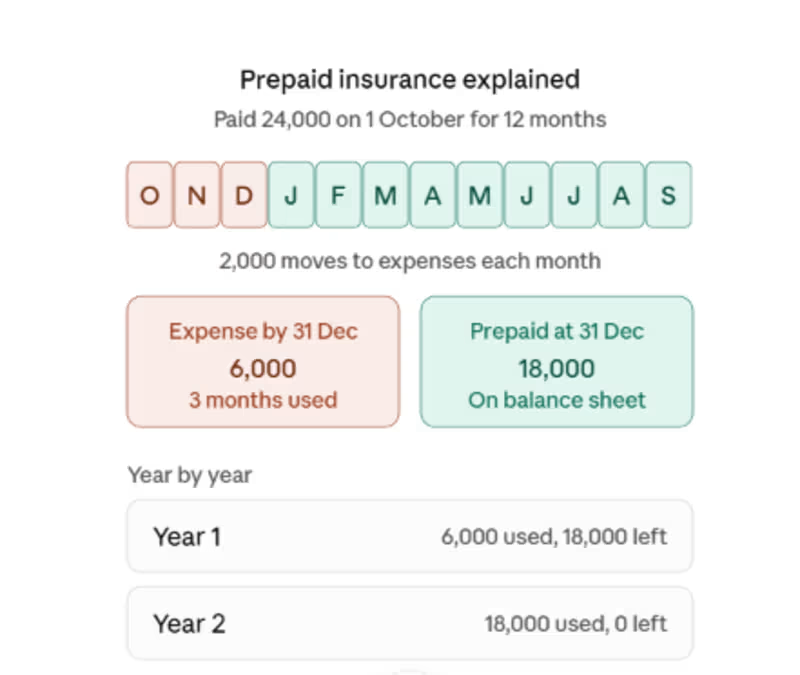
Say you pay 24,000 on 1 October for a 12 month policy. Each month, 2,000 moves into expenses.
By 31 December, you have used 3 months:
Expense so far: 6,000
Still unused: 18,000
That 18,000 stays on the balance sheet as prepaid.
The client still wasn’t fully sure from the numbers alone, so I showed them year by year:
Year 1 (Oct to Dec): 6,000 used, 18,000 still prepaid
Year 2 (Jan to Sep): 18,000 used, 0 left
By the end of the policy, the full 24,000 has moved into expenses. Nothing is lost. It just moves a little each month, as you use the cover.
That’s when it clicked for them.
Rent paid in advance, software subscriptions, annual membership, visa fees and licence fees all work the same way. Pay now, use over time, expense a little each month.
If your bookkeeper says “prepaid” and you just nod, ask them for a schedule like this. It’s your money, you should be able to see where it is.
2
221