Built with Rive
Rive UI Starter Kit

Maxim Vellinga

A FREE UI kit for Rive
Interactive UI in Rive is powerful—but setting it up from scratch can be slow, repetitive, and intimidating, especially when you just want to design and prototype quickly.
That’s why I built a 100% free UI starter kit for Rive: a collection of ready-to-use UI components with data binding, interactive states, and state machines already wired up.
The problem
Rive is incredibly flexible, but it doesn’t come with a component library.
Every time you want a simple button, toggle, or slider, you have to:
Create states (hover, press, active)
Wire up state machines
Add inputs and outputs
Connect data binding
Test interactions
That’s fine once ,but painful when you need to do it for every element.
I wanted Rive to feel more like shadcn/ui or a modern design system, where you grab a component and immediately start building.
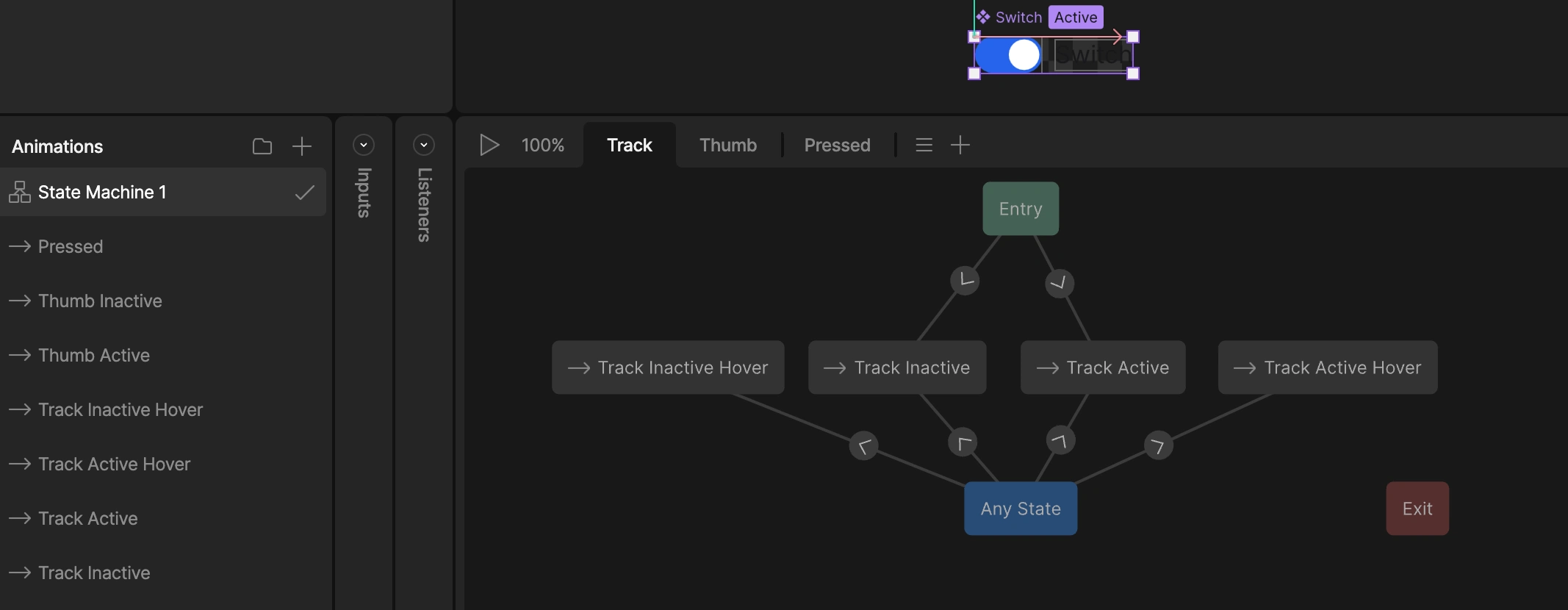
State machine setup of the Switch component
The solution
This UI kit gives you a growing set of production-ready components:
A button, switch, checkbox, slider and more
Each component includes:
Hover, pressed, active, and disabled states
Click and interaction events
Preconfigured state machines
Built-in data binding
You can plug them directly into your app logic or animations without touching the wiring.
👉 What components would you want to see in a UI kit like this?
Like this project
Posted Jan 12, 2026
A FREE UI kit for Rive. Drag and drop these components into your project and quickly start building your interfaces.
Likes
4
Views
57