PriceWatch — Competitor Price Monitoring & Alerts

JIANBIN LIU


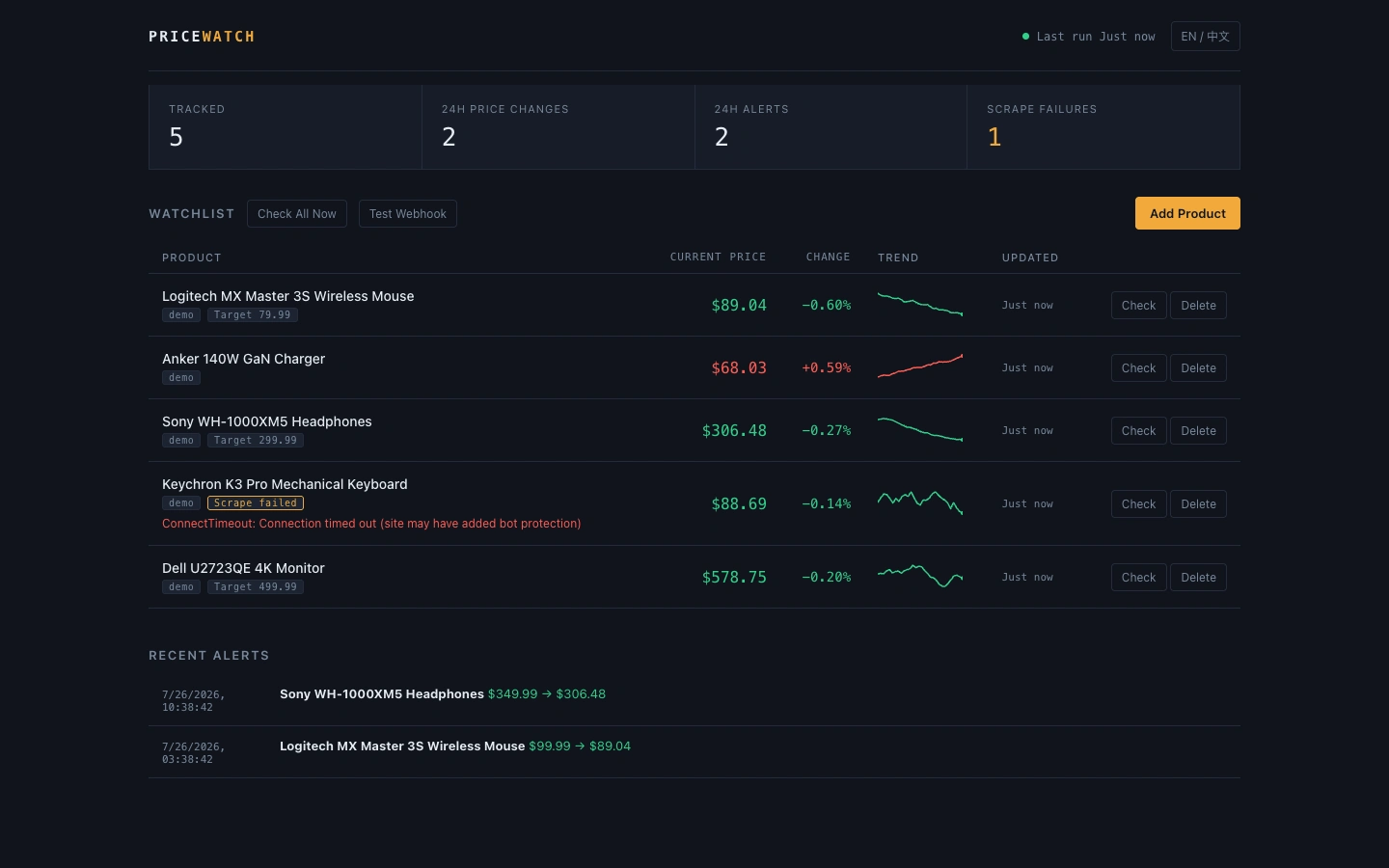
PriceWatch · Competitor Price Monitoring & Alerts
Track the price on any product page, keep the full history, and get pinged the moment something drops or crosses your target price.
One command to run it, SQLite to start, and a new site is just one more scraper class.
What problem it solves
E-commerce ops and buyers end up eyeballing competitor prices every day — manual price checks are slow and things slip through. PriceWatch turns that into a background job:
Auto-detects price — reads the schema.org structured data already on the page, zero config on most storefronts
A fallback that always works — when auto-detect fails, drop in one CSS selector and you're done
Full price history — every check is written to storage, with an inline trend sparkline right on the dashboard
Proactive alerts — get notified when the drop exceeds your threshold, or when price crosses a target you set
A notification path you can test — one "Test Webhook" button on the dashboard confirms the bot URL is right, right now, instead of finding out only when a real price drop goes nowhere
Scrape failures are visible — when a site redesign breaks your selector, the dashboard flags it in red instead of silently returning empty data
Adding a new site
Fill in a name and the product page URL. Most storefronts work with "auto-detect"; if that fails, add one CSS selector. Target price is optional — set it and you'll get a one-time alert the moment it's crossed.
When a scrape fails, you'll know
Site redesigns, domain changes, a selector that stopped matching — failures get written to storage just like successes, flagged red on the dashboard with the reason spelled out right in the row, no hover required. The biggest trap in scraping is a site changing under you and your job quietly returning nothing while looking fine.
Quick start
Want to see it in action first? Generate a batch of demo data (no network calls):
Demo data runs through the built-in
demo scraper — the scheduler keeps ticking every round exactly as it would in production, it just never makes a real request. That means you can leave the dashboard running: prices drift on their own, alerts fire on schedule, and nothing turns red just because it couldn't reach a fake sample site.Docker
Configuration
Everything is environment-variable driven — see
.env.example:Variable Default Description
DATABASE_URL sqlite:///./pricewatch.db Swap in a Postgres connection string to change database CHECK_INTERVAL_MINUTES 30 Interval between full scrape rounds ALERT_DROP_PERCENT 5 Alert when a drop exceeds this percentage ALERT_WEBHOOK_URL empty WeCom / DingTalk / Slack / Discord bot URL — leave blank to log alerts without sending them REQUEST_TIMEOUT 20 Per-request timeout, in secondsThe webhook payload format is auto-detected from the URL — no platform selection needed.
Architecture
Three deliberate trade-offs:
Scrapers are plugins. Supporting a new site means adding one
BaseScraper subclass and registering it with a single line in the registry — scheduling, storage, and alerting don't change.Failures get persisted too. A scrape error is written to the snapshot table with the error message attached, same as a success. The biggest failure mode in scraping is a site quietly breaking after a redesign; making failures explicit is what lets you catch it in time instead of finding out from a customer.
Ship something that runs, then scale it. SQLite plus a single-process scheduler is plenty for an individual or a small team — swap
DATABASE_URL to move to Postgres, and swap APScheduler for Celery once volume actually calls for it.API
Once the service is running, interactive docs live at
/docs — you can call every endpoint straight from the browser:Method Path Description
GET /api/products List products with current price, % change, and history POST /api/products Add a product (scrapes it immediately) PATCH /api/products/{id} Update name, selector, target price, active state DELETE /api/products/{id} Delete a product and its history POST /api/products/{id}/check Scrape once, right now GET /api/alerts Recent alert history POST /api/notify/test Send a test message to the configured webhook GET /api/stats Dashboard summary metricsExample — add a product:
Adding a new site
When neither auto-detect nor a CSS selector cuts it (price rendered by JS, say), write a scraper:
Add
MyShopScraper() to _REGISTRY in app/scrapers/registry.py and you're done.Notes
Check the target site's
robots.txt and terms of service before scraping. This project defaults to serial checks per product with a global concurrency cap of 5, built for low-frequency price monitoring — it's not meant for high-frequency, large-scale scraping.License
MIT
Like this project
Posted Jul 27, 2026
Designed and built a production-ready monitoring platform with pluggable scrapers, scheduled checks, price history, failure visibility, and webhook alerts.