Food Ordering App: Seamless and Appetising User Experience

Muhammad Tayyab


Food Ordering App: Seamless and Appetising User Experience
Description:
As a UX/UI designer, I approached the design of this food ordering app with the goal of creating an intuitive, visually appealing, and efficient platform that allows users to easily browse, customize, and order their favorite meals. Here’s how I designed it step by step:
User Research:
The target audience includes food lovers who want a quick and hassle-free way to order pizza, burgers, and other meals.
Key insights revealed the need for clear categorization, easy customization options, and a seamless checkout process.
Information Architecture:
The app is divided into three main sections:
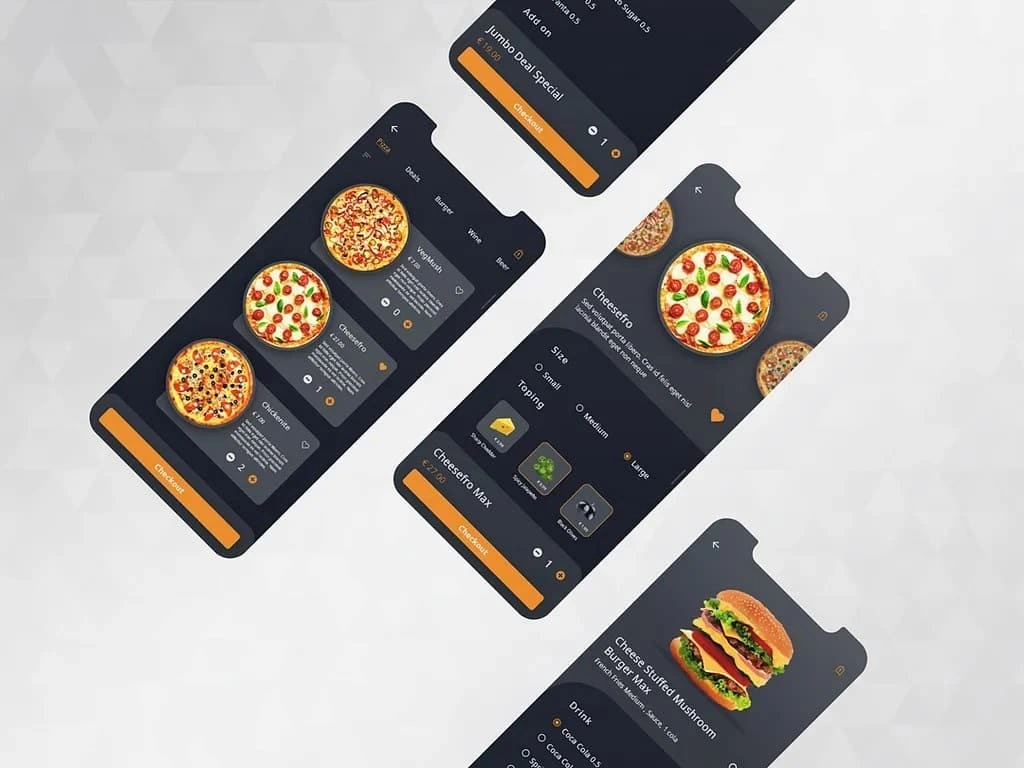
Category View: Displays different food categories (e.g., Pizza, Burgers) with images and prices, making it easy for users to browse options.
Product Detail View: Shows detailed information about each item, including size options, customizations, and pricing.
Checkout View: Provides a straightforward path to complete the order, ensuring users can review their selections before finalizing.
Visual Design:
Color Palette: Used a bold orange accent color to draw attention to key elements like the "Checkout" button and selected items, while maintaining a dark background for contrast and readability.
Typography: Chose clean, readable fonts for menu titles, descriptions, and pricing to ensure clarity.
Imagery: Included high-quality, appetizing images of food items to entice users and make the app visually engaging.
Interactive Elements:
Category Selection: Designed a grid layout for categories, allowing users to swipe or tap through options effortlessly.
Customization Options: Provided clear toggles and radio buttons for selecting sizes, toppings, and additional customizations, ensuring users have full control over their orders.
Add to Cart: Implemented prominent "Add to Cart" buttons with visual feedback (e.g., heart icons for favorites) to encourage user interaction.
Checkout Process: Kept the checkout flow simple and linear, with clear progress indicators and a summary of the order to build trust and reduce errors.
Usability:
Navigation: Ensured easy navigation between categories, product details, and checkout screens using back arrows and consistent UI patterns.
Accessibility: Used sufficient contrast between text and background, along with large, tappable buttons, to accommodate users with varying needs.
Responsive Design: Designed the app to adapt seamlessly to different screen sizes, ensuring a consistent experience on both smartphones and tablets.
Data Visualization:
Menu Cards: Displayed food items with clear images, names, and prices in a grid format, making it easy for users to compare options.
Order Summary: Showed a concise summary of selected items, quantities, and total cost during checkout to prevent mistakes.
Engagement:
Deals and Promotions: Highlighted special offers (e.g., "Jumbo Deal Special") to incentivize users and increase order value.
Personalization: Allowed users to save favorite items and view recent orders, enhancing the overall experience.
By focusing on simplicity, interactivity, and visual appeal, this design ensures that users can quickly find what they want, customize their orders, and complete their purchases with ease. The combination of vibrant visuals, intuitive navigation, and actionable elements creates a seamless and enjoyable food ordering experience.
Like this project
Posted Jun 8, 2025
Designed a seamless and visually appealing food ordering app for easy meal customization and ordering.