AI-Powered Dynamic Workspace Design for Freelancers

Priyanka Patel


AI-Powered Dynamic Workspace for Freelancers
Overview
I designed an AI-Powered Dynamic Workspace built in TempoLabs, a smart, adaptive environment tailored to how freelancers plan, manage tasks, and stay focused. The workspace responds to user context, offering predictive suggestions and layouts that evolve as workflows change.
Freelancers often juggle multiple tools (to-dos, notes, calendars, timers), which fragments focus and slows productivity. This concept explores how AI can reduce context switching while simplifying complex workflows into clear, intuitive experiences.
Problem Statement
Freelancers lack a unified workspace that:
Adapts to changing work priorities
Minimizes task context switching
Provides intelligent suggestions on what to do next
Reduces cognitive load and decision fatigue
Solution
I created a dynamic UI that:
Responds to user activity and task urgency
Delivers AI-powered planning assistance
Combines task management, prioritization, and focus tools
Scales from daily tasks to bigger project planning
The design balances AI guidance with user control, ensuring the experience feels intelligent without overwhelming the user.
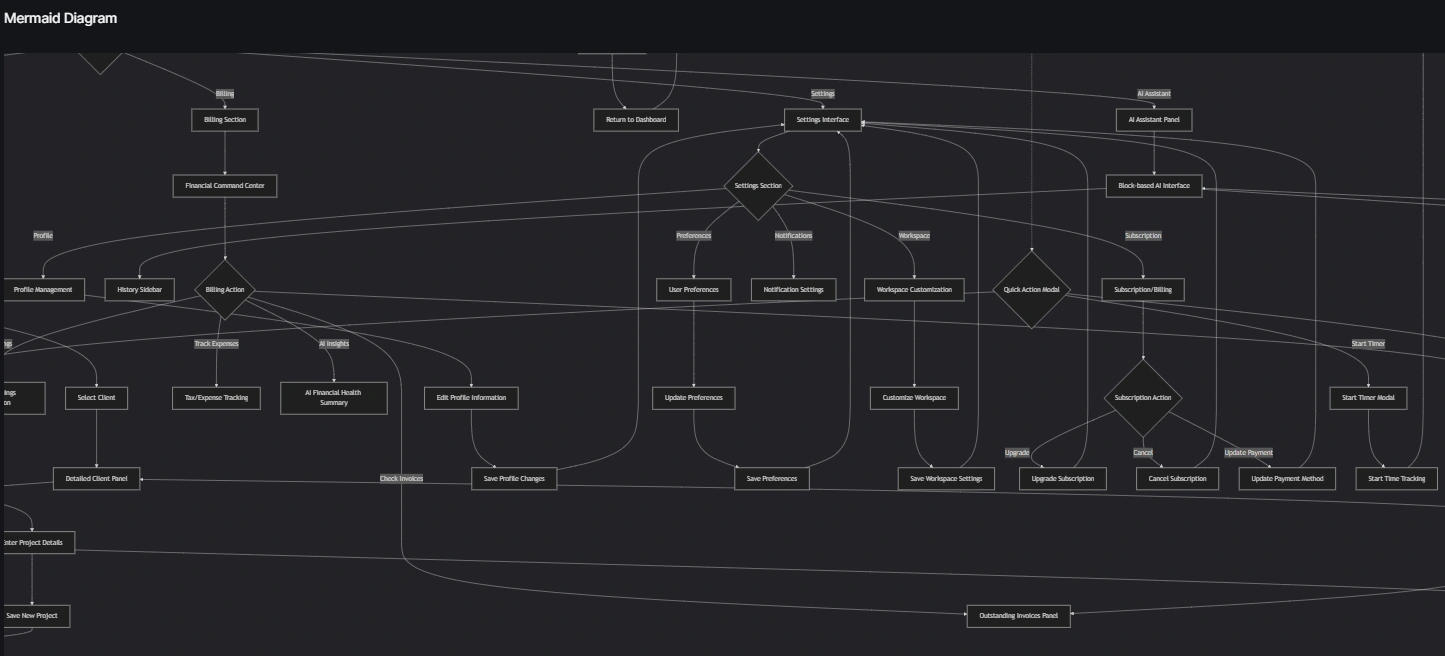
User Flow
Core Features
Intelligent Dashboard
Smart task board (drag & drop), AI focus timeline, active projects, real-time income insights
Project Workspace
Notion × Asana style layout with tabs (Overview, Tasks, Files, Messages, Billing) and AI risk summaries
AI Assistant
Block-based panel (no chat UI) for tasks, proposals, emails, plans, time tracking, and client messages
Client Management
CRM-style client list with detailed profiles, notes, linked projects, and AI follow-ups
Financial Center
Earnings overview, invoices, expense tracking, quick invoice creation, and AI financial insights
UI & Design System
Navigation
Persistent sidebar: Dashboard, Projects, Clients, Billing, AI Assistant, Settings
Design System
Soft neutral palette, Inter/SF-style typography, 8px grid, rounded components, reusable UI tokens
States & Settings
Polished empty/error states and a complete settings hub (Profile, Preferences, Billing, Workspace)
Visual Style
Production-ready SaaS aesthetic
Clean, minimal, and consistent spacing
Subtle shadows, no gradients or neon
Real content only — no placeholders
Key Interactions
Drag-and-drop task management
Inline editing across tasks and clients
AI insights that auto-refresh
Modal quick actions (Invoices, Timer, Projects)
Interactive charts and timelines
Tech Stack
Vite + React
Component-based architecture
Accessible, responsive, production-quality UI
Consistent patterns across all screens
What This Demonstrates
This project shows how AI can be thoughtfully integrated into everyday productivity tools, keeping usability and clarity at the center. It highlights:
Designing AI-enhanced workflows
UX thinking for adaptive interfaces
Translating complex behavior into simple, actionable UI
Rapid prototyping with TempoLabs in hours
What I learned:
Designing adaptive AI experiences requires anticipating when guidance is useful and when it interrupts. Context matters more than raw capability.
How I used TempoLabs:
Rapid feedback on interaction logic allowed me to validate behavioral assumptions without coding, saving time and allowing focus on experience over infrastructure.
Demo
Like this project
Posted Dec 18, 2025
AI-powered SaaS workspace for freelancers, designed and built using TempoLabs to manage projects, clients, finances, and workflows.
Likes
0
Views
24