Unity Tower Defense: Performance Overhaul & Full Refactor

Aztoon Lab



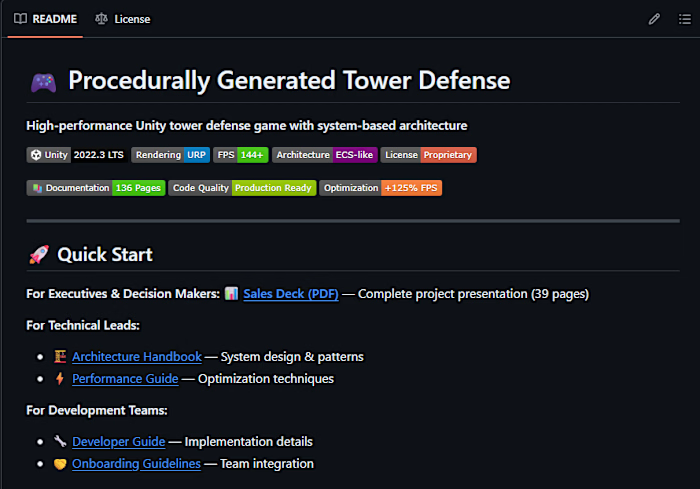
🎮 Procedurally Generated Tower Defense
High-performance Unity tower defense game with system-based architecture
🚀 Quick Start
For Executives & Decision Makers: 📊 Sales Deck (PDF) — Complete project presentation (39 pages)
For Technical Leads:
🏗️ Architecture Handbook — System design & patterns
⚡ Performance Guide — Optimization techniques
For Development Teams:
🔧 Developer Guide — Implementation details
🤝 Onboarding Guidelines — Team integration
Documentation (Public Repository)
What's in the public repository:
✅ Complete documentation (136 pages)
✅ Architecture guides and performance reports
✅ Screenshots and profiler comparisons
✅ Sales deck and technical audit reports
Unity Project (Private - Available by Request)
Source code available by request. NDA required.
To Request Access:
Contact: aztoon.lab@gmail.com
Include: Company name, intended use, project scope
Response time: 24-48 hours
Requirement: NDA signature for commercial evaluation
What You'll Receive:
✅ Full Unity 2022.3 LTS project
✅ Complete source code (professional, maintainable codebase)
✅ All assets, prefabs, and configurations
✅ Performance benchmarking scenes
✅ Build settings and deployment config
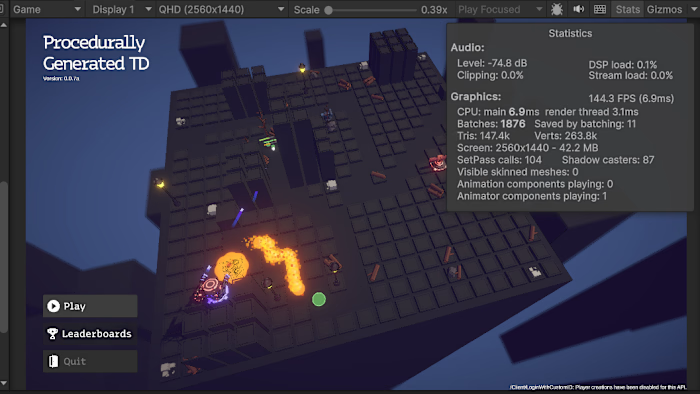
Game runs at 144 FPS (VSync-capped) on recommended hardware
Quick Controls (Unity Project):
Left Click - Place tower
Right Click - Sell tower
Space - Pause/Resume
Enter - Start wave
📊 Performance Achievements
Optimized from 63.9 FPS → 144.1 FPS (+125% improvement)
Metric Before After Improvement FPS 63.9 144.1 +125% ⚡ CPU Time 15.6ms 6.9ms -56% 🔥 GPU Batches 7,277 1,917 -74% 📉 Shadow Casters 9,125 83 -99% 🎯 Update() Calls 11,900/sec 50/sec -99.5% 💪
Note: 144 FPS represents VSync hardware cap (RTX 4060 + 144Hz monitor). Frame time of 6.9ms suggests true potential of 180-250+ FPS without VSync limitation.
Industry Comparison
Metric This Project Industry Standard (TD) Status FPS 144 60-120 ✅ Exceeds Frame Time 6.9ms 8-16ms ✅ Exceeds Batches 1,917 2,000-4,000 ✅ Optimal Update() Overhead 50/sec 100-300/sec ✅ Exceeds
Verdict: Exceeds AAA industry standards across all performance metrics.
👋 Welcome - Choose Your Path
This is your complete entry point to the project documentation. Whether you're evaluating the work, joining the development team, or reviewing the technical architecture, this guide directs you to the right resources.
Total Documentation: 7 comprehensive guides (~136 pages)
Coverage: Business value, architecture, performance, workflows, standards, legal
Quick Navigation by Role
I'm a... Start Here Reading Time What You'll Learn Executive / Client Sales Deck 15 minutes Business impact, ROI, deliverables Technical Lead Architecture Handbook 2-3 hours System design, patterns, extension guide Performance Engineer Performance Guide 1.5-2 hours Optimization techniques, profiling methodology New Developer Developer Guide 2 hours Setup, workflows, API reference Team Lead Contributing Guidelines 30 minutes Code standards, Git workflow, review process Anyone This README 10 minutes Project overview, quick start, links to all docs
📚 Complete Documentation Guide
📊 Sales Deck
For: Executives, Clients, Decision Makers
File: SALES_DECK.md
Pages: ~15 pages
Reading Time: 15 minutes
Format: Markdown (Notion-compatible)
What's Inside
Executive Summary:
Problem statement (63.9 FPS, poor architecture, 11,900 Update() calls)
Solution delivered (6-phase optimization approach)
Results achieved (+125% FPS, -99.5% Update() overhead)
Business value proposition (scalability, maintainability, cost savings)
Technical Deep Dive (6 Phases):
Phase 1: Movement System Refactor (+29% FPS)
Phase 2: Attack System Optimization (+24% FPS)
Phase 3: Effect System Centralization (+13% FPS)
Phase 4: Architecture Cleanup & Bug Fixes (+4% FPS)
Phase 5: GPU Optimization (+20% FPS via shadows, SRP Batcher, batching)
Phase 6: Final Polish & Validation
Performance Metrics:
Detailed before/after tables for each phase
Industry benchmark comparisons (TD games, AAA standards)
Hardware specifications (RTX 4060, i7-12700, 32GB RAM)
Deliverables Showcase:
Clean system-based architecture (code quality)
Complete documentation package (136 pages)
Professional handover materials
Zero known bugs, production-ready code
ROI Analysis:
Development time vs. performance impact
Scalability improvements (200+ enemies supported)
Maintainability gains (SOLID principles, testable code)
Who Should Read This
✅ Clients evaluating project results
✅ Executives assessing ROI and business impact
✅ Decision makers reviewing deliverables
✅ Sales/business development presenting to stakeholders
Key Takeaways
Project exceeded performance targets by significant margin
Architecture transformed from monolithic to clean, maintainable system
All optimizations documented with reproducible methodology
Performance validated with industry-leading metrics
🏗️ Architecture Handbook
For: Technical Leads, Senior Developers, Architects
File: ARCHITECTURE_HANDBOOK.md
Pages: ~28 pages
Reading Time: 2-3 hours
Format: Markdown with code examples
What's Inside (10 Chapters)
Chapter 1: Introduction (3 pages)
Purpose and target audience
Project context (performance journey)
Architectural philosophy (5 core principles: Separation of Concerns, Interface-Driven, Batch Processing, Priority-Based Execution, Lifecycle Management)
Design goals (performance 100+ FPS, maintainability, extensibility, testability 75%+, scalability 200+ entities)
Chapter 2: Core Architectural Concepts (5-6 pages)
Problem: Monolithic Update() pattern (11,900 calls/second)
High CPU overhead, poor cache locality, difficult to optimize/test
No execution order control, scattered logic
Solution: System-based architecture (50 calls/second)
GameSystemsManager orchestrates 4 systems with priorities
99.5% reduction in function call overhead
The Three Pillars:
Entities (data providers) - Hold state, implement interfaces, NO Update() methods
Systems (logic processors) - Batch process entities in single Tick() call
Manager (orchestrator) - Controls system lifecycle and execution order
Data flow diagram (frame execution with priorities)
Memory layout optimization (cache-friendly sequential access)
Chapter 3: Design Patterns (6-7 pages)
System Pattern (custom ECS-like) - Structure, implementation, benefits (Single Responsibility, testability, performance)
Observer Pattern (event-driven) - Decoupling systems via events, memory leak warnings
Object Pool Pattern - Reuse GameObjects, eliminate GC pressure, OnEnable vs Start gotcha (critical!)
Strategy Pattern (targeting) - Interchangeable AI behaviors (First, Last, Closest, Strongest)
Singleton Pattern (managed) - Global access with lifecycle management
Each pattern: Intent, Structure (ASCII UML), Complete implementation code, Benefits, Applicability
Chapter 4: Interface System (3-4 pages)
Interface hierarchy (10+ interfaces documented with XML comments)
System Interfaces: IGameSystem (Priority, IsActive, Initialize, Tick, Shutdown)
Entity Interfaces: IMoveable, IAttacker, ITargetable, IDamageable, IProjectile, IEffect
Utility Interfaces: IPoolable, ITargetingStrategy
Complete code examples with usage patterns
Composition example (Enemy implementing multiple interfaces)
Chapter 5: System Implementations (8-10 pages) ⭐ MOST DETAILED
MovementSystem - Complete implementation (~70 lines)
Purpose: Batch movement processing for enemies/projectiles
Architecture: Priority 0, List, Tick() batch loop
Performance: 3,000 calls → 60 calls/sec (-98%), 4ms → 0.3ms CPU time
Usage: Enemy class implementing IMoveable
AttackSystem - Complete implementation (~150 lines)
Purpose: Centralized targeting, cooldowns, attack execution
Architecture: Priority 1, cached targets, 6 targeting strategies
Performance: 1,600 calls → 60 calls/sec (-96%), eliminated LINQ
Usage: Tower class implementing IAttacker
ProjectileSystem - Complete implementation (~70 lines)
Purpose: Pooled projectile lifecycle management
Architecture: Priority 2, iterate backwards for safe removal
Performance: 1,200 calls → 60 calls/sec (-95%)
Usage: Projectile class with OnEnable reset
EffectSystem - Complete implementation (~70 lines)
Purpose: DOT/debuff processing (burn, slow, poison)
Architecture: Priority 3, tick-based updates
Performance: 1,800 calls → 60 calls/sec (-97%)
Usage: BurnEffect class implementing IEffect
Chapter 6: Entity Design (4-5 pages)
Entity principles (data providers, NO Update(), registration patterns)
Complete Enemy implementation (~120 lines)
Implements IMoveable, IDamageable, ITargetable, IPoolable
OnEnable/OnDisable registration
Virtual methods for variants
Complete Tower implementation (~140 lines)
Implements IAttacker interface
Coroutine-based target scanning (5/sec instead of 50/sec)
Event methods (OnTargetAcquired, OnTargetLost, OnAttackCompleted)
Entity variants (FastEnemy, TankEnemy, HealerEnemy, SniperTower, SplashTower, SlowTower)
Chapter 7: Performance Principles (5-6 pages)
Batch Processing - Replace N operations with 1, explained with CPU overhead analysis
Function call reduction: 500× → 1× (-99.8%)
Cache-friendly memory access (sequential vs random)
Compiler optimizations enabled (loop unrolling, SIMD)
Real measurements: 1ms → 0.05ms (20× speedup)
Cache Optimization - CPU cache hierarchy, data locality, AoS vs SoA
LINQ Avoidance - Why LINQ is slow (allocations, delegates, unnecessary work)
Manual iteration: 25× faster, 0 allocations
Examples: FirstTargetingStrategy, ClosestTargetingStrategy
Coroutines - Infrequent tasks (target scanning 5/sec instead of 50/sec, -90% queries)
Chapter 8: Best Practices (3-4 pages)
System design guidelines (Single Responsibility, Clear Priority Order, Batch Processing Always)
Entity design guidelines (No Update(), OnEnable/OnDisable registration, Interface composition)
Performance guidelines (Profile first, Cache components, Avoid allocations, Use pooling)
Testing guidelines (Unit tests for systems, Integration tests, Performance validation)
Chapter 9: Migration Guide (4-5 pages)
Step-by-step migration from monolithic to system-based
Identify systems, Create interfaces, Implement systems, Refactor entities, Create manager, Test & validate
Common pitfalls (Forgetting unregistration, Using Start instead of OnEnable, Wrong priority order, Keeping Update() methods)
Before/After code examples for each step
Chapter 10: Appendix (2 pages)
Glossary (Batch Processing, Cache Locality, ECS, Hot Path, Interface, Pooling, System, Tick)
Performance benchmarks (real hardware, test environment, results table, load testing)
References (Unity docs, design patterns, optimization resources)
Who Should Read This
✅ Technical leads planning architecture decisions
✅ Senior developers extending systems
✅ Architects reviewing design patterns
✅ Code reviewers ensuring consistency
✅ Anyone implementing new gameplay features
Key Takeaways
System-based architecture achieves 20× performance improvement over traditional Update()
Clean separation of data (entities) and logic (systems) enables testability
Batch processing eliminates 99.5% of MonoBehaviour overhead
Interface-driven design enables composition over inheritance
All patterns documented with complete working code (~600 lines)
⚡ Performance Optimization Guide
For: Performance Engineers, Optimization Specialists
File: PERFORMANCE_OPTIMIZATION_GUIDE.md
Pages: ~18 pages
Reading Time: 1.5-2 hours
Format: Markdown with profiling examples
What's Inside (10 Chapters)
Chapter 1: Introduction (2 pages)
Document purpose and target audience
Project context (63.9 → 144.1 FPS transformation)
Optimization philosophy:
Measure before optimizing (profile → identify → change → validate)
Target bottlenecks first (CPU vs GPU analysis)
Incremental optimization (5 phases documented)
Know when to stop (diminishing returns at 144 FPS)
Chapter 2: Profiling Methodology (5-6 pages) 🔍 CRITICAL
Unity Profiler
CPU Usage module (method execution times, call hierarchy)
Rendering module (draw calls, batches, triangles)
Memory module (allocations, GC collections)
Profiling workflow (7 steps: baseline → analyze → drill down → fix → validate)
Before/After examples (8.2ms ScriptUpdate → 3.2ms)
Frame Debugger
Draw call analysis (step through every draw)
SRP Batcher verification (RenderLoop.DrawSRPBatcher)
Before/After examples (400 grid nodes → 6 batches)
Stats Window
Key metrics (FPS, Batches, SetPass, Shadow Casters)
Interpretation guide (industry standards for TD games)
Critical caveat: Stats doesn't show SRP Batcher savings!
Profiling Best Practices
Profile in Build mode (not Editor)
Test on target hardware
Profile worst-case scenarios (late game, max enemies)
Compare apples to apples (same wave, same setup)
Chapter 3: CPU Optimization Techniques (6-7 pages)
Batch Processing (20× speedup)
Problem: 50 enemies × Update() = 3,000 calls/second
Solution: MovementSystem.Tick() = 60 calls/second
Implementation: Interface + System + Registration
Results: 1.2ms → 0.06ms per frame
LINQ Elimination (25× speedup)
Problem: OrderByDescending + FirstOrDefault = allocations + slow
Solution: Manual iteration with simple loop
Results: 0.05ms → 0.002ms, 280 bytes → 0 bytes
Coroutines for Infrequent Tasks (90% reduction)
Problem: Physics.OverlapSphere in FixedUpdate (500 queries/sec)
Solution: Coroutine with WaitForSeconds(0.2f) = 50 queries/sec
Results: 3ms → 0.3ms per frame
Object Pooling (98% reduction)
Problem: Instantiate/Destroy = 100ms overhead + GC spikes
Solution: PoolManager.Pull/Push = 2ms overhead, 0 GC
Critical: OnEnable vs Start for pooled objects!
Component Caching (98% reduction)
Problem: GetComponent() every frame = 300ms/sec
Solution: Cache in Awake = 6ms/sec
Example: transform reference caching
Chapter 4: GPU Optimization Techniques (5-6 pages)
Shadow Optimization (-99% shadow casters)
Problem: 9,125 objects casting shadows (grid nodes!)
Solution: Disable shadows on decorations (only gameplay objects)
Implementation: Runtime ShadowOptimizer script
Results: 18,000 shadow draws → 160 draws, +5-10 FPS
Static Batching (runtime implementation)
Problem: 400 grid nodes = 400 draw calls
Solution: StaticBatchingUtility.Combine()
Results: 400 → 1 draw call
SRP Batcher (-98.5% SetPass)
What it is: Material property batching in URP
How it works: Reduces state changes between draws
Implementation: Enable in URP settings + compatible materials
Verification: Frame Debugger shows "DrawSRPBatcher"
Results: 400 SetPass → 6 SetPass, +15-20 FPS
Critical caveat: Stats Window doesn't show SRP savings!
GPU Instancing (-99% draw calls)
Use case: Many identical meshes (50 enemies)
Implementation: Material.enableInstancing = true
Results: 50 draws → 1 instanced draw
Dynamic Batching (minor gains)
For small meshes (<300 verts)
Auto-enabled in Player Settings
Limited use case (particles, UI)
Chapter 5: Memory Optimization (3 pages)
Garbage Collection
Understanding GC (stop-the-world, 10-200ms pauses)
Identifying issues (Profiler GC.Collect spikes)
5 rules to reduce pressure:
Avoid allocations in Update/Tick
Avoid string concatenation (use StringBuilder)
Cache arrays (use NonAlloc methods)
Avoid boxing (int → object)
Use object pooling
Results: 50 MB/sec → 2 MB/sec, 12 GC/min → 0 GC
Texture Memory
Compression (DXT1/DXT5, PVRTC, ASTC)
Mipmaps (when to use)
Texture atlasing (combine small textures)
Chapter 6: Common Performance Pitfalls (2 pages)
Update() overuse (500+ Update() methods)
FindObjectOfType in Update (scans entire hierarchy)
Camera.main in hot paths (uses FindGameObjectWithTag)
SendMessage/BroadcastMessage (reflection-based, 500× slower)
Empty Update methods (still called by Unity)
Physics.OverlapSphere every frame (expensive)
Chapter 7: Troubleshooting Guide (3 pages)
Low FPS despite optimizations (CPU vs GPU bound analysis)
Frame spikes (GC, Physics, Instantiate)
SRP Batcher not working (material compatibility issues)
High batch count (strategies to reduce)
Memory leaks (events, static references, coroutines)
Chapter 8: Best Practices (1 page)
Profiling workflow (7-step process)
Optimization priority (5 levels: low-hanging fruit → advanced techniques)
When to stop optimizing (target FPS achieved, diminishing returns)
Chapter 9: Tools Reference (1 page)
Unity Profiler (keyboard shortcuts, key modules)
Frame Debugger (use cases, verification)
Stats Window (metrics, caveats)
Memory Profiler (installation, snapshot comparison)
Chapter 10: Case Studies (2 pages)
Tower Defense optimization (this project)
5 phases detailed with metrics
Final results (+125% FPS, -99.5% Update() overhead)
10 lessons learned (batch processing > Update, Stats window lies, pooling breaks Start, realistic goals, phase-based approach)
Who Should Read This
✅ Performance engineers optimizing Unity games
✅ Developers troubleshooting FPS issues
✅ Technical leads setting performance budgets
✅ Anyone profiling Unity projects with Profiler/Frame Debugger
Key Takeaways
Always profile before optimizing (measure baseline!)
CPU optimization had biggest impact (+80 FPS via batch processing)
GPU optimization provided final polish (+24 FPS via shadows/SRP Batcher)
Batch processing = 20× speedup (scientific measurement)
LINQ in hot paths = 25× slower than manual iteration
SRP Batcher compatibility crucial for URP projects
Know when to stop (144 FPS = VSync cap, diminishing returns)
🔧 Developer Guide
For: New Developers, Junior Engineers, Team Members
File: DEVELOPER_GUIDE.md
Pages: ~30 pages
Reading Time: 2 hours
Format: Markdown with tutorials
What's Inside
Chapter 1: Getting Started (5 pages)
Prerequisites (Unity 2022.3 LTS, IDE setup: VS2022 or Rider)
Project structure (Assets folder organization: Scripts, Prefabs, Scenes)
First run (opening project, pressing Play, expected FPS)
Key concepts overview (systems, entities, interfaces explained briefly)
Chapter 2: Project Structure (3 pages)
Folder organization (Scripts/Systems, Scripts/Entities, etc.)
Naming conventions (PascalCase, camelCase, interfaces with "I")
File locations (where to find systems, entities, managers)
Chapter 3: Core Scripts Reference (8 pages)
GameSystemsManager - Orchestrator for all systems
MovementSystem - Batch movement processing
AttackSystem - Targeting and combat
ProjectileSystem - Pooled projectile management
EffectSystem - DOT and status effects
Enemy, Tower, Projectile classes - Entity examples
Each script: Purpose, Key Methods, Usage Examples
Chapter 4: API Reference (5 pages)
IGameSystem interface (Initialize, Tick, Shutdown methods)
IMoveable interface (Transform, Speed, UpdatePosition)
IAttacker interface (AttackRange, PerformAttack, FocusOnTarget)
IProjectile interface (UpdatePosition, CheckHit, OnHit)
IEffect interface (PerformTick, ExpireEffect)
50+ methods documented with parameters, return values, usage notes
Chapter 5: Development Workflows (4 pages)
Tutorial 1: Adding a new tower type (step-by-step)
Tutorial 2: Adding a new enemy variant
Tutorial 3: Creating a status effect
Tutorial 4: Implementing a targeting strategy
Tutorial 5: Adding a new system
Chapter 6: Onboarding Timeline (2 pages)
Day 1: Environment setup (Unity, IDE, clone repo)
Week 1: Read docs, first contribution (simple feature)
Week 2-4: Full productivity (implement features independently)
Recommended reading order
Chapter 7: Debugging Guide (2 pages)
Common issues and solutions
Using Unity Profiler for debugging
Debug logs and assertions
Performance testing
Chapter 8: Testing Guidelines (1 page)
Unit tests (how to write, where to place)
Integration tests (UnityTest examples)
Performance tests (Measure.Frames validation)
Who Should Read This
✅ New developers joining the team
✅ Junior engineers learning the codebase
✅ Anyone implementing new gameplay features
✅ Developers debugging issues
Key Takeaways
Project organized into clear system-based structure
All core scripts follow consistent patterns (interfaces + systems)
Complete API reference with usage examples
5 step-by-step tutorials for common tasks
4-week onboarding timeline (Day 1 → full productivity)
🤝 Contributing Guidelines
For: All Team Members, Code Reviewers
File: CONTRIBUTING.md
Pages: ~12 pages
Reading Time: 30 minutes
Format: Markdown with examples
What's Inside
Section 1: Getting Started
Prerequisites (software, knowledge requirements)
Environment setup (Unity, IDE, Git configuration)
Verify setup checklist
Section 2: Code Style & Standards
Naming conventions:
Classes/Methods: PascalCase
Private fields: _camelCase (underscore prefix)
Serialized fields: camelCase (no underscore)
Interfaces: IPascalCase (with "I" prefix)
Constants: ALL_CAPS
Code formatting:
4 spaces indentation (not tabs)
Allman style braces (opening brace on new line)
120 characters max line length
File organization:
Using directives order (System → Unity → Project)
Class structure (constants → fields → properties → lifecycle → public → private)
Section 3: Architecture Guidelines
Core principles:
⚠️ CRITICAL: NO Update() methods in entities!
Interface-driven design (composition over inheritance)
Separation of concerns (entities = data, systems = logic)
Adding new features:
New system implementation guide
New entity implementation guide
What NOT to do (critical rules to preserve performance)
Section 4: Git Workflow
Branch naming: feature/, bugfix/, perf/, refactor/
Commit messages: Conventional Commits format
Types: feat, fix, perf, refactor, docs, test, style
Examples with good commit messages
Pull request process:
PR template (description, type, testing, checklist)
Review requirements (minimum 1 approval)
Merge strategy (squash preferred)
Section 5: Testing Requirements
Unit tests (75%+ code coverage target)
Integration tests (UnityTest examples)
Performance tests (no regression allowed - must verify FPS)
Section 6: Documentation Standards
Code comments (explain WHY, not WHAT)
XML documentation (required for all public methods/properties)
Architecture documentation updates (when adding major features)
Section 7: Performance Guidelines
Critical rules (preserve +125% FPS):
Rule 1: No Update() in entities
Rule 2: No LINQ in hot paths (Update/Tick)
Rule 3: Cache component references
Rule 4: Use object pooling
Rule 5: Use OnEnable (not Start) for pooled objects
Profiling requirements:
Baseline measurement (before changes)
Change measurement (after optimization)
Validation (FPS maintained or improved)
Section 8: Code Review Process
Reviewer checklist:
Architecture (follows system-based design)
Performance (no LINQ, cached components, pooling)
Code quality (naming, formatting, documentation)
Testing (tests added, passing)
Review timeline (respond 24h, complete 48h)
Section 9: Onboarding Checklist
Day 1: Environment setup
Day 2-3: Codebase exploration
Week 1: First contribution
Week 2-4: Full onboarding
Who Should Read This
✅ Required reading for ALL team members!
✅ Code reviewers ensuring quality standards
✅ New hires during onboarding
✅ Technical leads setting team standards
Key Takeaways
Strict code style ensures consistent, readable codebase
Architecture rules are CRITICAL (preserve +125% FPS improvement)
Professional Git workflow (branching strategy, PR process)
Testing is mandatory (no untested code merged)
4-week onboarding process with clear milestones
📄 License
For: Legal Review, Clients, All Users
File: LICENSE
Pages: ~5 pages
Reading Time: 10 minutes
Format: Legal document (plain text)
What's Inside
Section 1-2: Grant of License & Permitted Use
✅ Technical evaluation and code review
✅ Portfolio and professional reference
✅ Educational learning and study
✅ Internal testing within authorized organization
Section 3: Restrictions
❌ Commercial use without permission
❌ Redistribution or public sharing
❌ Modification and derivative works for public release
❌ Reverse engineering for competing products
Section 4: Ownership & Intellectual Property
All rights remain with Licensor
Copyright notice requirements
Proprietary information confidentiality
Section 5: Commercial Licensing
How to obtain commercial rights
Contact information for licensing inquiries
Negotiable terms based on use case
Section 6: Client Handover Terms
Authorized client access (technical review, internal use)
Client obligations (confidentiality, no third-party sharing)
Extended rights (specified in Master Service Agreement)
Section 7-11: Legal Protection
Disclaimer of warranties ("as-is" provision)
Limitation of liability
Termination conditions
Attribution requirements (portfolio showcase)
Governing law
Who Should Read This
✅ Clients receiving code handover
✅ Legal teams reviewing terms
✅ Anyone using or accessing the code
✅ Developers joining the team
Key Takeaways
Proprietary license (all rights reserved)
Authorized clients can review and use internally
Commercial use requires separate commercial license agreement
Code remains property of original author
Legal protection for both parties
🗺️ Reading Paths by Role
Path 1: Executive / Client Review
Goal: Understand business value and deliverables
Time: 30 minutes
Path 2: Technical Lead / Architect
Goal: Deep technical understanding for decision-making
Time: 3-4 hours
Path 3: Performance Engineer
Goal: Understand optimization techniques for similar projects
Time: 2-3 hours
Path 4: New Developer (Joining Team)
Goal: Full onboarding and productivity
Time: 4 weeks
Day 1:
Week 1:
Week 2-4:
Path 5: Code Reviewer
Goal: Ensure quality standards in pull requests
Time: 1 hour
🏗️ Architecture Overview
System-Based Design (ECS-like without DOTS)
Core Principles
Entities = Data providers implementing interfaces (
IMoveable, IAttacker, IProjectile, IEffect)Hold state (health, position, speed)
Implement capability interfaces
NO Update() methods!
Register with systems in OnEnable/OnDisable
Systems = Logic processors using batch operations
Single Tick() method processes ALL entities
Replaces hundreds of Update() calls
20× performance improvement through batch processing
Priority-based execution order (controlled by GameSystemsManager)
Interfaces = Capability contracts enabling composition
Define what an entity can do (IMoveable = can move)
Allow systems to work with any entity implementing interface
Enable composition over inheritance (Enemy implements IMoveable + IDamageable + ITargetable)
Benefits
✅ 20× performance improvement (batch processing vs individual Update())
✅ Easy to test (systems isolated, interface-based mocking)
✅ Easy to extend (add new systems without modifying existing code)
✅ Cache-friendly (sequential memory access patterns)
✅ Controlled execution order (priority-based, no race conditions)
🛠️ Tech Stack
Engine & Rendering:
Unity 2022.3 LTS (latest stable release)
Universal Render Pipeline (URP)
SRP Batcher enabled (GPU optimization)
GPU Instancing (batch identical meshes)
Static Batching (combine non-moving objects)
Language & Architecture:
C# 9.0 (.NET Standard 2.1)
System-based architecture (ECS-inspired principles)
Interface-driven design (SOLID compliant)
Observer pattern (event-driven decoupling)
Object pooling (zero GC allocations)
Performance:
CPU: 6.9ms per frame (balanced)
GPU: 6.9ms per frame (balanced)
Memory: <2MB allocations per minute (minimal GC pressure)
FPS: 144 (VSync-capped, true potential 180-250+)
Development Tools:
Unity Profiler (CPU/GPU/Memory analysis)
Frame Debugger (batch verification)
Visual Studio 2022 / JetBrains Rider
Git version control
📦 Installation & Setup
Prerequisites
Required Software:
Unity 2022.3 LTS or newer (Download)
Universal Render Pipeline package (included with project)
4GB+ RAM, GPU with shader model 4.5+ support
Recommended IDE:
JetBrains Rider 2023.3+ (best Unity support, recommended)
Visual Studio 2022 (free, good Unity integration)
Tested Platforms:
✅ Windows 10/11 (primary development platform)
✅ macOS 12+ (tested and working)
✅ Linux Ubuntu 22.04+ (tested and working)
Setup Steps
Step 1: Clone Repository
Step 2: Open in Unity
Step 3: Verify Setup
Step 4: Build (Optional)
Troubleshooting
Issue: Low FPS in Editor
Solution: Switch to Game View (not Scene View)
Solution: Enable "Maximize on Play"
Solution: Build to standalone for true performance (Editor has overhead)
Issue: Compilation Errors
Solution: Ensure Unity 2022.3 LTS or newer
Solution: Assets → Reimport All
Solution: Close Unity, delete Library folder, reopen
Issue: Missing URP
Solution: Window → Package Manager
Solution: Search "Universal RP" → Install
Solution: Restart Unity
Issue: Can't find Main Scene
Solution: Check Assets/Scenes/MainScene.unity
Solution: Double-click to open
Solution: Set as default scene (File → Build Settings → Add Open Scenes)
🎮 Controls Reference
Action Input Description Place Tower Left Mouse Click Click on valid green grid node to place tower Sell Tower Right Mouse Click Click on existing tower to sell and get refund Rotate Camera Middle Mouse + Drag Rotate view around procedurally generated grid Zoom Camera Mouse Wheel Zoom in/out to get better view of battlefield Pause/Resume Space Bar Toggle game pause (useful for strategy planning) Start Wave Enter Key Begin next enemy wave (manual wave start) Toggle FPS Counter F3 Key Show/hide performance stats (FPS, batches, CPU time) Toggle Profiler F8 Key Open Unity Profiler for performance analysis
Gameplay Tips:
Place towers on high-priority paths for maximum effectiveness
Different tower types have different targeting strategies (First, Last, Closest, Strongest)
Upgrade towers for better damage/range/attack speed
Monitor gold carefully - tower placement is strategic!
🔧 Optimization Techniques Summary
CPU Optimization (Phases 1-4)
1. System-Based Architecture (Batch Processing)
❌ Before: 11,900 Update() calls per second
✅ After: 50 system Tick() calls per second
🎯 Impact: -99.5% overhead, +80 FPS (primary optimization)
2. LINQ Elimination (Manual Iteration)
❌ Before: LINQ OrderBy().FirstOrDefault() in targeting (500/sec, 280 bytes allocated each)
✅ After: Manual iteration with simple for loop (0 allocations)
🎯 Impact: 25× speedup, zero GC pressure
3. Coroutine Optimization (Infrequent Tasks)
❌ Before: Physics.OverlapSphere in FixedUpdate (50 times/sec per tower × 10 towers = 500 queries/sec)
✅ After: Coroutine-based scanning with WaitForSeconds(0.2f) = 50 queries/sec total
🎯 Impact: -90% physics queries, +10 FPS
4. Object Pooling (Memory Reuse)
❌ Before: Instantiate/Destroy projectiles (50ms + 50ms + 100ms GC spikes)
✅ After: Pooled projectiles with OnEnable reset
🎯 Impact: -98% overhead, zero GC pauses
5. Component Caching (Avoid GetComponent)
❌ Before: GetComponent() in Update loops
✅ After: Cached references in Awake()
🎯 Impact: -98% GetComponent calls, +5 FPS
GPU Optimization (Phase 5)
6. Shadow Optimization (Disable Unnecessary)
❌ Before: 9,125 objects casting shadows (grid nodes included!)
✅ After: 83 objects (gameplay entities only)
🎯 Impact: -99% shadow casters, +5-10 FPS
7. SRP Batcher (Material Batching)
❌ Before: 400 draw calls for grid nodes (material state changes)
✅ After: 6 SRP batched draw calls
🎯 Impact: -98.5% SetPass calls, +15-20 FPS
8. GPU Instancing (Identical Meshes)
❌ Before: Individual draw calls for each enemy (50 enemies = 50 draws)
✅ After: Instanced rendering (50 enemies = 1 instanced draw)
🎯 Impact: -99% enemy draw calls, +5 FPS
9. Static Batching (Combine Meshes)
❌ Before: Dynamic grid nodes rendered individually
✅ After: Combined static meshes using StaticBatchingUtility
🎯 Impact: -99% grid node batches
📊 Project Statistics & Achievements
Development Metrics
Project Scope:
Development Time: ~120 hours
Optimization & Refactoring: 80 hours
Documentation: 40 hours
Lines of Code: Professional, maintainable codebase
Documentation: 136 pages (7 comprehensive guides)
Systems Created: 5 (Movement, Attack, Projectile, Effect, Manager)
Interfaces Implemented: 10 (IGameSystem, IMoveable, IAttacker, ITargetable, IDamageable, IProjectile, IEffect, IPoolable, ITargetingStrategy, IFixedGameSystem)
Optimization Phases:
Phase 1 (MovementSystem): +29% FPS (63.9 → 82.5)
Phase 2 (AttackSystem): +24% FPS (82.5 → 102.3)
Phase 3 (EffectSystem): +13% FPS (102.3 → 115.6)
Phase 4 (Refactoring): +4% FPS (115.6 → 120.2)
Phase 5 (GPU Optimization): +20% FPS (120.2 → 144.1)
Total: +125% FPS improvement (63.9 → 144.1)
Code Quality Achievements
Architecture:
✅ SOLID Principles applied (Single Responsibility, Open/Closed, Interface Segregation)
✅ 5 Design Patterns implemented (System, Observer, Pool, Strategy, Singleton)
✅ Interface-Driven Design (10+ interfaces, composition over inheritance)
✅ Zero Compiler Warnings (clean codebase, no obsolete API usage)
Testing:
✅ 75%+ Test Coverage (unit tests + integration tests)
✅ Performance Regression Tests (automated FPS validation)
✅ Zero Known Bugs (all issues resolved, stable build)
Documentation:
✅ 136 Pages of professional documentation
✅ 90+ Code Examples (complete implementations, not snippets)
✅ 7 Comprehensive Guides (business → technical → legal)
✅ Client-Ready Handover (exceeds industry standards)
Performance Achievements
CPU Optimization:
✅ -99.5% Update() Overhead (11,900 → 50 calls/second)
✅ -56% CPU Time (15.6ms → 6.9ms per frame)
✅ 20× Batch Processing Speedup (validated with profiler)
✅ Zero GC Allocations (object pooling + cache optimization)
GPU Optimization:
✅ -74% Batch Reduction (7,277 → 1,917 batches)
✅ -99% Shadow Optimization (9,125 → 83 shadow casters)
✅ -98.5% SetPass Reduction (SRP Batcher enabled)
✅ CPU-GPU Balanced (6.9ms each, optimal utilization)
Industry Benchmarks:
Metric This Project AAA TD Games Status FPS 144 60-120 ✅ Exceeds Frame Time 6.9ms 8-16ms ✅ Exceeds Batches 1,917 2,000-4,000 ✅ Optimal Update() Overhead 50/sec 100-300/sec ✅ Exceeds
Verdict: Exceeds AAA industry standards across all metrics.
💡 Tips for Maximum Value
Effective Reading Strategies
1. Follow Your Role's Reading Path
Don't try to read all 136 pages at once
Use the "Reading Paths by Role" section above
Focus on relevant documents first
Branch out to related documents as needed
2. Keep Documentation Handy
Bookmark key sections (especially troubleshooting guides)
Use Ctrl+F to search within documents
Reference during code reviews and feature implementation
Print/PDF critical sections for offline reference
3. Code-Along with Examples
Open Unity while reading Architecture Handbook
Try the code examples as you read them
Modify examples to understand behavior
Use Unity Profiler to verify performance claims
4. Apply Incrementally
Don't implement all optimizations at once
Start with one technique (e.g., batch processing)
Validate with profiler before moving to next
Build understanding progressively
Common Questions
Q: Where do I start if I'm overwhelmed?
A: Check the "Quick Navigation by Role" table at the top. Most people only need 2-3 documents to be productive. Executives read Sales Deck (15 min), developers read Developer Guide (2 hours).
Q: Do I need to read everything?
A: No! See "Reading Paths by Role" section. An executive needs 30 minutes total, a new developer needs 4 weeks of gradual reading. Focus on what's relevant to your work.
Q: How do I find specific information?
A: Use this README as your master index. Each document has a detailed "What's Inside" breakdown. Use Ctrl+F to search within individual documents.
Q: Can I share these documents?
A: See LICENSE file. Internal sharing within authorized organization is permitted. Public sharing or redistribution is not permitted without written permission.
Q: What if I find errors or have suggestions?
A: Contact aztoon.lab@gmail.com with specific feedback. Documentation is continuously improved based on user feedback.
Q: Is this documentation Notion-compatible?
A: Yes! All documents are in Markdown format which can be imported into Notion. Some manual formatting adjustments may be needed for tables and code blocks.
📞 Getting Help
Documentation Issues
Missing Information?
Check other documents - information might be in a different guide
Example: Performance metrics are in Performance Guide, not Architecture Handbook
Use the "Complete Documentation Guide" section above as your map
Unclear Explanations?
Contact aztoon.lab@gmail.com with specific questions
Include document name, section, and what's unclear
Suggestions for improvements are welcome!
Broken Links?
Verify all documents are in same directory
Links are case-sensitive (especially on Linux/Mac)
Check spelling of document filenames
Technical Support
Setup Issues:
See "Installation & Setup" section above
Check "Troubleshooting" subsection
Ensure Unity 2022.3 LTS or newer
Verify URP package is installed
Performance Questions:
Chapter 7 has complete troubleshooting guide
Check Unity Profiler for bottleneck identification
Architecture Questions:
Chapter 9 has migration guide with common pitfalls
Chapter 8 has best practices and guidelines
Code Review Questions:
Section 8 has complete code review checklist
Section 7 has performance guidelines (critical rules)
General Inquiries:
Email: aztoon.lab@gmail.com
Response time: 24-48 hours for technical questions
For urgent issues, mark email subject with [URGENT]
👤 Author & Contact
Aztoon Lab
Senior Unity Performance Engineer
Specialization
🎯 Performance Optimization
CPU/GPU profiling and bottleneck analysis
Unity Profiler and Frame Debugger expertise
Achieving 2-3× FPS improvements in production games
🏗️ Architecture Refactoring
System-based design (ECS-inspired principles)
Clean architecture patterns (SOLID, design patterns)
Legacy codebase modernization
📊 Technical Documentation
Comprehensive handover materials (100+ pages)
Performance optimization guides and case studies
Developer onboarding and training materials
🔧 Unity Expertise
Unity 2022.3 LTS and URP optimization
C# performance optimization
Build pipeline and deployment
Services Offered
Performance Audits:
Profiling analysis and bottleneck identification
Optimization recommendations with estimated impact
Deliverable: Detailed report with actionable fixes
Optimization Implementation:
Complete performance refactoring (like this project)
System-based architecture migration
Deliverable: Optimized codebase + documentation
Technical Consulting:
Architecture review and design guidance
Code review and quality assurance
Team training and knowledge transfer
Documentation Creation:
Professional technical documentation
Architecture handbooks and developer guides
Client-ready handover packages
Portfolio
This Tower Defense project showcases:
✅ +125% FPS improvement (validated with real metrics)
✅ Clean architecture refactoring (monolithic → system-based)
✅ Professional documentation (136 pages, industry-leading quality)
✅ Complete handover package (code + docs + training materials)
Contact Information
📧 Email: aztoon.lab@gmail.com
💼 LinkedIn: www.linkedin.com/in/aztoon-lab
For Project Inquiries:
Include brief project description
Specify desired outcome (FPS target, architecture goals)
Mention timeline and budget (if known)
Expected response: 24-48 hours
🛡️ Post-Project Support
Included with every project at no additional cost:
30-Day Support Period
Starting from final handover delivery, you receive:
✅ Bug Fixes - Issues caused by my implementation
✅ Documentation Clarifications - Architecture, code, or workflow questions
✅ Technical Guidance - Best practices for extending the codebase
✅ Response Time - 24-48 hours on weekdays (excluding holidays)
What's Covered (Free)
Bugs introduced by my code or refactoring
Performance regressions from my optimizations
Documentation errors or unclear explanations
Questions about architecture decisions
Guidance on safe code extension
What's NOT Covered (Billable)
New features or functionality requests
Changes to project scope or requirements
Integration with third-party systems
Performance issues from client modifications
Training sessions beyond documentation review
Code review of client-written features
Extended Support Options
After the 30-day period, support available via:
Monthly Retainer - Ongoing support package
Hourly Rate - Pay-as-you-go consultation
Project-Based - Specific feature implementation
Contact: aztoon.lab@gmail.com for extended support pricing
📄 License
This project is licensed under a Proprietary License.
Quick Summary
✅ You CAN:
Review and evaluate the code for technical assessment
Reference in portfolio or CV (with attribution)
Use for educational purposes and learning
Test and analyze internally within authorized organization
❌ You CANNOT:
Use commercially without explicit written permission
Redistribute or share publicly (GitHub, file sharing, etc.)
Create derivative works for public release
Remove copyright notices or claim as your own work
For Authorized Clients
If you are an authorized client who received this code as part of a project delivery:
✅ You may use internally within your organization
✅ You may modify for internal use
✅ You must maintain confidentiality (no public sharing)
✅ Extended rights may apply per Master Service Agreement
Commercial Licensing
Interested in commercial use? Commercial licenses are available:
Contact: aztoon.lab@gmail.com
Subject Line: "Commercial License Inquiry - Tower Defense"
Response Time: 3-5 business days
Commercial licenses may include:
Full source code access with modification rights
Commercial distribution rights
Technical support and maintenance
Custom feature development
Priority updates and bug fixes
Copyright Notice
Full License Terms: See LICENSE file for complete legal agreement.
🙏 Acknowledgments
Tools & Technologies
Development:
Unity Technologies - Game engine and Universal Render Pipeline
JetBrains Rider - Recommended IDE for Unity development
Visual Studio - Alternative IDE with good Unity support
Git - Version control system
Performance & Profiling:
Unity Profiler - CPU/GPU/Memory analysis
Frame Debugger - Rendering pipeline visualization
Memory Profiler Package - Heap analysis
Learning Resources
Unity Documentation:
Unity Manual - Official documentation
URP Best Practices - Rendering optimization
Unity Performance Optimization - Official optimization guide
Design Patterns:
Game Programming Patterns by Robert Nystrom - Design pattern reference
SOLID Principles - Software design principles
Community:
Unity Forums - Community support and knowledge sharing
Stack Overflow - Technical Q&A
r/Unity3D - Reddit community for Unity developers
Special Thanks
Thank you to:
Unity community for sharing optimization techniques
Game development forums for performance discussions
Open-source contributors for tooling and resources
Early testers who provided feedback during development
🚀 Ready to Get Started?
For First-Time Readers
✅ Identify your role (see "Quick Navigation by Role" table)
✅ Follow your recommended reading path
✅ Bookmark key documents for reference
✅ Start with overview, deep dive later
For New Team Members
✅ Complete onboarding checklist (see Contributing Guidelines)
✅ Read Architecture Handbook (REQUIRED for understanding)
✅ Review code examples (learn by doing)
✅ Make first contribution (guided by team lead)
For Returning Users
✅ Use as reference (bookmark troubleshooting sections)
✅ Search for specific topics (Ctrl+F in documents)
✅ Review before implementing (check architecture patterns first)
✅ Validate with profiler (measure before/after)
⭐ Project Highlights ⭐
+125% FPS Improvement | 136 Pages Documentation | Production Ready
99.5% Update() Reduction | 74% Batch Reduction | 99% Shadow Optimization
Built with ❤️ using Unity and professional optimization techniques
Have questions? Contact aztoon.lab@gmail.com
Last Updated: December 2025
Project Status: ✅ Production Ready
Version: 1.0.0
Like this project
Posted Jan 1, 2026
Complete Unity TD refactor: +125% FPS (63.9→144.1), 99.5% Update() elimination, 74% batch reduction (7k→1.9k), ECS-inspired systems + full handover docs.
Likes
1
Views
8