AP Invoice Automation for Property Company

Abigail Garcia


AP Invoice Automation | AI Extraction, GL Coding and Approval Routing
Role: Automation builder (design, build, testing)
Stack: n8n, Claude API (native PDF input + tool use), Gmail (send-and-wait approvals), Google Sheets API, Webhooks, JavaScript
Scope: 10 nodes, 1 webhook trigger, 5 Code nodes, 1 AI call, 1 human approval step
Type: Concept build with demo data (fictional commercial real estate portfolio)
THE PROBLEM
Accounts payable at a property company is slow, repetitive and high-stakes. Every vendor invoice has to be read, keyed into the system, matched to the right property, and coded to the right general ledger account. Coding matters more than it looks: a roof replacement booked as a repair, or a recoverable maintenance cost booked as non-recoverable, distorts the books and the CAM charges billed back to tenants.
The work is mostly routine, but the exceptions are expensive. A vendor's arithmetic error, a duplicate invoice, an unknown vendor or a large capital item all need a person to catch them. Done by hand, every invoice gets the same slow treatment whether it's a $180 cleaning bill or a $40,000 roof.
THE SOLUTION
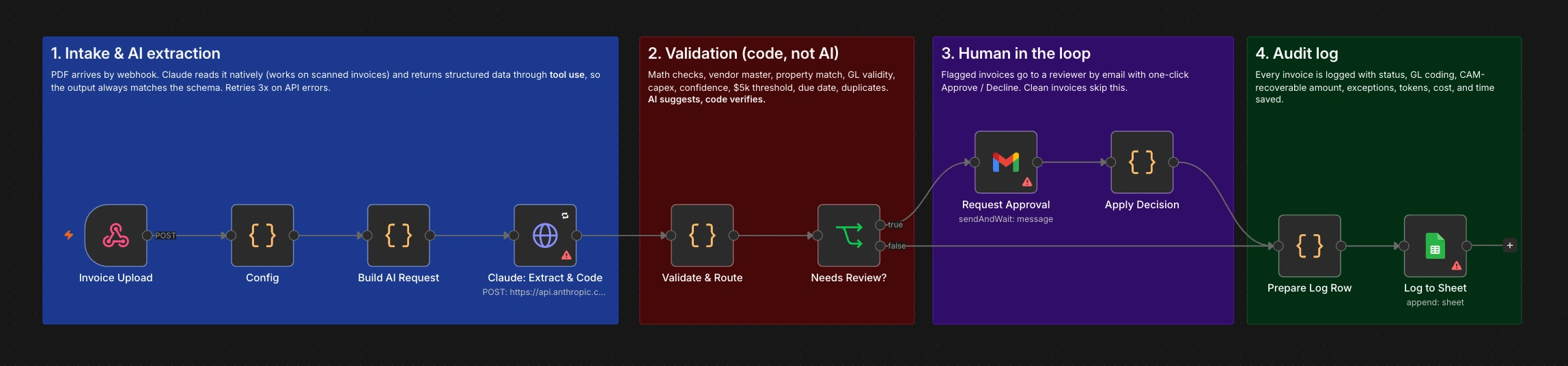
A workflow that reads each invoice PDF with AI, extracts every field, suggests a GL code for every line, then checks the AI's work with deterministic rules. Clean invoices go straight to the log. Anything unusual goes to a reviewer by email with the reasons listed and one-click Approve or Decline.
The design principle: AI suggests, code verifies.
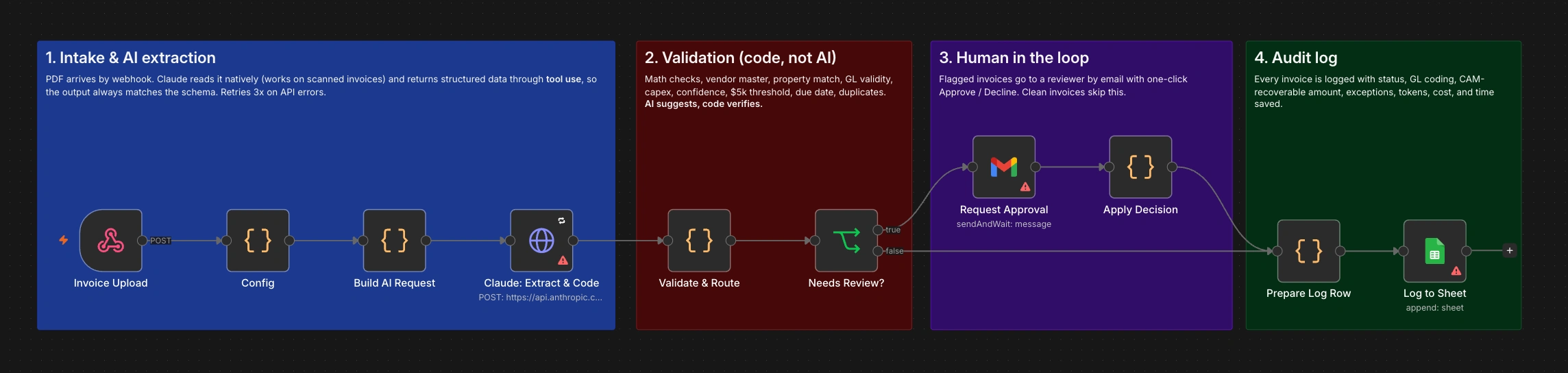
Intake and extraction, validation, human review, audit log. Clean invoices skip the review step entirely.
Intake and extraction, validation, human review, audit log. Clean invoices skip the review step entirely.
WHAT IT DOES
Reads any invoice PDF: typed or scanned, with no separate OCR step.
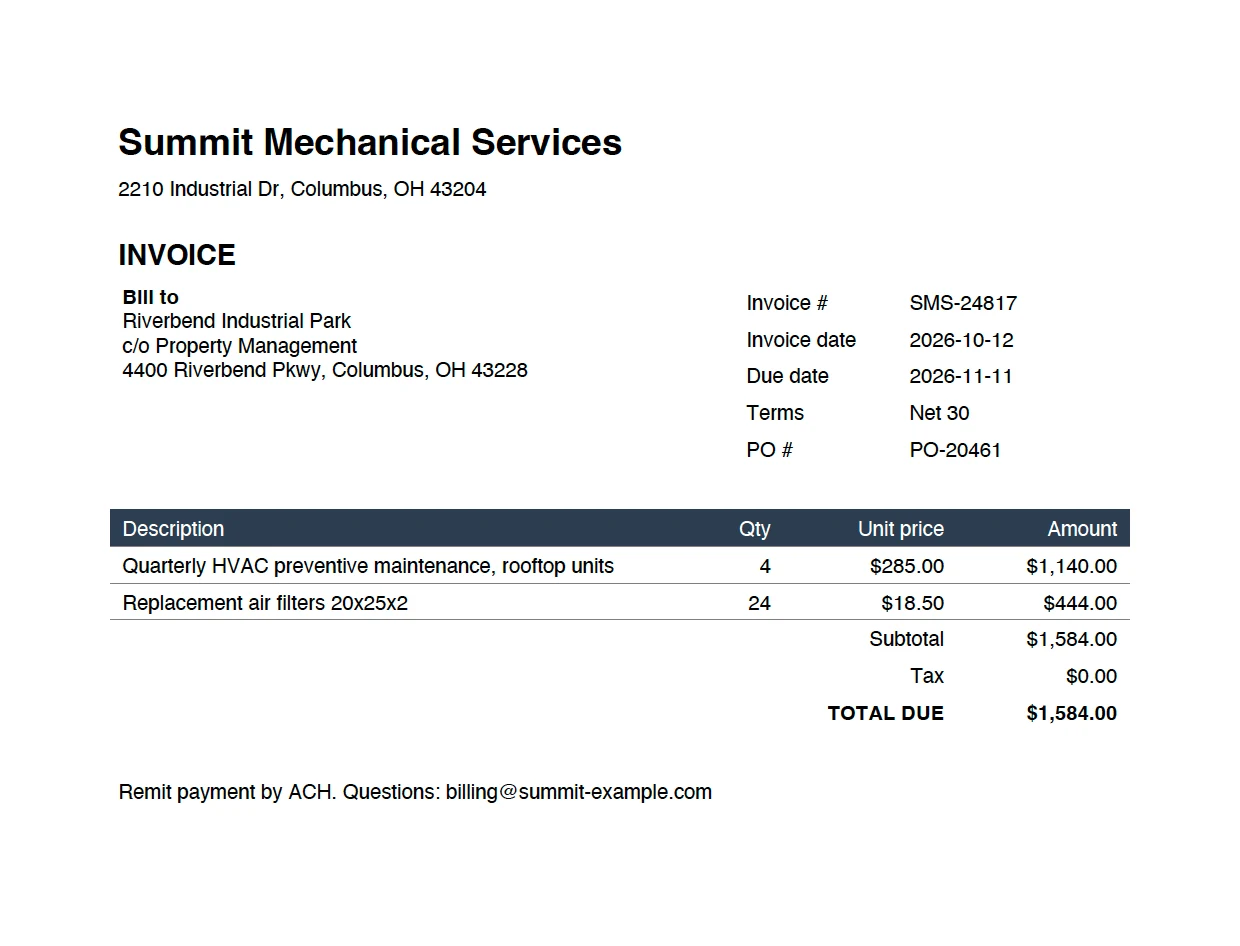
Extracts everything: vendor, invoice and PO numbers, dates, bill-to, subtotal, tax, total, and every line item.
Matches the property: from the bill-to or service address, against the portfolio list.
Codes every line: suggests a GL account with a one-sentence reason, and separates capital improvements from repairs.
Checks the vendor's math: line totals, subtotal and total, without letting the AI "fix" the numbers.
Catches the risky ones: unknown vendors, unmatched properties, duplicates, capex, low AI confidence, and anything over the approval limit.
Routes to a person only when needed: the reviewer gets an email listing exactly why it was flagged, with Approve and Decline buttons.
Logs everything: status, GL split, CAM-recoverable amount, exceptions, AI confidence, token cost and processing time.
HOW IT'S BUILT
Intake
A webhook accepts the invoice PDF as a multipart upload and responds immediately, so the sender isn't left waiting while the AI works. A Config node holds everything business-specific: the property list with addresses, the chart of accounts with hints and CAM-recoverable flags, the approved vendor master with aliases and default GL codes, the approval threshold, the confidence threshold, and model pricing. Adapting it to another company means editing one node.
Native PDF reading
The PDF is sent to Claude as a base64 document block. The model reads the page directly, including scans and handwriting, so there is no OCR stage to maintain or to lose layout in.
Structured output through tool use
Instead of asking for JSON in prose, the request defines a record_invoice tool with a full JSON schema and forces the model to call it with tool_choice. That guarantees the output's shape: required fields are present, numbers are numbers, and two fields are constrained by enums built from the Config node. property_code can only be a real property or UNKNOWN, and gl_code can only be a real account or REVIEW. The model can't invent a GL code.
Prompt rules that protect the data
Copy numbers exactly as printed. Never fix or recompute the vendor's math.
Use null for anything not printed, rather than guessing.
Treat replacements that extend an asset's life, usually single items over $2,500, as capital improvements, not repairs.
Report an honest confidence score, lower for blurry scans or guesses.
Note anything unusual: "FINAL NOTICE", late fees, handwriting, missing PO.
The HTTP node retries three times with a five-second wait, so a brief API hiccup doesn't fail an invoice.
Validation in code
One Code node checks the AI's output against hard rules and records each problem as an exception, either "block" (needs a human) or "warn" (logged only):
Required fields: vendor, invoice number, invoice date, total, and at least one line.
Math: quantity times unit price for each line, lines against subtotal, subtotal plus tax against total, within a one-cent tolerance.
Vendor master: name or alias must be on the approved list.
Property: must match a known property.
GL coding: every line must have a valid code. A code that differs from the vendor's usual one is a warning.
Capex: any capital improvement line always needs approval.
Thresholds: confidence below 0.85 or a total of $5,000 or more needs approval.
Due date: past due is a warning, to check for late fees.
Duplicates: vendor plus invoice number is remembered across runs, and a repeat is blocked.
Because the AI was told not to correct arithmetic, a vendor's mistake survives extraction and is caught here, instead of being silently "fixed" into the books.
Human in the loop
Flagged invoices go to a Gmail send-and-wait node. The reviewer receives an HTML summary: vendor, invoice number, total, property, dates, AI confidence, every reason it was flagged, a table of lines with suggested GL codes, and the AI's notes. They click Approve or Decline in the email, and the workflow resumes from that exact point with their decision.
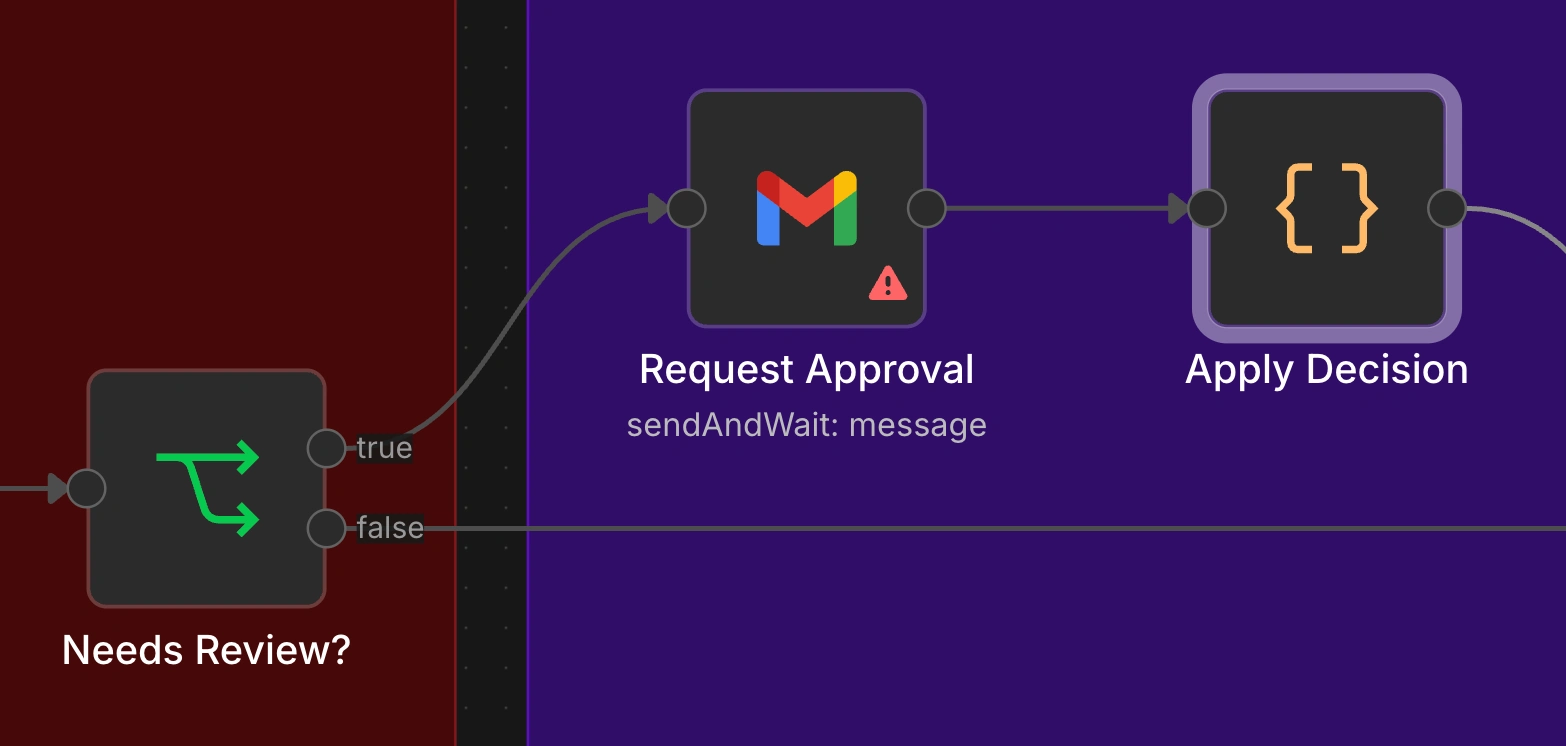
Everything needed to decide in one email. One click resumes the workflow.
Audit log
Every invoice, approved automatically or by a person, becomes one row in an Invoice Log sheet: status, all extracted fields, GL split per account, CAM-recoverable amount, exceptions, AI confidence and notes, input and output tokens, estimated cost, processing time and reviewer timestamp.
TRADE-OFFS
Approved invoices are logged, not posted. The last step would be writing to the accounting system (Yardi, MRI, QuickBooks), which needs that system's API.
The duplicate check uses n8n's workflow static data. It only persists for an active workflow, isn't visible to staff, and marks an invoice as seen even if it's later declined, so a corrected resubmission would be flagged. A lookup against the log or the accounting system would be more robust.
Config lives in a Code node. In production the property list, chart of accounts and vendor master belong in a sheet or the accounting system so finance can maintain them.
The webhook has no authentication. It needs a secret header or a mailbox trigger before real use.
AI confidence is self-reported by the model. It's useful as one signal among many, which is why every hard check is done in code.
"Minutes saved" is a configured estimate (8 minutes per invoice), not a measurement. It should be replaced with a figure timed against the real manual process.
A declined invoice is logged but no one is notified to follow up. A decline path back to AP would close the loop.
One reviewer, one approval level. Larger companies need tiered approval by amount or property.
PDF only. Image attachments and invoices in the email body aren't handled.
THE RESULT
Before: every invoice is read and keyed by hand, coded from memory, and checked with the same effort whether it's routine or risky.
After: invoices are extracted and coded automatically, the AI's work is checked against hard rules, routine invoices go straight to the log, and a person only sees the ones that need judgement, with the reasons already written out.
This is a concept build on demo data, so there are no client figures yet. The log is built to produce them from the first invoice: cost per invoice, processing time, and the share that needed review.
WHAT THIS PATTERN CAN DO FOR A TEAM
The pattern works for any document that arrives as a PDF and ends up as rows in a system: purchase orders, receipts and expense claims, lease abstracts, insurance certificates, shipping documents, onboarding forms. The reusable core is the split of responsibilities. AI reads and suggests within a strict schema, code verifies against the company's own rules, and people only handle the exceptions.
Like this project
Posted Oct 19, 2026
Automated AP invoice processing with AI and code verification.