Cancellation Backfill | Automatic Waitlist Offers for Med Spas

Abigail Garcia


Cancellation Backfill | Automatic Waitlist Offers for Med Spas
Role: Automation builder (design, build, testing)
Stack: n8n, Google Sheets API, Gmail API, Webhooks, JavaScript
Scope: 29 nodes, 4 triggers, 14 Code nodes, 3 sheet tabs, 1 client-facing claim page
THE PROBLEM
A cancelled appointment is the most perishable thing a clinic sells. A $600 treatment slot that opens on Tuesday for Thursday is worth $600 for about two days, then nothing.
Most clinics have a waitlist, but filling the gap is manual: someone at the front desk has to notice the cancellation, work out who on the list wants that treatment and can come that day, call or email them one by one, and wait for each answer before trying the next. On a busy day it doesn't happen, and the slot goes empty with a list of willing clients sitting right there.
THE SOLUTION
A workflow that watches the appointment sheet. The moment a booking is marked Cancelled, it offers the slot to the best-matched person on the waitlist with a one-click claim link and a time limit. If they don't take it, the offer expires and moves to the next person automatically. When someone claims it, the appointment, the waitlist and the front desk are all updated. If nobody does, the front desk is told the slot needs a phone call.
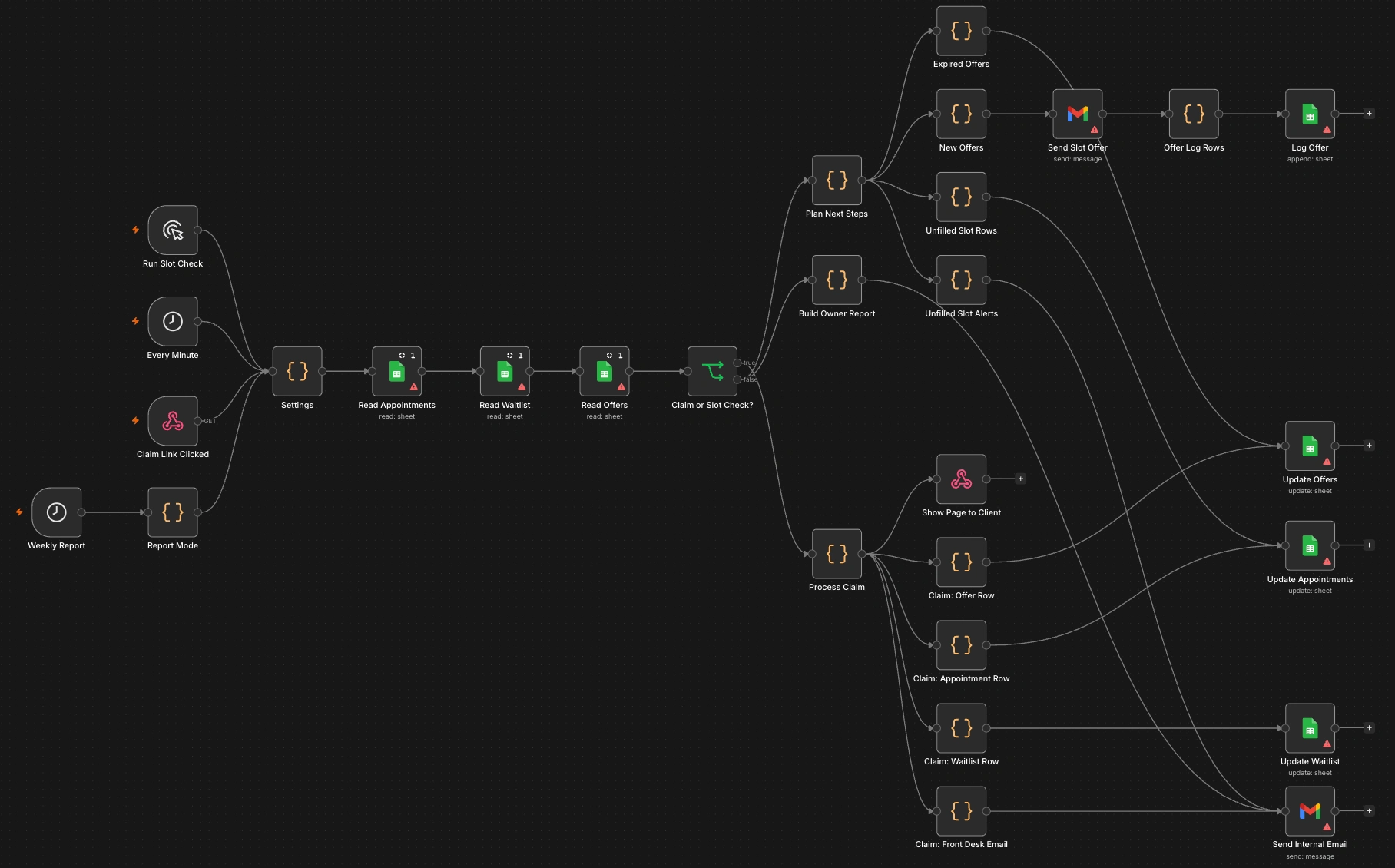
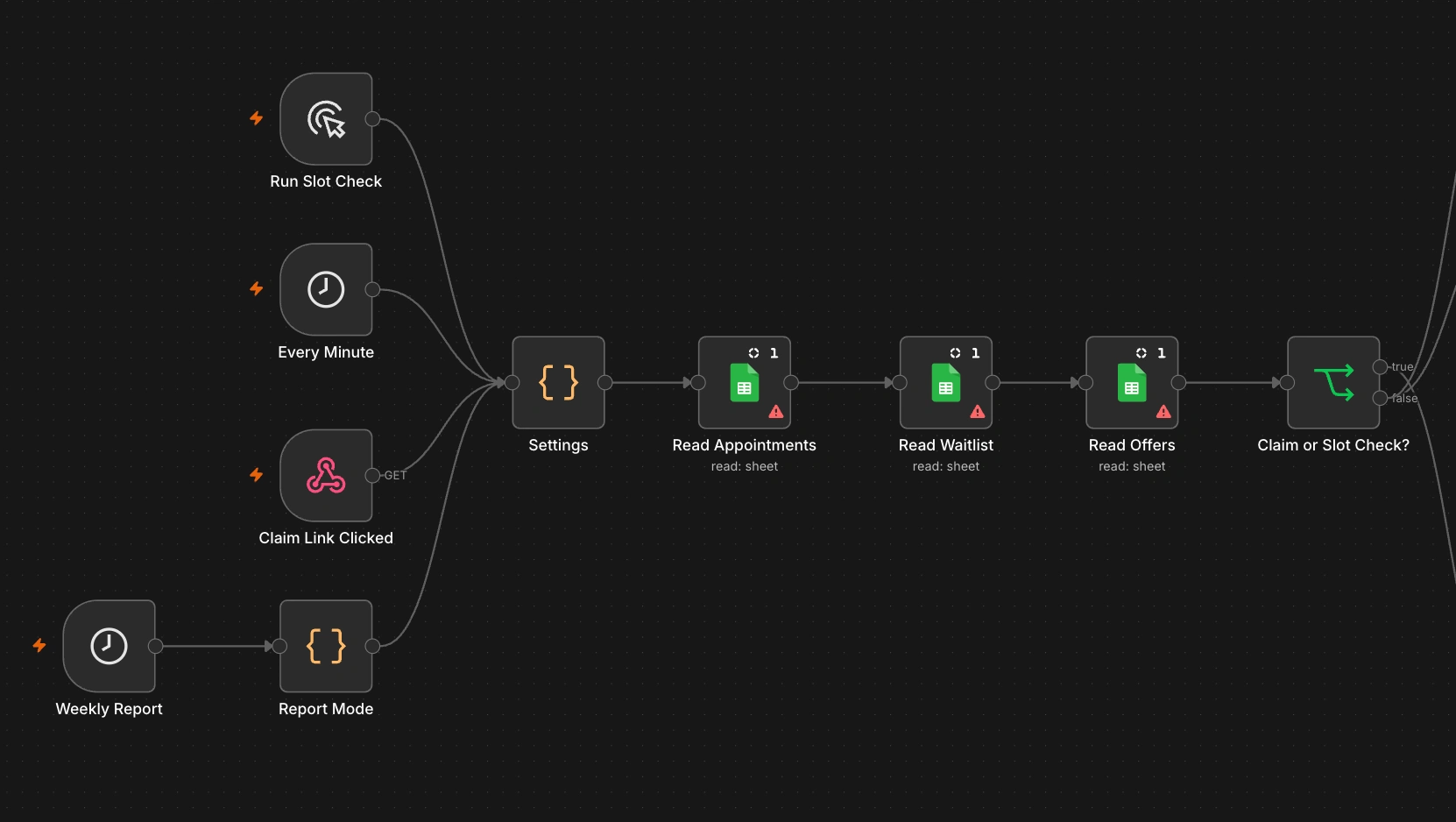
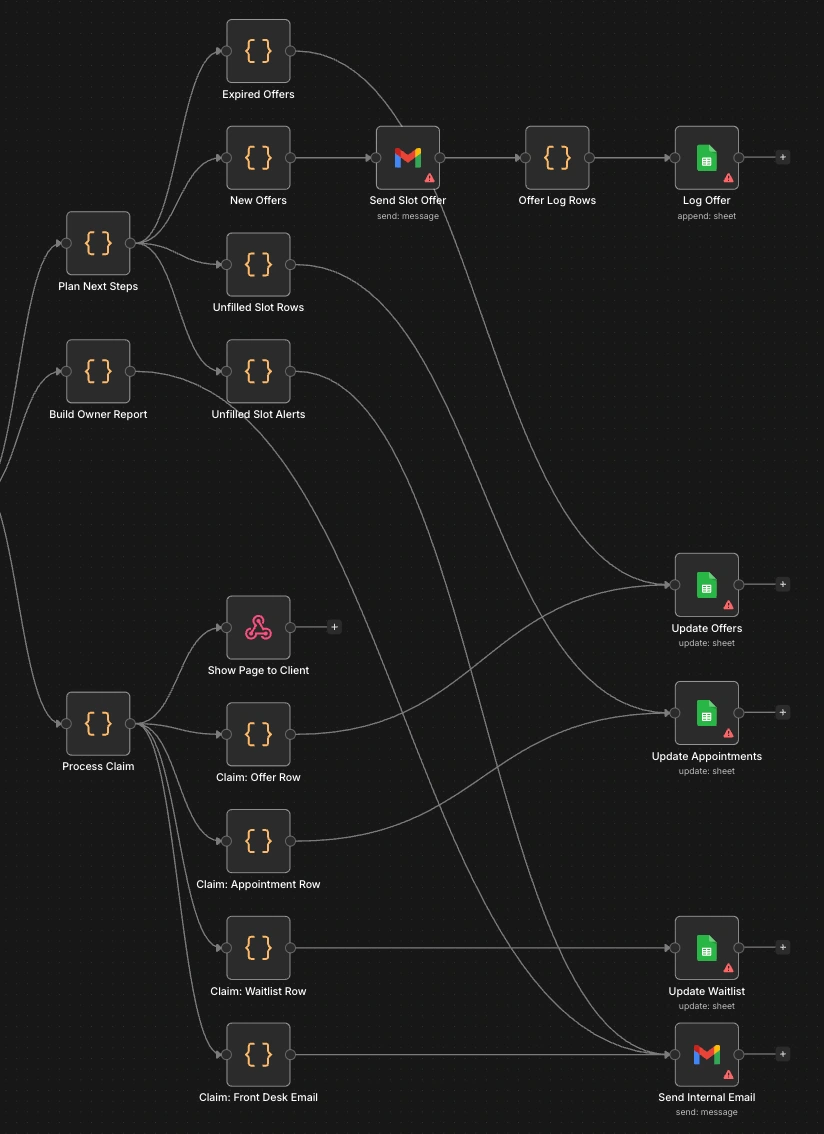
Four triggers feed one Settings node. The top branch decides who gets offered what. The bottom branch handles the click.
Four triggers feed one Settings node. The top branch decides who gets offered what. The bottom branch handles the click.
WHAT IT DOES
Spots cancellations within a minute: no one has to tell it a slot opened.
Picks the right person: same treatment, available on that weekday, longest on the waitlist first.
Sends a timed offer: the client has 30 minutes before it moves on.
Cascades down the list: expired offers roll to the next eligible client without anyone lifting a finger.
One-click claiming: the client taps a link, confirms, and sees a branded "You are booked in" page.
Handles the awkward cases: a client who clicks too late sees a polite "this slot has gone" page and stays on the waitlist.
Updates everything: the appointment is marked Refilled with who took it and when, the client comes off the waitlist, and the front desk gets an email to add it to the calendar.
Knows when to stop: if the list is exhausted or the date has passed, the slot is flagged and the front desk is alerted once.
Reports to the owner: revenue saved, fill rate, average time to refill, and every cancelled slot with its outcome.
HOW IT'S BUILT
Four triggers, one entry point
A schedule runs every minute, a webhook fires when a claim link is clicked, a weekly schedule fires on Monday at 8am, and a manual trigger is there for demos. All four feed one Settings node, which inspects the incoming payload and sets a mode: sweep, claim, report or manual. Every other node reads its configuration from Settings, so setup is one node to edit.
State lives in three tabs
Appointments: each booking and its status (Booked, Cancelled, Refilled, Waitlist exhausted, Unfilled).
Waitlist: who is waiting, for which treatment, on which days, and since when.
Offers: one row per offer, with its ID, appointment, client, sent and expiry times, and status (Sent, Accepted, Expired, Missed).
Every run reads all three first, then branches. The Offers tab is what makes the workflow stateless between runs: it never needs to remember anything, because the full history of who was offered what is in the sheet.
The planner
One Code node makes every decision for the sweep and outputs three lists: offers to expire, new offers to send, and slots to give up on. For each cancelled appointment it works through the same rules:
If the slot's date has passed, mark it Unfilled.
If someone is still holding a live offer for it, do nothing.
Otherwise find the next candidate: status Waiting, same treatment, available on that weekday (or "any"), not already offered this slot, and not currently holding a live offer for a different slot. Sort by join date so the longest wait goes first.
If there is a candidate, create an offer with a unique ID and an expiry time.
If there isn't, mark the slot "Waitlist exhausted" and alert the front desk, with a note saying whether nobody matched or everyone declined.
The "not holding another live offer" rule matters when two slots cancel at once. Without it, the same client could be offered both and block the second one for 30 minutes.
Because the status changes to "Waitlist exhausted" in the same run as the alert, the front desk is told exactly once per slot, not every minute.
The claim link
Each offer email carries a link to the workflow's own webhook with the offer ID as a parameter. The claim handler validates in order:
Unknown offer or appointment: "This link is not valid" page.
Already accepted by this client: a confirmation page, so a second click is harmless.
Slot no longer open, or another client holds a live offer for it: "Sorry, this slot has gone" page, and the offer is marked Missed.
Otherwise: proceed.
A late click isn't automatically refused. If the client's offer expired but the slot is still open and nobody else is holding it, they can still claim it. The rule is "is the slot available", not "is your timer running", which fills more slots.
Two-step confirmation
The first click shows the appointment details and a "Yes, book me in" button. Only the second request, carrying a confirm flag, books the slot. This exists because corporate and consumer email security tools open links in messages to scan them. With a one-step link, a scanner would claim slots on behalf of clients who never saw the email.
Responding as a web page
The webhook is set to respond through a Respond to Webhook node, which returns HTML generated in the Code node. The client sees a small, mobile-friendly page with the clinic's name, served straight from the workflow, with no separate site to host.
One click, four updates
A confirmed claim fans out to parallel paths: mark the offer Accepted, mark the appointment Refilled with the client's name and timestamp, set the waitlist entry to Booked, and email the front desk with the client's contact details and the slot's value. Each path is fed by a small Code node that passes its row only if that update applies, so the same structure handles "confirmed", "taken" and "invalid" without separate branches.
Reporting
The report node calculates revenue saved, fill rate, and average minutes from first offer to claim, by joining Appointments and Offers. It also lists every cancelled slot with its status and who filled it. It runs weekly, and on any manual run for demos.
Test mode
A single flag redirects every client email to the builder's own inbox. Setting the offer window to two minutes makes the whole cascade, from cancellation to expiry to the next offer, visible in a short demo.
TRADE-OFFS
Polling the sheet every minute is about 43,200 executions a month. A booking system that sends a webhook on cancellation would cut that to one run per cancellation.
Google Sheets isn't a transactional database. Two clients confirming in the same second could both be told they're booked. Low risk at clinic volume, but a real database or a lock would close it.
The front desk still adds the booking to the calendar by hand. Integrating the clinic's booking system would remove that step.
Offers go out one at a time. For a slot only hours away, a shorter window or offering to several people at once would fill it faster.
Matching is by treatment and weekday only. It doesn't yet consider time of day or preferred provider.
The offer ID in the link is the only thing protecting a claim. It's random, but short. A longer signed token would be safer.
Email only. For a 30-minute window, SMS would reach clients faster.
Slot expiry is checked by date, not time, so a slot from earlier today is still treated as open.
Three Code nodes carry copies of the same date and formatting helpers. Fine at this size, worth consolidating if it grows.
THE RESULT
Before: a cancellation is filled only if someone notices it, has time to work the waitlist by hand, and gets an answer before the slot passes.
After: the waitlist is worked automatically within a minute of the cancellation, in fair order, with a deadline on every offer, and staff are pulled in only when a slot is filled or needs a call.
This is a concept build on demo data, so there are no client revenue figures to report yet. The owner report is built to produce them from day one: revenue saved, fill rate and time to refill.
WHAT THIS PATTERN CAN DO FOR A TEAM
Any business that sells time has this problem: dental and physio clinics, salons, tutors, restaurants with a cancellation list, trades with a booked-out calendar. The reusable core is a timed, one-at-a-time offer with automatic fallback, and it works for more than appointments: releasing held stock to the next buyer, offering a shift to the next available staff member, or passing a lead to the next salesperson when the first doesn't respond in time.
Like this project
Posted Oct 11, 2026
Automated waitlist management for med spa appointment cancellations.