Lapsed Revenue Recovery | Reminders with AI Reply Handling

Abigail Garcia


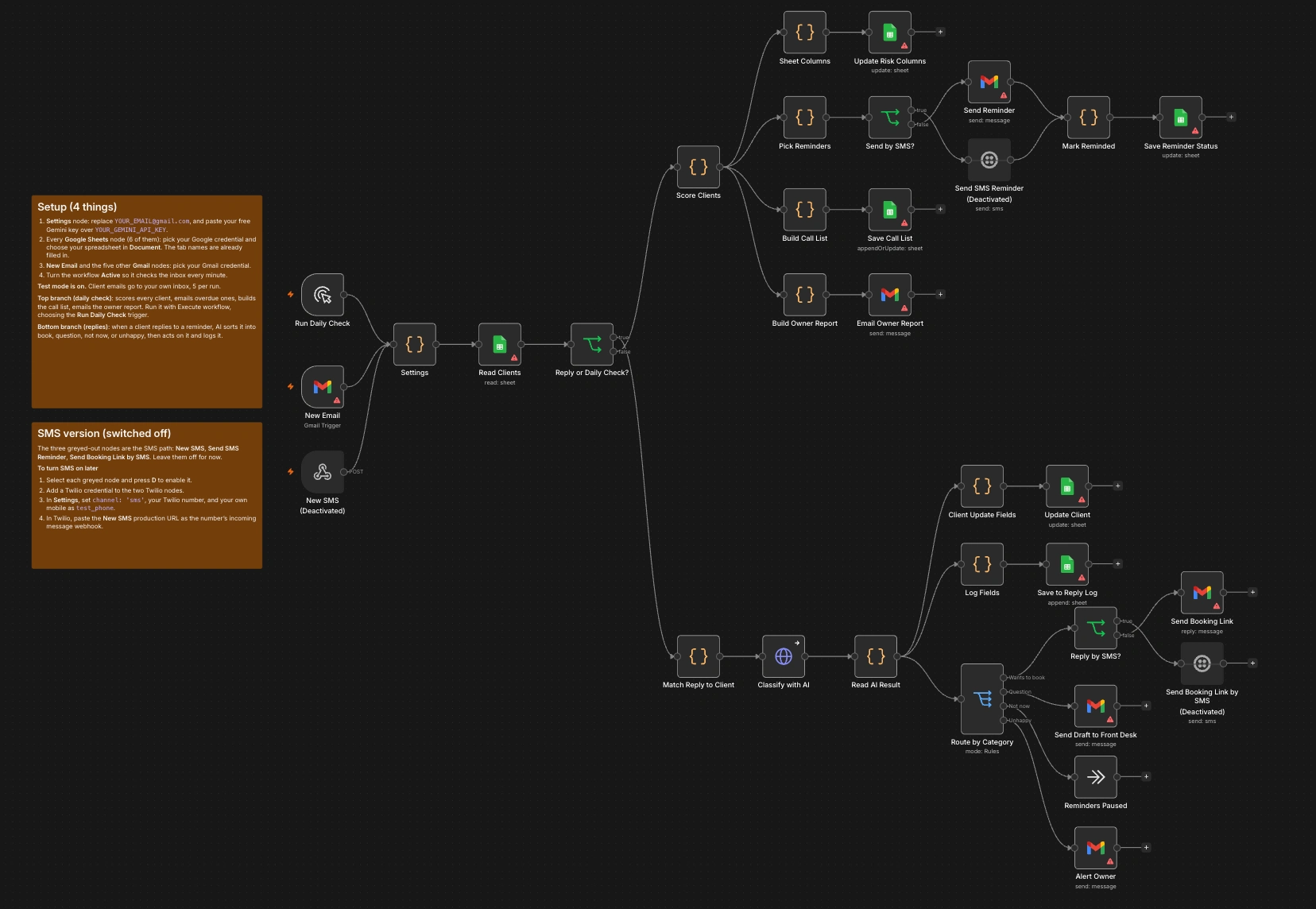
Lapsed Revenue Recovery | Email + SMS Reminders with AI Reply Handling
Role: Automation builder (design, build, testing)
Stack: n8n, Gmail API, Twilio SMS, Google Sheets API, Gemini (JSON mode), JavaScript
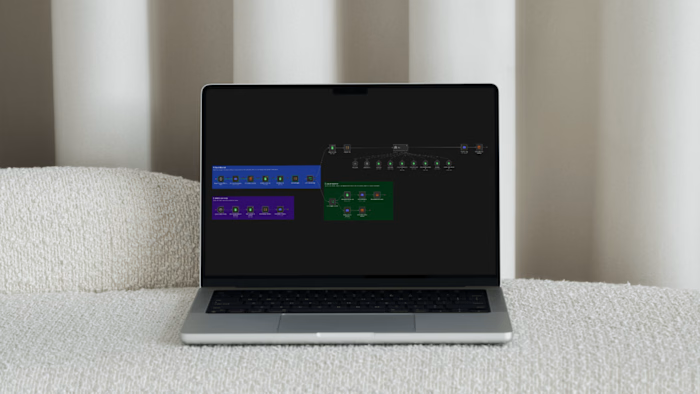
Scope: 33 nodes, 3 triggers, 11 Code nodes, 1 AI classification step, 2 channels, 3 sheet tabs
Type: Concept build with demo data. Email path active, SMS path built and switched off by default.
THE PROBLEM
Med spa treatments run on a clock. Botox softens after three to four months, a HydraFacial is monthly, peels and microneedling work as a series. When a client misses their window and nobody notices, that revenue is gone quietly.
Email reminders catch some of them, but plenty of clients never open clinic email and would answer a text in a minute. Adding a second channel usually means a second tool and a second inbox to watch, and the replies still need a person to read them: "yes please", "how much is it now?", "not right now" and "I wasn't happy last time" each need a different response.
THE SOLUTION
One n8n workflow that scores every client, reminds the overdue ones by email or SMS, and uses AI to sort whatever comes back, on either channel, through the same logic.
The channel is a single setting. Switching a clinic from email to text doesn't touch the scoring, the AI step, the routing or the reporting.
WHAT IT DOES
Finds overdue clients: compares each client's last visit to the normal cycle for their treatment.
Puts a number on it: every lapsed client carries a revenue-at-risk figure and a High or Standard priority.
Reminds by email or text: a treatment-specific email, or a short SMS with the booking link and an opt-out line.
Reads replies from both channels: an email reply or an incoming text is matched back to the right client.
Sorts replies with AI: book, question, not now, or unhappy, with a one-sentence reason and a suggested reply.
Answers on the channel the client used: a client who texts gets the booking link by text. A client who emails gets it in the same email thread.
Keeps people in the loop: questions go to the front desk as a draft to approve, and unhappy clients trigger an owner alert with no automated reply.
Escalates and reports: a call list for high-value clients who stay silent, and an owner report with revenue at risk and recovered.
Logs everything: every reply, category, reason and action lands in a Reply Log tab.
HOW IT'S BUILT
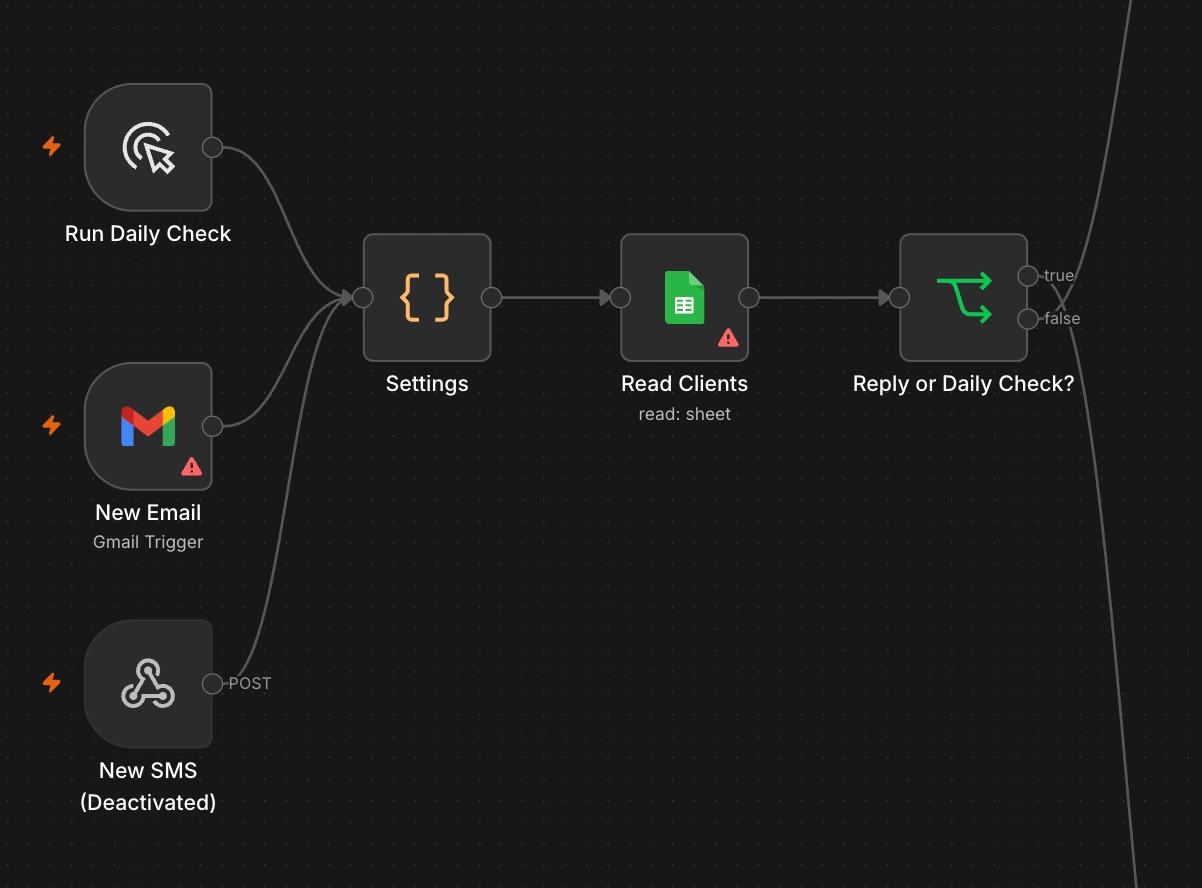
Three triggers, one entry point
A manual trigger runs the daily check, a Gmail trigger polls the inbox every minute, and a webhook receives incoming texts from Twilio. All three feed one Settings node, which inspects the payload to set two values: mode (daily or replies) and reply_channel (email or sms). Every other node reads its configuration from Settings, so a new clinic is set up by editing one node.
Scoring
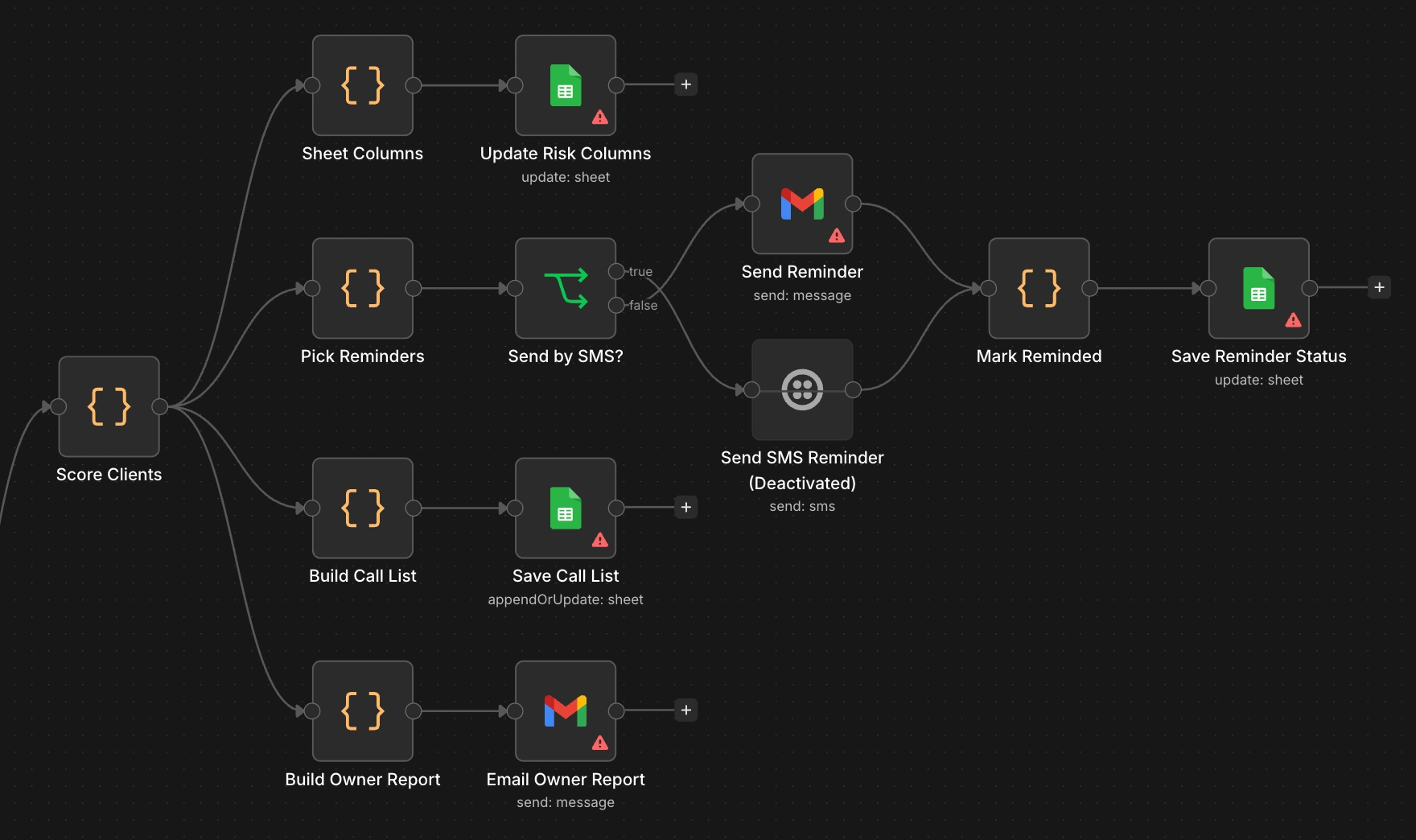
A Code node holds treatment cycles in days (Botox 105, Dermal Filler 300, HydraFacial 35, defaulting to 90) and computes each client's due date, days overdue, revenue at risk and priority. It then assigns one action: send_reminder, waiting, call_list or none. The date parser accepts spreadsheet serial numbers, ISO dates and US-style dates. The scored list fans out to four parallel paths: write risk columns to the sheet, send reminders, build the call list, build the owner report.
Channel switch on the way out
The reminder step prepares both versions of every message in one pass: the email subject and body, plus an SMS body and a phone number normalized to E.164. An IF node reads the channel setting and sends through Gmail or Twilio. Both paths rejoin at the same "mark reminded" step, so the sheet is updated identically whichever channel was used.
One normalized shape on the way in
The matching step is where the two channels become one. It converts an email or a text into the same object (channel, sender, text, ID) and then finds the client:
Email: by the Gmail thread ID stored when the reminder was sent, with sender address as a fallback.
SMS: by the last ten digits of the phone number, so formatting differences in the sheet don't break the match.
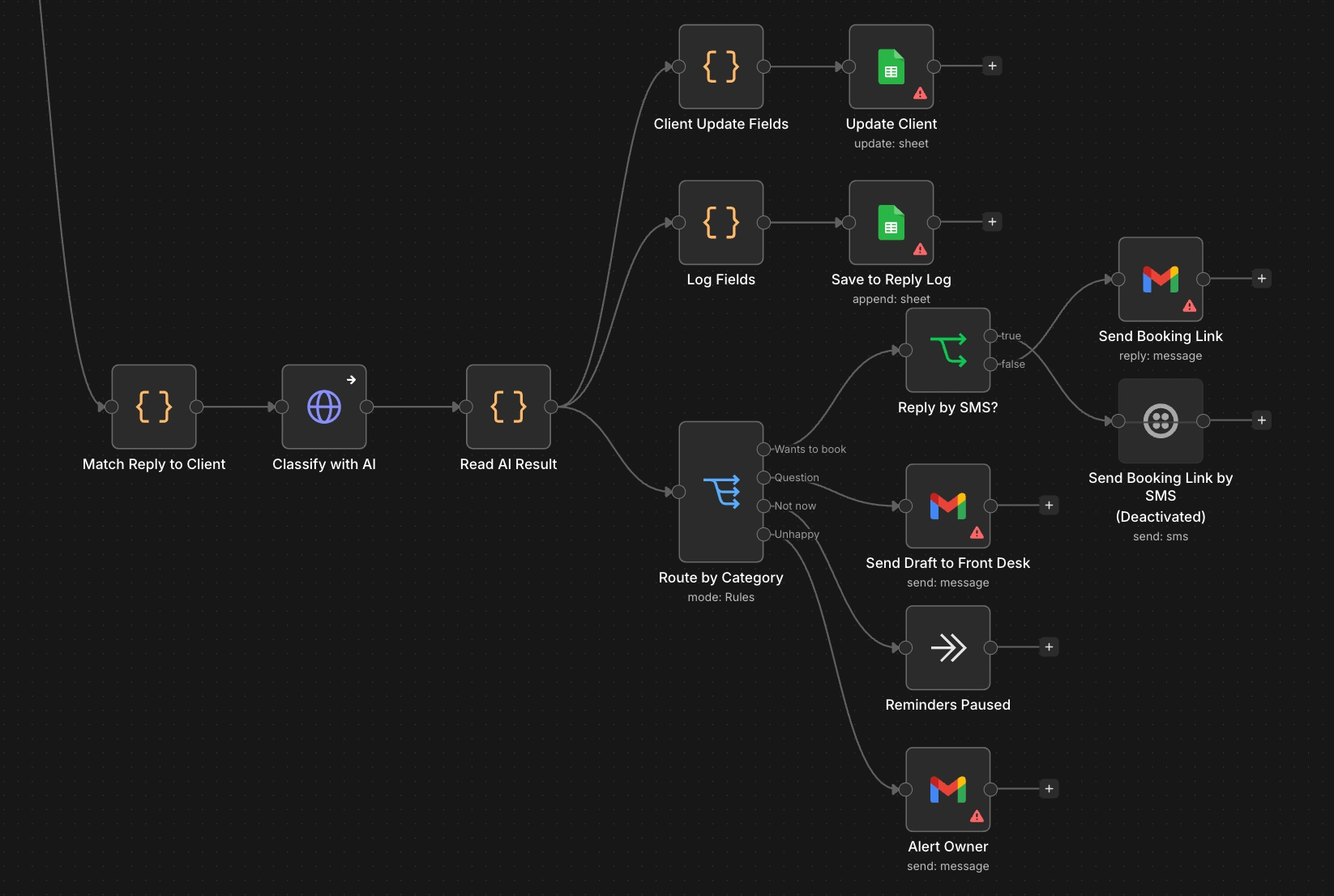
In both cases the client must still have a status of "Reminder sent". That keeps ordinary inbox traffic and unrelated texts away from the AI, and makes handling idempotent: once a reply is actioned the status changes, and later messages are left for a person.
AI classification
The cleaned reply (quoted history stripped, capped at 1,200 characters) goes to Gemini through an HTTP Request node with JSON response mode and a temperature of 0.2. The prompt asks for exactly three keys: category, reason and draft_reply.
Guardrails:
The reply is labelled as data to classify, never as instructions, to blunt prompt injection from a message body.
Drafts must not include medical advice, prices or availability the model wasn't given.
The category is validated against the four allowed values before anything acts on it.
Fallback when the AI is unavailable
The HTTP node continues on error. If the call fails or the response can't be parsed, keyword rules classify the reply and the log records "keyword fallback". No reply is dropped because an API was down.
Routing back on the right channel
A Switch node sends each category down its own path. For "book", a second IF node checks which channel the reply came in on and answers there: an in-thread Gmail reply, or a text to the number that messaged. Questions and complaints go to staff by email whichever channel the client used, with the channel named in the message so the front desk knows how to respond.
Shipping SMS switched off
The three SMS nodes are disabled in the delivered workflow, with an on-canvas note listing the four steps to enable them. A clinic can run on email from day one and add texting once it has a Twilio number and client consent, without a rebuild.
Test mode
One flag redirects every client message to the builder's own inbox or phone and caps sends at five per run. Because all test texts arrive at one phone, SMS replies in test mode are matched to the most recently reminded client, so the full loop can be demonstrated without messaging anyone real.
TRADE-OFFS
The SMS path is built and wired but disabled. It needs a Twilio number, a credential and a live test before a clinic relies on it.
The channel is set for the whole clinic. A per-client preference column would let each client be reached the way they prefer.
Phone numbers are assumed to be US numbers. Other regions need a different normalization rule.
The SMS webhook doesn't validate Twilio's request signature yet. That should be added before production so only Twilio can post to it.
SMS needs documented consent. The message includes an opt-out line, but a real deployment has to follow the texting rules for the client's region.
Draft answers to SMS questions go to staff by email. Staff still have to send the final text themselves.
The daily check runs on a manual trigger. Production use needs a Schedule Trigger, a one-node swap.
"Revenue recovered" depends on someone marking a client as Rebooked. A booking system integration would make it automatic.
One reminder per client. There is no follow-up sequence, only the call list for High priority clients.
THE RESULT
Before: lapsed clients are found by accident, reminders go out on one channel when someone has time, and replies wait in an inbox.
After: every client is checked against their treatment cycle, overdue ones are contacted in order of value by email or text, replies on either channel are sorted and actioned within about a minute, and the owner gets one report showing what is at risk and what came back.
This is a concept build on demo data, so there are no client revenue figures to report yet.
WHAT THIS PATTERN CAN DO FOR A TEAM
Any business with a repeat cycle has the same leak: dental hygiene visits, salon colour, physio follow-ups, vehicle servicing, subscription renewals. The reusable part is the middle. Normalize every channel into one shape, let AI sort the replies once, and answer on the channel the customer chose. Adding WhatsApp or a web chat later means one new trigger and one new send node, not a second system.
Like this project
Posted Oct 11, 2026
Built AI-driven email & SMS reminder system for med spa lapsed revenue recovery.