Built with Framer
Designing Without Limits: Framer Email Lists via Custom Code

Saheed Faremi


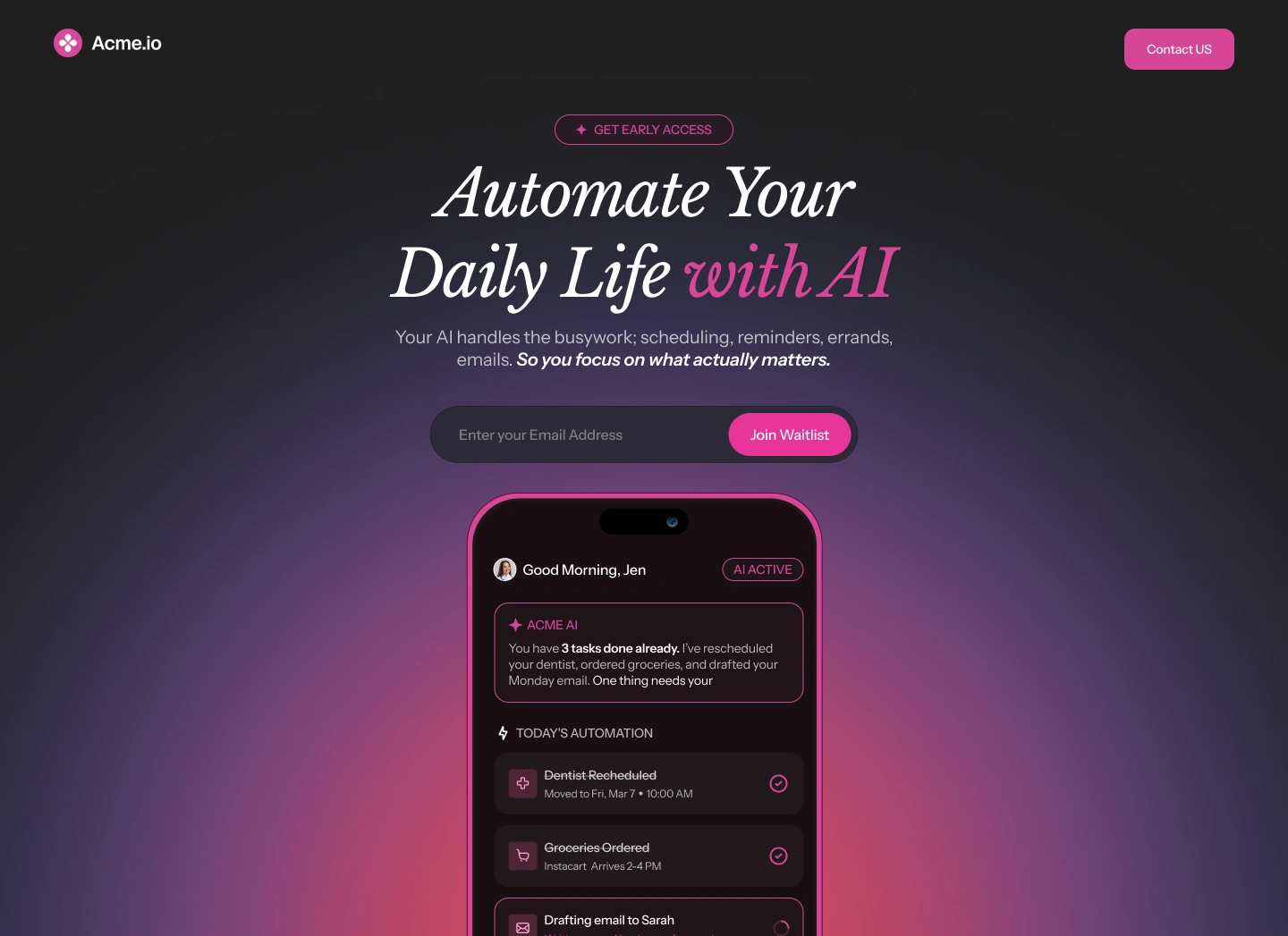
Most designers hand you a pretty skin on a dead body. They build something that looks great in a screenshot but falls apart the second a user tries to interact with it. If you’re tired of "Framer experts" who can’t look at a line of code without panicking, you’re in the right place. For the Acme.io project, I didn't just move pixels around, I engineered a high-performance SaaS landing page that actually works.
The breaking point of "No-Code"
I’ve seen it a thousand times: a startup wants a high-end UI/UX design, but they’re forced to settle for clunky, generic forms because their designer doesn't know how to handle data. With Acme.io, the "out-of-the-box" options weren't going to cut it. The goal was a clean, minimalist lead generation engine that felt smart.
Instead of dragging and dropping a standard form, I wrote a custom React component from scratch inside Framer. I wanted a specific type of feedback, if a user messes up their email, the input field shouldn't just turn red; it should react. I coded a shake-animation error state in JavaScript that gives the user immediate, tactile feedback without breaking the flow of the motion design.
The Design Stack
Figma: Used for layout, typography hierarchy, and complex glow-effect layering.
Framer: Used for the final build, leveraging its powerful animation engine and custom code capabilities.
Bypassing the middle-man
Most people would tell you to use a third-party tool like Zapier to move data from a website to a spreadsheet. That’s just another monthly subscription and another point of failure. I chose a cleaner route.
I architected a direct API integration that sends data straight from the Framer frontend to a Google Spreadsheet. It’s faster, it’s free to run, and it’s completely private. By handling the web development this way, I turned a simple landing page into a fully automated backend system.
Figma to Framer: Pixel-perfect is a baseline
Translating the Figma files for Acme.io wasn't just about matching colors. It was about capturing the "vibe"; the dramatic lighting, the deep purples, and the professional studio feel. I treated the site like a piece of product design, ensuring the transitions were snappy and the interactive design felt intentional, not accidental.
The Results: Performance Meets Precision
By treating this as a piece of Product Design rather than just a "website," the final result was a lightweight, lightning-fast Web Development masterpiece. The SaaS Design now serves as a 24/7 sales engine, capturing leads with zero technical friction.
Technical Specifications (SEO Engine)
Primary Stack: Framer, React.js, JavaScript, Figma.
Integrations: Google Sheets API, Custom Webhooks.
Design Discipline: UI/UX Design, Motion Design, Interaction Design.
Industry Focus: AI SaaS, FinTech, Tech Startups.

Philosophy
I don’t just design for screens; I design for experiences. When a native tool doesn't meet the standard of excellence I’ve set, I build the solution myself. Whether it's writing custom React hooks or architecting a backend through Google Scripts, technical limitations are simply problems waiting for a creative solution.
"Good design is a given. Exceptional design requires the technical courage to build what hasn't been provided out of the box."
Are you looking to push the boundaries of what your next digital product can do? Let's build something that doesn't just look great, but works flawlessly.
Like this project
Posted May 12, 2026
Bypass native limits with custom React logic. See how I integrated Figma, Framer, and Google Sheets to create a high-performance for SaaS lead generation engine
Likes
0
Views
2
Timeline
May 11, 2026 - May 12, 2026