Built with Rive
Rive & Flutter Wheel Spinner Development

Pascal Ferrère


Wheel Spinner built with Rive & Flutter
What is a Wheel Spinner?
A Wheel Spinner is one of the most effective gamification mechanics in digital products. The concept is simple: a user spins a wheel and wins a random prize. But behind that simplicity lies something much more powerful: anticipation, surprise, and reward. Three of the strongest emotional triggers in product design.
When executed well, a Wheel Spinner can:
Drive daily retention
Boost conversion
Build emotional connection
Increase average session time
Gamification is no longer a nice-to-have. It is a proven growth lever used by the world's most successful consumer apps. And the Wheel Spinner sits at the heart of it.
The problem...
The Wheel Spinner is a popular mechanic, yet it is rarely given the attention it deserves. For a feature that sits at the heart of a gamification strategy, the execution is often surprisingly underwhelming.
A good example is the FDJ app. France's largest lottery and gaming platforms. They have the right idea: a Wheel Spinner as a core engagement feature. The videos below show what their implementation looks like in practice.
FDJ App Wheel Sin
This App is used by thousands of people. And yet the experience feels like it could be so much more.
None of this is about pointing fingers. Building great animation at scale is genuinely hard. It is a craft that requires the right tools, the right workflow, and a real investment in quality. The point is simply this: when you are asking users to engage with a feature repeatedly, it has to feel worth it.
The solution...
The question I wanted to solve was:
What does a flexible, beautiful, and runtime-controllable Wheel Spinner look like when built for actual product teams?
And the answer was obvious: Rive.
This tool is uniquely suited to this challenge for three reasons.
1. Runtime data binding.
Rive's ViewModel system allows any platform to write directly to animation properties while the app is running. Colors, text, illustrations, triggers, etc ; all of it can be controlled from code without touching the animation file. This is not a workaround. It is the architecture Rive was designed around.
2. Artboard-based illustration slots.
Each wheel slice holds a reference to an independent illustration artboard. Swapping the illustration at runtime, from a skull to a Christmas tree to an Easter egg is a single line of code. The animation does not need to be re-exported. The app does not need to be rebuilt.
3. A single file, unlimited themes.
The entire animation, three themes, 24 illustrations, all states and transitions are in one
.riv file. What changes at runtime is the data. This is the fundamental shift that separates a Rive-powered animation from a traditional asset.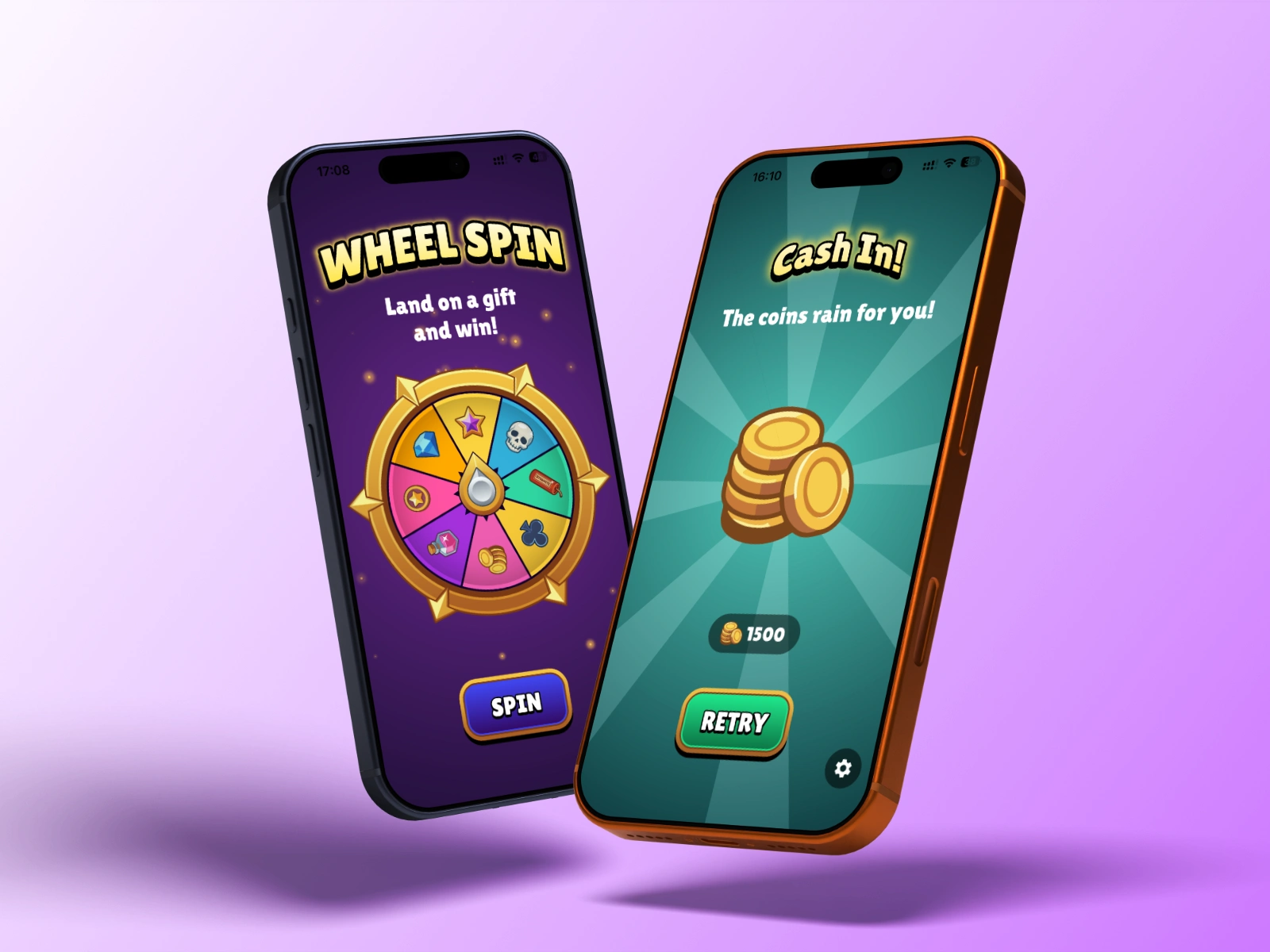
How I built it?
Rive file
The Rive file is organized around two ViewModels, a concept unique to Rive that acts as the data layer between the animation and the outside world.
PageStartVM controls the global page: background colors, the page title and subtitle, and everything on the reward screen: the prize illustration, the reward title, the subtitle, and the animated reward amount.
WheelVM controls the wheel itself: the number of slices, the spin behavior, the color of each slice, the illustration artboard assigned to each slot, and the reward label displayed inside each slice.
Every property that needs to change at runtime is exposed through this ViewModel system. Nothing is hardcoded into the animation timeline.
The illustration system deserves a special mention. Each of the eight slice slots on the wheel holds an artboard-type property, a slot that accepts a reference to another artboard inside the same file. This is what makes theme switching instant. When the user selects the Christmas theme, Flutter assigns eight new artboards (christmas_tree, christmas_sock, and so on) to the eight slots. Rive renders them immediately, with no animation rebuild required.
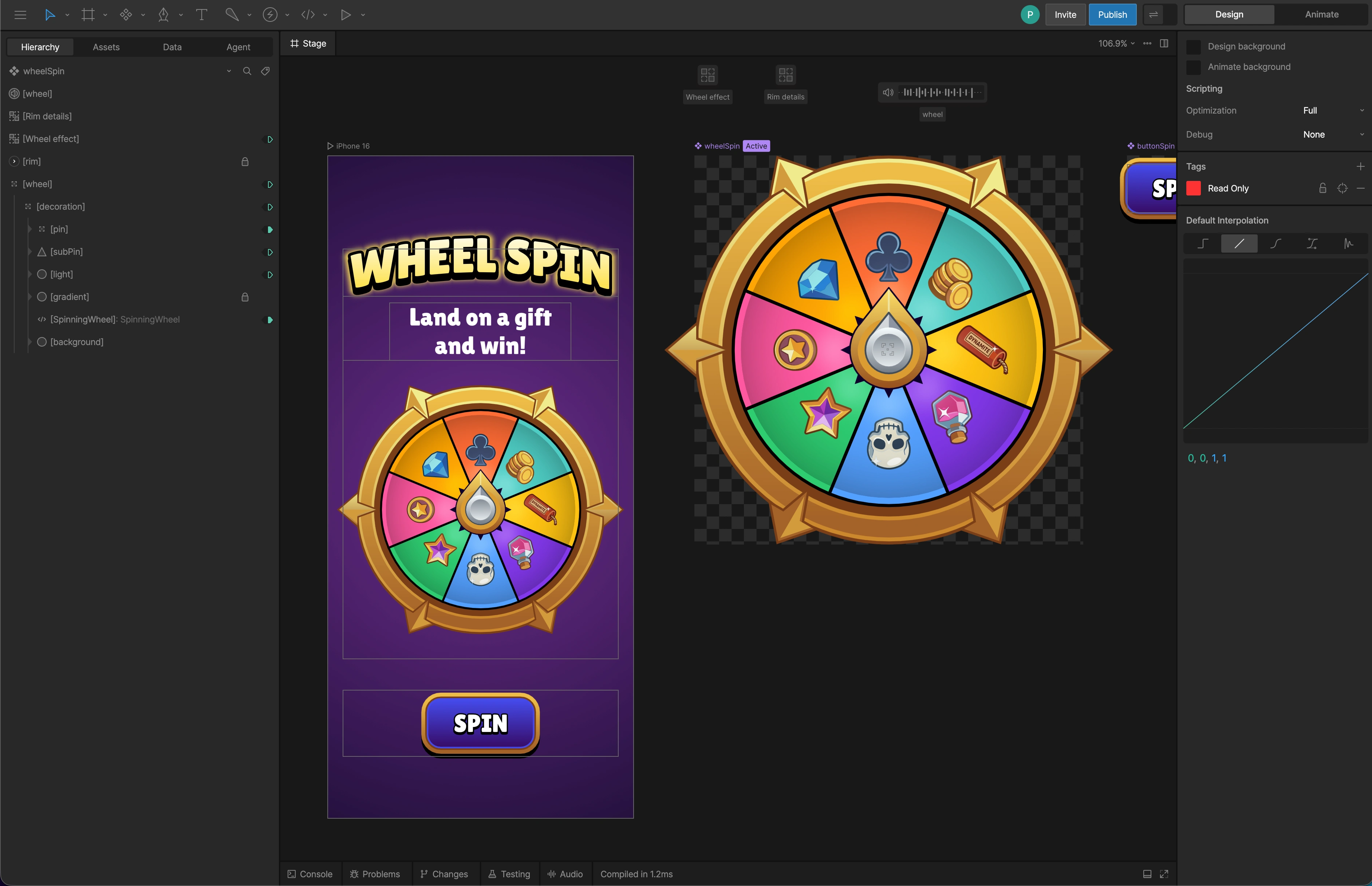
Rive Wheel Spinner File
Flutter demo
The Flutter project is not just a proof of concept. It is a working, polished demo that shows exactly what this wheel looks like in a real app. Theme switching, spinning, the reward reveal, the animated counter: everything works end to end, out of the box.
What makes the integration interesting is how little Flutter actually needs to do. Rive handles all the animation logic, Flutter simply tells it what to display and when. Switch to the Christmas theme? One call. Spin the wheel? One trigger. The reward screen appears with the right illustration, the right copy, and a counter that counts up to the exact prize amount... all in sync, all driven from a handful of clean, readable lines of code.
The result is an architecture that is genuinely easy to adapt. Adding a new theme, changing reward amounts, or plugging in a real backend to determine the winning slice ; none of it requires touching the animation. The Rive file stays exactly as it is. Only the data changes.
Wheel Spinner Flutter Runtime Demo
The benefits
For product teams.
A theme change that would normally require a designer, a developer, a new build, and a release cycle can now be done in minutes by changing a few values in code. Seasonal campaigns, A/B tests, personalised reward tiers... all of it becomes trivial.
For developers.
The Flutter integration is clean and well-documented. Every property handle is typed. Every listener is named and removable. The architecture is easy to follow, easy to extend, and hard to break. The included integration guide explains not just what the code does, but why each decision was made.
For designers.
The Rive source file is fully editable. Illustrations can be replaced, transitions can be adjusted, new states can be added. All within Rive's editor, with no impact on the Flutter integration as long as the ViewModel property names remain consistent.
For learners.
This project is a real-world example of Rive's most advanced features working together: ViewModel data binding, artboard-type properties, runtime theme switching, and cross-platform Flutter integration. The two video tutorials and the integration guide make it a great Rive + Flutter learning resource.
Everything you need, ready to go!
If this sparked an idea for your product, it is available now on my Contra Product page. And if you need something custom, a different mechanic, a different platform, or a Rive animation built from scratch ; feel free to reach out. I would love to work on it with you.
What's included?
🎨 Rive source file
Three themes, 24 illustrations, fully editable
📱 Flutter sample project
Clean, documented, production-ready architecture
🎬 Two video tutorials
Rive file walkthrough + Flutter code walkthrough
📖 Integration guide
Step-by-step reference for adapting it to your own app
Like this project
Posted Apr 9, 2026
Built a runtime-controllable Wheel Spinner with Rive and Flutter. 3 themes, 24 illustrations, all driven by live data, no animation rebuild required.