
At a glance
The problem
Rinks run on a patchwork of tools: one system for bookings, another for leagues, paper at the front desk, and spreadsheets for the rest. Staff enter the same information two or three times.
What I've done
Interviewed three rink staff and audited 11 operator systems. Then I sketched 40 ideas in Crazy 8s, drew 47 lo-fi screens and 20 more for settings and the office, checked them against my must-have user stories, and set who can do what for three staff roles.
Methods
Operator interviews · Competitor audit · Journey map · Service blueprint · Sketching · Wireframes
Where it stands
Lo-fi wireframes and a clickable prototype are done. Nobody outside me has tested them yet. Next: a second round of interviews, then usability tests.
3 of 3 rinks re-key game results by hand at night
3 of 3 check people in on paper
25 of 47 must-have user stories fully drawn so far
116 staff actions, each set for three roles
My role
Solo designer and founder: research, UX, and product direction.
Timeline
August 2026 – now
Platforms
Web dashboard + app for rink staff, on the same backend as the skater app
Tools
Figma · Excel · Claude
Status
In progress. Lo-fi wireframes and a clickable lo-fi prototype are done; not tested with anyone yet.
Last updated
November 2026
The problem
The skater app only works if the schedule is right. Today, rink staff keep the same schedule in two places by hand, re-key game results at the end of the night, and check people in on paper.
Problem statement
A rink manager needs to enter a session once and have it appear everywhere, because today the same schedule is kept in two places by hand.
What I've heard so far
The schedule gets typed into every system separately (2 of 3 rinks).
Game results are re-keyed at the end of the night (3 of 3).
Check-in is on paper at the front desk (3 of 3). Waivers are digital at all three now: the one rink that used paper waivers has since moved them online, along with membership sign-up.
Rinks can't see how full their sessions run (3 of 3).
Every rink has its own rules for waivers, memberships, goalies, and cancellations, so rules have to be settings, not hard-coded (3 of 3).
Research so far
I interviewed three rink staff in person: a front desk employee, a front desk manager, and a rink manager at a university rink. I also audited 11 operator systems from their public pages and reviews.
Operator 1, front desk
"I only need to enter it once, and it updates everywhere it needs to."
Operator 2, front desk manager
"I would love to only use 1 system instead of 2."
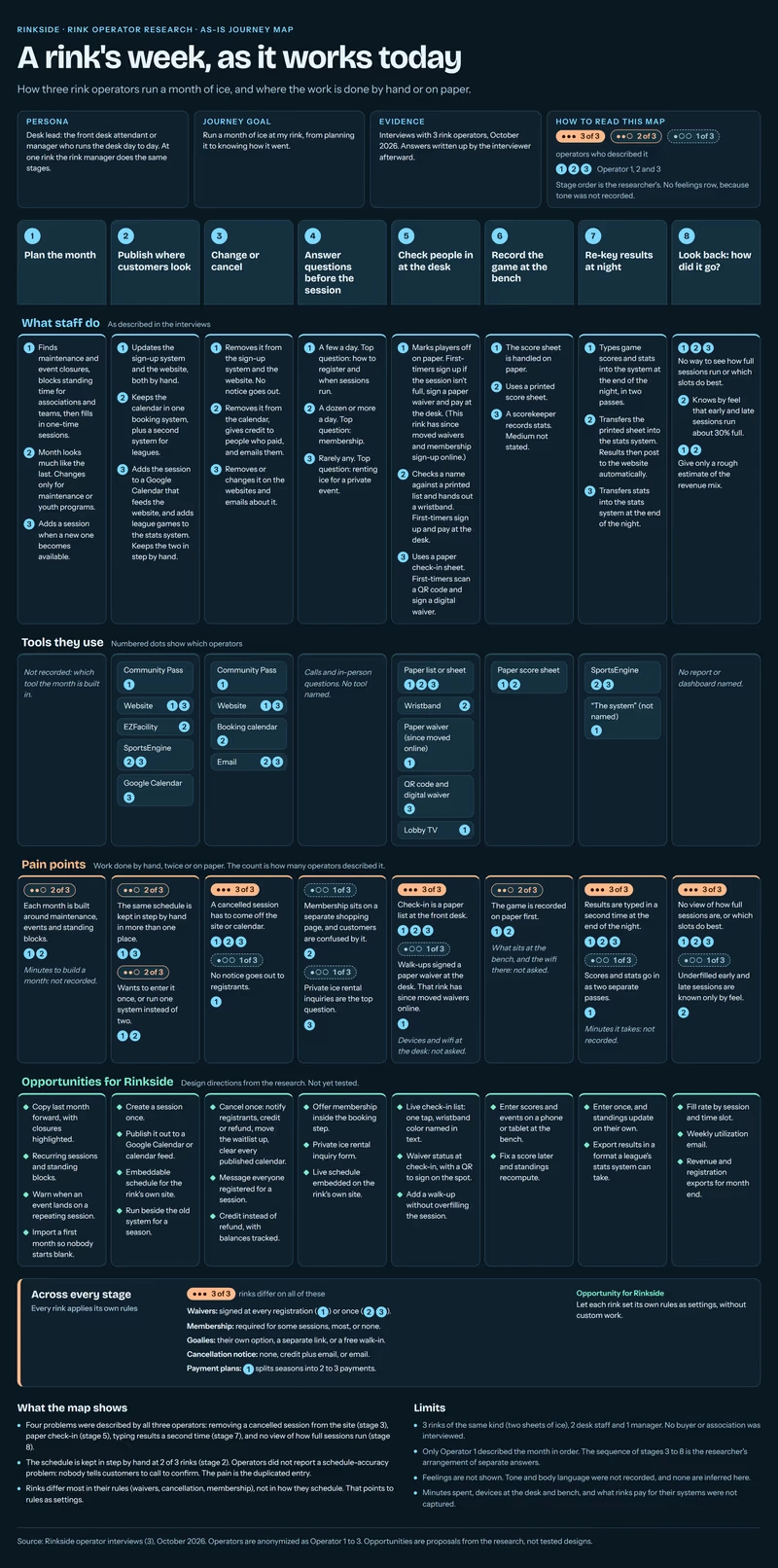
A rink's week, as it works today. Built from the three operator interviews.
What surprised me
Staff describe chores, not features. Re-keying results at night is the one thing all three do.
Nobody reported a schedule-accuracy problem. None of them tell customers to call and confirm. On the skater side, that was a big complaint, so the pitch to rinks has to be about saving staff time, not fixing accuracy.
Ideas: 40 sketches in five rounds
I picked five jobs from the interviews, my feature list, and 85 user stories, then did Crazy 8s for each one: eight different layouts for the same job. I did them digitally instead of on paper. Claude drew the eight panels for each round in Figma from my feature list, and I went through them and picked what moved forward.
Before this, I'd scored 14 concepts. Two didn't make it to sketching:
Pushing empty spots to skaters in the skater app. Only one rink said it had sessions that run underfilled, the demand is my guess, and it needs two other systems built first.
A lobby TV display. Only one rink has a TV, a competitor already sells one, and it doesn't earn anything. I've since drawn a settings screen for it as a paid add-on, but it never went through Crazy 8s.
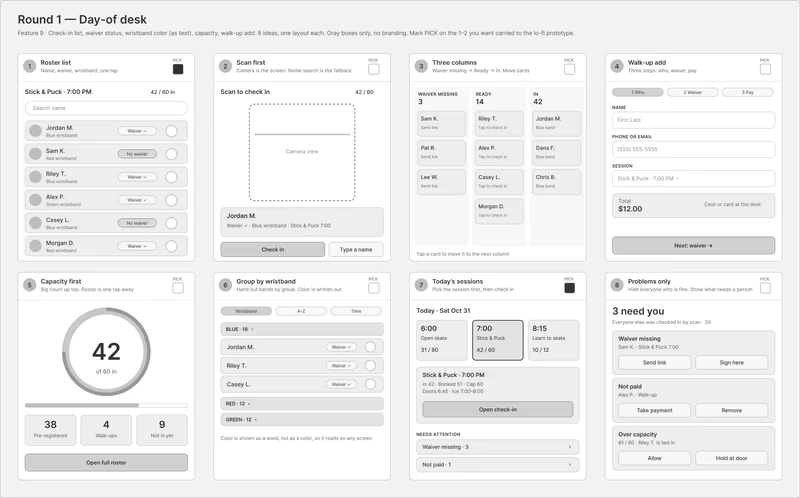
Round 1, the desk on game day. I picked the roster list (1) and today's sessions (7). The desk uses the roster to see missing waivers, unpaid bookings, and who's here. Today's sessions already shows how full each one is, so there's no separate capacity screen.
The other four rounds
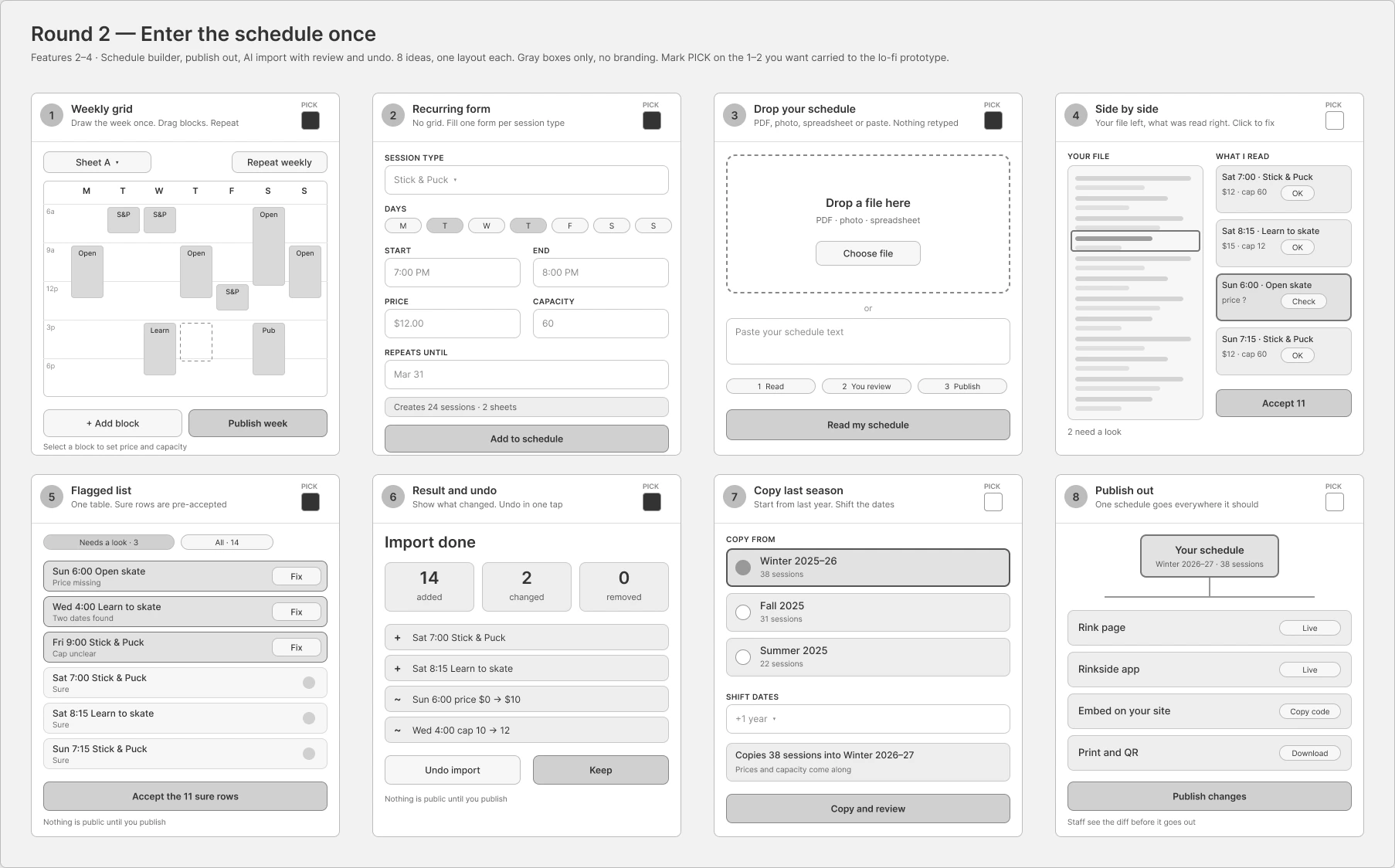
Round 2, enter the schedule once. I picked five: the weekly grid, the recurring-session form, dropping in a schedule, the flagged list, and result and undo. A manager fills in a calendar, adds one session or a series, keeps several calendars the way Google Calendar does, and can bring in a calendar from another site.
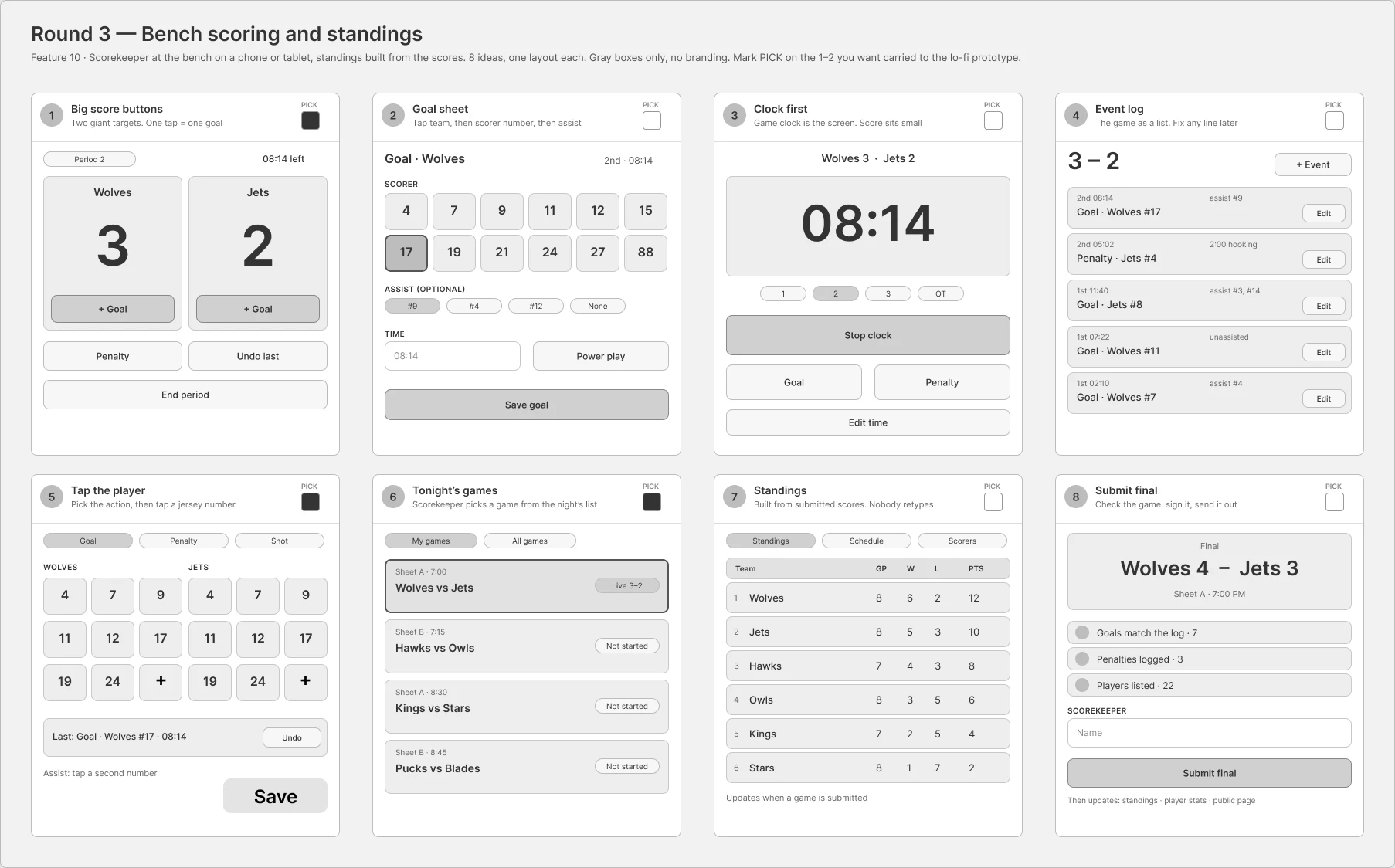
Round 3, scoring at the bench. I picked big score buttons, tap the player, and tonight's games. Each team gets a Goal and a Penalty button. The app doesn't keep game time, so the scorekeeper types the time in. Standings are worked out from final scores.
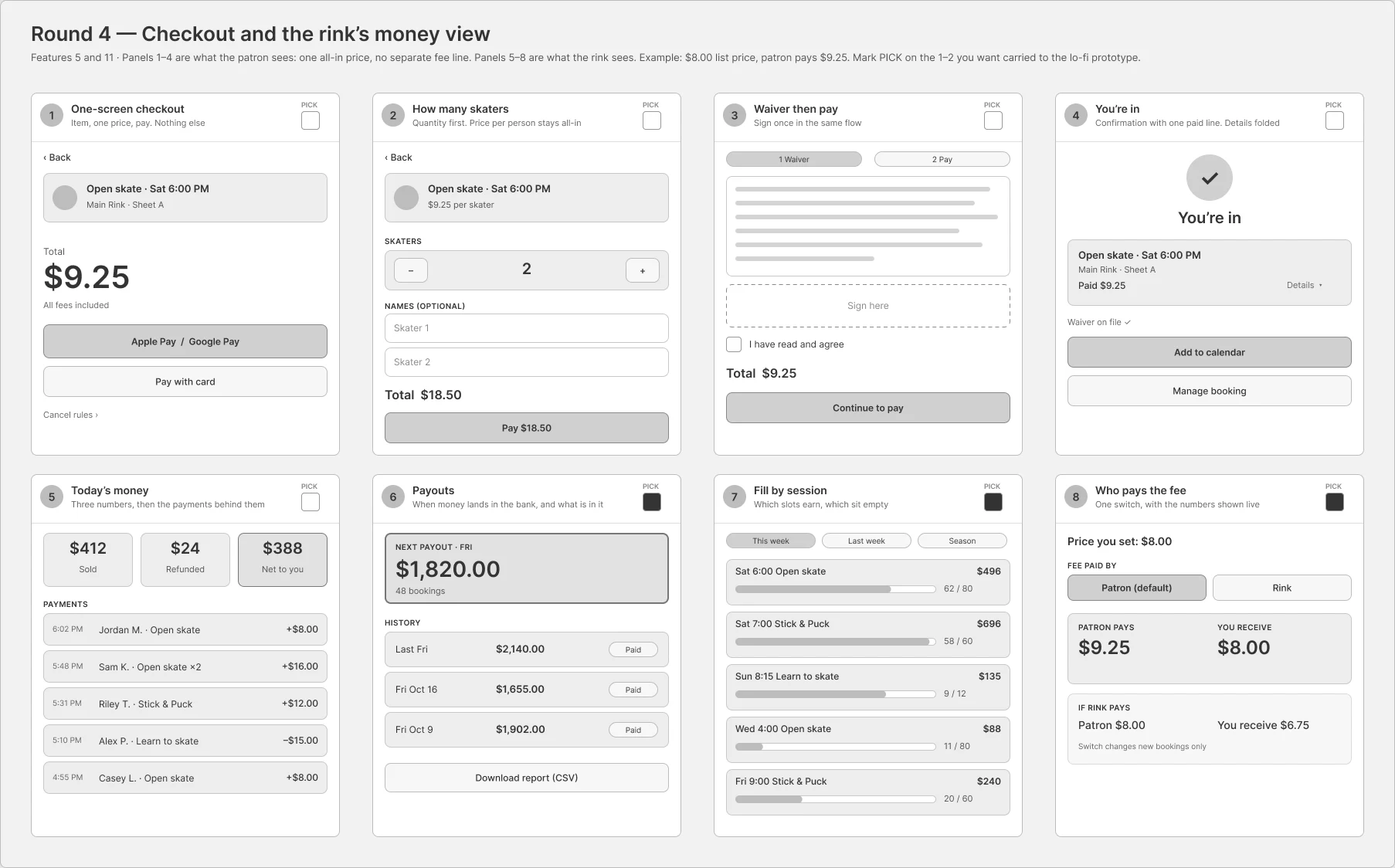
Round 4, the rink's money. I picked payouts, fill by session, and who pays the booking fee. Rinks see weekly and monthly earnings and how full each session runs, so they can spot the sessions that lose money. I didn't redraw skater checkout, because the skater app already covers it.
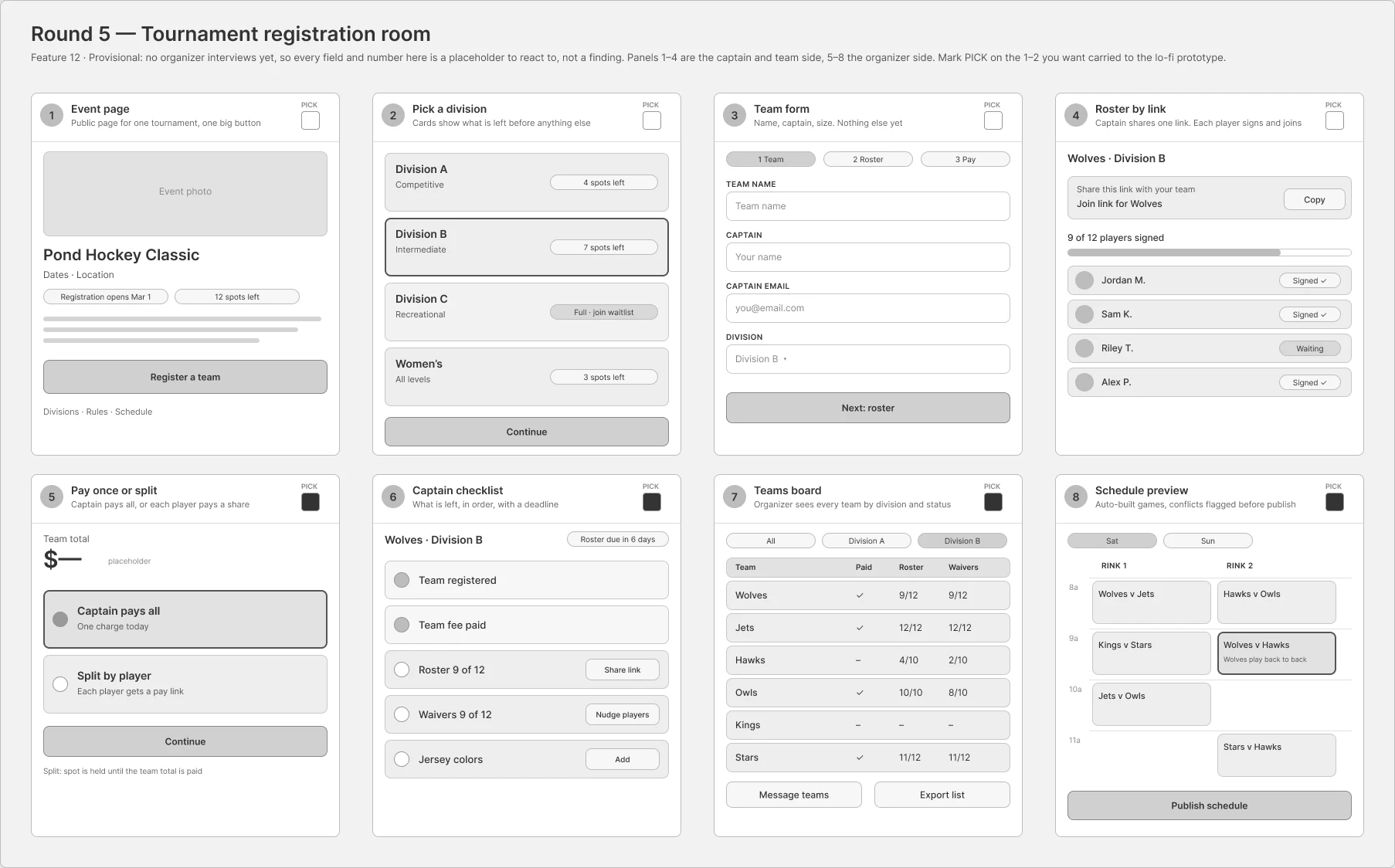
Round 5, tournament registration. I picked four, and two became screens: the teams board and the schedule preview. The other two are captain screens the skater app already has. This round is provisional, because I haven't interviewed a tournament organizer yet.
Lo-fi wireframes: 47 screens for four kinds of staff
The picks became 47 lo-fi screens in Figma, grouped by who uses them: the front desk, the rink manager, the scorekeeper at the bench, and a tournament organizer. They're gray boxes on purpose. Color comes later, from the skater app's design system. On November 8, I linked them into a clickable lo-fi prototype.
Decisions with research behind them
Check-in: the desk marks you here
All three rinks check people in on paper, and all three handle walk-ups at the desk. So the main action is a staff member tapping Mark here next to a name, with waiver and payment status on the same row. A QR code on the side lets walk-ins sign up and pay on their own phone.
Not asked yet: how long check-in can take at a busy start, like 51 people booked and one person at the desk. That's a question for the next round of interviews.
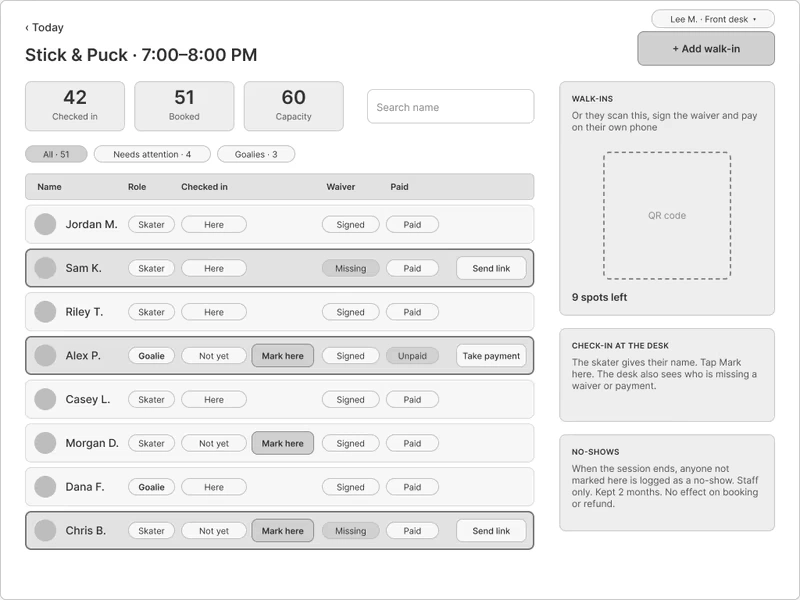
The session roster. Everything the desk needs on one row: here or not, waiver, paid.
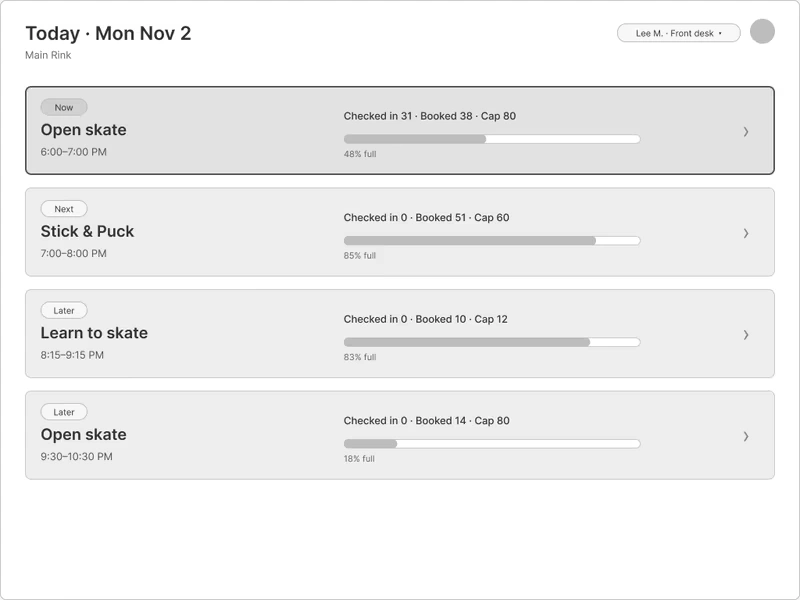
Today. Every session with how full it is, so the desk picks one and starts checking in.
Enter the schedule once
At two of the three rinks, the schedule is typed into more than one system by hand. So the manager builds it once in a calendar, or brings it in from a link or a screenshot, and checks what was found before anything goes public. Bringing it in from a link or a screenshot is my call. One caveat: no rink said the copies disagree, so the pitch is saving staff time, not fixing mistakes.
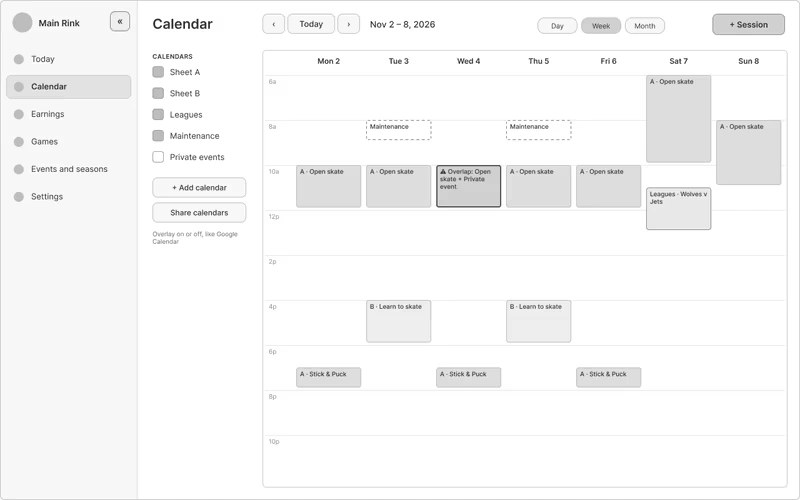
The week. One calendar per sheet of ice, plus leagues, maintenance, and private events, each one on or off.
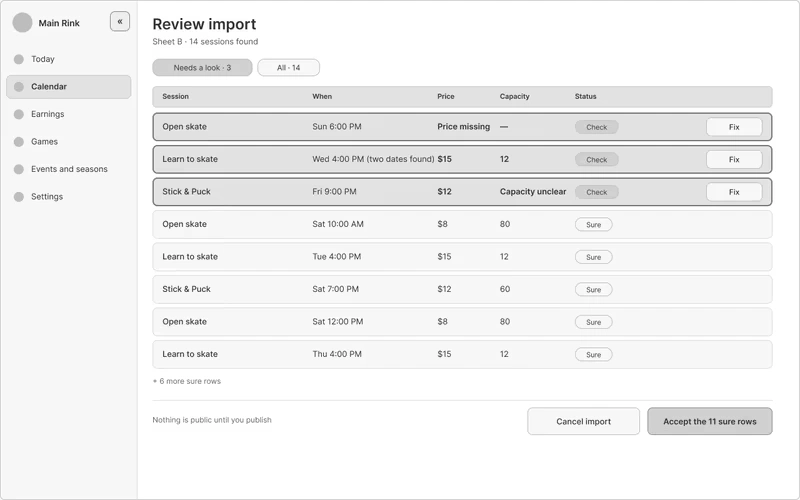
Review an import. Anything the import isn't sure about gets flagged, and nothing goes public until the manager accepts it.
Score the game at the bench, once
All three rinks type game results in a second time at the end of the night, and two keep paper score sheets. So the scorekeeper scores on a phone at the bench, in one flow: tonight's games, big Goal and Penalty buttons, then tap the player. Submitting the game updates the standings. Not asked yet: what device sits at the bench, and whether there's wifi.
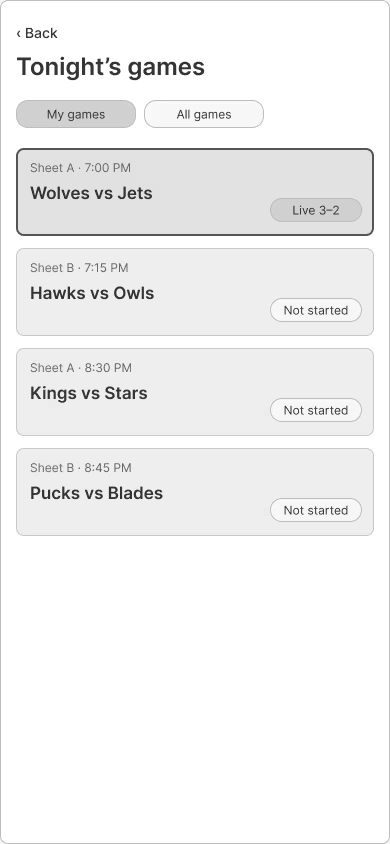
Tonight's games.
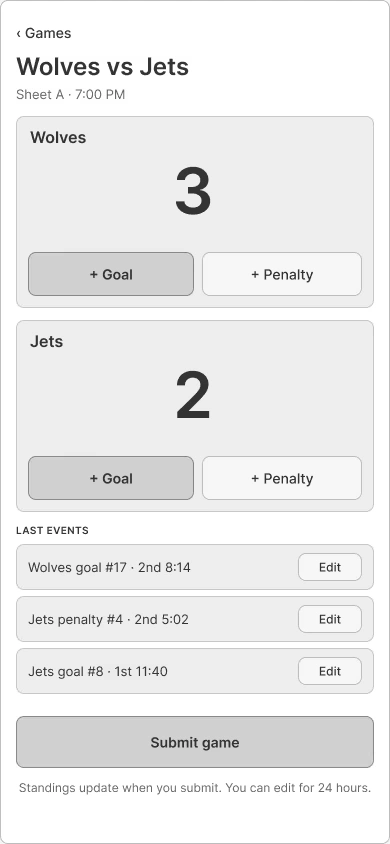
Score the game.
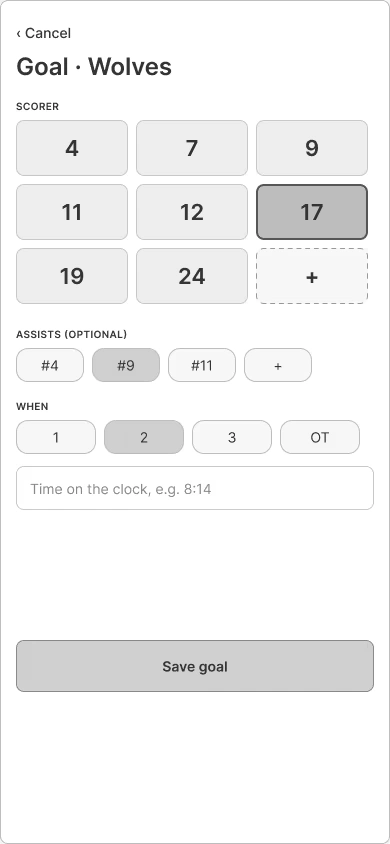
Add a goal. Tap the player's number.
See how full each session runs
None of the three rinks can see how full their sessions run. So the earnings screen lists every session with how many came and the share of capacity used, lowest first, and flags the ones under 40%.
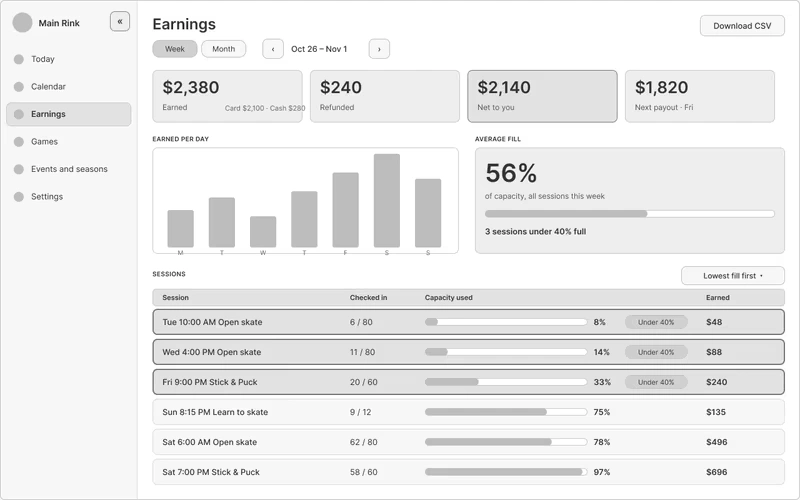
Earnings and fill. The sessions that lose money are at the top.
Calls I made without research yet
Scorekeepers sign in with a short game ID and their own PIN, so the rink has a record of who kept score. I haven't asked rinks how staff sign in today.
Whoever submits a game can edit it for 24 hours. After that, only a manager can, and a manager can undo changes back to the original submission. The 24 hours is my pick, not a number from research.
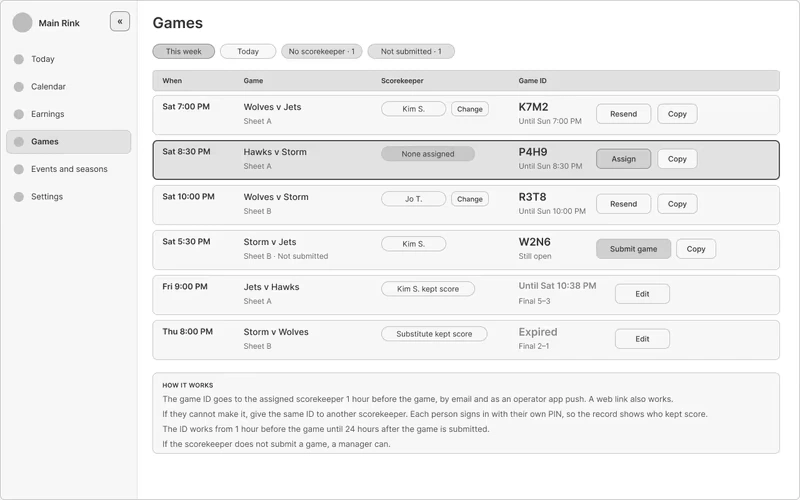
Games, for staff. Each game's ID and who's keeping score.
Two more screens: a walk-in payment and a tournament
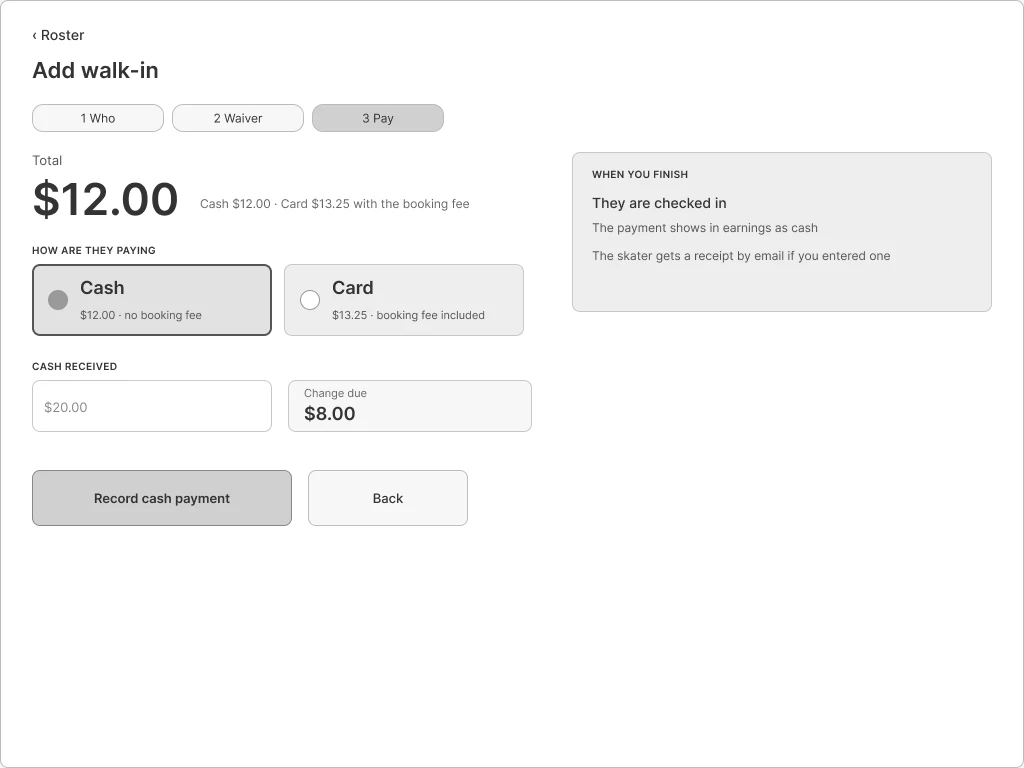
Walk-in payment. Cash shows the change due.
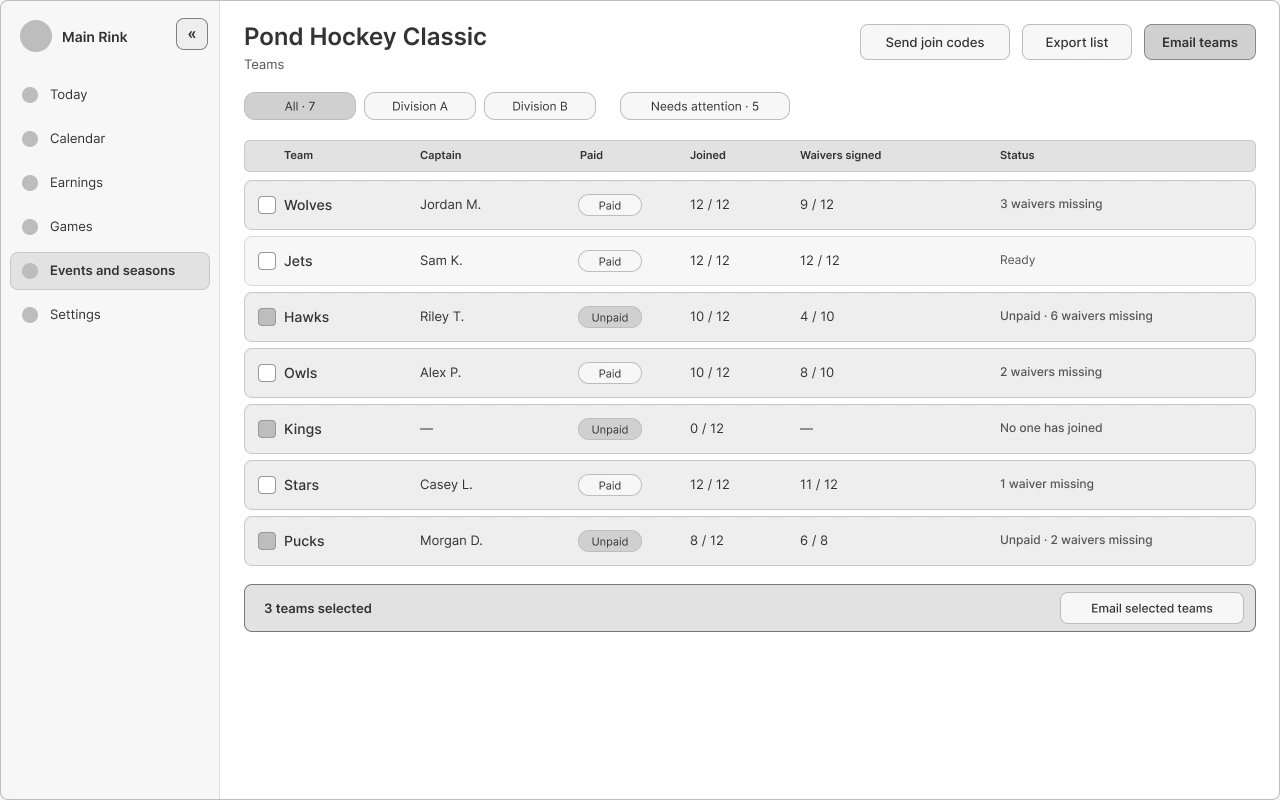
Tournament teams board. Who has paid and signed, at a glance. Provisional until I talk to an organizer.
Checking my own work: did the screens cover the stories?
After the Crazy 8s picks became screens, I went back and mapped every pick to the user stories it serves and the screens built from it. Then I scored all 47 must-have stories, out of 85 in total.
Where the 47 must-have user stories stand
Status
Stories
Drawn
25
Partly drawn
6
Not drawn
7
In the skater app, or a behavior with no screen
9
Total
47
15 of the 47 came straight from a Crazy 8s pick. 12 more got drawn later, from competitor audits and my own decisions.
The biggest gap is in my own work. The waitlist is a must-have rule, and every refund and tournament flow depends on it. Not one screen shows it.
Doing this gave me a chain I can trace from research to story to screen, and it showed me the holes before anyone tests it.
Service blueprint: the whole rink, front to back
The journey map shows a rink's week from the staff's side. A service blueprint lines up everyone involved at each stage: the customer, the front desk and scorekeeper, the manager, and the systems behind them. I made two versions, one for how the three rinks work today and one for how Rinkside is designed to work.
How to read it: the customer sits above the line of interaction, the front desk and scorekeeper above the line of visibility, and the manager above the line of internal interaction. The systems are below it. Every claim says where it came from: an interview count ("2 of 3 rinks"), the competitor audit, or "my decision" or "my assumption."
Today
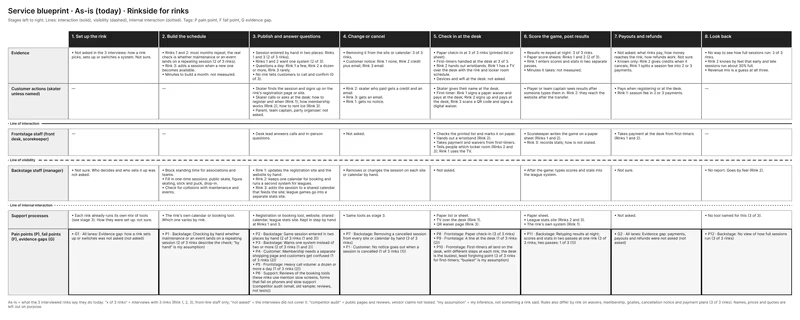
As-is, from the three rink interviews. Two stages are mostly empty, because nobody was asked about them.
Read the as-is blueprint as text
1. Set up the rink
Evidence
Not asked in the 3 interviews: how a rink picks, sets up or switches a system. Not sure.
Customer actions (skater unless named)
Frontstage staff (front desk, scorekeeper)
Backstage staff (manager)
Not sure. Who decides and who sets it up was not asked.
Support processes
Each rink already runs its own mix of tools (see stage 3). How they were set up: not sure.
2. Build the schedule
Evidence
Rinks 1 and 2: most months repeat; the real check is whether maintenance or an event lands on a repeating session (2 of 3 rinks).
Rink 3: adds a session when a new one becomes available.
Minutes to build a month: not measured.
Customer actions (skater unless named)
Frontstage staff (front desk, scorekeeper)
Backstage staff (manager)
Block standing time for associations and teams.
Fill in one-time sessions: public skate, figure skating, stick and puck, drop-in.
Check for collisions with maintenance and events.
Support processes
The rink's own calendar or booking tool. Which one varies by rink.
3. Publish and answer questions
Evidence
Session entered by hand in two places: Rinks 1 and 3 (2 of 3 rinks).
Rinks 1 and 2 want one system (2 of 3).
Questions a day: Rink 1 a few, Rink 2 a dozen or more, Rink 3 rarely.
No rink tells customers to call and confirm (0 of 3).
Customer actions (skater unless named)
Skater finds the session and signs up on the rink's registration page or site.
Skater calls or asks at the desk: how to register and when (Rink 1), how membership works (Rink 2), how to rent ice (Rink 3).
Parent, team captain, party organizer: not asked.
Frontstage staff (front desk, scorekeeper)
Desk lead answers calls and in-person questions.
Backstage staff (manager)
Rink 1: updates the registration site and the website by hand.
Rink 2: keeps one calendar for booking and runs a second system for leagues.
Rink 3: adds the session to a shared calendar that feeds the site; league games go into a separate stats site.
Support processes
Registration or booking tool, website, shared calendar, league stats site. Kept in step by hand at Rinks 1 and 3.
4. Change or cancel
Evidence
Removing it from the site or calendar: 3 of 3 rinks.
Customer notice: Rink 1 none, Rink 2 credit plus email, Rink 3 email.
Customer actions (skater unless named)
Rink 2: skater who paid gets a credit and an email.
Rink 3: gets an email.
Rink 1: gets no notice.
Frontstage staff (front desk, scorekeeper)
Not asked.
Backstage staff (manager)
Removes or changes the session on each site or calendar by hand.
Support processes
Same tools as stage 3.
5. Check in at the desk
Evidence
Paper check-in at 3 of 3 rinks (printed list or sheet).
First-timers handled at the desk at 3 of 3.
Rink 2 hands out wristbands. Rink 1 has a TV over the desk with the rink and locker room schedule.
Devices and wifi at the desk: not asked.
Customer actions (skater unless named)
Skater gives their name at the desk.
First-timer: Rink 1 signs a paper waiver and pays at the desk; Rink 2 signs up and pays at the desk; Rink 3 scans a QR code and signs a digital waiver.
Frontstage staff (front desk, scorekeeper)
Checks the printed list and marks it on paper.
Hands out a wristband (Rink 2).
Takes payment and waivers from first-timers.
Tells people which locker room (Rinks 2 and 3); Rink 1 uses the TV.
Backstage staff (manager)
Not asked.
Support processes
Paper list or sheet.
TV over the desk (Rink 1).
QR waiver page (Rink 3).
6. Score the game, post results
Evidence
Results re-keyed at night: 3 of 3 rinks.
Paper score sheets: Rinks 1 and 2 (2 of 3).
Rink 1 enters scores and stats in two separate passes.
Minutes it takes: not measured.
Customer actions (skater unless named)
Player or team captain sees results after someone types them in. Rink 2: they reach the website after the transfer.
Frontstage staff (front desk, scorekeeper)
Scorekeeper writes the game on a paper sheet (Rinks 1 and 2).
Rink 3: records stats; how is not stated.
Backstage staff (manager)
After the game: types scores and stats into the league system.
Support processes
Paper sheet.
League stats site (Rinks 2 and 3).
The rink's own system (Rink 1).
7. Payouts and refunds
Evidence
Not asked: what rinks pay, how money reaches the rink, how refunds work. Not sure.
Known only: Rink 2 gives credits when it cancels; Rink 1 splits a season fee into 2 or 3 payments.
Customer actions (skater unless named)
Pays when registering or at the desk.
Rink 1: season fee in 2 or 3 payments.
Frontstage staff (front desk, scorekeeper)
Takes payment at the desk from first-timers (Rinks 1 and 2).
Backstage staff (manager)
Not sure.
Support processes
Not asked.
8. Look back
Evidence
No way to see how full sessions run: 3 of 3 rinks.
Rink 2 knows by feel that early and late sessions run about 30% full.
Revenue mix is a guess at all three.
Customer actions (skater unless named)
Frontstage staff (front desk, scorekeeper)
Backstage staff (manager)
No report. Goes by feel (Rink 2).
Support processes
No tool named for this (3 of 3).
Pain points, fail points and evidence gaps
P1 · 2. Build the schedule · Backstage. Checking by hand whether maintenance or an event lands on a repeating session.
2 of 3 rinks describe the check; "by hand" is my assumption.
P2 · 3. Publish and answer questions · Backstage. Same session entered in two places by hand.
2 of 3 rinks (1 and 3).
P3 · 3. Publish and answer questions · Backstage. Wants one system instead of two or more.
2 of 3 rinks (1 and 2).
P4 · 3. Publish and answer questions · Customer. Membership needs a separate shopping page and customers get confused.
1 of 3 rinks (2).
P5 · 3. Publish and answer questions · Frontstage. Heavy call volume: a dozen or more a day.
1 of 3 rinks (2).
P6 · 3. Publish and answer questions · Support. Reviews of the booking tools these rinks use mention slow screens, forms that fail on phones and slow support.
Competitor audit (small, old sample; reviews, not tests).
P7 · 4. Change or cancel · Backstage. Removing a cancelled session from every site or calendar by hand.
3 of 3 rinks.
F1 · 4. Change or cancel · Customer. No notice goes out when a session is cancelled.
1 of 3 rinks (1).
P8 · 5. Check in at the desk · Frontstage. Paper check-in.
3 of 3 rinks.
P9 · 5. Check in at the desk · Frontstage. A line at the desk.
1 of 3 rinks (2).
P10 · 5. Check in at the desk · Frontstage. First-timers all land on the desk, with different steps at each rink; the desk is the busiest, least forgiving point.
3 of 3 rinks for first-timers; "busiest" is my assumption.
P11 · 6. Score the game, post results · Backstage. Retyping results at night; scores and stats in two passes at one rink.
3 of 3 rinks; two passes: 1 of 3 (1).
P12 · 8. Look back · Backstage. No view of how full sessions run.
3 of 3 rinks.
G1 · 1. Set up the rink · All lanes. Evidence gap: how a rink sets up or switches was not asked.
Not asked.
G2 · 7. Payouts and refunds · All lanes. Evidence gap: payments, payouts and refunds were not asked.
Not asked.
Two stages have almost no evidence: setting up the rink, and payouts and refunds. Neither came up in the interviews. The blueprint marks them as gaps instead of filling them in.
With Rinkside
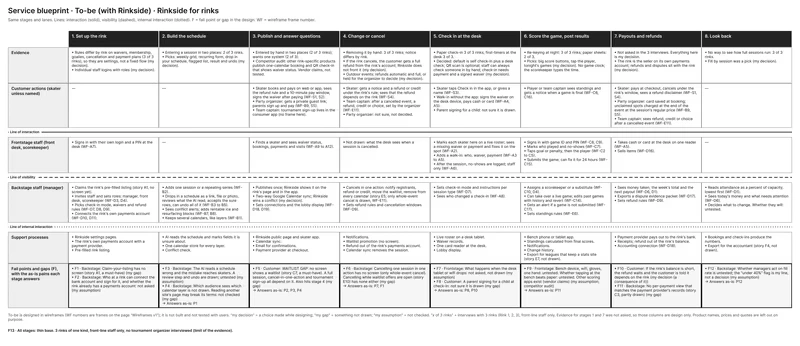
To-be. Designed in wireframes, not built and not tested with anyone.
Read the to-be blueprint as text
1. Set up the rink
Evidence
Rules differ by rink on waivers, membership, goalies, cancellation and payment plans (3 of 3 rinks), so they are settings, not a fixed flow (my decision).
Individual staff logins with roles (my decision).
Customer actions (skater unless named)
Frontstage staff (front desk, scorekeeper)
Signs in with their own login and a PIN at the desk (WF-A7).
Backstage staff (manager)
Claims the rink's pre-filled listing (story A1, no screen yet).
Invites staff and sets roles: manager, front desk, scorekeeper (WF-D3, D4).
Picks check-in mode, waivers and refund rules (WF-D7, D8, D9).
Connects the rink's own payments account (WF-D10, D11).
Support processes
Rinkside settings pages.
The rink's own payments account with a payment provider.
Pre-filled rink listing.
2. Build the schedule
Evidence
Entering a session in two places: 2 of 3 rinks.
Picks: weekly grid, recurring form, drop in your schedule, flagged list, result and undo (my decision).
Customer actions (skater unless named)
Frontstage staff (front desk, scorekeeper)
Backstage staff (manager)
Adds one session or a repeating series (WF-B2).
Drops in a schedule as a link, file or photo, reviews what the AI read, accepts the sure rows, can undo all of it (WF-B3 to B5).
Sees conflict alerts; adds rentable ice and resurfacing blocks (WF-B7, B8).
Keeps several calendars, like layers (WF-B1).
Support processes
AI reads the schedule and marks fields it is unsure about.
One calendar store for every layer.
Conflict check.
As-is problems this answers
P1
3. Publish and answer questions
Evidence
Entered by hand in two places (2 of 3 rinks); wants one system (2 of 3).
Competitor audit: other rink-specific products publish one-calendar booking and QR check-in that shows waiver status. Vendor claims, not tested.
Customer actions (skater unless named)
Skater books and pays on web or app, sees the refund rule and a 10-minute pay window, signs the waiver after paying (WF-S1, S2).
Party organizer: gets a private guest link; parents sign up and pay (WF-B9, S5).
Team captain: tournament sign-up lives in the consumer app (no frame here).
Frontstage staff (front desk, scorekeeper)
Finds a skater and sees waiver status, bookings, payments and visits (WF-A9 to A12).
Backstage staff (manager)
Publishes once; Rinkside shows it on the rink's page and in the app.
Two-way Google Calendar sync; Rinkside wins a conflict (my decision).
Sets connections and the lobby display (WF-D18, D19).
Support processes
Rinkside public page and skater app.
Calendar sync.
Email for confirmations.
Payment provider at checkout.
As-is problems this answers
P2, P3, P4
4. Change or cancel
Evidence
Removing it by hand: 3 of 3 rinks; notice differs by rink.
If the rink cancels, the customer gets a full refund from the rink's account; Rinkside does not front it (my decision).
Outdoor events: refunds automatic and full, or held for the organizer to decide (my decision).
Customer actions (skater unless named)
Skater: gets a notice and a refund or credit under the rink's rule; sees that the refund depends on the rink (WF-S4).
Team captain: after a cancelled event, a refund, credit or choice, set by the organizer (WF-E11).
Party organizer: not sure, not decided.
Frontstage staff (front desk, scorekeeper)
Not drawn: what the desk sees when a session is cancelled.
Backstage staff (manager)
Cancels in one action: notify registrants, refund or credit, move the waitlist, remove from every calendar (story E5; only whole-event cancel is drawn, WF-E11).
Sets refund rules and cancellation windows (WF-D9).
Support processes
Notifications.
Waitlist promotion (no screen).
Refund out of the rink's payments account.
Calendar sync removes the session.
As-is problems this answers
P7, F1
5. Check in at the desk
Evidence
Paper check-in 3 of 3 rinks; first-timers at the desk 3 of 3.
Decided: default is self check-in plus a desk check; QR scan is optional; staff can always check someone in by hand; check-in needs payment and a signed waiver (my decision).
Customer actions (skater unless named)
Skater taps Check in in the app, or gives a name (WF-S3).
Walk-in without the app: signs the waiver on the desk device, pays cash or card (WF-A4, A5).
Parent signing for a child: not sure it is drawn.
Frontstage staff (front desk, scorekeeper)
Marks each skater here on a live roster; sees a missing waiver or payment and fixes it on the spot (WF-A2).
Adds a walk-in: who, waiver, payment (WF-A3 to A5).
After the session, no-shows are logged; staff only (WF-A6).
Backstage staff (manager)
Sets check-in mode and instructions per session type (WF-D7).
Sees who changed a check-in (WF-A8).
Support processes
Live roster on a desk tablet.
Waiver records.
One card reader at the desk.
Lobby display.
As-is problems this answers
P8, P10
6. Score the game, post results
Evidence
Re-keying at night: 3 of 3 rinks; paper sheets: 2 of 3.
Picks: big score buttons, tap the player, tonight's games (my decision). No game clock; the scorekeeper types the time.
Customer actions (skater unless named)
Player or team captain sees standings and gets a notice when a game is final (WF-C6, C16).
Frontstage staff (front desk, scorekeeper)
Signs in with game ID and PIN (WF-C8, C9).
Marks who played and no-shows (WF-C7).
Taps goal or penalty, then the player (WF-C2 to C5).
Submits the game; can fix it for 24 hours (WF-C15).
Backstage staff (manager)
Assigns a scorekeeper or a substitute (WF-C10, D4).
Can take over a live game; edits past games with history and revert (WF-C14).
Gets an alert if a game is not submitted (WF-C17).
Sets standings rules (WF-E6).
Support processes
Bench phone or tablet app.
Standings calculated from final scores.
Notifications.
Change history.
Export for leagues that keep a stats site (story E7, not drawn).
As-is problems this answers
P11
7. Payouts and refunds
Evidence
Not asked in the 3 interviews. Everything here is my decision.
The rink is the seller on its own payments account; refunds and disputes sit with the rink (my decision).
Customer actions (skater unless named)
Skater: pays at checkout, cancels under the rink's window, sees a refund disclaimer (WF-S1, S4).
Party organizer: card saved at booking; unclaimed spots charged at the end of the event at the session's regular price (WF-B9, S5).
Team captain: sees refund, credit or choice after a cancelled event (WF-E11).
Frontstage staff (front desk, scorekeeper)
Takes cash or card at the desk on one reader (WF-A5).
Sells items (WF-D16).
Backstage staff (manager)
Sees money taken, the week's total and the next payout (WF-D6, D1).
Exports a dispute evidence packet (WF-D17).
Sets refund rules (WF-D9).
Support processes
Payment provider pays out to the rink's bank.
Receipts; refund out of the rink's balance.
Accounting connection (WF-D18).
8. Look back
Evidence
No way to see how full sessions run: 3 of 3 rinks.
Fill by session was a pick (my decision).
Customer actions (skater unless named)
Frontstage staff (front desk, scorekeeper)
Backstage staff (manager)
Reads attendance as a percent of capacity, lowest first (WF-D1).
Sees today's money and what needs attention (WF-D6).
Decides what to change. Whether they will: untested.
Support processes
Bookings and check-ins produce the numbers.
Export for the accountant (story F4, not drawn).
As-is problems this answers
P12
Where the design can fail, or has holes
F1 · 1. Set up the rink · Backstage. Claim-your-listing has no screen (story A1, a must-have).
My gap.
F2 · 1. Set up the rink · Backstage. Who at a rink can connect the bank account and sign for it, and whether the rink already has a payments account: not asked.
My assumption.
F3 · 2. Build the schedule · Backstage. The AI reads a schedule wrong and the mistake reaches skaters. A review step and undo are drawn; untested.
My assumption.
F4 · 2. Build the schedule · Backstage. Which audience sees which calendar layer is not drawn. Reading another site's page may break its terms: not checked.
My gap.
F5 · 3. Publish and answer questions · Customer. Waitlist gap: no screen shows a waitlist (story C7, a must-have). A full session, cancel-in-one-action and tournament sign-up all depend on it. Also hits stage 4.
My gap.
F6 · 4. Change or cancel · Backstage. Cancelling one session in one action has no screen (only whole-event cancel). Cancelling while waitlist offers are open (story E10) has none either.
My gap.
F7 · 5. Check in at the desk · Frontstage. What happens when the desk tablet or wifi drops: not asked, not drawn.
My assumption.
F8 · 5. Check in at the desk · Customer. A parent signing for a child at check-in: not sure it is drawn.
My gap.
F9 · 6. Score the game, post results · Frontstage. Bench device, wifi, gloves, one hand: untested. Whether tapping at the bench beats paper: untested. Other scoring apps exist (vendor claims).
My assumption; competitor audit.
F10 · 7. Payouts and refunds · Customer. If the rink's balance is short, the refund waits and the customer is told it depends on the rink.
My decision (a consequence of it).
F11 · 7. Payouts and refunds · Backstage. No per-payment view that matches the payment provider's records (story C3, partly drawn).
My gap.
F12 · 8. Look back · Backstage. Whether managers act on fill rate is untested; the "under 40%" flag is my line, not a decision.
My assumption.
F13 · All stages. Thin base: 3 rinks of one kind, front-line staff only, no tournament organizer interviewed.
Limit of the evidence.
What it found
It didn't change any decision, because I made it after them. What it did was check the design from another direction. It found the same three holes as the story check: no waitlist screen, no way to cancel one session in one action, and no screen for a rink to claim its listing.
It also showed where the next interviews are thin. None of the 23 new questions covers the bench, where all three rinks re-key results, or looking back at the numbers, where none of them can see how full sessions run. My earlier questions cover the bench. Nothing asks yet whether a manager would act on fill rate.
Twenty more screens: settings and the office
The first 47 screens covered the daily jobs. The next 20 cover how a rink sets itself up and runs the office: check-in modes, waivers, refund rules, payments setup, party rooms, the shop and card reader, dispute evidence, connections to other tools, the lobby display, and help with the rink's website.
Each screen has two versions, with the side menu open and closed. They're linked, so you can click through the menu, the toggle that opens and closes it, and the settings submenu.
Check-in became a setting
Rinks check people in differently, so each rink picks how it works. By default, the skater taps Check in in the app and the desk checks the name against the list. A rink can skip the desk check, or scan a QR code if it can. Either way, check-in only works once the booking is paid and the waiver is signed, and staff can always check someone in by hand.
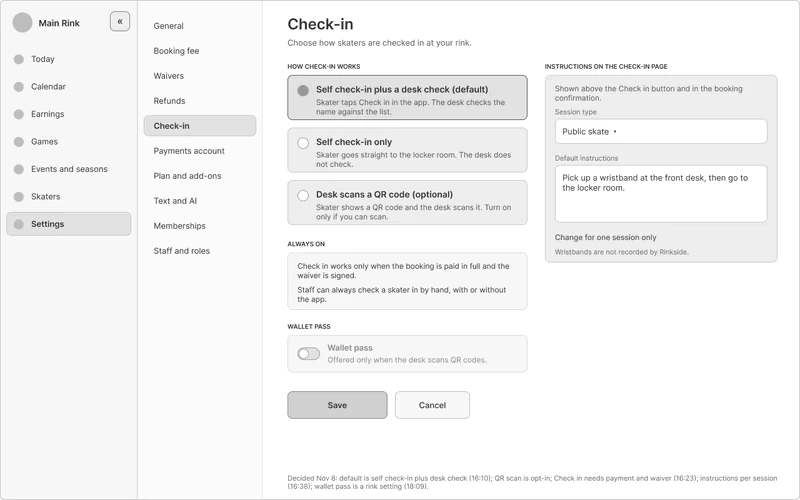
Menu open.
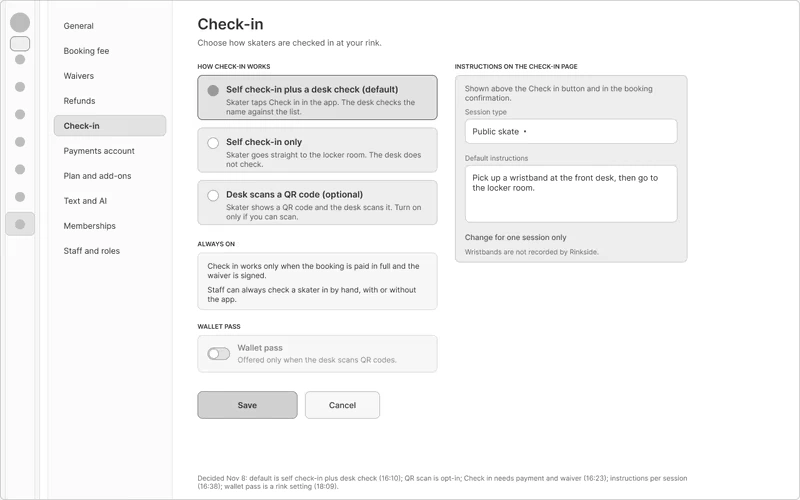
Menu closed.
Party rooms
A party room is its own calendar, and it doesn't include admission. The organizer gets a private link to send to parents, and each parent signs their own child up. The organizer's card is saved at booking, and spots nobody claims are charged at the end of the event.
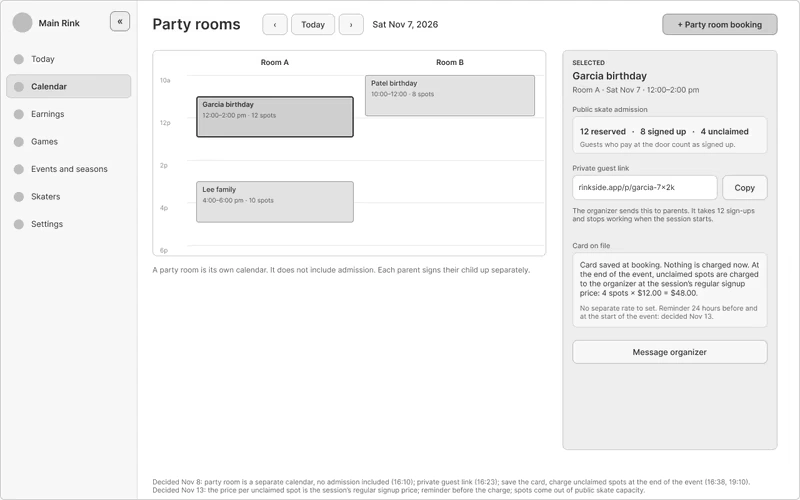
Party rooms. Reserved, signed up, and unclaimed, with the guest link beside them. The prices on the screen are examples.
Who can do what
There are three roles: manager, front desk, and scorekeeper. That split is my call more than the research's. The interviews showed a front desk and a manager, and only one rink mentioned a scorekeeper. Everyone gets their own login and PIN, so every check-in and every score change records who did it. A scorekeeper only needs the game in front of them, and a manager can do everything.
I started with 84 things staff do and set who can do each one. I decided every front desk action myself, and reviewed and accepted Claude's suggestions for the rest. The settings and office screens added more, and the list is now 116 actions.
116 rows is too many to read on a settings screen. So I grouped them by job into 25 rows, like "Take payments at the desk (cash or card)" or "Edit past games (after 24 hours)," each with a check or a dash for each role. The full list still sits behind it.
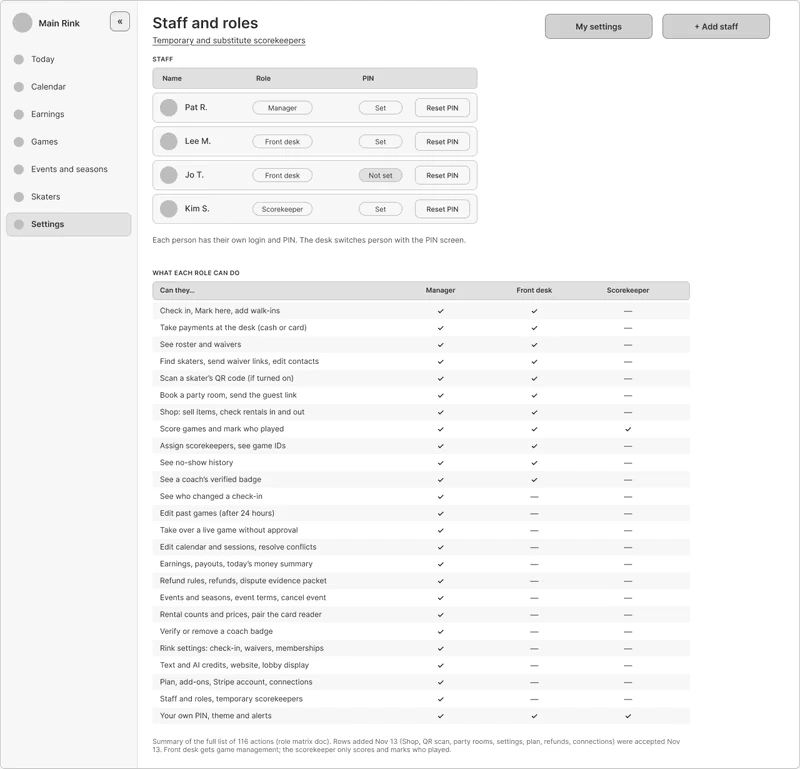
Staff and roles. 116 actions, grouped into 25 rows.
Four decisions about paying
No booking fee when someone pays by card at the desk. A skater who's already standing at the rink hasn't gotten anything from booking online, so they shouldn't pay for it.
The customer pays the booking fee by default, and a rink can switch to paying it. That way the rink keeps more of what each booking brings in.
One card reader at the desk instead of two terminals. Two would confuse both the person at the desk and the customer.
Unclaimed party spots cost the session's regular price instead of a separate party rate, so a rink has one less price to set.
None of these have been run past a rink yet.
How I'll know if it works
This is a plan, not results. Before launch, I'll collect a starting point from the first rinks:
the share of bookings made online
how full sessions run
minutes spent building a schedule
minutes spent re-keying scores
After launch, I'll compare against the same months a year earlier, not the months right before. Demand for ice is seasonal, so a plain before and after would mislead.
The next interviews
Two more rinks are next, and I still haven't talked to a tournament organizer. For those, I wrote 23 new questions and rebuilt the interview form. There are no findings from them yet.
Where I am now
Done: the problem definition, an as-is journey map of a rink's week, 85 user stories ranked by priority, 15 success criteria, 14 concepts scored, 40 Crazy 8s sketches, 47 lo-fi screens linked into a clickable prototype, 20 settings and office screens, a check of the screens against the 47 must-have stories, a service blueprint (as-is and to-be), who can do what across 116 actions, a plan for measuring success, and the questions for the next interviews.
0 likes · 1 view · Nov 20, 2026
Designed a rink-operations platform through staff research, service mapping, 67 low-fidelity screens, and a clickable prototype; testing is still pending.


