5 Zapier Integrations That Boost SaaS Conversions 17-20%

Isaac Olukoya


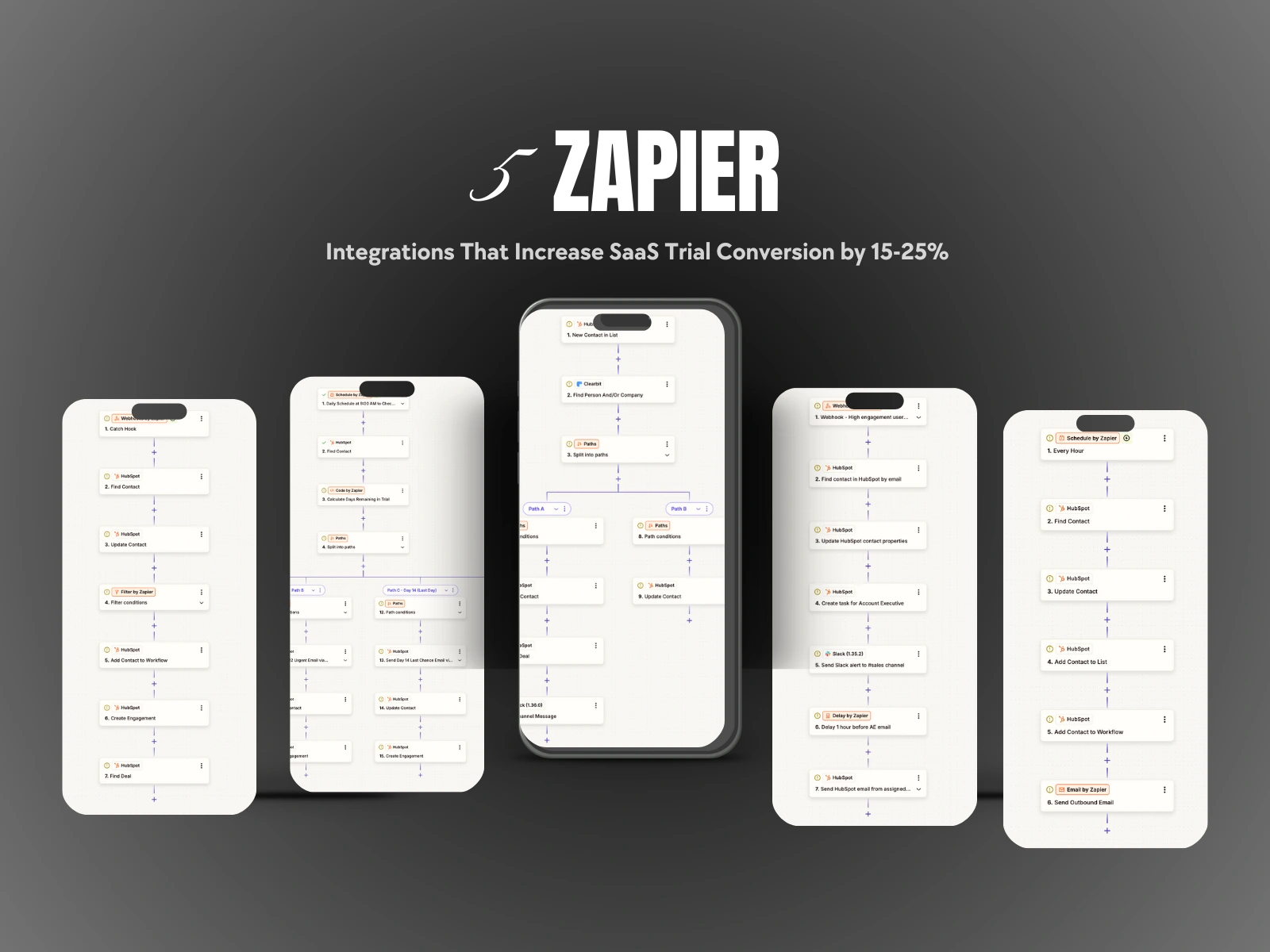
INTEGRATION 1: FAST-TRACK HOT TRIALS
Business Problem
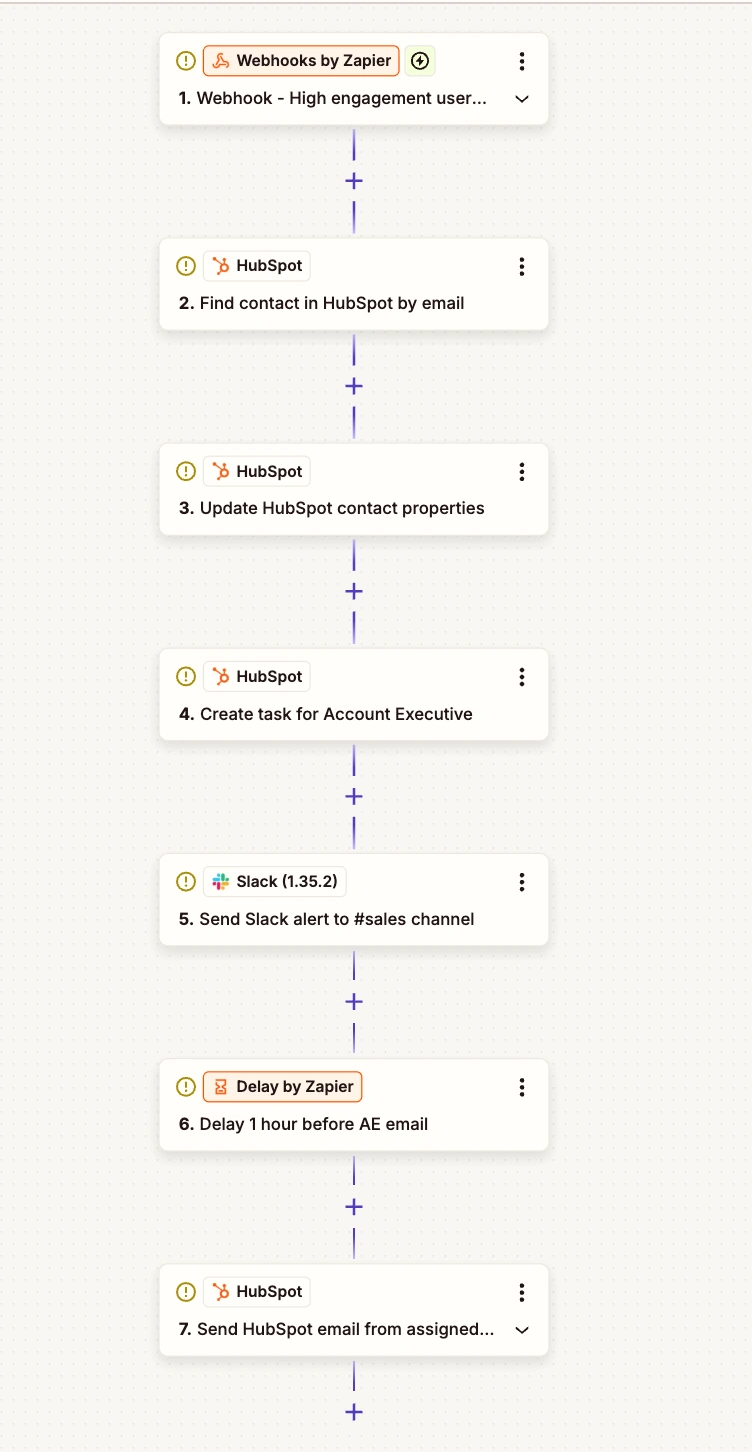
Hot trials
Highly engaged trial users get lost in standard sequences when they should get immediate sales attention.
How It Works
Trigger: Webhook fires when user completes 3+ key activation actions within 24 hours (e.g., creates first project, invites team, completes setup)
Find Contact: Searches HubSpot by email to locate the contact record
Update Properties: Sets "Trial Engagement Level" = "High" and updates lifecycle stage to "Product Qualified Lead"
Create Task: Assigns high-priority task to Account Executive for immediate follow-up
Slack Alert: Sends notification to #sales channel: "🔥 Hot trial: [Name] at [Company] just activated"
Delay: Waits 1 hour
Personal Email: Triggers personalized email from assigned AE offering advanced demo
Business Outcome
Sales engages while user is excited (not 3 days later)
High-intent users convert at 35-40% vs 20% in standard sequence
Zero manual monitoring needed
Tools Connected: Product → Zapier → HubSpot + Slack
INTEGRATION 2: RECOVER INACTIVE TRIALS
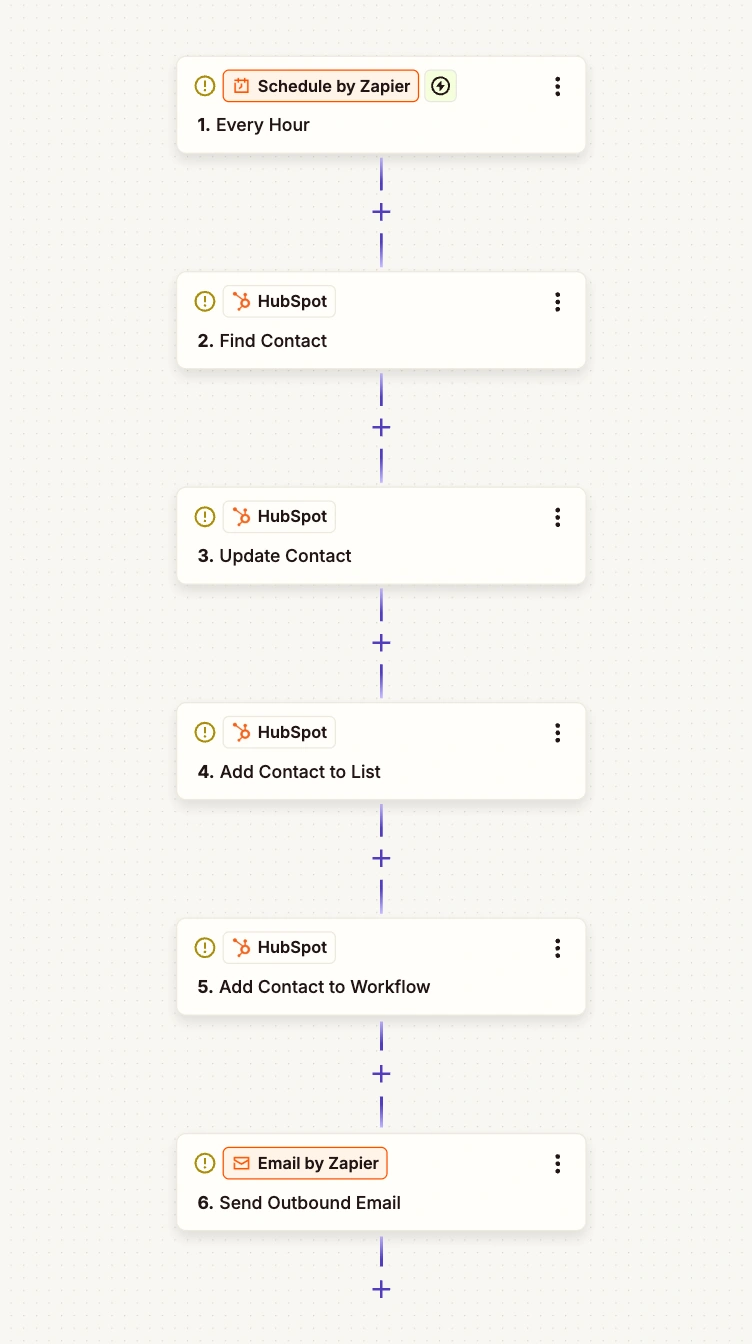
Recover inactive trials
Business Problem Users sign up, explore for 10 minutes, then disappear. Without monitoring, they ghost completely.
How It Works
Trigger: Zapier Schedule runs every hour at 9:00 AM
Find Contacts: Searches HubSpot for trial users with no login activity for 48+ hours
Update Status: Changes contact property to "Trial Status" = "At Risk"
Add to List: Adds contact to "Inactive Trial Users" list in HubSpot
Enroll in Workflow: Triggers HubSpot re-engagement sequence:
Email 1 (immediate): "Is something blocking you?"
Email 2 (24 hrs): "Here's what you're missing"
Email 3 (48 hrs): "Can we help?"
Send Email: Notifies Customer Success Manager of inactive trial
Business Outcome
Recovers 15-20% of users who would otherwise churn
Automated intervention saves CSM time
Identifies product friction points through feedback
Tools Connected: HubSpot → Zapier → HubSpot Workflows
INTEGRATION 3: ENTERPRISE VIP TREATMENT
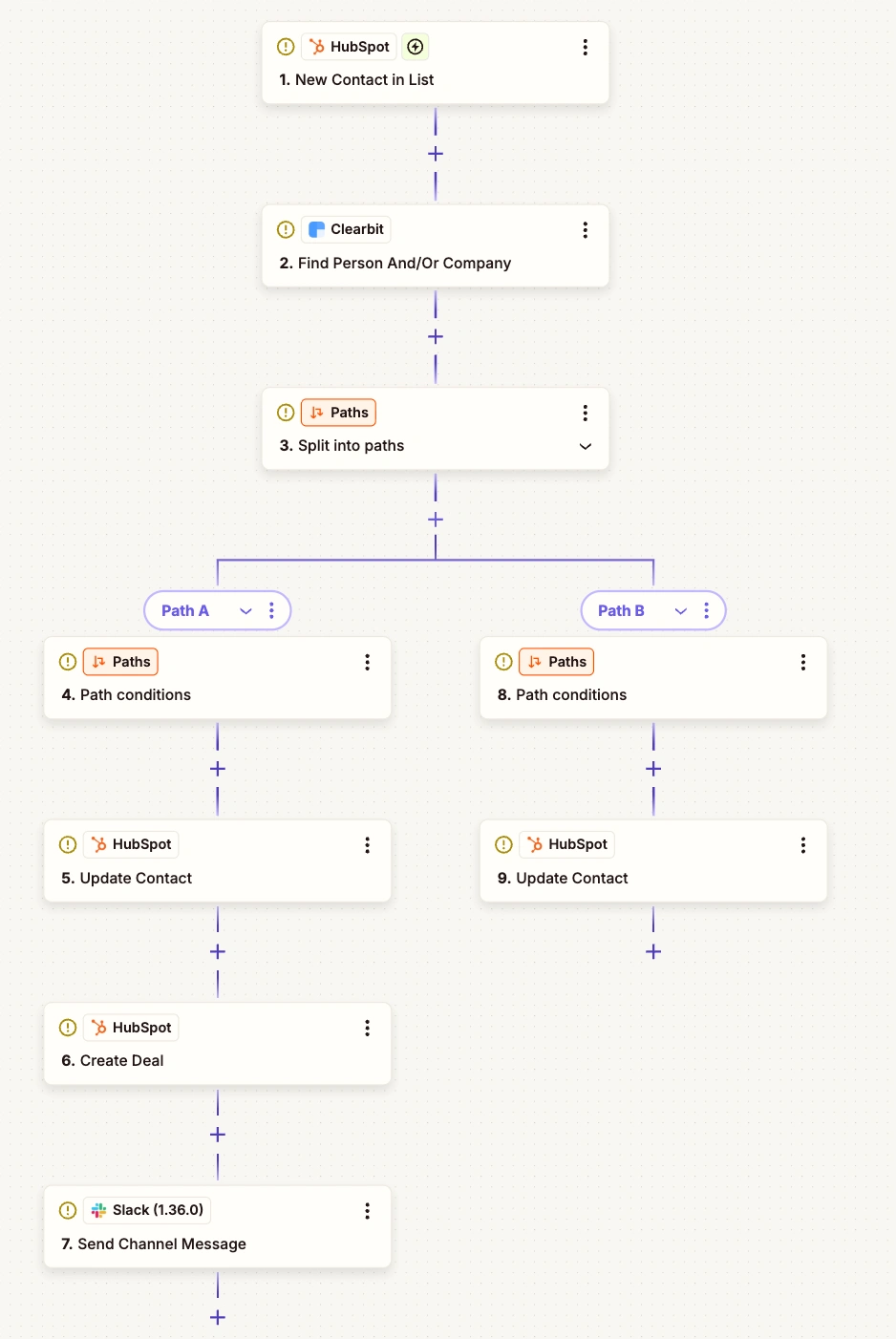
Enterprise VIP
Business Problem Enterprise prospects get same treatment as solo users. Need to fast-track high-value opportunities.
How It Works
Trigger: New contact created in HubSpot with lifecycle stage = "Trial User"
Enrich Data: Uses Clearbit to pull company size, revenue, industry, employee count
Split Paths: Conditional logic evaluates if enterprise criteria met (50+ employees, target industry, or enterprise email domain)
Path A - Enterprise Criteria Met: 4. Update "Account Tier" = "Enterprise" 5. Assign to Enterprise AE (round-robin) 6. Create deal in Enterprise pipeline with estimated value 7. Remove from standard email sequences 8. Send personal welcome from Enterprise AE with Calendly link 9. Slack notification to #enterprise-sales with company details
Path B - Standard Criteria: Continue with normal trial sequence
Business Outcome
Enterprise deals get white-glove treatment immediately
25-30% close rate on enterprise accounts vs 15% standard
Prevents generic emails to high-value prospects
Tools Connected: HubSpot → Zapier → Clearbit → HubSpot + Slack
INTEGRATION 4: UPSELL POWER USERS
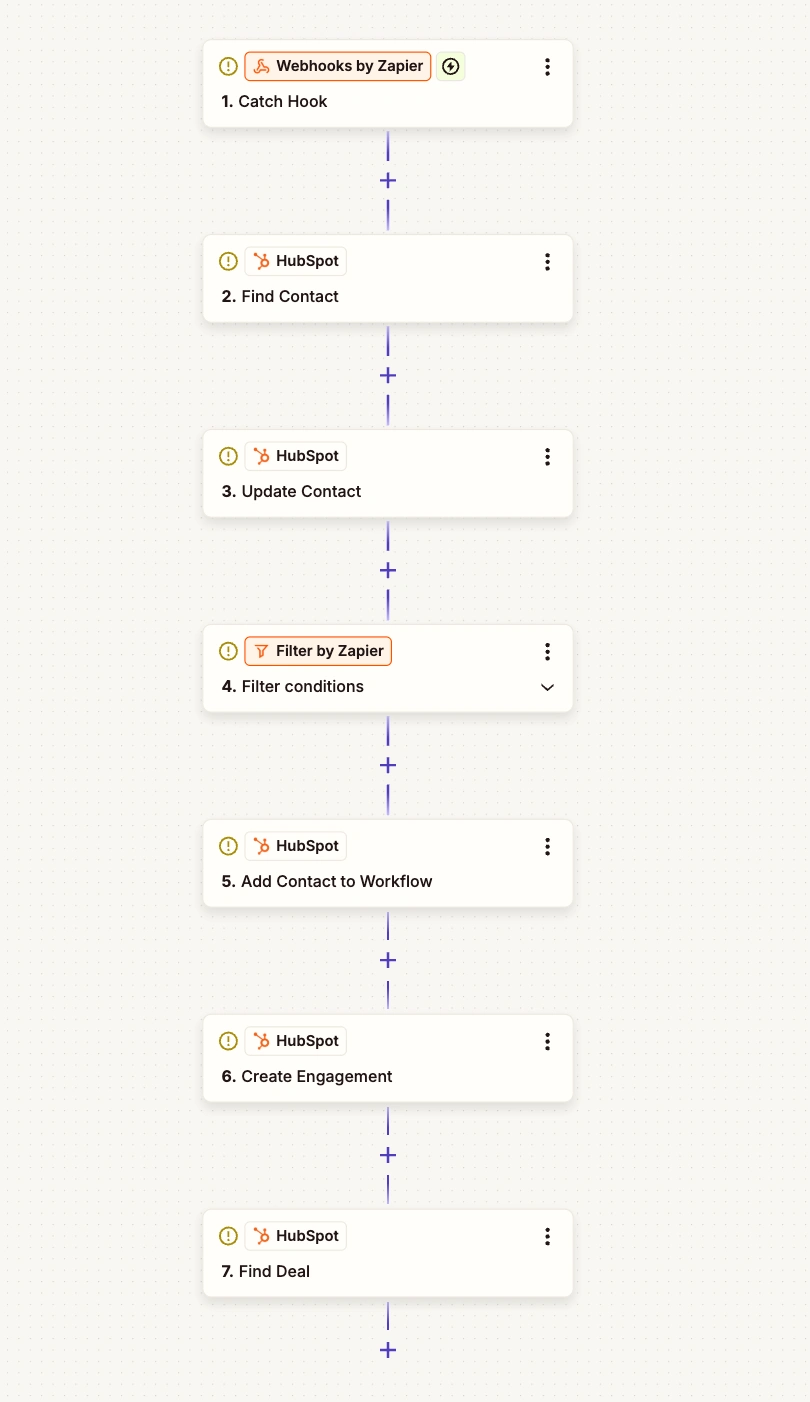
Business Problem Users activate core features but never discover premium features that drive upgrades.
How It Works
Trigger: Webhook from product when user crosses power user threshold (10+ projects, 50+ actions, etc.)
Find Contact: Searches HubSpot by email
Update Score: Sets "Feature Adoption Score" based on webhook data
Filter: Only continues if adoption score ≥ 75
Add to Workflow: Enrolls in HubSpot workflow that sends targeted email showcasing premium features relevant to their usage
Find Deal: Locates or creates opportunity in pipeline
Create Engagement: Logs activity on contact record
If user clicks premium feature link:
Creates task for AE: "Demo premium features to power user"
Updates deal stage: "Expansion Opportunity"
Business Outcome
Converts 12-18% of free/basic users to premium tiers
Identifies upsell opportunities automatically
Personalizes expansion messaging based on actual behavior
Tools Connected: Product Usage API → Zapier → HubSpot
INTEGRATION 5: TRIAL COUNTDOWN URGENCY
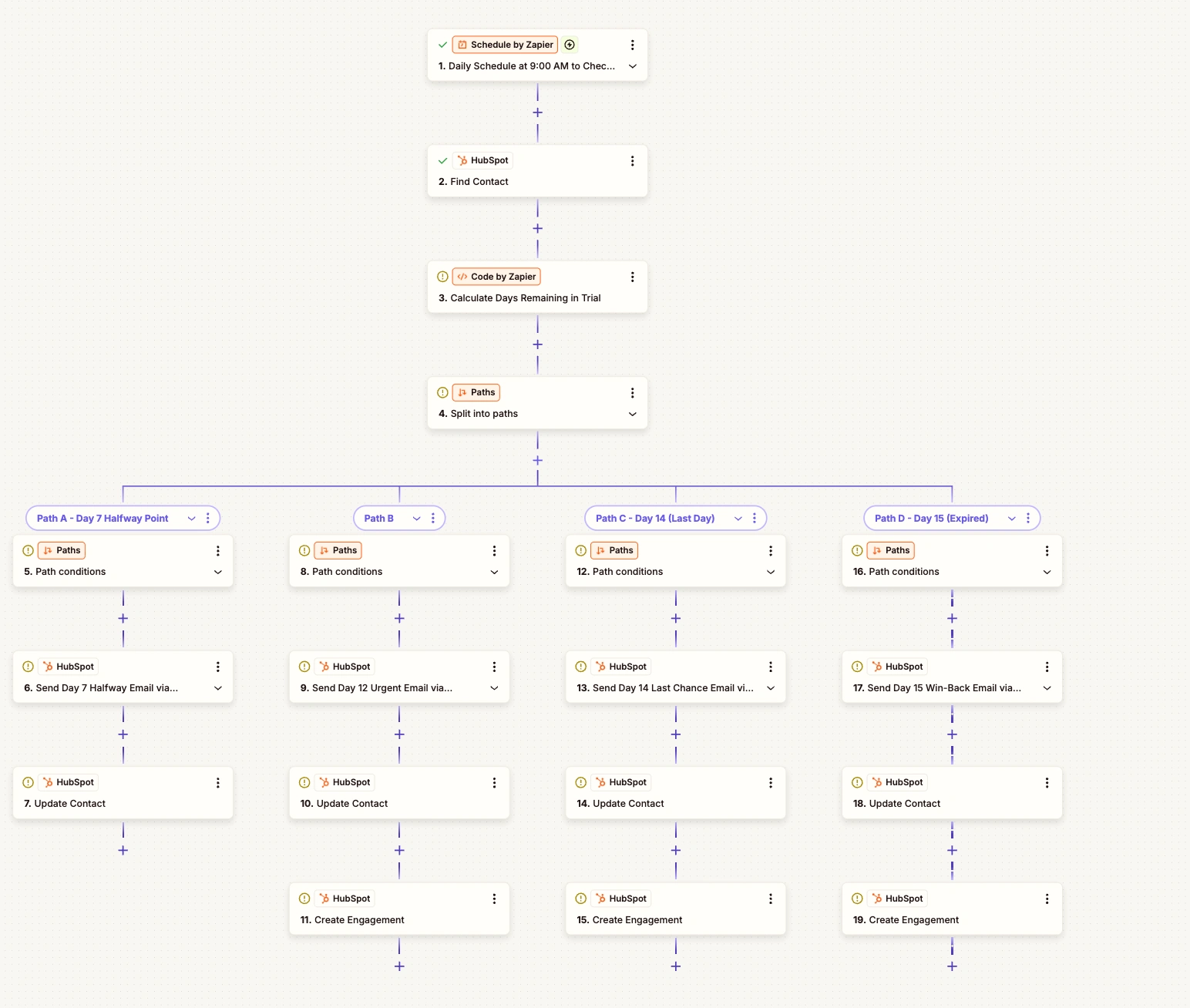
Trial countdown urgency
Business Problem Users lose track of trial end date. Conversion rate drops because urgency isn't clear.
How It Works
Trigger: Daily schedule at 9:00 AM checks all trial users
Find Contacts: Searches HubSpot for active trial users
Calculate Days: Uses Code by Zapier to compute (Trial Start Date + 14) - Today
4-Way Path Split: Routes to different sequences based on days remaining:
Path A - Day 7 (Halfway):
Email: "You're halfway through your trial"
Offer demo booking
Update milestone property
Path B - Day 12 (2 Days Left):
Email: "2 days left - here's what you've accomplished"
Include ROI calculator
Offer 20% discount
Create AE follow-up task
Path C - Day 14 (Last Day):
Email: "Your trial ends tonight"
Extreme urgency messaging
One-click upgrade button
High-priority AE task
Path D - Day 15 (Expired):
Update status to "Trial Expired"
Email: "Restore your access"
Offer 7-day extension or win-back discount
Create CSM win-back task
Business Outcome
Creates clear urgency at key moments
Prevents "forgot my trial was ending" drop-offs
25% increase in Day 12-14 conversion spike
Recovers 8-12% who expired but still interested
Tools Connected: Zapier Scheduler → HubSpot → Code by Zapier
Like this project
Posted Nov 29, 2025
Implemented automated workflows to enhance trial user engagement and conversion.