Built with FlutterFlow
Nourish Devotional | Faith-Based Audio App & Admin Panel

Gokul Shivappa


Nourish Devotional | Faith-Based Audio App & Admin Panel
"Rooted in Scripture. Growing in grace."
Nourish Devotional — Daily Devotional App & Admin Panel
Built for Sean Coley
Client Review
OVERVIEW
Nourish Devotional is a non-profit faith-based audio platform dedicated to helping Christians cultivate daily growth in their faith. It delivers scripture-grounded teachings organized into thematic albums — designed to bring continuity, consistency, and spiritual renewal to everyday life. Users listen to curated devotional episodes, track their spiritual journey, and access content on any device. The app is built around a freemium model — select albums are available free, while premium content is unlocked through a subscription.
The platform ships with a full Admin Panel so the founder can independently upload albums, manage episodes, and oversee users — without needing a developer for day-to-day operations.
THE CHALLENGE
Sean needed a way to bring his devotional teachings to a global audience through a polished, professional app — without a technical co-founder and on a bootstrap budget. The core requirements were:
Audio-first experience — scripture-based teachings delivered as listenable episodes organized by topic
Freemium monetization — some content free to draw users in, premium subscription for full access
Persistent progress — users resume exactly where they left off, even across devices
Founder independence — a full admin panel to upload content, manage users, and run the business solo
Cross-platform reach — one codebase delivering iOS, Android, and Web
App Store compliance — proper subscription handling through RevenueCat
WHAT WAS BUILT
Authentication & Onboarding
Users sign up or log in with email and password. First-time users see a video-based onboarding screen with an introduction to the app and its mission. After completing onboarding, they land directly on the personalized home screen.
Home Screen
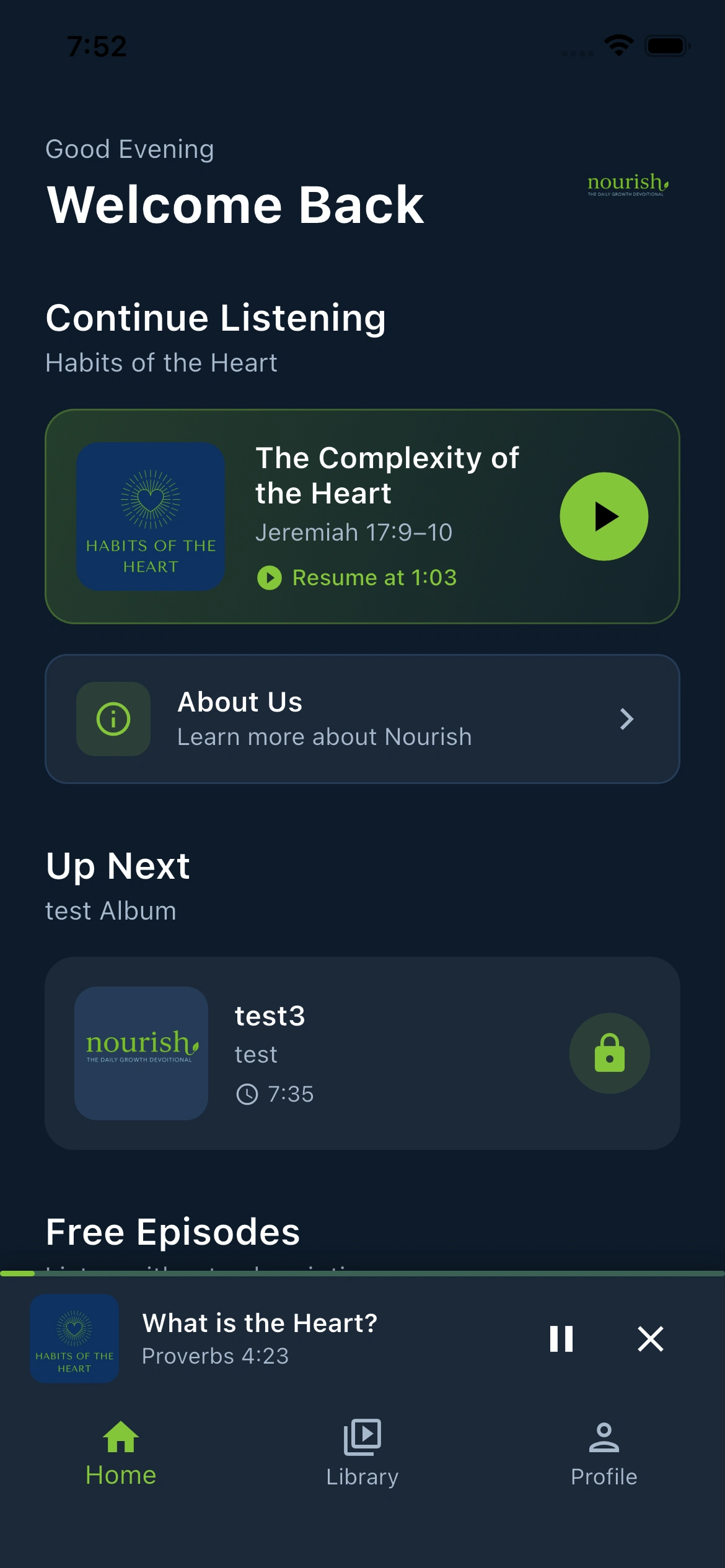
The home screen adapts to where each user is in their journey:
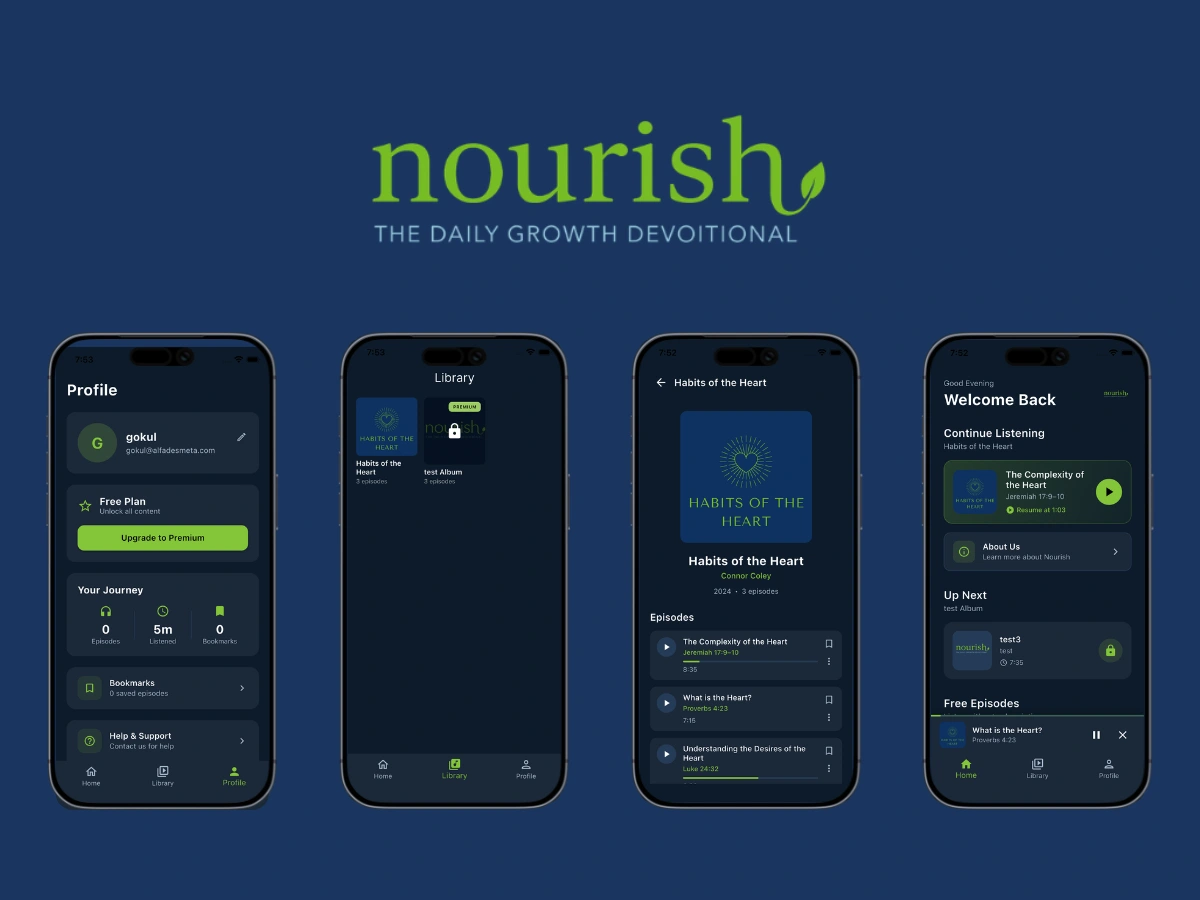
Continue Listening — picks up the exact episode and timestamp the user last left off, displaying the scripture reference as a subtitle (e.g., Jeremiah 17:9-10). One tap resumes playback immediately.
About Us — accessible from home, this links back to the founder's introduction video and mission statement.
Up Next — automatically suggests the next unlistened episode, pulling intelligently from the current album or rolling over to the next one when an album is completed.
Free Episodes — a horizontal scroll of free content, always visible to non-subscribers. Each card shows a FREE badge and a play button. Tapping a locked episode takes the user to the paywall.
The Mini Player persists at the bottom of the screen while audio is playing, showing the current episode title, scripture reference, and playback controls.
Library
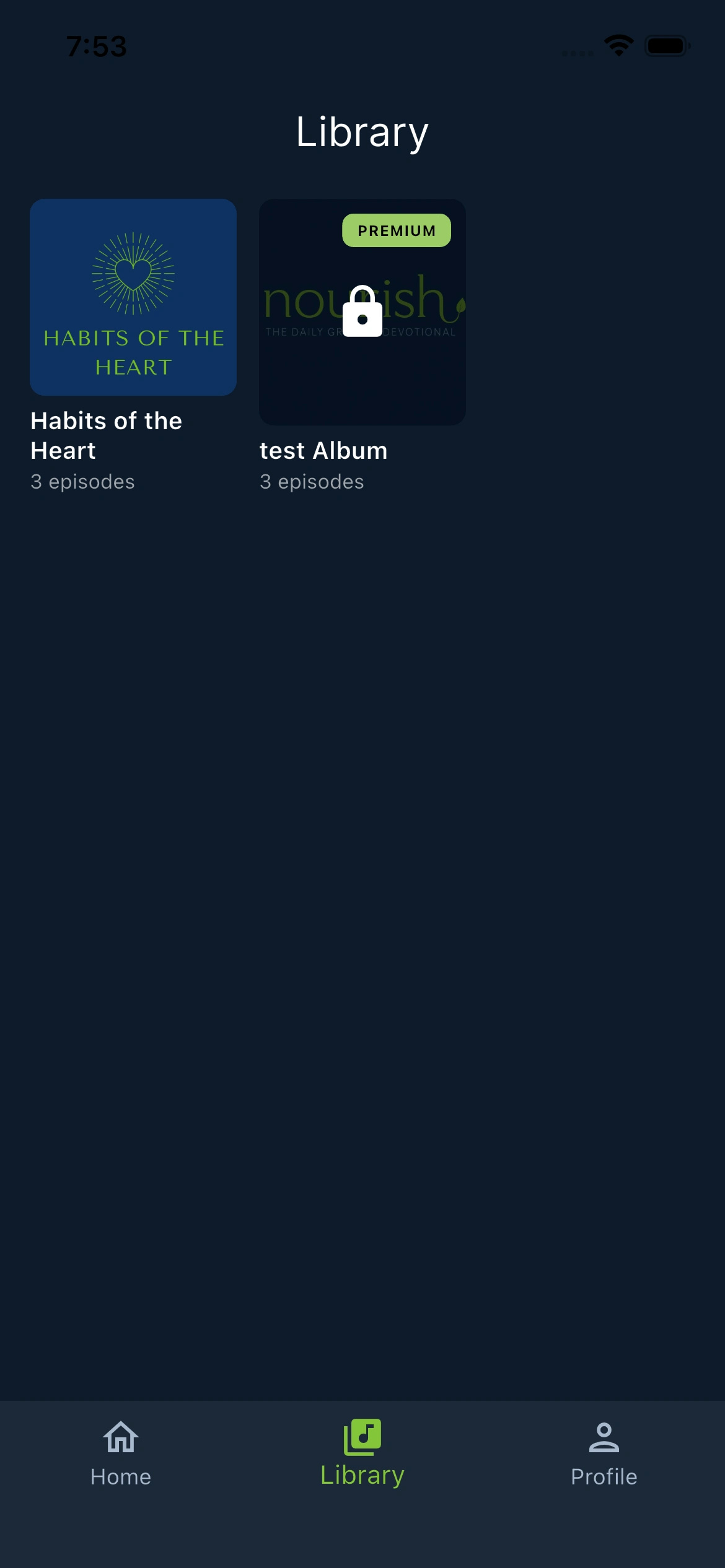
The Library displays all albums in a grid. Free albums are immediately accessible. Premium albums display a lock icon and a PREMIUM badge — tapping them surfaces the subscription paywall rather than blocking silently.
Album Detail & Episode List
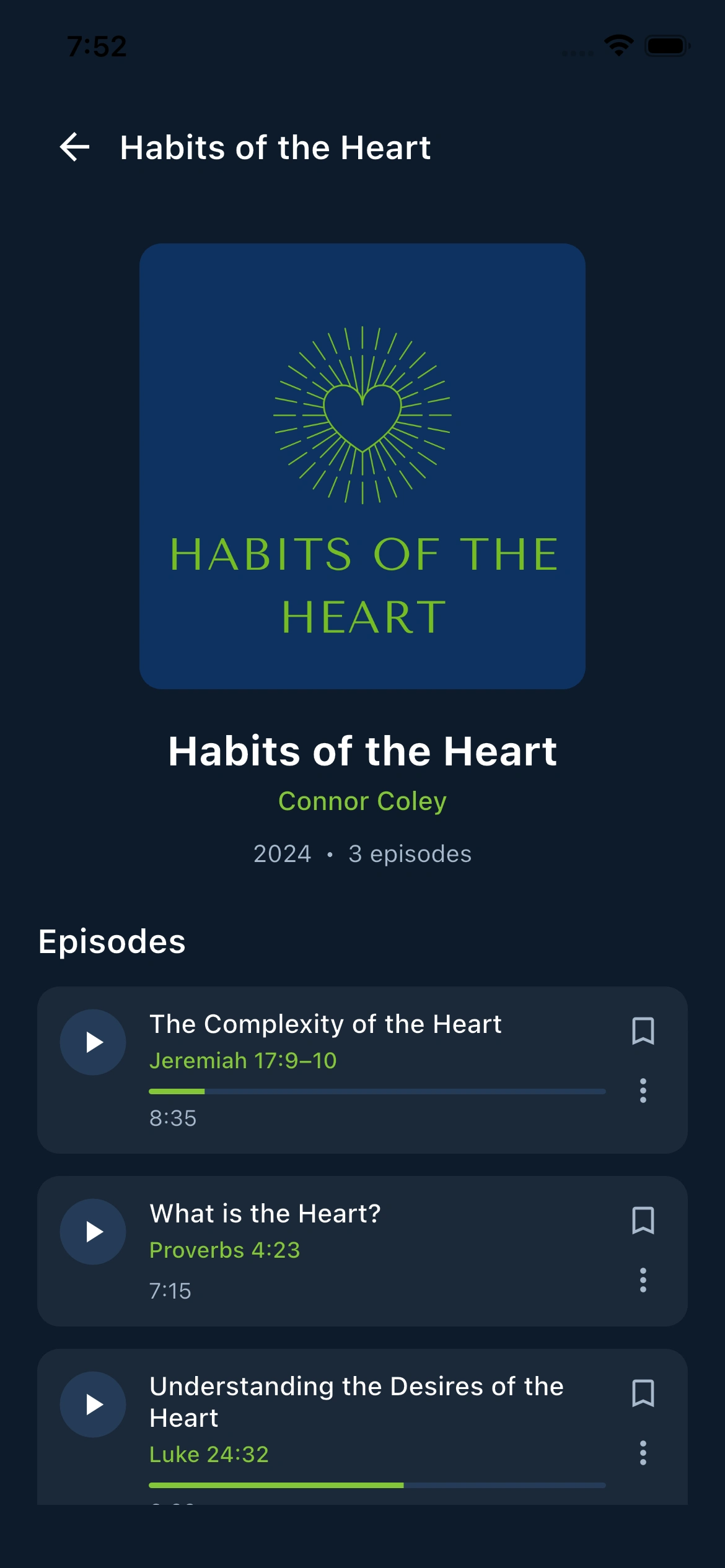
Each album opens into a detail page showing:
Album cover and metadata (artist name, year, episode count)
PREMIUM badge on restricted albums
Episode list with title, scripture reference as subtitle, duration, and listening progress
Progress bar under each partially-listened episode
Listened badge on completed episodes
Bookmark toggle per episode
Play/Pause button that responds to the current player state (highlights active episode)
Episodes are scripture-keyed — the subtitle always shows the biblical reference (e.g., Proverbs 4:23, Luke 24:32), reinforcing the devotional nature of the content.
Audio Player
The audio player has two modes that transition seamlessly:
Mini Player (persistent bar at bottom of screen)
Thin progress bar at the very top
Album art thumbnail, episode title, scripture reference
Play/Pause and close buttons
Tapping expands to full-screen
Expanded Player (full screen)
Large album artwork
Episode title and scripture reference
Seek bar with buffered position and elapsed/total time
10-second skip backward and forward
Bookmark and Mark as Listened toggles
Collapse back to mini player
Background audio is fully supported — audio continues when the app is minimized, and lock screen controls work on mobile.
User Profile
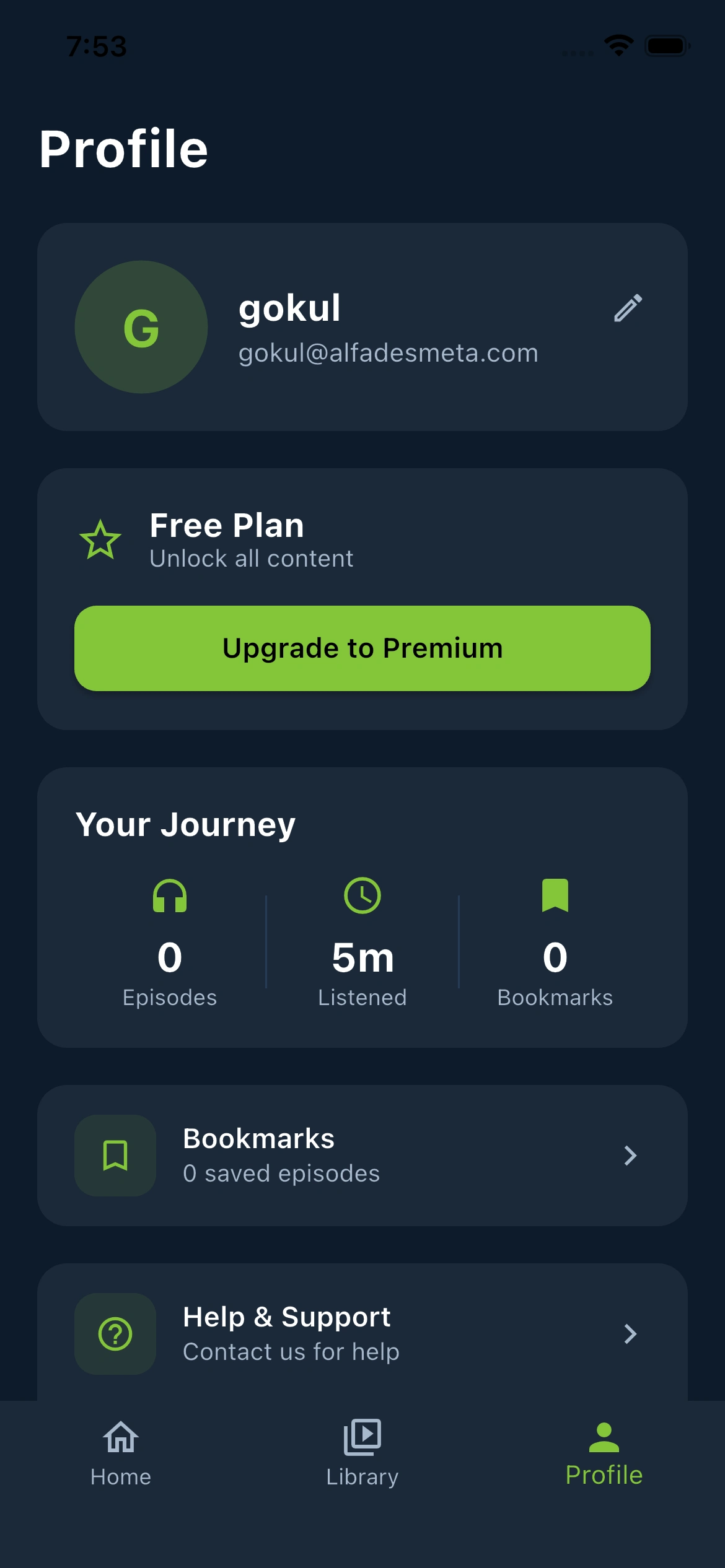
The profile page brings together the user's full account view:
Profile Card — avatar with initials, display name (editable inline), and email address.
Subscription Card — shows Free Plan or Premium Member status. Free users see an "Upgrade to Premium" button. Premium users see their plan type (Monthly/Annual) and a manage subscription option.
Your Journey — three stats: Episodes listened, total listening time, and bookmarks saved.
Bookmarks — opens a full-screen slide-up view of all bookmarked episodes, each playable directly from the list.
Help & Support — shows contact email with a one-tap copy button.
Terms & Privacy — direct links to legal pages.
Sign Out — confirmation dialog before logging out.
Delete Account — requires typing "DELETE" to confirm; calls a Supabase Edge Function that cascades through all user data before removing the auth record.
Paywall
RevenueCat handles the full purchase flow natively on iOS and Android, with subscription status synced back to Supabase for admin visibility.
ADMIN PANEL
The admin panel is a separate web application giving Sean complete control over the platform without developer involvement.
Dashboard
The dashboard shows live counts of total users, premium subscribers, albums, and episodes. Quick action buttons navigate to each management section. Recent users and recently added albums display below.
User Management
A searchable, filterable user list with:
Email and name display
Role assignment (User / Admin)
Subscription status toggle (Free / Premium)
Sort by name, join date, or subscription status
Responsive: sortable data table on desktop, card list on mobile
Content Management
Albums and episodes are managed through a single content page.
Albums view:
Grid of all albums with cover images
Create and edit via dialog (title, description, cover image upload, display order, free/premium toggle)
Delete with confirmation
Clicking an album drills down into its episodes
Episodes view (within an album):
Episode list with audio playback for previewing
Create and edit episodes (title, scripture reference as subtitle, description, audio file upload, cover image, episode number)
Drag-and-drop reordering
Delete with confirmation
All file uploads go directly to Supabase Storage. Audio duration is auto-detected on upload.
TECHNICAL ARCHITECTURE
Stack
Frontend Framework: FlutterFlow (no-code base) + custom Dart code
Database: Supabase (PostgreSQL)
Auth: Supabase Auth (Email/Password)
Storage: Supabase Storage
Serverless Functions: Supabase Edge Functions (Deno/TypeScript)
Subscriptions: RevenueCat (iOS + Android)
Audio Playback: Just Audio + Audio Service
State Management: Flutter BLoC (audio player)
Deployment: App Store & Play Store Deployment
Audio Architecture
The audio system was the most technically complex part of the build. A custom BLoC-based state machine handles:
Singleton player instance shared across the entire app so playback continues as the user navigates
Background audio via audio_service — plays through lock screen and notification controls
Real-time position streaming into the player UI without polling
Buffered position display so users can see what is loaded ahead
Resume from timestamp — progress is saved to Supabase on pause and app exit, then picked up from there on next open
Album-aware sequencing — "Up Next" logic knows what album the user is in and what episode number they are on
RESULTS
What Was Unlocked for the Founder
Production app shipped without a technical co-founder
App live on both the App Store and Google Play
Content uploaded and managed independently through the admin panel
Subscription revenue enabled on day one via RevenueCat
User base can grow without infrastructure changes
Full account management (roles, subscriptions, deletion) without developer involvement
Cross-platform reach from a single codebase
DELIVERABLES
User app — live on iOS App Store and Google Play
Admin web app — full content and user management
Complete source code
Post-launch support and iteration
CLIENT REVIEW
"Gokul did an outstanding job delivering an app and music player that not only positioned us well for launch, but also established a strong foundation for future growth and development. I look forward to working with Gokul again in the future. His work ethic, integrity, and ingenuity are exceptional, and you will not be disappointed in the quality of his efforts."
— Sean Coley, Founder of Nourish Devotional (May 2026)
Built by Alfadesmeta
Like this project
Posted May 7, 2026
Built a faith-based audio devotional app with custom audio player, subscription paywall, and full admin panel. Live on iOS and Android.