Microsoft 365 Setup, Security & Intune Device Management

Abhishek Anand


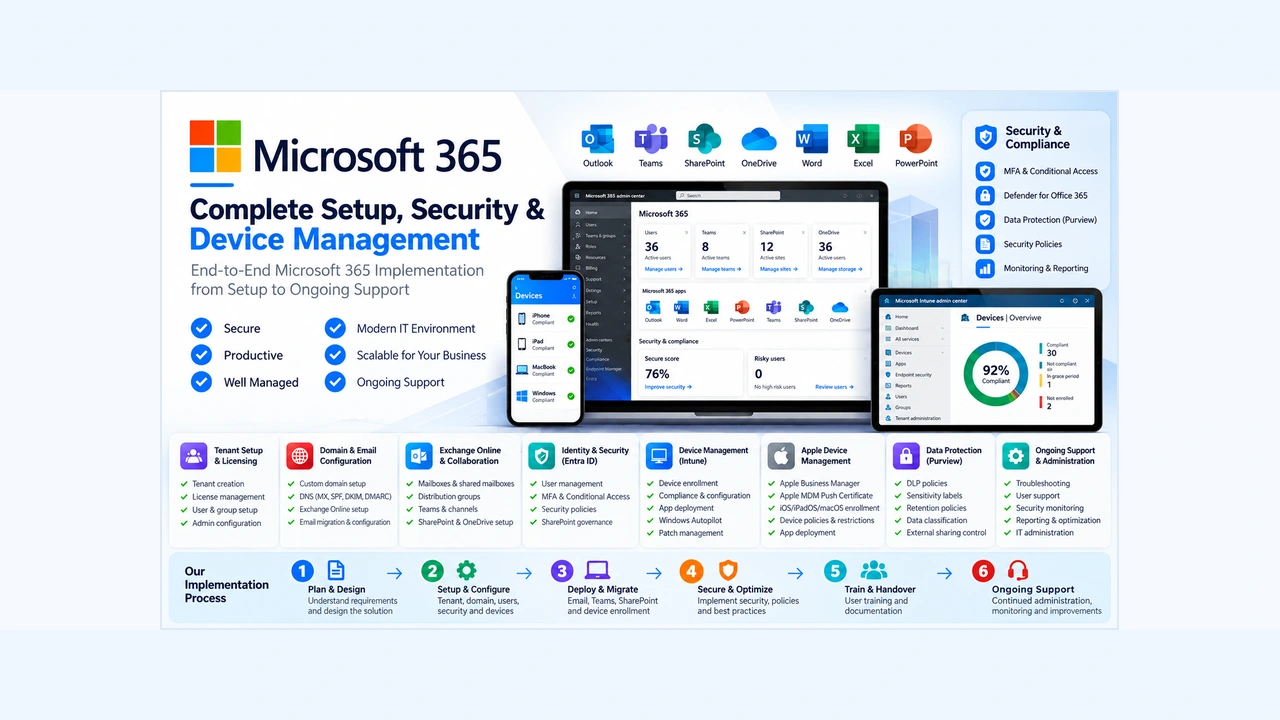
Microsoft 365 – Complete Implementation, Security & IT Administration
This project covers the end-to-end implementation, configuration, security and ongoing administration of Microsoft 365 for a business environment.
The objective is to establish a secure, reliable and centrally managed IT environment where employees can access company resources, collaborate efficiently and work across Windows, macOS, iOS and Android devices.
The implementation covers everything from initial Microsoft 365 tenant setup, domain configuration and email services to Microsoft Entra ID, Microsoft Defender, Intune, Windows Autopilot, Apple Business Manager and ongoing IT security management.
Microsoft 365 Tenant Setup & Initial Configuration
The foundation of a secure Microsoft 365 environment starts with the correct tenant configuration.
Scope of implementation:
Microsoft 365 tenant creation and initial configuration.
Organisation information and administrative settings.
User account creation and management.
Security administrator and Global Administrator configuration.
Microsoft 365 license assignment and optimization.
Security defaults and authentication configuration.
User groups and distribution groups.
Administrative roles and permissions.
Microsoft 365 Admin Center configuration.
Initial tenant security assessment.
Custom Domain & DNS Configuration
Configure the company's business domain to work correctly with Microsoft 365 services.
Scope of implementation:
Custom domain addition and verification.
DNS record configuration.
MX records for Exchange Online.
SPF configuration for email authentication.
DKIM configuration for email protection.
DMARC configuration and monitoring.
Domain ownership verification.
Email routing and delivery testing.
Review of trusted and approved email domains.
Exchange Online & Email Administration
Configure and manage business email services with appropriate access controls and security policies.
Scope of implementation:
Exchange Online configuration.
User mailbox creation and management.
Shared mailbox setup.
Distribution lists and mail-enabled security groups.
Mailbox permissions and delegation.
Email migration and configuration.
Mail flow rules and transport policies.
Email forwarding restrictions.
Quarantine and spam management.
Mailbox auditing and forwarding reviews.
Email retention and archiving configuration where required.
Microsoft Teams & Collaboration
Set up a structured collaboration environment for internal teams and external communication.
Scope of implementation:
Microsoft Teams configuration.
Team and channel creation.
User access and permissions.
External and guest access configuration.
Meeting and messaging policies.
Teams administration.
Microsoft Teams integration Phone call setups.
Collaboration and file-sharing controls.
SharePoint Online & OneDrive
Implement centralized document management with appropriate access and sharing controls.
Scope of implementation:
SharePoint site creation and configuration.
Department-wise document libraries.
SharePoint user permissions.
OneDrive account configuration.
Internal and external sharing policies.
Document access management.
File synchronization and collaboration.
Data migration and document organization.
Review of external sharing permissions.
Microsoft Entra ID – Identity & Access Management
Establish centralized identity management and secure authentication for all employees.
Scope of implementation:
User and group management.
Microsoft Entra ID configuration.
Multi-Factor Authentication (MFA).
Microsoft Authenticator and passkey authentication.
Conditional Access policies.
Named Locations and approved country restrictions.
Sign-in risk monitoring.
Risky user identification and response.
Administrative role management.
Enterprise application access review.
Authentication method management.
User access review and permission management.
Microsoft Defender & Email Security
Strengthen email and endpoint protection against phishing, malware, suspicious links and unauthorized access.
Scope of implementation:
Microsoft Defender security configuration.
Standard protection policies.
Safe Links protection.
Safe Attachments protection.
Anti-phishing and spam protection.
Email quarantine policies.
Suspicious sender and domain filtering.
Malicious attachment protection.
External email forwarding restrictions.
Email security rules and policy reviews.
Defender alerts and security monitoring.
Microsoft Intune – Endpoint & Device Management
Implement centralized device management to control company laptops, desktops and mobile devices.
Scope of implementation:
Microsoft Intune tenant configuration.
Device enrollment and registration.
Windows device management.
macOS device management.
iOS and Android enrollment.
Device compliance policies.
Device configuration profiles.
Security and password policies.
Application deployment and management.
Remote device lock and wipe.
Device restrictions and access controls.
Windows update management.
BitLocker encryption policies.
Device inventory and compliance reporting.
Windows Autopilot & Device Deployment
Simplify employee onboarding through standardized and automated Windows device provisioning.
Scope of implementation:
Windows Autopilot configuration.
Device registration and deployment profiles.
Enrollment Status Page configuration.
Automated device enrollment.
Application deployment during onboarding.
Windows configuration and security policies.
Device naming and assignment.
User-driven device setup.
Testing and troubleshooting of deployment.
Apple Business Manager & Apple MDM
Extend centralized IT management to Apple devices using Apple Business Manager and Microsoft Intune.
Scope of implementation:
Apple Business Manager setup and configuration.
Organisation verification and management.
Apple MDM Push Certificate setup and renewal.
Integration between Apple Business Manager and Microsoft Intune.
Automated Device Enrollment (ADE).
iPhone and iPad enrollment.
macOS device enrollment.
Apple device configuration policies.
Application deployment and management.
Corporate device restrictions.
Device compliance and security policies.
Managed Apple account and device management planning.
Microsoft Purview & Data Protection
Improve data protection and control how sensitive business information is accessed, stored and shared.
Scope of implementation:
Microsoft Purview configuration.
Data Loss Prevention (DLP) policies.
Sensitivity labels.
Data classification.
Retention policies.
Sensitive information protection.
External sharing controls.
Data governance and compliance reviews.
Document protection and access restrictions.
Microsoft 365 Applications & Automation
Configure additional Microsoft 365 applications to improve business productivity and automate routine processes.
Applications and services:
Microsoft Word, Excel and PowerPoint.
Microsoft Forms.
Microsoft Planner.
Microsoft Bookings.
Power Automate.
Power BI integration.
Microsoft Lists.
Microsoft Loop.
Microsoft 365 application administration.
Workflow automation and notifications.
Application permissions and access management.
Features and availability depend on the organisation's Microsoft 365 licensing.
Microsoft 365 – 20 Security Measures
The following security controls form part of the Microsoft 365 security hardening and ongoing monitoring approach.
Identity & Access Security
MFA for All Users: Enforce Multi-Factor Authentication for all users, primarily using Microsoft Authenticator and passkey-based authentication.
Conditional Access: Configure access policies based on location, authentication and security requirements, including a seven-day sign-in period where applicable.
Named Locations: Configure approved countries and locations in Microsoft Entra to restrict sign-ins from unapproved locations.
Location-Based Security: Review location-based authentication, including GPS-based verification where appropriate. IP-based location controls are retained where GPS verification causes user access issues.
Risky User Protection: Monitor risky users in Entra ID and require password resets and MFA re-verification when necessary.
Approved Device Management: Register and manage approved company devices through Entra ID and Intune, with phased device enrollment.
Email & Microsoft Defender Security
Microsoft Defender Protection: Enable and maintain appropriate Microsoft Defender protection policies.
Safe Links: Protect users from malicious and suspicious links in emails and supported Microsoft 365 applications.
Safe Attachments: Scan email attachments for malicious content using Microsoft Defender protection.
Quarantine & Spam Protection: Strengthen quarantine policies to hold suspicious emails for review.
Suspicious Domain Filtering: Send emails from suspicious sender domains, including domains containing numbers, to quarantine for additional review.
HTML Attachment Protection: Apply quarantine rules to emails containing HTML/HTM attachments to reduce phishing risks.
External Forwarding Disabled: Disable automatic external email forwarding to prevent unauthorized sharing of company information.
Trusted Domain Management: Review known and frequently used domains while maintaining security filtering for unknown and suspicious senders.
Monitoring & Account Security
Sign-in Monitoring: Review sign-in activity, failed login attempts, unusual locations, devices and authentication activity.
Security & Audit Log Review: Review audit logs for suspicious sign-ins, administrator activity and security configuration changes.
Mailbox Rules & Forwarding Review: Check mailbox rules and forwarding settings to identify unauthorized forwarding or suspicious inbox rules.
Connected Application Review: Review connected and enterprise applications to ensure third-party applications have only the access they require.
Authentication Method Review: Review and restrict available authentication methods, with a focus on Microsoft Authenticator and passkey-based authentication.
Overall Email Security Review: Regularly review spam protection, quarantine settings, email authentication and security policies.
Security Monitoring & IT Administration
Security is an ongoing process, not a one-time configuration.
Ongoing activities include:
Daily review of important security alerts.
Sign-in and authentication monitoring.
Risky user and suspicious login investigation.
Email quarantine review.
Defender security alert investigation.
Mailbox forwarding and inbox rule reviews.
Enterprise application permission reviews.
License and user access reviews.
Device compliance monitoring.
Security policy review and improvement.
Documentation of security incidents and resolutions.
IT Support & Service Management
Provide ongoing IT administration and end-user support to maintain a reliable business environment.
Scope of support:
Microsoft 365 user support.
User onboarding and offboarding.
Password and authentication troubleshooting.
Laptop and desktop troubleshooting.
Printer and network troubleshooting.
Email and Outlook support.
Microsoft Teams and SharePoint support.
Intune enrollment troubleshooting.
Application installation and support.
IT ticket management and escalation.
User permissions and access requests.
IT documentation and knowledge base management.
Deliverables
The project can provide the following deliverables depending on the agreed scope:
Configured Microsoft 365 tenant.
Verified business domain and DNS configuration.
Configured Exchange Online and collaboration services.
Microsoft Entra identity and access policies.
MFA and Conditional Access configuration.
Microsoft Defender and email security policies.
Intune enrollment and device management setup.
Windows Autopilot configuration.
Apple Business Manager and Intune integration.
Device compliance and security policies.
Licensing assessment and recommendations.
Security documentation and implementation guides.
Testing, troubleshooting and handover documentation.
Like this project
Posted Oct 31, 2026
End-to-end Microsoft 365 setup, implementation. covering tenant and user setup, Exchange Online. Entra ID security, MFA, Conditional Access, Defender.