Built with Kajabi
Kajabi Funnel and Dashboard for Academia Tips

Poncho Black
Verified


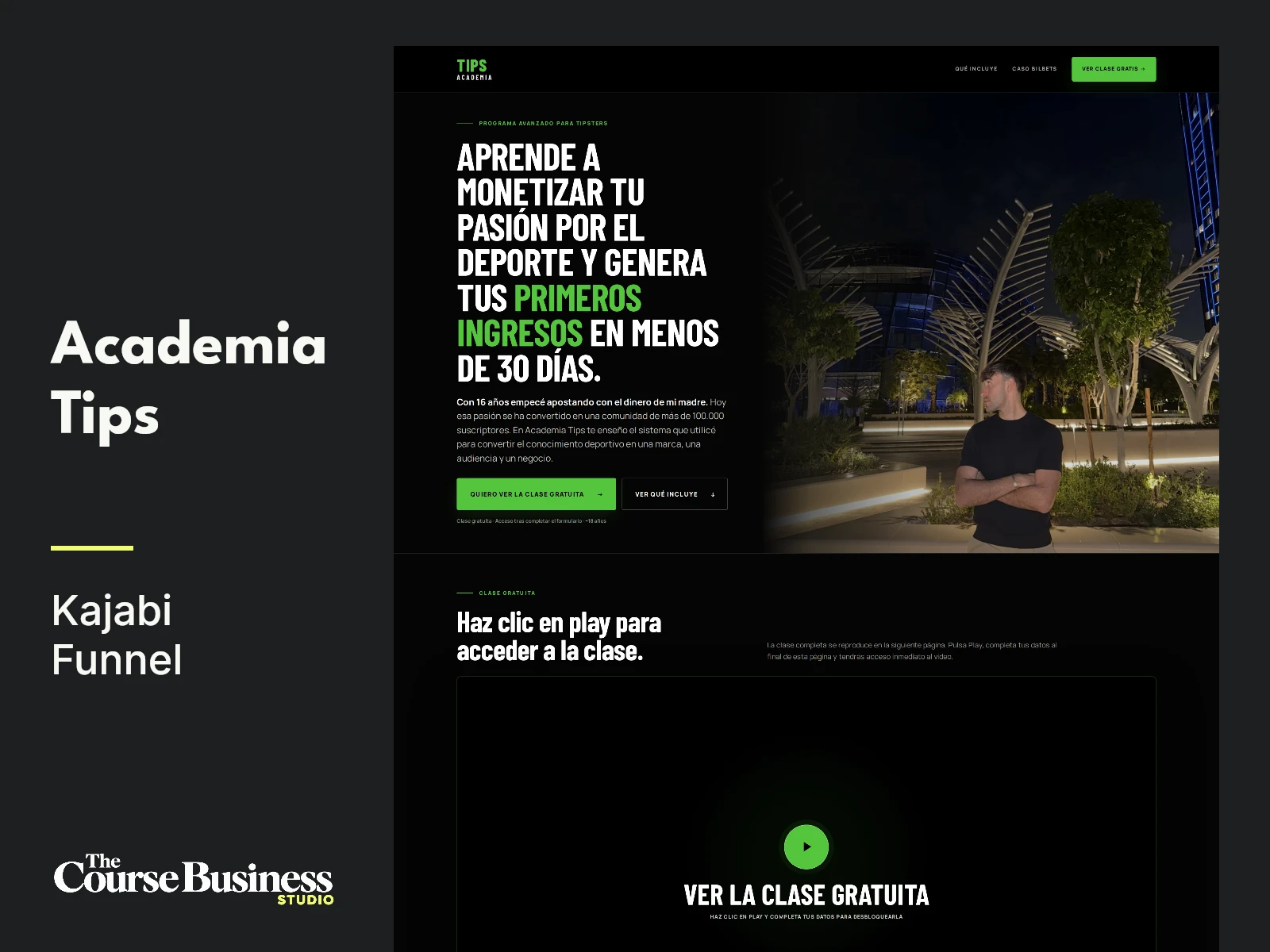
Academia Tips:
Building a Kajabi Funnel Around a Video Masterclass
Academia Tips needed a Kajabi funnel that could introduce its educational offer, collect visitor details, and take registered prospects to a video presentation.
I worked directly with Ernest on the page implementation and revisions. The project included a custom sales page, the registration-to-video flow, a follow-up page, and a branded course dashboard design.
An important part of the brief was the order of the experience. Visitors would see a preview of the video on the sales page, but the full presentation belonged on the next page, after registration. That requirement shaped both the page layout and the interaction around the video.
I handled the custom HTML and CSS, the page connections, the registration interaction, the branding adjustments, and the desktop and mobile refinements.
What the funnel needed to do
The sales page had to introduce Academia Tips and explain the offer before asking visitors to register.
The video was a central part of that experience, but clicking its preview needed to guide people toward the form further down the page. Once they submitted their information, the next page would present the video.
That gave the funnel a straightforward sequence:
Explore the offer on the sales page.
Click the video preview or a registration call to action.
Complete the registration form.
Continue to the next page to watch the presentation.
My work focused on implementing those steps and making the transition between them understandable. The sales page, form, and video page needed to work together as parts of the same journey.
Building the main sales page
I built and revised the sales page around the supplied content and media.
The page brought together the opening message, video preview, offer explanation, supporting material, and registration section. I worked on the arrangement of those elements, their spacing, and the calls to action connecting them.
The registration section needed to remain easy to find within a longer page. Visitors could arrive there through a call to action rather than having to search for the form themselves.
I also implemented changes to the placement of supporting screenshots. Their position mattered because they needed to appear alongside the explanation they supported. A screenshot placed between the relevant introduction and follow-up text could be understood in context, instead of appearing as an unrelated image elsewhere on the page.
These revisions were specific to the sales-page content. I worked through them directly in the implementation as Ernest provided feedback.
Connecting the video preview to registration
One of the more specific requirements was the behavior of the video section.
The sales page showed a preview, but clicking it needed to move visitors to the registration form. The full video presentation would then be shown on the following page.
I worked on that interaction and the connection between form submission and the next step. This involved the clickable preview, the destination within the sales page, and the registration flow itself.
The form required additional troubleshooting during implementation. I worked through issues around its loading and submission behavior, because the page needed to support the intended progression into the video presentation.
This was a functional part of the build. A visually finished page would still fall short of the brief if visitors could not move through the registration step.
The resulting structure separated the preview from the full presentation while keeping them connected through the form.
Refining the Academia Tips branding
The branding also developed through the revision process.
Ernest supplied a visual reference for the logo and requested changes to the colors. I adjusted the design to follow that direction and updated the naming across the assets to use “Academia Tips” consistently.
The logo treatment needed to work in different areas of the experience, including the header and footer. I worked on the arrangement of “Tips” and “Academia” according to the supplied reference.
Those changes carried into the course dashboard design as well. I adapted the colors, logo treatment, interface copy, and naming so the learning environment followed the same brand direction as the public-facing pages.
The dashboard was part of extending the visual identity beyond the sales page. Someone moving from the offer presentation toward the educational experience should recognize the same brand.
My contribution here was the design and customization of that interface, alongside the funnel work.
Working through the mobile video experience
The video preview needed particular attention on mobile, especially on iPhone.
During revisions, an unwanted native play graphic appeared inside the custom play treatment. That changed the appearance of the section and interfered with the intended design.
I worked through revisions to remove that extra graphic and bring the mobile presentation closer to the desktop version.
Another requirement was keeping the moving video preview visible behind the play control. The intended mobile experience included that motion, so the section required more than a static image with a button placed over it.
I used the implementation from the follow-up page as a reference while revising the sales-page preview. That gave the work a concrete comparison point for the requested behavior.
These details became an important part of the project because the video section was both a visual feature and an entry point into registration.
How I handled the implementation
I worked directly on the custom page code and styles, translating feedback into changes to the actual layouts and interactions.
The work covered both presentation and behavior:
Custom sales-page construction and revisions.
Registration section implementation.
Video-preview interactions and page connections.
Follow-up page adjustments.
Placement of supplied supporting media.
Logo, color, and naming updates.
Course dashboard branding.
Mobile video-preview refinements.
The revision process included screenshots, written feedback, and video references. I used those materials to identify the relevant section and work through the requested change.
Some requests involved a local content adjustment. Others affected how a visitor moved through the funnel or how a component behaved on a particular device.
What the project produced
The work produced a custom Kajabi funnel presentation for Academia Tips, with a sales page leading into registration and a separate page for the video presentation.
It also produced a branded course dashboard design and a consistent naming and visual direction across the assets I worked on.
The strongest evidence of the project is the experience itself: the sales-page layout, the registration-to-video sequence, the supplied media in context, and the desktop and mobile versions of the video preview.
This case study documents my design and implementation contribution. The supporting screenshots and walkthrough show what was built and how the parts connect.
Client: Academia Tips / Ernest
Platform: Kajabi
Project type: Funnel implementation and course dashboard customization
My role: Custom page development, branding adjustments, registration-flow implementation, and responsive revisions
Tools and techniques: HTML, CSS, Kajabi forms, video integration, and custom interface styling
If you need a Kajabi funnel built around your offer, send me the content, assets, and the steps you want visitors to take. I handle the implementation and revisions directly.

Academia Tips by Tips El Verde
Like this project
Posted Oct 13, 2026
Developed a Kajabi funnel for Academia Tips, focusing on sales-page design, video interactions, and course branding.
Likes
0
Views
2