Liteboxer: Connected Fitness App UX/UI

Robert Licau


Liteboxer
Designing the app experience for a connected boxing platform, from device setup to everyday training.
Role
Lead UX/UI Designer, Litesport Inc., 2019–2020
Scope
AI conversation UX, Desktop app, Marketing website
Where
$20M
Series A raised in 2021
Hardware + app
Designed as one connected experience
iOS + Android
Across phones and tablets
01 - Brief
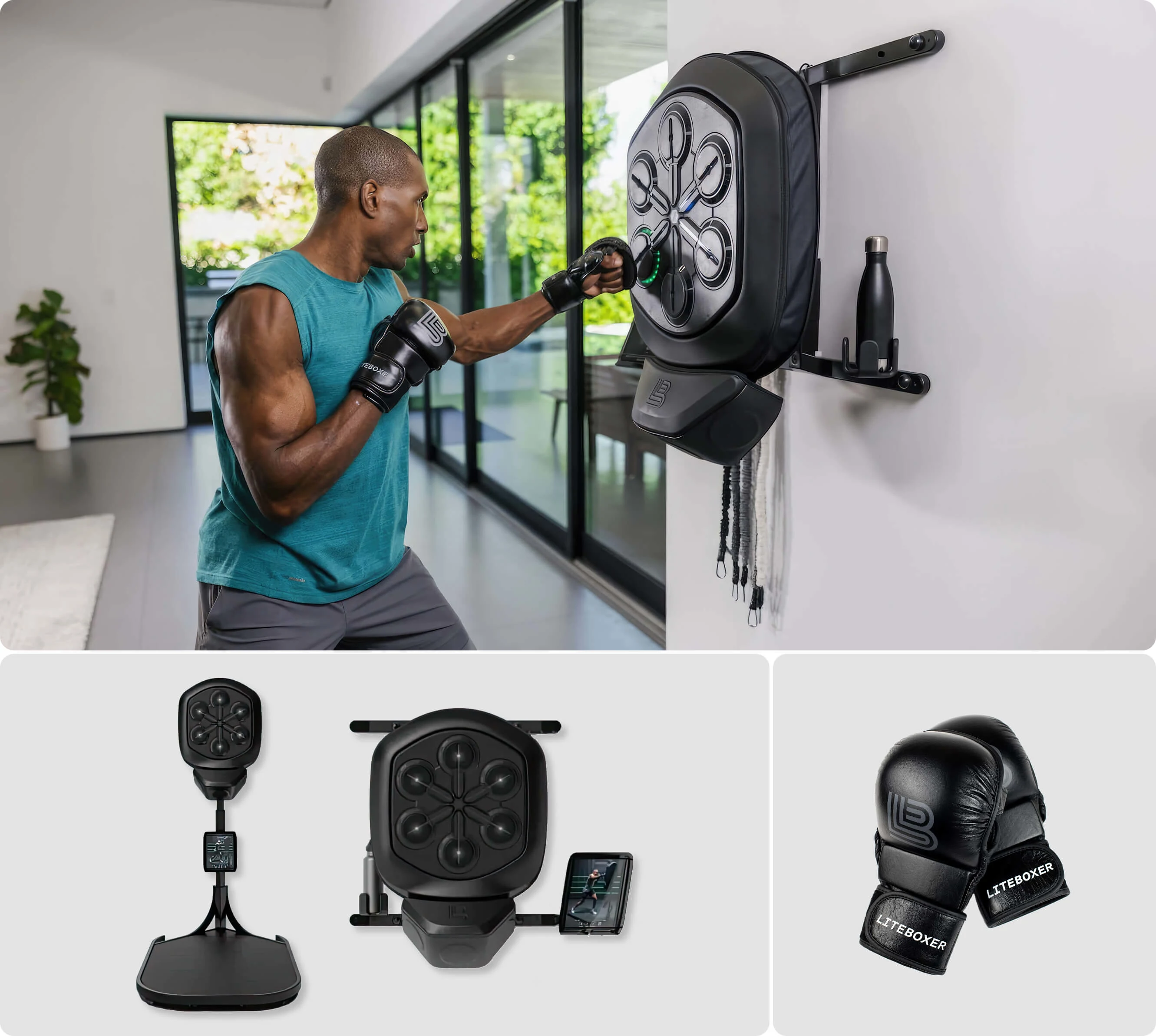
Liteboxer combines a physical boxing device with an app for music-driven workouts and trainer-led sessions. I joined during the early stages as Lead UX/UI Designer, designing the app experience across iOS and Android.
The founders had a clear vision for the workout: energetic, responsive, and built around the rhythm of music. My role was to translate that vision into a product people could navigate, understand, and use alongside the device.
The scope extended from account setup and device pairing to finding workouts, choosing music, viewing performance, and setting up challenges. These flows needed to work together for someone trying Liteboxer for the first time and someone returning for their next session.
02 - Challenge
Turning a product vision into a usable structure.
Liteboxer brought together guided training, music, performance data, and game mechanics. The challenge was to organize these features into clear paths, with a navigation system that made the next step easy to find.
Connecting the physical and digital experience.
Before starting a workout, users needed to connect and calibrate the device. The app had to explain what was happening, what action was required, and when the hardware was ready.
Designing for different moments of use.
Browsing a workout library and following a workout place different demands on an interface. The experience needed to support exploration before a session and quick, readable feedback during it.
Keeping the experience consistent across devices.
The app needed to work on iOS and Android phones and tablets. I had to account for screen space and platform conventions while maintaining a recognizable structure and visual language.
03 - Approach
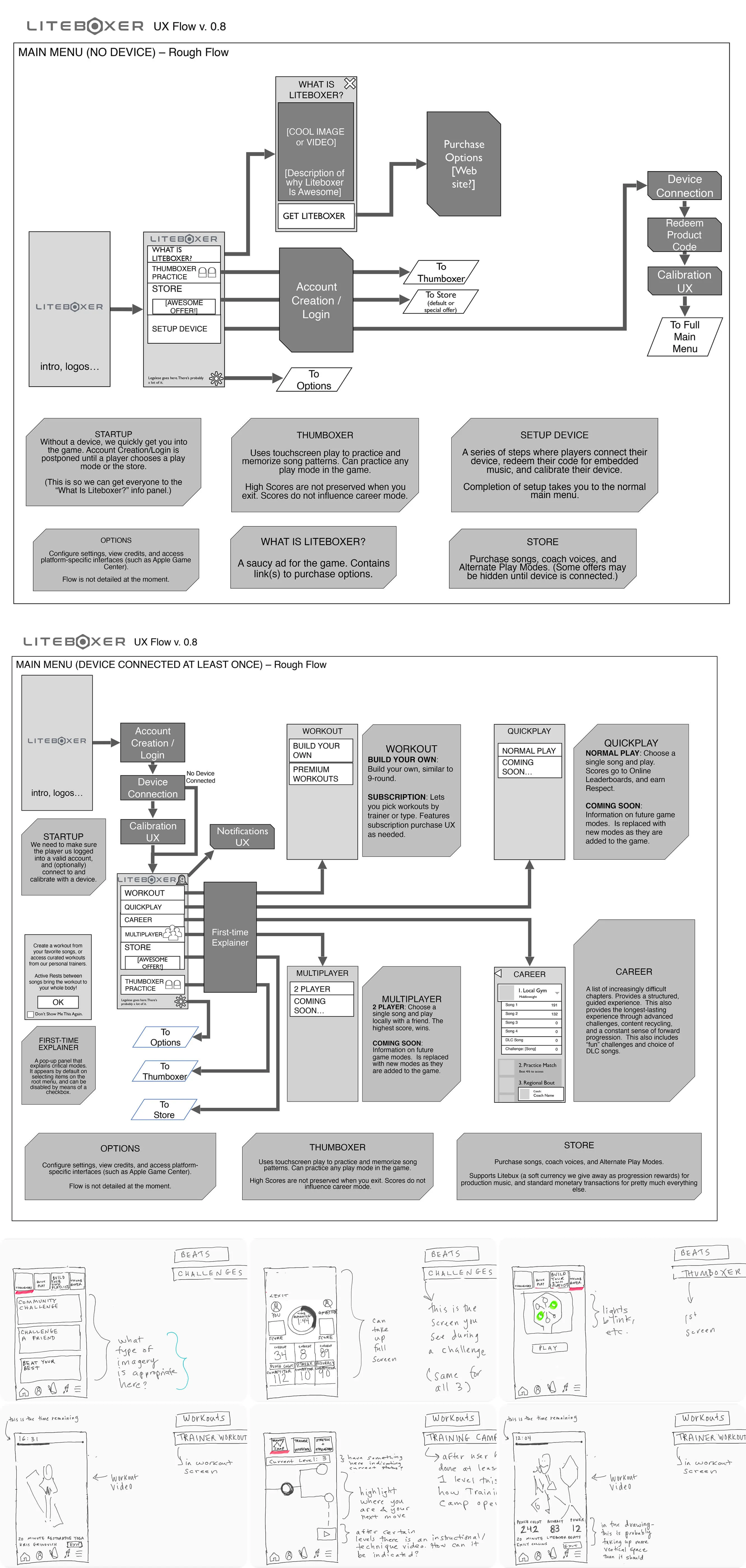
I started by mapping the core journeys and the relationships between them: entering the app, connecting the device, choosing a workout, completing a session, and reviewing results. This gave the team a shared structure to discuss before moving into detailed UI.
I developed flows and sketches to work through navigation, screen hierarchy, and the actions required at each stage. Device setup was considered alongside the rest of the experience, including connection, calibration, and readiness to train.
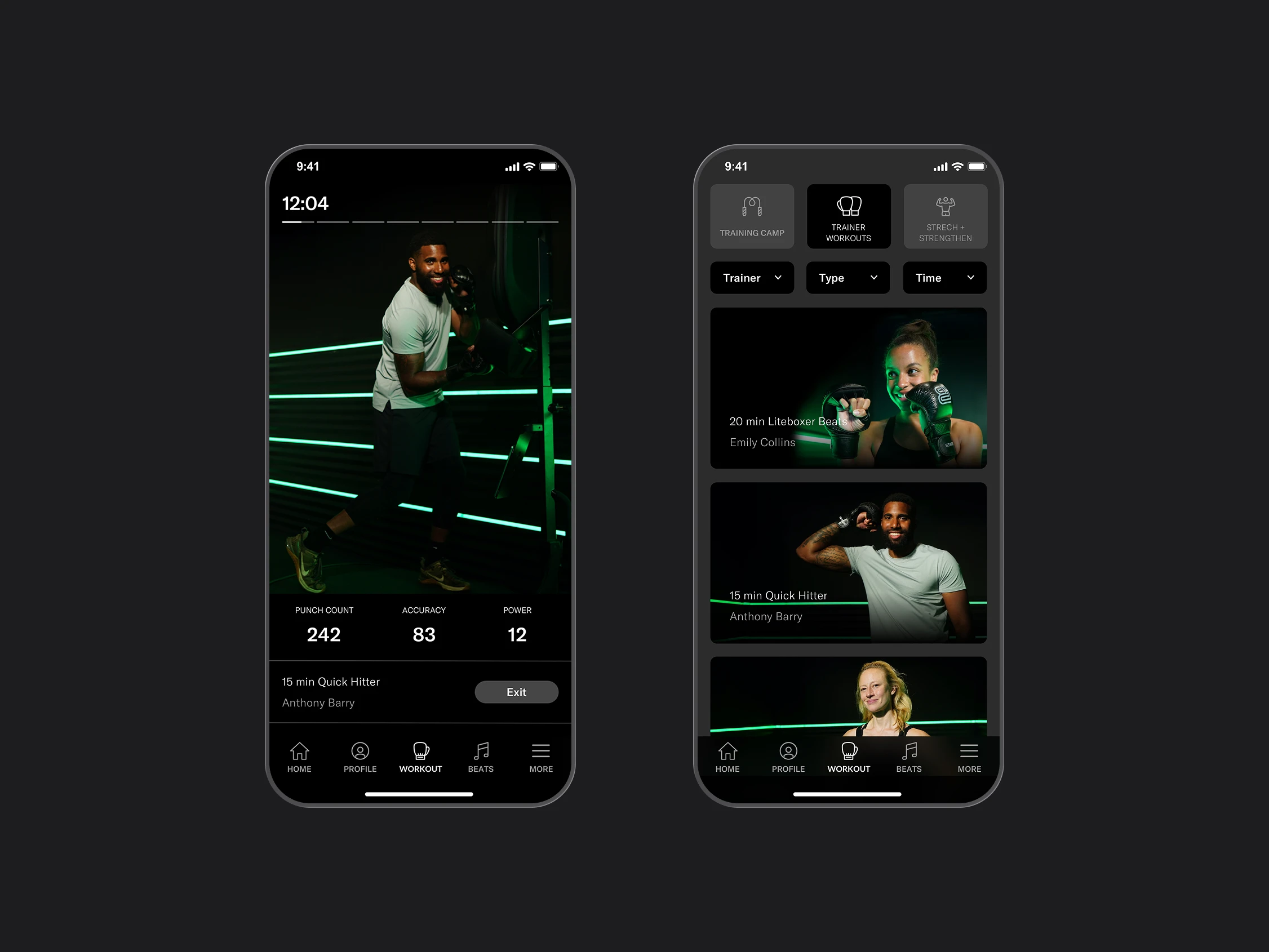
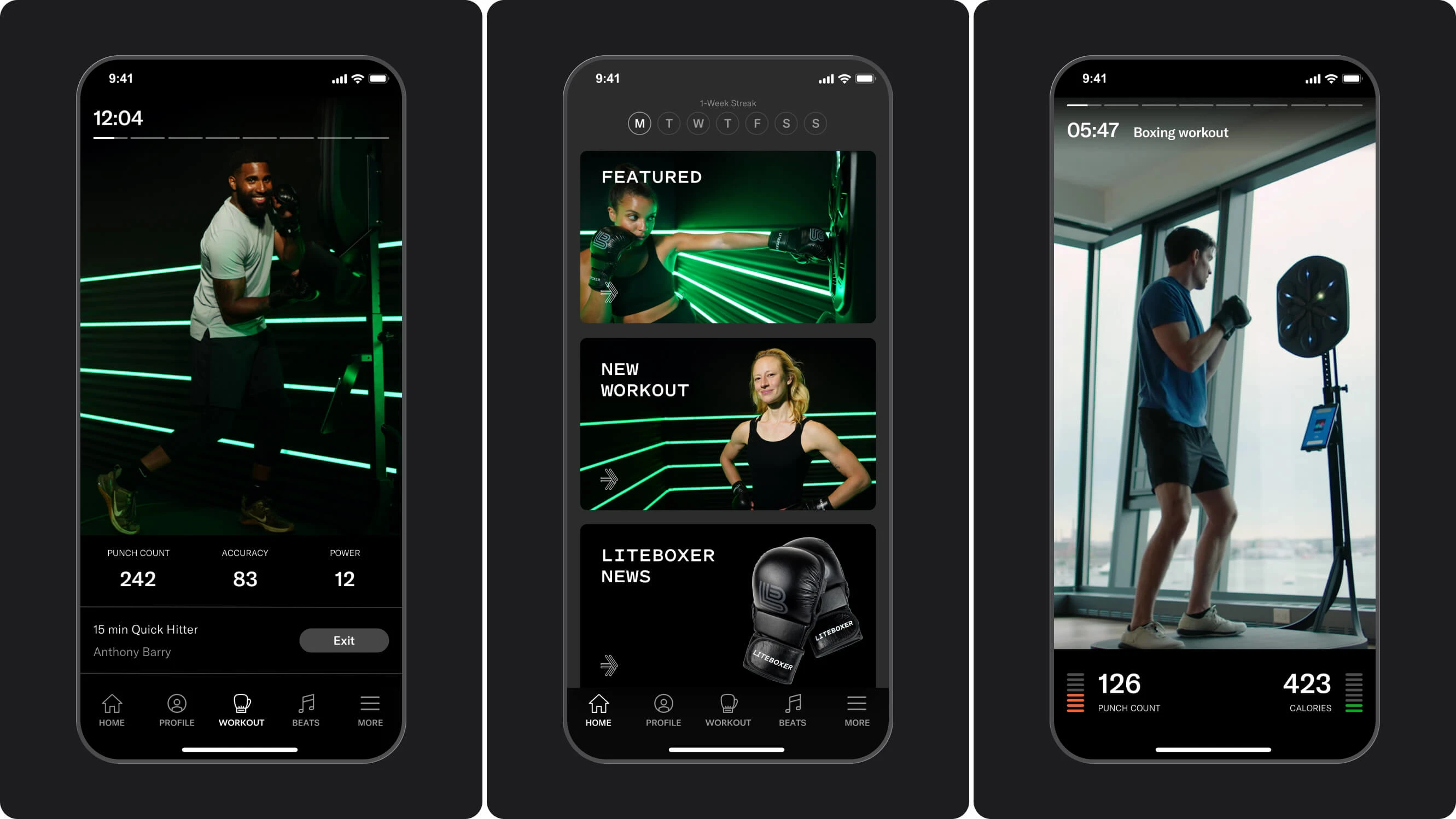
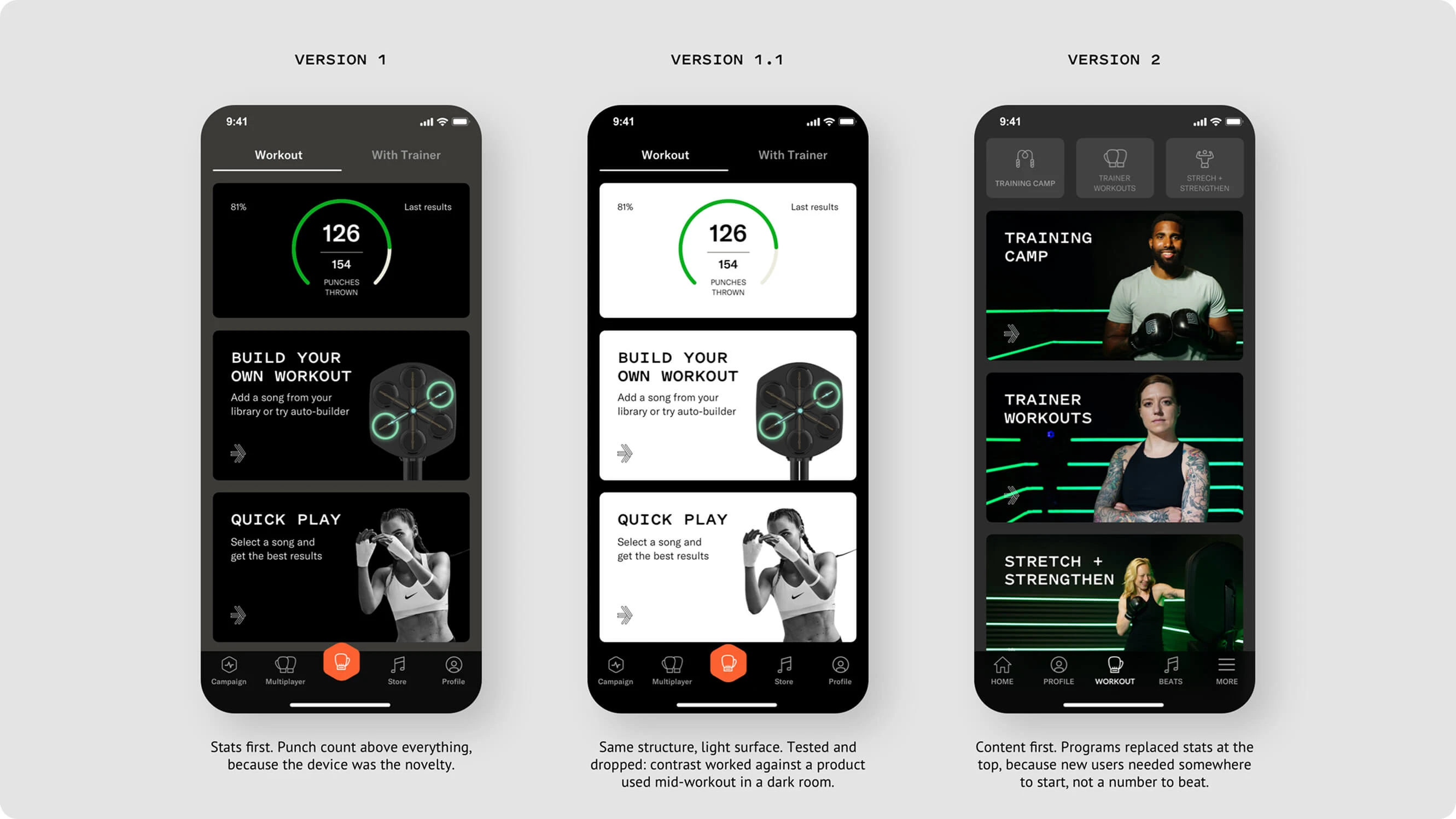
For the workout interface, I focused on the information users needed while physically active. Before and after a session, the app could offer more detail; during training, the priority was readable feedback and accessible controls.
I then developed and refined the visual direction, adapting the core screens for phones and tablets across iOS and Android.
04 - Decisions
DECISION 1: Define the product structure before refining the screens
I mapped the main flows before developing the detailed interface. This made it possible to discuss how setup, workouts, music, and challenges connected, and to identify which actions belonged at each stage.
The flows became a shared reference for reviewing the product with the founders and moving from individual feature ideas to a coherent app.
DECISION 2: Give device setup a clear sequence
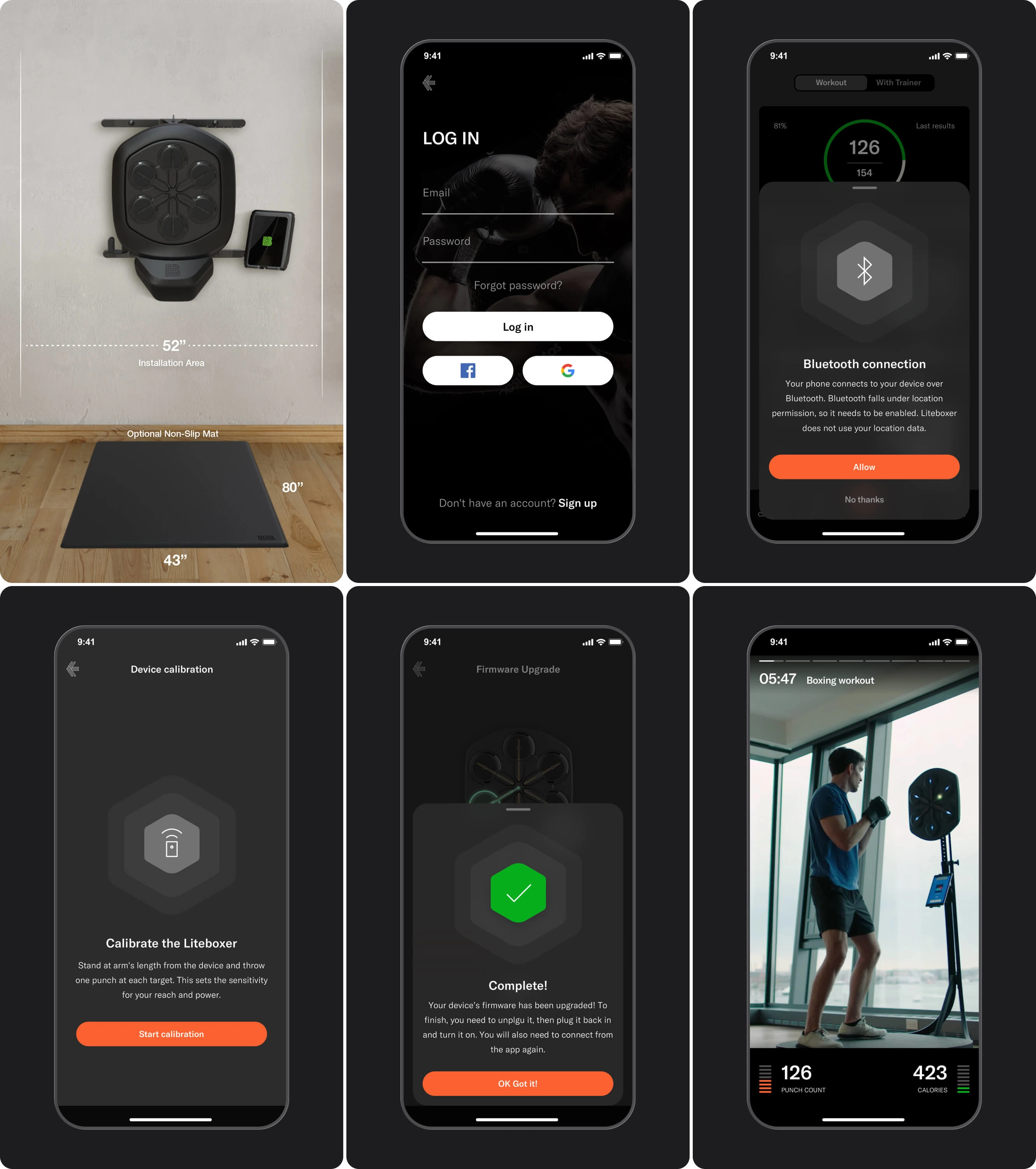
Pairing and calibration required users to move between the app and the physical device. I designed dedicated steps that explained the action to take and provided feedback on progress or completion.
The goal was to make a technical process understandable and give users a clear path toward starting a workout.
DECISION 3: Match information density to the workout
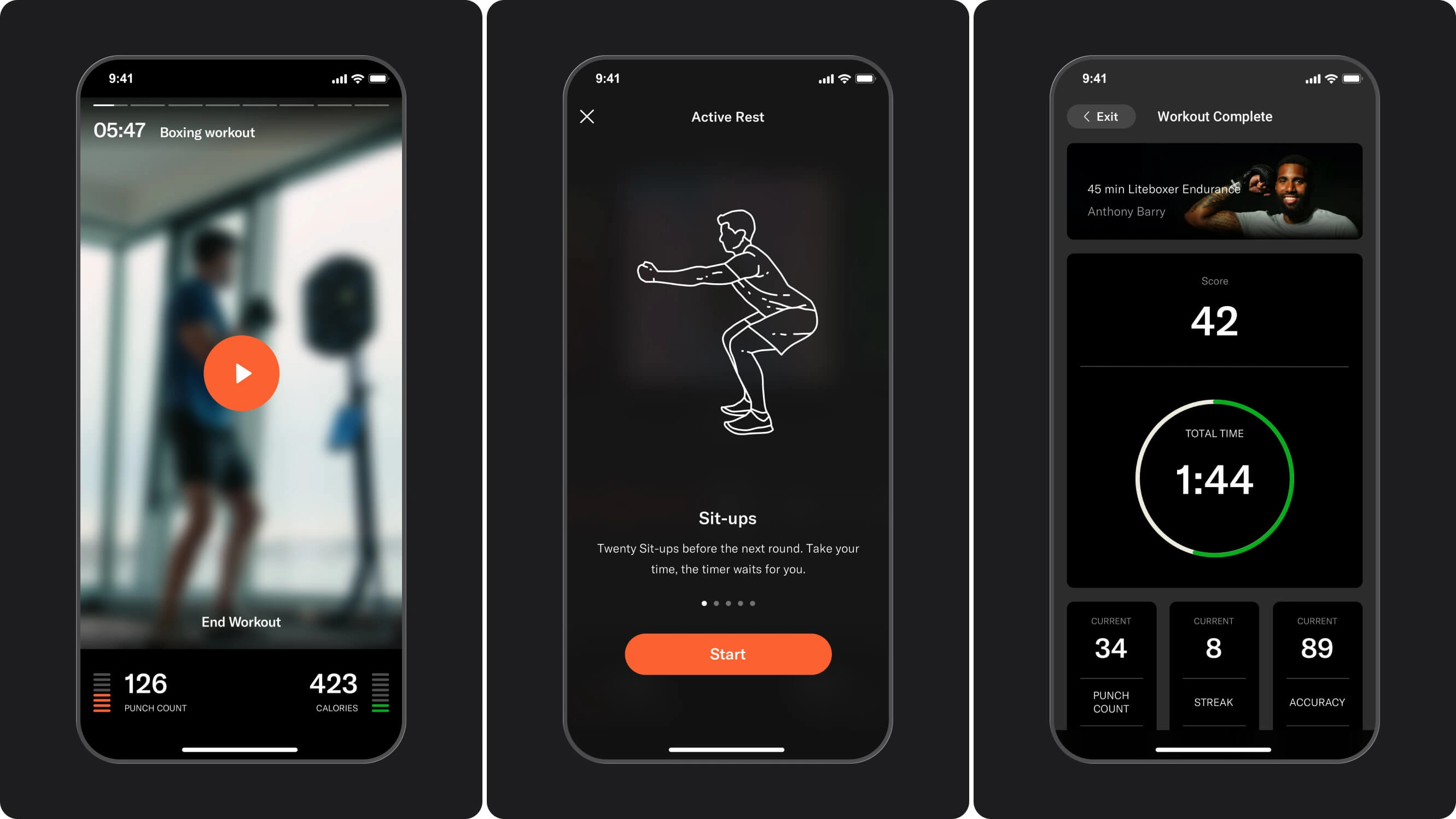
During a session, users needed to follow the workout while receiving feedback from the device. I prioritized the training content, essential performance information, and session controls.
More detailed results had their own place after the workout. This separated information useful during exercise from information users could review once they had finished.
DECISION 4: Adapt one visual language across platforms and screen sizes
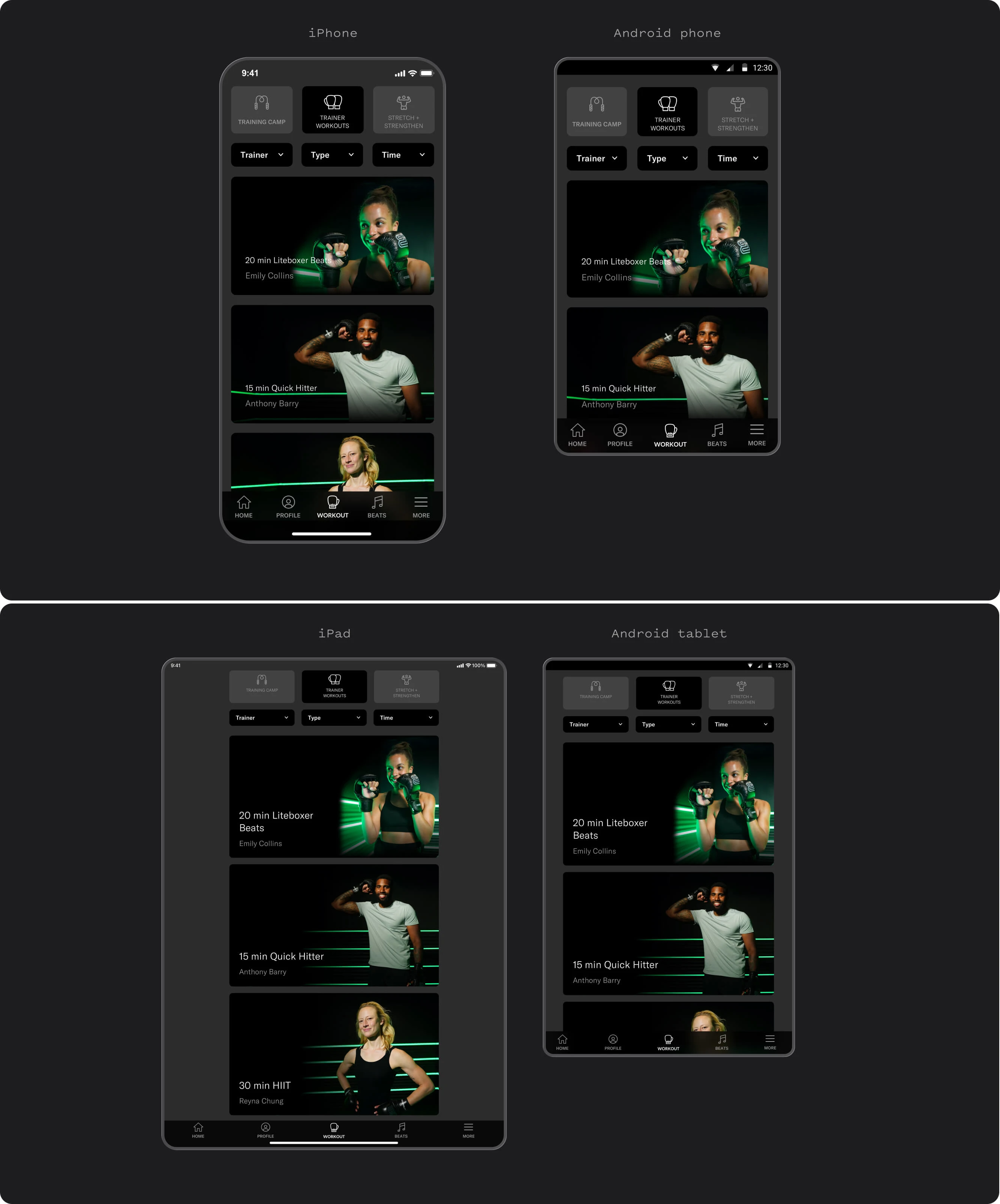
I used a shared navigation structure, visual hierarchy, and set of recurring UI patterns across the app.
Layouts were adapted for phones and tablets, with attention to the conventions of iOS and Android. This kept the product recognizable while allowing the interface to respond to different screen sizes.
DECISION 5: Give music-driven workouts their own entry point
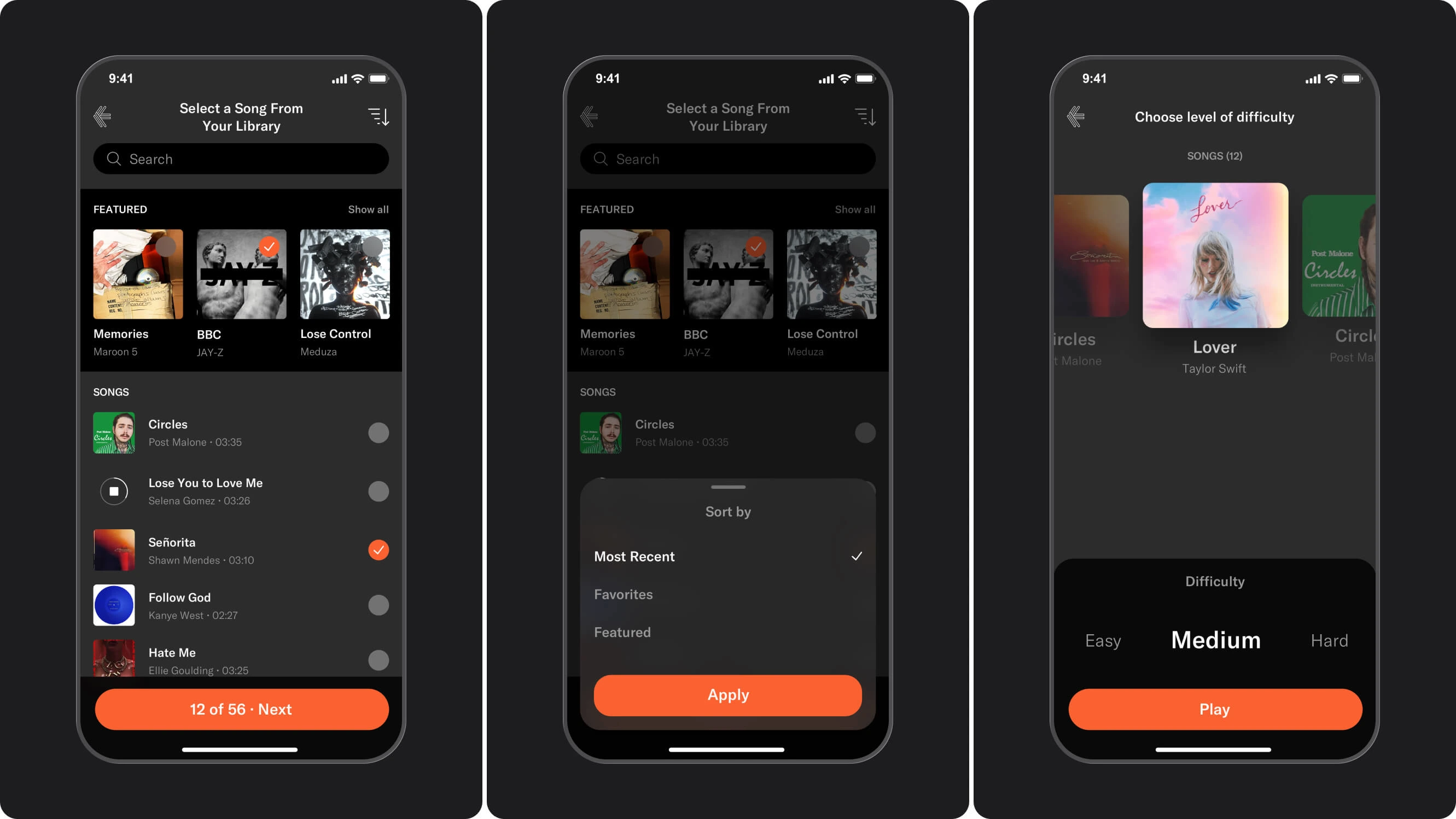
Liteboxer supported both trainer-led sessions and workouts built around music. I designed a dedicated music selection flow so users could browse tracks, make a selection, and choose a difficulty level.
This gave users a clear way to start with the music they wanted to train to, alongside the separate path for finding guided workouts.
DECISION 6: Make local challenges straightforward to set up
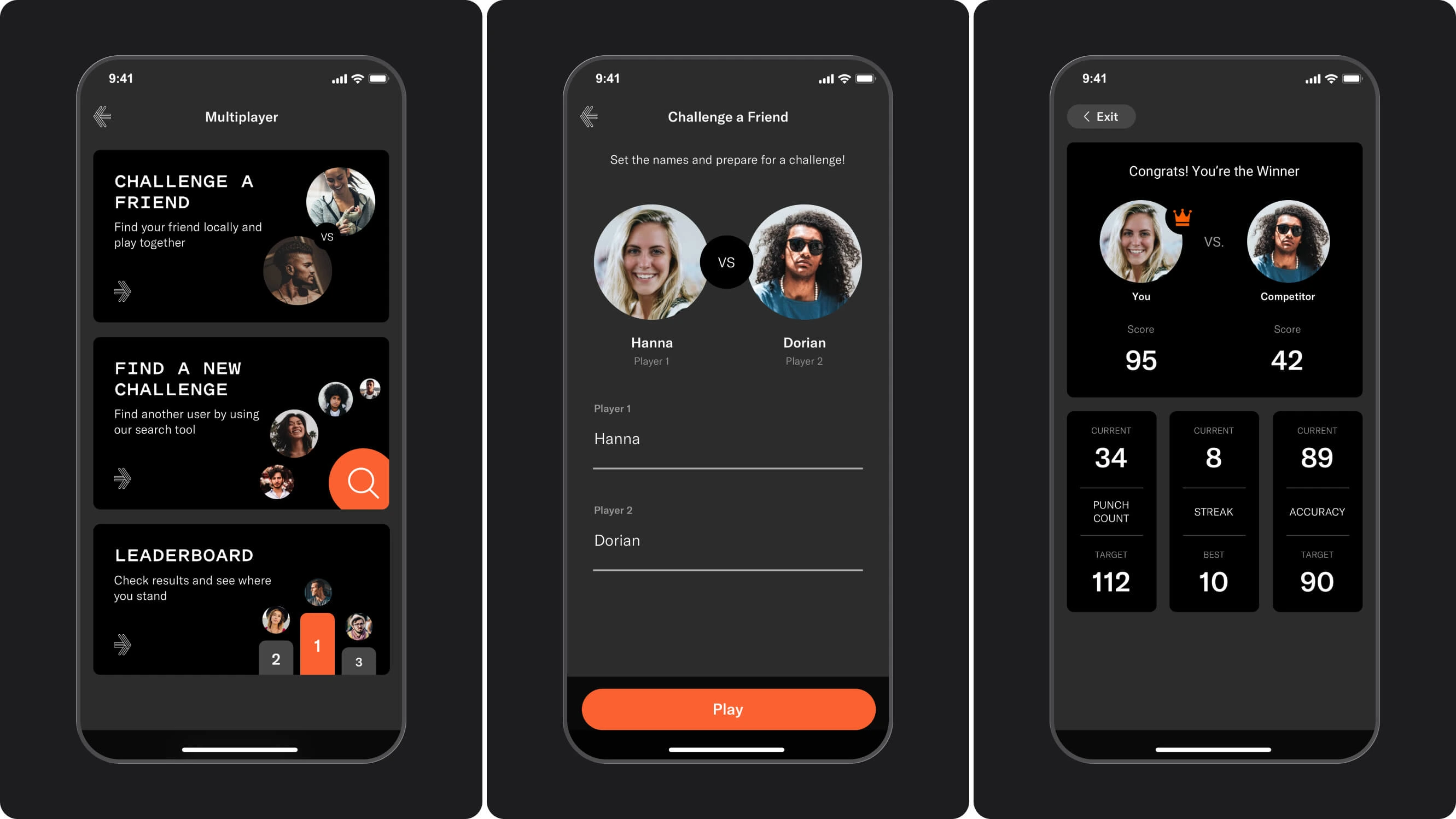
For the local multiplayer flow, I focused on two people preparing to compete in the same room: entering their names, starting a challenge, and comparing results.
I treated this as a distinct path within the broader multiplayer area, which also included challenge discovery and leaderboard screens.
05 - The work
A. First-run experience
Account access, device connection, calibration, and firmware feedback—bringing the setup steps into a clear sequence before training.
B. Core app experience
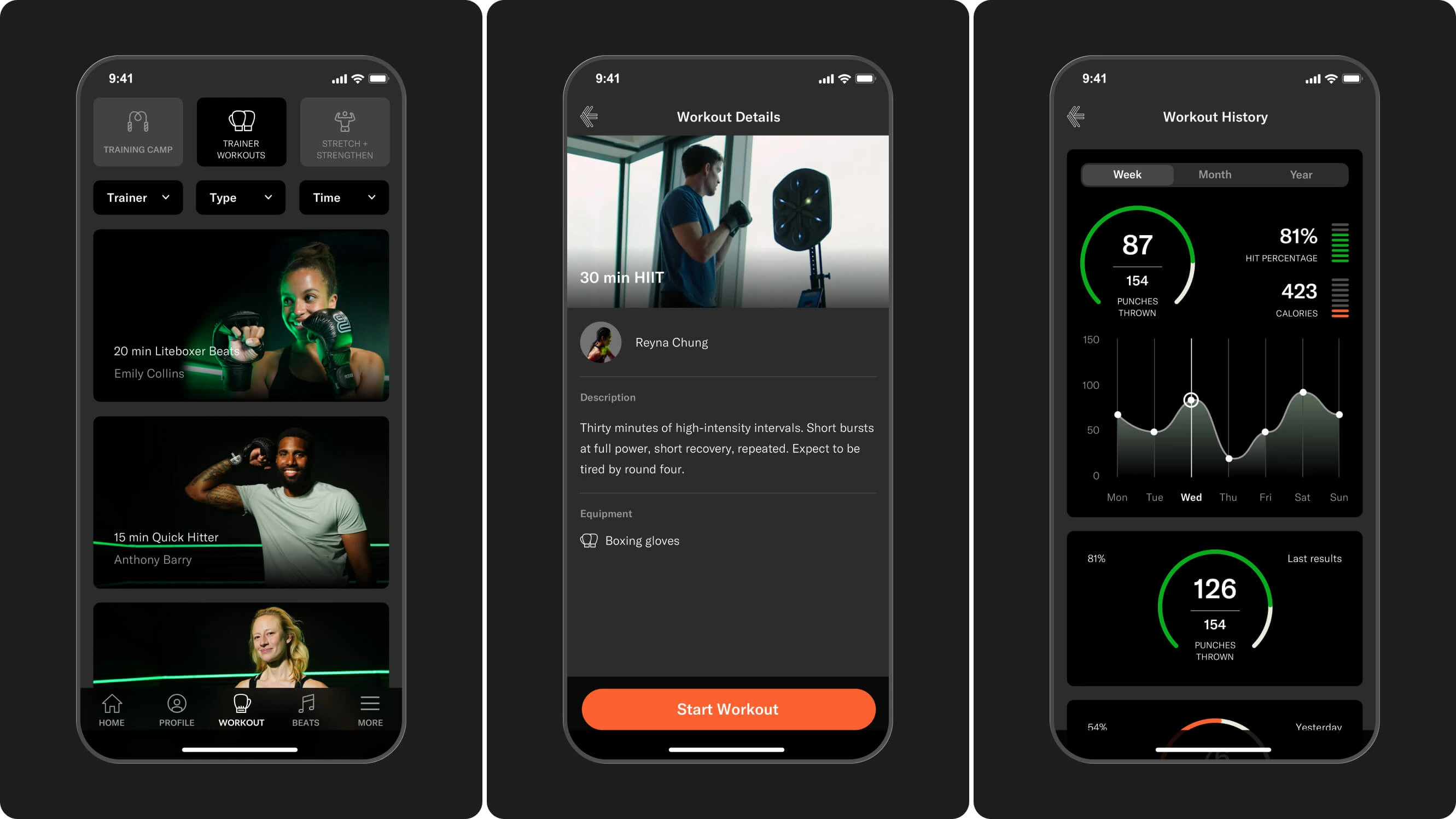
Workout discovery, filtering, session details, and workout history, supporting both the choice of a session and the review of previous activity.
C. In-workout UI
Training content, live performance feedback, rest states, and session summaries, with an information hierarchy designed around each stage of a workout.
D. Choosing the music
A dedicated flow for browsing and sorting tracks, selecting music, and setting workout difficulty.
E. Multiplayer and social
Challenge entry points, local player setup, head-to-head results, and leaderboard access.
F. Cross-platform
Core screens adapted for iOS and Android phones and tablets, using a consistent visual language and layouts suited to each screen size.
06 - Outcomes
The design work translated Liteboxer’s early product vision into a defined app experience, covering both device setup and the core training flows.
What I delivered:
UX flows and interface designs for iOS and Android phones and tablets
Device connection, calibration, and setup screens
Workout discovery, session details, and workout history
In-workout interfaces with live performance feedback
Music browsing, track selection, and difficulty settings
Multiplayer flows, challenge results, and leaderboard screens
A shared visual language across platforms and screen sizes
Company milestone
In June 2021, following its 2020 launch, Liteboxer announced a $20M Series A, bringing its total funding to $28.5M at that time.
We worked with Robert in the early stages of our project. He was able to work with our messy vision to create an organized UX/UI flow that we could implement in our app. He was always on time and a great collaborator. Hope to work together again soon.
Jeffrey Morin
CEO and Founder at Litesport
07 - Reflection
Liteboxer required thinking across the full experience: a person preparing the device, choosing how to train, following a session, and making sense of the result. Each stage needed a different balance of guidance, choice, and feedback.
The project reinforced the importance of defining the product structure early and refining it through detailed interface work. Flows helped establish how the experience connected; screen design made those decisions tangible and exposed what still needed clarification.
That combination of product structure and hands-on UI design remains central to how I work. I help teams connect individual features into an experience people can understand and use.
Like this project
Posted Oct 8, 2026
Led UX/UI design for Liteboxer’s iOS and Android apps, connecting device setup, workout discovery, live training feedback and results.
Likes
1
Views
1
Timeline
Jan 1, 2019 - Jan 1, 2020